Zoho Creator vs Zoho Analytics: Key Differences Explained
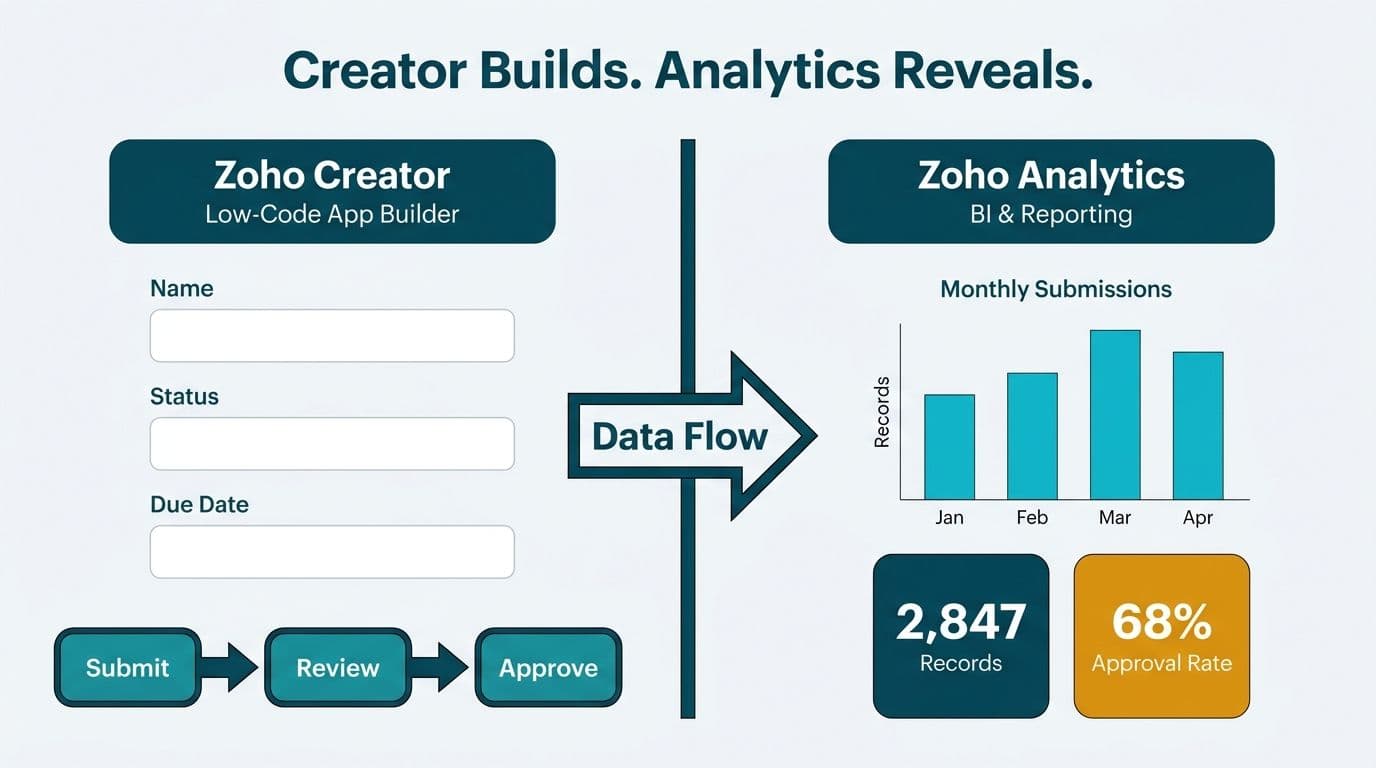
Zoho Creator is a low-code application builder that lets teams design custom workflows, portals, and data-capture forms without heavy coding investment. Zoho Analytics is a business intelligence platform built to connect disparate data sources, power interactive dashboards, and surface actionable insights. These two products solve fundamentally different problems: Creator builds the operational processes; Analytics visualizes the data those processes generate.
Key Takeaways
Zoho Creator is a low-code app builder - use it when you need a custom workflow, client portal, or structured data-entry form that existing software does not cover.
Zoho Analytics is a BI and reporting platform - use it when you have structured data across multiple systems and need unified dashboards or predictive analytics.
The two tools complement each other: Creator captures clean operational data; Analytics queries that data to produce business intelligence.
Healthcare and finance teams in the US, UK, and Canada face distinct compliance obligations (HIPAA, GDPR, PIPEDA) that affect how each platform must be configured.
Mid-market organizations typically implement Creator first to standardize data entry, then layer Analytics on top for reporting.
What Is the Core Difference Between Zoho Creator and Zoho Analytics?
The simplest way to frame the Zoho Creator vs Zoho Analytics difference is to ask what problem you are trying to solve. Creator answers "How do we collect, route, and act on data?" Analytics answers "What does our data tell us?"
Zoho Creator is a development environment. Teams build multi-page applications - inspection forms, customer onboarding portals, field-service ticketing systems - using a drag-and-drop interface backed by Deluge scripting. The output is a functional, deployable application that non-developers can use on a daily basis.
Zoho Analytics is a consumption layer. It ingests data from spreadsheets, cloud databases, Zoho CRM, and hundreds of other connectors, then enables analysts to build pivot tables, KPI scorecards, and trend charts without writing SQL. The output is insight, not software.
Partnering with a qualified Zoho consulting services team at the outset prevents the most common deployment mistake: connecting Analytics to messy, unstructured data that Creator could have cleaned at the point of entry.
When Should You Choose Zoho Creator?
Choose Zoho Creator when your team needs a purpose-built operational application that existing off-the-shelf software does not adequately address. Three concrete scenarios illustrate the decision:
US healthcare - HIPAA-compliant patient referral: A US healthcare network needed a patient-referral portal that integrated with its electronic health record system. Creator allowed the IT team to build and deploy a HIPAA-eligible workflow in eight weeks, with field-level encryption and audit logging configured without writing a custom API layer.
Canadian manufacturing - PIPEDA-compliant quality inspection: A Canadian manufacturing firm replaced paper-based inspection sheets with a Creator application. Data residency was set to Canadian servers, satisfying PIPEDA obligations around the storage of personal information collected on the shop floor.
UK fintech - GDPR-compliant document submission: A UK fintech lender built a mortgage-document-submission portal in Creator. GDPR's data-minimization principle was enforced by capturing only the fields regulators required, with automated deletion workflows triggered at the end of each retention period.
Creator is not a reporting tool. Its built-in record views handle simple lookups, but the platform is not designed for cross-application trend analysis or predictive forecasting. For a deeper look at Creator's app-building capabilities, the guide on what Zoho Creator is used for walks through the most common deployment patterns.
When Should You Choose Zoho Analytics?
Choose Zoho Analytics when you already have structured data and need to make it visible, comparable, and actionable across the organization. The platform excels in three areas:
Multi-source dashboards: Finance directors who need a single view combining CRM pipeline data, a billing system, and a support-desk ticketing tool can connect all three sources in Analytics without writing integration code. Native connectors handle the majority of common business applications.
Board-ready reporting: Analytics supports scheduled report delivery via email, white-labeled dashboards for executive presentations, and drill-down capability that lets a CFO move from a company-level revenue chart to an individual-account view in two clicks.
AI-assisted forecasting: Zia, Zoho's built-in AI engine, identifies anomalies in revenue data, projects pipeline churn, and responds to natural-language queries - without requiring a dedicated data science team.
Healthcare CFOs face growing pressure to produce cleaner financial reporting with fewer manual steps. Mid-market health systems commonly spend 8–12 hours per week manually consolidating financial and operational data from disparate systems; deploying Analytics typically reduces that overhead by 70–80% once core dashboards are configured. Zoho Analytics directly addresses that demand for teams that cannot justify the procurement cost of an enterprise BI platform.
Analytics is the wrong choice when underlying data is inconsistent, duplicated, or siloed in disconnected spreadsheets. Clean the pipeline first - which may involve Creator, a structured Zoho CRM implementation, or a dedicated data transformation step - before layering BI on top.
Zoho Creator vs Zoho Analytics: Feature and Pricing Comparison
The table below maps both products across the dimensions that CIOs and finance directors most commonly evaluate during Zoho platform selection.
| Dimension | Zoho Creator | Zoho Analytics |
|---|---|---|
| **Primary function** | Low-code app builder | BI and reporting platform |
| **Typical user** | Operations managers, app builders | Analysts, finance directors, executives |
| **Data role** | Captures and structures data | Analyzes and visualizes data |
| **Coding requirement** | Optional (Deluge scripting) | None (SQL optional for advanced use) |
| **AI capability** | Workflow automation, Zia suggestions | Ask Zia (NL queries), predictive analytics |
| **Connectors** | Zoho ecosystem, REST APIs, webhooks | 500+ data source connectors, cloud databases, spreadsheets |
| **Compliance controls** | Field encryption, audit logs, retention rules | Row-level security, workspace permissions, data masking |
| **Pricing entry point (as of 2026)** | ~$12 per user/month | ~$30/month for two users (Basic plan) |
| **Typical deployment time** | 4-12 weeks for a custom app | 1-3 weeks for initial dashboards |
| **Best for regulated industries** | Compliant intake and workflow applications | Reporting on de-identified or aggregated datasets |
Both products sit well below the cost threshold of comparable enterprise tools, making the combined Creator-plus-Analytics stack accessible for mid-market teams without the lengthy procurement cycles that larger platforms require.
How Do Zoho Creator and Zoho Analytics Work Together?
The most effective configuration is not a binary choice - it is a data pipeline that runs through both products. Creator captures structured operational data at the point of origin; Analytics queries that data to produce business intelligence downstream.
A concrete example: a US SaaS finance team built an expense-approval application in Creator. Every approved record flowed automatically into Analytics via a native Zoho connector. The CFO accessed real-time spend-by-department dashboards in Analytics without touching the Creator application. The result was clean data in, actionable insight out - with no manual export steps.
This pipeline architecture matters especially for organizations building toward AI-driven analytics. High-quality, well-structured operational data at the source is precisely the foundation Creator provides before Analytics runs its analysis layer on top.
For organizations evaluating the full Zoho ecosystem, the overview of Zoho One licensing and bundling explains how Creator and Analytics pricing compares within the Zoho One bundle, which frequently changes the build-vs-buy calculation for mid-market finance and operations teams.
How Do Regulated Industries in the US, UK, and Canada Choose Between Creator and Analytics?
Regulated industries add a compliance dimension to the Creator vs Analytics decision that generic feature comparisons do not capture. The right choice depends as much on what data you are handling as on what you want to do with it.
US healthcare (HIPAA): Creator is the standard choice for building HIPAA-eligible intake and workflow applications because it supports the field-level encryption and audit logging required under the HIPAA Security Rule. Zoho Analytics is appropriate for de-identified or aggregated clinical and financial data. Connecting identified patient data to Analytics requires a signed Business Associate Agreement with Zoho. Teams building healthcare KPI dashboards should confirm the BAA is in place before connecting any clinical source.
US and Canadian finance (SOC 2, PIPEDA): Finance directors at mid-market firms in both markets use Zoho Analytics for FP&A dashboards, combining general-ledger exports with CRM pipeline data. For Canadian organizations, PIPEDA requires that personal financial data either reside on Canadian servers or be subject to explicit cross-border-transfer consent. Data residency options should be verified with the Zoho account team before production deployment.
UK and EU finance (GDPR): A UK fintech firm using Creator to build a loan-origination workflow must configure data retention policies within the application - GDPR's right-to-erasure obligation applies to personally identifiable records held in Creator databases. Zoho Analytics workspaces for EU-based organizations should be provisioned on EU data centers, an option available on the Enterprise plan.
The AI Analytics Data Privacy Risks guide provides an audit framework applicable to both platforms and serves as a practical compliance checklist for health system and financial services teams operating across these jurisdictions.
What Is the Practical Decision Matrix for Choosing Between Creator and Analytics?
Use this framework when stakeholders are debating which product to implement first.
Choose Zoho Creator if:
You need a workflow, form, or portal that no existing software covers adequately.
Your data collection is inconsistent and you need to enforce structure at the point of entry.
A regulated-data intake process - such as a HIPAA patient-intake form or a GDPR-compliant document-submission portal - is part of the requirement.
Your team has a technical resource comfortable with Deluge scripting or REST API configuration.
Choose Zoho Analytics if:
You have structured data in at least two systems and need a unified reporting view.
Your finance or operations team spends several hours per week assembling manual reports from spreadsheets or individual system exports.
You need board-level dashboards with drill-down capability and scheduled email delivery.
AI-assisted forecasting is a near-term requirement and you lack an in-house data science function.
Choose both products if:
You are building a net-new operational process in Creator that will generate data you want to analyze in Analytics.
You are migrating off a legacy system and must rebuild both the workflow application and the reporting layer simultaneously.
You want a clean data foundation before layering Zoho's AI capabilities across the stack.
For guidance on selecting the right Zoho implementation partner for either product, the Zoho Certified Partner vs Independent Consultant decision matrix outlines the key trade-offs for mid-market teams operating in regulated environments.
---
Ready to determine whether Creator, Analytics, or both fit your organization's roadmap? Our Zoho consulting services team offers scoped discovery sessions with certified partners experienced in healthcare, finance, and regulated-industry deployments across the US, UK, and Canada. Try Zoho free to explore either platform hands-on before committing.
---
About Lets Viz: Lets Viz has delivered Zoho ecosystem implementations and data analytics solutions for clients across US healthcare, UK fintech, Canadian manufacturing, and global SaaS since 2020. The firm holds a 5.0 rating on Clutch and specializes in mid-market deployments where data quality, regulatory compliance, and time-to-insight are non-negotiable.


