ServiceNow ITSM: Modules, Costs and How to Scope a Rollout
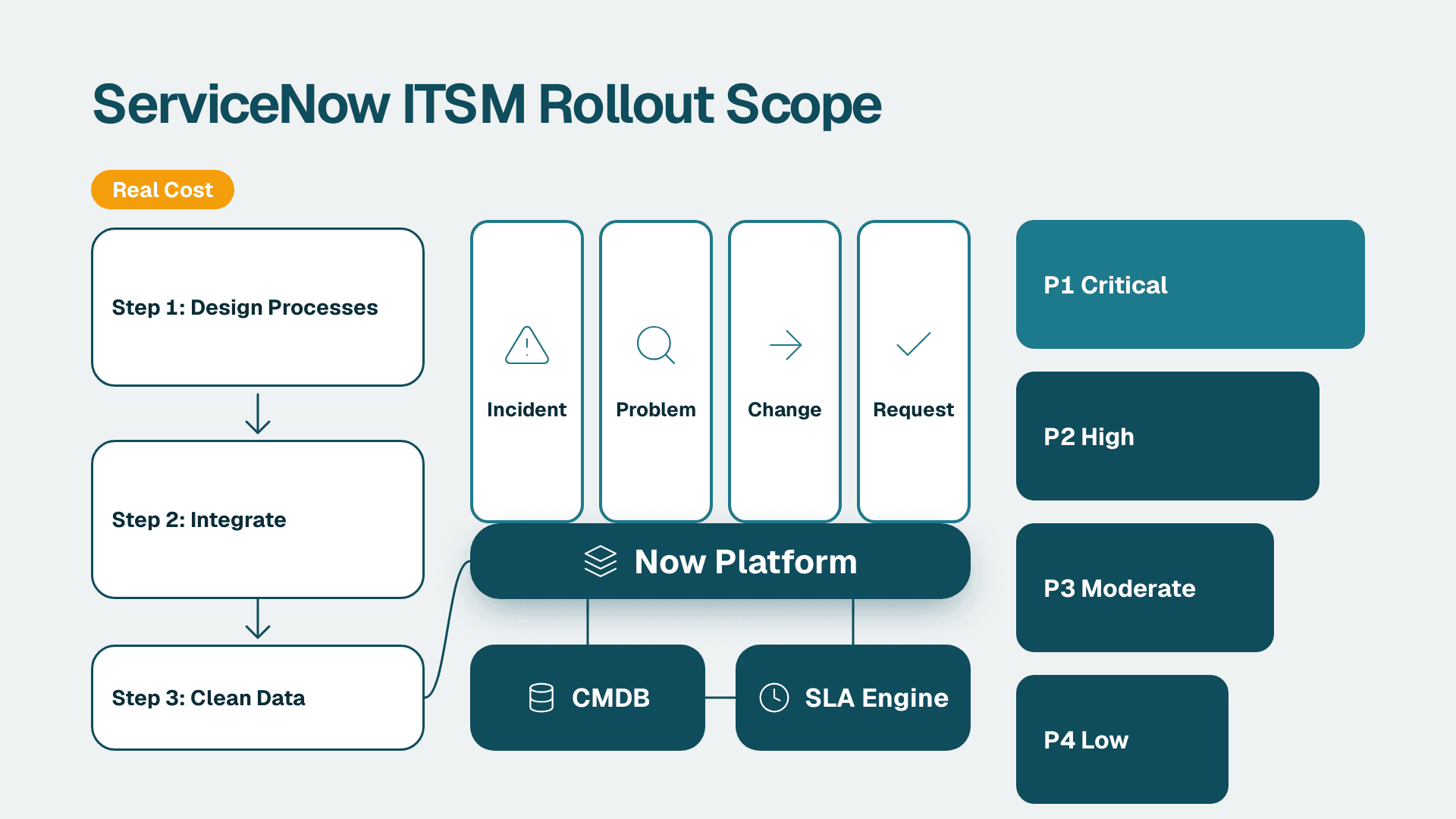
ServiceNow ITSM is the IT service management application on the Now Platform. It handles incident, problem, change and request work in one system of record, linked to a CMDB and an SLA engine. For mid-market teams, the real cost sits in process design, integrations and data quality, not just licences.
Key Takeaways
- ServiceNow ITSM covers four core processes: incident, problem, change and request fulfilment, plus knowledge, SLAs and a service portal.
- ITIL is a framework of practices; ITSM is the discipline of running IT as a service; ServiceNow is the tooling that encodes both.
- Licence price is only one line of the budget. Process design, integrations, data cleanup and ongoing admin usually matter more.
- A phased rollout (incident and request first, change second, problem third) lowers risk for mid-market teams.
- A reliable CMDB and clean priority rules decide whether the workflows deliver value after go-live.
What Is ServiceNow ITSM and Why Do Teams Choose It?
ServiceNow ITSM (also written ITSM ServiceNow or ITSM and ServiceNow in search) is the set of applications that run IT service management on the Now Platform. It replaces email threads, spreadsheets and disconnected ticket tools with structured workflows, one data model and shared reporting.
ServiceNow has been associated with IT service management since 2012, and the vendor now describes the platform as cross-departmental, according to a ServiceNow Community article on whether ServiceNow is just an ITSM tool. That history matters for buyers: ITSM is the most mature part of the platform, and many organisations start there before adding other workflows.
The same article lists the benefits ServiceNow attributes to ITSM: improved quality of IT solutions, end-user expectations met, relief for the IT team and reduced long-term ITSM process costs. Treat these as the vendor's framing. Your own results depend on how well the processes are designed and maintained.
For IT directors, the practical appeal comes down to three things:
- One system of record. Incidents, changes and requests all reference the same configuration items, so you can see which service a change might affect before approving it.
- Workflow automation. Routing, approvals, escalations and notifications are configured rather than handled by people watching inboxes.
- A platform to grow into. Once ITSM is stable, the same data model supports adjacent work such as operations management, asset management and employee workflows.
If you want a broader view of the platform before narrowing to ITSM, the CIO's guide to what ServiceNow is covers the full product map. Teams that want help turning an ITSM scope into a plan often start with ServiceNow consulting services to pressure-test the design before building.
What Are the ITSM Modules Available in ServiceNow?
The core ITSM modules in ServiceNow are incident management, problem management, change management and request fulfilment, supported by knowledge management, service level management, the service catalogue and the CMDB. Exact packaging varies by edition, so confirm current tiers with your account team and the vendor's ServiceNow ITSM product page.
| Module | What it does | Typical first-year priority |
|---|---|---|
| **Incident management** | Logs, prioritises, routes and resolves service interruptions | High - usually the first go-live |
| **Request fulfilment and service catalogue** | Standardises requests such as access, hardware and software with approvals | High - quick visible win |
| **Change management** | Controls and records changes with risk assessment and approvals | Medium - needs CMDB quality |
| **Problem management** | Finds root causes behind repeat incidents | Medium - needs incident history |
| **Knowledge management** | Publishes articles for self-service and agents | Medium - grows with usage |
| **Service level management** | Tracks response and resolution targets | Medium - depends on priority rules |
| **CMDB** | Holds configuration items and their relationships | Foundational - build early |
Incident management
An incident is an unplanned interruption or degradation of a service. ServiceNow captures it through the portal, email, chat or monitoring integrations, assigns a priority, routes it to a group and tracks it against an SLA. This is the module most teams recognise as the help desk.
Request fulfilment
A request is a planned, repeatable ask such as a new laptop or a software licence. The service catalogue defines forms, approvals and fulfilment tasks. Well-designed catalogue items remove the back-and-forth that eats agent time.
Change management
Change management governs modifications to production services. It records what is changing, the risk, the approvers and the schedule. Done well, it reduces self-inflicted outages. Done badly, it becomes a bureaucratic queue that teams route around.
Problem management
Problem management looks for the underlying cause behind multiple incidents. It needs reasonably clean incident categorisation to work, which is why many teams switch it on after incident management has stabilised.
Knowledge, SLAs and AI assistance
Knowledge articles support self-service and agent resolution. Service level management measures whether you are hitting targets. ServiceNow also offers AI-assisted features such as virtual agents and predictive routing in some tiers. Availability depends on edition and configuration, so verify what is included before building a business case around them.
What Is the Difference Between ITIL and ITSM?
ITSM is the practice of designing, delivering, managing and improving IT services. ITIL is a widely used framework of best practices for doing that. ServiceNow is the platform that implements those practices as workflows.
A simple way to hold the three together:
| Term | What it is | Example |
|---|---|---|
| **ITSM** | The discipline of managing IT as a service | Running a help desk with defined SLAs |
| **ITIL** | A framework of recommended practices | Separating incident from problem management |
| **ServiceNow ITSM** | A tool that automates those practices | An incident form that routes by category and priority |
You do not need formal ITIL certification to run IT service management in ServiceNow. You do need clear definitions of what counts as an incident, a request, a problem and a change. Teams that skip this step end up with a configured platform and the same confusion they had before.
What Are P1, P2, P3 and P4 Tickets in ServiceNow?
P1 to P4 are shorthand for ticket priority levels, where P1 is the most urgent. In ServiceNow, priority is normally calculated from two fields: impact (how many users or services are affected) and urgency (how quickly the work is needed). The platform maps the combination to a priority value.
The exact labels and number of levels are configurable, and many organisations use their own naming. A common convention looks like this:
| Level | Typical meaning | Typical handling |
|---|---|---|
| **P1** | Critical service down, wide impact | Immediate response, major incident process |
| **P2** | Significant degradation or a key group affected | Fast response, close tracking |
| **P3** | Limited impact, workaround usually available | Standard queue |
| **P4** | Minor issue or low urgency | Scheduled or batched |
The common failure is not the matrix itself but inconsistent use of impact and urgency. If every requester marks their ticket as high urgency, the priority field becomes noise and SLAs stop meaning anything. Define impact and urgency in plain language, publish examples, and review a sample of tickets each month.
How Much Does ServiceNow IT Service Management Cost a Mid-Market Team?
The cost of ServiceNow IT service management is the licence plus implementation, integration, data preparation, training and ongoing administration. ServiceNow licensing is quote-based and varies by edition, user type and contract, so no public list price applies. Anyone quoting a flat figure without scoping is guessing.
What matters for planning is knowing the cost drivers:
| Cost driver | What shapes it | Common surprise |
|---|---|---|
| **Licences** | Edition, number of fulfiller users, add-on products, contract term | Requesters are often treated differently from fulfillers, so user counts need careful modelling |
| **Implementation** | Number of processes, catalogue items, approval rules, reports | Catalogue design takes longer than expected |
| **Integrations** | Monitoring tools, identity systems, HR sources, messaging | Each integration needs ownership and testing |
| **Data preparation** | CMDB population, user and group cleanup, category redesign | Poor source data delays go-live |
| **Training and change management** | Agent training, requester communication, process owners | Underinvestment shows up as low adoption |
| **Ongoing administration** | Upgrades, platform releases, customisation upkeep | Heavy customisation raises upgrade effort |
Two principles keep mid-market budgets under control. First, stay close to out-of-the-box workflows wherever the business process allows. Every customisation is a cost you pay again at each platform upgrade. Second, budget for a named platform owner. Instances without an owner drift into inconsistency within a year.
For a detailed breakdown of implementation spend by company size, see the ServiceNow implementation cost breakdown for mid-market teams.
How Do You Scope an ITSM Rollout in ServiceNow?
Scope a ServiceNow ITSM rollout by choosing a small set of processes, defining ownership and data requirements for each, and releasing in phases. For most mid-market teams, that means incident and request first, change second, and problem management third.
Step 1: Define what is in and out
Write down which processes go live in phase one, which user groups are included and which integrations are required on day one. A narrow first release is easier to test, train and support. Leave advanced features until the basics are stable.
Step 2: Assign process owners
Each process needs a business owner who decides how it works, separate from the technical admin who configures it. Without owners, configuration decisions become arguments, and the platform inherits every unresolved disagreement.
Step 3: Fix the data before you load it
User records, groups, locations and categories feed almost every workflow. If these are inconsistent, routing and reporting will be too. Clean them before migration rather than after.
The configuration management database deserves special attention because change and problem management depend on it. Guidance on building one that holds up is in how to set up a ServiceNow CMDB that stays accurate. A practical rule: populate fewer configuration items well rather than many items badly.
Step 4: Design priority, SLAs and escalation together
Priority rules, SLA definitions and escalation paths depend on each other. Design them in one workshop, not three. Keep the first version simple, then adjust after you see real ticket data.
Step 5: Build the catalogue around real demand
Start with the requests your service desk handles most often. Review a few months of ticket history, group by type and build catalogue items for the top categories. A short catalogue that people use beats a long one that nobody trusts.
Step 6: Plan adoption, not just go-live
Communicate to requesters how to submit tickets, train agents on the new workflows and decide when old channels are retired. If email stays as an unmanaged parallel path, you will run two service desks.
Step 7: Release in phases and review
Go live with phase one, review after a defined period, and use the findings to shape phase two. Teams that treat go-live as the finish line tend to leave defects and process gaps unaddressed.
What Mistakes Slow Down ITSM and ServiceNow Rollouts?
The most common mistakes are over-customising early, loading unclean data, launching too many processes at once and leaving no owner after go-live. Most are organisational rather than technical.
- Replicating the old tool. Copying every legacy field and approval into ServiceNow preserves old problems. Use the migration to simplify.
- Treating ITSM and ServiceNow as an IT-only project. Service catalogue and approval design need input from HR, finance and facilities, since those teams own many requests.
- Ignoring compliance requirements. Regulated teams need audit trails, access controls and retention rules designed in. A US healthcare IT group working under HIPAA needs to think about who can see tickets that reference patient systems. A UK or EU team handling employee or customer data under GDPR needs to consider what personal data appears in ticket descriptions and how long it is kept. A Canadian manufacturer subject to PIPEDA has similar obligations around personal information in service records. If risk and compliance workflows are a wider goal, see what ServiceNow GRC covers and who it fits.
- Skipping reporting design. Collecting ticket data is easy. Deciding which questions leadership will ask, and building reports for them, takes planning.
A hypothetical illustration: suppose a US SaaS company with a small IT team launches incident, request, change and problem management in one release. Agents struggle with four new workflows, categories are inconsistent and nobody trusts the first reports. A phased plan with incident and request first would likely have given the team time to stabilise data and habits before adding more.
How Do You Know Whether ServiceNow ITSM Is Working?
You know ITSM is working when tickets are routed correctly the first time, SLAs reflect real expectations, repeat incidents decline and requesters choose the portal over email. Measure these with a small set of consistent indicators rather than a large dashboard nobody reads.
Useful indicators for a mid-market IT team include:
- Reassignment rate. How often tickets bounce between groups. High rates point to poor categorisation or routing.
- SLA attainment by priority. Whether response and resolution targets are met, and whether targets are realistic.
- Repeat incidents. Recurring issues that should feed problem management.
- Change outcomes. How many changes cause incidents, and whether risk scoring is reliable.
- Portal adoption. The share of requests arriving through the catalogue rather than email or phone.
- Knowledge usage. Whether articles are being used to resolve tickets.
Pick a handful, agree on definitions and review them monthly. For guidance on building views that leadership will use, see how to build a KPI dashboard leadership actually uses. The principle carries over: fewer, clearer measures beat a wall of charts.
The broader point is that ITSM in ServiceNow is a living service. Process owners, platform owners and agents need a regular rhythm for reviewing what the data shows and adjusting rules. Teams that do this keep the platform useful as the business changes.
ServiceNow consulting services
---
About Lets Viz: Lets Viz is a data analytics and platform consultancy that has supported clients since 2020, including US healthcare organisations, UK fintech firms, Canadian manufacturers and global SaaS companies. Our team designs and reviews reporting, automation and service management implementations, and we hold a 5.0 Clutch rating from client reviews.
Sources
Facts and prices checked November 2026.