Zoho Analytics Pricing Plans and Limits Explained
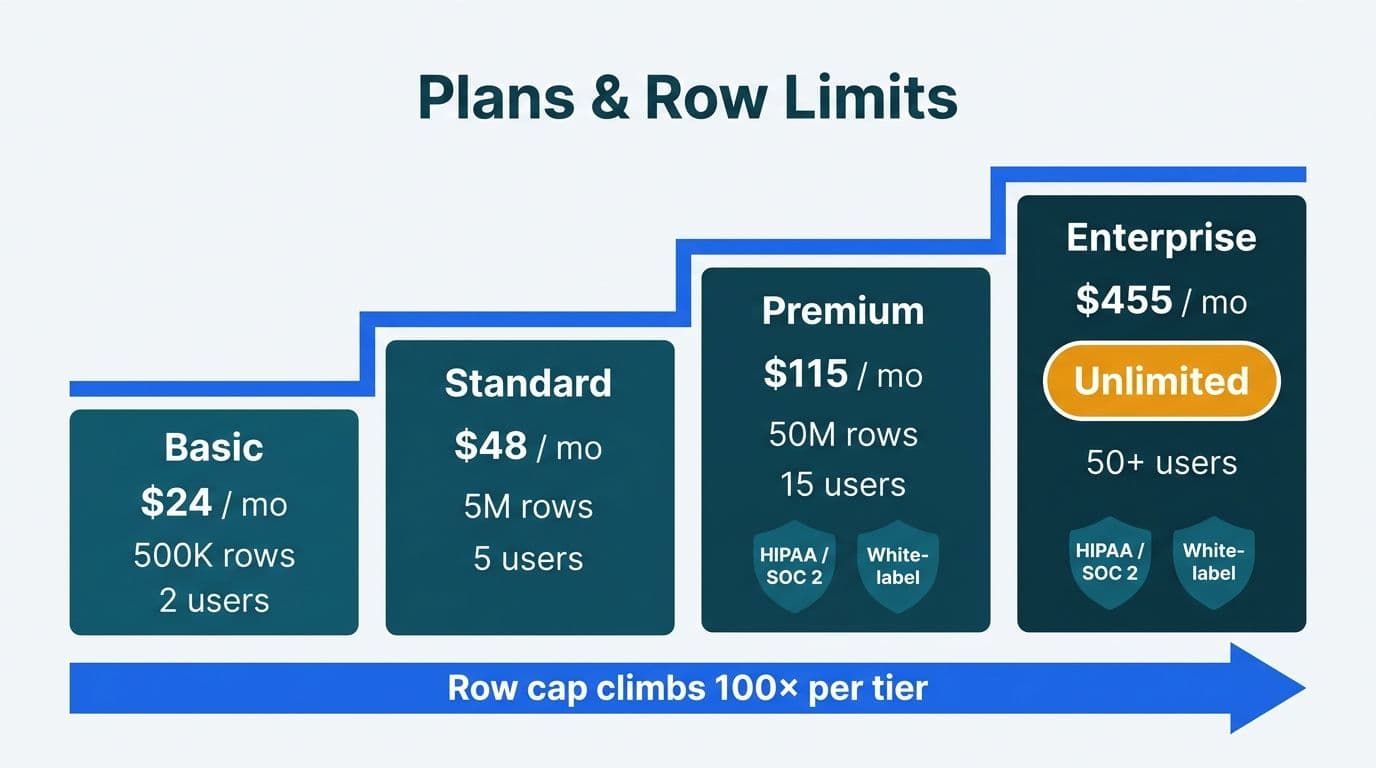
Zoho Analytics offers four paid tiers - Basic, Standard, Premium, and Enterprise - each capped by row storage limits, included user seats, and connector access. For mid-market teams in healthcare and finance, Premium or Enterprise is typically necessary to meet data-volume needs, satisfy HIPAA or SOC 2 audit requirements, and unlock white-label embedding for client-facing analytics.
Key Takeaways
Four paid cloud tiers (billed annually in USD): Basic (~$24/mo), Standard (~$48/mo), Premium (~$115/mo), and Enterprise (~$455/mo).
Row caps climb from 500,000 rows on Basic to unlimited on Enterprise - the most disruptive constraint for high-volume clinical or transactional datasets.
User seats range from 2 (Basic) to 50 (Enterprise); all tiers above Basic allow additional seat purchases.
White-label and embedded analytics are a paid add-on on Premium and are bundled into Enterprise at no extra charge.
Engaging Zoho consulting services before procurement helps right-size your tier, surface partner pricing, and avoid costly mid-contract upgrades.
What Are the Zoho Analytics Pricing Plans and Limits?
Zoho Analytics is a cloud-based business intelligence and self-service reporting platform designed for teams that need to blend data from multiple sources, build interactive dashboards, and share insights across an organization. Its pricing model is structured around two constraints that scale in tandem: storage capacity (rows) and access (user seats).
The four published cloud tiers, priced at annual billing rates in USD (verify current figures directly on Zoho's pricing page, as rates update periodically), break down as follows:
| Plan | Monthly Price (USD, billed annually) | Included Users | Row Cap | Data Source Connectors | White-Label Embedding |
|---|---|---|---|---|---|
| **Basic** | ~$24 | 2 | 500,000 | 40+ | Not available |
| **Standard** | ~$48 | 5 | 1,000,000 | 75+ | Not available |
| **Premium** | ~$115 | 15 | 5,000,000 | 100+ | Add-on (metered cost) |
| **Enterprise** | ~$455 | 50 | Unlimited | 150+ | Included |
UK and Canadian buyers see GBP and CAD equivalents on Zoho's regional portals; the tier structure and feature boundaries are identical across geographies. A UK fintech firm processing payments transaction data under GDPR will find the same row-cap and connector structure - but should confirm data-residency options with Zoho's EU compliance team before signing an Enterprise agreement.
Engaging Zoho consulting services before selecting a tier delivers a practical advantage: certified partners can model your data-volume trajectory against each cap and often have access to promotional or multi-year pricing not advertised on the public pricing page.
How Do Row Caps and Storage Limits Compare Across Zoho Analytics Plans?
The row limit is the most disruptive constraint for organizations that underestimate it at procurement time, because Zoho does not gracefully degrade when a workspace hits its ceiling - new data stops loading.
In US healthcare, a mid-size hospital network ingesting daily EHR exports, lab results, billing codes, and claims data can exhaust the Standard plan's 1-million-row ceiling within weeks. Finance teams running daily general-ledger transaction feeds across multiple legal entities face the same ingestion velocity. A Canadian credit union processing retail and commercial transaction records under PIPEDA data-retention requirements should assume 20-30% annual row-count growth and plan accordingly.
That trajectory means data volumes locked in today will need to accommodate materially larger datasets within two to three years.
Practical sizing guidance:
Calculate your largest single-table row count today.
Multiply by 2.5 to account for two years of data growth and ancillary staging tables.
If the result exceeds 1 million rows, skip Standard and start on Premium.
If it exceeds 3 million rows, budget for Enterprise from day one.
Additional row packs can be purchased as add-ons on some tiers, but the per-row cost typically exceeds that of an outright tier upgrade - and the administrative overhead of repeated capacity requests creates its own risk for teams with strict reporting SLAs.
Workspace administrators can monitor current row utilization from the account usage dashboard inside Zoho Analytics. Reviewing this figure monthly and flagging when utilization crosses 60% gives teams enough runway to complete a tier change before the silent overnight failure scenario - where a nightly batch load stops loading and operations staff cannot explain why reports are stale.
How Many User Seats and Data Connectors Does Each Plan Include?
User seat structure
Zoho Analytics uses named-user licensing, not concurrent-session licensing. Basic's 2-seat allocation suits a single-analyst-plus-manager setup. Standard's 5 seats cover a compact analytics team. Premium's 15 seats represent the practical minimum for a finance department deploying dashboards to department liaisons, or a health system's analytics team distributing reports to clinical and operational leads. Enterprise's 50-seat bundle supports organization-wide rollout.
Zoho distinguishes between analyst seats (full authoring, report building, and data upload) and viewer seats (read-only dashboard access). Viewer seats are available at a lower per-seat cost, making it economical to push dashboards to a large executive or operational audience without provisioning full analyst licenses for every consumer. Organizations that need to distribute reports to 100 or more internal stakeholders typically combine a Premium analyst seat allocation with viewer-only access for the broader population.
Connector breadth and data blending
The connector count sets the ceiling on how many external systems you can link without custom API development. Basic's 40+ connectors cover standard relational databases, flat-file imports (CSV, Excel), and widely used cloud applications. Premium's 100+ connectors add specialized ERP integrations, extended Zoho suite connections (Zoho Books, Zoho CRM, Zoho Desk, Zoho Inventory), and custom API endpoints - enabling teams learning how to build a dashboard in Zoho Analytics from heterogeneous source systems to do so without writing custom extraction scripts.
Enterprise's 150+ connectors extend to dedicated data warehouse adapters and advanced business application integrations suited to organizations running multi-system architectures across cloud and on-premises environments.
A US SaaS finance team that needs to blend Zoho CRM revenue data with bank transaction feeds and a third-party payroll system will require Premium's connector set at minimum - Standard's 75 sources may not cover the full integration stack. The distinction between Zoho Creator and Zoho Analytics for reporting surfaces frequently in this context: Zoho Creator is a low-code application builder optimized for data capture and workflow automation, while Zoho Analytics is the dedicated BI and reporting layer that queries and visualizes data already collected. They integrate natively but serve distinct functions - a boundary explored further in the next section and in our AI Analytics Use Cases in Healthcare Finance guide.
What Are the Zoho Creator Pricing Plans for 2026 and What Does a Full Project Cost?
Organizations evaluating the wider Zoho platform frequently search for zoho creator pricing plans 2026 alongside Analytics pricing - and the two products are often procured together, with Creator capturing structured data that Analytics then visualizes. Understanding Creator's tier economics is therefore directly relevant when modeling the total cost of a Zoho-based solution.
Zoho Creator offers three cloud plans priced per user per month (billed annually, USD). As with Analytics, verify current rates on Zoho's pricing page before contracting, as figures update periodically:
| Plan | Monthly Price (USD/user, billed annually) | Records per App | Apps Included | Notable Capabilities |
|---|---|---|---|---|
| **Standard** | ~$12 | 250,000 | 3 | Forms, basic workflows, standard integrations |
| **Professional** | ~$30 | 1,000,000 | Unlimited | Custom functions, advanced integrations, Zoho Analytics connector |
| **Enterprise** | ~$37 | 2,500,000 | Unlimited | SSO, IP restriction, sandbox environment, white-label portal |
Record and row limits in practice
Creator's record limit operates per application, not per account - a meaningful architectural constraint. A Professional-tier account running three separate apps each approaches 1 million records independently, but a single app consolidating all data across those three domains hits the ceiling sooner. Teams building data-capture applications that feed downstream Analytics reporting should map their record-growth trajectory the same way they would map Analytics row counts: calculate the largest single-app record volume, multiply by 2.5 for two years of growth, and tier accordingly.
User caps and licensing structure
Creator licenses every named user who logs in to build or use an app. The Standard plan's per-user rate is viable for small teams building internal tools, but the record cap of 250,000 per app becomes a constraint quickly for any transactional workflow. Professional's 1-million-record ceiling and unlimited apps make it the entry point for most mid-market deployments. Enterprise adds the security controls - SSO, IP restriction, audit logging - required in regulated environments.
What a complete Creator project costs once consultant time is added
The subscription fee is rarely the majority of spend on a custom Creator project. A realistic total-cost model for 2026 includes three layers:
Simple app (1-3 forms, basic approval workflow, standard Zoho CRM integration): USD 2,000 - 5,000 in consultant time, plus the annual subscription.
Mid-complexity app (custom business logic, multi-system integrations, Analytics reporting layer): USD 6,000 - 15,000 in consultant time.
Enterprise app (multi-department workflows, custom API integrations, white-label portal, staged rollout): USD 15,000 - 35,000 or more depending on scope.
UK and EU VAT
UK buyers pay 20% VAT on both the software subscription and consultancy services. A mid-complexity UK project budgeted at GBP 10,000 in consultant fees carries a GBP 2,000 VAT charge - recoverable for VAT-registered businesses but a real cash-flow consideration for SMEs or partially exempt organizations such as charities and NHS trusts. EU buyers face local VAT rates that typically range from 19% to 25% depending on country; the Zoho subscription is invoiced from a local EU entity in most member states, so input tax recovery follows standard domestic rules.
Engaging a Zoho consulting partner before scoping a Creator project reduces the risk of underestimating record-volume growth or selecting the wrong tier - both of which trigger mid-project upgrades that compress timelines and inflate cost.
What White-Label and Embedded Analytics Add-Ons Are Available?
White-label and embedded analytics allow organizations to serve Zoho Analytics dashboards inside their own product interfaces or client portals without any Zoho branding visible to end users. This capability matters for software vendors, managed analytics firms, and healthcare platforms delivering reporting to payers or patients.
Premium - embedded analytics as a paid add-on
On Premium, white-label embedding is available through the Zoho Analytics Embedded Analytics SDK. Pricing is usage-based, measured by embedded API calls and active sessions. This suits a UK healthtech startup embedding patient-outcome dashboards into a client portal under a GDPR data processing agreement - but the metered cost model requires careful session-volume estimation to avoid budget surprises.
Enterprise - white-label included
Enterprise bundles white-label embedding into the base subscription: custom domains, fully unbranded login pages, SAML/SSO integration, and unlimited embedded API calls. Enterprise is the standard choice for organizations reselling analytics as part of their own platform, or for finance and healthcare firms delivering board-level dashboards under their own brand.
Compliance-relevant capabilities by tier:
| Capability | Basic | Standard | Premium | Enterprise |
|---|---|---|---|---|
| Audit logs (access history) | No | No | Yes | Yes |
| SAML/SSO integration | No | No | Yes | Yes |
| Custom domain | No | No | Add-on | Included |
| Remove Zoho branding | No | No | Add-on | Included |
| Data encryption at rest | Yes | Yes | Yes | Yes |
| HIPAA BAA availability | Contact Zoho | Contact Zoho | Yes | Yes |
For US healthcare organizations, the audit-log row in the table above is non-negotiable. HIPAA requires access logs for any system that processes protected health information. Both Premium and Enterprise satisfy this requirement - and critically, Zoho Analytics audit logs on these tiers support export to CSV and can be scheduled for automated delivery to a designated compliance inbox, which integrates cleanly into SOC 2 evidence-collection workflows without requiring manual admin queries before each review cycle. A SOC 2 Type II audit expects the same access-record integrity. Basic and Standard do not provide audit logs at the level required for regulated environments, and should not be used to process PHI without confirming controls with Zoho's compliance team.
For a deeper look at how these controls integrate into a compliant analytics architecture, the HIPAA-Compliant Analytics Dashboard best practices guide walks through the full technical and administrative safeguard checklist.
When Should Your Team Upgrade to a Higher Zoho Analytics Plan?
Four conditions reliably signal that a tier change is necessary rather than optional:
1. Row utilization exceeds 80%. At 80% of the row cap, ingestion latency increases and dashboard refresh times degrade. Teams typically discover they have reached 100% overnight, when a nightly batch load fails silently and operations staff cannot explain why reports are stale.
2. Multi-source data blending is blocked. Standard and Basic constrain the number of live data sources that can be joined in a single report. If a US hospital network's finance team cannot combine EHR-derived cost data with general-ledger transactions and claims-adjudication outcomes in one view, the bottleneck is the connector tier, not a product deficiency.
3. An audit or compliance review requires access logs. HIPAA-covered entities and organizations undergoing SOC 2 Type II audits need access logs as a basic control. Canadian organizations under PIPEDA face equivalent record-keeping requirements. Upgrading to Premium before an audit window opens costs significantly less than a post-findings remediation.
4. A client or stakeholder expects branded analytics. White-label requirements push most professional services and healthcare IT firms directly to Enterprise. When the add-on cost on Premium is modeled against the base price of Enterprise across a 12-month cycle, Enterprise typically becomes the more economical choice above 300-400 active embedded sessions per month.
Analytics embedded in consulting and advisory deliverables must carry the firm's own brand - making Enterprise's unlimited white-label bundle an operational necessity at scale.
Before committing to a new tier, the Zoho Certified Partner vs Independent Consultant Decision Matrix is useful reading: certified partners often have access to promotional or volume pricing that changes the tier economics meaningfully.
How Do You Build an Accurate Total Cost Model for Zoho Analytics?
The headline tier price understates total cost of ownership for most organizations. A complete budget model includes six components:
1. Base subscription - Annual tier cost at published or partner-negotiated pricing.
2. Seat add-ons - The included seat count rarely matches actual demand at rollout. Calculate analyst seats and viewer seats separately; the viewer rate is lower and can substantially reduce per-user cost for large audiences.
3. Row and connector add-ons - If you are within one capacity cycle of the row ceiling, model the per-pack add-on cost against an outright tier upgrade. The upgrade is almost always cheaper per row.
4. White-label embedding fees - On Premium, these are metered. On Enterprise, they are included. The crossover point where Enterprise becomes more economical than Premium plus embedding typically falls at 300-400 active embedded sessions per month.
5. Implementation cost - Zoho analytics consultant cost for a standard project covering five to ten dashboards, connector configuration, data modeling, and user training typically ranges from USD 2,000 to USD 8,000 when working with a qualified partner. UK buyers should add 20% VAT to consultant fees and software subscriptions; EU buyers apply their local VAT rate, typically 19-25%. Canadian organizations should apply comparable local-currency ranges based on regional rates and project scope.
6. Internal certification - Teams that prepare staff through the Zoho Analytics certification exam pathway reduce long-term consultant dependency and build institutional knowledge that outlasts any single engagement. Certification preparation typically adds two to four weeks of part-time study per analyst, and the investment pays back quickly when teams can handle incremental reporting requirements in-house.
Zoho Analytics' AI assistant (Zia) is available from Standard upward, but its predictive modeling and anomaly-detection depth increase materially at Premium - making that tier the practical entry point for healthcare revenue-cycle forecasting or finance teams building forward-looking operational models.
For a rigorous ROI methodology applicable to Zoho Analytics and comparable BI platforms, the CFO's guide to measuring ROI on AI analytics tools provides a step-by-step framework adaptable to any tier. If you are evaluating Zoho Analytics as part of a broader Zoho ecosystem decision, the What Is Zoho One and Is It Worth It guide compares standalone Analytics pricing against bundled Zoho One economics across different organization sizes.
---
About Lets Viz: Lets Viz has delivered data analytics and BI consulting services since 2020, serving US healthcare systems, UK fintech firms, Canadian manufacturing companies, and global SaaS businesses. With a 5.0 Clutch rating, our team has implemented Zoho Analytics across all four pricing tiers and specializes in compliance-sensitive configurations for HIPAA, SOC 2, GDPR, and PIPEDA environments.
Ready to right-size your Zoho Analytics deployment? Our Zoho consulting services team evaluates your data volumes, compliance requirements, and growth trajectory to recommend the optimal plan - and negotiates directly with Zoho on your behalf. Try Zoho Analytics free to explore the platform before committing to a paid subscription.


