Power BI App Guide: Mobile, Desktop and Licences for Leaders
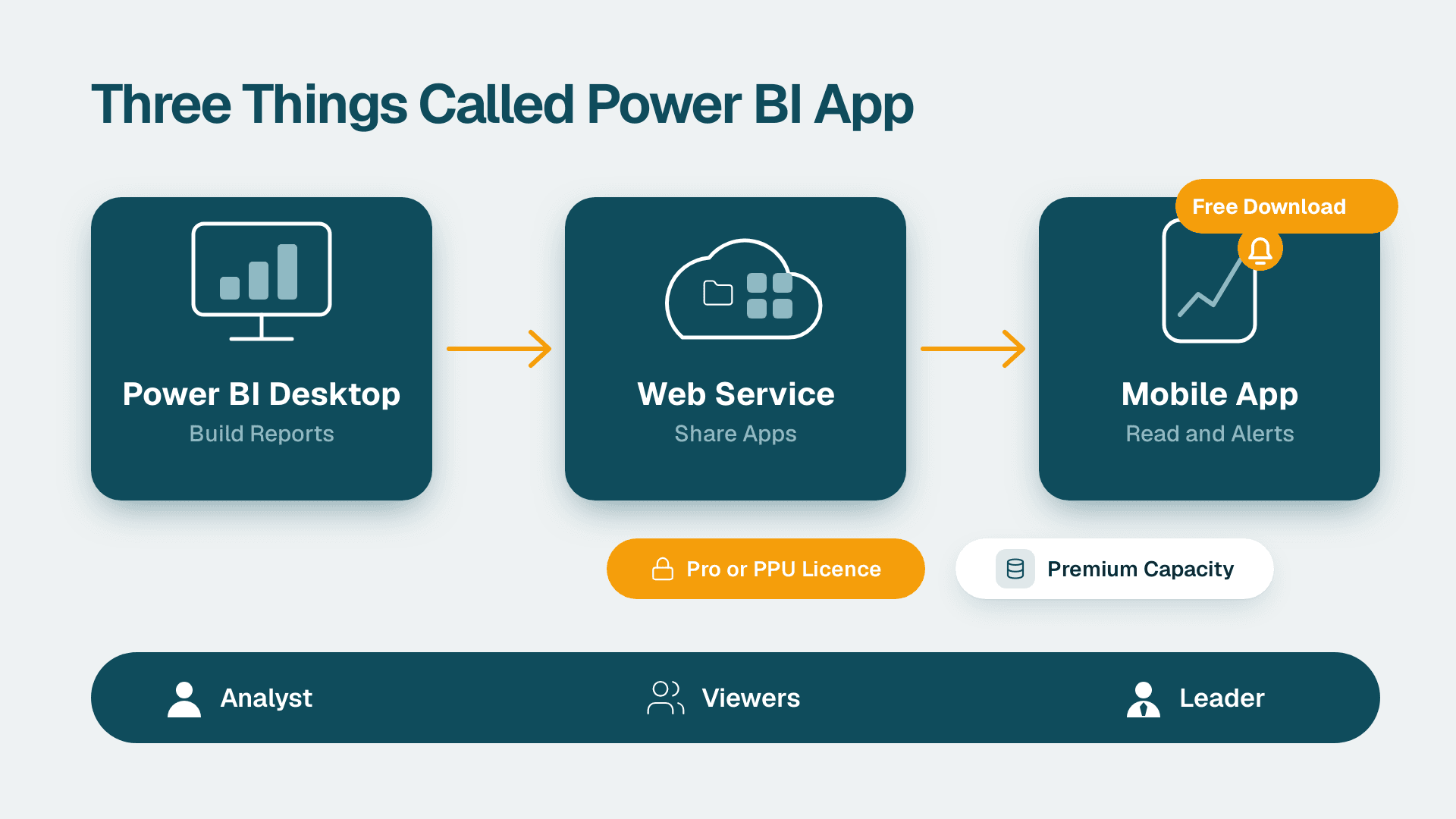
The Power BI app can mean three things: Power BI Desktop, where analysts build reports; the Power BI web service, where reports are shared; and the free Power BI mobile app, where leaders read them and receive alerts. Viewers generally need a Pro or Premium Per User licence, unless the content sits in Premium capacity.
Key Takeaways
- "Power BI app" is used loosely: Desktop builds, the web service shares, and the mobile app is for reading and alerts.
- The mobile app is free to download, but opening a shared workspace app still depends on a licence or on Premium capacity.
- A workspace app (the packaged bundle of content) is different from a single report, and the distinction drives access and permissions.
- Alerts are the main reason leaders should install the mobile app; confirm offline behaviour in your own tenant before promising it.
- A team rollout is mostly licensing, workspace and audience design, not software installation.
What does a Power BI app do?
A Power BI app does one of two jobs, depending on who is speaking. Product-wise it is the set of tools that build, share and read analytics. In day-to-day business talk it often means a packaged bundle of dashboards and reports that you hand to a team.
Microsoft describes the full suite as Power BI Desktop, the Power BI web service and Power BI Mobile, according to the Microsoft Power BI listing on the Apple App Store (2026). Each piece has a different audience, and mixing them up is the most common source of confusion in budget conversations.
If you are still deciding whether the platform fits your company, our plain-English guide to what Power BI is covers the basics. If you already know you are adopting it and want help with licensing and rollout design, Power BI consulting is the service that covers that work.
The three pieces at a glance
| Piece | Who uses it | What it does |
|---|---|---|
| **Power BI Desktop** | Analysts and report builders | Connects to data, cleans it, models it and designs reports |
| **Power BI service (web)** | Builders and viewers | Hosts reports, manages workspaces, shares content and apps |
| **Power BI mobile app** | Leaders, field teams, managers | Reads reports on a phone or tablet, sets alerts, asks questions |
The split matters because only one of these three needs to sit on every executive's phone. Desktop is a builder's tool, usually installed on a handful of analyst machines. Most of your company will only ever touch the web service or the mobile app.
Why the word "app" causes confusion
There is a fourth meaning. Microsoft's documentation says workspace apps are the experience previously and widely called Power BI apps, and that they package and publish Power BI content from a workspace. So when an analyst says "we published an app," they usually mean a curated bundle, not an installation on a device. Keep this in mind in meetings: ask whether someone means a device app or a published bundle before approving any spend.
What is the difference between a Power BI app and a Power BI report?
A report is a single, multi-page view of data built from one semantic model. A workspace app is a packaged collection that can combine several reports, dashboards and other content for a defined audience.
According to Microsoft Learn's documentation on workspace apps (2026), an app combines related content such as dashboards, spreadsheets, semantic models and reports, with one or more of each type bundled together. Think of the report as a single document and the app as the folder you hand to a department, with a tidy navigation menu on top.
Why the distinction matters for leaders
Three practical differences follow from it:
- Permissions can differ. An app can have permissions that are different from the permissions set on the workspace. That means analysts can keep editing in a workspace while executives see only the finished, approved version.
- Updates land quietly. Power BI sends a notification email when a user first gets access to an app, and again when they gain access to another audience in the same app. Republished or updated apps appear in their latest version without a notification, so a changed number does not announce itself.
- Audiences can be split. One app can serve different audiences, for example finance seeing margin pages that operations never sees.
A useful rule: give builders workspace access and give consumers app access. It keeps half-finished work away from the board pack and reduces accidental edits.
Workspace apps, org apps and Fabric Apps
Terminology is moving. Microsoft states that workspace apps can coexist with org apps, which are Fabric items and a newer evolution of workspace apps. Existing workspace apps are not automatically renamed, upgraded, migrated or replaced. Fabric Apps are in preview, while org apps are generally available. For a mid-market team the sensible position is to keep using workspace apps where they work, and treat the newer options as something to evaluate rather than a forced migration.
What does the Power BI mobile app do for business leaders?
The mobile app lets leaders read dashboards on a phone or tablet, set data alerts, annotate and share, and ask questions in plain language. It is the lightest way to put live numbers in front of people who will never open Desktop.
The App Store listing shows a 4.7 rating from 98K ratings, an age rating of 4+ and a download size of 228.5 MB. Those figures are a user-satisfaction signal and a size check for corporate devices, not a measure of business value, but they confirm the app is mature and widely installed.
Features that matter in a leadership setting
According to the same listing, the mobile app supports:
- Data alerts and real-time notifications, so a metric crossing a threshold reaches you without opening a report.
- A Q&A virtual analyst, which lets users ask questions in their own words to get insights into their data.
- Barcode and QR code scanning, useful for tracking inventory and getting real-world data in context.
- Secure access to on-premises data, which matters for firms that have not moved everything to the cloud.
- Annotating and sharing, so a manager can mark up a chart and send it to a colleague.
Q&A answers are only as good as the underlying model. If column names and measures are messy, plain-language questions return messy answers. Cleaning data before modelling is the unglamorous fix, and our guide on using Power Query to clean data before modelling explains how analysts do it.
Design for the phone, not just the desktop
A report that looks excellent on a 27-inch monitor can be unreadable on a phone. Ask your builders to create a phone layout for any report leaders will read on the move: a few headline numbers, one trend, one exception list. The principles in our build guide for Power BI dashboards leaders actually use apply doubly on a small screen.
Is the Power BI app free, and which licences do viewers need?
The mobile app is free to download, but being able to open shared content depends on licensing. Microsoft Learn states that to view and open an app, the recipient must have a Power BI Pro or Premium Per User (PPU) licence, or the app must be shared with the recipient in Premium capacity.
The App Store lists the mobile app as Free. That is the app itself, not the content behind it. A free download that cannot open anything is the situation many finance teams hit in their first week, so settle the licence model before you send invitations.
Licence options in one table
| Option | List price | What it means for viewers |
|---|---|---|
| **Power BI Pro** | $14 per user/month | Each person who builds or views shared content has a licence |
| **Premium Per User (PPU)** | $24 per user/month | Per-person licence with premium features |
| **Premium capacity** | Priced by capacity | Content can be shared with viewers who do not hold individual paid licences |
Pro and PPU prices are list prices since 1 April 2025. Capacity pricing varies by size and region, so ask for a current quote rather than relying on any figure you find online.
The arithmetic is simple. Suppose a 50-person company wants every manager to read the monthly pack: that is a per-seat model, and cost scales with headcount. Suppose instead 400 people need read access and only a few build: a capacity model may be worth pricing. Our comparison of Power BI Pro, PPU and Fabric walks through where that crossover tends to sit.
Two licence traps to avoid
1. Template apps. A Pro or PPU licence is needed to install, customise and distribute a template app. Do not assume a free tier covers it.
2. Copilot. Copilot in Power BI and Fabric needs a paid Fabric capacity of F2 or higher, or Power BI Premium P1 or higher. A Pro or PPU licence alone is not enough, and trial capacities are excluded. There is no F64 minimum for Copilot. Our Copilot scenario library shows which use cases justify that spend.
If your audience is external, such as clients or partners, the per-seat model is rarely the right fit. Our article on sharing reports with clients without individual licences through Power BI Embedded covers that scenario.
Does the Power BI app work offline, and how do alerts behave?
Alerts are well documented and are the strongest reason for leaders to install the mobile app. Offline use is a different matter: it is not covered by the verified sources for this article, so test it in your own tenant before you promise it to executives.
How alerts work in practice
The mobile app supports data alerts and real-time notifications. In practice, an alert is a rule on a numeric tile, such as a cash balance, an open-ticket count or a stock level, that notifies you when the value crosses a threshold. That turns a dashboard from something you check into something that tells you when to look.
A few habits make alerts useful rather than noisy:
- Set alerts only on numbers that trigger a decision, not on every tile.
- Agree one owner per alert so two managers do not act on the same signal.
- Review alerts quarterly and retire the ones nobody acts on.
Offline: what to check before you rely on it
Because offline behaviour depends on the device, the content type and your tenant settings, we do not state specifics here. Run a simple test on a managed phone: open the report you care about while connected, switch to airplane mode, and see what remains visible. Record the result and write it into your rollout notes. If field staff or travelling executives depend on reading figures without signal, make that test a go or no-go item, and check Microsoft's current mobile documentation for the latest position.
What does Power BI Desktop do, and who needs it?
Power BI Desktop is the builder's workbench, used to connect to data, clean it, model it and design reports before publishing them to the web service. Most organisations need it on a few analyst machines, not on every laptop.
Microsoft's download page lists Power BI Desktop alongside the mobile apps, so it is easy to assume everyone needs everything. They do not. A finance director who only reads the month-end pack needs the web service or the mobile app, not the builder tool.
Who should install what
| Role | Desktop | Web service | Mobile app |
|---|---|---|---|
| Report builder or analyst | Yes | Yes | Optional |
| BI lead or admin | Yes | Yes | Optional |
| Finance or ops manager | Rarely | Yes | Yes |
| Executive or board member | No | Occasionally | Yes |
The web service sits at the centre. Users sign in through the Power BI web service to find workspaces and apps, and builders publish there from Desktop. Keeping the number of Desktop users small also limits the number of people who can create competing versions of the same metric, which is a governance benefit as much as a cost one.
How do you set up the Power BI app for a team?
Set up a team in five steps: decide who builds and who views, confirm licences, organise a workspace, publish an app with audiences, and have everyone install and test the mobile app. The software is the easy part; the decisions are the work.
Step by step
1. Split builders from viewers. List who will create content and who will only read it. This drives the licence count and the Desktop installs.
2. Confirm the licence model. Choose per-seat Pro or PPU, or Premium capacity, using the table above. Assign licences before inviting anyone.
3. Build in a workspace. Keep drafts, test reports and the semantic model in a workspace limited to builders.
4. Publish an app with audiences. Package the finished reports and dashboards, and set audience permissions separately from workspace roles.
5. Onboard viewers. Select Apps in the navigation pane, then Get apps, to find workspace apps. Workspace apps are available only to people in your company, while template apps are published by Microsoft and the community. Then install the mobile app and set the first alerts.
One detail worth knowing: gallery view and template-app version browsing are available on the old Apps page, not the new one. If a team member cannot find a feature described in an older tutorial, the page version is the likely reason.
Choosing the first content
Start with one pack that a leader will genuinely open every week. Our ranking of which Power BI dashboard to build first helps pick it by function. A tight first release builds trust, and trust is what turns a licence purchase into a habit.
What goes wrong when teams roll out Power BI apps?
Most failed rollouts fail on licensing surprises, unclear ownership and unmanaged data access, not on the technology. The examples below are hypothetical, framed to show patterns rather than report real outcomes.
Pattern 1: the free app that opens nothing
Suppose a US SaaS finance team installs the free mobile app on every manager's phone, then discovers that most of them cannot open the shared app without a Pro or PPU licence or Premium capacity. The fix is to settle licences first and install second. For a US healthcare or financial-services firm, add a security review under HIPAA or SOC 2 expectations before any sensitive dataset is shared to mobile devices.
Pattern 2: the pack nobody owns
A UK fintech might publish an app to a broad audience and let it drift because no one owns the refresh or the definitions. Updated apps appear without a notification, so a changed figure can reach readers silently. Under GDPR, the same drift can expose personal data to people who should not see it, so audience permissions deserve a named owner and a periodic review. EU and UK teams should also check where data is stored and who can export it from a phone.
Pattern 3: the field team without a plan
A Canadian manufacturing company might want plant managers to scan barcodes and read inventory data on the shop floor. The mobile app supports barcode scanning and secure access to on-premises data, which fits that scenario. Before rollout, the firm should confirm how personal information is handled under PIPEDA, test connectivity in the buildings where staff work, and confirm what happens with poor signal.
A short pre-launch checklist
- Licence model confirmed and assigned to every named viewer.
- One owner named for each app and each alert.
- Phone layouts created for any report leaders read on mobile.
- Offline and low-signal behaviour tested on managed devices.
- Audience permissions reviewed against your data protection obligations.
- Audit retention understood: Microsoft Purview Audit (Standard) keeps audit logs for 180 days, so plan any longer evidence needs separately.
Business leaders do not need to master every setting. They need to make four decisions well: who builds, who views, which licence model pays for it, and who owns each published pack. Get those right and the apps do their job quietly.
Power BI consulting - licensing design, workspace and app setup, and rollout support for mid-market teams adopting Power BI.
---
About Lets Viz: Lets Viz is a data analytics consultancy that has built Power BI and data solutions since 2020 for clients across US healthcare, UK fintech, Canadian manufacturing and global SaaS. The team holds a 5.0 rating on Clutch and works to HIPAA, SOC 2, GDPR and PIPEDA expectations where they apply.
Sources
- Microsoft Power BI on the Apple App Store
- Workspace apps in Power BI - Microsoft Learn
- Download Power BI - Microsoft
- Sign in to Microsoft Power BI
Facts and prices checked November 2026.