Zoho Inventory: Multi-Warehouse Stock and Gaps for SMBs
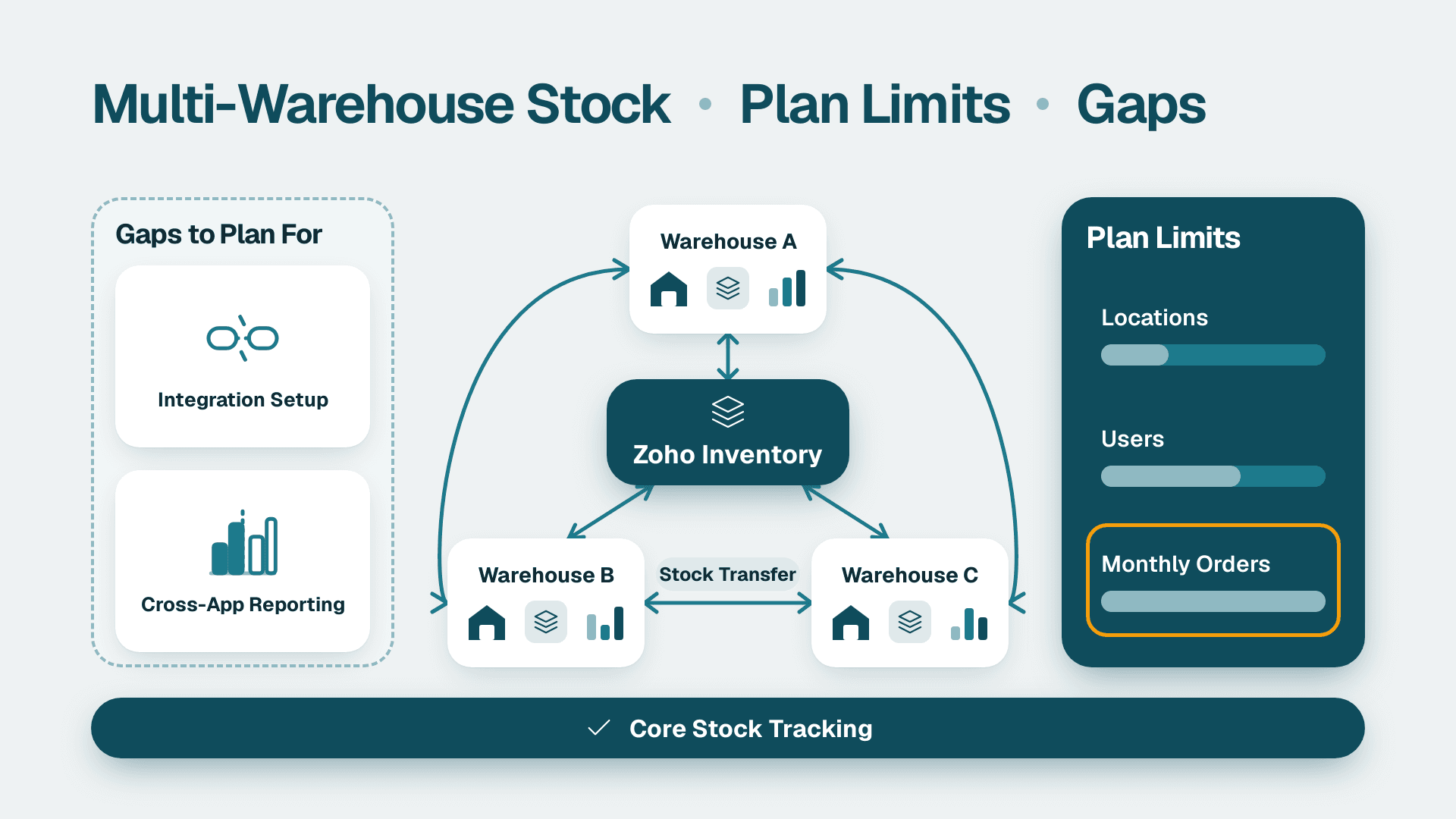
Yes, Zoho Inventory handles multi-warehouse stock and order management for most small businesses, with stock transfers between locations, warehouse-specific reports and sales order workflows. The limits are plan-based: location, user and monthly order caps rise with price. The real gaps for suite users tend to be cross-app reporting and integration setup, not core stock tracking.
Key Takeaways
- Zoho Inventory supports multiple warehouse locations, transfers between them and warehouse-specific reports, but the number of locations depends on your plan.
- Monthly order caps are the constraint most SMBs hit first, so size the plan to your order volume, not your SKU count.
- Webhooks and workflow automation cover most integration needs, but cross-module reporting across Books, CRM and Desk usually needs a separate analytics layer.
- Plan names and limits differ between Zoho's regional pages, so confirm the numbers on the page for your own market before you buy.
- A 14-day trial is long enough to test transfers, backorders and carrier rates with real data.
What Is Zoho Inventory Used For?
Zoho Inventory software is a cloud tool for tracking stock, managing sales and purchase orders, and shipping goods across one or more locations. Small businesses typically adopt it when spreadsheets stop coping with stock held in more than one place, or when orders and purchasing start to collide.
According to the Zoho Inventory US product page, the feature set includes barcode and RFID stock tracking, batch and serial number tracking, unit of measure conversion, low stock alerts with reorder points, inventory adjustments, user roles and permissions, and a customer and vendor portal. It also supports item groups and assemblies, dropshipping and backordering, and package geometry for visualizing how items pack into a shipment.
That list tells you the product is aimed at product-based SMBs: distributors, retailers, light manufacturers and ecommerce sellers who need more than a basic stock counter but do not want a full ERP project. If you already run other Zoho apps, the question is less "does it work" and more "how does it fit with what I have." Teams weighing that decision often bring in Zoho consulting services to map Inventory against CRM, Books and Desk before committing. If you are still deciding whether to buy the bundle at all, our guide on whether Zoho One is worth it for a small business covers that question first.
Who it fits best
Zoho Inventory suits businesses with a catalogue that changes slowly enough to manage by item group, a handful of locations, and order volumes in the hundreds or low thousands per month. It is a weaker fit for operations that need complex production scheduling, multi-level bills of materials or heavy warehouse automation. Those needs push you toward a dedicated manufacturing or warehouse management system.
Does Zoho Inventory Handle Multi-Warehouse Stock?
Yes. Zoho states that Zoho Inventory supports multiple warehouse locations, transfers between them, and warehouse-specific reports. The practical limit is how many locations your plan allows, not whether the feature exists.
Consider a hypothetical US distributor with one warehouse in Texas and another in Ohio. Stock received into Texas can be transferred to Ohio as a recorded movement rather than a manual adjustment, and each location carries its own quantity on hand. That matters for accuracy: a transfer keeps total stock constant while shifting where it sits, whereas two separate adjustments can quietly distort your totals.
What to check before you rely on it
The feature list confirms that multi-location tracking exists, but the details that decide daily usability are worth testing in your own account:
- How reorder points and low stock alerts behave when the same item is held in several locations.
- Whether sales orders can be fulfilled from a chosen location, and what happens when that location runs short.
- How backorders interact with stock arriving at a different location from the one the order was placed against.
- How batch or serial tracking carries through a transfer.
None of these are reasons to avoid the product. They are the points where SMB setups most often need a deliberate process decision, so settle them during the trial rather than after go-live.
How Much Does Zoho Inventory Cost, and Is It Free?
Zoho Inventory has a free plan, but it is deliberately small: it is a way to test the product or run a very low-volume operation. Paid plans scale by orders per month, users and locations, all billed per organization rather than per seat.
On the US page, pricing is billed annually per organization per month and runs as follows.
| Plan (US page) | Price per org/month, billed annually | Orders/month | Users | Locations |
|---|---|---|---|---|
| Free | $0 | 50 | 1 | 1 |
| Standard | $29 | 500 | 3 | 2 |
| Premium | $79 | 3,000 | 5 | 4 |
| Plus | $129 | 7,500 | 10 | 6 |
| Enterprise | $249 | 15,000 | Not clearly stated | 10 |
Two cautions apply. First, Zoho's regional pages do not match each other. The global Zoho Inventory page lists the Free plan with 2 locations rather than 1, and names the tiers Free, Standard, Professional, Premium and Enterprise at $0, $29, $79, $129 and $249. It also shows Standard with 2 users and Enterprise with 7 users and 10 locations. So the $79 tier is called Premium on the US page and Professional on the global page. Always read the page for the market you will buy in, and screenshot it for your records.
Second, the cap that bites is almost never the price. A 500-order plan works out to roughly 16 orders a day, which a busy small shop can pass in a good month. Size the plan against your peak month, not your average.
Zoho also advertises a 14-day free trial with no credit card required and cancel anytime, which is enough time to run a real batch of orders through the system.
How Does Order Management Work for an SMB?
Zoho Inventory manages the order cycle from sales order through packing and shipping, with purchase orders on the supply side. For an SMB, the value is that stock levels update as orders move, so sales, purchasing and fulfilment work from the same numbers.
The order-handling features Zoho lists are broader than many small teams expect:
- Dropshipping and backordering let you sell items you do not hold, or take orders ahead of stock.
- Item groups and assemblies handle variants such as size and colour, and bundled kits made from component items.
- Batch and serial number tracking supports traceability for goods that must be recalled or warrantied.
- Unit of measure conversion helps when you buy by the case and sell by the unit.
- Shipping carrier integrations are listed for UPS, USPS, DHL, Aramex, FedEx and Canada Post.
The carrier list is a useful signal for the three markets this article targets. A US seller is covered by UPS, USPS and FedEx, a Canadian seller by Canada Post, and a UK or EU seller by DHL, though you should confirm which services and rate options are available for your own origin and destination before assuming parity.
A hypothetical Canadian manufacturing company illustrates the batch tracking point. If it ships components in lots and a supplier later flags a defect, batch numbers let it identify which customers received which lot. For businesses with Canadian privacy obligations under PIPEDA, remember that customer shipping details held in the system are personal information, so user roles and permissions deserve real attention at setup rather than defaulting everyone to full access.
Where order management gets strained
The strain shows up when order volume is spiky, when returns are frequent, or when one order draws from several locations. Those are process issues as much as software issues, and they are easier to design around when you decide the rules up front: which location ships by default, how splits are handled, and who can override a reorder point.
What Integration Gaps Should You Plan For?
Zoho Inventory is built to connect, but connecting is not the same as finished. Zoho states that it supports webhooks to trigger actions or workflows in third-party apps, and workflow automation such as custom actions when an invoice becomes overdue. Those two tools cover a lot of ground, and they are also where gaps hide.
The common ones for suite users:
- Data consistency across modules. If product names, SKUs or customer records differ between Inventory, Books, CRM and Desk, automation will faithfully spread the inconsistency. Agree a single naming standard first.
- Event coverage. A webhook fires on the events the product exposes. If you need a trigger it does not offer, you will need a workaround rather than a setting.
- Ownership of the logic. Automations built by one person, with no documentation, become a liability when that person leaves.
For connecting Inventory to other apps without writing code, Zoho Flow for cross-app automation is the usual route, and our guide explains what it can and cannot do. When a workflow needs a custom screen, such as a pick-and-pack form tailored to your warehouse, no-code apps built in Zoho Creator can fill the space the standard interface leaves.
For a UK or EU business, integrations also carry GDPR implications. Each connected app that receives customer data becomes part of your processing footprint, so list what flows where before you switch on a new automation, and check the data processing terms for each tool involved.
What Reporting Gaps Does Zoho Inventory Have?
Inside Inventory, reporting is strong on the operational basics, including the warehouse-specific reports Zoho lists. The gap is usually not within Inventory but across it: questions that span stock, finance, sales and support are hard to answer from any one module.
Typical examples of cross-module questions an SMB owner asks:
- Which products tie up the most cash relative to how fast they sell?
- Which customers generate the most support tickets per unit shipped?
- How does the margin on an order look once shipping and returns are included?
- Which warehouse consistently fills orders late, and what does that cost in refunds?
Each needs data from more than one app. Inventory reports tell you what is on hand and where. Books holds the financial side, CRM holds the customer relationship, and Desk holds the service history. Joining them is a reporting-layer job. Zoho Analytics is the natural first stop inside the suite, and a dedicated BI tool becomes worthwhile when you also need to blend data from outside Zoho.
There is one more reporting caution, and it is about trust rather than features. If stock adjustments are made casually, reports will be accurate to the data and wrong about reality. Controlling who can adjust inventory, and requiring a reason for each adjustment, is the cheapest reporting improvement available. A US finance or healthcare supplier operating under SOC 2 or HIPAA expectations will also want that adjustment trail for audit purposes, so confirm that the audit information you need is actually captured.
Inventory Zoho or a Full ERP: Which Fits Your SMB?
Choose Zoho Inventory when your core need is multi-location stock, order handling and shipping at a manageable scale, and when you already use other Zoho apps. Choose a broader ERP when manufacturing, complex costing or heavy compliance sit at the centre of your operation.
People often ask which is better when comparing Zoho with other all-in-one business suites. There is no universal winner, because the right answer depends on your constraints. These criteria separate the options more reliably than feature checklists:
| Question | Points toward Zoho Inventory | Points toward a broader ERP |
|---|---|---|
| How many locations do you run? | A few, within plan limits | Many, or complex networks |
| What is your monthly order volume? | Hundreds to low thousands | Well beyond plan caps |
| Do you manufacture? | Simple assemblies and kits | Multi-level production planning |
| Which apps do you already use? | CRM, Books and Desk in Zoho | A different core system |
| How much customisation do you need? | Workflows and light no-code extensions | Deep, bespoke process control |
The fair framing is that Zoho Inventory is a strong value for the middle of the SMB market, and the cost of being wrong is low because you can trial it and the plans are billed per organization rather than per seat. The cost of a heavier ERP, in time and implementation effort, is considerably higher, so it is rarely the right first move for a small team.
Is Zoho an Indian Company, and Does It Matter?
Zoho Corporation was founded in India and is headquartered in Chennai, though it sells globally and serves customers across the US, UK, EU and Canada. For most buyers the origin matters less than where your data is stored and how it is processed.
What to check instead:
1. Data location options. Confirm which regional data centre your account uses and whether that suits your obligations.
2. Data processing terms. UK and EU businesses should review the processing agreement under GDPR, and Canadian organizations should consider how PIPEDA applies to personal information held in the system.
3. Access controls. Use the roles and permissions Zoho lists, and give each user the minimum access their job needs.
These steps apply to any cloud inventory tool, and they are better answered by your own documentation review than by assumptions about a vendor's home country.
How Should You Test Zoho Inventory Software Before Buying?
Use the 14-day trial to run real transactions rather than clicking through demo data. A short, structured test exposes the process gaps that a feature list hides.
| Test | What it proves |
|---|---|
| Import a sample of your real SKUs, including variants | Whether item groups match how you sell |
| Transfer stock between two locations | That totals hold and reports show each location correctly |
| Place an order that exceeds stock at one location | How backorders and fulfilment rules behave |
| Generate a shipping label with your main carrier | Whether carrier setup works for your origin and destination |
| Trigger a webhook or workflow | That your integration path works end to end |
| Build one report spanning Inventory and another app | Whether you need an analytics layer on day one |
If your trial order volume is far below what you expect in production, note it. A plan that feels comfortable in week one may be tight by peak season, and the cap is on orders, not on days.
A good outcome from the trial is not a perfect score. It is a short written list of decisions: which location ships first, who may adjust stock, which automations you will build, and which reports you will need beyond the built-in ones. That list is the real deliverable, and it is far cheaper to produce before launch than to reconstruct afterwards.
---
About Lets Viz: Lets Viz is a data analytics and Zoho consultancy that has helped teams design, connect and report on their business systems since 2020. We work with clients across US healthcare, UK fintech, Canadian manufacturing and global SaaS, and hold a 5.0 Clutch rating.
If you want help mapping Inventory, Books, CRM and Desk into one working setup, explore our Zoho consulting services.
Sources
Facts and prices checked October 2026.