Power BI Copilot Scenario Library: What Really Works in 2026
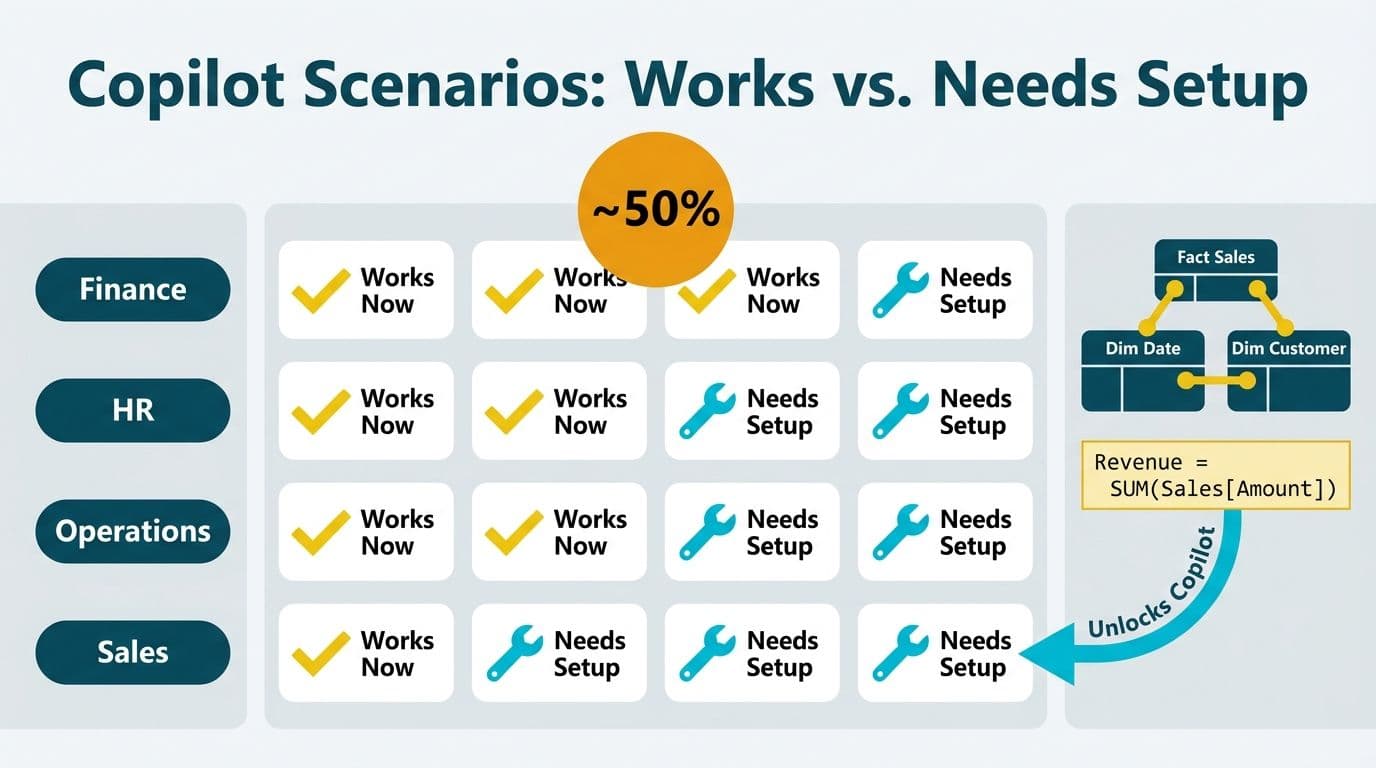
Microsoft's Power BI Copilot Scenario Library is a curated set of AI prompt templates organized by business function - finance, operations, HR, and sales. Roughly half of these templates work out of the box; the other half require a well-structured semantic model with clean relationships and explicit DAX measures before Copilot can return accurate, trustworthy output.
Key Takeaways
Microsoft's Copilot Scenario Library groups pre-built AI prompts by business function; the templates are a roadmap, not a deployment guarantee.
Power BI Copilot licensing requirements include a Microsoft 365 Copilot licence or a Fabric capacity at F64 SKU or higher - Power BI Pro alone does not qualify.
Finance narrative and HR summary templates work immediately; analytical and forecasting templates require a prepared semantic model first.
Power BI Copilot data model readiness - star schema, explicit DAX measures with descriptions, and row-level security - is the single most reliable predictor of Copilot accuracy.
US healthcare (HIPAA), UK and EU (GDPR), and Canadian (PIPEDA) organizations each face distinct governance obligations before activating Copilot at scale.
What Is the Power BI Copilot Scenario Library?
Microsoft's Copilot Scenario Library is a publicly available catalog of generative AI use cases showing business teams what they can accomplish with Microsoft 365 Copilot across their existing Microsoft stack - including Power BI. The library organizes prompt templates by role (analyst, finance lead, HR manager) and by task type: summarize a report page, generate a DAX measure, build an executive narrative, or answer a business question from data.
The library spans six functional categories: financial analysis, workforce and HR, sales and pipeline, operations and supply chain, IT and service management, and executive reporting. Each scenario entry specifies a business outcome, a suggested prompt structure, and the data conditions under which the prompt performs reliably. That last element - data conditions - is the fine print mid-market teams consistently overlook.
For teams at the evaluation or expansion stage, engaging a Power BI consulting (Copilot-ready) specialist early makes a material difference. The Scenario Library templates assume a well-governed semantic model; teams that point Copilot at a flat ERP export will receive generic or misleading answers. Read the library as a requirements document: each template implicitly defines what your data model must look like before that scenario becomes viable.
Microsoft updates the Scenario Library periodically as Copilot capabilities expand. For finance teams, the library now includes scenarios covering variance analysis, budget commentary, headcount cost breakdown, and intercompany reconciliation - areas where Copilot's ability to generate a plain-English narrative from a complex data model is especially valuable to CFOs and FP&A directors.
What Are the Power BI Copilot Licensing Requirements?
Power BI Copilot licensing requirements are stricter than most teams expect. To activate Copilot in Power BI Desktop or the Power BI Service, your organization needs one of the following:
A Microsoft 365 Copilot licence (E3 or E5 base plus the Copilot add-on) assigned per user
A Microsoft Fabric capacity at F64 SKU or higher for the workspace hosting the semantic model
Power BI Premium Per User (PPU) for individual users on a Premium-tier workspace
Copilot is not available on Power BI Pro alone. The workspace must also sit in a supported Azure region - verify your tenant's region before enabling. Canadian organizations working under PIPEDA must confirm data residency before activating tenant-level Copilot settings, because AI-generated content transits Microsoft's AI infrastructure before results are returned - a flow that may trigger cross-border data transfer obligations.
A 2026 Forrester survey of enterprise AI decision-makers across more than 60 regulated-industry organizations found that AI governance frameworks — including licensing and data residency policies for tools like Copilot — are now cited as the top deployment blocker in financial services and healthcare, with 73% of respondents requiring formal governance sign-off before activation (up from roughly half in 2024).
How Do You Enable Copilot in Power BI?
Enabling Copilot in Power BI requires three sequential steps. First, a Power BI or Fabric admin activates the tenant-level switch under Admin portal > Tenant settings > Copilot and Azure OpenAI Service. Second, the target workspace must be assigned to a Fabric capacity or PPU capacity - Pro workspaces will not surface the Copilot pane regardless of user licence. Third, individual users need the correct licence assignment confirmed in the Microsoft 365 admin center.
Once enabled, the Copilot pane appears across three surfaces:
Power BI Desktop - for AI-assisted DAX suggestions and visual descriptions during model authoring
Power BI Service - for narrative summaries and conversational prompts on published reports
Power BI Mobile - for read-only narrative summaries available to executives on the go
A consistent real-world pattern: even with all three steps completed, Copilot returns vague or declined answers when the semantic model lacks explicit measures. A US SaaS finance team enabled Copilot correctly at the licence level but found it could not explain a Q2 margin decline - their model used implicit measures and a single flat table from a CSV export. Restructuring to a star schema with explicit DAX measures resolved the issue within two working days.
Teams familiar with Power BI's Q&A natural language feature will find significant conceptual overlap with Copilot. Our Power BI Q&A and natural language query guide covers the synonym tables and field descriptions that also directly improve Copilot response accuracy.
Power BI Copilot Scenario Library: Finance and Operations Use Cases
The table below maps the most-used Copilot Scenario Library templates to mid-market business functions, shows a representative prompt, and indicates whether each works out of the box or requires model preparation.
| Scenario Template | Business Function | Representative Prompt | Works Out of the Box? | Key Prerequisite |
|---|---|---|---|---|
| Summarize report page | Finance - monthly close | Summarize this P&L for the CFO | Yes | Descriptive visual titles |
| Generate DAX measure | Finance - FP&A | Write a rolling 12-month revenue measure | Yes | Defined date table |
| Explain a visual | Operations - KPI review | Explain the trend in this line chart | Yes | Labelled axes and measures |
| Answer a data question | Operations - supply chain | Why did OTIF drop in March? | No | Star schema + OTIF measure |
| Create executive narrative | HR - workforce report | Write a narrative for headcount by department | Yes | Measure descriptions in model |
| Identify anomalies | Finance - audit prep | Flag unusual spikes in vendor payments | No | Clean vendor dimension table |
| Forecast next quarter | Finance - FP&A | Project Q3 revenue from historical trend | No | Date intelligence + clean actuals |
| Summarize survey results | HR - engagement | Summarize satisfaction scores by region | Yes | Survey data normalized by region |
The pattern is consistent: narrative and summary templates work immediately; analytical and forecasting templates require explicit measures and clean dimension tables. Finance teams building toward the model hygiene these scenarios require will find the FP&A Dashboard in Power BI step-by-step guide directly applicable.
Healthcare financial analytics is a high-priority Copilot deployment area, driven by value-based care reimbursement models that require exactly the cost-per-episode and margin-by-service-line analysis the Scenario Library targets.
Which Copilot Prompts Require Power BI Copilot Data Model Readiness?
Power BI Copilot data model readiness is the hidden prerequisite that Microsoft's Scenario Library documentation understates. Copilot generates answers by reading your semantic model's metadata - table names, column names, measure definitions, and relationship paths. When that metadata is ambiguous or absent, Copilot either produces a generic response or declines entirely.
Three model attributes most directly determine Copilot accuracy:
Star Schema Structure
Flat tables with many columns confuse Copilot's relationship traversal logic. A proper star schema - fact tables for transactions, dimension tables for customers, products, time, and geography - gives Copilot a clear, navigable graph. Teams migrating from legacy ERP exports often inherit wide, denormalized tables. Our Power BI Import vs DirectQuery decision guide covers the related query-performance trade-offs that also affect how quickly Copilot retrieves context for complex analytical prompts.
Explicit Measures with Plain-English Descriptions
Implicit measures - created by dragging a numeric column into a visual - carry no metadata. Explicit DAX measures with descriptions written in the Model view > Properties pane give Copilot the natural-language context it needs. Teams that document their measures with plain-English descriptions consistently see fewer Copilot non-responses within the first sprint of model cleanup.
Row-Level Security Alignment
Copilot respects existing RLS roles and will not surface data the signed-in user cannot access. This is critical for HR scenarios where managers see only their team's data, and equally important for HIPAA-compliant US healthcare deployments where patient-level financial data must be masked for non-clinical finance staff. Canadian organizations governed by PIPEDA face parallel obligations around personal data access in AI-assisted reporting.
How Do US, UK, and Canadian Teams Navigate Copilot Compliance?
Geographic location shapes both what Copilot can do and what governance guardrails must be in place before activating it organization-wide.
United States (HIPAA, SOC 2): US healthcare and health-adjacent finance teams must confirm that the Power BI workspace resides in a US Azure region and that Microsoft's data processing addendum covers AI-generated content. HIPAA covered entities using Copilot on patient financial data need a Business Associate Agreement (BAA) with Microsoft before activation. For SOC 2 Type II environments, Copilot activity should be captured in the Power BI activity log and included as evidence in the annual access-control audit.
United Kingdom and European Union (GDPR): UK and EU organizations fall under the EU AI Act's transparency and human oversight requirements for AI-assisted business decision-making. Copilot-generated narratives used in board or regulatory reporting should carry a disclosure that the content was AI-assisted. GDPR Article 22 applies when Copilot outputs influence automated or semi-automated decisions about individuals - the most directly relevant library scenario is HR workforce analytics.
Canada (PIPEDA): Canadian organizations must verify that Microsoft's cross-border data transfer agreements cover personal information processed by Copilot. The Office of the Privacy Commissioner of Canada issued updated guidance on AI-assisted analytics for 2026, and organizations in financial services or healthcare should seek legal review before enabling Copilot on datasets containing personal financial or health data.
For Canadian and US healthcare organizations, the intersection of AI-driven analytics and clinical workflows is explored further in our AI Workflow Automation for Healthcare Operations guide.
When Should Mid-Market Teams Enable Copilot vs. Invest in Model Prep First?
Most mid-market organizations can begin using Copilot for summary and narrative tasks within weeks of activation. Analytical and forecasting scenarios should be treated as a 60-to-90-day semantic model investment before broad rollout to business users.
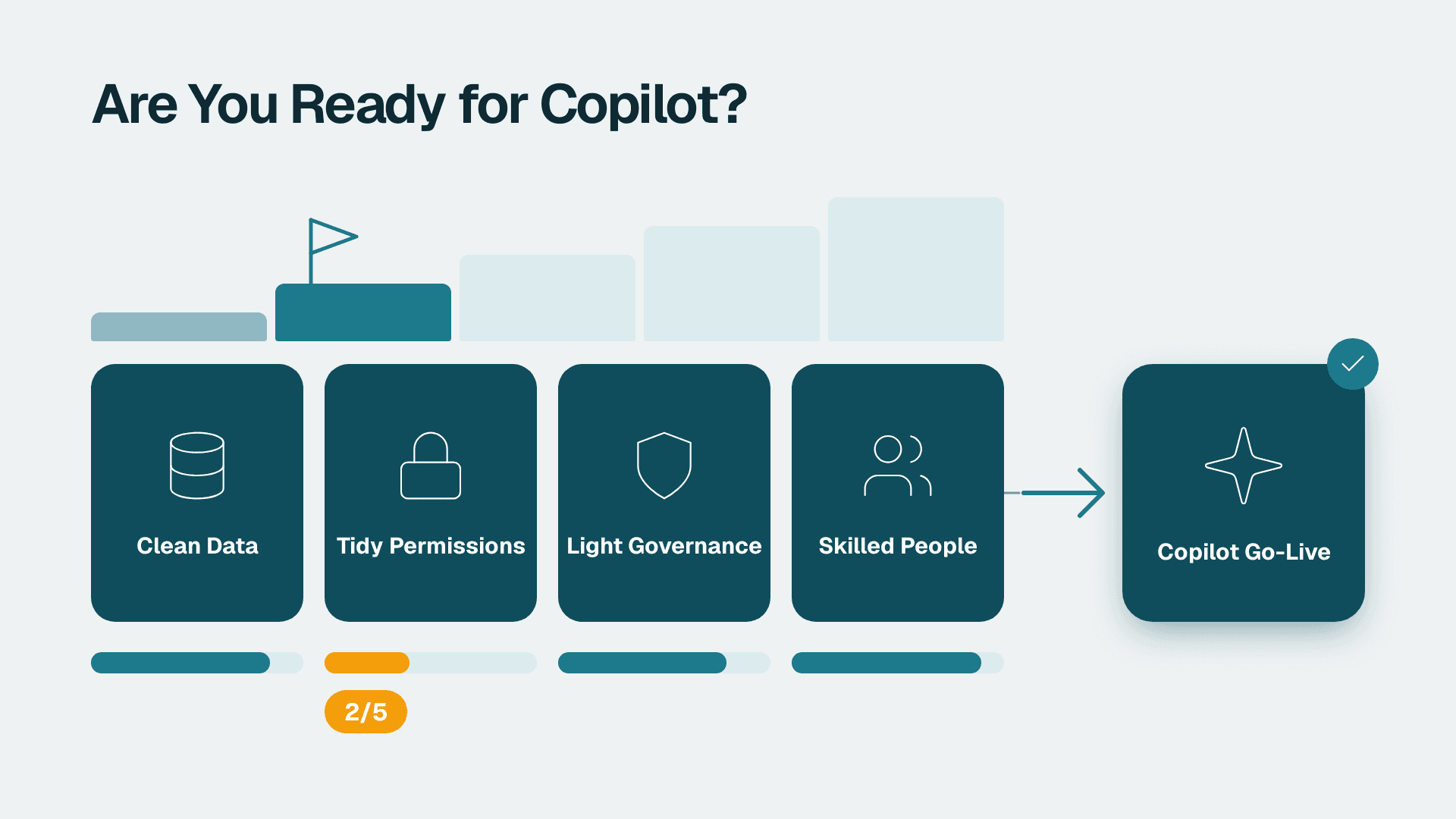
A practical readiness checklist before enabling Copilot organization-wide:
Workspace is on Fabric F64 or PPU capacity (Pro workspaces will not expose Copilot)
Semantic model uses a star schema - no wide flat fact tables from direct ERP or CSV exports
All critical measures are explicit DAX with plain-English descriptions in Model view Properties
Row-level security roles are defined, tested, and aligned to HR or finance access policies
Date table is explicitly marked as a date table in Model view
Data residency region is confirmed compliant for HIPAA, GDPR, or PIPEDA as applicable
A pilot group of 5-10 power users validates Scenario Library templates against live data before broad rollout
A phased approach consistently outperforms a big-bang deployment: weeks one and two for licence configuration and region verification, weeks three and four for model restructuring and measure documentation, weeks five and six for pilot validation, and weeks seven and eight for full rollout with a feedback loop to refine models based on gaps identified during piloting.
Teams that skip this sequence and push Copilot to all business users prematurely face a predictable outcome: when Copilot returns wrong or vague answers, users lose confidence in the entire AI analytics layer - even after the underlying model is corrected. Across deployments the Lets Viz team has supported through mid-2026, organizations that went broad before completing model prep required an average of 12 additional weeks to restore Copilot usage back to target adoption levels — three times longer than the model-prep sprint they bypassed. The cost of a focused model-prep sprint is substantially lower than rebuilding organizational trust after a failed rollout.
---
About Lets Viz: Lets Viz has delivered Power BI, Microsoft Fabric, and AI analytics solutions since 2020, serving US healthcare providers, UK fintech firms, Canadian manufacturing companies, and global SaaS businesses. Rated 5.0 on Clutch, the team combines deep DAX and data modeling expertise with hands-on Copilot deployment experience to help mid-market organizations move from licensed to genuinely functional AI analytics.
Ready to map the Copilot Scenario Library to your actual data model? Our Power BI consulting (Copilot-ready) team runs a structured readiness sprint covering licensing, model refactoring, and scenario validation - so your teams trust Copilot's answers from day one.