How to Build an AI Data Strategy in 7 Steps
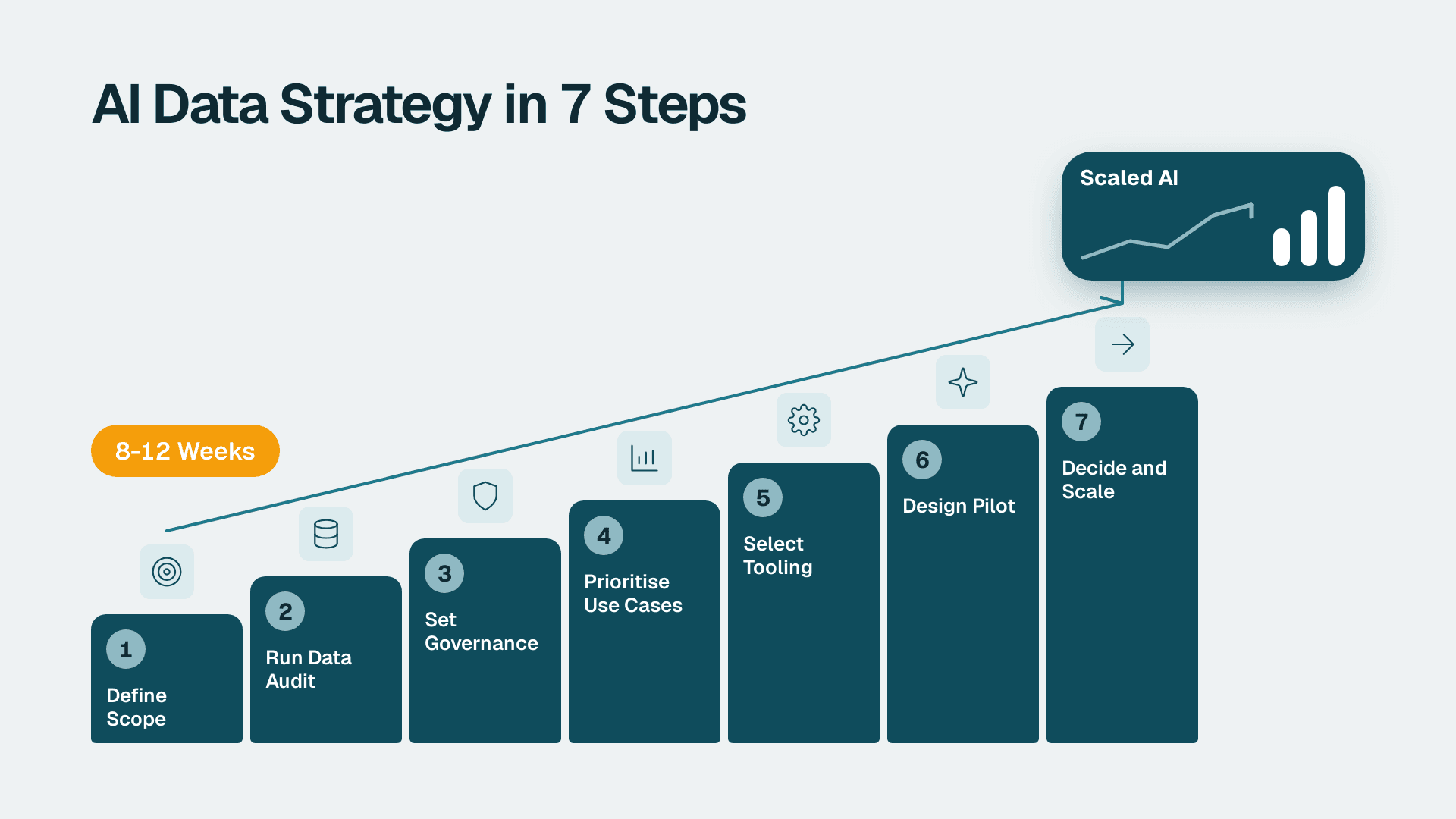
You will build a working AI data strategy: a scored data inventory, a governance model, a ranked use-case list, a tooling shortlist, a pilot plan and a scaling gate. For a mid-market financial services or healthcare organisation, expect roughly 8 to 12 weeks of part-time effort from a small cross-functional team.
What You'll Need
Gather these before Step 1. Most failed strategies stall because one of them is missing.
- An executive sponsor (CIO, CFO or Chief Medical Information Officer) who can resolve cross-department disputes about data ownership.
- A named strategy lead, usually the analytics lead, with about 30 percent of their time for 8 to 12 weeks.
- Read access to your core systems of record: the data warehouse or lakehouse, the CRM, the finance or claims system, and the EHR or patient-administration system if you are in healthcare.
- Your existing policies: data classification, retention, access control, vendor risk and incident response. Even outdated drafts help.
- A compliance partner from legal, privacy or risk who can sit in two workshops. Regulations differ by region, so confirm which ones apply to you (for example HIPAA, GDPR, PIPEDA, or sector rules for banking and insurance).
- A spreadsheet or workspace tool where you can keep the inventory and scoring sheets. Nothing fancy is required.
- A realistic budget range from finance. If you have none, use the instant project cost calculator to get a starting figure for the pilot.
Step 1: Define Scope and Name an Owner for Your AI Data Strategy
A strategy without a boundary becomes a wish list. Start by writing a one-page charter.
1. Open a blank document and create four headings: Business outcomes, In scope, Out of scope, Decision rights.
2. Under Business outcomes, write two or three measurable goals in plain language. Examples: shorten month-end close, reduce claim denials, cut manual report preparation. Avoid goals like be AI-first, because nobody can verify them.
3. Under In scope, list the business units and data domains you will cover in the first 12 months. Pick no more than three domains. A common financial services choice is customer, transactions and risk. A common healthcare choice is scheduling, revenue cycle and clinical quality.
4. Under Out of scope, list what you are deliberately deferring. This protects you when a department asks to be added in week five.
5. Under Decision rights, name one person who approves use cases, one who approves data access, and one who can stop a pilot.
What you should see: a single page that the sponsor can sign. If it runs to three pages, it is a plan, not a charter. Cut it down.
Before moving on, run the free BI readiness self-assessment with your team. It gives you a baseline for reporting maturity, which is the foundation most AI work stands on.
Step 2: Run the Data Audit
The audit tells you what data you actually have, where it lives, who owns it and whether it is fit for AI use. Build it as a table.
1. Create a sheet with these columns: Dataset, System of record, Owner, Sensitivity class, Contains personal or regulated data (Y/N), Refresh frequency, Quality score (1-5), Documented lineage (Y/N), Legal basis or consent recorded (Y/N).
2. List every dataset in your three in-scope domains. Pull the list from your catalogue if you have one. If you do not, interview each system owner for 30 minutes and ask: what tables do you depend on, and which would hurt most if wrong?
3. Fill the Sensitivity class column using your existing classification. If you have none, use four tiers: public, internal, confidential, regulated.
4. Score Quality by sampling. Take 100 records per dataset and check completeness, duplicates, and agreement with a trusted source. Score 5 if almost all pass, 3 if you see regular fixes, 1 if people avoid the data.
5. Mark Documented lineage as Y only if someone can show where the numbers come from without a meeting.
6. Add a final column, AI-ready, set to Y only when quality is 4 or higher, lineage is documented, and the legal basis column is Y.
What you should see: a ranked inventory in which a minority of datasets are AI-ready. That is normal. The gap list becomes your data remediation backlog.
Check for shadow data
Ask each team which spreadsheets, exports and personal databases feed their reports. Add them as rows. Unmanaged copies of regulated data are the most common source of surprise findings, and they are also where staff paste data into unapproved AI tools. A structured AI audit can help you separate data, model, process and compliance questions.
Step 3: Set the Governance Model and Compliance Checkpoints
Governance is the set of rules that decides who can use which data for which purpose. Write it down before any tool is bought.
1. Form a data and AI council of five to seven people: the sponsor, strategy lead, privacy or compliance lead, security lead, a data engineering lead, and two business owners. Meet every two weeks during the strategy build.
2. Write an acceptable use policy with three lists: approved AI uses, uses that need review, and prohibited uses. Prohibited uses in regulated sectors typically include sending identifiable patient or customer data to any tool that has not passed vendor review.
3. Define roles for every dataset in the audit: owner (accountable), steward (maintains quality), custodian (technical access). Fill these into the audit sheet.
4. Create a review gate with these compliance checkpoints. Each use case must pass all of them before build:
- Purpose: the use is within the purpose for which data was collected.
- Minimisation: the model receives only the fields it needs.
- Residency: you know in which region data is stored and processed, and it matches your obligations. If your CRM is a source, confirm which data centre region holds your account.
- Human oversight: a named person reviews outputs that affect a customer, a patient or a financial decision.
- Explainability: you can describe, in plain language, how an output was produced.
- Retention and audit: logs of prompts, outputs and approvals are kept for as long as your regulator expects. Note that Microsoft Purview Audit (Standard) keeps audit logs for 180 days, so if your obligation is longer you need a separate retention plan.
5. Add a vendor review step using a checklist. The AI vendor due diligence checklist is a good starting template, which you can tighten for regulated data.
What you should see: a governance document of two to four pages, a calendar of council meetings, and a gate form that takes under an hour to complete per use case. If the form takes days, nobody will use it.
For healthcare and cross-border work, map the checkpoints to your specific frameworks. The guide to Microsoft Fabric data governance for HIPAA, GDPR and PIPEDA shows how those controls look inside one platform. Have your counsel confirm the final mapping, because this article is not legal advice.
Step 4: Prioritise Use Cases With a Scoring Sheet
Now decide what to build first. Collect candidates, then score them on the same scale.
1. Run a 90-minute workshop with business owners. Ask each to bring three painful, repetitive or slow processes. Capture them as one-line use cases, for example: summarise adjuster notes, flag unusual transactions for review, draft denial-appeal letters for a reviewer to edit.
2. Create a new sheet with these columns: Use case, Value (1-5), Data readiness (1-5), Risk (1-5, 5 is lowest risk), Effort (1-5, 5 is lowest effort), Total.
3. Fill Data readiness straight from the audit sheet. Do not let sponsors override it. A high-value use case on poor data scores low here, and that is the point.
4. Fill Risk using the compliance checkpoints from Step 3. A use case that touches regulated data and influences a decision about a person scores 1 or 2.
5. Set Total with a weighted formula. A sensible default is `=(Value*0.35)+(Data readiness*0.30)+(Risk*0.20)+(Effort*0.15)`. Adjust weights once, with the council, and then freeze them.
6. Sort by Total descending and pick the top one for the pilot and the next two as a queue.
What you should see: a ranked list where the first item is useful but not terrifying. The best first pilot is usually an internal, assistive use case with a human reviewer, not an autonomous decision about a customer.
If reporting automation is on your list, the same approach used in the automation audit checklist works well for scoring workflows quickly.
Step 5: Select Tooling Against Your Requirements
Choose tools after the use case, not before. Otherwise the tool decides the problem.
1. Write a requirements list from the top-ranked use case: data sources, volume, latency, required region, who consumes the output, and which controls from Step 3 must be enforced by the tool.
2. Build a comparison table with three to five candidates. Columns: Meets residency requirement, Supports role-based access to source data, Logs prompts and outputs, Integrates with existing warehouse or BI layer, Pricing model, Exit path.
3. Check licence prerequisites in writing, because they are where budgets break. For example, Copilot in Power BI and Fabric needs a paid Fabric capacity of F2 or higher, or Power BI Premium P1 or higher. A Pro licence (list price $14 per user per month) or Premium Per User (list price $24 per user per month) alone is not enough, and trial capacities are excluded. The Power BI Copilot readiness checklist walks through the other conditions.
4. For any other vendor, request current price and limits in a written quote. Do not rely on a web page from last year.
5. Decide build, buy or configure for each layer: storage, transformation, model access, orchestration, and presentation. Most mid-market teams should buy or configure the platform layers and build only the thin business logic.
6. Run a one-day proof with real, masked data on your top two candidates. Record setup time, accuracy on 20 test cases, and the number of controls that needed workarounds.
What you should see: a one-page recommendation with a clear winner, a named runner-up, and a total cost range that includes licences, cloud capacity, integration labour and review time. People often forget the last two. Cost drivers typically include data preparation, integration work, security review and ongoing monitoring, not just the licence line.
If you need to compare analytics platforms for a clinical setting, the healthcare BI vendor evaluation checklist gives you ready-made criteria.
Step 6: Design the Pilot
A pilot proves value and tests your governance at small scale. It should end with a decision, not a demo.
1. Write a pilot brief with: the use case, the users (aim for 10 to 25), the dataset, the duration (6 to 8 weeks is typical), and the owner.
2. Define success metrics before you start. Pick one primary measure (for example, minutes spent per report, or share of drafts accepted with minor edits) and two guardrails (for example, error rate found in review, and policy exceptions raised).
3. Capture a baseline for two weeks before go-live. Without it you cannot show improvement honestly.
4. Set up the environment: a dedicated workspace, masked or minimised data, role-based access limited to pilot users, and logging switched on. Confirm logs are being written by opening them and finding a test entry.
5. Define the human review step. Every output a user relies on is checked by a named reviewer until the error rate is understood.
6. Hold a weekly 30-minute check-in with users. Log issues in a shared sheet with three fields: what happened, the data involved, and whether a control failed.
7. Set the stop rule: if a guardrail is breached twice, the pilot pauses and the council reviews.
What you should see: by week two, a steady rhythm of feedback, a baseline number and early readings of your primary metric. If scheduled jobs support the pilot (refreshes, extracts, notifications), test them in a copy first. Changes to a live schedule are a frequent cause of silent failures, as covered in this guide to a Power BI data refresh schedule that does not break reports.
Step 7: Decide, Scale and Keep the Strategy Alive
At the end of the pilot, run a decision meeting and publish the result.
1. Compile a results pack: baseline versus pilot on the primary metric, guardrail results, control findings, user feedback, and actual cost against estimate.
2. Ask the council to choose one of three outcomes: scale, fix and repeat, or stop. Stopping a weak pilot is a success of the process, not a failure.
3. If scaling, write a rollout plan with waves. Wave one adds a second team using the same data domain. Wave two adds a new domain. Do not add a new use case, new data and new users in the same wave.
4. Work the remediation backlog from Step 2. Each wave should lift at least a few datasets to AI-ready status.
5. Set up ongoing monitoring: a monthly review of usage, quality, cost and incidents, plus a quarterly re-score of the use-case list. Keep an audit trail for changes to AI-assisted outputs, such as the approach in this guide to an AI change log for Power BI reports.
6. Schedule an annual strategy refresh tied to your budget cycle and to regulatory changes.
What you should see: a published roadmap for the next 12 months, with owners and dates, and a governance process that has been exercised at least once.
Common Mistakes
- Buying tools before the audit. Teams license a platform, then discover the source data is not clean or permitted for that use. Fix: do not sign anything until the audit's AI-ready column exists for the pilot dataset.
- Scoring use cases by value alone. High-value ideas on weak data stall. Fix: keep data readiness and risk in the formula and do not let anyone overwrite those scores.
- Writing governance as a policy nobody uses. A 40-page document is ignored. Fix: reduce it to a short gate form that takes under an hour and is tied to project approval.
- Starting with an autonomous, customer-facing decision. The compliance burden is highest and trust is lowest. Fix: begin with an assistive internal use case that keeps a human reviewer in the loop.
- Skipping the baseline. Without before numbers, the pilot result is an opinion. Fix: measure the current process for two weeks first.
Troubleshooting
- Symptom: the audit sheet keeps growing and never finishes. Likely cause: scope was not limited to three domains. Return to the charter and cut to the datasets that feed the top five candidate use cases.
- Symptom: the compliance gate takes weeks per use case. Likely cause: the form asks for evidence that already exists elsewhere, or the reviewer is a single bottleneck. Pre-fill dataset details from the audit and name a deputy reviewer.
- Symptom: pilot users stop using the tool after week two. Likely cause: outputs are not integrated into their daily workflow, or accuracy is below what they will tolerate. Review the weekly issue log, fix the top two complaints, and move the output into the tool they already open each morning.
If you would rather have experienced help with any step, a structured engagement can compress the audit and pilot design considerably. Our AI automation consulting team works with analytics leads and CIOs to build and run these strategies end to end.
---
About Lets Viz: Lets Viz is a data analytics and AI consultancy that has served clients since 2020, with a focus on financial services, healthcare and other regulated industries. We hold a 5.0 Clutch rating and specialise in Power BI, Microsoft Fabric, Zoho and automation. Explore our analytics services to see how we work.