Microsoft Fabric Data Governance: HIPAA, GDPR & PIPEDA
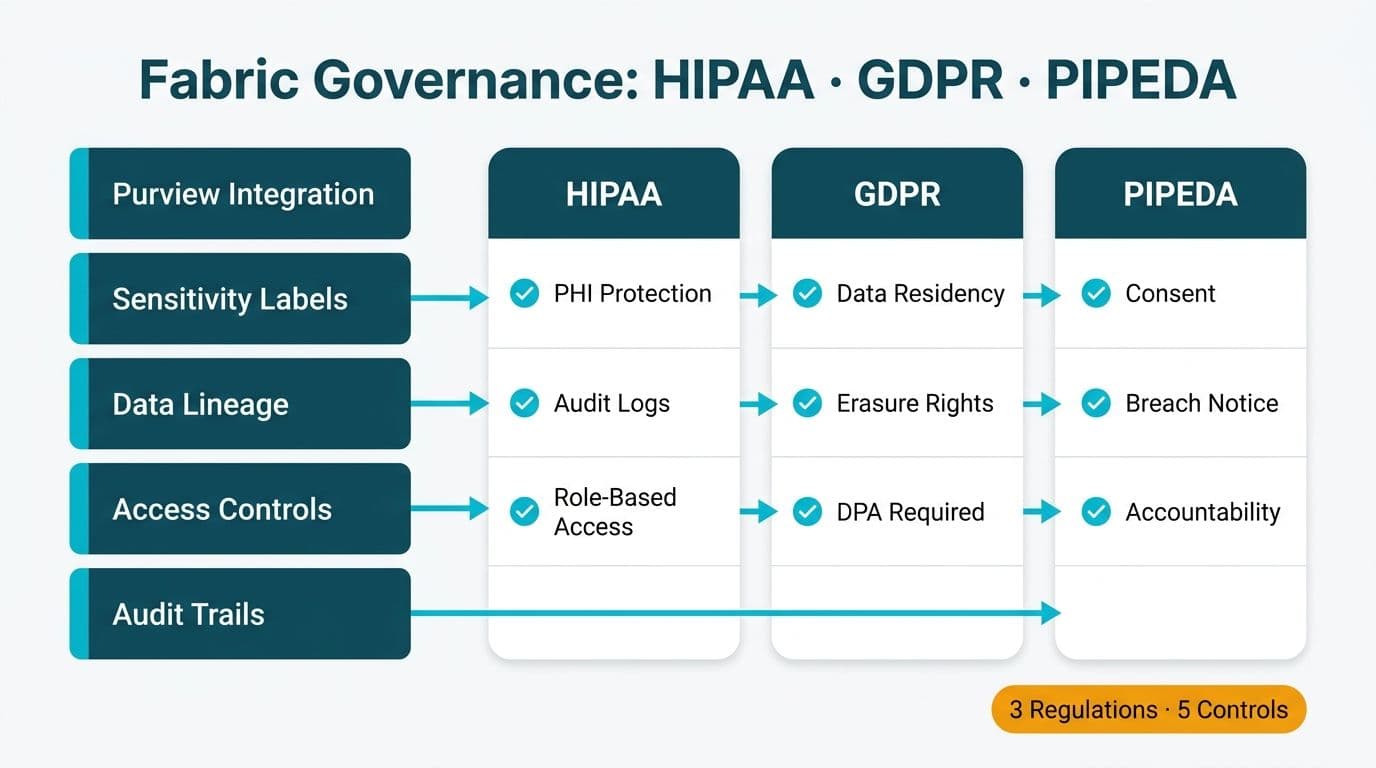
Microsoft Fabric provides a unified governance layer through Microsoft Purview integration, sensitivity labels, and automated lineage tracking - giving healthcare and finance teams a compliant foundation for regulated data workloads under HIPAA (US), GDPR (UK and EU), and PIPEDA (Canada). When configured correctly, Fabric's governance stack maps directly onto the access controls, audit trail requirements, and data residency obligations each regulation demands. For CIOs and data leads evaluating a regulated analytics platform, the configuration sequence matters as much as the platform choice itself.
Key Takeaways
Microsoft Purview connects to Fabric natively, surfacing sensitivity labels, data classification, and lineage across all Fabric workloads without custom connectors.
HIPAA requires access controls and audit logs; GDPR requires residency controls and erasure capability; PIPEDA requires purpose limitation and breach notification - Fabric addresses all three through different configuration layers.
Sensitivity labels flow from Microsoft 365 into Fabric items, including lakehouses, warehouses, and Power BI reports - but only if Information Protection is enabled at the tenant level.
Data lineage in Fabric is visual and exportable, which satisfies auditor requests for impact analysis without manual documentation.
Getting governance right from the start is significantly cheaper than retrofitting controls after a regulatory audit flags gaps.
What Is Microsoft Fabric Data Governance for HIPAA, GDPR, and PIPEDA?
Microsoft Fabric data governance for HIPAA, GDPR, and PIPEDA refers to the set of platform-level controls - sensitivity classification, access policies, lineage tracking, and data residency configuration - that map Fabric's architecture onto each regulation's specific technical requirements.
Healthcare and finance teams cannot treat governance as a post-deployment task. Under HIPAA, any system storing or processing protected health information (PHI) must enforce role-based access, maintain audit logs, and apply encryption at rest and in transit. GDPR adds data residency - EU personal data must remain within the European Economic Area unless specific transfer mechanisms apply - and grants data subjects the right to erasure. PIPEDA, Canada's federal privacy law, requires organizations to identify the purpose of data collection before collection begins and to appoint an accountable privacy officer.
Teams working across these three jurisdictions simultaneously need a governance layer that can apply different rules to different data domains without requiring separate platform instances. That is precisely what Fabric's Purview integration is designed to deliver - and it is the core reason Power BI and Fabric consulting engagements for regulated industries start with governance architecture, not the data model.
How Does Microsoft Purview Integrate With Microsoft Fabric?
Microsoft Purview connects to Fabric through a native integration that requires no custom connectors - once enabled at the tenant level, Purview can scan Fabric workspaces, classify items using built-in and custom classifiers, and surface those classifications in the Purview Data Map.
The integration works across three operational layers.
Data Map scanning. Purview's scanner traverses Fabric lakehouses, warehouses, and KQL databases. It identifies tables and files containing sensitive patterns - social security numbers, health record identifiers, credit card numbers - and can apply classification labels based on those patterns. For a US healthcare organization, this means PHI fields can be flagged before they appear in a downstream report, though detection should be validated against your own data rather than assumed to be complete.
Sensitivity label inheritance. Labels created in the Microsoft 365 compliance portal propagate into Fabric items. A lakehouse table labeled Highly Confidential - PHI will carry that label when data is copied into a downstream warehouse or Power BI semantic model, provided the Fabric tenant setting for sensitivity labels is active.
Policy enforcement. Purview Information Protection policies restrict downstream actions on labeled content - preventing export to unsupported formats, blocking copy-paste to unlabeled destinations, or requiring justification for label downgrade. For a UK fintech firm under GDPR's Article 32 obligation to implement appropriate technical measures, these policy guardrails are documentable evidence of compliance.
The configuration sequence is: enable Purview integration in the Fabric Admin Portal, connect the Purview account, configure auto-labeling policies, then validate label inheritance across at least one end-to-end data flow before moving workloads to production.
How Do You Configure Sensitivity Labels in Microsoft Fabric?
Sensitivity labels in Microsoft Fabric are configured in the Microsoft Purview compliance portal and applied at the workspace, item, or column level within Fabric. The five-step process below covers the essential configuration for regulated environments.
Step 1: Define the label taxonomy. Labels are created in the Purview compliance portal under Information Protection. A baseline taxonomy for regulated healthcare or finance workloads includes: Public, Internal, Confidential, Highly Confidential - PHI (for HIPAA), and Highly Confidential - PII (for GDPR and PIPEDA).
Step 2: Enable label propagation in Fabric. In the Fabric Admin Portal under Tenant Settings, enable the setting that allows users to apply sensitivity labels to Fabric content. Without this step, labels defined in Purview will not appear within Fabric item menus.
Step 3: Apply labels to workspaces and items. Workspace-level labels apply to all items within the workspace by default. Individual lakehouse tables, reports, and semantic models can carry more specific labels. For a Canadian financial institution subject to PIPEDA, attaching a Confidential - Customer Financial Data label to the warehouse layer signals data handling expectations to downstream users before they query the table.
Step 4: Configure auto-labeling policies. Auto-labeling policies can scan Fabric content and apply labels based on sensitive information types, which reduces (but does not eliminate) the dependency on individual contributors to apply labels manually - a significant compliance risk in fast-moving data teams. Auto-labeling coverage depends on the item types and sensitive information types supported, so keep manual labeling and periodic review in place for anything the policies do not catch.
Step 5: Validate label inheritance. When data moves between Fabric items - for example, from a lakehouse into a Power BI semantic model - the higher-sensitivity label should be inherited by the downstream item. Test this across your most critical data flows before sign-off. The Power BI Governance Best Practices: 12-Point Checklist covers the broader governance validation steps that complement this label audit.
How Does Lineage Tracking in Microsoft Fabric Support Regulatory Audits?
Fabric's built-in lineage view generates an interactive graph showing how data flows from source through transformation to report - giving auditors a verifiable chain of custody without manual documentation.
Under HIPAA's audit control standard (45 CFR § 164.312(b)), covered entities must implement mechanisms to record and examine activity in systems containing PHI. Fabric lineage satisfies the examine requirement: a compliance officer can open the lineage view for any Power BI report and trace every upstream source, every transformation step, and every downstream consumer in a single screen.
For GDPR's Article 30 requirement to maintain a record of processing activities, Fabric lineage combined with Purview's data catalog provides a machine-readable map of where personal data flows across the analytics estate. A UK or EU data protection officer can export the lineage graph alongside Purview scan results to produce a documented Record of Processing Activities (ROPA).
PIPEDA requires organizations to document the purposes for which personal information is collected (Principle 3). A lineage graph connecting a raw customer dataset to a specific report or model makes the business purpose explicit and auditable.
Practical export workflow. Fabric lineage is accessible via the REST API, allowing teams to export lineage metadata into their governance registry or GRC tool. Organizations running quarterly compliance reviews can automate this export through Power Automate or a lightweight script - producing a point-in-time snapshot without manual effort.
HIPAA, GDPR, and PIPEDA: What Microsoft Fabric Must Deliver by Regulation
The table below maps each regulation's core technical requirements to the specific Fabric configuration that addresses them.
| Requirement | HIPAA (US) | GDPR (UK/EU) | PIPEDA (Canada) | Fabric Configuration |
|---|---|---|---|---|
| Access control | Role-based access to PHI | Restrict PII access by purpose | Limit access to authorized individuals | Workspace roles + Row-Level Security |
| Audit logs | Required for PHI access (45 CFR § 164.312(b)) | Required under Article 32 | Required for accountability | Fabric Admin Activity Log + Purview audit |
| Data residency | US preferred for PHI in cloud | EEA residency for EU personal data | Canadian residency preferred | Fabric capacity region selection |
| Encryption | At rest and in transit | Appropriate technical measures (Art. 32) | Safeguards proportionate to sensitivity | Microsoft-managed keys or CMK |
| Right to erasure | Not applicable (retention obligations differ) | Right to be forgotten (Art. 17) | Right to withdraw and delete | Purview data lifecycle + lakehouse delete |
| Data classification | PHI identification required | PII identification required | Personal information identification | Purview auto-classification |
| Breach notification | 60 days to HHS | 72 hours to supervisory authority | Without unreasonable delay | Purview alert policies + activity alerts |
This mapping is the starting point for a compliance gap analysis, not the end state. Each organization's specific data flows, third-party processors, and existing technical controls will determine which items are already covered and which need remediation.
What Are the Most Common Governance Mistakes in Microsoft Fabric Rollouts?
The most common mistake is enabling Purview integration without validating label inheritance - creating a false sense of compliance where labels exist at the source but do not propagate to downstream reports.
Several patterns appear repeatedly in regulated-industry Fabric deployments.
Labels applied but not enforced. A team applies sensitivity labels to lakehouse tables but never configures policy enforcement. The label becomes decorative: an export to an unlabeled Excel file carries no protection. For HIPAA workloads, this is effectively a failure of the encryption-in-transit requirement the moment data leaves Fabric.
Lineage gaps at ingestion. When source data arrives via a pipeline not registered in Fabric's lineage graph - for example, a custom Python script writing directly to a lakehouse - the lineage view shows an incomplete chain. Auditors reviewing GDPR Article 30 records will flag unresolved upstream sources.
Capacity region mismatches. Teams configure sensitivity labels and lineage correctly but deploy Fabric capacities in a region outside the required data residency zone. An EU organization storing personal data on a US-East Fabric capacity violates GDPR's data transfer rules. Region selection happens at capacity creation - it cannot be changed after deployment.
Workspace roles without item-level RLS. Restricting workspace access prevents unauthorized browsing, but it does not prevent a workspace member with Viewer access from running a report that returns PHI outside their authorized cohort. Row-Level Security must be configured at the semantic model layer for any dataset containing person-level regulated data. The Power BI Healthcare Reporting: Implementation Cost Guide covers RLS architecture for healthcare deployments in detail.
No governance for self-service workspaces. Self-service Fabric workspaces allow business users to create lakehouses and shortcuts independently. Without a workspace creation policy requiring sensitivity label assignment at creation time, ungoverned items accumulate quickly. Enforce workspace governance policies in the Admin Portal from day one.
How Should You Sequence a Microsoft Fabric Governance Implementation?
A phased approach - governance architecture first, data migration second - avoids the cost of retrofitting controls onto a live production environment.
Phase 1 - Foundation (weeks 1-4). Configure Purview integration, define the label taxonomy, enable auto-labeling policies, and set capacity regions to match data residency requirements. This phase produces no analytics output but establishes the control framework every subsequent workload will inherit.
Phase 2 - Pilot workload (weeks 5-8). Migrate one regulated data domain - a single claims dataset for a US health plan, or a client account table for a Canadian financial institution - and validate the full governance stack: label propagation, lineage completeness, RLS enforcement, and audit log output. Walk a sample lineage report through an internal compliance review before proceeding.
Phase 3 - Production rollout (weeks 9-16). Migrate remaining workloads, apply governance templates from the pilot, and onboard business users with role-appropriate training. Establish a quarterly compliance review cycle using activity log exports and Purview scan results.
Phase 4 - Continuous monitoring. Configure Purview alert policies to notify the data governance team of label downgrades, new sensitive data in ungoverned workspaces, or unusual bulk-access events. For organizations subject to GDPR's 72-hour breach notification window, automated alerting is not optional - it is what makes the timeline achievable.
For teams that need external expertise during the architecture phase, Power BI Managed Service for Finance Teams: What to Expect outlines what a structured engagement includes, covering governance deliverables alongside reporting infrastructure. Organizations running parallel ITSM workflows will find complementary configuration guidance in ServiceNow ITSM for Healthcare IT Teams: HIPAA, GDPR & PIPEDA.
Fabric governance is not a one-time configuration - it is an operational capability. Organizations that treat it as infrastructure rather than a project deliverable are the ones whose compliance reviews generate findings, not fire drills.
---
About Lets Viz: Lets Viz is a data analytics consultancy helping regulated-industry organizations design and operate compliant analytics environments since 2020. The team has delivered Power BI and Fabric implementations for US healthcare payers, UK fintech firms, Canadian manufacturing companies, and global SaaS businesses. Every engagement begins with governance architecture to ensure auditability from the first dataset.
If your organization is building or scaling a regulated Fabric environment, Power BI and Fabric consulting from Lets Viz covers governance architecture, Purview configuration, and compliance validation across HIPAA, GDPR, and PIPEDA workloads.


