Power BI Copilot Readiness Checklist: 10 Conditions to Meet First
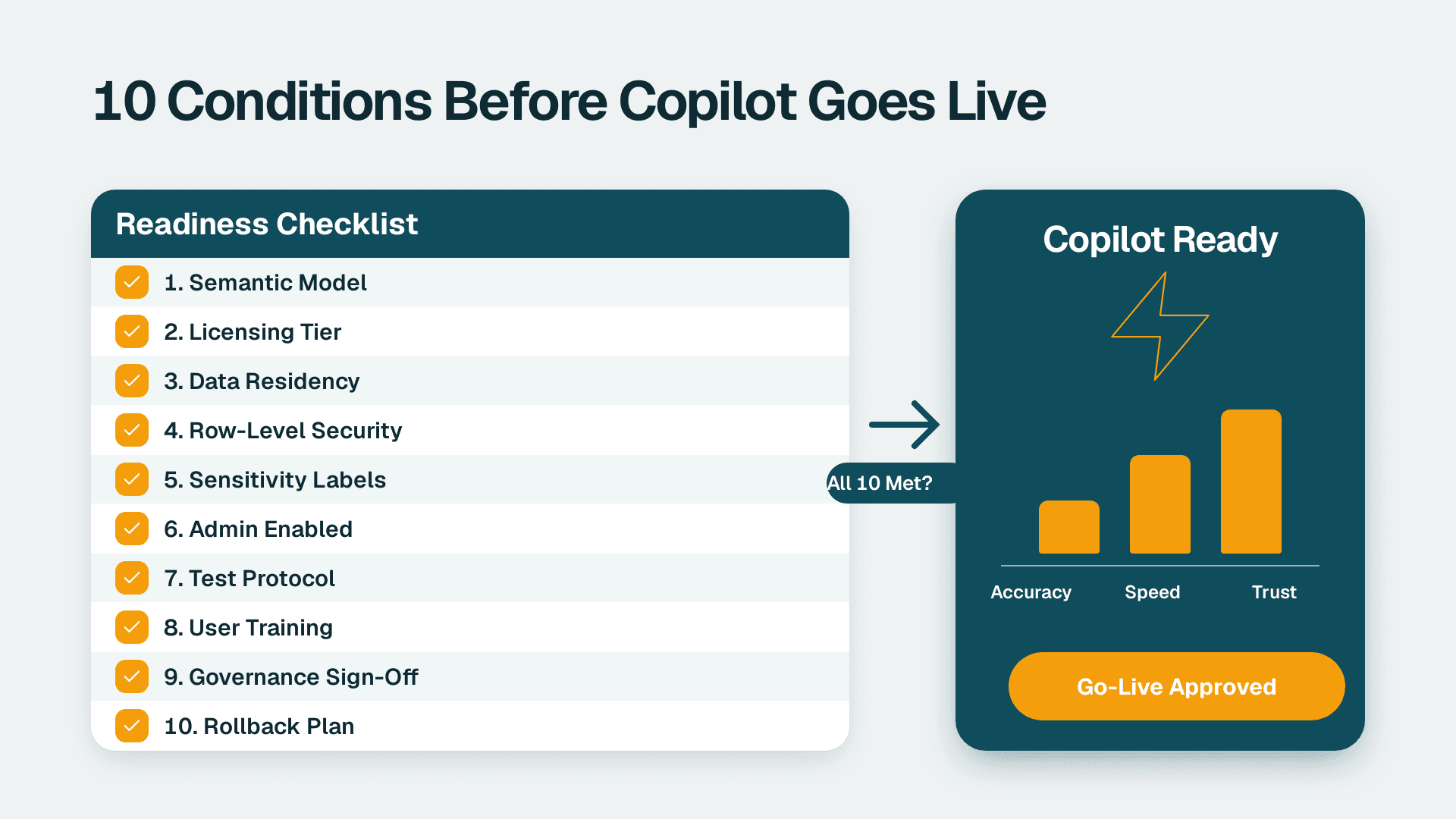
Enabling Copilot in Power BI for a finance team requires more than toggling a switch in the admin portal. Ten conditions must be verified before go-live: semantic model quality, correct licensing, data residency compliance, row-level security, sensitivity labeling, admin enablement, a structured test protocol, user training, governance sign-off, and a rollback plan. Skipping any one condition risks AI answers that are wrong, insecure, or non-compliant.
Key Takeaways
- Copilot's answer quality is a direct function of your semantic model's quality - poorly named measures and missing descriptions produce unreliable AI responses
- Finance teams need at least Power BI Premium Per User (PPU) or an F64 Microsoft Fabric capacity to access Copilot features (Microsoft, 2026)
- Data residency obligations under GDPR (UK/EU), HIPAA (US), and PIPEDA (Canada) must be reviewed before Copilot processes financial queries
- Row-level security and Microsoft Purview sensitivity labels are prerequisites, not post-launch tasks
- Governance sign-off from finance leadership, IT security, and legal is required before any finance user receives access to Copilot
What Is the Power BI Copilot Readiness Checklist for Finance?
The Power BI Copilot readiness checklist is a structured pre-launch verification confirming your environment, data, and people are prepared before the AI layer goes live. Copilot in Power BI generates natural-language answers, summaries, and DAX by querying your semantic model - every flaw in that model becomes a flaw in every AI response a finance user receives. For finance teams where a wrong revenue figure in a board pack carries real consequences, the checklist is not procedural overhead. It is the minimum viable standard.
For BI leads and IT directors at mid-market organizations, engaging a Power BI consulting (Copilot-ready) partner during the readiness phase is the fastest way to identify and close gaps across all ten conditions before the rollout clock starts. A gap left open on day one becomes a governance incident on day thirty.
The checklist maps to five risk categories that most finance teams encounter: model integrity, licensing, security and compliance, testing, and governance. Work through them sequentially - later categories depend on earlier ones being complete.
The Ten Conditions at a Glance
| # | Condition | Category | Blocking? |
|---|---|---|---|
| 1 | Semantic model quality verified | Model integrity | Yes |
| 2 | Measures described and certified | Model integrity | Yes |
| 3 | Licensing tier confirmed (PPU or F64+) | Licensing | Yes |
| 4 | Data residency and privacy review complete | Compliance | Yes |
| 5 | Row-level security implemented and tested | Security | Yes |
| 6 | Sensitivity labels applied to financial datasets | Security | Yes |
| 7 | Copilot enabled in admin portal (scoped test group) | Admin | Yes |
| 8 | Test protocol run against known financial questions | Testing | Yes |
| 9 | Finance user training completed | People | Recommended |
| 10 | Governance sign-off and rollback plan documented | Governance | Yes |
Why Does Semantic Model Quality Make or Break Copilot?
Copilot reads your semantic model's table names, column names, measure descriptions, and synonyms to interpret what a finance user is asking. A model built for developer convenience - with cryptic column names like `GL_AMT_LC`, measures named `Measure1`, or entire tables without a business description - will cause Copilot to either refuse to answer or generate a plausible-looking number that does not match any validated report. In finance, a confidently wrong answer is more dangerous than no answer at all.
Condition 1 - Semantic model quality verified: every table and column used in financial reporting must carry a plain-English name and, where ambiguous, a description in the model properties pane. Run the DAX Studio model documenter or Tabular Editor's metadata export to audit coverage systematically. A finance analytics data governance checklist should include a dedicated line item for model metadata completeness - if your governance process does not already require measure descriptions, add it before any Copilot readiness work begins. Name quality is not cosmetic; it is the primary signal Copilot uses to map a natural-language question to the correct measure.
Condition 2 - Measures described and certified: Copilot prioritises certified measures when answering financial questions, and uses the description field verbatim in its reasoning chain. Per Microsoft's 2026 Power BI documentation, you certify a measure via the dataset settings endorsement workflow in the Power BI Service. Every measure a finance user would naturally ask about - revenue, gross margin, budget variance, days sales outstanding, operating expense by cost centre - must be certified and carry a one-sentence description that a non-technical finance analyst could read and immediately understand.
Understanding how Copilot queries the semantic model is inseparable from the underlying storage mode. Our guide on Power BI Import Mode vs DirectQuery for Copilot and Q&A covers this trade-off in detail. For most finance reporting workloads, Import mode gives Copilot faster and more reliable access to data. Teams that require real-time financial reporting against transactional source systems will need to weigh DirectQuery's latency and refresh constraints carefully against Copilot's performance requirements.
What Licensing Tier Is Required to Enable Copilot in Power BI?
Copilot in Power BI is not available on Power BI Pro licences. As of Microsoft's 2026 licensing documentation, Copilot requires one of the following: Power BI Premium Per User (PPU), a Power BI Premium capacity (P1 or above), or an F64 Microsoft Fabric capacity or higher.
Condition 3 - Licensing tier confirmed: before any technical readiness work begins, verify your tenant's capacity SKU in the Power BI Admin Portal under "Capacity settings." This step is deliberately first in the licensing category because mid-market finance teams running on shared Pro licences must upgrade or purchase PPU licences before any other readiness work becomes testable in a live environment.
PPU is priced on a per-user-per-month basis (see Microsoft's current licensing page for the latest figures) and makes Copilot accessible to individual named users without requiring a full capacity purchase. For finance departments with ten to thirty Copilot users, PPU is typically the fastest path to enablement. For larger organizations already on Premium capacity, the licensing gate may already be cleared.
An F64 Fabric capacity also enables Copilot across Fabric workloads beyond Power BI - including data pipelines, Fabric notebooks, and SQL analytics endpoints. If your finance analytics roadmap extends into Microsoft Fabric beyond reporting, confirm the capacity tier covers the full workload scope before purchase.
How Do You Complete a Security and Compliance Review Before Enabling Copilot?
Finance data is among the most sensitive data a company processes. Before Copilot handles a single natural-language query against your income statement, treasury positions, or payroll model, three security conditions must be independently verified and documented.
Condition 4 - Data residency and privacy review complete: Copilot sends query context to Microsoft's Azure OpenAI infrastructure. As Microsoft documents (2026), data processed by Copilot in Power BI stays within your Microsoft 365 tenant boundary and is not used to train foundation models. However, your legal and compliance function must confirm this aligns with your specific obligations. For UK and EU finance organizations, this means a GDPR data-processing assessment confirming that Azure OpenAI processing is covered by your existing Microsoft data-processing agreement. For US finance teams operating under SOC 2 or within regulated sectors, document Copilot's data flow in your controls inventory before the next assessment period. Canadian organizations subject to PIPEDA should verify that any cross-border processing is addressed in their privacy impact assessment and retained for audit.
Condition 5 - Row-level security implemented and tested: Copilot respects RLS and returns only data the querying user is authorised to see. However, RLS must be correctly implemented before Copilot goes live - a misconfigured RLS role produces a misconfigured AI answer with no visible warning to the user receiving it. Our guide on Power BI RLS for HIPAA PHI Data Protection covers the verification steps that apply equally to finance data under any compliance framework. Test every RLS role against a matrix of test users and confirm expected data boundaries hold before Copilot is activated.
Condition 6 - Sensitivity labels applied to financial datasets: Microsoft Purview sensitivity labels - such as "Confidential - Finance" or "Highly Confidential - Board Only" - must be applied to every dataset Copilot will query. Labels travel with exported data and activate Data Loss Prevention policies that prevent financial data from being exfiltrated through AI-generated outputs. Per Microsoft's 2026 admin documentation, confirm that "Require sensitivity labels" is enforced for the workspaces containing financial models before Copilot is activated.
What Test Protocol Should Finance Teams Run Before Go-Live?
A test protocol answers one question: does Copilot return correct, consistent answers to the financial questions your users will actually ask? Testing is not optional - it is the difference between a confident rollout and a credibility-damaging wrong answer in a board pack.
Condition 7 - Admin portal enablement scoped to a test security group: before broad rollout, enable Copilot in the Power BI Admin Portal only for a designated test security group. Under "Tenant settings - Copilot and Azure OpenAI Service," Microsoft's 2026 admin documentation describes how to scope enablement to specific security groups, limiting exposure while you validate Copilot behaviour against your actual financial models.
Condition 8 - Test protocol run against known financial questions: build a question bank of 20-30 queries your finance team would naturally type. Cover the core finance reporting surface: revenue by business unit, cost centre budget vs actuals, period-over-period variance, working capital metrics, and headcount cost. Run each question. For each answer, verify the DAX Copilot generated matches your expected measure logic. Log every answer where Copilot refuses to respond, returns an unexpected number, or references a measure you did not anticipate. Each logged item maps back to a gap in Condition 1 or 2 - a missing description, an ambiguous measure name, or an endorsement that was never completed.
For finance teams using natural-language querying beyond Copilot, our guide on how Power BI Q&A natural language queries work explains the synonym and linguistic engine that underpins both Q&A and Copilot. Improving synonym coverage in Q&A directly improves Copilot answer quality because both features draw from the same semantic model metadata.
What Finance Questions Does Copilot Handle Well vs Poorly?
| Question type | Copilot performance | Why |
|---|---|---|
| "What was revenue last quarter?" | Excellent | Single certified measure, unambiguous time context |
| "Compare budget vs actuals by cost centre" | Good | Needs certified measures and a clean dimension hierarchy |
| "Why did gross margin drop in July?" | Variable | Requires narrative reasoning; quality depends on measure descriptions |
| "Show me anomalies in AP aging" | Limited | Complex pattern detection is better handled by dedicated AI anomaly tools |
| "What will Q4 revenue be?" | Not supported | Copilot does not perform predictive or forward-looking modelling |
Finance teams evaluating dedicated AI anomaly detection as a complementary capability can explore AI anomaly detection in financial reporting for a detailed look at where rule-based and AI-driven detection complement Copilot's summarisation strengths.
Condition 9 - Finance user training completed: a one-hour orientation covering how to phrase financial questions, how to validate AI-generated answers against authoritative source reports, and what Copilot cannot do reduces misuse and complaint volume after launch. Finance leaders frequently raise whether AI tools will replace financial analysts. The honest answer for current-generation Copilot is no. It automates data retrieval and summarisation; the interpretive, advisory, and judgment-intensive work that defines high-value financial analysis sits outside its current scope. Setting this expectation clearly in training positions Copilot as a productivity tool rather than a threat, and reduces the resistance that commonly slows mid-market rollouts.
How Do You Get Governance Sign-Off Before Enabling Copilot in Finance?
Governance sign-off is the final gate - and for mid-market organizations, frequently the most politically complex part of the readiness process. Three stakeholder groups must formally approve before broad enablement.
Condition 10 - Governance sign-off and rollback plan documented: the sign-off matrix for a typical finance Copilot rollout includes the finance controller or CFO, confirming that AI-generated answers will not serve as the primary source for regulated financial disclosures without human review; the IT security lead, confirming Conditions 4-6 are met and on file; and the legal or data protection function, confirming the compliance review from Condition 4 is complete and documented.
Equally important is the rollback plan. Specify in advance how you will disable Copilot - via the admin portal security group - if a critical incorrect answer surfaces post-launch. Finance teams in regulated industries should treat the rollback plan as a formal control document: UK fintech firms operating under FCA oversight, US companies subject to Sarbanes-Oxley, and Canadian public companies under National Instrument 52-109 all face audit scrutiny of any AI-assisted process that touches financial reporting.
A typical mid-market governance sign-off cycle takes two to four weeks when Conditions 1-8 are already complete. A common and costly failure mode is initiating sign-off before technical conditions are verified, only to restart the governance cycle when gaps emerge during review.
Regional Compliance Considerations at Sign-Off
A US SaaS finance team should update SOC 2 Type II control documentation to reflect AI-assisted query processing. A UK fintech firm under GDPR should obtain written confirmation from Microsoft's Data Processing Addendum that Copilot processing is covered by the existing agreement. A Canadian manufacturing company subject to PIPEDA should document the cross-border data flow assessment and retain it for audit purposes. These are the questions your external auditors or data protection authority will raise when they see "AI-assisted financial reporting" in your controls documentation for the first time.
What Happens When Finance Teams Skip the Readiness Checklist?
Organizations that enable Copilot without completing the readiness checklist encounter three predictable failure modes. First, incorrect answers from an under-described semantic model erode user trust fast - one wrong revenue figure in a leadership presentation is sufficient to trigger a full rollback and a difficult second approval process. Second, RLS gaps expose financial data across organizational boundaries, creating a compliance incident and a potential breach notification obligation. Third, without governance sign-off, finance leadership typically disables Copilot unilaterally after the first high-profile error, making re-enablement a significantly harder organizational sell.
Teams that follow a finance analytics maturity model approach - assessing data governance, security posture, and semantic model quality as a unified readiness score rather than as isolated IT tasks - consistently achieve cleaner, faster Copilot rollouts. If your organization is in the pre-assessment stage, our free BI readiness self-assessment provides a starting benchmark across model quality, licensing, and governance dimensions before a formal engagement begins.
---
About Lets Viz: Lets Viz has delivered Power BI and data analytics solutions since 2020, serving US healthcare systems, UK fintech firms, Canadian manufacturing companies, and global SaaS organizations. The practice holds a 5.0 Clutch rating and specialises in production-ready semantic models, Copilot enablement, and finance analytics governance that meets audit requirements across multiple regulatory frameworks.
Ready to validate your environment against all ten conditions before your finance users touch Copilot? Our Power BI consulting (Copilot-ready) team runs a structured readiness assessment and closes gaps before a single AI-generated answer reaches a finance end user.