AI Change Log for Power BI Reports: Build Your Audit Trail
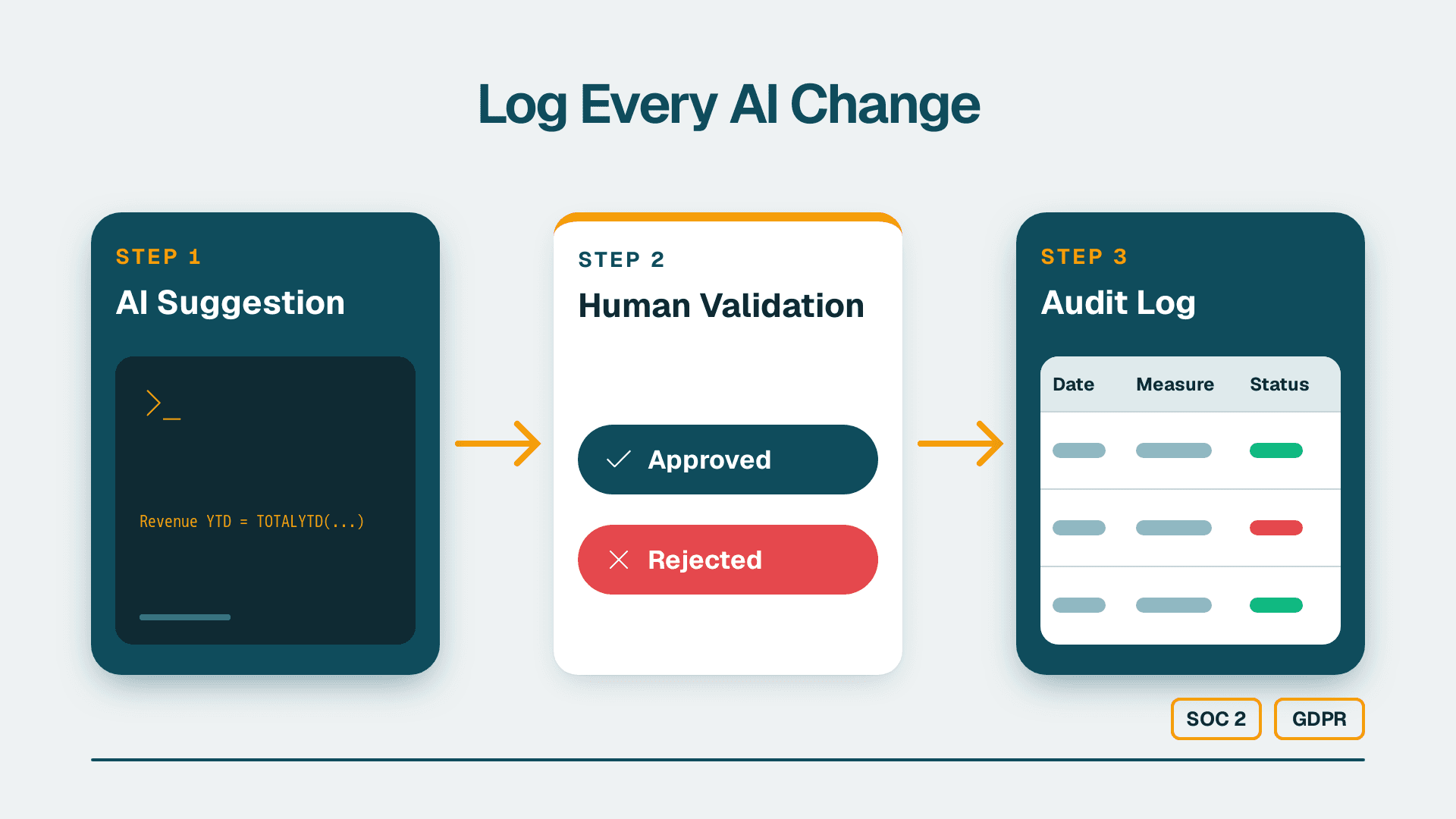
An AI change log for Power BI captures every Copilot-suggested measure or calculation, documents the human validation step that accepted or rejected it, and timestamps when the approved version went live. Without this record, tracing a metric's origin - and who authorised it - is impossible after the fact, creating audit exposure under SOC 2, GDPR, or PIPEDA.
Key Takeaways
A Power BI AI audit trail requires three components: a suggestion log, a human validation record, and a deployment timestamp.
Microsoft Copilot for Power BI does not generate its own change log automatically - you must build the governance layer around it.
Human validation should capture the reviewer's name, the business logic they confirmed, and the date of sign-off.
Deployment timestamps from Power BI deployment pipelines provide the go-live evidence auditors require.
The same governance framework satisfies US SOC 2, EU/UK GDPR, and Canadian PIPEDA audit requirements without material changes to the process.
What Is an AI Change Log in Power BI?
An AI change log is a versioned, human-readable record that tracks every AI-generated suggestion applied to a Power BI report - covering the original DAX expression or visual recommendation, the human review outcome, and the production deployment timestamp.
Microsoft Copilot for Power BI (Microsoft Learn, 2026) can generate DAX measures, propose report summaries, and suggest visuals based on the underlying semantic model. None of those outputs create an automatic audit trail in your tenant. The governance layer must be built deliberately, and it should be designed before your team starts using Copilot at scale - not retrofitted after dozens of unlogged AI contributions accumulate across multiple reports.
For teams beginning a Copilot rollout, a Power BI consulting (Copilot-ready) engagement typically includes a governance design review as a first step. Establishing the change log structure before AI features go live is substantially easier than reconstructing review history afterward, when analysts may no longer remember which outputs originated from Copilot and which were written manually.
The change log integrates naturally into existing operational workflows. If your organisation manages software and infrastructure changes through a ticketing or ITSM platform, Power BI AI suggestions fit within the same change request process - creating a unified record type for AI-assisted report updates alongside standard infrastructure changes.
Why Does an AI Audit Trail Matter for Power BI Reports?
The audit trail matters because AI-generated measures carry a risk that manually authored DAX does not: they can be statistically plausible but business-logically wrong, and without a log there is no way to establish whether a qualified human reviewed the logic before it drove a business decision.
Consider a US SaaS finance team using Copilot to generate a Net Revenue Retention DAX measure. If the measure silently applies the wrong filter context and the team relies on it for a board presentation, they must demonstrate under SOC 2 Type II controls that the measure was reviewed by a named individual, using a documented method, before it reached a distributed report. Without a change log, that control is absent and the audit finding is material.
The regulatory framing differs by market but the underlying requirement is consistent. A UK fintech firm operating under FCA model risk guidance needs written evidence that AI-assisted calculations were validated by a qualified analyst before influencing regulatory capital reporting. A Canadian manufacturing organisation subject to PIPEDA accountability principles must demonstrate that automated data transformations were reviewed before impacting records referencing customer information.
Beyond regulatory compliance, the change log protects the BI team operationally. When a report figure is challenged six months after go-live, the log converts "no one checked this" into "this was reviewed by a named analyst on a specific date using a documented method" - a distinction that matters for both internal trust and external audit findings.
Before enabling any Copilot features in production, confirming your environment meets the prerequisites is essential. The Power BI Copilot Readiness Checklist covers the ten conditions your tenant must satisfy - including sensitivity label configuration and workspace governance settings - before the change log has anything meaningful to govern.
How Do You Build an AI Audit Trail for Power BI Reports?
Building the AI audit trail requires three components working in sequence: a suggestion capture record, a human validation record, and a deployment timestamp. Each answers a different auditor question.
Suggestion Capture
Every time Copilot generates a DAX measure or visual your team considers using, that output should be recorded before any decision is made. The minimal record includes:
Suggestion ID - a unique reference (such as CL-0042) linking all subsequent records
Date and time generated in UTC
The exact DAX expression or configuration Copilot produced, stored verbatim
Report and measure name the suggestion was proposed for
The analyst who requested it
The simplest implementation is a SharePoint list analysts populate as part of their review workflow. A more scalable approach uses Power Automate to write entries to a SharePoint list or Azure SQL table whenever an analyst initiates a Copilot review, reducing manual entry to a structured form submission. For organisations whose data flows through an ERP system or cloud data warehouse before reaching Power BI, the record should also reference the upstream source - extending lineage traceability from the original system to the AI-generated output.
Human Validation Record
This is the component most teams skip and the one auditors examine first. The validation record documents:
Reviewer name and role - a named individual, not a generic team or queue
Review date
Validation method - DAX Studio comparison, sample data spot-check, peer review, or a combination
Business logic confirmation - a brief note stating what the measure calculates and confirming it matches the agreed definition
Decision - accepted, accepted with modification, or rejected
Modification notes - what changed if the reviewer altered the expression before accepting
Deployment Timestamp
Power BI deployment pipelines (Microsoft Fabric documentation, 2026) generate a timestamp and record the workspace user at each stage transition. Capture at deployment: the pipeline stage (Development to Test, Test to Production), the UTC timestamp, the deploying user, and the change log reference ID linking back to the suggestion and validation records.
When these three components connect, you can answer the auditor's core question - "Where did this number come from, who checked it, and when did it go live?" - with a complete, traceable reference chain.
What Should the Human Validation Step Include?
The human validation step should verify business logic, test edge cases, and produce a written sign-off naming the reviewer - not just a status checkbox.
| Validation Step | What to Check | Evidence to Record |
|---|---|---|
| Business definition match | Does the DAX match the agreed metric definition? | Note confirming alignment, with definition source |
| Filter context review | Are CALCULATE modifiers behaving as expected? | DAX Studio or Performance Analyzer output |
| Edge case testing | Blank dates, zero values, late-arriving data | Sample query results showing correct handling |
| Cross-report consistency | Does this measure agree with the same metric elsewhere? | Reconciliation note |
| Data source lineage | Can the measure be traced to a governed source table? | Source table and column reference |
| Reviewer sign-off | Named individual confirms the above | Name, role, and date |
The review should be performed by someone other than the analyst who requested the suggestion - ideally the BI lead or a senior analyst with domain knowledge of the metric. For reports feeding regulated outputs, a second sign-off from the relevant business owner adds an additional control layer. In a UK fintech context, this might mean the analytics lead validates the DAX logic while the CFO separately confirms the business definition alignment before the measure moves to production.
How Do You Log a Complete Power BI AI Change Entry?
A single completed log entry for a Copilot-generated measure, stored in a SharePoint list or lightweight database, looks like this:
| Field | Example Value |
|---|---|
| Suggestion ID | CL-0042 |
| Date Generated | 2026-09-15 14:22 UTC |
| Report Name | FP&A Monthly Revenue |
| Measure Name | Net Revenue Retention % |
| DAX Origin | Copilot-generated (verbatim expression in notes) |
| Reviewer | Sarah Chen, Analytics Lead |
| Review Date | 2026-09-16 |
| Validation Method | DAX Studio comparison + CFO definition document v3 |
| Business Logic Note | Trailing 12-month NRR per segment; excludes new MRR |
| Decision | Accepted with modification (filter adjusted for closed deals) |
| Go-Live Timestamp | 2026-09-18 10:05 UTC |
| Deployed By | J. Okonkwo, BI Engineer |
| Pipeline Stage | Test to Production |
This single row answers every question an internal audit team is likely to raise about that measure. Across the twelve to twenty measures in a typical mid-market FP&A dashboard, these entries build into a complete, auditable history of every AI contribution to the reports your organisation relies on.
For teams building the financial reporting layer these measures feed into, Real-Time Financial Reporting Best Practices for FP&A covers the data architecture and refresh scheduling decisions that sit alongside this governance layer.
When Is the Lightweight Log Enough - and When Do You Need More?
For most mid-market teams, a SharePoint list log plus deployment pipeline timestamps satisfies internal audit requirements under SOC 2 Type I, GDPR Article 5(2) accountability obligations, and PIPEDA's accountability principle. The format matters less than the consistency: a log analysts maintain reliably is more valuable than an elaborate system with gaps.
The lightweight log becomes insufficient in three specific scenarios.
Regulated financial reporting - A Canadian bank subject to OSFI model risk requirements, or a UK firm under FCA internal model governance, will need a formal Model Risk Management framework that classifies AI-generated measures as models requiring independent validation. In those environments, the change log is one component of a larger control structure.
High-frequency Copilot usage - If analysts generate dozens of AI suggestions per week, manual log entry creates its own audit risk through gaps and inconsistency. At that volume, automating suggestion capture through Power Automate or a custom connector justifies the build investment. The Microsoft Fabric Architecture: CFO Finance Reporting Guide covers how Fabric's unified workspace model simplifies governance at scale for organisations consolidating their BI environment.
Cross-tool reporting environments - Organisations using Power BI alongside other BI tools need to decide whether to maintain separate logs per tool or consolidate into a single governance register. Whatever the tooling mix, the principle holds: every AI-generated output that reaches a distributed report needs a corresponding review record before it ships.
The goal is a change log simple enough for every analyst to maintain reliably and detailed enough for an auditor to follow without follow-up questions. Getting the structure right before the first Copilot-generated measure reaches production is the most effective approach.
If your team is enabling Microsoft Copilot for Power BI and needs a governance framework built for internal audit from day one, our Power BI consulting (Copilot-ready) service covers change log architecture, human validation workflows, and deployment pipeline controls as part of every Copilot readiness engagement.
---
About Lets Viz: Lets Viz has delivered data analytics and Power BI consulting since 2020, working with clients across US healthcare, UK fintech, Canadian manufacturing, and global SaaS organisations. The firm holds a 5.0 rating on Clutch and specialises in Copilot-ready Power BI environments, governed reporting architectures, and audit-compliant BI design.