Zoho Notebook: Free vs Paid Limits and When to Standardise
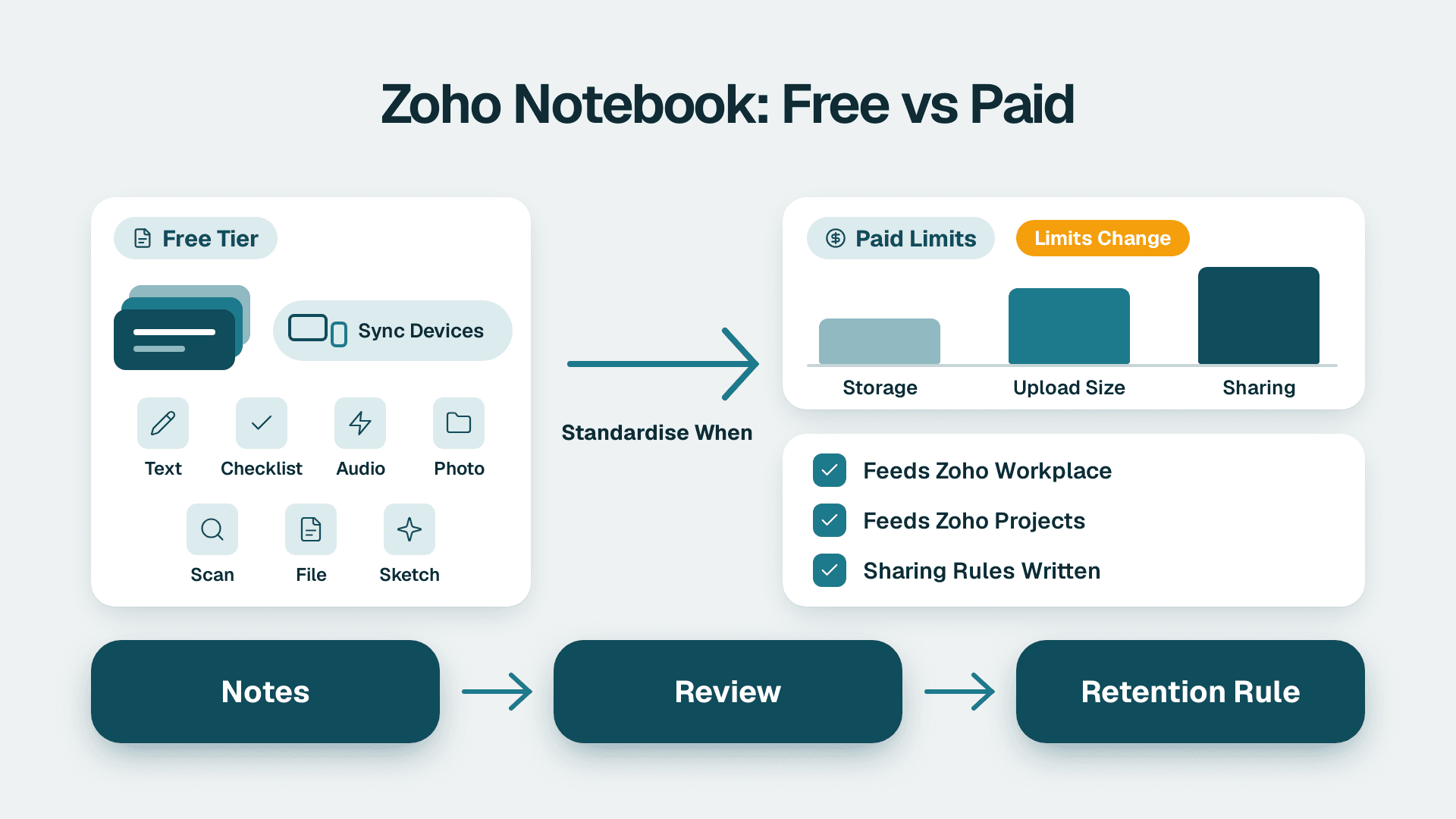
Zoho Notebook is Zoho's note-taking app for capturing text, checklists, audio, photos, scans and files as organised cards. It is free to start, works across devices, and suits individuals and small teams that need shared notes. A business should standardise on it only when notes feed Zoho Workplace and Zoho Projects routines, and when sharing and retention rules are written down.
Key Takeaways
- Zoho Notebook is a card-based notes app with seven card types, AI transcription and a web clipper, not a document management system.
- It is free to start, but paid limits and tiers change, so confirm them on Zoho's current pricing page before you budget.
- It works best as the capture layer next to Zoho Workplace and Zoho Projects, with finished work living in the system of record.
- Standardise on it when several people already use it informally and you can set sharing, retention and export rules.
- Export your notes before any suite downgrade or cancellation, because notes are easy to forget in a data-exit plan.
What is Zoho Notebook?
Zoho Notebook is a note-taking application that stores each piece of content as a card inside a notebook. According to the official Zoho Notebook product page (checked November 2026), it offers seven card types: Text, Check List, Audio, Photo, Smart, Sketch and File. A card can be a typed meeting note, a recorded call, a photographed whiteboard or an attached spreadsheet.
The design is deliberately visual. Cards sit in a grid, notebooks hold related cards, and nested collections let you build a hierarchy, so a "Clients" collection can contain one notebook per account. Tags and reminders can be added to individual cards, which turns a note into a lightweight follow-up item.
For a small-business owner or operations lead, the practical question is where this fits. Notebook is not a CRM, an accounting system or a help desk. It is the place where thinking happens before it becomes a record in one of those systems. If you are weighing the wider suite, the Zoho consulting services team can map which of these tools your business actually needs, but the sections below give you enough to decide on your own.
Notebook usually arrives as part of a wider Zoho rollout. If you are weighing the full suite, read What Is Zoho One and Is It Worth It for Small Business?.
How is it different from a shared document folder?
A document folder stores finished files. Notebook stores working fragments: a voice memo from a site visit, a scanned business card, a checklist for a client onboarding call. Search works with a keyword across notes, including inside documents and images, whether the content was typed, spoken or scanned. That makes it good for retrieval of half-formed information, and weaker as an audited archive.
Is Zoho Notebook free, and how much does it cost?
Zoho Notebook is free to start. The app listing for Windows describes it as a free note-taking app and digital notepad for capturing ideas, to-do lists, meeting notes, voice memos and journal entries. That covers the core use case for most individuals and many small teams.
What we cannot give you honestly is a table of paid prices and storage caps. Zoho revises tiers, storage allowances and AI quotas, and the pages we checked for this article do not publish a stable figure we can verify. Rather than guess, treat any number you find in a third-party blog as a prompt to check the live pricing page, not as a fact.
Use this table to structure the check before you commit a team to the app.
| Question to answer | Why it matters | Where to confirm |
|---|---|---|
| Is the free tier enough for each user's storage? | Audio, scans and PDFs fill space faster than text | Zoho Notebook pricing page |
| Are AI transcription and writing tools included or capped? | Meeting-heavy teams hit usage limits first | Zoho Notebook pricing page |
| Is Notebook bundled in your Zoho One or Workplace plan? | You may already be paying for it | Your Zoho admin console and order form |
| Can an admin manage users centrally? | Shared notes need an owner when someone leaves | Zoho admin console |
| What export formats exist? | Defines your exit and backup route | In-app export options |
What does "free vs paid" mean for a team?
For a team, the useful distinction is less about features and more about control. Free personal accounts are fine for individual capture. The moment several staff share client notes, you want central administration, predictable limits and a way to recover content when an employee leaves. Check whether those controls come with your existing suite plan before buying anything separately.
What can Zoho Notebook do that a plain notes app cannot?
Notebook adds capture methods and light project tools on top of ordinary notes. The same Zoho product page lists several features that matter for business use, summarised below.
| Feature | What Zoho says it does | Typical business use |
|---|---|---|
| Audio cards | Record meetings or lectures and convert audio to searchable text | Client calls, internal stand-ups |
| Notebook AI | Writing suggestions, grammar insights, content generation | Drafting follow-up emails from raw notes |
| AI transcription | Turns recordings into structured notes using templates you set once | Consistent meeting minutes |
| Smart Cards | Save and format content automatically | Saving reference material |
| File cards | Add PDFs, spreadsheets and more to a notebook | Keeping a brief with its notes |
| Scanner | Scans documents, books and business cards; export as PDF | Trade-show contacts, receipts |
| Noteboard | Kanban-style board for projects and documents | Small task tracking |
| Whiteboard | Sketch and brainstorm, share boards, collaborate | Workshops, planning sessions |
| Web Clipper | Saves articles and images from Chrome, Firefox, Safari and Edge | Market and competitor research |
| Sharing | Notebooks shared with read, write or share access | Controlled collaboration |
Two details deserve emphasis. First, the transcription templates: because a custom template can be set up once and applied to later transcripts, a team can standardise how meeting notes look without anyone retyping them. Second, the access levels of read, write and share give you a basic permissions model, which is enough to separate "can view" from "can pass this on".
The Google Play listing positions the app as an AI note-taking tool and task manager that helps students, professionals and teams remember what was said in meetings and lectures. That framing is accurate: the strongest use case is capturing spoken and visual information quickly.
How do teams use Zoho Notebook next to Zoho Workplace and Zoho Projects?
Most teams use Notebook as the front door for raw information, then move anything that needs a record into the proper Zoho application. Workplace holds the formal documents and communication, Projects holds tasks and delivery, and Notebook holds the messy middle. We have not verified specific native integrations between these products for this article, so confirm any connection you rely on in your own edition.
A practical division of labour
Suppose a 20-person US services firm runs client onboarding. The account manager records the kickoff call as an audio card, lets Notebook AI produce structured notes, and shares that notebook with the delivery lead using write access. The delivery lead then creates the actual tasks and milestones in Zoho Projects. The note remains as the source of context, while Projects remains the source of truth for who does what by when.
A hypothetical UK consultancy might do the reverse for internal knowledge. Staff clip research with the web clipper, tag it by client sector, and keep a shared "playbook" notebook with read-only access for most people and write access for two editors. Finished policies and templates still go into the Workplace document store so that version control and ownership are clear.
The rule that keeps this tidy is simple: notes are working memory, records are commitments. If a statement could be audited, contested or needed in a dispute, it belongs in the system built for that, not in a card.
Where does it connect to the rest of the suite?
Notebook is not a data entry point for CRM, Creator, Books or Desk. If your team's real problem is that information gets re-keyed, the better fix is usually structured capture. Our guide to building Zoho Forms that feed CRM and Creator covers that route, and Zoho Flow for automating work across Zoho and other apps covers moving data once it exists. Notebook sits before both: it is where the idea or conversation lives until someone decides it deserves a structured record.
Is Zoho like a full office suite?
Zoho is a broad business software family, not a single office product, and Notebook is only one small part of it. The company sells separate applications for CRM, finance, help desk, project management, email and documents, and bundles many of them in Zoho One. Notebook is the note-taking piece, comparable in role to a personal notebook rather than a word processor or spreadsheet.
That matters for expectations. Notebook will not replace a document editor for long reports, and it will not replace a spreadsheet for modelling. It excels at capture and retrieval. If you are still deciding whether the suite as a whole is worth the commitment, read What Is Zoho One and Is It Worth It for Small Business? before standardising on any single app.
How does Zoho Notebook handle privacy, data residency and compliance?
Zoho states that it neither sells user information nor shows advertisements in Zoho Notebook. That is a useful statement for procurement, but it is a vendor claim, not a substitute for your own review of data processing terms.
Residency is the second question. Notebook is also served from an EU data-centre domain, notebook.zoho.eu, which presents the same feature set as the main site, including the same card types, Notebook AI and web clipper browsers. For a UK or EU business, that is the version to evaluate first when GDPR obligations and transfer rules shape your vendor choices.
A few market-specific points are worth noting:
- US healthcare and finance: if notes could contain protected health information or regulated financial data, HIPAA or SOC 2 expectations apply to the whole workflow. Do not assume a notes app is covered by your compliance programme. Get written confirmation from Zoho and decide whether such content should be kept out of Notebook altogether.
- UK and EU: voice recordings and transcripts of calls can contain personal data. Under GDPR you need a lawful basis, a retention period and a way to honour deletion requests, which is harder when notes are scattered across personal accounts.
- Canada: a manufacturing firm in Ontario or Quebec handling employee or customer information needs to consider PIPEDA, and Quebec's own privacy law, when staff record or scan documents on personal devices.
The common thread is that audio cards and scanned documents turn Notebook from a scratchpad into a store of personal data. Treat it accordingly.
When should a business standardise on Zoho Notebook?
Standardise when the informal use is already happening and the risk of leaving it unmanaged is higher than the cost of managing it. A business should adopt Notebook as a team standard only if it can answer yes to most of the checks below.
| Check | Standardise if... | Hold off if... |
|---|---|---|
| Current usage | Several staff already use it | Only one enthusiast does |
| Meeting load | Calls and site visits generate lots of spoken context | Work is mostly typed in the CRM |
| Admin control | You can manage users and sharing centrally | Notes live only in personal accounts |
| Data sensitivity | Content is low to moderate risk | Notes routinely hold regulated data |
| Suite fit | You already pay for the Zoho suite | You use a different notes tool the team likes |
| Exit plan | You know how to export and archive | Nobody owns backups |
What does a sensible standard look like?
A workable standard is short. Name a notebook owner per department. Define three or four shared notebooks, such as Clients, Projects, Playbooks and Meetings. Set default access to read, with write granted deliberately. Require that decisions, quotes and commitments be copied into the CRM, Projects or Books record on the same day. And set a review date to prune dead notebooks.
The last point is where most standards fail. Notes accumulate quietly, and nobody deletes them. A quarterly review of old notebooks costs an hour and prevents a retention problem later.
When is it the wrong choice?
Do not standardise on Notebook if your team needs formal document control, approval workflows or e-signatures on the content. Those are jobs for the document and signing tools. Our walkthrough of setting up Zoho Sign in CRM and Creator for contracts shows the route for anything that must be signed and stored. Likewise, if your team already has a notes tool that people use daily, forcing a switch only to consolidate vendors often costs more in lost habits than it saves.
What happens to your notes if you downgrade or cancel Zoho One?
Treat notes as data you must export yourself. We have not verified how Zoho handles Notebook content after a plan downgrade or cancellation, so read the current terms and ask support in writing before you act. Whatever the answer, the safe practice is the same: export first, confirm the export opens, and only then change the plan.
A short exit checklist:
1. List every shared notebook and its owner.
2. Export notes in the available formats and store them in your company archive.
3. Download audio recordings and scanned PDFs separately, since they are the largest and most easily missed items.
4. Check whether personal accounts hold business content, and move it to shared notebooks.
5. Record the date, the person responsible and the location of the archive.
This matters for compliance as much as for convenience. A UK or EU business that cannot find a recording after a deletion request has a GDPR problem, and a US firm that cannot produce a client note during a dispute has an evidence problem.
How should you scope a Zoho rollout that includes Notebook?
Scope Notebook as a small line item inside a wider rollout, not as a project of its own. The questions that matter are about ownership and boundaries rather than features.
Ask any rollout partner, internal or external, to answer these before work starts:
- Which apps are in scope, and where does Notebook sit relative to CRM, Creator, Books and Desk?
- Who administers users, sharing and retention for notes?
- What content is explicitly out of bounds for Notebook, such as regulated data?
- How will notes move into records, and who is responsible for that step?
- What is the export and exit plan if the suite is downsized?
- How will staff be trained, and by when?
A clear answer to each prevents the usual outcome, where a pleasant tool spreads without rules. If your plans extend into reporting, Zoho Analytics is the natural next topic, since structured records, not notes, are what feed dashboards. And if you are building custom apps on top of the suite, our explainer on what Zoho Creator is used for helps you decide which data belongs there instead.
Zoho consulting services can help you decide where Notebook fits in your wider Zoho setup and write the sharing, retention and export rules before the rollout begins.
---
About Lets Viz: Lets Viz is a data analytics and business systems consultancy that has delivered Zoho, Power BI and automation projects since 2020 for clients including US healthcare providers, UK fintech firms, Canadian manufacturers and global SaaS companies. We hold a 5.0 Clutch rating and write from hands-on implementation experience across the Zoho suite.
Sources
- Zoho Notebook official product page
- Zoho Notebook EU data-centre site
- Zoho Notebook on Google Play
- Zoho Notebook app listing for Windows
Facts and prices checked November 2026.