CRM Database: What It Is and How to Structure One in Zoho
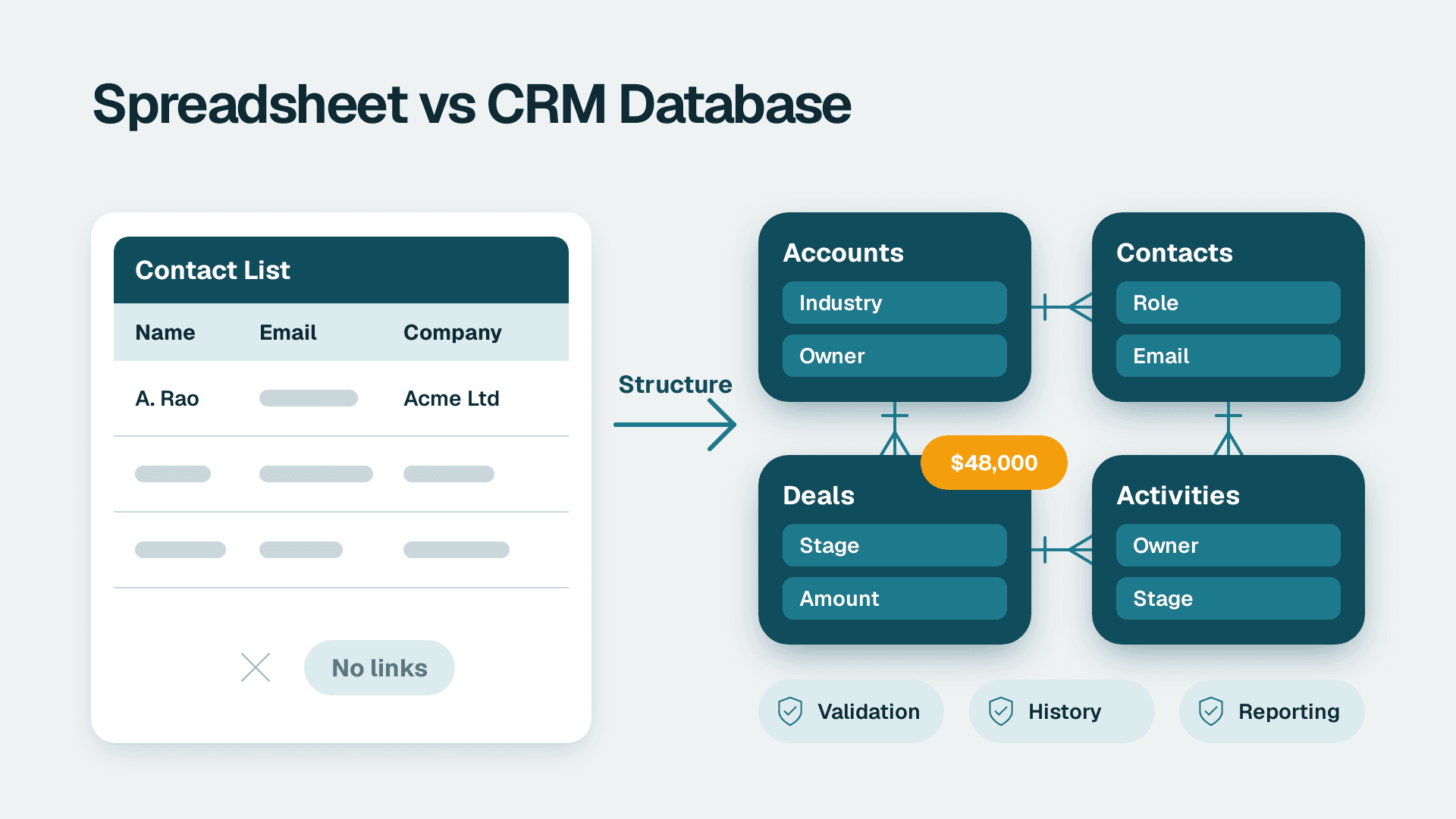
A CRM database is the structured store of customer and prospect records inside a CRM system: accounts, contacts, deals, activities and the relationships between them. Unlike a spreadsheet or contact list, it links records, enforces rules on what can be entered, keeps history and feeds reporting. In Zoho CRM, it is the set of modules and fields your team works from every day.
Key Takeaways
- A CRM database is a set of linked records with rules, not a flat list of names and emails.
- The main difference from a spreadsheet is relationships, validation and history, not storage.
- Structure modules around real business objects, and keep each field to one clear purpose.
- Data quality is a design problem first: required fields, picklists and duplicate checks beat clean-up drives.
- Assign every critical field an owner, or reporting will quietly degrade.
What is a CRM database?
A CRM database is the organised collection of customer and prospect data held inside a customer relationship management system, stored as linked records rather than loose rows. One large CRM vendor's guide, a vendor guide to CRM databases, describes it as a single source of truth for contact details, purchase history, communication records, service requests and preferences.
That definition is accurate, but the operational meaning is narrower. In Zoho CRM, the database is made of four building blocks:
- Modules are the record types, such as Leads, Contacts, Accounts and Deals. Think of each as a table.
- Fields are the attributes on each record, such as email, deal amount or lead source. Think of them as columns.
- Records are individual entries, such as one company or one opportunity.
- Relationships connect records, for example a Contact linked to an Account, or a Deal linked to both.
The same guide lists four uses of CRM data: segmentation (grouping customers by purchasing behaviour, demographics and similar traits), tracking (monitoring leads and forecasting sales trends), analysis (spotting service trends and customers at risk of churning) and powering AI features. Every one of those uses depends on the structure underneath. Segmentation fails if industry is free text. Forecasting fails if deal stages mean different things to different reps. Churn analysis fails if nobody records why a customer left.
This is the layer where Zoho CRM consulting work usually concentrates, because module and field decisions are the hardest to reverse once real data is inside.
What is the difference between a CRM and a database?
A database stores data; a CRM is an application built on a database that adds sales logic, user interfaces, automation and reporting. You can build a database with no CRM at all, but you cannot run a CRM without a database underneath.
In practice, the question usually means "do we need a CRM, or can we just keep a well-organised database?" For a small team the honest answer depends on what happens around the data. A raw database holds records. A CRM also:
- Assigns owners and enforces who can see or edit what.
- Logs emails, calls and meetings against the right record.
- Triggers follow-up tasks and alerts when a deal stalls.
- Produces pipeline and conversion reports without a data analyst.
- Connects to forms, email campaigns, e-signature and finance tools.
The CRM vendor's overview of customer relationship management makes a related point about fragmentation: the average organisation uses close to 900 applications, and only 29% of them are integrated (vendor-stated; the year is not given in the source, so treat it as indicative). Customer data scattered across that many tools is the problem a CRM database is meant to solve by becoming the shared reference point.
How is a CRM database different from a spreadsheet or contact list?
A spreadsheet stores rows; a CRM database stores relationships, history and rules. The practical gap shows up when a second person edits the file, when a customer has several contacts, or when someone asks for last quarter's conversion rate.
| Capability | Contact list | Spreadsheet | CRM database |
|---|---|---|---|
| Structure | Names and details only | Flexible columns, no enforced types | Typed fields across linked modules |
| Relationships | None | Manual, via copy and paste or lookups | Built-in links between contacts, accounts and deals |
| Duplicate control | None | Manual filtering | Duplicate detection and merge tools |
| Validation | None | Limited cell rules, easily bypassed | Required fields, picklists and validation rules |
| History | Overwritten | Overwritten unless versioned | Timeline of activities, notes and field changes |
| Access control | File-level | File-level | Role and profile-based permissions |
| Reporting | Counts only | Pivot tables, rebuilt each time | Live dashboards and reports on current data |
| Automation | None | Macros or scripts | Workflows, assignment rules and reminders |
Spreadsheets remain a sensible starting point for a handful of customers. The trouble starts when the sheet becomes the only record of who was contacted, by whom and when. Two people edit the same file, a column is renamed, a filter is left on, and the numbers in the board pack no longer match what the team believes. The Zoho CRM for small business guide covers when that moment arrives and how to choose an edition.
How should you structure modules in a Zoho CRM database?
Structure modules around the real objects your business sells to and works with, and keep one record type per module. Most teams need fewer modules than they think, and extra modules are easier to add later than to merge.
A typical B2B setup looks like this:
| Module | What it holds | Links to | Common mistake |
|---|---|---|---|
| Leads | Unqualified prospects, before conversion | Converts into Contact, Account and Deal | Keeping leads forever instead of converting or archiving |
| Accounts | Companies you sell to | Contacts, Deals | Creating a new account per contact, so one company appears many times |
| Contacts | People at those companies | Account, Deals | Storing the company name as text instead of linking the Account |
| Deals | Opportunities with value, stage and close date | Account, Contact | Using stages that describe activity rather than buyer progress |
| Activities | Calls, tasks and meetings | Any record above | Logging outside the CRM, so history is missing |
| Custom module | An object unique to your business, such as Projects or Subscriptions | Account, Deal | Building one for something a field or a tag would handle |
Three rules keep the structure healthy.
Separate the company from the person
If a company has five buyers, you want one Account and five Contacts. Putting company details on each person creates five versions of the truth, and any change to the company, such as a new address or a rename, must then be made five times.
Model the pipeline on buyer progress
Deal stages should describe where the buyer is, such as qualified, proposal agreed or contract out, not what the rep did. Stage design drives forecast reliability, and the Zoho CRM pipeline structure guide goes through it in detail.
Add a custom module only for a distinct object
A new module is justified when the thing has its own lifecycle and many records per customer, such as installations, policies or projects. If it is just an attribute of an existing record, use a field. Over-modularised systems become hard to report on because data sits in too many places.
How do you design CRM fields people will trust?
Design each field to hold one type of fact, in one format, with one owner. Sales teams stop trusting CRM fields when the same question can be answered three different ways, or when a field is mandatory but nobody knows what it is for.
The pattern is familiar. A field called Industry is free text, so reports show "Software", "SaaS", "software company" and "IT" as four segments. A Lost Reason box is optional, so churn and loss analysis has nothing to work with. A Source field is filled in only by the person who created the lead, so attribution is guesswork. Reps learn that the data is unreliable, stop updating it, and the cycle continues.
| Field type in Zoho CRM | Best used for | Data-quality rule |
|---|---|---|
| Picklist | Industry, lead source, loss reason, deal stage | Prefer over free text for anything you will group or filter on |
| Lookup | Linking a Contact to an Account, or a Deal to a Contact | Use instead of typing a company name |
| Date | Close date, renewal date, last contact | Make required at the stage where it becomes meaningful |
| Currency or number | Deal amount, seats, contract value | Set a single currency convention or a clear multi-currency policy |
| Email and phone | Contact channels | Use the native types so formats can be checked |
| Checkbox | Consent, do-not-contact, key account | Use for true or false facts only |
| Text (single or multi-line) | Genuinely unstructured notes | Never use it for anything you intend to report on |
Make fields required at the right moment
Requiring everything at record creation produces junk, because reps type anything to get past the form. Require the minimum to create a record, then require more as the deal advances. For example, ask for amount and close date at proposal stage, and loss reason when a deal is marked lost. Zoho CRM provides layout rules and, depending on your edition, validation rules and stage-based controls to do this.
Record the reason, not just the outcome
If you want to analyse customer churn in Zoho CRM later, capture the inputs now: an account status field, a churn or cancellation date, and a picklist of reasons with an optional comment. Without those three, churn analysis becomes a reading exercise through notes. With them, a simple report can show which segments and sources lose customers fastest.
Give every critical field an owner
Name the person responsible for each important field, such as lead source, stage definitions and industry values. When the sales head owns stage definitions and marketing owns source values, changes go through one person instead of drifting. Retire fields nobody owns; unused fields clutter layouts and make reps less likely to fill in the ones that matter.
What data-quality rules keep a CRM database usable?
The rules that work are the ones the system enforces at entry, backed by a short, regular review. A clean-up project done once a year treats the symptom while the cause keeps producing bad records.
Analytics vendors such as Validity describe CRM data as the measurable record of customer behaviour and interactions that underpins sales tracking and forecasting. Treating it that way means defining what "good" looks like before anyone starts entering data.
Rule 1: Prevent duplicates at the door
Turn on duplicate checking for Leads, Contacts and Accounts, and decide the matching keys: usually email for people and domain or registered name for companies. Merge rather than delete, so activity history survives.
Rule 2: Standardise formats
Agree on how names, phone numbers, countries and addresses are written. A US team and a UK team in the same CRM will otherwise write dates, postcodes and phone prefixes differently, which breaks imports and merges. Use country and state or region picklists rather than free text.
Rule 3: Use picklists for anything you will group by
If it appears in a report filter or a segment, it should be a picklist or lookup. Free text is for notes.
Rule 4: Require data when it becomes relevant
Stage-based requirements keep early entry quick and later records complete, as described above.
Rule 5: Set a freshness rule
Define when a record counts as stale, for example a deal with no activity for a set number of days or a contact with no touch in a year. Review stale records on a schedule, close or archive them, and keep the pipeline honest.
Rule 6: Design for privacy from the start
Customer data is regulated personal data in most markets, so field design and retention are compliance questions as well as quality ones:
- A UK fintech team, or any team with EU contacts, should record a lawful basis and consent source for marketing contacts, and be able to find and delete a person's data on request under GDPR.
- A Canadian manufacturer should keep contact data accurate and limit it to what it needs, in line with PIPEDA principles on consent and accuracy.
- A US healthcare services business should decide up front whether any health information belongs in the CRM at all. If it does, HIPAA obligations and the vendor's agreements need review. If it does not, the simplest control is to keep clinical detail out of free-text notes.
- A US SaaS finance team pursuing SOC 2 will want role-based access and an audit trail on who changed what.
These are hypothetical illustrations of how the rules apply, not legal advice; confirm requirements with your own counsel.
How do you keep CRM data clean before reporting season?
Start four to six weeks before the reporting deadline, not the week of. First, run a duplicate scan and merge. Second, list deals with missing amounts, close dates or owners and assign each to a named person. Third, close or archive stale records so that open pipeline reflects real opportunities. Fourth, freeze definitions: no new picklist values or stage changes until the report is out. Finance and sales leadership will then be reading the same numbers, and the effort drops as entry rules improve.
If some reporting leaves the CRM for a BI tool, clean data at that boundary as well. The Power Query data-cleaning guide shows how to shape exported records before modelling.
What are CRM tools in data entry?
CRM data-entry tools are the features that get information into the database in a controlled way: forms, imports, integrations, layouts and automation. The best ones reduce typing, because manual entry is where most errors begin.
In a Zoho environment, the main routes are:
- Web forms that create leads directly with validated fields, covered in the guide to Zoho Forms that feed CRM.
- Import tools for bulk loads from spreadsheets, with field mapping and duplicate handling.
- Email and calendar integration that logs communications against the right record.
- Layouts and rules that show only relevant fields for each record type and stage.
- Workflows and assignment rules that fill in owner, status and follow-up tasks automatically.
The less a rep has to type, the less variation enters the system. Prefer capture at the source, such as a form with a picklist, over a manual note typed after the fact.
How do you migrate existing data into a CRM database?
Migrate by cleaning and mapping first, importing a small test batch, checking the result, and only then loading the rest. Loading a messy spreadsheet straight into a new CRM simply moves the problem into a more expensive system. The vendor guide cited earlier also lays out a five-step approach to data migration, which reflects how common this stage is.
A practical sequence:
1. Inventory sources. List every spreadsheet, inbox, accounting tool and legacy system holding customer data.
2. Decide what not to bring. Dead leads and duplicates cost money to store and confuse reports.
3. Map columns to fields. For each source column, name the destination module and field, and the format.
4. Clean before import. Standardise country names, dates and picklist values in the sheet.
5. Import a test batch. Load 50 to 100 records, then check links between Contacts and Accounts.
6. Load and reconcile. Compare record counts and a sample of values against the source.
7. Switch off the old sheet. Make it read-only so nobody keeps two versions alive.
Step 7 is the one most often skipped, and it is why "the spreadsheet" and "the CRM" end up disagreeing six months later.
When should you hire a developer for Zoho CRM customisation?
Hire a developer when the requirement cannot be met with configuration: custom modules with complex logic, integrations with systems that have no ready connector, or automation that spans several platforms. Fields, layouts, picklists, validation, workflows and standard reports can usually be handled by a capable administrator without code.
A useful test is to ask whether the change alters data structure or only how people see it. Adding a picklist or rearranging a layout is configuration. Syncing subscription status from a billing system into an account record, or enforcing a multi-step approval that touches several modules, is closer to development. For cost framing, see the Zoho CRM customisation cost guide.
One caution applies in both cases: get the data model right before building on top of it. Code and automation written against a poor structure inherit its flaws and make later changes more expensive.
---
About Lets Viz: Lets Viz has delivered analytics, CRM and automation projects since 2020 for clients including US healthcare organisations, UK fintech firms, Canadian manufacturers and global SaaS teams. The team holds a 5.0 Clutch rating and focuses on Zoho and Microsoft data stacks that operations teams can maintain themselves.
If you are designing or repairing a CRM database and want a second pair of eyes on the module and field structure, see our Zoho CRM consulting service.
Sources
- CRM database guide, definition, uses of CRM data and migration steps
- Overview of customer relationship management and application integration
Facts and prices checked November 2026.