How to Build a Zoho CRM Blueprint for Sales Process Automation
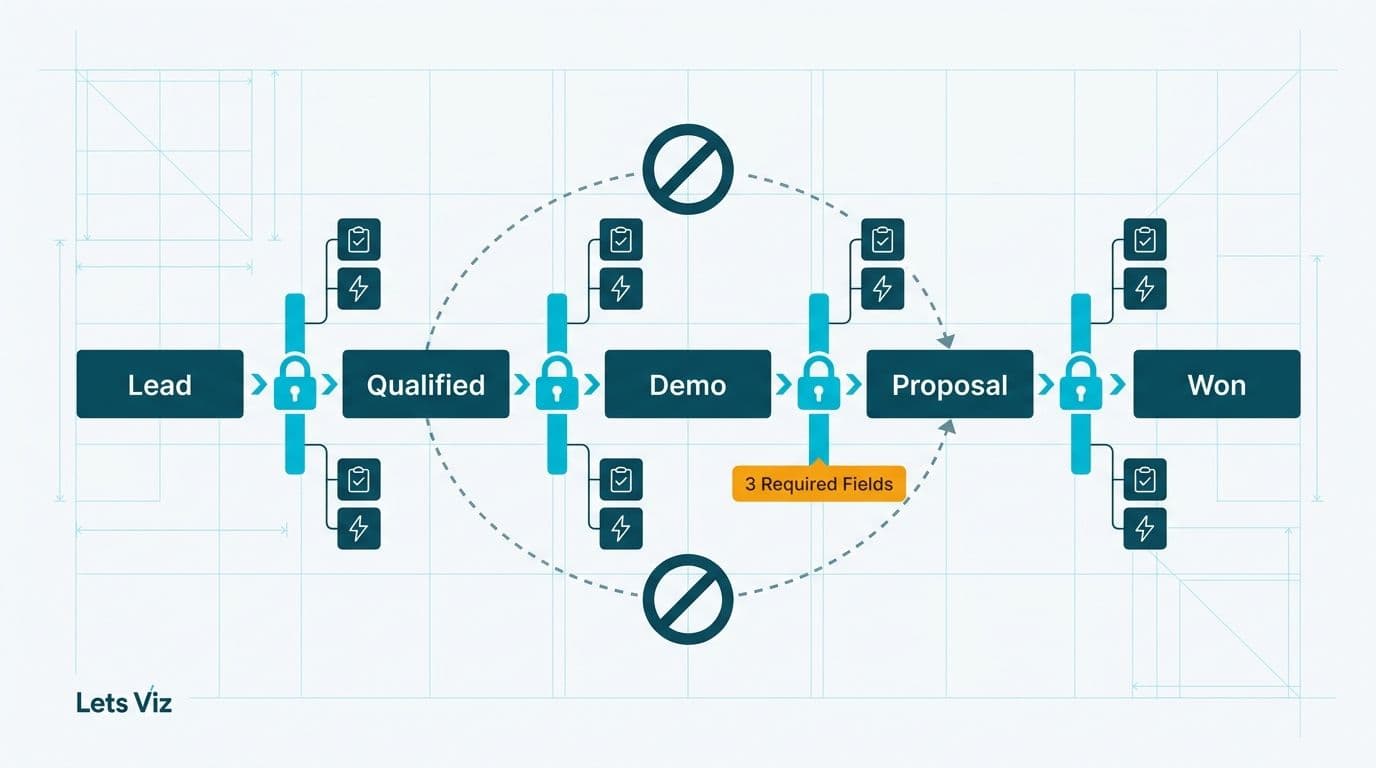
A Zoho CRM Blueprint for sales process automation is a stage-gated workflow tool that enforces sequential stage transitions, mandates field completion before a deal can advance, and fires automated actions at each handoff. Unlike event-triggered workflow rules, a Blueprint functions as a process guardrail - preventing reps from skipping stages, ensuring data integrity, and giving revenue leaders a repeatable, auditable sales process they can rely on for forecasting and compliance.
Key Takeaways
A Blueprint enforces stage gates: a deal cannot advance until defined transition criteria and mandatory fields are satisfied
Mandatory fields at each transition prevent the data gaps that distort pipeline reporting and CRM-driven forecasting
Automated before- and after-transition actions replace ad hoc manual follow-up with system-driven execution
Blueprints govern sequential processes; workflow rules handle event-triggered automation - they solve different problems and work best in combination
Healthcare and finance sales teams gain compliance-ready deal audit trails as a direct byproduct of Blueprint enforcement
Lets Viz offers Zoho consulting services for businesses implementing Zoho One, Zoho CRM, and the full Zoho suite across US, UK, and Canadian markets.
What Is a Zoho CRM Blueprint and How Does It Differ from Workflow Rules?
A Blueprint is Zoho CRM's process enforcement layer. It maps a business process onto pipeline stages and defines the exact conditions under which a deal can move from one state to the next. A workflow rule, by contrast, fires automatically when a record matches a predefined trigger condition, independent of where that record sits in a sequential process.
The operational difference is significant for revenue leaders. Workflow rules answer the question: what should happen when X occurs? Blueprints answer a different question: what must be true before the process can proceed? For healthcare and finance organizations where process compliance and deal audit trails are non-negotiable, Blueprints provide the stage-level governance that workflow rules are not designed to deliver.
According to Future Market Insights (2025), the AI consulting services market reached USD 11.07 billion in 2025 and is projected to grow to USD 90.99 billion by 2035, a 26.2% compound annual growth rate driven largely by demand for structured, auditable process automation in regulated industries. Zoho CRM Blueprint addresses precisely this demand within CRM deployments.
For context on how Zoho CRM's visual configuration tools complement Blueprint-based process design, see our guide on What Is Zoho CRM Canvas and How Does It Work?.
Blueprint vs Workflow Rules: Side-by-Side
| Dimension | Blueprint | Workflow Rule |
|---|---|---|
| Trigger type | Manual stage transition by a rep | Automatic on a data event |
| Stage enforcement | Yes - blocks unauthorized skips | No |
| Mandatory fields before advance | Yes | No |
| Automated actions | Yes - before and after each transition | Yes - on trigger event only |
| Audit trail | Full transition log with timestamps | Action log only |
| Sequential process design | Native | Not designed for this |
| Configuration complexity | Higher | Lower |
| Best fit | Multi-step process governance | Single-event automation |
When Should CRM Admins Choose Workflow Rules vs Blueprint Automation?
Understanding Zoho CRM workflow rules vs blueprint automation at a conceptual level is useful; knowing which tool to reach for first in a specific admin scenario is what saves configuration hours and avoids the brittle setups that create support tickets six months post-launch.
Reach for workflow rules when the automation is triggered by a single data event and does not depend on process position. A workflow rule that sends a manager alert when a deal's close date is overdue fires on a date condition - it works identically regardless of which pipeline stage the deal occupies. Rules that auto-populate fields on record creation, send reminders on a date threshold, or update a lead source on form submission are all event-triggered operations that belong in workflow rules, not Blueprint.
Reach for Blueprint when the process requires a defined sequence of stages and the business has a material cost for reps skipping ahead. Any process where data captured at stage A is a prerequisite for the action taken at stage B is a Blueprint candidate. Multi-step B2B sales cycles, onboarding workflows, and compliance-gated approval chains all share this characteristic. If skipping a stage causes a downstream data gap that breaks forecasting or a compliance record, Blueprint is the right tool.
Use both in parallel for the most effective CRM configurations. Blueprint enforces stage gates while workflow rules handle event triggers outside the transition sequence. For example: Blueprint blocks a deal from reaching Legal Review without a signed NDA date, while a separate workflow rule sends a manager escalation if any deal has remained in the same stage for more than 21 days. These tools address different failure modes and do not conflict when each is configured for its intended purpose.
The most common admin misconfiguration is attempting to enforce a sequential process using chained workflow rules - "if Stage = Discovery then update Stage to Proposal when field X is filled." This creates brittle dependency chains with no true stage-gate enforcement. A rep who updates field X before completing the Discovery checklist still advances because the rule fires on the field condition, not on transition intent. Blueprint is the correct tool for process enforcement; workflow rules are the correct tool for reactive event automation. Conflating them produces neither effectively.
How to Build a Sales Pipeline in Zoho CRM: Deal Stages, Weighted Probabilities, and Forecast Views
For teams migrating off spreadsheets or a legacy CRM, knowing how to build a sales pipeline in Zoho CRM correctly from the start prevents the rebuild work that derails most CRM adoption projects six months post-launch. The pipeline configuration - deal stages, close probabilities, and forecast categories - is the foundation that Blueprint enforcement builds on. Get the stages wrong, and your Blueprint process map is misaligned with how deals actually move.
Configuring deal stages. Deal stages live under Settings - Modules and Fields - Deals - Stage (picklist field). Each stage value maps to a phase in your sales process. For a standard B2B pipeline, seven to nine stages is the practical ceiling before rep cognitive load starts increasing stage-skipping behavior. Keep stage names action-oriented and outcome-based: "Proposal Sent" rather than "Proposal," "Legal Review In Progress" rather than "Legal." Teams migrating from a spreadsheet pipeline often discover their existing stages are activity labels rather than deal states - this is the moment to clean that up before it replicates into the CRM.
Setting weighted probabilities. Each deal stage carries a close probability percentage that feeds your weighted pipeline view. To edit these, go to Settings - Modules and Fields - Deals - Stage picklist and assign a probability to each stage value. Weighted probability should reflect your actual historical conversion rate from that stage to closed won, not an optimistic estimate. For a team migrating from spreadsheets with no conversion history, start with conservative benchmarks - 10% at Qualified, 25% at Discovery Completed, 50% at Proposal Sent, 75% at Verbal Commit - and recalibrate after 90 days of CRM data. Once Blueprint mandatory fields are enforcing consistent stage transitions, your stage-level conversion data becomes reliable enough to base probabilities on actual pipeline behavior rather than guesswork.
Building forecast views. Navigate to Sales - Forecasts to configure your organization's forecast model. Zoho CRM supports target-based forecasting by rep, team, or territory. The forecast view pulls weighted pipeline value from the probability fields set above and compares it against the targets you define. For finance directors and CIOs who relied on spreadsheet-based pipeline rollups before the CRM migration, the forecast view delivers the same visibility with real-time data and no manual aggregation. Set forecast periods to match your planning cycle - monthly for fast-moving SMB pipelines, quarterly for enterprise deal cycles with longer average stage durations.
Pipeline visibility vs. Blueprint enforcement. It is worth separating these two layers clearly: the stage and probability configuration described above governs what you can see and forecast, while Blueprint governs how deals move through the structure you have built. Both layers are necessary, but they serve different purposes and can be configured independently. For teams focused on weighted-pipeline KPI reports, navigate to Reports - Create Report, select Deals, and build a Summary report grouped by Stage with a Weighted Value column (Deal Amount multiplied by Probability) to get a single-screen view of pipeline health by stage. Pair that report with a Funnel chart widget on your pipeline dashboard to surface conversion drop-off between stages at a glance. Once Blueprint mandatory fields are enforcing data entry at each transition, your weighted pipeline values reflect real deal quality rather than rep-entered optimism - making stage probability weights genuinely predictive rather than decorative. Teams regularly report that this combination, accurate probability weighting plus Blueprint-enforced stage data, is what makes their quarterly forecast conversations substantive rather than a manual reconciliation exercise.
How Do You Build a Zoho CRM Blueprint for Sales Process Automation?
Building a Blueprint for a standard five- to seven-stage B2B pipeline takes two to four hours for an experienced Zoho administrator. Here is the complete step-by-step process.
Step 1 - Map your process before opening the CRM. Define every stage on paper before touching any configuration. For a mid-market B2B sales cycle, typical states include: Qualified Lead, Discovery Completed, Proposal Sent, Legal Review, Verbal Commit, Closed Won, and Closed Lost. Identify who owns each transition and what data is essential at each handoff before any CRM work begins.
Step 2 - Navigate to Blueprint setup. In Zoho CRM, go to Settings - Process Management - Blueprint. Click Create Blueprint, select the Deals module (or Leads, Contacts, or a custom module depending on your process), and choose the picklist field that drives your pipeline stages. Name the Blueprint descriptively - for example, Enterprise Sales US Healthcare 2026.
Step 3 - Build your process canvas. The Blueprint editor displays a visual drag-and-drop canvas. Each State you place on the canvas represents one pipeline stage. Transitions are the directional arrows you draw between states. Each transition maps to a specific action a rep takes to advance a deal, such as Send Proposal or Confirm Legal Review Complete.
Step 4 - Assign transition ownership. For each transition, specify which CRM roles or profiles can execute it. A Mark as Legal Reviewed transition might be restricted to senior account executives or legal review coordinators. This enforces approval hierarchy within the sales process without requiring a separate approval workflow module.
Step 5 - Configure mandatory fields. Under each transition's During Transition settings, add the fields that must be populated before the transition button becomes active. If the Proposal Sent transition requires a validated budget figure, an NDA date, and a confirmed decision maker contact, those three fields are mandatory - the transition button stays greyed out until all three carry values. The CRM enforces this automatically, with no manager intervention required.
Step 6 - Set automated actions. Each transition supports Before Transition actions (alerts, approvals, and field updates that execute before the stage change is committed) and After Transition actions (emails, tasks, webhooks, and field updates that fire once the stage change is recorded). A standard configuration for a proposal stage: automatically set the Proposal Date field, create a seven-day follow-up task, and send a templated confirmation email to the prospect - all triggered by a single rep action.
Step 7 - Test and publish. Use the built-in Test mode in the Blueprint editor to walk a sample deal through the full process. Verify that mandatory fields block advancement when unpopulated and that automated actions fire in the correct sequence. Publish when confirmed.
For a clear view of how Blueprint configuration fits within total Zoho CRM setup investment, see our Zoho CRM Customization Cost guide.
What Mandatory Fields and Entry Criteria Should You Configure Per Stage?
Mandatory fields guarantee CRM data quality at each stage gate. The guiding principle: require only the data genuinely necessary to justify moving to the next stage - not every field that might be useful at some point in the deal lifecycle.
A healthcare-sector example: at the transition from Discovery to Proposal, require Decision Maker Contact (lookup field), HIPAA Data Scope (dropdown), and Compliance Review Required (yes/no checkbox). This ensures your sales team captures the compliance classification before investing proposal resources and creates an auditable record for your legal and IT security teams.
A finance-sector example: at the transition from Proposal to Legal Review, require Contract Value (currency field), Payment Terms (dropdown), and Risk Classification (picklist). This gives your finance director the structured pipeline data needed for quarterly forecasting without requiring managers to chase reps for updates after deals have moved.
Recommended Mandatory Fields by Stage - Healthcare and Finance
| Stage Transition | Healthcare Fields | Finance Fields |
|---|---|---|
| Discovery to Proposal | Decision Maker Contact, HIPAA Data Scope, Compliance Review Required | Decision Maker Contact, Budget Range, Authority Level |
| Proposal to Legal Review | NDA Date, Proposal Value, Clinical Champion | Contract Value, Payment Terms, Risk Classification |
| Legal Review to Verbal Commit | Legal Sign-Off Contact, Data Processing Agreement | Approved Contract Value, Signatory Authority Confirmed |
| Verbal Commit to Closed Won | Signed Agreement Date, Implementation Start Date | Signed Agreement Date, Invoice Schedule |
Entry criteria operate differently from mandatory fields. They are record-level conditions evaluated before the transition button appears at all. A typical entry criterion: the associated Contact must have a validated email address before the Proposal Sent transition becomes visible. Entry criteria prevent the button from displaying on ineligible records; mandatory fields block the rep mid-transition when required data is absent.
The Healthcare Financial Analytics Market is projected to grow at an 8.58% CAGR from 2025 to 2035, driven by demand for structured, compliant data workflows (Market Research Future, 2025). Blueprint-enforced mandatory fields directly support that compliance posture: every deal in your CRM carries the data required for regulatory review at the stage where it was captured, not entered retrospectively.
For healthcare organizations handling HIPAA-relevant deal data in Zoho CRM, the structured capture that Blueprints enforce works alongside the controls covered in our HIPAA-Compliant Analytics Dashboard best practices checklist.
How Do Automated Actions Inside a Blueprint Work?
Automated actions in a Blueprint execute at two distinct moments: Before Transition and After Transition. Getting this sequencing right is the difference between a clean automation chain and one that fires in the wrong order.
Before Transition actions execute before the system records the stage change. Use these for:
Sending an internal manager alert to review a deal before the transition commits
Triggering a mandatory approval task that must be resolved before the advance finalizes
Auto-populating a date field, such as setting Proposal Sent Date to today at the moment of the transition
Running a field validation check that cross-references values on related records
After Transition actions execute once the stage change is written to the record. Use these for:
Sending an automated email to the prospect summarizing confirmed next steps
Creating follow-up tasks assigned to the deal owner, a delivery lead, or a compliance reviewer
Triggering a webhook to notify an external system - a contract management platform, a financial reporting tool, or a compliance tracking system - that the deal has entered a new stage
Updating a related Account record to reflect the current pipeline position of its highest-value open deal
The combined effect: a single rep clicking one transition button can simultaneously record the stage change, alert the manager, notify the prospect, create follow-up tasks, and push structured data to external systems. This is the operational leverage that separates a CRM used for process execution from one used only for record-keeping.
Throughout 2025 and 2026, value-based care, AI-driven analytics, and payer analytics innovation have been the defining themes reshaping healthcare revenue operations (MedInsight, 2025). For healthcare sales teams operating in this environment, Blueprint-automated post-transition actions ensure each deal advance triggers the compliance documentation and clinical alignment steps required before the next client interaction - without depending on rep memory or manager follow-up.
For healthcare and finance organizations building out analytics infrastructure alongside CRM process design, see our guide on AI analytics for healthcare finance teams.
How Do You Create a Sales Pipeline Report in Zoho CRM?
Once your Blueprint is enforcing stage gates and populating mandatory fields consistently, your CRM data is clean enough to build meaningful reports. Here is a practical walkthrough for creating a sales pipeline report in Zoho CRM that surfaces the metrics revenue leaders actually need.
Custom report types. Navigate to Reports - Create Report and select Deals as the primary module. Choose a Tabular or Summary report type depending on whether you need row-level deal detail or aggregated stage metrics. For pipeline analysis, a Summary report grouped by Stage gives you deal count and total pipeline value per stage in a single view. If you need to pull in contact or account data alongside deal fields - for example, to segment pipeline by industry vertical or decision-maker seniority - select a joined report type that links Deals to Contacts or Accounts. Cross-module reporting is particularly valuable for mid-market teams where deal context is distributed across the Contacts, Accounts, and Deals modules simultaneously.
Stage-conversion KPI widgets. Once your base report is saved, add it to a CRM dashboard as a chart widget. The most actionable widget type for pipeline health is a Funnel chart showing deal count by stage - it visualizes stage-to-stage conversion drop-off at a glance. For revenue leaders tracking quarterly targets, a KPI widget showing total pipeline value in active stages versus closed-won value gives an at-a-glance variance from plan. You can stack multiple widgets on a single dashboard to show conversion rate by rep, average days per stage, and weighted pipeline value side by side. Because Blueprint mandatory fields enforce consistent data entry at every transition, these conversion metrics reflect actual behavior rather than rep-optimistic stage placements.
Multi-user dashboard sharing. In Zoho CRM, dashboards can be shared with individual users, roles, or entire organizations via the Share Dashboard option in dashboard settings. For revenue operations teams, publishing a shared pipeline dashboard means every stakeholder - from the VP of Sales to individual account executives - views the same real-time data without receiving separate exported reports. Role-based visibility controls ensure that reps see only their own pipeline while managers see the full team view.
When multi-currency or cross-module reporting matters. If your organization operates across currencies - for example, US and Canadian deal values in the same pipeline - enable multi-currency in Zoho CRM settings before building pipeline reports. Without it, aggregate deal values in summary reports mix currencies without conversion, making pipeline totals unreliable for any cross-border forecasting. Similarly, if your sales process involves tracking deals across custom modules (such as a separate Renewal module or a Partner Deals module), cross-module report joins become essential for a complete pipeline picture. Both capabilities are available in Zoho CRM Professional and Enterprise tiers and should be confirmed before your reporting architecture is finalized.
What Results Should Mid-Market Sales Teams Expect from a Blueprint?
A well-configured Blueprint produces three measurable operational improvements: higher pipeline data quality, reduced deal cycle variance, and stronger compliance documentation.
Pipeline data quality improves because mandatory fields eliminate the blank cells that make CRM reporting unreliable. When every deal entering the Proposal stage carries a validated budget, a named decision maker, and a defined timeline, pipeline reports reflect actual deal status rather than rep-optimistic stage placements. Finance directors and CIOs who rely on CRM pipeline data for quarterly planning gain a reporting foundation that does not require downstream data cleanup.
Deal cycle variance decreases because Blueprints prevent reps from skipping qualification stages and advancing unready deals. Stage duration data becomes analytically useful once Blueprints are in place: organizations can identify exactly where deals consistently stall, which transitions are most often abandoned, and where sales enablement investment will have the highest impact on conversion rates.
Compliance documentation becomes a byproduct of the sales process rather than a separate administrative task. For healthcare organizations managing HIPAA data scope during deal qualification, or finance teams capturing contract risk classification before legal review, Blueprint-enforced mandatory fields create the compliance record at the moment of operational relevance - not retrospectively.
Configuration investment scales with process complexity. A five-stage pipeline with two mandatory fields per transition and standard email and task automation can typically be built in a half-day by an experienced Zoho administrator. A multi-module process with external webhooks, manager approval workflows, and role-based transition restrictions generally requires two to three days of structured implementation work - an investment that typically pays back within the first full sales quarter through improved forecast accuracy and reduced pipeline cleanup effort.
If you are designing a Zoho CRM Blueprint for a healthcare or finance sales team and want expert configuration support, our Zoho consulting services team works with mid-market organizations across the US and Canada to build CRM processes that enforce the right data standards without creating friction for your sales team.
---
About Lets Viz: Lets Viz is a data analytics and CRM consulting firm serving mid-market healthcare and finance organizations across the US and Canada since 2020. Our team holds implementation credentials across Zoho CRM, Power BI, and Microsoft Fabric, and partners with CIOs, revenue operations leaders, and finance directors to build CRM workflows and analytics infrastructure designed to meet compliance requirements without sacrificing sales team usability. We bring documented expertise in HIPAA-compliant data environments, regulated financial services organizations, and enterprise-grade Zoho CRM configuration.
---