Zoho Creator Custom Apps for Field Service Teams: Build Guide
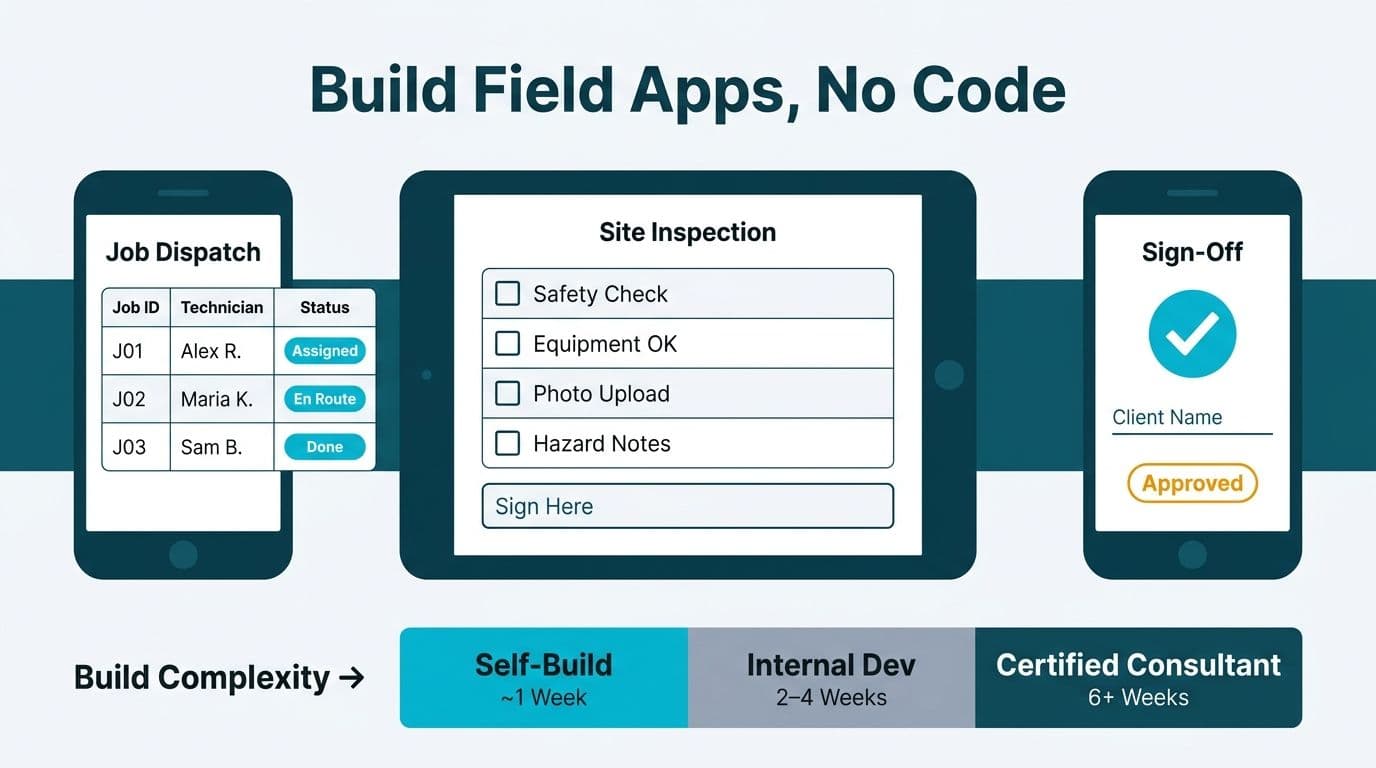
Zoho Creator lets field service teams build custom no-code apps - job dispatch boards, mobile inspection forms, and digital sign-off workflows - without dedicated engineering resources. Single-form apps can be self-built in under a week. Multi-step approval workflows, offline-capable mobile apps, and integrations with ERP or payroll systems are where build complexity rises and a certified Zoho consultant delivers clear value.
Key Takeaways
- Job dispatch, mobile inspection forms, and digital sign-off are the three highest-return Zoho Creator use cases for field service teams
- Build complexity ranges from Low (a form-only app any Zoho admin can configure) to High (offline sync, external API integrations, or regulated data flows)
- HIPAA, GDPR, and PIPEDA requirements add configuration depth that makes professional review the lower-risk approach for regulated organizations
- Zoho Creator's native integration with the broader Zoho suite reduces friction for organizations already running CRM, Books, or Desk
- The clearest hire signal: your app requires Deluge scripting beyond simple rules, external system integration, or customer-facing portal access
What Are Zoho Creator Custom Apps for Field Service Teams?
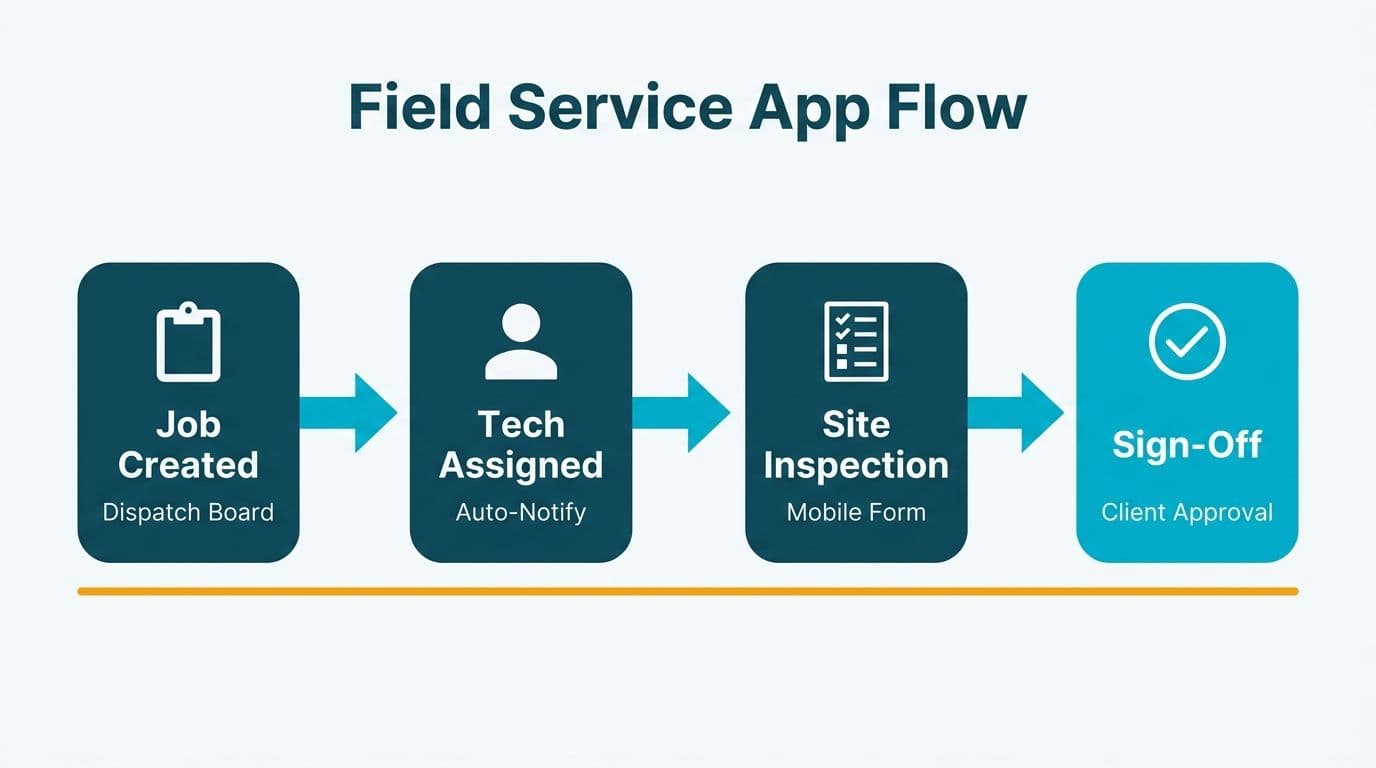
Zoho Creator is a low-code application development platform that lets operations and IT teams build, deploy, and maintain purpose-built apps without a dedicated software engineering team. Field service organizations use it to replace paper forms, email-based dispatch queues, and disconnected spreadsheets with a single mobile-accessible system that captures structured data at the job site and routes it automatically to back-office workflows.
Creator apps run natively on iOS, Android, and web browsers. They support offline data capture that syncs when connectivity returns - a requirement for technicians working in medical facilities, utility infrastructure, or remote sites where coverage is unreliable. Native connections to Zoho CRM, Zoho Books, Zoho Desk, and Zoho Analytics mean a Creator app can function as the operational hub for field activities without requiring custom API work on Zoho-to-Zoho integrations.
For organizations already running any part of the Zoho suite, engaging Zoho consulting services to design the Creator app architecture alongside the existing stack avoids the most common rework scenario: apps built in isolation that create data silos rather than eliminating them.
What No-Code App Scenarios Work Best for Zoho Creator Field Service Teams?
The three highest-return starting points for field service organizations deploying Zoho Creator custom apps for field service teams are job dispatch management, mobile inspection forms, and digital sign-off collection. Each maps cleanly to a build complexity level that determines whether a team can self-build or needs outside expertise.
Job Dispatch Management
A basic dispatch app consists of a work order form, a technician lookup-and-assignment view, and automated SMS or email notifications when a job is assigned or updated. At this scope - which most Zoho admins can configure using the drag-and-drop form builder and built-in workflow rules - the build is Low complexity and deliverable in under a week.
Complexity increases when dispatch logic must account for technician capacity limits, territory-based routing, or real-time job status updates pushed back from the field to a coordinator dashboard. Adding a live map view or a routing API integration moves the project to Medium territory, where Deluge scripting (Creator's built-in coding layer) enters the picture.
Mobile Inspection Forms
Inspection apps let field technicians complete standardized checklists on a smartphone or tablet, attach photo evidence, and submit results that trigger a back-office review or approval step. A single-section checklist with photo upload and a conditional pass/fail outcome is a Low-to-Medium build. Multi-section inspections with branching logic - if equipment status is Fail, route to supervisor before the job can close - reach Medium complexity.
For US healthcare equipment servicing teams, inspection records that contain or reference protected health information (PHI) require HIPAA-compliant configuration. Zoho Creator supports the field-level encryption, audit logging, and session management controls needed - but those controls must be configured deliberately, not assumed. Zoho publishes its HIPAA shared-responsibility guidance in its compliance documentation (Zoho, 2025).
Digital Sign-Off Workflows
A digital sign-off app captures a customer's or supervisor's signature at job completion, timestamps the record, locks it against modification, and generates a PDF or triggers a downstream step such as invoice creation, case closure, or a compliance log entry. A single-screen sign-off widget is Low complexity. Wiring that signature into a multi-step internal approval before an invoice releases in Zoho Books - with conditional escalation if the invoice value exceeds a threshold - moves the build to Medium-to-High.
Understanding how to build an approval workflow in Zoho Creator - using workflow rules, Deluge custom functions, and role-based record permissions - is the dividing line between what a capable admin can self-build and what benefits from an experienced consultant's design.
How Do You Rate Build Complexity for Zoho Creator Field Service Apps?
Build complexity falls into three tiers - Low, Medium, and High - determined by scripting requirements, integration depth, and whether the app handles regulated data. The table below consolidates core field service scenarios alongside two adjacent use cases that teams frequently add to a Creator build roadmap.
| App Type | Complexity | Self-Build Feasible? | Key Complexity Driver |
|---|---|---|---|
| Single-form job dispatch | Low | Yes - under 1 week | Form builder + notification rule |
| Mobile inspection checklist | Low-Medium | Yes - 2 to 3 weeks | Branching logic, photo upload |
| Digital sign-off | Low | Yes - under 1 week | Signature widget, record lock |
| Multi-step approval workflow | Medium-High | Partial | Deluge scripting, role permissions |
| Inventory management app | Medium | Partial | Stock logic, reorder triggers |
| Client portal with external login | High | No | Portal config, external user auth |
| Offline-capable mobile field app | High | No | Sync conflict resolution, mobile UX |
| ERP or payroll integration | High | No | REST API design, data mapping, error handling |
Rating definitions: Low = a Zoho admin with no scripting experience can configure and deploy using the drag-and-drop builder and standard workflow rules. Medium = Deluge scripting and advanced workflow configuration are required; a technically confident internal resource can manage it with Zoho's documentation. High = integration architecture, portal design, or regulated data flows that benefit from a certified consultant to avoid costly rebuilds.
How Does Zoho Creator Compare to Competing Low-Code Platforms for Field Service?
For organizations already on the Zoho suite, Creator typically offers lower total cost of ownership and faster integration with native Zoho data. Organizations deeply invested in a different cloud vendor's ecosystem may find that vendor's low-code tooling reduces friction on their side of the stack - the decision is less about which platform is objectively superior and more about which minimizes integration overhead against your existing environment.
Zoho Creator's per-user pricing (per Zoho's official pricing page, 2025) includes app hosting and built-in workflow automation at the base tier. Competing enterprise low-code platforms from major cloud vendors typically require premium licensing on top of existing productivity suite subscriptions to unlock equivalent capabilities - a meaningful cost difference for a 50-to-200-seat mid-market team.
For organizations whose operational stack runs on Zoho CRM, Zoho Books, or Zoho Desk, Creator has a clear integration advantage: native connectors to read and write Zoho data require no premium add-ons and no custom API work. For organizations with an established footprint in a different major cloud vendor's ecosystem, that vendor's low-code offering may have the native integration edge on its own stack.
A UK fintech firm running its productivity tools in a non-Zoho cloud environment with no existing Zoho products will typically minimize friction by staying within that ecosystem. A Canadian manufacturing company already on Zoho CRM and Zoho Books will achieve faster time-to-value and lower total cost from Creator, with no additional connector licensing required for Zoho-to-Zoho integrations.
For a broader view of Zoho's product ecosystem and licensing architecture, the Zoho CRM pricing comparison guide covers the structure relevant to teams evaluating the full Zoho stack alongside a Creator investment.
How Do HIPAA, GDPR, and PIPEDA Requirements Affect Zoho Creator App Design?
Compliance requirements don't limit what Creator can build - they govern how it must be configured, and they raise the cost of getting that configuration wrong. This is the area where the gap between a self-built app and a professionally designed one is most consequential for regulated organizations.
HIPAA (US): Field service teams servicing healthcare facilities, medical equipment, or clinical environments often capture data that touches PHI - patient location in a facility, equipment linked to patient records, or inspection results tied to care areas. Under HIPAA, the covered entity and any Business Associate must enforce encryption at rest and in transit, session timeouts, audit trails, and documented access controls. Zoho offers a Business Associate Agreement (BAA) for covered entities using its platform (Zoho, 2025). Your organization remains responsible for configuring Creator's data access roles, retention rules, and audit logging to satisfy those controls.
GDPR (UK and EU): Any Creator app that captures personal data from residents of the UK or European Union - technician personal data, customer contact details collected in the field, or location data from inspection workflows - falls under GDPR obligations. This includes data residency selection (Zoho's EU data centers), data minimization in form design, and a documented legal basis for data processing. UK organizations follow UK GDPR, which mirrors the EU framework in most material respects.
PIPEDA (Canada): Canadian field service organizations should document data flows at the design stage rather than retroactively. Where an inspection or dispatch app captures information adjacent to customer health services - common in home healthcare equipment and medical device servicing - the overlap between PIPEDA and provincial standards in Alberta and British Columbia can create additional requirements that benefit from legal and technical review in parallel.
A lesson from our field work illustrates the risk of skipping architectural review: an air-quality remediation company's revenue reports were quietly missing money. When we audited all 9,500 invoices in their field service account, we found 175 orphaned invoices that a date-filter bug had silently dropped from the reporting join. The problem was not the app's interface - it was a data architecture that was never validated before going live. In regulated environments, this class of silent error extends beyond revenue to compliance exposure.
For healthcare organizations managing compliance reporting alongside field operations, our Zoho Analytics for Healthcare Compliance Reporting setup guide covers the analytics layer that sits above Creator-generated data.
When Should You Hire a Zoho Creator Consultant vs. Build In-House?
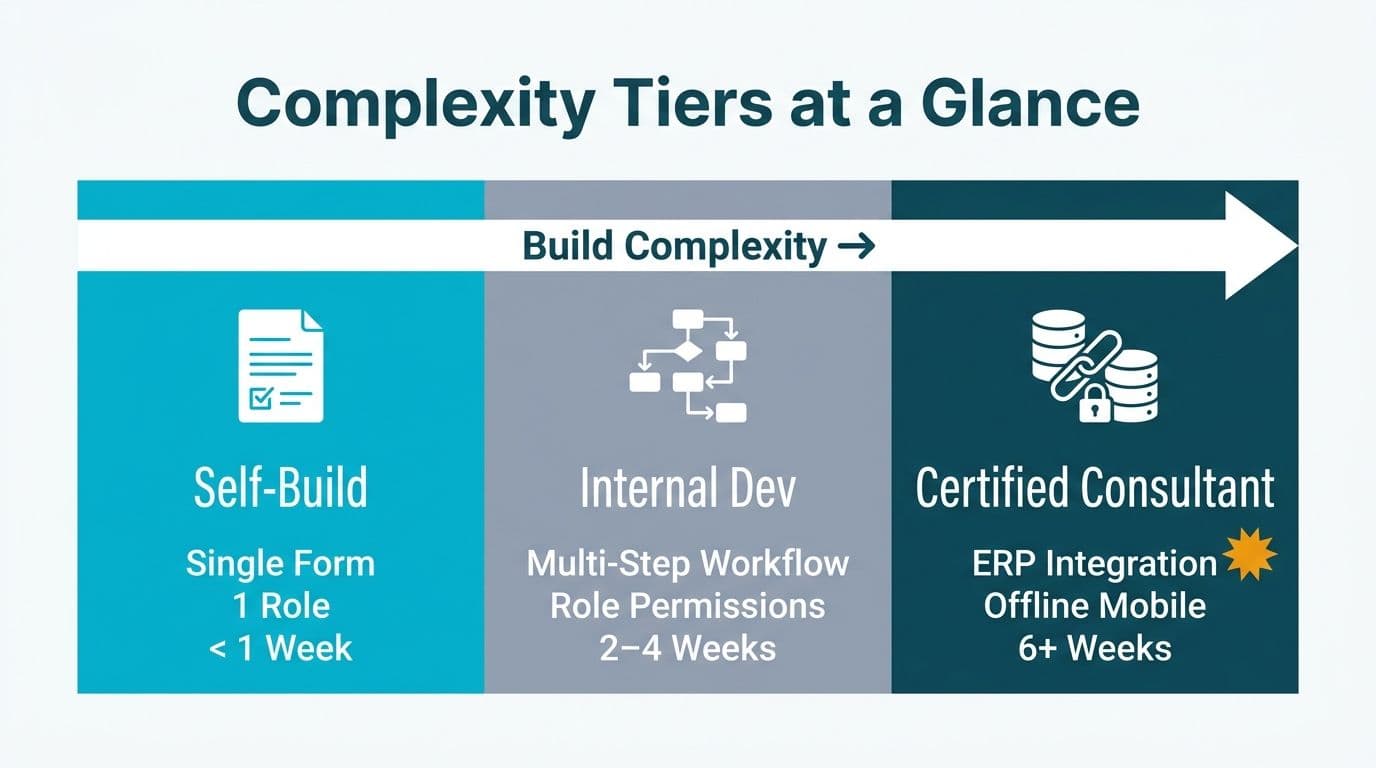
The hire-versus-build decision turns on three variables: your target app's complexity rating, the regulatory environment your data operates in, and the opportunity cost of your internal team's bandwidth on a project outside their core responsibilities.
Build in-house when:
- The app rates Low on the complexity table above
- Data is non-regulated - no PHI, no GDPR-covered personal data, no PIPEDA-covered records, and no financial data subject to audit
- You have a Zoho admin who has deployed at least one Creator app previously
- The app is internal-only with no customer-facing portal or external user login
Hire a certified Zoho consultant when:
- Your app requires Deluge scripting beyond simple conditional rules
- You need to build a client portal in Zoho Creator with external user authentication and record-level access permissions
- Data flows touch HIPAA, GDPR, or PIPEDA-regulated records
- The app must integrate with a system outside Zoho - ERP, CMMS, payroll, or third-party routing
- The project must go live within 30 days and your team has no prior Creator experience
- Your approval workflow spans more than two departments or requires conditional escalation paths
Zoho Creator app development cost from a certified consulting partner varies primarily by scope category. A Low-complexity configuration-only build is a fraction of the cost of a High-complexity project involving Deluge custom functions, external API integration, and compliance-validated data architecture. Using a project cost calculator before engaging partners gives finance directors a concrete scope category to anchor proposals against rather than open-ended estimates.
When evaluating consulting partners, the distinction between Zoho's Authorised, Premium, and Elite certification tiers matters for High-complexity builds. Our guide to Zoho partner certification levels explains what each tier signals about technical depth and the vetting criteria Zoho applies at each level.
A US healthcare equipment servicing team building a mobile inspection app that touches any patient-adjacent data should treat that project as High complexity regardless of how simple the form design appears. The compliance configuration - not the UI - is where the project risk concentrates, and a certification audit of a misconfigured app is far more costly than a well-scoped consulting engagement at the outset.
---
About Lets Viz: Lets Viz has delivered data and automation solutions for US healthcare providers, UK fintech firms, Canadian manufacturing companies, and global SaaS businesses since 2020. Our certified Zoho practice spans CRM, Analytics, and Creator implementations, and we hold a 5.0 rating on Clutch across client engagements.
Ready to scope your field service app? Talk to our team through Zoho consulting services, or Try Zoho Creator free → to explore the platform before committing to a build.