What Is Copilot in Power BI? Capabilities, Limits and Licensing
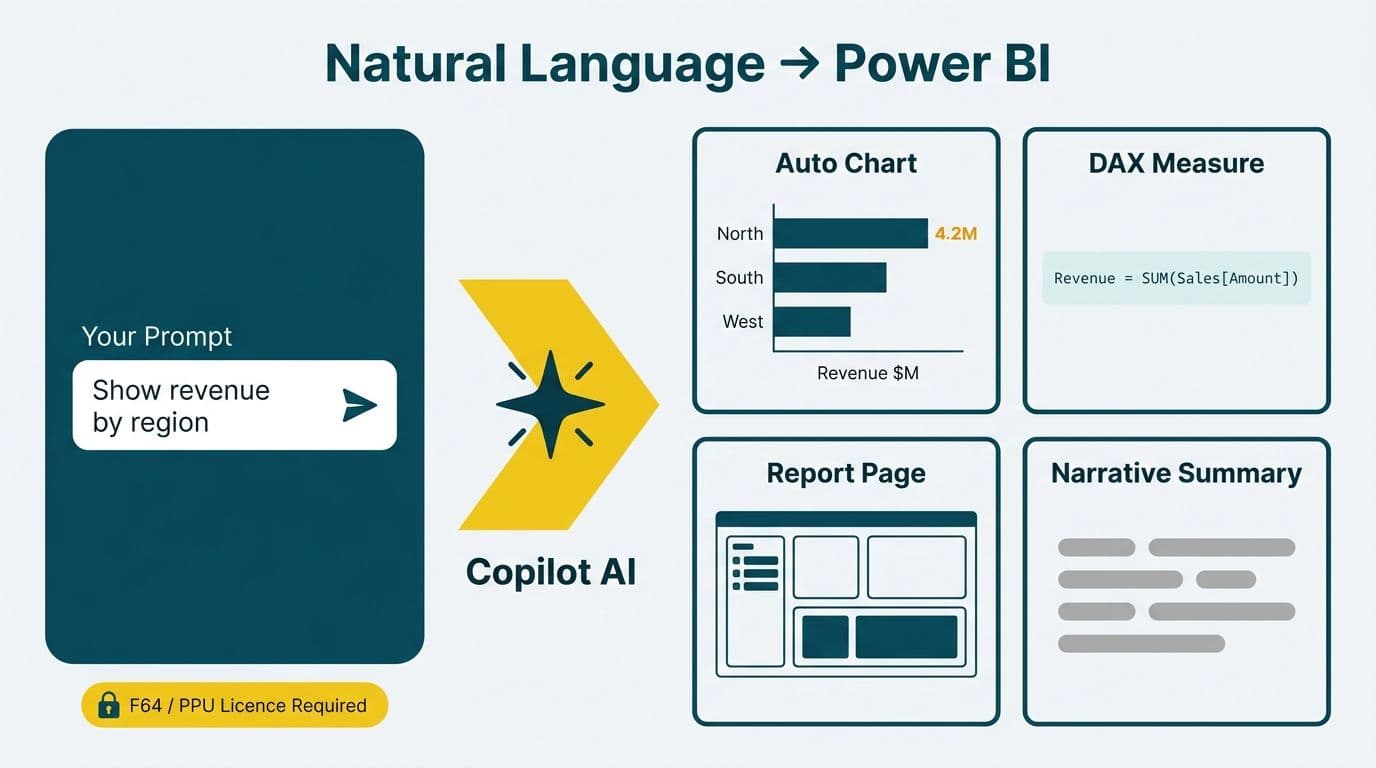
Copilot in Power BI is Microsoft's generative AI assistant embedded directly inside Power BI's authoring and report consumption interface. Business users ask questions in plain language and Copilot returns charts, DAX measures, report pages, or written narrative summaries drawn from the underlying semantic model. It activates only on Microsoft Fabric-backed workspaces and requires at minimum a Fabric F64 capacity SKU or a Power BI Premium Per User (PPU) licence.
Key Takeaways
Copilot automates four tasks: natural-language Q&A, DAX measure drafting, report page scaffolding, and executive narrative summaries.
Critical limits: Copilot cannot design a data model, configure row-level security, manage governance controls, or reliably write complex DAX - skilled BI professionals remain essential.
Licensing gate: Power BI Pro does not include Copilot. You need Fabric F64 capacity or Power BI Premium Per User (PPU) at minimum.
Pre-conditions for safe deployment: a certified semantic model, correctly configured RLS, and user training on Copilot's limitations.
Regional compliance: HIPAA (US healthcare), GDPR (UK/EU), and PIPEDA (Canada) all shape where and how you can deploy Copilot.
What Does Copilot in Power BI Actually Automate?
Copilot handles four discrete, clearly defined tasks. Everything outside these four areas still requires a trained BI professional.
Natural-Language Q&A on a Published Semantic Model
A finance director at a US healthcare system can type "which cost centres exceeded budget by more than 10% last quarter?" into the Copilot panel and receive a filtered table or bar chart - without writing a formula or navigating a filter panel. Copilot maps the plain-language question to the published semantic model and executes the query, respecting the row-level security rules for the signed-in user.
DAX Measure Generation
Copilot drafts DAX measures from plain-language descriptions. Ask for "year-over-year revenue growth excluding returns" and Copilot produces a formula for you to review, edit, and accept. This is valuable for analysts who know what they need but are not yet fluent in DAX syntax. For teams building DAX fluency alongside AI tools, our Power BI consulting (Copilot-ready) practice combines Copilot coaching with hands-on DAX workshops.
Report Page Scaffolding
From a one-line brief, Copilot selects chart types, arranges visuals, and adds slicers to produce a starter report page. Teams that adopt Copilot scaffolding typically find it compresses the initial build phase from several hours to under 30 minutes for standard dashboard layouts. The page is a starting point - it almost always requires human review, accessibility adjustments, and brand alignment before publication.
Narrative Summaries for Executives
Copilot generates a written paragraph describing what the data shows, flagging anomalies and trends in plain language. This is valuable for executive briefings where data storytelling matters as much as the underlying numbers. Every narrative should be reviewed before distribution - Copilot can confidently describe a trend that does not exist if the underlying measure is misconfigured.
The Healthcare Financial Analytics Market is projected to grow at an 8.58% CAGR from 2025 to 2035, fuelled by AI-driven analytics adoption (Future Market Insights, 2025). Now one year into that forecast window, adoption of AI-driven reporting tools in regulated industries is accelerating — automating the narrative layer is one of the most direct ways healthcare and finance teams can compress reporting cycles without adding headcount.
What Can Copilot in Power BI NOT Do?
Understanding Copilot's limits is as important as knowing its capabilities - particularly for CIOs deciding how to structure BI teams after deployment.
Copilot cannot:
Design or repair a semantic model. Broken relationships, ambiguous hierarchies, and circular dependencies produce wrong Copilot answers just as they produce wrong human-authored answers. The data model must be clean before Copilot goes live.
Write complex DAX reliably. Standard aggregations work well. Advanced patterns - CALCULATE with layered filter arguments, semi-additive measures, multi-calendar time intelligence - require expert authorship and will produce subtly wrong results if delegated to Copilot without close review.
Manage an AI data governance framework. Copilot does not configure sensitivity labels, information barriers, or column-level security. A formal governance framework must be in place before Copilot touches sensitive data. Our healthcare AI data privacy audit guide covers the key controls required under HIPAA, GDPR, and PIPEDA.
Connect to new data sources. Copilot queries the published semantic model only. It cannot add tables, call external APIs, or write SQL against a warehouse.
Guarantee factual accuracy. Like all large language models, Copilot can hallucinate metric names or describe trends that are not present in the data. Treat every Copilot output as a confident first draft, not a final answer.
Which Microsoft Fabric Licensing Tier Unlocks Copilot in Power BI?
This is the question most BI managers get wrong when scoping a Copilot rollout. The World Economic Forum's 2025 AI in Financial Services initiative convened over 100 experts representing more than 50 financial services organisations (WEF, 2025), and licensing complexity was identified as one of the primary barriers to enterprise AI adoption at scale - Power BI Copilot licensing is a clear example.
The complete licensing picture as of mid-2026:
| Licence / SKU | Copilot Available? | Typical Use Case |
|---|---|---|
| Power BI Free | No | Read-only report consumption |
| Power BI Pro | No | Collaboration and sharing |
| Power BI Premium Per User (PPU) | Yes | Teams with up to ~25 power users |
| Microsoft Fabric F64 Capacity | Yes | Org-wide rollout, shared compute pool |
| Microsoft Fabric F128 and above | Yes | Enterprise scale; advanced Fabric workloads |
| Microsoft 365 Copilot add-on | Partial | Copilot in Teams and Excel only - does NOT unlock Power BI Copilot |
PPU vs. Fabric F64 in practice: For a Canadian manufacturing company with 15 power users, PPU is almost always the more cost-effective choice until seat count crosses roughly 25 to 30 users. At 50 seats and beyond, F64 capacity typically wins on unit economics. Our BI platform total cost of ownership analysis models both scenarios across 50 to 500 seats.
Data residency affects both cost and compliance. Canadian organisations choosing Canada Central or Canada East Azure regions, and UK teams anchoring data in UK South, should confirm regional pricing with their Microsoft account team and verify data residency settings to satisfy PIPEDA and GDPR requirements before committing to a SKU.
How Does Copilot Fit Into the Microsoft Fabric Lakehouse Architecture?
Copilot does not float free of your data infrastructure. It reads from semantic models built on top of Microsoft Fabric's OneLake. Understanding the relationship between Microsoft Fabric and Power BI is a prerequisite for any enterprise Copilot deployment.
The standard data flow:
Raw sources > Bronze layer (OneLake) > Silver layer (cleaned and conformed tables) > Gold layer (certified semantic model) > Copilot
Microsoft Fabric lakehouse best practices follow a medallion architecture: raw data lands in Bronze, cleansed and conformed data lives in Silver, and business-ready aggregates sit in Gold. Copilot queries the Gold layer only. A well-built medallion architecture in Microsoft Fabric grounds Copilot answers in trusted, curated data rather than noisy raw records.
For healthcare analytics, this architecture carries direct compliance implications. A US hospital system using Fabric for clinical and revenue cycle data must ensure PHI is de-identified or masked at the Silver-to-Gold transition before Copilot can query it. HIPAA's minimum necessary standard applies to AI-generated queries, not just human-authored ones. A UK fintech firm must configure workspace-level data residency to comply with GDPR Article 46 transfer restrictions.
Building governed data foundations - clean lakehouses, certified semantic models, and RLS configurations - is what makes AI assistants safe and trustworthy in regulated industries.
For a deeper look at the underlying architecture, see our plain-English guide to the Microsoft Fabric Lakehouse.
When Should Healthcare and Finance Teams Enable Copilot in Power BI?
Copilot delivers measurable value when three conditions are simultaneously in place. If any one is absent, fix that gap before activating Copilot in a production workspace.
Condition 1: A Clean, Certified Semantic Model Exists
If your Power BI environment contains dozens of uncertified datasets with overlapping measures and inconsistent naming conventions, Copilot will produce inconsistent and confusing answers. Before enabling Copilot, certify the models that users should trust and deprecate or hide the rest. One clean, authoritative model is better than ten partially correct ones.
Condition 2: Row-Level Security Is Correctly Configured
Copilot respects RLS: it only surfaces data the signed-in user is authorised to see. But RLS must be correctly implemented before Copilot goes live. A US SaaS finance team discovered during a 2026 internal pilot that a misconfigured RLS rule allowed Copilot to surface compensation data across cost centres. The data exposure was remediated in hours; the audit documentation took weeks. HIPAA-covered entities should treat RLS setup as a patient privacy control, not merely a BI administration task.
Condition 3: Users Understand Copilot's Limits
Copilot's narrative summaries are polished and confident in tone. A finance director receiving a well-written paragraph about Q2 performance trends may not question whether the underlying measure was correctly defined. Training users to treat Copilot output as an intelligent first draft - not a certified answer - is the most important change management step in any rollout. Our AI analytics use cases in healthcare and finance guide includes industry-specific readiness checklists for both verticals.
Copilot vs. Traditional BI Workflows: What Changes and What Does Not
The table below addresses the question data team leads most commonly ask: does Copilot reduce the need for skilled BI staff?
| Task | Copilot | Skilled BI Analyst |
|---|---|---|
| Ad-hoc Q&A on certified data | Handles well | Overkill for routine queries |
| Standard DAX measures | Handles well - review required | Required for complex patterns |
| Starter report page layout | Handles well - redesign often needed | Required for production-grade |
| Data model design and repair | Cannot do | Required |
| Row-level security configuration | Cannot do | Required |
| Sensitivity label governance | Cannot do | Required |
| Complex time intelligence DAX | Partially - unreliable | Required |
| Executive narrative summaries | Handles well - fact-check required | Required for custom audience |
| Cross-source data integration | Cannot do | Required |
| Semantic model certification | Cannot do | Required |
The pattern is consistent: Copilot compresses time-to-insight for standard reporting tasks. It does not reduce headcount for skilled BI work - it redirects that headcount from low-value report assembly toward higher-value modelling, governance, and Copilot oversight. For a broader evaluation of the AI analytics tool landscape, our best AI tools for finance professionals comparison benchmarks Copilot against category alternatives across accuracy, auditability, and integration depth.
---
About Lets Viz: Lets Viz has delivered data analytics and Power BI implementations since 2020, serving US healthcare systems, UK fintech firms, Canadian manufacturers, and global SaaS businesses. We hold a 5.0 rating on Clutch and specialise in Microsoft Fabric architecture, semantic model governance, and Copilot-ready Power BI deployments for mid-market and enterprise clients.
If your organisation is evaluating or rolling out Power BI Copilot, our Power BI consulting (Copilot-ready) team can audit your semantic model, configure row-level security, and design the Fabric architecture that makes Copilot effective and compliant in regulated environments.