What Is Microsoft Fabric Lakehouse? A Plain-English Guide
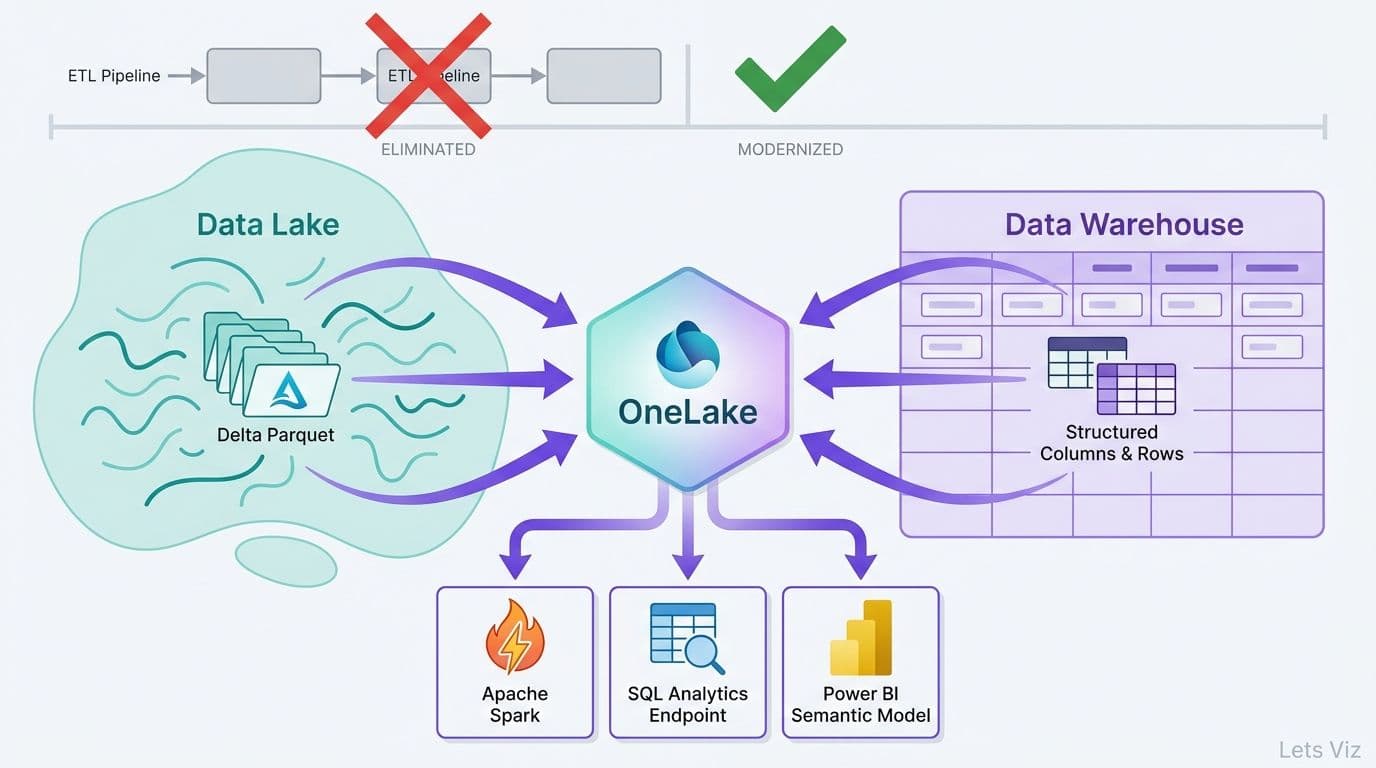
A Microsoft Fabric Lakehouse is a unified data store that combines the schema-on-read flexibility of a data lake with the query performance of a relational warehouse - all inside a single Microsoft Fabric workspace. It persists data as Delta Parquet files on OneLake and exposes every table through a SQL analytics endpoint and a default semantic model for Power BI, eliminating the traditional ETL-load-model cycle.
Key Takeaways
A Fabric Lakehouse stores everything on OneLake in open Delta Parquet format, creating one source of truth across Spark, SQL, and Power BI workloads.
The SQL analytics endpoint is auto-generated and read-only - BI tools connect to it exactly like a SQL Server database, with no data movement required.
The semantic model layer is created automatically when the Lakehouse is provisioned, cutting time from data ingestion to Power BI report from hours to minutes.
Microsoft Fabric replaces Azure Synapse Analytics as the go-forward platform, with capacity-based licensing that is simpler to forecast than Synapse's variable billing.
For healthcare and finance teams, the Lakehouse's built-in auditing, column-level security, and open file format reduce compliance overhead significantly.
Fabric Eventstream enables real-time data ingestion into a Microsoft Fabric Lakehouse directly from Azure Event Hubs, Kafka, and CDC feeds - writing managed Delta tables that are queryable within seconds of the source event firing.
What Is a Microsoft Fabric Lakehouse? The Four-Layer Architecture
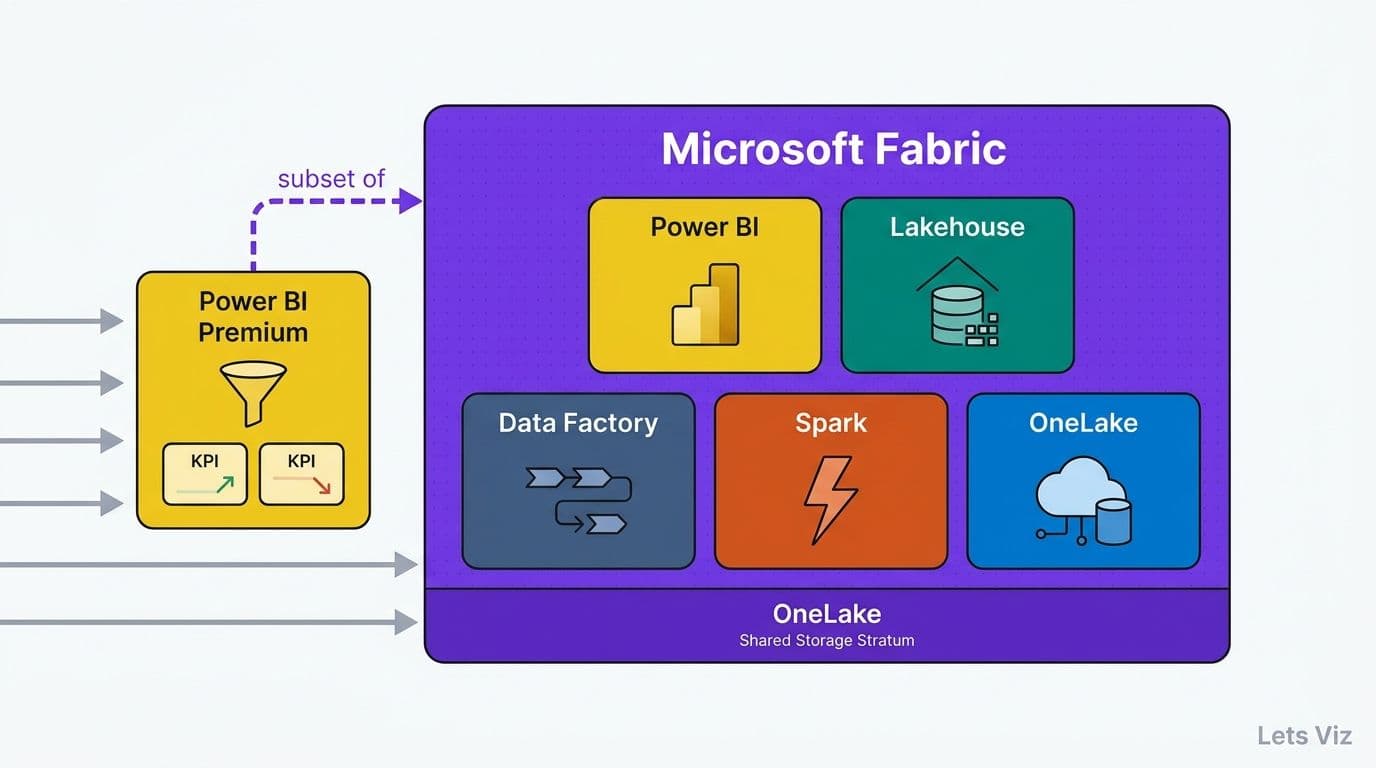
The Lakehouse is the foundational storage artifact in the broader set of Microsoft Fabric components explained - which also includes Data Factory for ingestion, Synapse Data Engineering for Spark-based transformation, Synapse Data Warehouse, Real-Time Intelligence for streaming and low-latency event ingestion, and Power BI for visualization. Understanding the Lakehouse means understanding four tightly integrated layers:
1. OneLake - the organization-wide storage layer holding all data as Delta Parquet files
2. Delta tables - structured, ACID-compliant tables written by Spark notebooks, dataflows, or Eventstream
3. SQL analytics endpoint - a read-only T-SQL interface auto-generated over all managed tables
4. Semantic model - the business logic layer that connects Power BI directly to Lakehouse data
The data fabric vs data lakehouse architecture distinction is worth clarifying before going deeper. A data fabric is a design philosophy - an approach to connecting disparate sources through metadata and automation. A Lakehouse is a specific compute-storage construct. Microsoft Fabric the platform embodies data fabric principles across all its workloads, while the Lakehouse is the primary storage artifact within that platform.
According to Market Research Future, the Healthcare Financial Analytics Market is projected to grow at an 8.58% CAGR from 2025 to 2035, driven by regulatory changes and technology adoption - a forecast that 2026 adoption trends are already confirming as health systems accelerate data platform consolidation. For mid-market healthcare and finance organizations, this trajectory underlines the urgency of building scalable, auditable data platforms now. Organizations typically begin by aligning on a sound AI analytics strategy for mid-market companies before selecting a storage layer.
What Is OneLake and How Does It Store Your Data?
OneLake is a single, organization-wide data lake that serves as the storage backbone for every item in every Microsoft Fabric workspace. Rather than provisioning separate Azure Data Lake Storage Gen2 accounts per project or department, OneLake provides one logical lake per Microsoft 365 tenant. Workspaces are folders within that lake; Lakehouses, Warehouses, and KQL Databases are subfolders within workspaces. Every item shares the same physical storage, eliminating the data silos that characterize multi-tool analytics stacks.
Technically, OneLake is built on top of Azure Data Lake Storage Gen2 - but Microsoft manages the storage account. Users interact with OneLake through Fabric workspace paths, the OneLake File Explorer desktop application, or any tool that speaks the ADLS Gen2 API, including AzCopy and Azure Storage Explorer. Organizations do not need to provision a separate storage account. This is the most common misconception for teams researching what is Microsoft OneLake storage: they assume they must bring their own ADLS Gen2 account, but with Fabric, that layer is handled automatically.
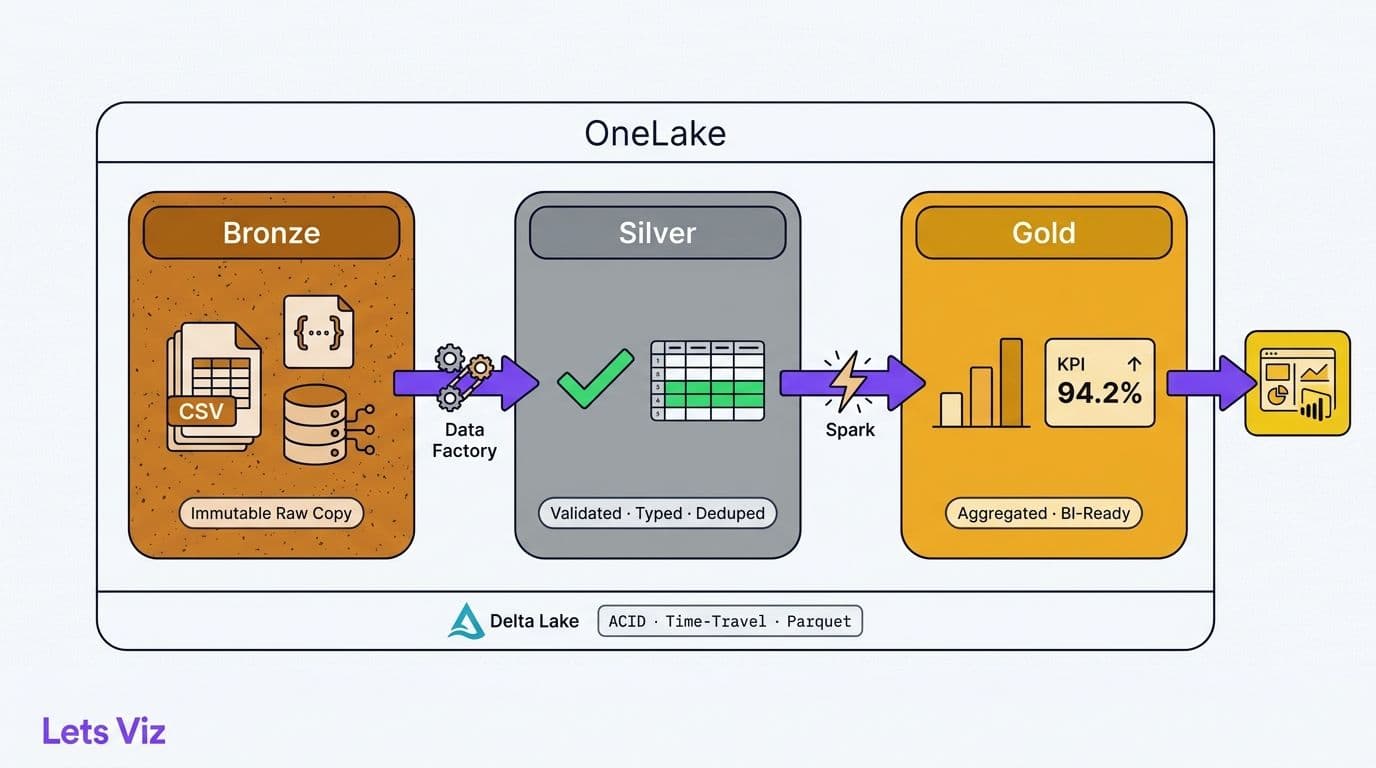
Delta Lake is the open-source storage format that gives OneLake tables their enterprise-grade characteristics:
ACID transactions - concurrent writes do not corrupt tables, which is critical for healthcare pipelines where multiple data feeds land simultaneously.
Schema enforcement - once a table schema is registered, column types are validated at write time, preventing silent data corruption across pipelines.
Time travel - every Delta table retains a full change history, enabling rollback to any prior snapshot. For finance teams managing general ledger or audit data, this is a built-in audit trail without additional tooling.
Lakehouse tables come in two varieties. Managed tables are fully governed by Fabric - the platform owns the underlying Delta files and manages the schema. External (unmanaged) tables point to Delta files stored elsewhere in OneLake, allowing engineering teams to register existing data assets without copying them. This pattern is common in healthcare organizations that already have structured claims files in Azure storage and want to surface them in Fabric without a full migration. For teams building toward HIPAA-compliant reporting environments, OneLake's centralized access control is a useful foundation - one covered in our HIPAA-compliant analytics dashboard best practices checklist.
How Does the SQL Analytics Endpoint Work in Fabric?
Every Fabric Lakehouse automatically generates a SQL analytics endpoint - a serverless, read-only SQL interface that reflects all managed Delta tables in the Lakehouse. No configuration is required: as soon as a table is created in the Lakehouse, it appears in the endpoint and is immediately queryable via T-SQL.
This is the layer that most BI leads care about. Power BI Desktop connects to the SQL analytics endpoint using a standard SQL Server connection string, indistinguishable from connecting to Azure SQL Database. Existing reports pointed at Azure SQL or Synapse serverless SQL can be redirected to the Lakehouse endpoint with minimal changes. Data analysts who do not use Spark can write standard T-SQL SELECT statements and get performant results directly against Delta Parquet files on OneLake.
The endpoint supports views, column-level security, and object-level permissions - governance features that matter in regulated industries. A finance director managing sensitive compensation or pricing data can grant analysts access to revenue columns while restricting margin or salary columns through SQL views, all without creating a separate data mart. Teams already automating financial reporting workflows will find this endpoint is the natural integration point described in our guide to automating monthly financial reporting in Power BI.
The endpoint does not support writes. All data modifications happen through the Lakehouse Files or Tables interface, or via Spark notebooks or Eventstream. This read-write separation is intentional - it protects Delta table consistency and prevents accidental schema mutations by SQL users who have query access but should not control data structure.
| Feature | Lakehouse SQL Endpoint | Fabric Data Warehouse |
|---|---|---|
| Write support | Read-only | Full DML (INSERT, UPDATE, DELETE) |
| Storage format | Delta Parquet (auto-managed) | Delta Parquet (user-managed) |
| Schema application | At read time | Enforced at write time |
| Best use case | BI queries on ingested data | Curated, governed data mart |
| T-SQL scope | SELECT, views, column security | Full T-SQL including stored procedures |
| Spark access | Shared OneLake files | Shared OneLake files |
How to Filter Data in Microsoft Fabric: SQL Endpoints, Dataflows, and Spark Notebooks
For Power BI analysts making their first move into Fabric, one of the most practical questions is how to filter data in Microsoft Fabric before it reaches a report. Fabric gives you three distinct filtering surfaces, each suited to a different skill level and use case. Applying filters as early as possible in the pipeline - at the Spark or SQL layer rather than inside Power BI - means the semantic model and reports operate on a pre-filtered, right-sized dataset instead of pulling full table scans at refresh time.
Filtering via the SQL analytics endpoint is the most familiar path for anyone comfortable with T-SQL. Open the SQL analytics endpoint from the Fabric workspace, select "New SQL query," and write a standard SELECT with a WHERE clause:
```sql
SELECT
patient_id,
claim_date,
paid_amount
FROM claims_silver
WHERE claim_date >= '2026-01-01'
AND claim_status = 'PAID';
```
Save that query as a view and it appears immediately in the endpoint's schema, ready for Power BI to connect to in Import or DirectLake mode. This is the recommended first step for Power BI analysts: define your filter logic once as a view, then point reports at the view. No Spark knowledge required.
Filtering via Dataflows Gen2 is the bridge for analysts already comfortable with Power Query. Create a Dataflow Gen2 from any Fabric workspace, connect to the Lakehouse as a source, and apply row filters and column selection using the Power Query editor - the same interface used in Power BI Desktop. The filtered output writes directly into a Lakehouse Delta table. Dataflows Gen2 supports incremental refresh, so large source tables can be filtered and updated incrementally without a full reload on each run - a significant performance improvement over Power BI dataflows for tables exceeding tens of millions of rows.
Filtering via Spark notebooks gives data engineers the most control. A notebook reads a full Delta table using PySpark, applies partition pruning and predicate pushdown with `.filter()` or `.where()`, then writes a filtered subset to a new Lakehouse table:
```python
from pyspark.sql import SparkSession
spark = SparkSession.builder.getOrCreate()
df = spark.read.format("delta").load("Tables/claims_silver")
filtered_df = df.filter(
(df["claim_date"] >= "2026-01-01") &
(df["claim_status"] == "PAID")
)
filtered_df.write.format("delta").mode("overwrite").saveAsTable("claims_paid_2026")
```
Delta Lake's partition pruning means Fabric reads only the relevant Parquet files. Filtering a 500-million-row claims table by year typically scans only the partitions for that year, not the full dataset. The resulting `claims_paid_2026` table appears immediately in the SQL endpoint and the default semantic model - no additional registration step needed.
The right tool depends on where you are in the stack. SQL endpoint views suit analysts who own the report layer and want governance through T-SQL permissions. Dataflows Gen2 suit Power Query users who want a no-code incremental pattern. Spark notebooks suit engineers handling large-volume transformations or complex multi-table logic before data reaches the BI layer.
How Does Real-Time Data Ingestion Work in a Microsoft Fabric Lakehouse?
Real-time data ingestion into a Microsoft Fabric Lakehouse is handled through Fabric Eventstream - the managed, no-code streaming pipeline inside the Real-Time Intelligence workload. Where Spark notebooks and Dataflows Gen2 serve batch and micro-batch patterns, Eventstream is designed for continuous, sub-second ingestion from event sources like Azure Event Hubs, IoT Hub, Kafka-compatible endpoints, and CDC feeds from operational databases. For finance teams processing trade confirmations, payment authorizations, or fraud signals, and for operational teams ingesting sensor or telemetry data, Eventstream delivers managed Delta Lake tables that are queryable within seconds of the source event firing.
The following walkthrough covers the end-to-end pipeline a data engineer would build for a low-latency finance or operations use case.
Step 1 - Create an Eventstream item in your Fabric workspace.
From the Fabric workspace, select New > Eventstream. Give it a descriptive name such as `payments-realtime-stream`. The editor opens as a canvas with a source, transformation, and destination topology laid out visually.
Step 2 - Connect a source.
Select Add Source and choose your event producer. Azure Event Hubs is the most common choice for finance architectures. Provide the Event Hub namespace, hub name, consumer group, and connection string. For Kafka-compatible sources, Eventstream accepts standard Kafka bootstrap server credentials with no additional broker configuration. The source begins buffering events immediately once connected.
Step 3 - Add optional stream transformations.
Before events land in the Lakehouse, Eventstream supports inline transformations directly on the canvas: filtering by field value, projecting only required columns, aggregating over tumbling or hopping time windows, and joining two streams on a shared key. A fraud detection pipeline might apply a 30-second tumbling window aggregation to count authorization attempts per card number before writing to Delta - flagging burst patterns without any external Spark compute. These transformations execute inside the Eventstream managed runtime, not inside the Lakehouse, keeping ingestion latency decoupled from Spark job scheduling.
Step 4 - Route the output to a Lakehouse destination.
Select Add Destination > Lakehouse. Point to the target workspace and Lakehouse, then specify the destination table name. Eventstream writes the stream as a managed Delta table inside the Lakehouse `Tables/` path. Delta Lake's transaction log handles ACID guarantees automatically - concurrent Eventstream writes and Spark batch reads do not conflict, because Delta serializes operations through the log without locking the table for readers.
Step 5 - Verify in the SQL analytics endpoint.
Once events begin flowing, open the Lakehouse SQL analytics endpoint. The new Delta table appears within minutes and is immediately queryable via T-SQL:
```sql
SELECT
card_number,
event_time,
transaction_amount,
authorization_status
FROM payments_realtime
WHERE event_time >= DATEADD(MINUTE, -15, GETUTCDATE())
ORDER BY event_time DESC;
```
Power BI in DirectLake mode reads this table with near-zero latency - no import refresh cycle, no scheduled dataset update. A finance operations dashboard showing real-time payment authorization rates updates as Eventstream writes new events, typically within 5 to 10 seconds of the source event.
Step 6 - Partition the Delta table for query efficiency.
For high-volume streams - a payments feed processing thousands of events per second - partition the destination table by a date or hour column. Eventstream's Managed Table write mode generates partition-aware Delta files automatically. Partitioning by `event_date` means T-SQL queries filtering by date scan only the relevant Parquet files, keeping the SQL endpoint fast even as the table grows to hundreds of millions of rows across months.
The full Eventstream-to-Lakehouse pipeline - from source event to queryable Delta table to live Power BI visual - requires no custom Spark code and no external Kafka consumer management. It is the fastest path to low-latency operational analytics inside Fabric for engineering teams that need streaming without the overhead of a self-managed Kafka cluster or a separate streaming platform license.
What Is the Semantic Model Layer and Why Does It Matter?
Above the SQL analytics endpoint sits the semantic model - the business logic layer that defines how Power BI interprets Lakehouse data. The semantic model maps raw column names to business-friendly measure names, defines relationships between tables, applies row-level security roles, and organizes fields into display folders that report authors can navigate without needing to understand the underlying Delta schema.
In Microsoft Fabric, a default semantic model is created and kept synchronized automatically when a Lakehouse is provisioned. It mirrors every managed table in the Lakehouse - including tables written by Eventstream - and updates automatically as underlying data changes. No manual refresh schedule is required. BI engineers can extend this default model in Power BI Desktop or the web-based model editor by adding DAX measures, calculated tables, and role-based security rules that reflect the organization's governance requirements.
For BI leads new to Fabric, this is the most significant architectural shift. The traditional Power BI pipeline involved five steps: extract from source, load into a dedicated warehouse, build a Power BI dataset manually, schedule refresh jobs, then build reports. With the Fabric Lakehouse, steps two through four collapse: data lands in the Lakehouse via Spark, a pipeline, or Eventstream for streaming sources, the SQL endpoint exposes it, and the semantic model is generated automatically. BI engineers spend less time maintaining data pipelines and more time on business logic and governance.
According to Future Market Insights, the AI consulting services market - valued at USD 11.07 billion in 2025 and projected to reach USD 90.99 billion by 2035 at a 26.2% CAGR - has reached an estimated USD 14 billion in 2026 as AI integration projects accelerate across healthcare and finance sectors, a pace that reflects growing organizational demand for platforms that reduce integration overhead rather than add to it. Fabric's semantic model layer directly addresses that demand. Finance teams already exploring AI-augmented analytics will find the connection to advanced Power BI capabilities explored in our AI-powered Power BI consulting guide for finance teams.
Microsoft Fabric vs Azure Synapse Analytics: What Changed?
The Microsoft Fabric vs Azure Synapse Analytics evaluation is the most common architecture question data engineers face in 2026. The direct answer: Fabric is the successor. Azure Synapse Analytics remains supported but is in maintenance mode - new features, AI workloads, and real-time capabilities are being built exclusively for Fabric.
The component mapping between the two platforms:
| Synapse Analytics Component | Microsoft Fabric Equivalent |
|---|---|
| Synapse Spark pools | Fabric Spark (Data Engineering workload) |
| Synapse dedicated SQL pool | Fabric Data Warehouse |
| Synapse serverless SQL pool | Lakehouse SQL analytics endpoint |
| Synapse Pipelines | Data Factory in Fabric |
| Azure Machine Learning integration | Fabric Data Science workload |
| Power BI Premium datasets | Fabric semantic models on OneLake |
| Azure Purview governance | Microsoft Purview in the Fabric hub |
The fundamental architectural change is unified storage on OneLake. In Synapse, each compute engine - Spark, dedicated SQL, serverless SQL - maintained its own storage tier, which meant data movement between engines was common and operationally expensive. In Fabric, all workloads read from and write to the same OneLake Delta Parquet files. A Spark notebook and a T-SQL query can operate on the same table simultaneously without any data copy.
Licensing shifted from variable consumption billing to capacity-based pricing. Organizations purchase F-SKU or P-SKU capacity measured in Compute Units (CUs), and all Fabric workloads within that capacity share the pool. For CFOs and finance directors, this produces a predictable monthly cost line rather than a variable Azure spend that fluctuates with query volume - a change that simplifies cloud financial governance considerably. Organizations migrating from Synapse dedicated SQL pools to equivalent F-SKU capacity frequently report 20-40% reductions in monthly data platform costs when workloads are right-sized during migration. The largest savings typically come from eliminating DWU reservation charges for overnight and weekend windows - a pattern especially common in healthcare and finance organizations where batch loads run nightly but SQL query demand drops to near zero outside business hours.
The Microsoft Fabric DP-600 certification - formally the DP-600: Implementing Analytics Solutions Using Microsoft Fabric exam - is the Microsoft-recommended credential for data engineers transitioning from Synapse. A Microsoft Fabric DP-600 certification study guide approach covers the full breadth of Microsoft Fabric workloads explained: Lakehouse, Data Warehouse, Spark Data Engineering, Data Factory, Real-Time Intelligence, and Data Science. Teams assessing whether to build in-house Fabric expertise or engage a consulting partner will find a structured framework in our guide on when to outsource Power BI management.
How Does Microsoft Fabric Lakehouse Handle GDPR, HIPAA, and Data Residency Compliance?
For healthcare and finance organizations operating across the US, UK, EU, and Canada, Microsoft Fabric Lakehouse GDPR, HIPAA, and cross-border compliance comes down to four concrete platform capabilities: geo-fenced data residency, layered row-level security, unified audit logging, and Purview-backed access governance. Each maps directly to a regulatory obligation, and together they make a Fabric-based architecture defensible under HIPAA's Security Rule, GDPR's data sovereignty requirements, and Canada's PHIPA and PIPEDA frameworks.
Data residency is enforced at the capacity level. When an organization provisions a Fabric capacity, it selects a specific Azure region - UK South or West Europe for GDPR-scoped workloads, Canada Central or Canada East for PHIPA requirements, and US-based regions for HIPAA-covered entities. OneLake stores all Delta Parquet files within that region's Azure storage infrastructure and does not replicate data across regional boundaries unless the organization explicitly configures cross-region replication. For organizations subject to GDPR Article 44 restrictions on international data transfers, this means EU patient or customer data stays within the EU geography without additional configuration beyond region selection at capacity provisioning time.
Row-level security (RLS) operates at two independent layers. At the semantic model layer, DAX-based RLS roles restrict which rows each user or group can see in Power BI reports - a clinician sees only their patient panel, a regional finance controller sees only their entity's transaction records. These roles apply regardless of whether the user accesses data through a Power BI report or a direct semantic model connection. At the SQL analytics endpoint layer, object-level permissions and column-level security grant or deny access to specific tables and columns via T-SQL GRANT and DENY statements. A compliance officer can, for example, expose de-identified claims columns to a broad analyst group while restricting columns containing protected health information to a named subset of users - all enforced at the storage query layer before data reaches any client tool.
Audit logs for Microsoft Fabric Lakehouse activity flow into the Microsoft 365 unified audit log, which captures workspace access events, item-level reads, pipeline runs, and semantic model refreshes. These logs are accessible through Microsoft Purview's Audit solution and can be exported to a Log Analytics workspace for long-term retention policies that meet HIPAA's six-year record retention requirement or GDPR's accountability documentation obligations. For SOC 2-audited finance firms, the same audit stream serves as evidence for the availability, confidentiality, and security trust service criteria.
Purview-backed access controls add a governance layer above workspace permissions. Microsoft Purview integrates natively with Fabric, allowing data stewards to apply Microsoft Information Protection sensitivity labels - Confidential, Highly Confidential, PHI - directly to Lakehouse tables and downstream semantic models. These labels propagate automatically to Power BI reports that connect to labeled tables, applying visual watermarks and export restrictions without requiring report authors to configure protection manually. Purview data policies can further restrict which service principals, user accounts, or Entra ID groups are permitted to read specific Lakehouse items - enforcing least-privilege access at the catalog level, independent of workspace role assignments.
For UK and EU organizations, this combination of regional data residency, sensitivity labeling, and Purview audit coverage provides a documentable compliance posture under GDPR's accountability principle. For US healthcare entities, row-level security at both the semantic model and SQL layers, combined with six-year-capable audit retention, addresses the HIPAA Security Rule's access control and audit control implementation specifications. Canadian organizations subject to both federal PIPEDA and provincial health privacy laws benefit from the same stack running within Canadian Azure regions, with sensitivity labels that can be scoped to tag data containing personal health information under PHIPA definitions.
When Should Healthcare and Finance Teams Adopt Microsoft Fabric?
The Fabric Lakehouse architecture becomes a clear fit for mid-market healthcare and finance organizations in five specific scenarios.
Data volumes have outgrown Power BI dataflows. When source tables routinely exceed tens of millions of rows - clinical data warehouses, claims feeds, ERP transaction tables - Spark-based ingestion into a Lakehouse consistently outperforms Power BI dataflow refreshes. The performance gap widens as data volume grows.
Multiple teams need the same data in different tools. OneLake's open Delta Parquet format means a data science team running Python notebooks works from the same files a SQL analyst queries via T-SQL - no copy, no reconciliation problem, no version divergence between teams.
Operational workloads require low-latency analytics. Finance teams monitoring intraday payment flows, fraud signals, or trading positions benefit from Eventstream writing directly to Lakehouse Delta tables - giving dashboards and alerting systems access to data seconds after it leaves the source system, without a separate streaming infrastructure layer.
Compliance requires centralized auditing. Fabric workspace-level audit logs and OneLake activity tracking create a unified audit surface across all data access patterns. For HIPAA-covered entities and SOC 2-audited finance firms, this single audit trail simplifies evidence collection during regulatory reviews. Healthcare organizations building toward compliant reporting environments will recognize the principles detailed in our HIPAA-compliant analytics dashboard best practices checklist.
The organization is standardizing on Microsoft 365. Fabric capacity licenses attach to Microsoft 365 tenants. Organizations already on M365 E3 or E5 can trial Fabric capacity within an existing procurement relationship, significantly lowering the barrier to evaluation.
Leadership wants a clear path to AI-augmented analytics. Fabric's Data Science workload connects directly to Lakehouse Delta tables. The same tables feeding Power BI dashboards can also serve as training and inference data for machine learning models - without a separate data pipeline. For healthcare and finance organizations building toward AI-driven forecasting and anomaly detection, our AI analytics guide for healthcare finance teams covers the full strategic roadmap.
As healthcare analytics moves deeper into 2026, value-based care, AI-driven analytics, and payer analytics innovation - the three themes that defined 2025 according to MedInsight - are accelerating further, with generative AI now embedded in clinical decision support workflows across major health systems. All three require the kind of scalable, unified data foundation that a Fabric Lakehouse provides.
---
If your organization is evaluating Microsoft Fabric or planning a migration from Azure Synapse, the architectural decisions made in the first 90 days - how Lakehouses are structured, how capacity is sized, and how the semantic model layer is governed - determine the value you extract from the platform in the years that follow. Our Power BI and Fabric consulting practice helps mid-market healthcare and finance teams in the US and Canada design and implement Fabric architectures that are auditable, scalable, and connected to existing Power BI investments.
---
About Lets Viz: Lets Viz is a data analytics consulting firm specializing in Power BI, Microsoft Fabric, and AI-driven analytics for mid-market healthcare and finance organizations in the US and Canada since 2020. Our consultants hold Microsoft certifications including DP-600 and PL-300 and have delivered governed analytics environments for HIPAA-covered entities, regional health systems, and finance teams managing complex multi-entity reporting at scale.