Microsoft Fabric vs Power BI: What's Actually Different
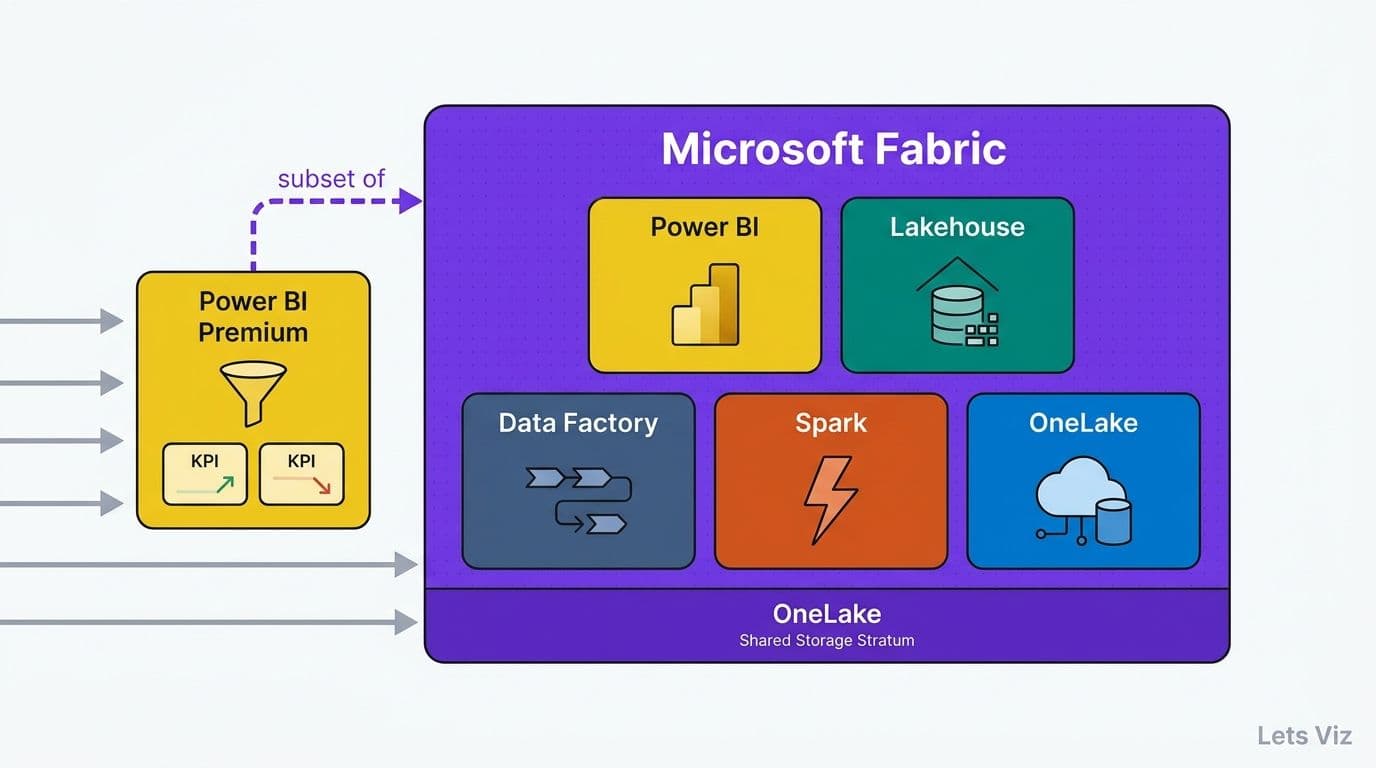
Microsoft Fabric and Power BI are not competing products - Fabric is a unified analytics platform that contains Power BI alongside a Lakehouse, Apache Spark, Data Factory, and OneLake storage in a single SaaS capacity. Power BI Premium delivers enterprise-grade reporting and semantic modelling; Fabric extends that foundation with data engineering, real-time analytics, and a shared storage layer. The decision between them hinges on data engineering maturity, data volume, and whether your organisation needs governed infrastructure alongside its reporting layer.
Key Takeaways
Microsoft Fabric is a superset of Power BI Premium - all Premium semantic models, reports, and DAX measures run unchanged inside Fabric workspaces.
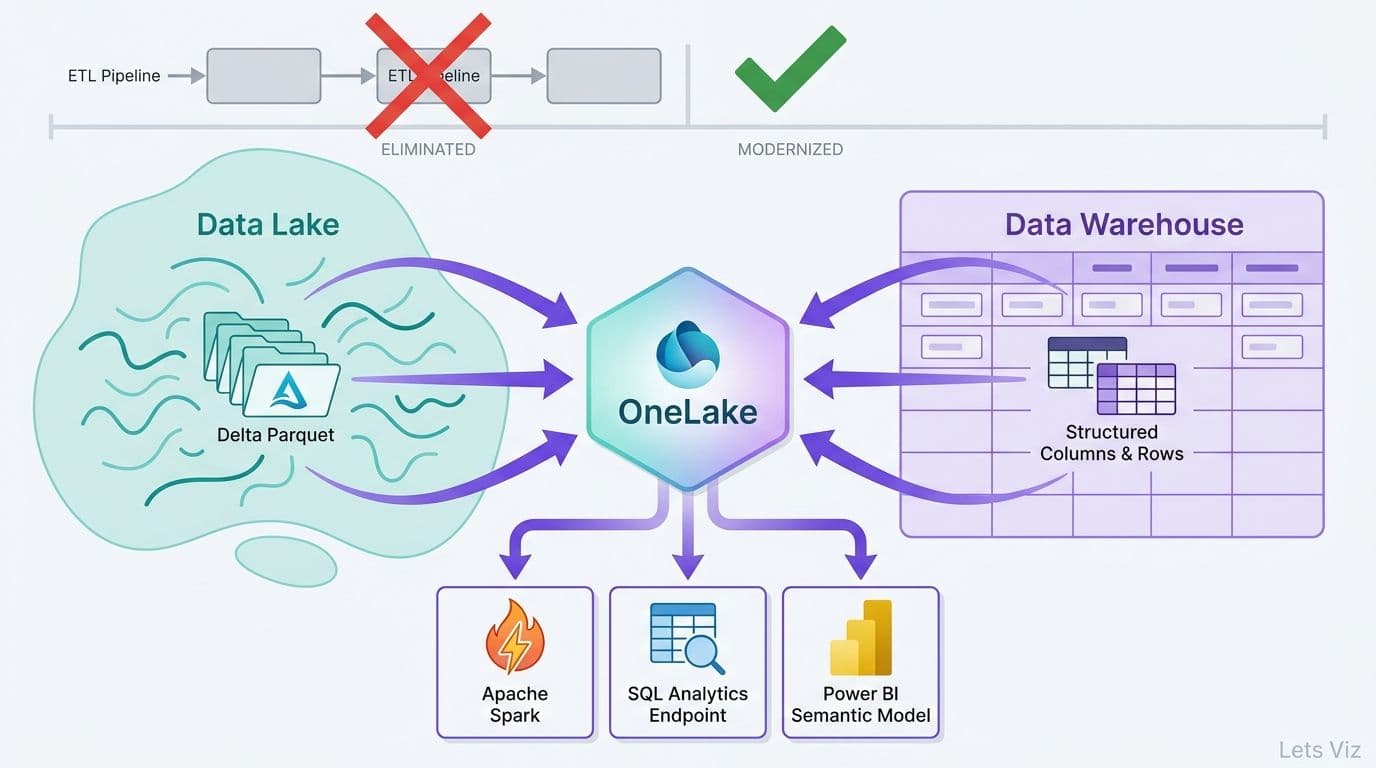
OneLake eliminates storage silos by providing a single Azure Data Lake Storage Gen2 layer shared across all Fabric workloads.
Apache Spark notebooks and Data Factory pipelines are native in Fabric; in standalone Power BI they require separately billed Azure services.
Real-time analytics via KQL databases and Eventstream handles millisecond-latency ingestion that Power BI streaming datasets alone cannot serve.
The typical migration trigger is organisations managing more than 1 TB of raw data per month with at least one dedicated data engineer on staff.
Lets Viz provides Power BI consulting for mid-market and enterprise teams across the US, UK, and Canada -- from initial model design to ongoing optimisation.
What Is Microsoft Fabric vs Power BI - and How Are They Related?
Power BI is Microsoft's self-service and enterprise BI tool, available in Pro, Premium Per User, and Premium capacity tiers. Microsoft Fabric, released for general availability in late 2023, is a unified analytics platform built on top of Power BI Premium capacity. Every Fabric workspace includes the full Power BI Premium feature set - including paginated reports, large semantic models, and XMLA read/write endpoints - while adding six new workload areas: Data Engineering (Spark), Data Factory, Data Science, Data Warehouse, Real-Time Intelligence, and OneLake.
The practical implication for decision-makers: organisations already on Power BI Premium can trial Fabric workloads without migrating existing reports or semantic models. Those on Power BI Pro or Premium Per User must upgrade to a Fabric capacity SKU - at minimum F64, which maps roughly to a P1 capacity in compute terms - to access the new workloads. For teams weighing the licensing arithmetic, our guide to Power BI consulting cost in 2026 covers per-user versus capacity pricing in detail.
According to Future Market Insights (2026), the AI consulting services market reached approximately USD 13 billion in 2026, up from USD 11.07 billion in 2025, and is projected to grow to USD 90.99 billion by 2035 — driven in significant part by enterprises consolidating fragmented data toolchains onto unified platforms precisely like Microsoft Fabric.
What Does Microsoft Fabric Add Beyond Power BI Premium?
Power BI Premium gives your organisation large model storage, incremental refresh, deployment pipelines, and multi-geo distribution. Fabric builds on that foundation with capabilities that previously required separate Azure services or third-party tools and separate billing.
OneLake - One Logical Storage Layer for All Workloads
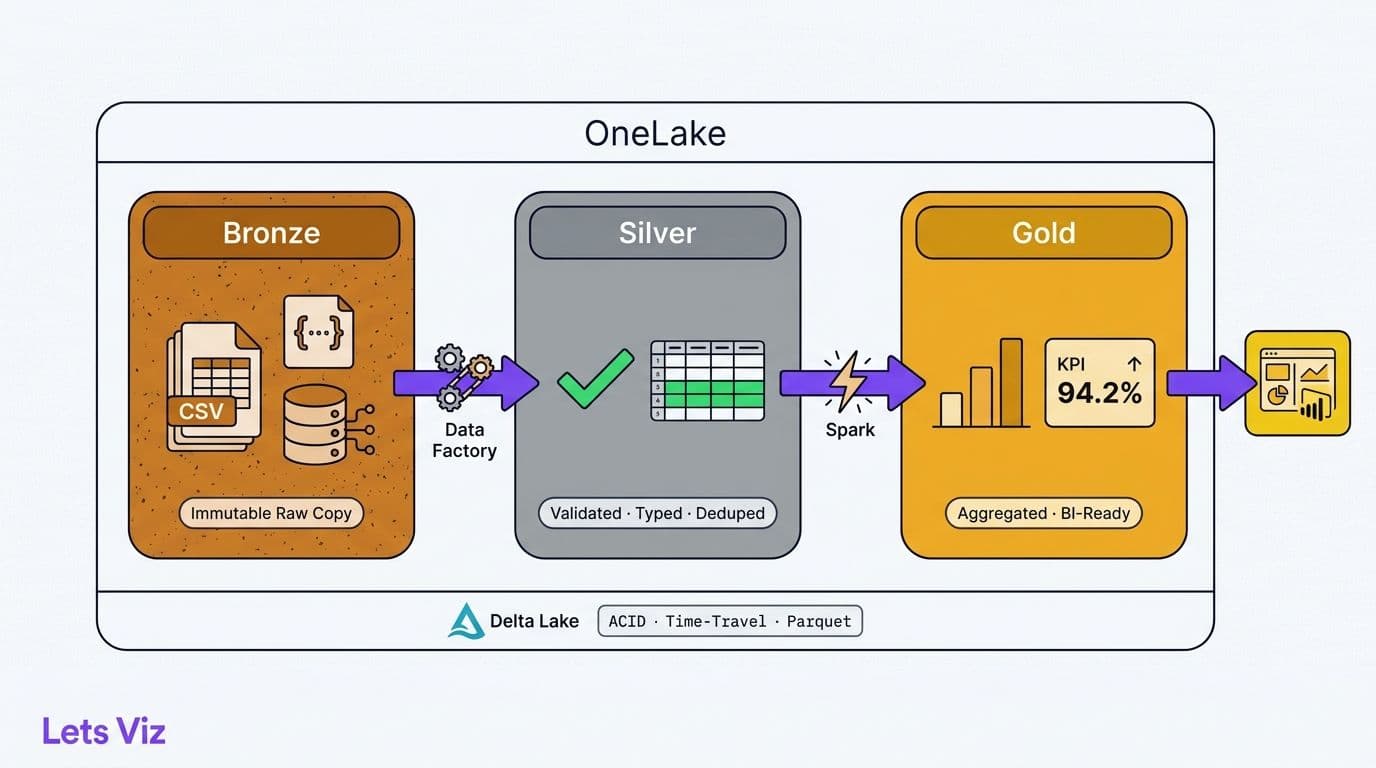
OneLake is Fabric's most structurally significant addition. It provides a single Azure Data Lake Storage Gen2 namespace shared automatically across every Fabric workload in your tenant. A Spark notebook, a SQL analytics endpoint, a KQL database, and a Power BI semantic model can all read from the same Parquet or Delta Lake files without copying data or maintaining separate pipelines. Shortcuts - logical pointers to external storage accounts or other Fabric capacities - extend OneLake's reach without physical data movement.
For regulated industries - healthcare, financial services, insurance - this matters beyond engineering convenience. A unified storage layer means a single location for data-at-rest encryption policies, role-based access controls, and audit trails. Teams managing HIPAA obligations can apply one data classification scheme across engineering and reporting layers rather than reconciling two separately governed data stores. Our HIPAA-compliant analytics dashboard checklist covers how storage architecture directly shapes compliance posture at the dashboard level.
Apache Spark Notebooks and Data Engineering
Standalone Power BI relies on Power Query (M) and Dataflows Gen2 for transformation. These are sufficient for moderate data volumes, but they have hard limits: no Python or Scala libraries, no distributed compute, and no native support for unstructured or semi-structured source formats.
Fabric's Data Engineering workload brings Apache Spark directly into the platform. Data engineers write PySpark or Scala notebooks, schedule them as Fabric pipeline activities, and output Delta Lake tables that Power BI semantic models consume through the automatic SQL analytics endpoint - all without provisioning separate Azure Databricks or Synapse Analytics resources. The operational saving is material: one environment, one permission model, one monitoring surface. For organisations currently paying for both a separate ETL orchestration tool and Power BI Premium, eliminating the middle layer frequently covers the Fabric price differential.
Real-Time Analytics - KQL Databases and Eventstream
Power BI supports near-real-time refresh via streaming datasets and DirectQuery mode, but its practical granularity is approximately one-minute intervals and it does not persist raw event records. Fabric's Real-Time Intelligence workload introduces KQL (Kusto Query Language) databases and Eventstream, which ingests from Apache Kafka, Azure Event Hubs, or IoT Hub sources at millisecond latency, stores every raw event record, and surfaces that data for both live dashboards and retrospective analysis.
For any organisation deploying a bi tool for operations and supply chain analytics, this distinction is operationally critical. A mid-size logistics operator tracking 50,000 GPS and sensor pings per hour accumulates roughly 1.2 million raw event records daily — a dataset that KQL's columnar storage can query across in seconds, and that streaming aggregates cannot reconstruct for replay. A platform that persists raw events allows analysts to replay exactly what happened at a specific moment - useful for root-cause investigations of supply disruptions, quality failures, or logistics exceptions. Aggregated streaming snapshots, which is all standalone Power BI streaming datasets offer, cannot support that replay capability.
Data Warehouse and SQL Analytics Endpoint
Fabric includes a Synapse Data Warehouse workload with a dedicated T-SQL endpoint and automatic metadata synchronisation from OneLake Lakehouses. Data teams that need ANSI SQL semantics, warehouse-layer row-level security, and compatibility with JDBC/ODBC clients - common in financial services and regulated healthcare - get a managed warehouse without a separate Synapse workspace and its associated network configuration overhead.
Microsoft Fabric vs Power BI Premium: Licensing and Total Cost
The licensing model is the most common source of confusion among decision-makers. The table below simplifies the core comparison:
| Dimension | Power BI Premium (P-SKU) | Microsoft Fabric (F-SKU) |
|---|---|---|
| Base unit | P1 (8 v-cores, ~$4,995/month) | F64 (64 CUs, ~$6,272/month) |
| Power BI features | Full Premium feature set | Full Premium feature set |
| OneLake storage | Not included - separate ADLS | Included per workspace |
| Spark compute | Not included - separate service | Native Fabric capacity |
| Real-time KQL | Not included | Native Fabric capacity |
| Data Factory | Not included - separate billing | Native Fabric capacity |
| Overage model | Reserved capacity, burst limited | Capacity Units, smoothed bursting |
| Trial available | Yes (P1 trial) | Yes (60-day Fabric trial) |
The power bi premium vs pro licensing question typically resolves before the Fabric decision arises: Pro is per-user ($10-14/user/month), appropriate for teams under 25 users consuming shared reports; Premium and Fabric are capacity-based, designed for organisations publishing content to larger internal or external audiences without per-user content licences.
For power bi vs tableau total cost of ownership comparisons, Fabric changes the calculation by consolidating engineering infrastructure costs onto a single invoice. Organisations running a separate ETL tool, a separate data lake storage account, and Power BI Premium simultaneously often find Fabric's consolidated billing competitive once they account for reduced DevOps overhead and eliminated data movement costs. Our managed Power BI vs in-house BI team cost guide provides a total-cost framework that adapts directly to the Fabric upgrade decision.
According to Market Research Future (2026), the Healthcare Financial Analytics Market is projected to grow at an 8.9% CAGR through 2035, driven partly by the need for integrated data platforms that reduce the cost and compliance risk of maintaining separate analytical and operational data stores.
When Should Your Organisation Choose Fabric Over Power BI Premium?
Fabric is not universally the right choice - the additional cost and engineering overhead are unjustified for many organisations. The decision maps cleanly to a two-path framework.
Choose Power BI Premium (or Premium Per User) when:
Transformations are handled entirely in Power Query or Dataflows.
Data volumes are below 1 TB per month.
No data engineers are on staff or planned within 12 months.
The use case is reporting and BI only - no ML pipelines, no event streaming, no ad hoc SQL.
On-premises data stays on-premises with no cloud data lake strategy planned.
Choose Microsoft Fabric when:
You currently pay for separate Azure Data Factory, Databricks, or Synapse alongside Power BI.
Engineers or data scientists need Python or Spark access to raw data.
A use case requires sub-minute event data latency - IoT, live operations, or capital markets.
Compliance requires a unified audit trail across engineering and reporting data stores.
You are on a regulated-industry data modernisation programme where storage consolidation is a governance requirement.
Our decision framework for outsourcing Power BI management applies equally here: internal engineering maturity is the first gate before evaluating any platform's advanced capability.
What Company Profile Gets the Most Value from Fabric?
The organisations extracting the highest return on Fabric investment in regulated industries share a consistent profile.
Data volume and velocity: More than 1 TB of ingested data per month, with at least one stream requiring sub-hourly freshness. Healthcare systems ingesting electronic health record events, financial services firms consolidating transaction feeds, and logistics operators tracking GPS and sensor telemetry all fit this pattern.
Engineering maturity: At least one full-time data engineer comfortable with Python or SQL — and realistically, capacity for 150–200 dedicated engineering hours in the first six months to stand up Lakehouse pipelines, tune Spark jobs, and establish OneLake governance. Without that ramp budget, the platform's cost advantage over a well-tuned Power BI Premium deployment rarely materialises within the first year. Fabric's Spark and warehouse workloads require engineering skills that pure-BI analyst teams do not typically possess. Organisations without this capability often deliver more value by extending Power BI Premium with a managed service than by adopting Fabric prematurely.
Multi-workload consolidation intent: Fabric's value compounds when it replaces three or more separate Azure services. If you are replacing only one tool, the cost arithmetic rarely favours the upgrade.
Hybrid and on-premises requirements: Teams managing power bi on-premises data gateway configurations for regulated data that cannot leave a private network should evaluate Fabric's VNet data gateway support and Azure Private Link integration before committing. Fabric's private connectivity story has matured significantly through 2025 and into 2026, with VNet data gateway support now generally available across all Fabric SKUs, but hybrid architectures involving mainframe or legacy on-premises sources still require careful network design.
The World Economic Forum (2026) noted that over 100 experts representing more than 50 financial services organisations are actively working to govern AI and analytics infrastructure - a signal that multi-workload data governance, precisely what Fabric's unified permission model addresses, is a board-level priority across regulated industries.
How Does Fabric Affect Existing DAX Models and Power BI Reports?
Existing Power BI semantic models, DAX measures, and reports migrate to Fabric without modification. DAX patterns including crossfilter expressions and complex filter-context functions such as ALLSELECTED vs ALL behave identically because the Power BI Analysis Services engine runs unchanged inside Fabric capacity. Teams that have invested in sophisticated DAX logic do not face a rebuild.
The one meaningful new option is Direct Lake mode - a storage mode exclusive to Fabric that reads Delta Lake files from OneLake at near-import speed without query-time overhead or scheduled refresh latency. For existing semantic models, Direct Lake is an opt-in migration, not a forced change. Teams managing large financial or clinical data models - where import refresh windows are already straining scheduled maintenance cycles - often find Direct Lake delivers a measurable improvement in both data freshness and perceived dashboard performance.
A clarification worth making for operations teams: Power BI and Power Automate are separate products serving different purposes. Power BI is a data visualisation and analytics platform; Power Automate is a workflow automation tool. The two integrate - Power Automate can trigger data refreshes or send alerts based on Power BI metrics - but choosing Fabric does not alter your Power Automate licencing or existing workflow automations. They remain independent services within the Microsoft 365 and Azure ecosystem.
For finance teams specifically, our guide to AI-powered Power BI consulting for finance teams covers how Fabric's Direct Lake mode and Spark-powered transformations are accelerating financial close and regulatory reporting workflows in 2026.
---
Estimate your Fabric migration scope and cost with the Instant project cost calculator.
---
About Lets Viz: Lets Viz has delivered data analytics consulting for finance and healthcare organisations since 2020, specialising in Power BI, Microsoft Fabric, and AI-assisted reporting architectures. Our certified consultants have designed compliant analytics solutions for regulated-industry clients across HIPAA-governed health systems and SEC-regulated financial advisors. We combine platform implementation expertise with ongoing managed services to help mid-market teams build durable, scalable analytics infrastructure.