Tableau
Tableau Funtion: LOG
Tableau Function: LOG
Category: Number Functions
The LOG() function in Tableau is a mathematical function used to compute the logarithm of a number with a specified base.
In other words, it answers the question:
“To what power must the base be raised to produce a given number?”
Mathematically:
LOG( x, base )= logbase( x )
Purpose
The LOG() function allows users to analyze exponential relationships, normalize data distributions, and transform nonlinear trends into linear ones.
It is a versatile mathematical tool for handling data that grows or decays exponentially, such as population, financial returns, or scientific data.
Type of Calculations It Performs
Category: Mathematical / Transformational
Operation: Calculates the logarithm of a positive number with a specified base.
Use Cases: Scaling data, growth rate analysis, and log-based regression modeling.
Practical Use Cases
Data normalization: Reducing skewness in large numeric ranges.
Trend analysis: Identifying exponential growth or decay trends.
Scientific data processing: Handling data in scientific notation or power relationships.
Financial modeling: Calculating growth rates, interest rates, or returns over time.
Regression analysis: Transforming exponential data to linear relationships for better modeling.
LOG(number, base)
| Parameter | Type | Description |
|---|---|---|
number | Numeric (scalar, table, or column) | The positive numeric value or field whose logarithm is to be calculated. Must be greater than 0. |
base | Numeric (scalar) | The base of the logarithm. Common bases are 10 (common log) and 2 (binary log). Must be greater than 0 and not equal to 1. |
How It Works?
The mathematical definition of the logarithm is:
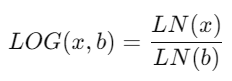
where:
LN(x)is the natural logarithm (base e).bis the chosen base.
Interpretation:
The LOG() function determines how many times the base must be multiplied by itself to reach the input number.
Example Calculation:
because 102 =100
LOG( 8, 2 ) = 3 because 23 = 8
LOG( 32, 2 ) = 5 because 25 = 32
What Does It Return?
Type: Floating-point number
Meaning: Returns the logarithm of the given number to the specified base.
Error Handling: Returns NULL if
number ≤ 0orbase ≤ 0orbase = 1.
When Should We Use It?
Use the LOG() function when:
You’re working with exponential data (growth or decay).
You need data normalization for visualization or regression.
You want to compare magnitudes of growth across scales.
You’re computing decibel (dB) or signal ratios in engineering data.
You need to convert between different log bases for analysis compatibility.
Basic Usage
LOG(100, 10)
Result: 2
Explanation: Because 102 = 100
Column Usage (Field Example)
LOG([Sales], 10)
Description: Computes the base-10 logarithm of each value in [Sales].
Useful for compressing large sales ranges or visualizing growth patterns.
| Sales | LOG(Sales, 10) |
|---|---|
| 10 | 1 |
| 100 | 2 |
| 1000 | 3 |
Advanced Usage (Dynamic Base or Transformations)
a. Combining with LN()
LOG([Profit], 2)
Equivalent to:
LN([Profit]) / LN(2)
Explanation: Converts a natural logarithm into a binary logarithm.
b. Continuous Growth Rate Example
(LN([Ending Value]) - LN([Starting Value])) / [Time Period]
While using LN(), this formula can be adapted using LOG() for a different base if needed.
c. Dynamic Logarithmic Base
LOG([Revenue], [Custom Base])
This allows users to define their own logarithmic scales interactively.
Tips and Tricks
Use base 10 for standard logarithmic scaling (common in business data).
Use base 2 for binary scaling (common in computing or digital systems).
Use base e (≈2.71828) for natural exponential models — equivalent to the
LN()function.Combine with
EXP()to reverse logarithmic transformations:EXP( LOG( x, e ) ) = x
Avoid zero or negative inputs. Tableau will return NULL because logarithms are undefined for such values.
Avoid using base = 1 as logarithms with base 1 are undefined.
Related Functions You Might Need
| Function | Purpose |
|---|---|
LN() | Calculates the natural logarithm (base e). |
EXP() | Returns e raised to a specified power (inverse of LN). |
POWER() | Raises a number to a given exponent (inverse of LOG). |
SQRT() | Returns the square root of a number — similar in scale reduction. |
ABS() | Returns the absolute value, useful for ensuring positive inputs before applying LOG(). |
We’ve got plenty of resources to help you master Tableau functions. For more details, check out the official Tableau documentation. Or, if you’re ready for more practice, let’s dive into related functions and build your Tableau skills further!
If you’re ready to harness the full power of Tableau and elevate your data analytics capabilities, our expert Tableau consulting services are here to guide you. Whether you need support with building advanced calculated fields, creating dynamic visual dashboards, or optimizing your data sources for peak performance, our team of experienced Tableau consultants delivers customized solutions designed for your business needs. Visit our Tableau Consulting page to discover how we can help your organization turn data into impactful, insight-driven decisions.
1. What does the LOG function do in Tableau?
It returns the logarithm of a number to a specified base, helping analyze exponential data.
2. What is the difference between LOG() and LN()?
LOG() allows specifying a base (e.g., 10 or 2), while LN() always uses base e (≈2.71828).
3. Can I use LOG() for negative or zero values?
No. The input must be greater than 0; otherwise, Tableau returns NULL.
4. How do I reverse a logarithmic transformation?
Use the POWER() function:POWER(base, LOG(x, base)) = x
5. What base should I use for the LOG function?
Use base 10 for business or general data, base 2 for binary or digital systems, and base e for natural exponential models.