Power BI AI Rollout Plan: A Realistic 90-Day Guide
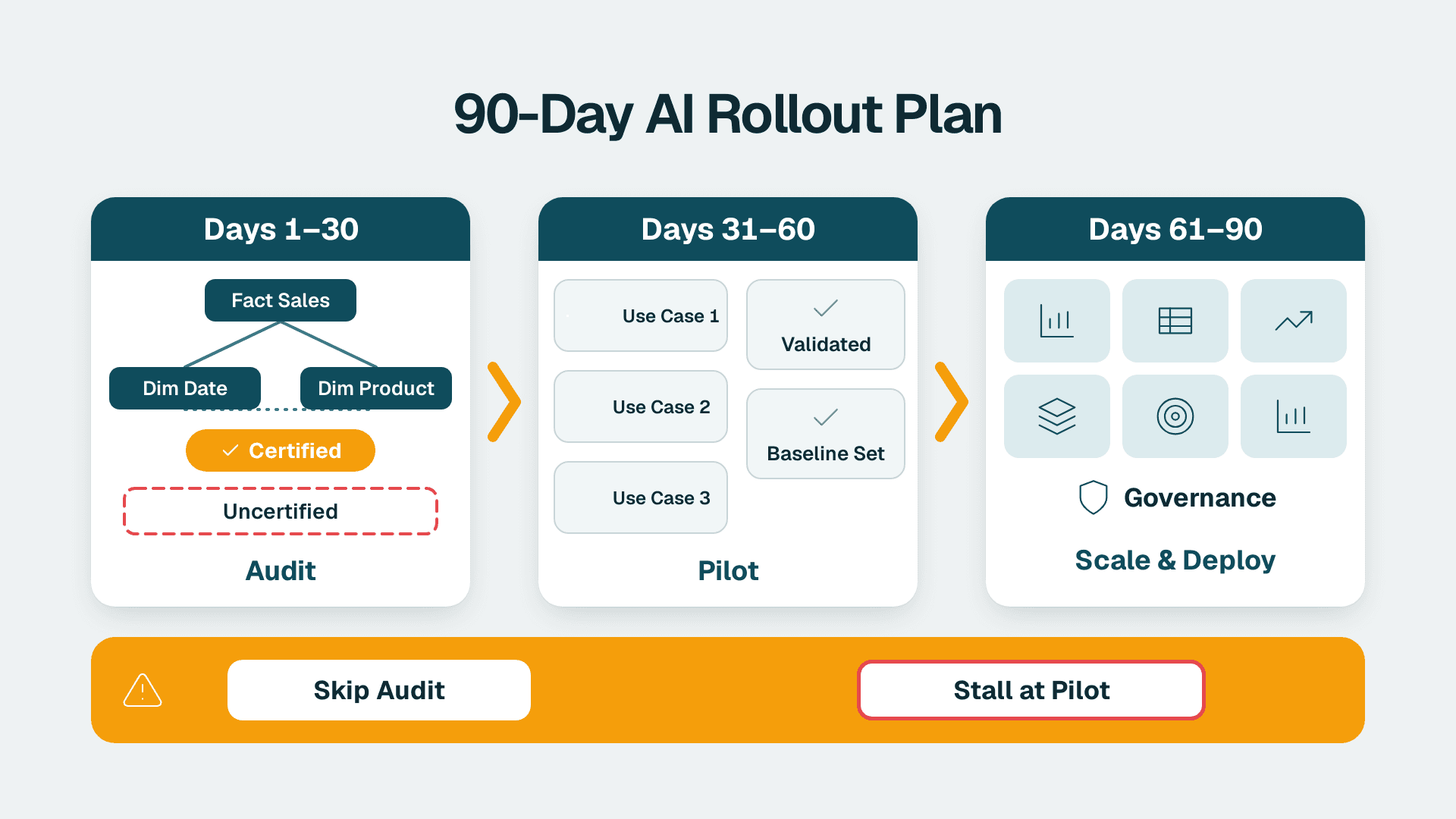
A realistic Power BI AI rollout runs ninety days in three discrete phases: a semantic model audit and data baseline (days 1-30), a controlled pilot on exactly three use cases with a structured validation protocol (days 31-60), and formal governance sign-off plus scaled deployment (days 61-90). Organizations that skip the audit phase consistently stall at pilot stage because Microsoft Copilot in Power BI requires well-structured, certified semantic models - not ad hoc DirectQuery connections or poorly named measures. Plan for the audit first, and the rest follows predictably.
Key Takeaways
A semantic model audit in days 1-30 is not optional: Copilot accuracy depends directly on model quality and column naming conventions
Piloting exactly three use cases (not ten) forces disciplined validation and produces reusable documentation for governance
Healthcare and finance teams must embed HIPAA, GDPR, or PIPEDA controls into phase 2 - retrofitting compliance at phase 3 causes delays
Days 61-90 are governance-gated: sign-off from IT, legal, and executive stakeholders must precede expanded rollout
A managed Power BI partner compresses each phase by bringing pre-built audit frameworks and avoiding common model anti-patterns
How Do You Build a Realistic 90-Day Power BI AI Rollout Plan?
A realistic plan treats AI readiness as an infrastructure problem before it becomes a features problem. Most mid-market organizations discover during an AI readiness audit for analytics teams that their existing Power BI environment - typically built over three to five years - contains measure naming inconsistencies, duplicate tables, and hidden columns that confuse natural language queries. Copilot in Power BI, available as part of Microsoft Fabric per Microsoft's 2025 release documentation, relies on the semantic model to understand what users mean when they type "show me revenue by region last quarter." If "revenue" exists under seven different names across three datasets, the feature produces unreliable answers.
This is why teams that invest in Power BI consulting (Copilot-ready) begin every engagement with a model audit rather than immediately enabling Copilot in the admin portal. The ninety-day structure below is designed for a 50-150 seat analytics team at a mid-market company in healthcare or financial services.
| Phase | Days | Key Activities | Success Gate |
|---|---|---|---|
| Semantic Model Audit + Baseline | 1-30 | Inventory all datasets, score model health, document data lineage, establish KPI baseline | Audit report signed off by data team lead |
| Pilot on 3 Use Cases | 31-60 | Enable Copilot on pilot workspace, validate outputs vs. ground truth, document edge cases | Accuracy rate meets defined threshold on all 3 use cases |
| Governance Sign-Off + Expanded Rollout | 61-90 | Draft AI use policy, complete compliance review, enable for broader user group | IT, legal, and exec sign-off obtained |
Days 1-30: How Do You Conduct a Semantic Model Audit and Baseline?
What is an AI audit in the Power BI context? It is a structured review of your existing semantic models, data sources, gateway configurations, and report catalog to determine whether your environment can support AI features reliably and compliantly. Think of it as a pre-flight checklist - a fitness-for-purpose assessment, not a technology evaluation.
How to conduct an AI audit for Power BI follows four steps.
Step 1 - Inventory. Catalog every dataset in your Power BI tenant. The Power BI REST API, documented in Microsoft's 2025 Power BI developer reference, exposes a `/datasets` endpoint returning dataset IDs, owners, refresh schedules, and workspace assignments. As an illustrative estimate, a two-analyst team can complete this for a 50-workspace tenant in approximately three days.
Step 2 - Score model health. Evaluate each dataset against a checklist covering measure naming consistency, relationship integrity, hidden vs. visible column ratios, and row-level security (RLS) coverage. Tools like DAX Studio and the Tabular Editor Best Practice Analyzer automate part of this review. For healthcare organizations subject to HIPAA, the RLS audit is mandatory - PHI-containing columns must be restricted at the model layer before AI summarization features can touch them. See our detailed guide on Power BI RLS for HIPAA PHI data protection for the step-by-step configuration.
Step 3 - Document data lineage. Map each dataset back to its source system - EHR, ERP, claims platform, or general ledger. For Canadian organizations under PIPEDA, this lineage map doubles as the data inventory required for privacy impact assessments. For UK and EU organizations, it feeds directly into GDPR Article 30 records of processing activities.
Step 4 - Establish a KPI baseline. Before any AI feature is enabled, record current performance on three to five metrics your pilot use cases will affect - for example, time to generate a variance report, number of ad hoc data requests escalated to the analytics team per week, or report error rate. This baseline is your control group for the phase 2 validation protocol. Without it, you cannot demonstrate the business value of AI features at the end of ninety days.
How much does an AI audit cost? For a mid-market Power BI environment covering 50-200 workspaces, a structured audit delivered by an external partner typically runs four to six weeks of consulting effort. Internal teams with a dedicated Power BI admin can complete a lighter-weight version in two to three weeks. The audit should produce a scored report with specific remediation tasks ranked by impact on AI feature reliability.
One critical remediation decision surfaces consistently: Import Mode vs. DirectQuery for Copilot. Copilot and Q&A features perform significantly better against Import Mode datasets because the semantic model is fully in-memory and query patterns are predictable. If your audit reveals that key datasets run in DirectQuery against a live EHR or general ledger system, migrating them to scheduled Import or hybrid mode is a phase 1 remediation task, not a phase 2 decision. The Power BI Import Mode vs DirectQuery trade-off for Copilot and Q&A has downstream accuracy effects that are far easier to correct before the pilot than after.
Days 31-60: How Do You Run a Pilot on Three Use Cases With a Validation Protocol?
Three use cases - not ten, not two. Three generates enough evidence to write a governance document without spreading the pilot team too thin. Select use cases that represent distinct data consumers:
Finance: budget vs. actuals variance summary, automated with Copilot narratives
Operations: claims processing lag (healthcare) or transaction reconciliation speed (finance)
Leadership: executive KPI summary page with Q&A enabled for drill-down queries
This mix mirrors how the expanded rollout will actually be used, which makes the validation results directly applicable to governance documentation.
The validation protocol has three components.
Ground truth comparison. For each AI-generated output - a Copilot narrative, a Q&A result, a natural language filter - record what the AI produced and what the correct answer is per a human analyst. Track accuracy at the measure level, not just the visual level. A chart that looks right but draws from the wrong measure is a failure that the visual layer will not catch on its own.
Edge case documentation. Deliberately ask questions the model should refuse or redirect - questions about employee-level PHI in a healthcare environment, consolidated group financials a user is not authorized to see, or prior-period data outside the model's retention window. Document whether RLS and sensitivity labels blocked appropriately. A US hospital system operating under HIPAA and a Canadian benefits administrator under PIPEDA should both run this edge case battery as a required phase 2 checkpoint before any phase 3 discussion begins.
Summarization quality review. Test the system's ability to summarize data in Power BI using Copilot's narrative feature. Copilot generates automatic summaries of report pages - evaluate these for factual accuracy, appropriate hedging on incomplete data, and absence of hallucinated figures. Per Microsoft's 2025 Copilot in Power BI documentation, narrative generation draws from visible report visuals rather than raw tables, so visual configuration errors propagate directly into summaries.
Power BI data residency under GDPR and PIPEDA requires explicit verification during this phase. Microsoft's 2025 Fabric capacity documentation specifies how to pin workspaces to EU data regions, which is relevant for UK and EU organizations post-Brexit and under GDPR. Canadian organizations should confirm whether their tenant is provisioned in Canada Central or Canada East - both are listed as available Fabric capacity regions in Microsoft's 2025 geo guidance. A UK fintech firm piloting Copilot on a regulatory capital reporting use case would need to confirm that no query data leaves the EEA boundary and that audit logs are retained per FCA record-keeping requirements. These are configuration checks, not architectural changes - but missing them in phase 2 guarantees a compliance hold in phase 3.
Days 61-90: What Does Governance Sign-Off Require Before Expanded Rollout?
Governance sign-off is a document package, not a single meeting. By day 60, you should have three artifacts ready: a completed audit report from phase 1, a validation report with accuracy metrics and edge case results from phase 2, and a draft AI use policy for Power BI. The sign-off process converts these into commitments from three stakeholder groups.
IT sign-off covers: gateway configuration, capacity licensing (Copilot requires a paid Fabric capacity F2 or higher, or Power BI Premium P1 or higher - a Pro or Premium Per User licence alone is not enough, and trial capacities are excluded), data residency confirmation, sensitivity label taxonomy, and incident response procedure for AI-generated errors. The IT review typically takes five to seven business days when the phase 1 and 2 documentation is complete and organized.
Legal and compliance sign-off works through the AI compliance audit checklist for GDPR, HIPAA, and PIPEDA:
HIPAA (US healthcare): Confirm that the Business Associate Agreement with Microsoft is current and explicitly covers Fabric and Copilot workloads. Validate that PHI is not exposed in Copilot summaries or Q&A outputs.
GDPR (UK and EU): Confirm lawful basis for AI-assisted processing. Verify data residency as validated in phase 2. Review implications of automated summarization under GDPR Article 22 on automated decision-making.
PIPEDA (Canada): Confirm that consent scope in your privacy notice covers AI-assisted analytics. Document the specific purposes for which Copilot summarization is used.
Executive sign-off is the commercial gate. Present the pilot validation report with accuracy rates, a rollout sequence covering which user groups get access in what order, and the ongoing support model - internal or Managed Power BI services. Finance directors will typically ask for the licensing cost comparison - Fabric capacity reservations at different F-SKU sizes (F2 or higher) vs. Power BI Premium P1 or higher, at Microsoft's 2025 published rates - before approving expanded access.
The expanded rollout itself follows a tiered access sequence: power users and analysts first (weeks 10-11), department heads and report consumers second (week 12). Enabling Copilot for all users simultaneously overwhelms the support queue and surfaces model gaps at the leadership layer before the analytics team has had the chance to address them. For additional governance structure, the Power BI governance best practices checklist covers workspace organization, certification workflows, and lineage documentation that complement the AI governance layer described here.
What Ongoing Support Model Works After Day 90?
Day 90 is not the end state - it is the point at which the rollout transitions to a managed operation. AI features in Power BI update on Microsoft's monthly release cadence, and each update may change Copilot behavior, introduce new summarization capabilities, or adjust how Q&A interprets natural language. An internal team without dedicated Power BI expertise typically falls behind within two to three update cycles, and the model governance debt compounds quickly.
A US healthcare system managing clinical and financial dashboards across fifteen departments would need continuous model governance: certifying new datasets before they are exposed to Copilot, reviewing RLS configurations when organizational structure changes, and revalidating summarization accuracy when the underlying data model is modified. This is the scope of a Power BI managed service for finance teams - a standing operational commitment rather than a project with an end date.
For teams evaluating AI workflow automation alongside the Copilot rollout - triggering dataset refreshes via the Power BI REST API, orchestrating staging table updates, or building lightweight agents that schedule and distribute AI-generated report summaries - the orchestration tooling decision is worth treating separately. The tradeoff between low-code workflow platforms such as n8n and API-native agent frameworks such as the OpenAI Agents API depends on your team's development capacity and integration requirements; evaluate it independently once your semantic model is stable rather than combining it with the ninety-day rollout plan, where it introduces scope risk to both efforts.
The clearest signal that a rollout has succeeded: the analytics team spends less time fielding ad hoc data questions and more time on model governance and new use case development. Copilot deflects the routine queries; the analysts own the semantic model. That division of labor is the operational goal the ninety-day plan is designed to produce.
---
About Lets Viz: Lets Viz has delivered Power BI implementations and AI readiness engagements for US healthcare systems, UK fintech firms, Canadian manufacturing organizations, and global SaaS companies since 2020, earning a 5.0 rating on Clutch. Our work spans semantic model architecture, compliance-aware governance, and managed analytics operations - the disciplines that make an AI rollout reliable at scale.
If your team is planning a Copilot-enabled Power BI deployment, our Power BI consulting (Copilot-ready) engagement starts with the semantic model audit described in phase 1 - so you enter the pilot phase with a model Copilot can actually use.