Power BI Governance Best Practices: 12-Point Checklist
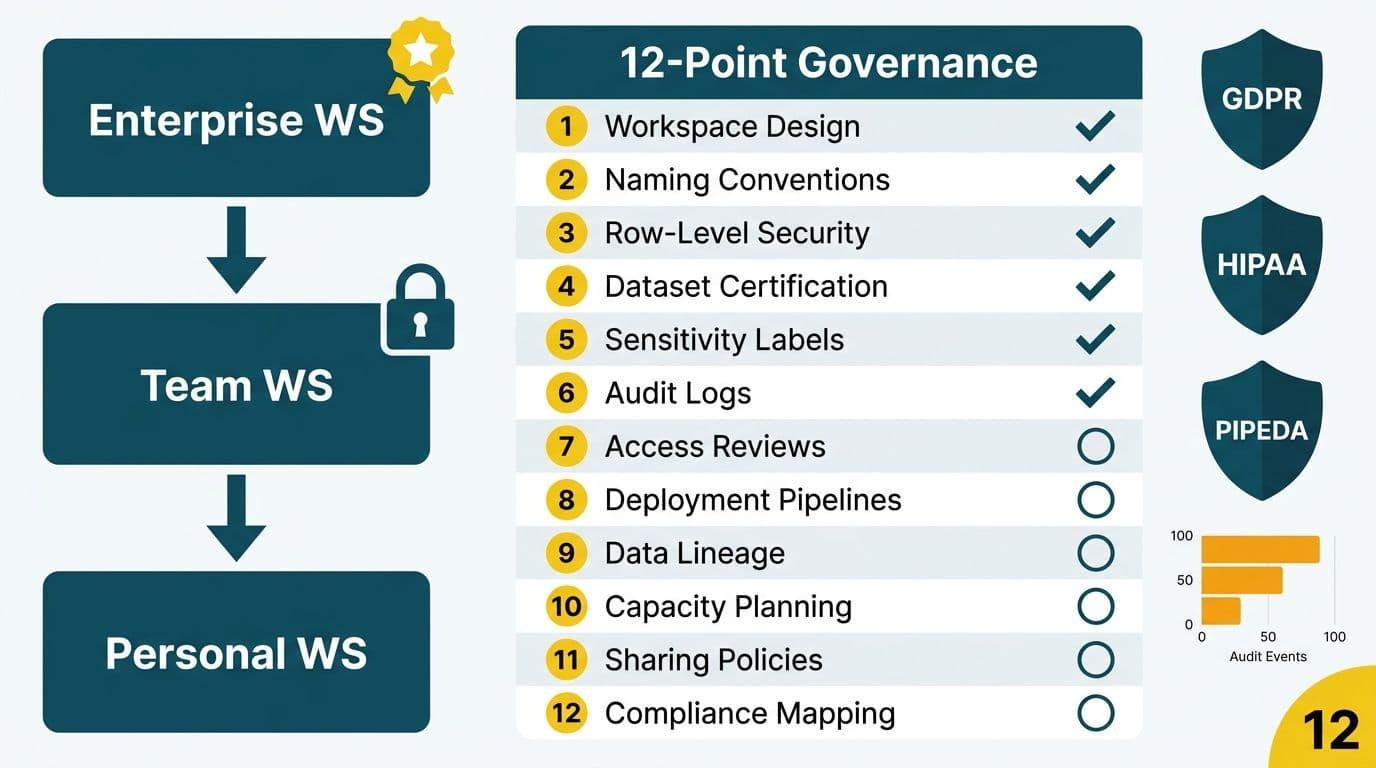
A Power BI governance best practices checklist gives CIOs and data team leads a structured way to control who sees data, which datasets are authoritative, and how every access event is recorded. The 12-point framework below covers workspace design, row-level security, certified datasets, sensitivity labels, and audit logs - each control mapped to GDPR, HIPAA, and PIPEDA obligations for mid-market organizations in the US, UK, EU, and Canada.
Key Takeaways
- Workspace hierarchy and naming conventions are the structural foundation - without them, audit queries become guesswork across an ungoverned tenant.
- Row-level security must use dynamic filtering for organizations with changing personnel; static roles fail under any org restructure.
- Microsoft Purview sensitivity labels follow data through Excel and PDF exports, closing the gap workspace permissions cannot cover.
- Certified datasets break the report-sprawl cycle by making the authoritative version discoverable before analysts build competing models.
- Audit log retention differs by jurisdiction: HIPAA environments need six years, PIPEDA at least one year, and GDPR environments should document retention proportional to processing risk.
What Is a Power BI Governance Checklist and Why Do Regulated Organizations Need One?
Power BI governance is the set of policies, technical controls, and review cycles that determine who can create content, which data each role can access, and how changes are tracked. Without a documented checklist, mid-market organizations accumulate ungoverned personal workspaces, conflicting dataset versions, and audit gaps that surface during regulatory reviews.
Our Managed Power BI services team works with finance directors and CIOs across healthcare, financial services, and manufacturing, and the pattern is consistent: organizations with the most difficult Power BI audits are those that scaled adoption before governance was in place.
Regulatory context by jurisdiction:
- US - HIPAA: Healthcare organizations must demonstrate access controls and audit trails for any system holding Protected Health Information (PHI), per 45 CFR § 164.312(a) and (b).
- UK and EU - GDPR: Data minimization and purpose limitation must be documented at the dataset level under Articles 5 and 6. Article 25 requires data protection by design - access controls must be built in, not bolted on.
- Canada - PIPEDA: Consent-based access must be documented and individuals must have a traceable path to understand how their personal information was used, per Principle 4.7 and Principle 4.1.
How Should You Design Power BI Workspaces for Scalable Governance?
Checklist points 1-3: Workspace hierarchy, naming conventions, and role assignment
Workspace design is the structural layer on which all other controls depend. Microsoft's Power BI admin documentation (2025) describes four workspace roles - Admin, Member, Contributor, and Viewer - each with distinct publishing and editing rights.
Point 1 - Establish a three-tier workspace hierarchy. Separate personal workspaces (sandbox only), team workspaces (departmental collaboration), and certified workspaces (production, formally reviewed). Personal workspaces must never connect to production sources holding PHI or PII - a rule that applies equally to a US hospital system, a UK fintech firm processing payment records under GDPR, and a Canadian insurer governed by PIPEDA.
Point 2 - Enforce naming conventions across the tenant. A pattern such as `[BU]-[Domain]-[Environment]` (for example, `FIN-Revenue-PROD`) makes workspaces discoverable in the Admin portal and simplifies audit queries. Without it, identifying all workspaces holding regulated data during an incident response becomes a manual exercise.
Point 3 - Apply least-privilege role assignment. Default new members to Viewer. Promote to Contributor or Member only when a documented business need exists; Admin access requires approval from the data team lead and data privacy officer. For GDPR-obligated UK and EU organizations, documenting the justification for each Admin assignment provides evidence of compliance with Article 25.
How Does Row-Level Security Protect Sensitive Data in Power BI?
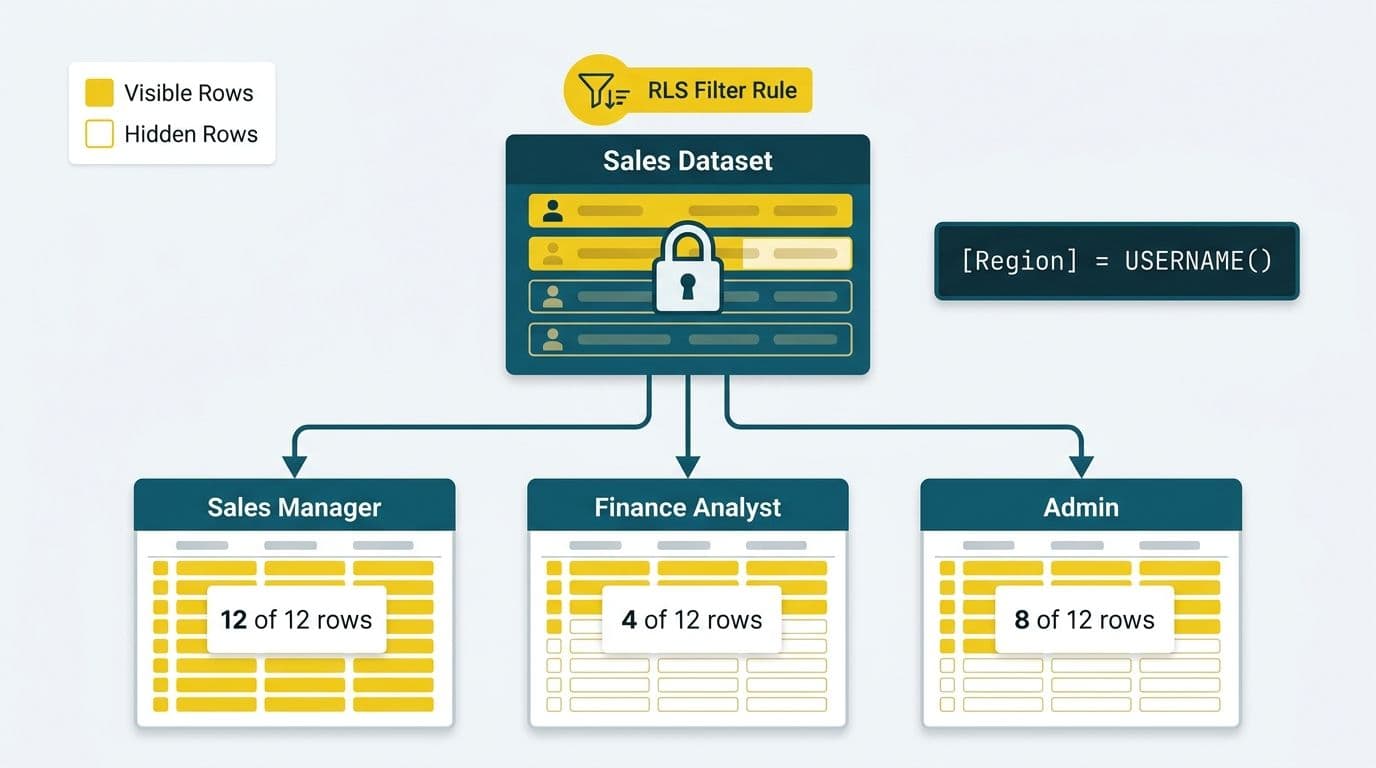
Checklist points 4-5: Configuring and testing RLS
Row-level security (RLS) filters data at the semantic model layer so a single report returns only the rows the authenticated user is permitted to see - regardless of how the report is distributed. Workspace roles alone cannot prevent a Viewer from seeing data rows outside their legitimate scope.
Point 4 - Define RLS roles in the semantic model. For stable org structures, define DAX filter rules in Power BI Desktop and publish with the model. For dynamic structures - common in healthcare where clinicians rotate departments, or in financial services where analyst coverage changes - use dynamic RLS by binding `USERPRINCIPALNAME()` to a security table in the data warehouse. Dynamic RLS eliminates the maintenance burden of updating static roles with every personnel change.
Point 5 - Test RLS systematically before deployment. Power BI Desktop's "View as roles" function lets developers impersonate any defined role and verify that the correct rows appear. For HIPAA environments, document each role-test result before promoting a model to a certified workspace. Unverified RLS is a HIPAA audit finding waiting to be discovered.
For organizations connecting clinical systems to Power BI, RLS must align with clinical system permission tiers. Connect EHR Data to Power BI: Epic, Cerner and FHIR Guide covers the data pipeline architecture that makes this practical. For a broader compliance comparison across BI platforms, HIPAA Compliant BI Tools for Hospital Data Visualization examines the controls that differentiate compliant from non-compliant tools.
What Are Certified Datasets and How Do They Reduce Report Sprawl?
Checklist points 6-7: Endorsement and certification
Certified datasets are semantic models a designated data steward has reviewed, accuracy-tested, and formally endorsed through the Power BI endorsement workflow. They appear with a certification badge in the data hub - making the authoritative version the first result analysts discover before building a competing model with a subtly different revenue or readmission-rate definition.
Point 6 - Implement a two-stage endorsement workflow. Microsoft distinguishes between "Promoted" (self-endorsed by the owner) and "Certified" (formal sign-off by a tenant administrator or designated certifier, per Microsoft Power BI endorsement documentation, 2025). Only Certified datasets should appear in reports distributed to executive leadership, regulators, or external stakeholders.
Point 7 - Restrict certification authority to a named security group. In the Power BI Admin portal, limit certification to a specific Azure AD security group. For a mid-market US finance firm with SOC 2 obligations, restricting this authority to the data governance committee creates a chain of custody that satisfies the Availability and Confidentiality trust service criteria - and provides GDPR Article 25 evidence of data protection by design.
How Do Sensitivity Labels Map to GDPR, HIPAA, and PIPEDA Requirements?
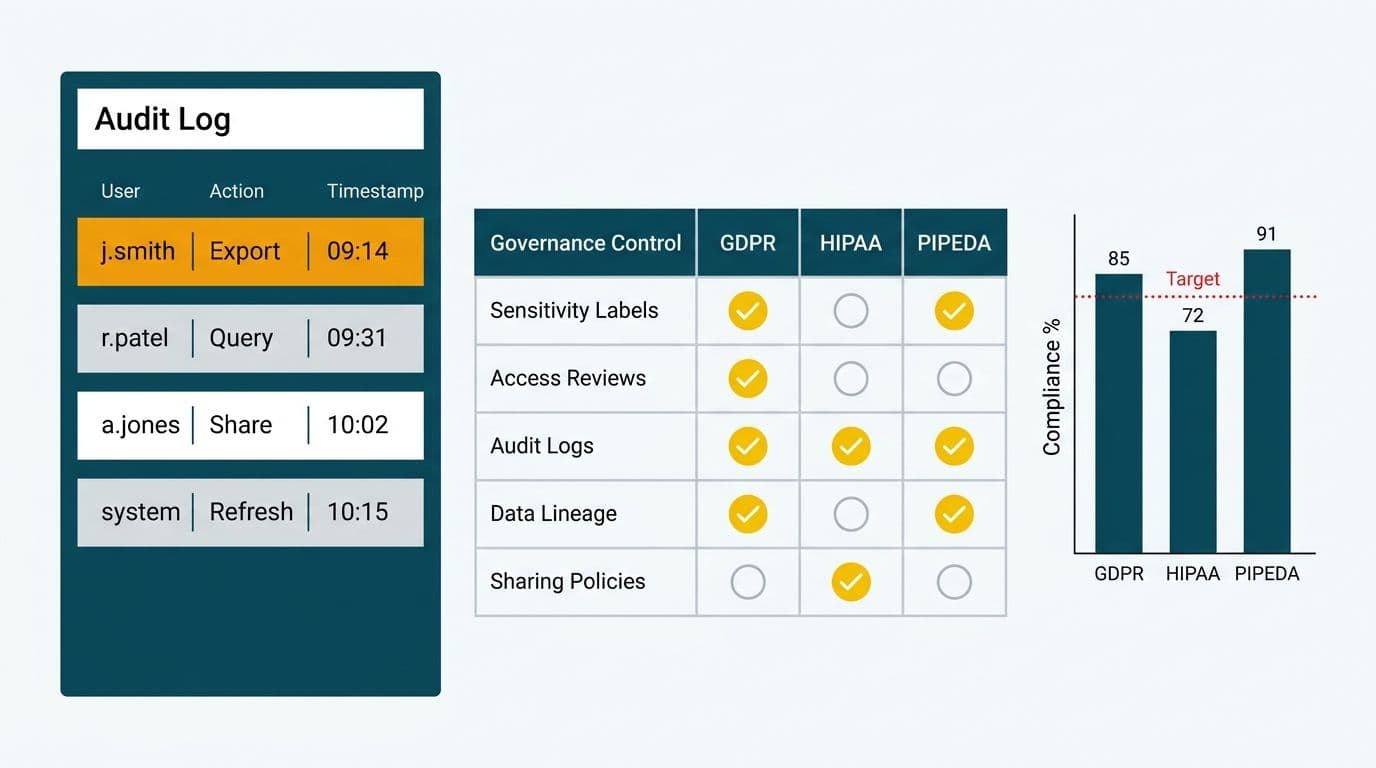
Checklist points 8-9: Label taxonomy and auto-labeling
Microsoft Purview sensitivity labels apply a persistent, metadata-driven classification to Power BI semantic models, reports, dashboards, and dataflows. When a user exports a labeled report to Excel or PDF, the label travels with the file and enforces encryption or external sharing restrictions automatically - no user judgment required at the moment of export.
Point 8 - Define a four-level label taxonomy aligned to your regulatory obligations.
| Label | Description | Regulatory Trigger |
|---|---|---|
| Public | Non-sensitive, shareable externally | No specific trigger |
| Internal | Business data, no regulatory obligation | General data handling |
| Confidential | PII or commercially sensitive data | GDPR Art. 5, PIPEDA Principle 4, CCPA |
| Highly Confidential | PHI, payment data, or regulated health data | HIPAA, PCI-DSS, GDPR Art. 9, PIPEDA |
For organizations operating in both the US (HIPAA) and Canada (PIPEDA), the Highly Confidential label covers both obligations through a single policy rather than requiring separate label sets per jurisdiction.
Point 9 - Configure auto-labeling policies in Microsoft Purview. Configure trainable classifiers or exact-data-match rules that detect PHI patterns (US Social Security numbers, ICD codes), financial identifiers (credit card patterns, routing numbers), or Canadian SIN patterns. Auto-labeling eliminates the governance gap that user-applied labels consistently leave open.
GDPR note: GDPR Article 32 requires "appropriate technical and organisational measures" proportional to processing risk. Purview labels enforcing encryption and restricting external sharing are a documented technical measure a UK or EU organization can reference in its Record of Processing Activities during a Data Protection Authority inquiry.
PIPEDA note: PIPEDA Principle 7 (Safeguards) requires protection proportional to data sensitivity. Purview labels triggering rights-management encryption on export satisfy the technical safeguard component of this principle.
How Should You Configure Power BI Audit Logs for Regulatory Compliance?
Checklist points 10-11: Retention and monitoring
Power BI audit logs record every significant user action - report views, dataset refreshes, permission changes, RLS modifications, and export events - in the Microsoft 365 Unified Audit Log. They are the primary evidence trail for regulatory investigations and breach notification obligations.
Point 10 - Match audit log retention to your regulatory obligation. Microsoft retains Unified Audit Log entries for 90 days under a default E3 license and up to one year under E5 or the Audit (Premium) add-on (Microsoft 365 Compliance documentation, 2025). HIPAA's Security Rule (45 CFR § 164.312(b)) requires audit controls, and most healthcare legal teams interpret HIPAA's records retention standard as a minimum six-year requirement for system audit trails. Canadian privacy commissioners have consistently accepted one year as a reasonable PIPEDA minimum. For GDPR, document retention periods proportional to processing risk explicitly in the ROPA.
Point 11 - Build automated monitoring for high-risk events. Specific patterns should trigger alerts rather than relying on manual log review: bulk exports above 1,000 rows in a single session, new Admin role assignments, RLS definition changes, sensitivity label downgrades, and access from unmanaged devices or unexpected geographies. A US hospital managing PHI, a UK fintech firm under GDPR, and a Canadian insurer holding regulated health records face different threat models - but all three benefit from alert routing to a security inbox or SIEM rather than periodic spot-checks.
For finance teams managing compliance monitoring across multiple platforms, the alert routing patterns in our AI Automation Compliance Checklist for Finance Teams translate directly to this Power BI audit workflow.
What Does a Complete Power BI Governance Best Practices Checklist Look Like?
Point 12 - Schedule quarterly governance review cycles.
Technical controls erode without structured human review. Quarterly reviews should cover five areas: workspace membership audits (remove departed employees and stale service accounts); RLS role verification (confirm definitions match the current org chart after any restructure); certification review (re-certify or de-certify datasets that changed owners or scope); sensitivity label coverage (identify unlabeled production datasets); and audit log sampling (pull five to ten representative records and confirm the trail is interpretable by a third-party auditor with no prior context).
The complete 12-point Power BI governance best practices checklist:
| # | Control | Category | Primary Compliance Relevance |
|---|---|---|---|
| 1 | Three-tier workspace hierarchy | Workspace design | All regulated frameworks |
| 2 | Naming convention enforcement | Workspace design | Audit readiness |
| 3 | Least-privilege role assignment | Access control | HIPAA 45 CFR § 164.312(a), GDPR Art. 25, PIPEDA Principle 7 |
| 4 | RLS roles on semantic models | Data filtering | HIPAA (PHI), GDPR (PII), PIPEDA |
| 5 | RLS testing and documentation | Quality assurance | HIPAA audit trail requirements |
| 6 | Two-stage endorsement workflow | Data quality | SOC 2, internal governance |
| 7 | Restricted certification authority | Data quality | SOC 2, GDPR Art. 25 |
| 8 | Four-level sensitivity label taxonomy | Data classification | GDPR, HIPAA, PIPEDA, PCI-DSS |
| 9 | Auto-labeling policies in Purview | Data classification | GDPR Art. 32, PIPEDA Principle 7 |
| 10 | Audit log retention by jurisdiction | Compliance | HIPAA (6 yr), PIPEDA (1 yr min), GDPR (risk-based) |
| 11 | Automated alerting for high-risk events | Monitoring | All regulated frameworks |
| 12 | Quarterly governance review cycle | Ongoing governance | All regulated frameworks |
For those implementing a subset first, prioritize controls 3, 4, 8, and 10 - they address the four highest-probability failure modes: unauthorized data access, leakage through uncontrolled exports, incorrect data classification, and inability to produce audit evidence on demand.
For a side-by-side platform comparison in regulated environments, Power BI vs Healthcare Analytics Software: Decision Framework covers the technical differentiators for compliance-driven platform selection.
---
About Lets Viz: Lets Viz has delivered data analytics solutions since 2020 to clients across US healthcare, UK fintech, Canadian manufacturing, and global SaaS businesses, earning a 5.0 rating on Clutch. Our governance engagements span HIPAA-regulated hospital systems, GDPR-compliant financial services firms, and PIPEDA-governed Canadian insurers - bringing regulatory depth and technical precision to every Power BI implementation.
If your organization is ready to move from ad-hoc Power BI adoption to a defensible, auditable governance framework, explore our Managed Power BI services to see how we structure and maintain enterprise-grade Power BI environments for mid-market teams.