How Power BI Q&A Natural Language Queries Work
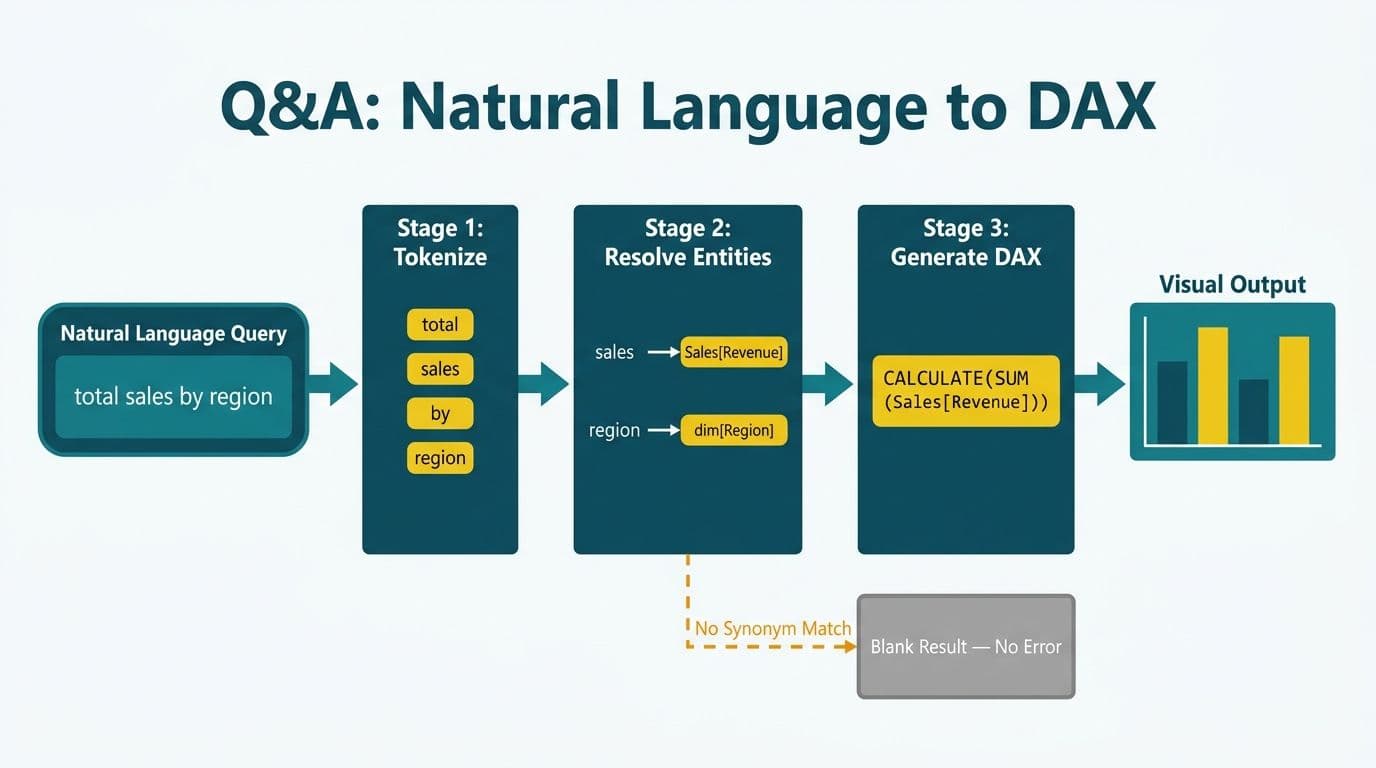
Power BI Q&A uses a multi-stage NLP pipeline that tokenizes your question, resolves terms against the semantic model's tables, columns, and measures, then generates a DAX query to render the visual. When a phrase has no synonym mapping, no linguistic schema entry, or references an ambiguous field name, the engine fails silently - returning a blank or approximate result with no error message. Understanding this pipeline is the prerequisite for making Q&A and Copilot reliable at enterprise scale.
Key Takeaways
- Power BI Q&A maps natural language through three stages: entity resolution, intent classification, and DAX generation
- Silent failures occur when the semantic model lacks synonyms, phrasings, or unambiguous field names
- Three targeted fixes - synonym layers, linguistic schema phrasings, and measure visibility - address the root causes of most Q&A and Copilot errors
- Copilot for Power BI shares the same entity-resolution foundation as Q&A, meaning semantic model hygiene directly affects Copilot answer quality
- Compliance environments (HIPAA, GDPR, PIPEDA) add a critical fourth layer: row-level security must be validated before enabling natural language interfaces at scale
How Does Power BI Q&A Map Natural Language to Semantic Model Entities?
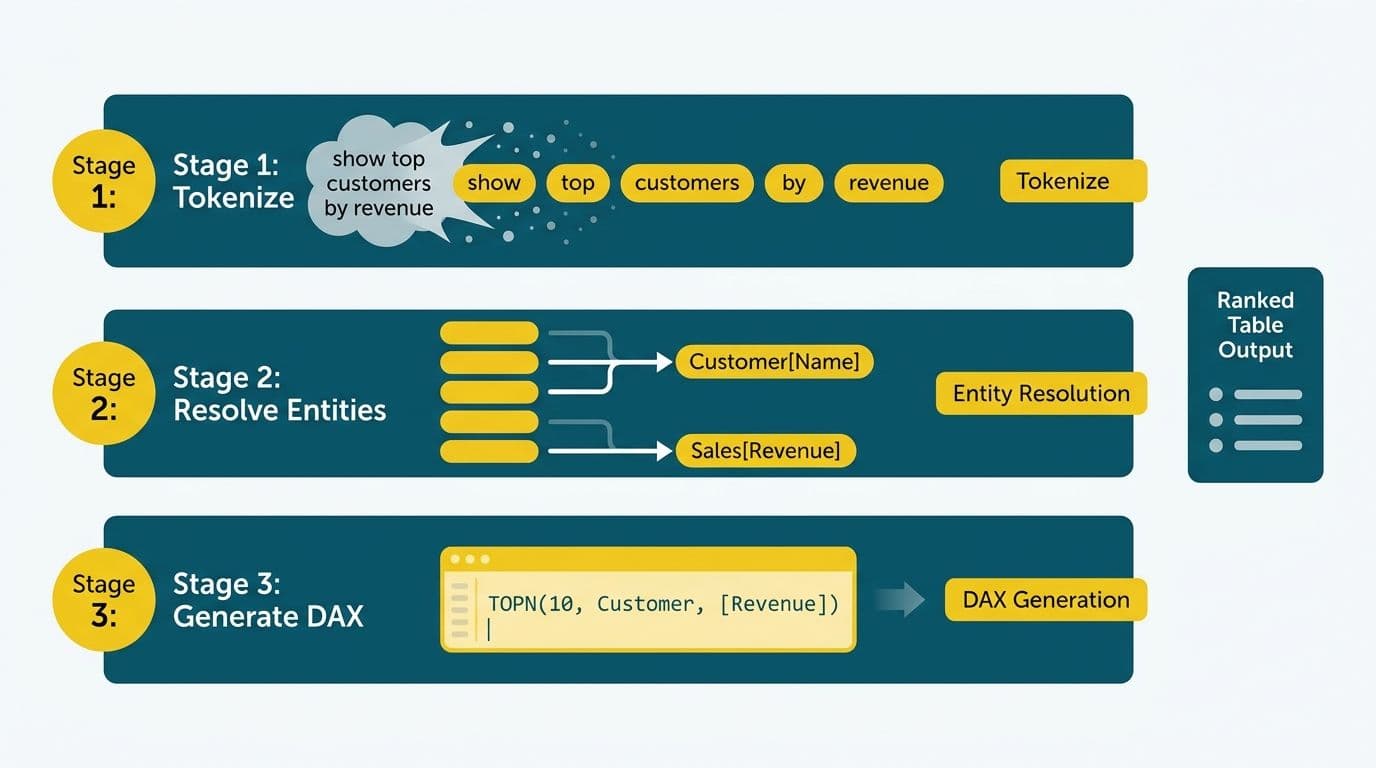
Power BI Q&A resolves a question in three sequential steps: lexical tokenization, entity resolution against the semantic model, and intent-driven DAX generation.
Step 1 - Tokenization and lexical analysis: The engine strips common stop words and splits the query into candidate tokens. "Show me total revenue by region for last quarter" yields the working set: {total, revenue, region, last, quarter}. The engine also normalizes morphological variants - "revenues" resolves the same as "revenue", and "admitted" resolves similarly to "admissions" - reducing the vocabulary surface that synonym mappings need to cover.
Step 2 - Entity resolution: Each token is matched against the semantic model's metadata catalog: table names, column names, measure names, and any synonyms registered in the dataset's synonym layer or the linguistic schema YAML file. If the measure [Sales Amount] has "revenue" listed as a synonym, the engine resolves the token to [Sales Amount] with high confidence. If no synonym exists, the engine attempts a fuzzy match and assigns a confidence score. When confidence falls below an internal threshold - not publicly documented by Microsoft - the engine either selects the highest-scoring candidate silently or aborts the query entirely.
Step 3 - Intent classification and DAX generation: Once entities are resolved, the engine classifies the aggregation intent. "Total revenue" maps to a SUM aggregation. "Top customers" maps to a TOPN function. "Average claim value" maps to AVERAGE. Filter conditions are resolved separately - "last quarter" maps to a PREVIOUSQUARTER or DATESINPERIOD time intelligence function. The engine then assembles a DAX query and selects a visual type: bar charts for by-dimension groupings, card visuals for single scalar results, and line charts for time-series queries.
According to Microsoft's documentation on the Q&A linguistic schema (2024), the engine also supports phrasing definitions - explicit YAML templates that tell the NLP layer how to interpret domain-specific expressions such as "patients admitted to ICU" or "invoices past 90 days." Without these, even a well-synonymized model fails on complex relational queries.
The entity-resolution stage is precisely where most enterprise Q&A implementations break down - and where Power BI consulting (Copilot-ready) engagements typically begin: auditing synonym coverage and phrasing completeness before any Q&A or Copilot rollout to end users.
Why Do Power BI Q&A Natural Language Queries Fail Silently?
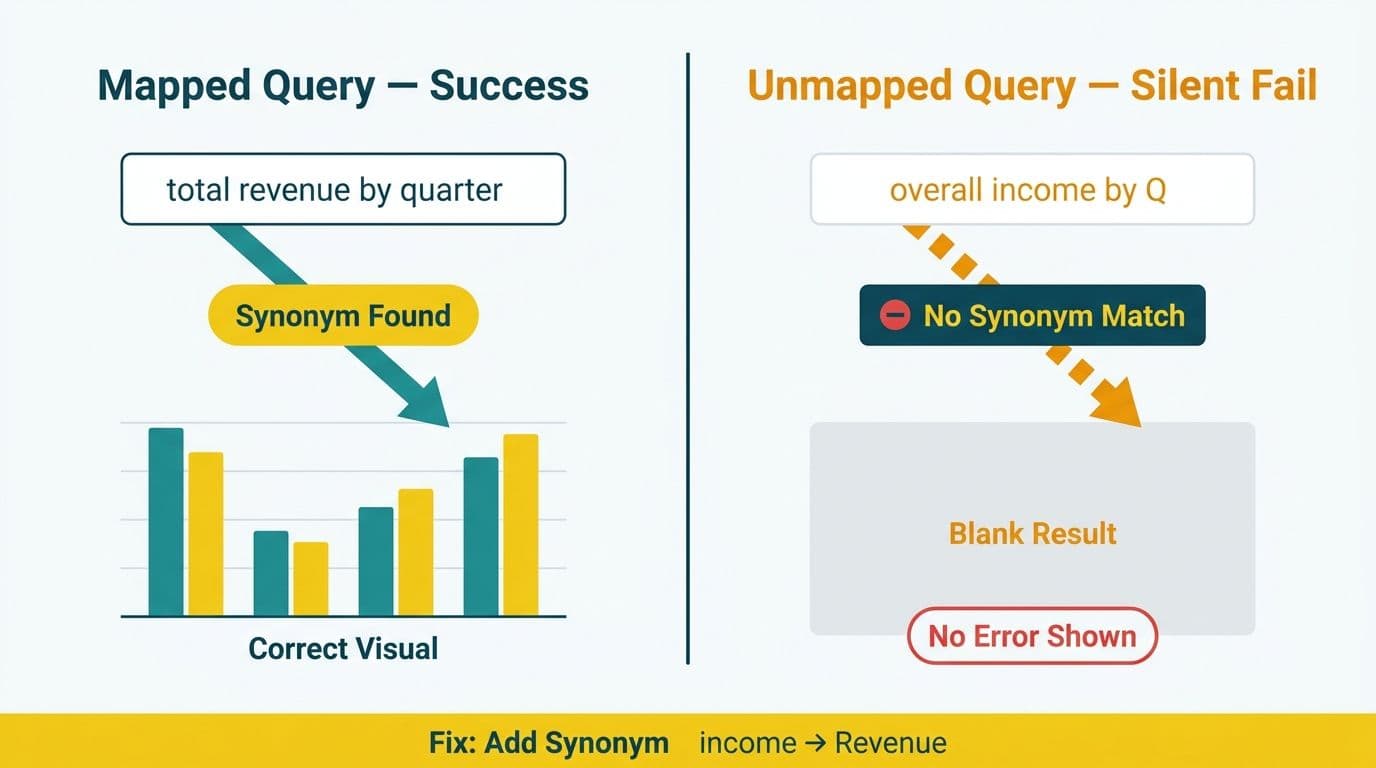
Silent failure is by design. Power BI Q&A was built for self-service users, so the engine suppresses technical error messages to avoid exposing DAX syntax or schema internals to non-technical audiences. The result is a blank visual, a generic "I didn't understand that" message, or - more problematically - a confidently rendered visual that answers the wrong question entirely.
Four root causes explain the vast majority of failures when natural language queries in Power BI go wrong:
1. Missing synonyms: If a measure is named [Employee Headcount] and a user types "how many employees", the engine has no synonym bridge and either mismatches to a different entity or returns nothing. Finance users routinely use colloquial terms - "burn rate", "net new ARR", "DSO", "coverage ratio" - that do not appear verbatim in the semantic model's field names. Healthcare users face the same gap: "denials", "readmissions", and "LOS" are business-standard terms that rarely match column names in a clinical data warehouse.
2. Ambiguous field names: When two tables each contain a column named "Status" - common in healthcare data models where claim status and patient status coexist - the engine selects one arbitrarily or triggers a confidence-threshold failure. The user sees a blank visual or the wrong status dimension. The BI team sees no error log, making the failure nearly invisible in standard Power BI monitoring.
3. Unmapped phrasings: Comparative and superlative intents require explicit phrasing entries in the linguistic schema. Queries like "show me which region has the highest rejection rate" or "compare Q1 and Q2 margins" need ordinal and comparative phrasings defined in the YAML. Without them, the engine cannot classify the relational intent and produces no output.
4. Measure invisibility: Measures marked as hidden in the semantic model are excluded from Q&A resolution entirely. Finance teams often hide intermediate calculation measures to keep report surfaces clean - inadvertently blocking Q&A from accessing exactly the values users need. A measure that a CFO queries daily through a report visual may be completely invisible to the Q&A engine if it was hidden during initial model development.
This silent-failure dynamic affects organizations regardless of geography. A US healthcare network running HIPAA-compliant Power BI workspaces, a UK fintech firm operating under GDPR data minimization requirements, and a Canadian manufacturer subject to PIPEDA constraints all encounter the same core problem: end users receive no actionable feedback about why their natural language query produced nothing, making root cause analysis slow and expensive.
For a broader governance framework addressing how field-level permissions interact with Q&A scope, the Power BI Governance Best Practices: 12-Point Checklist covers data classification and access policies that directly shape which fields the Q&A engine can surface.
What Are the Three Model Fixes That Resolve 80% of Q&A Errors?
Microsoft's Q&A tooling exposes three distinct levers. Applied systematically in order of effort-to-impact, they address the root causes above and restore reliable natural language query behavior.
Fix 1: Build a comprehensive synonym layer
Open the dataset in Power BI Desktop, select each table or field in the Fields pane, and add synonyms through the Synonyms panel in the Q&A setup interface. Prioritize every measure and dimension column a business user might reference by an alternative name:
- Finance domain: add "revenue" and "sales" for [Net Sales Amount], "headcount" for [Employee Count], "DSO" for [Days Sales Outstanding], "churn" for [Customer Attrition Rate]
- Healthcare domain: add "patients" for [Member Count], "claims" for [Encounter Records], "denials" for [Rejected Claims], "LOS" for [Length of Stay]
The synonym layer is the highest-return fix per unit of effort. It requires no YAML editing, costs no additional licensing, and typically resolves the majority of entity-resolution failures within a few hours of structured input.
Fix 2: Define phrasings in the linguistic schema
Download the linguistic schema YAML via the Q&A setup panel in Power BI Desktop. Add attribute phrasings for property relationships ("show [customers] [by region]"), dynamic phrasings for flexible aggregations ("total [metric] for [dimension]"), and ordinal phrasings for ranking queries ("the [region] with the highest [revenue]"). For date-relative queries common in finance - "month-over-month", "year-to-date variance" - define explicit time-expression phrasings that map to the correct time intelligence DAX.
This fix is more labor-intensive but unlocks the query patterns business users find most valuable: ranking, exception-flagging, period comparison, and drill-down intent.
Fix 3: Enforce measure visibility and populate field descriptions
Audit the semantic model for hidden measures that users legitimately need to query. Where a measure must remain hidden from report surfaces for visual cleanliness, create a visible alias measure that references it under a name the Q&A engine and end users can resolve. Populate field descriptions for all visible measures - Power BI propagates these descriptions to the Copilot suggestion layer, improving autocomplete accuracy for Copilot-enabled workspaces.
| Fix | Root Cause Addressed | Implementation Effort | Effect on Copilot |
|---|---|---|---|
| Synonym layer | Missing entity resolution | Low - UI-based in Desktop | Direct - Copilot uses the same resolution layer |
| Linguistic schema phrasings | Unmapped intents and comparatives | Medium - YAML file editing | Indirect - improves intent classification accuracy |
| Measure visibility and descriptions | Hidden measures, ambiguous intent | Low - property panel in Desktop | Direct - descriptions populate Copilot suggestion text |
How Does Copilot for Power BI Use the Same NLP Foundation?
Copilot for Power BI, generally available in Fabric-backed workspaces as of 2024, extends the Q&A engine with a generative AI layer. The entity-resolution stage is shared: Copilot reads the same synonym layer and linguistic schema that Q&A uses. Where Copilot diverges is in the intent-handling layer - it uses a large language model to interpret open-ended natural language prompts ("summarize this report for a non-technical audience", "what drove the spike in claim denials in Q3?") rather than mapping directly to a fixed DAX template.
The practical implication for BI leads: a poorly configured semantic model breaks Copilot for the same reasons it breaks Q&A. A UK fintech firm enabling Copilot for finance analysts across a GDPR-regulated data workspace will find that Copilot's answer quality is directly correlated with the synonym coverage and measure visibility of the underlying dataset. Microsoft's Fabric documentation (2025) explicitly recommends completing Q&A synonym setup as a prerequisite before enabling Copilot features.
Row-level security (RLS) introduces an additional consideration unique to Copilot's broader surface area. Copilot respects RLS roles defined on the semantic model, meaning a Canadian manufacturing organization subject to PIPEDA can safely enable Copilot for cross-department use without cross-departmental data exposure - provided RLS is correctly configured, tested against specific role boundaries, and periodically reviewed as the organization's data access policies evolve. The Power BI Managed Service for Finance Teams: What to Expect covers ongoing RLS validation as part of a managed service engagement scope.
How Should BI Leads Validate Q&A Before a Broad Rollout?
Validation follows a structured three-phase approach that prevents silent failures from reaching the broader user population.
Phase 1 - Query inventory: Collect the 20 to 30 questions your target users would most likely ask. Run structured workshops with five to ten representative users - finance analysts, clinical operations staff, or sales managers depending on the model's domain. Do not assume: the questions users actually ask differ substantially from what BI teams anticipate.
Phase 2 - Gap analysis: Run each question against the current semantic model in Q&A test mode. Log every failure - blank result, wrong entity, wrong visual type, or a plausible-but-wrong result. Categorize each failure as a synonym gap, phrasing gap, visibility issue, or RLS scope restriction.
Phase 3 - Fix and re-test: Apply the three fixes in priority order (synonyms first, phrasings second, visibility third). Re-run the full query inventory. Target a pass rate above 85% before enabling Q&A or Copilot for the broader user population.
For compliance-sensitive environments - a US hospital system under HIPAA, a Toronto-based investment firm under PIPEDA, or a London-based asset manager under GDPR - add a Phase 4: verify that RLS roles correctly restrict Q&A and Copilot results to each user's authorized data scope. Natural language interfaces can create unexpected data exposure vectors when a user discovers they can phrase a question that circumvents an assumed row-level filter.
Organizations evaluating Power BI against other analytics platforms as part of this readiness work will find the Power BI vs Tableau TCO 2026: Full Cost Breakdown a useful reference for total cost of ownership comparisons. Finance teams building Fabric-integrated models can apply the same Q&A readiness framework described in Fabric Lakehouse Finance Analytics: Power BI Reporting for FP&A.
One note for teams running Looker Studio alongside Power BI for sales dashboard or marketing analytics views: Looker Studio's natural language capabilities operate on a different engine architecture, and the synonym-and-phrasing approach specific to Power BI's semantic layer does not transfer directly. Teams managing both environments need separate optimization tracks for each platform's NLP tooling.
---
About Lets Viz: Lets Viz has delivered Power BI, Fabric, and analytics consulting engagements since 2020, serving US healthcare systems, UK fintech firms, Canadian manufacturing organizations, and global SaaS companies. The practice holds a 5.0 rating on Clutch and specializes in semantic model architecture, Copilot readiness, and governed self-service BI at mid-market scale.
Ready to make Q&A and Copilot reliable across your organization? Power BI consulting (Copilot-ready) covers semantic model audits, synonym layer builds, linguistic schema development, and Copilot enablement from end to end.