Power BI Import Mode vs DirectQuery for Copilot and Q&A
Power BI storage mode - the choice between Import, DirectQuery, and Composite - directly determines how accurately Q&A can answer natural language questions and how quickly Copilot responds to prompts. Import mode caches your data in-memory for fast AI inference; DirectQuery queries the source live, preserving freshness at the cost of latency. For finance and healthcare BI teams in the US, UK, and Canada, storage mode is not a performance tuning decision - it is a foundational architectural choice with direct consequences for AI capability, compliance posture, and user trust in AI-generated answers.
Key Takeaways
- Import mode gives Q&A and Copilot the fullest schema visibility and fastest response times - it is the default choice for historical finance reporting and quality-metric dashboards.
- DirectQuery preserves real-time data accuracy but adds measurable latency to every Copilot prompt and Q&A query, and restricts certain AI functions entirely.
- Composite mode (mixing Import and DirectQuery tables in one model) is the pragmatic path for teams that need both live operational feeds and fast AI-assisted analysis on historical data.
- HIPAA, GDPR, and PIPEDA each affect whether patient or financial data can be cached in a Power BI dataset - compliance review must precede storage mode selection.
- The semantic model's table names, column synonyms, and defined relationships matter as much as storage mode for Q&A accuracy - both must be maintained together.
What Are Import Mode and DirectQuery in Power BI?
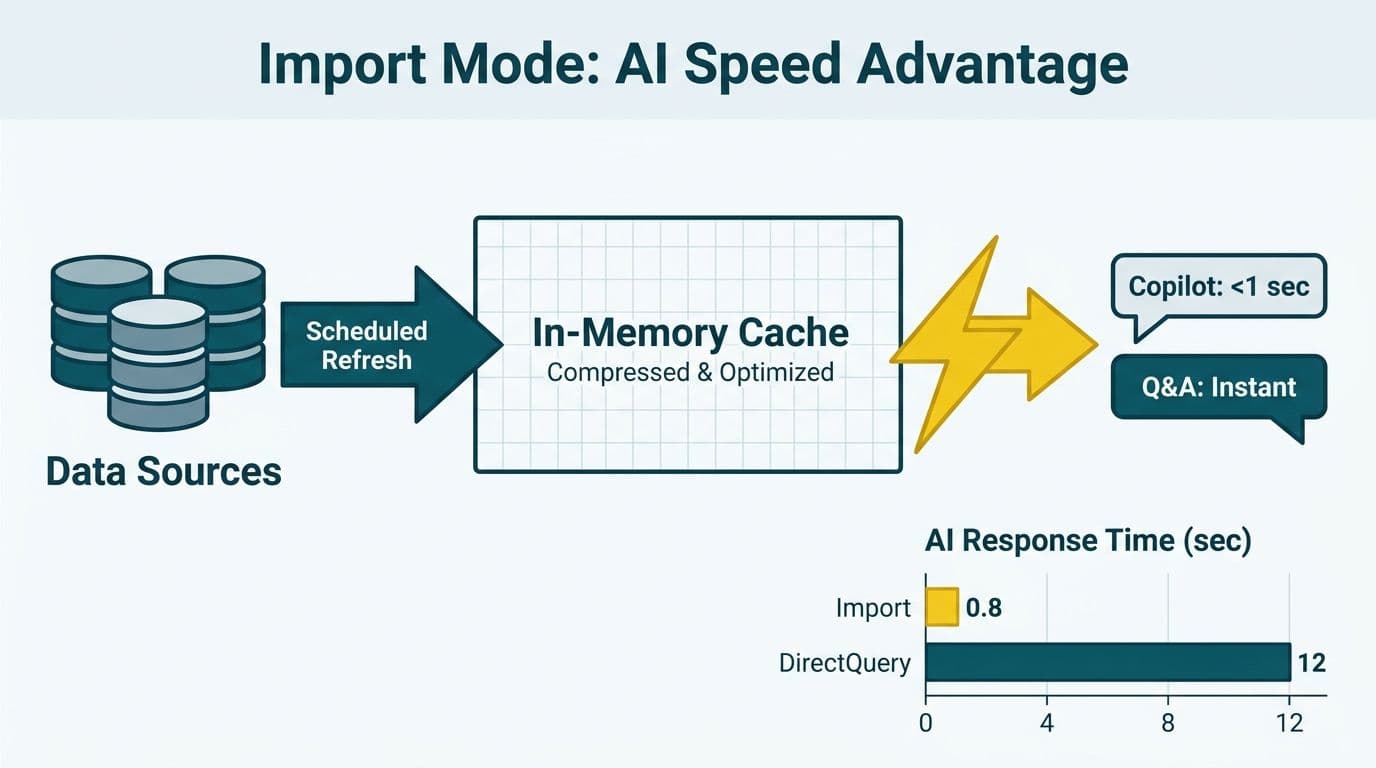
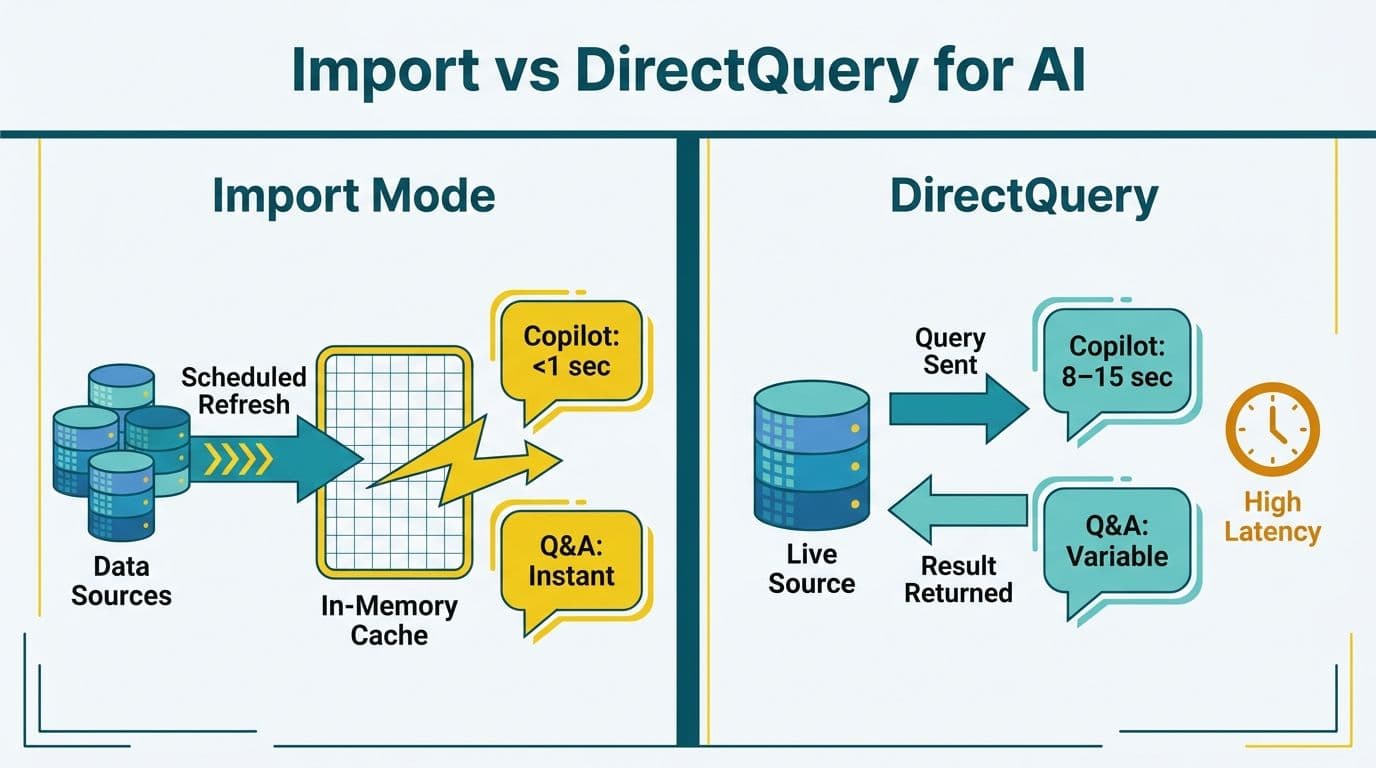
Import mode loads a full snapshot of your source data into Power BI's VertiPaq in-memory columnar engine. The VertiPaq engine compresses data significantly on typical finance and operational datasets, meaning a large source table can occupy a fraction of its original size in the Power BI model. Every query - whether from a report visual, a Q&A natural language question, or a Copilot prompt - runs against this compressed resident cache. According to Microsoft's Power BI documentation (2025), Import datasets can refresh up to 48 times per day on Premium capacity, or eight times per day on shared (Pro) capacity.
DirectQuery mode sends every query directly to the underlying data source. No data is stored in Power BI. Each report interaction, Q&A question, or Copilot prompt generates a live query to your SQL Server, Azure SQL, Synapse, Snowflake, or other connected source. The dataset reflects the current state of the source at all times, but response time depends entirely on source query performance and network round-trip latency.
If you are building or modernizing a Power BI environment for finance or healthcare, storage mode selection belongs in scope from day one. Our Power BI consulting (Copilot-ready) practice treats it as a required architectural checkpoint before any Copilot or Q&A feature is enabled - decisions made here are expensive to reverse once reports and user habits are established.
How Does Storage Mode Control Q&A Accuracy in Power BI?
Q&A accuracy depends on schema completeness and query generation reliability. In Import mode, the full dataset schema - every table, column name, measure, synonym, and relationship - is resident in memory and immediately available to the Q&A engine. Natural language questions map against this rich, always-available metadata. Synonym tables and linguistic schema files, which teach the engine domain vocabulary ("ARR" for annual recurring revenue, "DOS" for date of service), are fully supported in Import mode and operate at their full capacity.
In DirectQuery mode, Q&A must not only interpret the natural language question but also generate a syntactically valid query against the live source. If the generated query references a column that exists in the source but is not exposed in the Power BI model, Q&A returns an unhelpful "I couldn't understand that" response. Synonym tables and linguistic schema files have only partial support in DirectQuery, and some Q&A query patterns - top-N queries with complex aggregations, for instance - may be unsupported depending on the underlying source. Microsoft's Power BI Q&A documentation (2025) explicitly notes that DirectQuery models require more synonym management effort to achieve comparable Q&A quality to Import mode.
A US healthcare payer team using Import mode for their quality-metrics dataset found that Q&A correctly answered questions like "show HEDIS scores for Medicare Advantage members in Q1" on the first attempt. Their parallel DirectQuery model for live claims data required additional DAX measure creation and careful synonym configuration before Q&A became reliable. This reflects the added engineering discipline that DirectQuery demands - not a reason to avoid it, but a cost to plan for. For governance frameworks that support Q&A reliability at scale, see our Power BI Governance Best Practices: 12-Point Checklist.
How Does Power BI Copilot Respond Differently in Import vs DirectQuery?
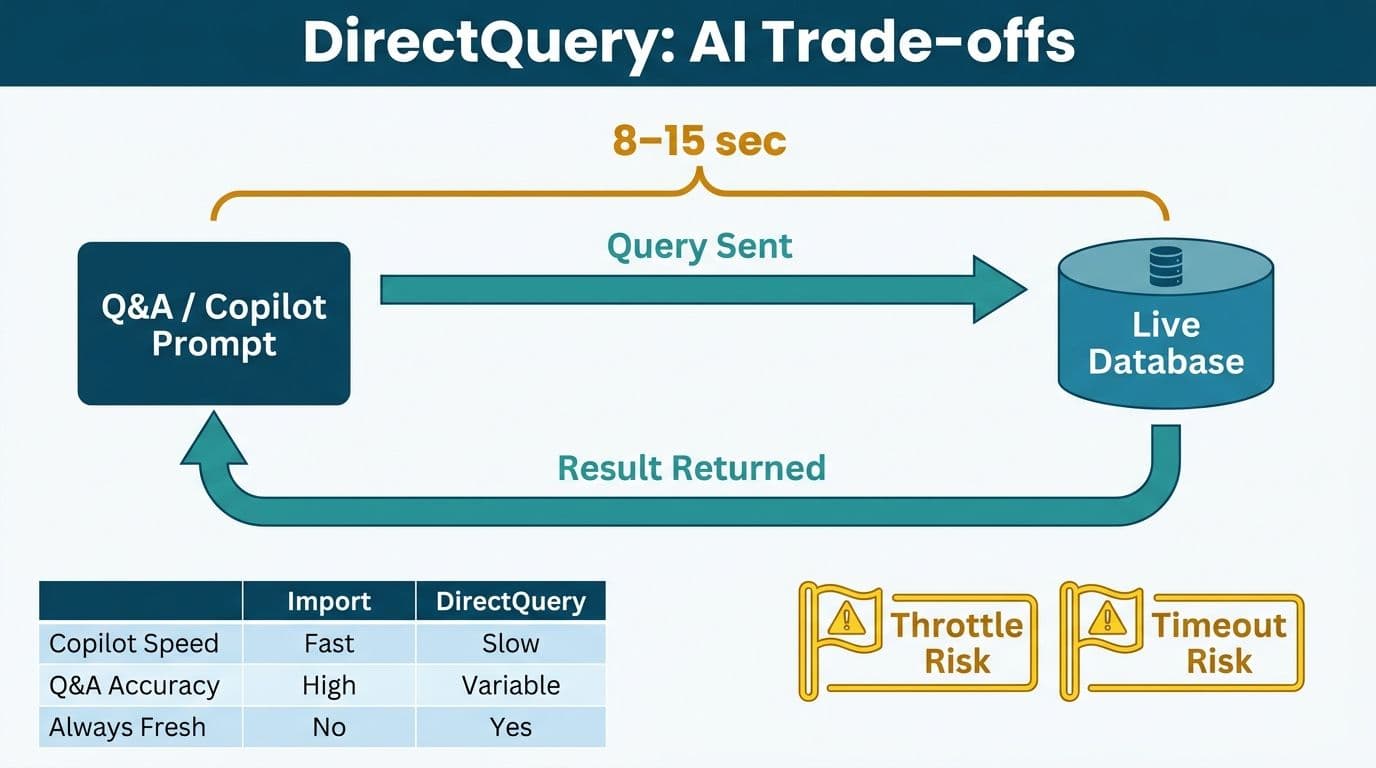
Every Copilot prompt in Power BI generates DAX behind the scenes. In Import mode, that DAX runs against VertiPaq and typically completes in under a second - fast enough that Copilot's response feels near-instant to the user. In DirectQuery mode, the generated DAX is translated into a native query (SQL, SparkSQL, or the equivalent for the connected source) and sent to the source database, adding full round-trip query latency before Copilot can begin composing its response.
For a finance director at a mid-market US company conducting a monthly close review, the difference between a sub-second Copilot response and a 5-8 second DirectQuery response is immediately noticeable. Across 15 to 20 Copilot prompts in a single budget variance session, that latency compounds into an experience that feels labored rather than assistive.
DirectQuery also restricts Copilot's ability to generate certain DAX patterns. Time-intelligence functions and measures referencing multiple filter contexts do not always fold correctly to the source query engine. When query folding fails, Copilot either returns a less precise calculation or surfaces an error. Microsoft's Copilot for Power BI documentation (2025) recommends Import or Composite mode as the baseline for the most consistent Copilot experience, with DirectQuery appropriate only when real-time freshness is a hard requirement.
UK fintech firms operating under GDPR, where EU data residency is a hard constraint, often find DirectQuery attractive precisely because no data is copied into Power BI's cloud cache. This compliance benefit must be weighed explicitly against the Copilot and Q&A performance penalties described above - the tradeoff is real and should be captured as a formal architecture decision for stakeholders. For teams managing Power BI across a finance organization, our Power BI Managed Service for Finance Teams guide covers how storage mode selection fits into ongoing model governance.
Decision Matrix: Import Mode vs DirectQuery for Finance and Healthcare BI Teams
The table below maps common BI scenarios in finance and healthcare to the recommended storage mode, with AI feature impact and compliance notes for US, UK, and Canadian teams.
| Scenario | Recommended Mode | Q&A Accuracy | Copilot Latency | Key Compliance Note |
|---|---|---|---|---|
| Historical FP&A / budget variance | Import | High | Under 1 sec | Verify capacity region matches data residency policy |
| Live general ledger / operational finance | DirectQuery | Moderate | 3-8 sec | Data stays in source - supports SOC 2 data inventory hygiene |
| Healthcare quality metrics (historical) | Import | High | Under 1 sec | PHI cached in Premium - confirm HIPAA BAA with Microsoft |
| Live patient census / ADT feeds | DirectQuery | Moderate | 4-10 sec | PHI stays in clinical source - preferred under HIPAA minimum-necessary |
| Accounts receivable aging | Import | High | Under 1 sec | Schedule refresh to billing cycle; real-time latency not required |
| Clinical trial interim analysis | Composite | High (historical tables) | Mixed | Partition PHI tables as DirectQuery; summary aggregates as Import |
| Canadian payer analytics (PIPEDA) | Composite or DirectQuery | Moderate-High | Mixed | PIPEDA may restrict caching identifiable patient data across borders |
| UK fintech regulatory reporting (GDPR) | DirectQuery or Composite | Moderate | 3-8 sec | Confirm Power BI tenant region is EU (West Europe / North Europe) |
What Are the Compliance Implications Across US, UK/EU, and Canada?
Storage mode is not only a performance decision - it determines where your data physically resides and for how long.
United States (HIPAA and SOC 2). Healthcare organizations subject to HIPAA must confirm that their Power BI capacity is covered by a Business Associate Agreement with Microsoft. As of 2025, Power BI Premium capacity supports a HIPAA BAA, but shared (Pro) capacity does not. Caching PHI in an Import dataset on a shared workspace is a compliance gap. Import mode for PHI therefore requires Premium capacity with an active BAA in place. DirectQuery avoids this constraint entirely - PHI never leaves the clinical source system. Finance organizations pursuing SOC 2 Type II should document all Import datasets containing customer financial data as part of their formal data inventory, since an undocumented Import dataset in a shared workspace is a finding auditors routinely flag.
United Kingdom and European Union (GDPR). GDPR's data residency and data minimization principles create a structural preference for DirectQuery among UK and EU financial services firms. Caching EU personal data in a Power BI cloud dataset - even transiently between scheduled refreshes - may require a Data Protection Impact Assessment and updated controller-processor agreements with Microsoft. Organizations using Power BI Premium in EU-hosted regions (West Europe, North Europe) can use Import mode, but must verify tenant data residency settings in the Microsoft 365 admin center before proceeding. A UK financial institution that cached client transaction data in a US-hosted Power BI capacity could face a reportable cross-border transfer obligation - a risk that should be evaluated at the architecture stage, not discovered in a compliance audit.
Canada (PIPEDA). PIPEDA requires organizations to protect personal information throughout its lifecycle and to account for any cross-border data transfers. Canadian healthcare payers and financial institutions should confirm that their Power BI Premium capacity is hosted in a Canadian Azure region (Canada Central or Canada East) when using Import mode for datasets containing personal information. Import datasets replicated to US-hosted capacity trigger cross-border transfer obligations that must be documented. DirectQuery or Composite mode with PHI tables designated as DirectQuery is often the cleaner compliance path for Canadian healthcare organizations that have not yet provisioned Canadian-region Premium capacity.
When Should You Use Composite Mode in Power BI?
Composite mode - where individual tables within a single dataset are independently designated as Import or DirectQuery - is the most flexible option and the right choice for teams that need fast AI performance on historical data alongside real-time accuracy on operational feeds.
A typical composite model for a Canadian healthcare payer or a US finance team might structure as follows:
- Import tables: historical quality measure results (refreshed nightly), demographic aggregates (refreshed weekly), cost-and-utilization summaries
- DirectQuery tables: live authorization queue, intraday transaction feed, real-time operational notifications
In this architecture, Copilot and Q&A perform well on the Import tables for trend analysis, budget comparisons, and variance explanations. DirectQuery tables provide live operational context when needed. The key engineering constraint: DirectQuery and Import tables cannot join directly in the same query without aggregation tables defined for query folding. This is a non-trivial modeling requirement that demands experienced data architects and adds meaningfully to implementation scope.
Teams comparing Power BI against alternative analytics tools for sales dashboard setup will find that storage mode architecture at this granularity is specific to Power BI's semantic model approach. Other platforms handle the live-vs-cached tradeoff differently and do not expose the same fine-grained controls for AI feature optimization.
What Happens When Storage Mode Mismatches Data Volume?
Data volume is a forcing function that exposes storage mode misconfigurations quickly.
A book distributor we worked with had loaded their billing data into a Power BI Import model. Report-level visual exports were capped at 30,000 rows - a hard Power BI limit on visual-level CSV export. To recover all 5,042,721 billing rows, we connected directly to the VertiPaq model engine underneath and streamed the full dataset out at roughly a million rows per minute. The lesson for finance and healthcare BI teams: Import mode stores considerably more data than Power BI's report layer exposes through standard export paths. Teams that need full-fidelity extraction for audit purposes or regulatory submissions must plan for XMLA endpoint access or a parallel extraction pipeline from the source - not from the Power BI model layer.
DirectQuery avoids this ceiling by definition - the source database remains authoritative and can be queried at full volume through its own interfaces - but it reintroduces latency on every Copilot and Q&A interaction. For organizations building automated data pipelines that feed Power BI - whether using workflow orchestration or comparing options such as n8n versus OpenAI agent builder for automation tasks - storage mode choice should be confirmed before pipeline architecture is finalized. DirectQuery models do not require data movement into Power BI at all, which simplifies the ingestion pipeline significantly.
For a full breakdown of how storage mode choice affects implementation cost in regulated environments, see our Power BI Healthcare Reporting: Implementation Cost Guide.
---
About Lets Viz: Lets Viz has delivered Power BI and analytics consulting since 2020, serving US healthcare systems, UK fintech firms, Canadian manufacturing organizations, and global SaaS companies. Rated 5.0 on Clutch, the team specializes in Copilot-ready semantic model design, storage mode governance, and compliance-aligned BI architecture for finance and healthcare clients in regulated markets.
If your team is evaluating storage mode as part of a Copilot rollout or Q&A enablement project, Power BI consulting (Copilot-ready) covers how we approach semantic model design for AI-ready reporting environments in finance and healthcare.