n8n Pricing: Cloud vs Community Edition vs Self-Hosting
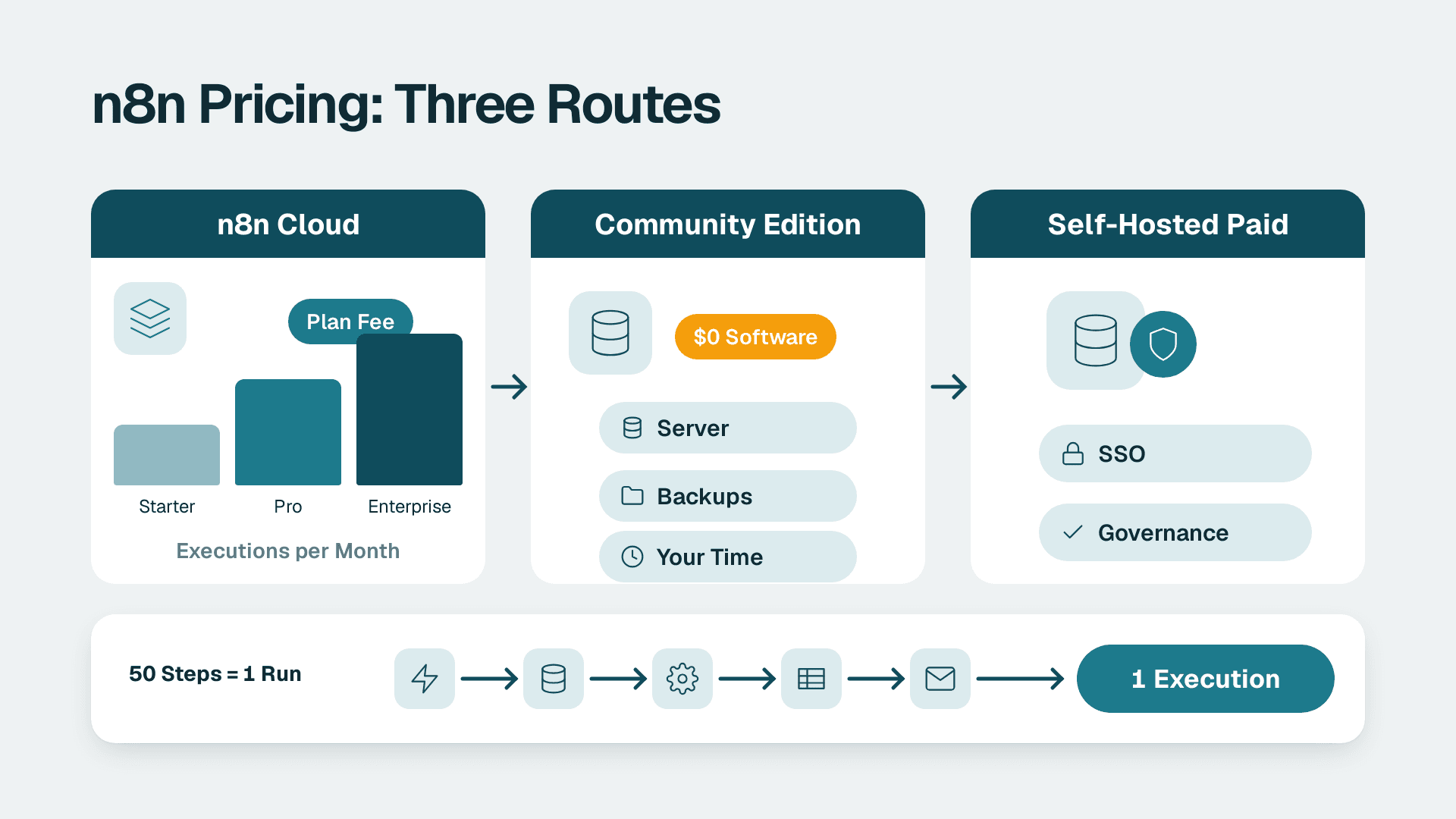
n8n pricing comes down to three routes: paid n8n Cloud plans sized by monthly workflow executions, the free self-hosted Community Edition, and self-hosted paid plans that add governance features. The software itself can cost nothing, but running it never does. Your real price is either the plan fee or the hosting and maintenance time you absorb instead.
Key Takeaways
- n8n bills by executions (one full workflow run), not by individual steps, so a 50-step workflow costs the same as a 2-step one.
- The Community Edition is free to download and self-host, but you pay for servers, backups, upgrades and engineer time.
- Cloud plans differ mainly on shared projects, concurrent executions, insight history and governance features, not just on run counts.
- The Business plan is self-hosted only and is aimed at companies with fewer than 100 employees.
- Estimate your executions from your schedules before you choose, because frequent polling workflows are the usual source of surprise bills.
How much does n8n cost in 2026?
The n8n price depends on where you run it: n8n Cloud is a subscription, the Community Edition has no licence fee, and the Business and Enterprise plans add paid features for self-hosted teams. Exact monthly figures change, so confirm them on the official n8n plans and pricing page before you budget.
For most ops leads, the useful question is not "what is the sticker price" but "what is the total cost of owning this workflow engine for a year". That total has four parts:
1. Licence or subscription: zero for the Community Edition, a recurring fee for Cloud, Business or Enterprise.
2. Infrastructure: nothing on Cloud, because n8n hosts it; a server, database and storage if you self-host.
3. People time: upgrades, security patching, monitoring and incident response when you self-host.
4. Usage overage: extra Assistant credits or a move up a tier when volume grows.
Teams that compare only the first line usually under-count the third. If you want help weighing these trade-offs against your own workflow volume, our n8n consulting and implementation work often starts with exactly this sizing exercise.
What does each n8n Cloud plan include?
n8n Cloud pricing is tiered by capacity and governance: Starter is the entry plan, Pro adds more projects and concurrency, Business moves to self-hosting with enterprise controls, and Enterprise adds unlimited projects and a support SLA. The table below summarises what each tier includes, based on the vendor's published plan details.
| Plan | Hosting | Shared projects | Concurrent executions | Notable inclusions |
|---|---|---|---|---|
| Starter | n8n Cloud | 1 | 5 | 1,600 Assistant credits per month, forum support |
| Pro | n8n Cloud | 3 | Up to 50 | 7 days of insights, up to 9,600 Assistant credits per month, admin roles, workflow history |
| Business | Self-hosted only | 6 | Scales with queue mode | SSO and LDAP, 30 days of insights, Git-based version control |
| Enterprise | Custom | Unlimited | 200+ | 365 days of insights, external secret store integration, log streaming, dedicated support with SLA |
Three details in that table deserve a closer look.
Concurrency matters as much as run count
Concurrent executions are how many workflow runs can be in flight at once. On Starter that ceiling is 5. A team that triggers many webhooks at the same moment, for example a burst of form submissions after an email campaign, can hit that ceiling long before it exhausts its monthly allowance. Pro raises the limit to 50, and Enterprise to 200 or more.
Assistant credits are a separate meter
Assistant credits power the in-product AI features and refresh every month. Unused credits do not roll over, and you can buy extra credits that are consumed once the included allowance runs out. If you plan to build agent-style workflows, read our practical tutorial on building AI agents in n8n first, because model calls add their own costs on top of the plan.
Business is a self-hosted plan
The Business plan is for companies with fewer than 100 employees and is self-hosted only. That surprises buyers who assume a higher tier means a bigger hosted plan. If you want SSO, LDAP and Git version control but do not want to run servers, you will need to look at Enterprise or budget for the hosting yourself.
There is also a Start-up Plan for companies with under 20 employees, which gives 50% off Business.
How does n8n count executions?
n8n defines an execution as a single run of the entire workflow, regardless of how many steps it has or how much data it processes. That is the key difference from tools that bill per task or per step, and it is why n8n often looks cheap for long, complex automations.
What drives the execution count is therefore your triggers, not your logic. n8n's own estimate is that a workflow scheduled every 5 minutes uses about 8,600 to 8,900 executions per month, while a daily schedule uses 30 or 31. A single polling workflow can consume more executions than a hundred daily reports.
A simple way to estimate your monthly executions
List every workflow and tag it with its trigger type:
- Scheduled: multiply runs per day by 30. A 15-minute schedule is 96 runs a day, or roughly 2,900 a month.
- Webhook or event-driven: count the events you expect, such as new CRM leads, support tickets or invoices.
- Polling: treat these as scheduled workflows, because each poll is a run even when nothing has changed.
Suppose a 40-person US SaaS finance team runs five polling workflows every 5 minutes. On the maths above, those five workflows alone would approach 44,000 executions a month before a single event-driven automation is added. Switching those polls to webhooks, where the source system supports them, is usually the cheapest optimisation available.
What happens when you hit a limit
Reaching the saved-execution, storage or retention limit does not stop workflows from running. It only changes how much execution history is kept. That matters for audit trails: if you need to prove what ran and when, plan retention deliberately rather than assuming the platform will keep everything.
Is n8n free to use?
Yes, in one specific sense: the n8n Community Edition is a standard, self-hosted version of n8n available on GitHub, with no licence fee. It is not free in the sense of costing nothing to operate, and it is not a hosted service. If you want a full orientation first, our beginner's guide to n8n as open-source workflow automation explains how the product is built and licensed.
There are two other ways to use n8n free, both time-limited:
- n8n Cloud trial: limited to 1,000 executions, 5 concurrent executions, a 180-second execution timeout and 1 team project. It includes 800 Assistant credits plus 100 AI credits, and no credit card is required.
- Business plan trial: full access to all Business features for 14 days. A credit card is required for this trial only.
So the honest answer to "is n8n free" is: the software can be, the trial is, and a production deployment rarely is.
Can you use n8n for free for life?
You can run the Community Edition for as long as you like, because there is no expiring licence. The costs that remain are the ones you carry yourself: a server, a database, backups, TLS certificates, monitoring, and the hours someone spends on upgrades. The Cloud trial, by contrast, ends, so it is a way to evaluate, not a permanent free tier.
What the free version may not give you
Governance features are where the paid tiers separate from the free edition. SSO and LDAP, Git-based version control, log streaming and external secret store integration are all listed under paid plans. Check the current plan comparison before assuming the Community Edition covers a requirement your security team will raise. If your procurement process asks for single sign-on or secrets management on day one, that alone may decide the question.
What does self-hosting n8n really cost?
Self-hosting n8n costs whatever your infrastructure and your engineers cost, because the licence line is zero. For a small team that is often a modest virtual server plus a few hours a month; for a team with strict uptime or compliance needs it can exceed a Cloud subscription once salaries are counted.
Break the cost into recurring categories:
| Cost category | What it covers | Who carries it on Cloud |
|---|---|---|
| Compute and storage | Server, database, execution data | n8n |
| Backups and recovery | Scheduled backups, restore testing | n8n |
| Upgrades | Applying new versions, testing workflows after changes | n8n |
| Security | Patching, access control, network rules, secrets handling | Shared |
| Monitoring | Uptime checks, failed-run alerts, log review | Shared |
| Scaling | Queue mode, workers, concurrency tuning | n8n (within plan limits) |
The last row is worth noting: queue mode for scaling is listed as a Business plan feature, so scaling a self-hosted deployment beyond a single process is part of the paid offer, not a free default.
Hidden costs people forget
- On-call burden. If a workflow that posts invoices fails at 2 a.m., someone has to notice. On Cloud, platform outages are n8n's problem; on self-hosted, they are yours.
- Upgrade risk. Skipping upgrades saves time today and creates a painful jump later. Budget a regular maintenance window.
- Data residency work. A UK fintech firm bound by GDPR, or a Canadian company handling personal information under PIPEDA, must know where execution data is stored. Self-hosting in a chosen region makes that easy to control, but it also makes you responsible for documenting it.
- Security reviews. A US healthcare operations team subject to HIPAA, or a finance team pursuing SOC 2, will need access controls and logging that someone has to configure and evidence.
If your workflows touch data in any of those categories, treat the engineering hours as a real line item rather than an invisible one.
Why is n8n so expensive for some teams?
Most complaints about the n8n price come from a mismatch between how people estimate usage and how n8n meters it, not from the per-unit rate. Three patterns explain nearly all of the sticker shock.
1. Polling workflows inflate executions. As shown above, a 5-minute schedule alone uses thousands of runs a month, whether or not anything changed.
2. Capacity and governance sit in higher tiers. A team that needs more than one shared project, more than 5 concurrent executions or role-based admin features is pushed from Starter to Pro or beyond even if its run count is low.
3. Self-hosting looks free but is not. The Community Edition removes the subscription and replaces it with operational work. When that work is unplanned, the total feels more expensive than a plan would have been.
There is also a counter-argument. Because n8n counts one execution per workflow run regardless of steps, a long multi-step automation can cost less than it would under a per-step model. If you are comparing platforms rather than plans, our comparison of n8n with the other main automation tools for SMEs walks through where each pricing model wins.
Which n8n option fits your team?
The right option depends on three variables: your execution volume, your governance requirements and how much infrastructure work you can absorb. Use the table below as a starting point, then validate against the current plan details.
| Your situation | Likely best fit | Why |
|---|---|---|
| Evaluating n8n, few workflows | Cloud free trial | No server to run, no card needed to start |
| Small team, light volume, no hosting skills | Starter or Pro on Cloud | Hosting, backups and upgrades are handled for you |
| Technical founder, comfortable with servers, tight budget | Community Edition | No licence fee; you own operations |
| Under 20 employees, need SSO and Git versioning | Start-up Plan (50% off Business) | Self-hosted with governance features at a reduced rate |
| Under 100 employees, self-hosted, need queue mode and version control | Business | Scaling and governance features on your own infrastructure |
| Large or regulated programme, needs SLA and audit-grade logging | Enterprise | Unlimited projects, 365 days of insights, log streaming, dedicated support |
Three hypothetical examples
These are illustrative scenarios, not client results.
- A US operations team at a mid-market services firm automates lead routing and invoice reminders. Volume is low, nobody wants to maintain a server, and the data is not regulated. A Cloud plan is the simplest fit, and the main task is checking concurrency against campaign spikes.
- A UK or EU fintech wants workflow execution data to stay in a specific region to satisfy GDPR commitments. Self-hosting gives control over location, so the team compares the Business plan against the Community Edition and decides whether SSO and version control justify the fee.
- A Canadian manufacturer syncs production and ERP data across plants, with PIPEDA obligations for any employee information in the flow. It has an IT team that already runs internal services, so the Community Edition with a documented maintenance routine may be economical, provided someone owns upgrades.
In each case the decision turned on who runs the platform, not on the headline fee.
How can you test n8n costs before committing?
Run a short, measured pilot rather than guessing. A two-week evaluation gives you real execution counts, which are the number every plan decision depends on.
1. Start on the Cloud trial with your two or three highest-value workflows. Note the 1,000 execution cap and 180-second timeout, and design your tests around them.
2. Log executions per workflow per day for the whole period, and extrapolate to a month.
3. Identify polling triggers and test whether webhooks can replace them.
4. Try the Business trial if you need self-hosted governance features. Its 14 days give full access, but remember it requires a credit card.
5. Cost the self-hosted alternative honestly by adding server, backup, monitoring and engineer hours to the same volume estimate.
Once you have those numbers, the comparison between Cloud, Community Edition and a self-hosted paid plan becomes arithmetic rather than opinion.
How do you keep n8n costs predictable?
- Prefer event triggers over frequent schedules wherever the source app supports them.
- Merge small workflows that run on the same schedule where the logic allows it, since each run counts once.
- Set retention deliberately, knowing that hitting history limits does not stop workflows.
- Watch Assistant credits monthly, because unused credits expire and overage is bought separately.
- Review execution counts quarterly so a tier change is a planned decision, not a reaction to a limit.
What should you do next?
Start by listing your workflows and their triggers, then estimate monthly executions using the schedule maths above. Compare that figure with the concurrency and governance needs of your team, and decide whether you want to run the platform yourself. If the answer is no, a Cloud plan is the natural starting point. If it is yes, price the engineering time next to the licence before you commit.
---
About Lets Viz: Lets Viz is a data analytics and automation consultancy that has helped teams build reliable reporting and workflow systems since 2020, serving US healthcare, UK fintech, Canadian manufacturing and global SaaS organisations. We hold a 5.0 Clutch rating, and our guidance reflects hands-on implementation work rather than vendor marketing.
If you want a second opinion on plan choice, hosting and workflow design, see our n8n consulting and implementation service.
Sources
Facts and prices checked October 2026.