Microsoft Fabric OneLake Explained: The Unified Data Lake
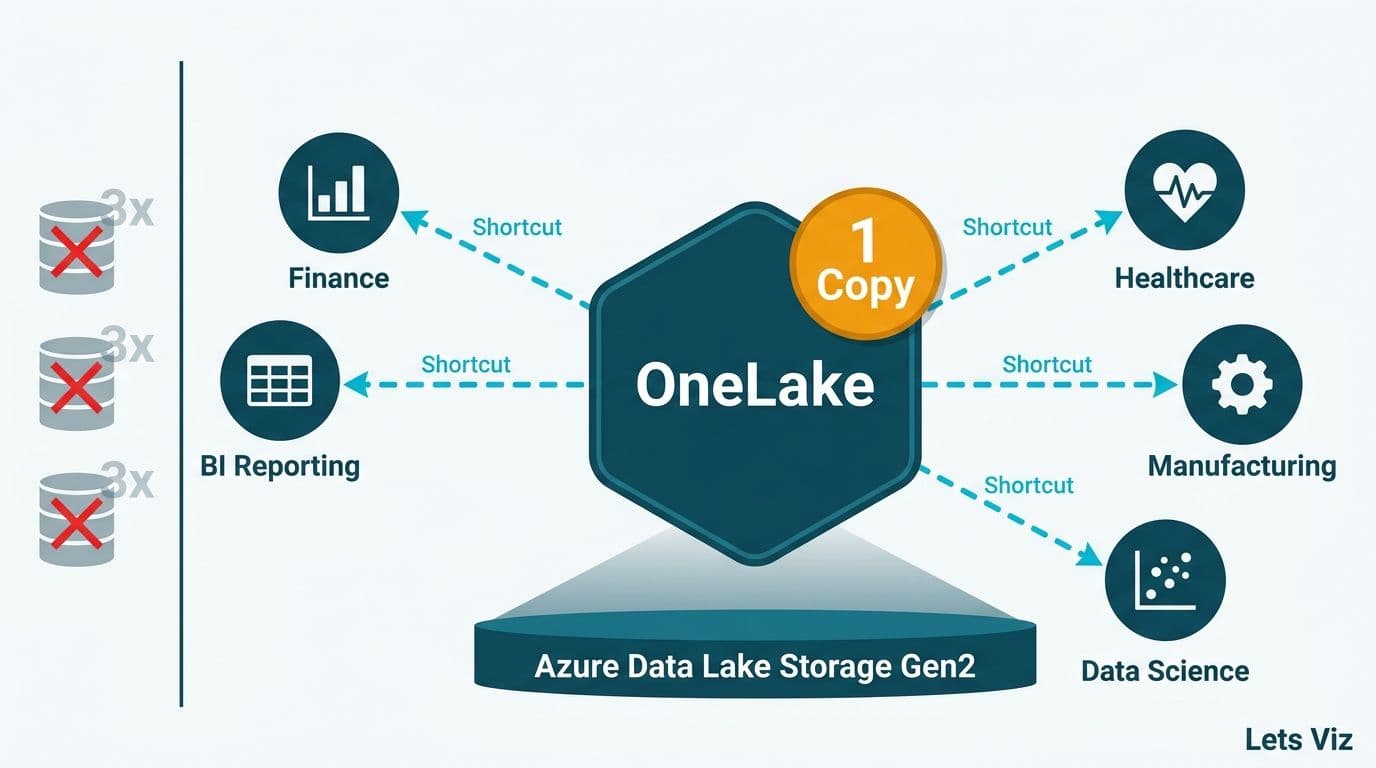
Microsoft Fabric OneLake is a single, organization-wide data lake built into every Microsoft Fabric tenant. It stores data once and lets any authorized workspace access it through virtual pointers called shortcuts - eliminating the redundant copies that inflate storage costs and create data-consistency problems. For data teams at mid-market healthcare, finance, or manufacturing companies, OneLake changes the fundamental economics of running a modern data platform.
Key Takeaways
OneLake is a single logical data lake shared across all Fabric workspaces in a tenant - one place, one authoritative copy of every dataset
Shortcuts are virtual pointers that let any workspace read data from another workspace, Azure Data Lake Storage Gen2, or Amazon S3 without physically moving files
Cross-workspace access is governed by Fabric role-based and row-level security, keeping sensitive records protected even when shared broadly
Regulated industries benefit because a single authoritative dataset simplifies audit trails and reduces the compliance surface area
OneLake is built on Azure Data Lake Storage Gen2, meaning existing ADLS pipelines integrate without a full re-engineering effort
What Is Microsoft Fabric OneLake, Explained as a Unified Data Lake?
OneLake is Microsoft's answer to the data fragmentation that plagues most enterprise analytics architectures. In a traditional setup, each business unit - finance, operations, clinical - provisions its own storage account and builds ETL pipelines that pull data from source systems into that silo. The result is dozens of copies of the same customer or patient record, each slightly different, each requiring its own governance workflow.
OneLake inverts this model. Every Fabric workspace in a tenant writes to one shared lake, organized in a hierarchical namespace: tenant, then workspace, then item (lakehouse, warehouse, or Eventhouse). Teams still work in their own workspaces, but the underlying data lives in one location with one chain of custody.
Think of it like OneDrive for organizational data. Just as OneDrive gives every employee a personal folder inside one enterprise storage layer, OneLake gives every Fabric workspace its own namespace inside one lake. The organizational owner controls the root; workspace owners control their subtrees. Nothing is siloed, and nothing is duplicated by default.
For organizations evaluating Power BI and Fabric consulting, understanding OneLake is foundational - it changes how Power BI reports connect to data sources and how semantic models are structured, especially in multi-department or multi-entity environments where data ownership is distributed across teams.
OneLake supports the Delta Lake open table format natively. Data stored in Fabric lakehouses, warehouses, and Eventhouses is immediately readable by any tool that speaks Delta - including Apache Spark, Apache Hive, and third-party query engines. There is no proprietary lock-in at the storage layer, which matters for organizations that run hybrid or multi-cloud analytics stacks.
According to Future Market Insights (2026), the global AI consulting and data platform services market is projected to grow from approximately USD 14 billion in 2026 to USD 90.99 billion by 2035 at a 26.2% CAGR. OneLake positions Microsoft Fabric as the infrastructure of choice for organizations making that platform investment now rather than retrofitting fragmented storage architectures later.
How Do OneLake Shortcuts Work - and Why Do They Eliminate Data Duplication?
Shortcuts are the mechanism that makes OneLake's one-copy promise practical at scale. A shortcut is a virtual link inside a OneLake namespace that points to data stored elsewhere - in another Fabric workspace, in Azure Data Lake Storage Gen2, in Amazon S3, or in Google Cloud Storage. When a report or pipeline reads through a shortcut, Fabric fetches data from its original location in real time. Nothing is copied; nothing is moved.
Here is how this works in a regulated context. A US healthcare network stores raw electronic health records in an ADLS Gen2 account managed by its IT security team under HIPAA-mandated access controls. The analytics team creates a OneLake shortcut pointing to that storage account. Clinical analysts working in Power BI see data that appears to live in their own workspace - but the master record never left the IT-controlled account. No duplication, no data drift, and no expanded HIPAA compliance surface area from additional copies.
The same logic applies across clouds. A Canadian retailer migrating from AWS can shortcut from OneLake into existing S3 buckets while refactoring pipelines incrementally rather than executing a big-bang migration. Under Canada's PIPEDA data handling requirements, keeping data in its original jurisdiction while shortcutting - rather than replicating across regions - is a meaningful architectural advantage that reduces regulatory exposure during the transition period.
Shortcuts also enable the medallion architecture pattern across workspaces without data movement. A Bronze layer shortcut pulls raw data from source systems, a Silver workspace applies cleaning and conformance transformations, and a Gold workspace exposes reporting-ready Delta tables. Each layer can have different workspace owners and different access tiers, all unified under OneLake's namespace hierarchy. Our guide to Medallion Architecture in Microsoft Fabric provides step-by-step implementation detail for this pattern.
| Scenario | Traditional Copy ETL | OneLake Shortcut |
|---|---|---|
| New team needs dataset access | DBA creates another copy in the team's schema | Admin creates a shortcut in the team's workspace |
| Storage cost impact | Multiplies with each additional consumer | One copy regardless of consumer count |
| Data freshness | Depends on ETL schedule lag | Real-time read-through from source |
| Compliance audit | Must track every copy location and lineage | Single authoritative source; shortcut metadata auditable |
| Cross-cloud access (AWS + Azure) | Complex replication pipeline required | Native S3 shortcut with no data movement |
How Does Cross-Workspace Access Work in OneLake?
Cross-workspace access in OneLake is governed by two independent security layers that stack on top of each other. The first is Fabric workspace roles - Viewer, Contributor, Member, and Admin. A user with Viewer access to Workspace B can read items in that workspace but cannot write to them or see Workspace A's data unless explicitly granted access. The second layer is item-level permissions, which let workspace owners share specific lakehouses or warehouses with external users without granting them full workspace access.
For healthcare organizations, the critical third control is row-level security enforced at query time by Power BI and the DirectLake connection mode. A hospital system in Ontario, Canada - operating under both PIPEDA and Ontario's Personal Health Information Protection Act - can store all patient data in a single Gold lakehouse and apply RLS so that cardiology analysts see only cardiology records, even though the underlying OneLake item is shared across departments. This architectural pattern is cleaner and more auditable than maintaining separate dataset copies per department, and it aligns directly with the power bi row level security for healthcare data approach used in enterprise clinical deployments.
In the UK and EU, GDPR's data minimization principle requires that users access only data necessary for their stated purpose. OneLake's combination of item-level sharing and row-level security directly satisfies this requirement: share one item, restrict rows at query time, and route every access event through Microsoft Purview's unified audit log - without creating additional data copies that multiply compliance obligations.
A UK fintech firm running open-banking analytics, for example, can shortcut transaction ledger data from a regulated storage account into a shared OneLake environment, then use item-level permissions to expose only anonymized transaction aggregates to the business intelligence team. The compliance team retains full-row access to the same underlying source, with every query logged for GDPR Article 30 accountability evidence.
OneLake vs Traditional Data Lake Architectures: What Actually Changes?
Traditional multi-silo data lake architectures evolved organically: each business unit provisioned its own storage account, built independent ETL pipelines, and maintained local copies of shared reference data. The result - often called a data swamp - is dozens of slightly different versions of the same record, each requiring its own governance workflow, its own pipeline maintenance burden, and its own storage cost.
OneLake changes the governance model, not just the storage topology. Because there is one namespace per tenant, Microsoft Purview can scan, classify, and label data across all workspaces from a single control plane. Data stewards see a unified catalog rather than hunting through disconnected storage accounts. Sensitivity labels applied at the OneLake layer propagate automatically to Power BI reports built on top of that data - without requiring manual intervention from report authors or additional configuration by the BI team.
For mid-market organizations that lack a dedicated data governance function - common in the 200 to 500 employee range - this automatic label propagation is a significant operational advantage. According to Market Research Future (2026), the Healthcare Financial Analytics Market is projected to grow at an 8.58% CAGR from 2026 to 2036, driven substantially by regulatory changes and demand for standardized, auditable data. Smaller health systems and regional finance firms are increasingly selecting platforms that bake governance in from day one, rather than treating it as a retrofit.
Our article on What Is Microsoft Fabric Lakehouse? A Plain-English Guide explains how the lakehouse construct inside OneLake differs from a raw storage account - a useful prerequisite before designing a multi-workspace architecture.
Why Healthcare and Finance Teams Are Adopting OneLake Now
The business case for OneLake converges differently by industry, but two drivers appear in both healthcare and finance: regulatory auditability and analytics at the point of decision.
In healthcare, the shift toward value-based care and AI-driven clinical analytics - identified by MedInsight (2026) as the dominant investment themes across US health systems - requires that clinicians and administrators work from the same data. A hospital patient flow and bed capacity dashboard in Power BI only functions correctly if it draws from one authoritative admission and census source. If the bed management team uses one dataset copy and finance uses another, capacity metrics and cost-per-patient figures will never reconcile in reporting. OneLake eliminates this structural problem by design.
Connecting FHIR-formatted clinical data to Power BI for clinical reporting also becomes architecturally cleaner under OneLake. A pipeline writes FHIR bundles to a Bronze lakehouse, a Silver transformation layer flattens and normalizes them into Delta tables, and clinical dashboards in Power BI connect via DirectLake - all within one namespace, all auditable under HIPAA's minimum necessary standard. US organizations should verify that their Fabric tenant is deployed in a HIPAA-eligible Azure region and that a Business Associate Agreement is in place with Microsoft before storing protected health information in OneLake.
For dashboard patterns built on this architecture, see Healthcare KPI Dashboard Examples by Department (2026) and the full implementation guide on Power BI Consulting for Healthcare Organizations.
In finance, the equivalent driver is reconciliation integrity. A US asset manager running portfolio performance analytics alongside a separate regulatory reporting workstream historically maintained two copies of trade data - one optimized for attribution calculations, one formatted for regulatory submissions. With OneLake, both workstreams shortcut to the same Delta table. Any upstream correction propagates instantly to both consumers without a pipeline synchronization step - a pattern that early adopters report cuts monthly reconciliation cycles by two to three days and eliminates an entire class of discrepancy investigations that previously consumed analyst hours before regulatory submission deadlines.
A Canadian bank subject to OSFI B-20 mortgage guidelines benefits similarly: a single copy of mortgage portfolio data with full lineage tracked in Purview represents a stronger compliance posture than distributed copies with inconsistent transformation histories. Our guide to AI-Powered Power BI Consulting for Finance Teams covers how finance-specific semantic models layer on top of OneLake for executive reporting and regulatory evidence packages.
What Are the Data Governance Implications of OneLake?
OneLake governance rests on three pillars: Microsoft Purview integration, sensitivity labels, and audit logs.
Purview scans OneLake natively, identifying PII, protected health information, and financial data automatically and applying classification labels. Those labels then control downstream behavior. A file labeled Highly Confidential in OneLake cannot be exported to an unmanaged location by Power BI unless the requesting user holds the required export permission. For organizations building a HIPAA-compliant analytics environment in the US, or meeting GDPR's accountability requirements in the UK and EU, automated classification substantially reduces the manual compliance workload that typically falls on already-stretched data teams.
Audit logs from OneLake flow into Purview's unified audit trail, providing a timestamped record of every access event: who read which data, from which workspace, and when. This is precisely the evidence that SOC 2 Type II audits require in the US and that GDPR Article 30 mandates for records of processing activities in UK and EU organizations.
One governance risk that early adopters frequently overlook: workspace boundaries do not equal security boundaries by default. A user with Contributor access to a workspace that contains a shortcut to a sensitive source dataset can potentially read that source data through the shortcut, even without direct access to the origin storage account. Organizations should audit shortcut targets as part of their regular data access review cycle and use item-level permissions on sensitive shortcuts rather than relying solely on workspace role assignments to control access.
What Are Microsoft Fabric Data Agents and When Do They Add Value in Mid-Market Analytics?
Microsoft Fabric data agents are AI-powered query interfaces that let business users ask questions about a lakehouse in plain English and receive answers drawn directly from the underlying Delta tables in OneLake - without writing a single line of SQL or DAX.
The key distinction from Copilot in Power BI is where in the stack each capability operates. Copilot in Power BI works inside the report authoring experience: it suggests DAX measures, generates M query steps, and summarizes visuals for report builders. Fabric data agents operate at the data tier. A data agent is configured against a specific lakehouse or warehouse item in OneLake, given structured descriptions of its tables and columns, and then deployed as a conversational endpoint. When a finance analyst asks "what was our gross margin by product line last quarter, excluding intercompany transfers?" the agent interprets the natural-language intent, generates SQL against the Gold Delta tables, executes it, and returns a formatted answer - with access controls inherited directly from OneLake's existing workspace and row-level security settings. An agent built on a warehouse that enforces RLS will return only the rows a given user is entitled to see, regardless of how the question is phrased.
For mid-market organizations, this distinction matters operationally. A 300-person manufacturer may have ten analysts who can build Power BI reports and eighty operations managers who cannot. Microsoft Fabric data agents give that broader group governed, self-service access to OneLake data through a conversational interface - whether embedded in Microsoft Teams, in the Fabric portal, or via API in an internal application.
Where data agents add measurable value in mid-market analytics:
Ad hoc operational queries that previously required an analyst to build a one-off report: inventory availability by location, open purchase orders by supplier, aged receivables by customer segment
Executive follow-up questions where a CFO or COO wants to drill into a dashboard metric without waiting for the next analyst sprint
Onboarding new business units onto an existing OneLake environment, where building a full semantic model would take weeks but a data agent can surface 80% of common questions within days
The practical prerequisite: data agents perform reliably only against well-structured Gold layer Delta tables with accurate, complete table and column descriptions. A lakehouse with sparse metadata or inconsistently named fields produces unreliable natural-language query results. This is one concrete reason why investing in a clean medallion architecture before deploying Fabric data agents pays a direct return - the same Gold tables that power your Power BI DirectLake semantic models become the foundation the agents reason over.
How Do You Migrate Azure Data Lake Storage Gen2 to a Microsoft Fabric Lakehouse?
The most common path organizations take when they migrate Azure Data Lake Storage to Microsoft Fabric Lakehouse is a phased shortcut-first approach that avoids a big-bang cutover and keeps compliance controls intact at every step. The playbook below is designed for ADLS Gen2 environments and maps GDPR and PIPEDA checkpoints to each phase - the two regulatory frameworks most frequently raised by Canadian and UK organizations during Fabric architecture reviews.
Phase 1: Inventory and data classification
Before touching infrastructure, catalog every ADLS Gen2 container: data format (Parquet, CSV, JSON), approximate volume, access policies, and any existing sensitivity classifications. For GDPR, this phase surfaces personal data under Article 4(1) - names, identifiers, location data - and confirms whether it is already labeled or requires Purview classification before migration. For PIPEDA, the equivalent question is whether the data constitutes "personal information" under Section 2 of the Act and which provinces' residents are represented.
GDPR checkpoint: document the legal basis for processing each personal dataset in your Article 30 records of processing activities before migration begins. This record must exist prior to any data movement.
PIPEDA checkpoint: verify that data currently held in a US Azure region under ADLS Gen2 is covered by an adequate contractual arrangement for cross-border transfers, and determine whether moving to a Canadian-region Fabric tenant is required by your privacy management program.
Phase 2: Create OneLake shortcuts (zero data movement)
Create ADLS Gen2 shortcuts from your Fabric lakehouse pointing to each cataloged container. Data remains in its original ADLS Gen2 location; Fabric reads through the shortcut in real time. This phase is fully reversible - deleting a shortcut leaves source data untouched - making it the lowest-risk way to validate that existing pipelines and Power BI reports can query source data through Fabric before committing to Delta conversion.
GDPR checkpoint: confirm that shortcut access is governed by item-level permissions in Fabric and that only users with a legitimate processing purpose can reach personal data through the shortcut. Enable shortcut audit events in Purview's unified audit log at this stage so the access record is continuous from day one of the migration.
PIPEDA checkpoint: if the shortcut crosses regional boundaries (ADLS in East US, Fabric tenant in Canada Central), confirm that the cross-border data flow is covered by a contractual arrangement or that PIPEDA's accountability principle is satisfied through Microsoft's data processing addendum for the Fabric tenant.
Phase 3: Delta Lake conversion and Bronze-to-Gold build
With shortcuts confirming data reachability, run Spark notebooks in Fabric to convert Parquet and CSV files to Delta format in the Bronze lakehouse. Apply Silver transformations - cleansing, conformance, deduplication - and build Gold Delta tables that Power BI and Fabric data agents will query via DirectLake. Delta's transaction log provides row-level lineage from this point forward, which auditors in regulated industries treat as stronger evidence of data integrity than file-level object storage metadata.
GDPR checkpoint: apply data minimization during Silver transformation. Fields not necessary for the downstream analytical purpose should be dropped at this layer rather than carried forward to Gold. Fields that are retained but classified as sensitive should carry their Purview sensitivity labels into the Gold Delta tables so downstream access controls inherit them automatically.
PIPEDA checkpoint: encode consent records and retention schedules as table-level metadata in the Gold lakehouse at this phase. Automated retention enforcement can then reference this metadata directly rather than relying on manual tracking spreadsheets, satisfying PIPEDA's accountability principle (Schedule 1, Clause 4.1).
Phase 4: Pipeline cutover and ADLS decommission
Redirect ingestion pipelines from writing directly to ADLS Gen2 to writing into the OneLake Bronze lakehouse. Once data flows directly into OneLake and downstream reports and agents are validated against the Gold layer, remove the Phase 2 shortcuts and initiate decommission of the original ADLS Gen2 storage accounts through a defined retention window.
GDPR checkpoint: right-to-erasure requests received during the migration period require deletion from both the ADLS source and any OneLake copies simultaneously. Establish a single deletion workflow that targets the OneLake Gold table and traces back to the source before ADLS is decommissioned. After decommission, OneLake becomes the sole authoritative system and erasure processing simplifies to a single location.
PIPEDA checkpoint: document the decommission date and final data disposition in your privacy management program records. Confirm that Microsoft's data processing addendum covers the Fabric tenant before closing the ADLS account, satisfying PIPEDA's requirement that third-party handling of personal information is contractually defined.
The full migration from ADLS Gen2 to a production OneLake lakehouse architecture typically spans six to twelve weeks for a mid-market organization, depending on data volume and the number of pipelines requiring cutover. Organizations that attempt all workloads simultaneously routinely hit scheduling conflicts and compliance review bottlenecks; the phased shortcut approach above lets each workload be validated and signed off independently before the next phase is started.
When Should Your Organization Move to Microsoft Fabric OneLake?
OneLake delivers the most immediate value when at least two of the following conditions apply to your organization:
Multiple teams access overlapping datasets and currently maintain separate copies with manual sync processes
Storage and ETL pipeline costs are growing faster than data volume as more consumers are onboarded
Compliance or audit reviews require tracing data lineage across departments or systems
Power BI reports from different teams show conflicting numbers drawn from the same underlying source metric
The organization already operates on Azure and holds Microsoft 365 E3 or active Fabric capacity licenses
If your organization is earlier in the analytics maturity curve - still consolidating fragmented spreadsheets into a central reporting layer - the Power BI Import vs DirectQuery: Mid-Market Decision Guide is a better starting point before designing a lake architecture.
For teams ready to evaluate OneLake as part of a broader Fabric rollout, Microsoft Fabric vs Power BI: What's Actually Different explains the product relationship and which licensing tier activates OneLake capabilities. OneLake is included in all Fabric SKUs at F2 capacity and above, and is available during the Fabric capacity trial period - meaning most organizations can validate shortcut and cross-workspace access patterns in a sandbox before committing to production architecture decisions.
The organizations that see the fastest return from OneLake are those that start with a clear inventory of their highest-cost data duplication pain points and resolve them one workspace pair at a time using shortcuts, rather than attempting a wholesale migration of all storage accounts simultaneously.
If you are ready to evaluate how OneLake fits your organization's data architecture, our Power BI and Fabric consulting team designs and deploys Microsoft Fabric environments for healthcare systems, financial services firms, and mid-market enterprises across the US, Canada, and the UK - from initial tenant configuration through production-grade governance frameworks and DirectLake semantic models.
---
About Lets Viz: Lets Viz has delivered data analytics and Business Intelligence consulting since 2020, serving US healthcare systems, UK fintech firms, Canadian manufacturers, and global SaaS businesses. Recognized with a 5.0 Clutch rating, our team holds active Microsoft certifications across Power BI, Azure, and Fabric, and has designed OneLake-based architectures for clients operating under HIPAA, GDPR, and PIPEDA compliance requirements.