Power BI Import vs DirectQuery: Mid-Market Decision Guide
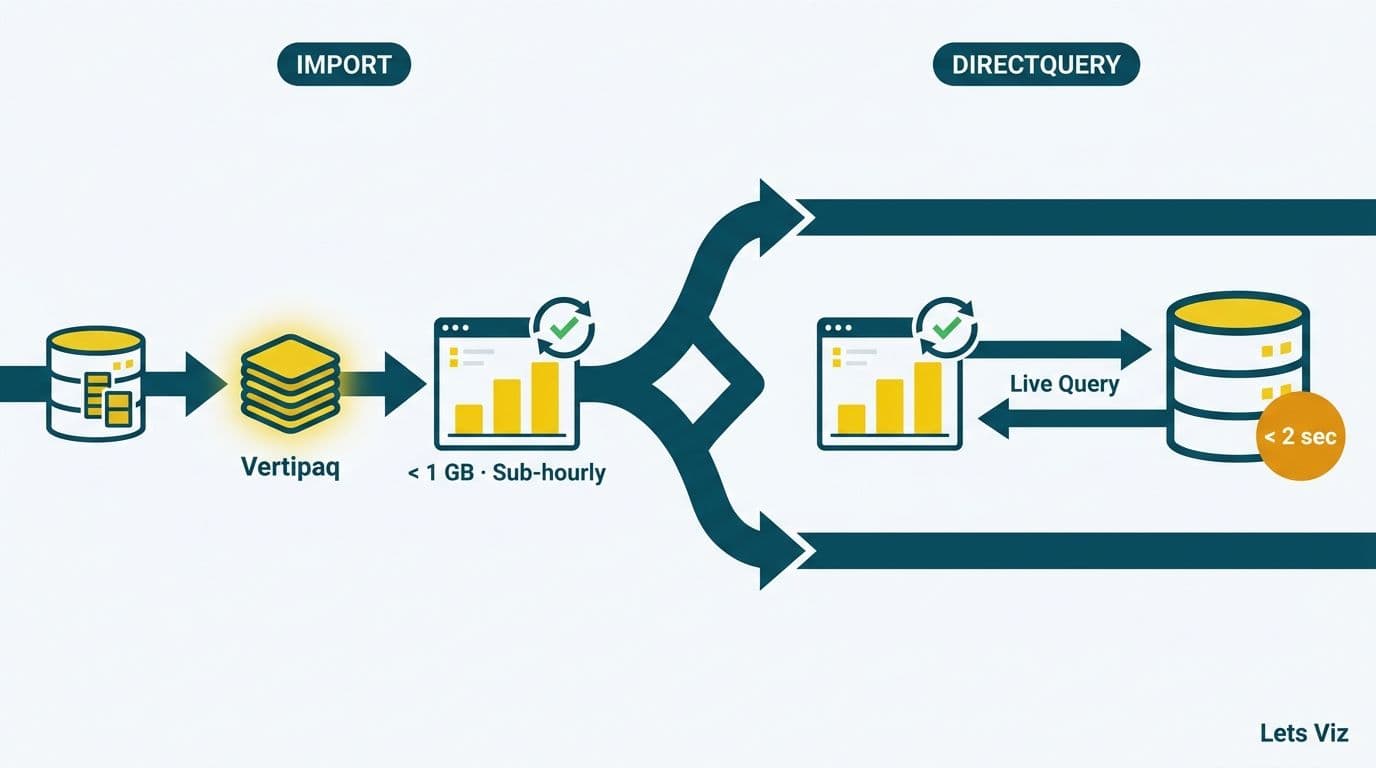
For mid-market data teams choosing between Import mode and DirectQuery in Power BI, the decision hinges on three variables: data volume, refresh frequency, and source latency. Import mode compresses data into Power BI's Vertipaq in-memory engine and delivers fast, feature-rich reports - ideal for datasets under 1 GB with daily or sub-hourly refresh requirements. DirectQuery routes every visual query live to the source system, suiting large or regulated datasets where reports must reflect transactions from the last few seconds.
Key Takeaways
Import mode compresses data locally and delivers sub-second performance, but limits data freshness to the refresh schedule - minimum 30 minutes on Power BI Pro.
DirectQuery enables near real-time data but reduces report speed and restricts certain DAX functions.
Healthcare and finance mid-market teams frequently require DirectQuery or Composite Model for EHR feeds, live trading data, or regulatory audit trails.
Dataset sizes above roughly 300-500 million rows typically force a DirectQuery or Composite Model approach.
Composite Model blends Import and DirectQuery tables in one dataset and is the emerging standard for mid-market organizations with mixed data freshness requirements.
Lets Viz provides Power BI consulting for mid-market and enterprise teams across the US, UK, and Canada -- from initial model design to ongoing optimisation.
What Are Import Mode and DirectQuery in Power BI?
Power BI offers two primary storage modes for connecting reports to data: Import and DirectQuery, plus a hybrid Composite Model that blends both within a single dataset.
In Import mode, Power BI copies data from the source into its Vertipaq in-memory columnar engine during each scheduled refresh. Reports query the local compressed cache, which is why visuals render in milliseconds even for complex aggregations involving millions of rows. The trade-off is data currency: the model reflects data only as of the last completed refresh. Power BI Pro allows up to 8 scheduled refreshes per 24 hours; Power BI Premium raises that ceiling to 48 - translating to a minimum 30-minute refresh interval at the upper end.
In DirectQuery mode, no data is stored in the Power BI model. Every filter interaction, slicer change, or page load generates a native query that Power BI fires directly against the source database or data warehouse. Freshness is near-instant, but report render speed depends entirely on how quickly the source responds and how many concurrent users are firing queries simultaneously. For teams building Power BI financial reporting dashboards, this distinction between cached and live data is often the most consequential architectural decision in the entire BI stack.
Composite Model allows Import and DirectQuery tables to coexist in one dataset. A large transactional table might remain in DirectQuery against a cloud data warehouse while smaller reference tables - cost center mappings, payer configurations, product hierarchies - are imported for speed. Composite Model is available on both Pro and Premium licenses, and it is increasingly the practical resolution when the binary Import-or-DirectQuery choice is too limiting.
How Does Data Volume Shape the Import vs DirectQuery Power BI Decision?
Data volume is the first filter in any Import vs DirectQuery Power BI evaluation because it determines whether Import is feasible at all.
Import mode stores data in a compressed columnar format. Vertipaq typically achieves compression ratios of 8:1 to 15:1 depending on column cardinality and data type distribution. Power BI Pro caps models at 1 GB per dataset in shared capacity; Power BI Premium Gen2 extends this to 400 GB per dataset. The practical strain threshold for Import is around 300-500 million rows, or when refresh duration extends beyond 30-60 minutes and begins timing out or exceeding capacity limits.
According to Market Research Future (as of 2026), the Healthcare Financial Analytics Market is projected to grow at an 8.58% CAGR through 2035, driven by the volume of claims, encounter records, and payer data that healthcare organizations must process continuously. Healthcare mid-market teams managing multi-year claims history or encounter data at member level frequently approach Import row limits faster than peers in other industries - making data volume a particularly acute decision driver in that sector.
The table below summarizes how each mode handles the key variables:
| Factor | Import | DirectQuery | Composite Model |
|---|---|---|---|
| Max model size | 1 GB (Pro) / 400 GB (Premium Gen2) | Unlimited - source limited | Imported tables count toward limit |
| Row count sweet spot | Under 300M rows | 300M+ rows | Mixed, per table |
| Report render speed | Sub-second | Source-dependent (1-10+ seconds) | Mixed, per table |
| DAX support | Full library | Limited subset | Full on imported; limited on DQ tables |
| Data freshness | Refresh schedule (30-min minimum) | Near real-time | Per table |
| Scheduled refresh limit | 8/day (Pro); 48/day (Premium) | Not applicable | Applies to imported tables only |
| Calculated columns | Yes | Limited | Yes on imported tables |
| Row-level security | Full support | Full support (with query overhead) | Full support |
| Best fit | Financial reporting, HR, historical analysis | Operational dashboards, audit trails | Mixed mid-market workloads |
For mid-market teams evaluating their broader BI investment alongside storage mode, the managed Power BI versus in-house BI team cost guide covers how storage mode choice affects infrastructure and staffing economics over time.
When Should You Choose Import Mode?
Import mode is the right default for most mid-market reporting workloads - particularly where reports serve planning cycles, financial close, and performance reviews rather than real-time operational decisions.
Choose Import when the following conditions apply:
Your dataset fits within model size limits. Financial statements, budget variance analyses, and workforce analytics typically involve millions of rows, not hundreds of millions. Import handles these comfortably on Pro, and Premium Gen2's 400 GB ceiling covers virtually all mid-market scenarios outside of large insurance carriers and integrated delivery networks.
Report speed is a business requirement. Finance directors reviewing a monthly close dashboard will notice a 5-second visual load time on every filter interaction. Import delivers sub-second renders regardless of source load or network conditions. Automating monthly financial reporting in Power BI nearly always calls for Import mode because of this render speed guarantee and the DAX dependency that financial models carry.
You need the full DAX library. Complex financial calculations - time intelligence functions such as SAMEPERIODLASTYEAR, rolling 12-month revenue, contribution margin by segment, and what-if parameters - require DAX features that DirectQuery either prohibits or restricts. Models with calculated columns, complex many-to-many relationships, or bidirectional filter chains require Import.
Your source systems cannot absorb concurrent BI query traffic. Every user opening a DirectQuery report fires live queries against the source. A mid-market ERP shared by accounting, operations, and sales cannot always absorb additional analytical query pressure without degrading transactional performance. Import completely isolates the reporting workload from the operational database.
You are building reports with complex cross-table calculations. Calculated tables, many-to-many relationships requiring bidirectional filtering, and DAX measures that span multiple fact tables are either unavailable or severely constrained in DirectQuery. Import removes these limitations.
The primary limitation of Import is data staleness. On Pro, the maximum refresh frequency is 8 times per 24 hours. If stakeholders need data more current than every few hours, Import alone on Pro cannot deliver it - and the solution is either a Premium license with incremental refresh, or a shift to DirectQuery or Composite Model.
When Does DirectQuery Make Sense for Mid-Market Teams?
DirectQuery becomes the logical choice when data freshness requirements outpace what Import refresh cycles can deliver, or when dataset volume makes importing impractical.
Choose DirectQuery when the following conditions apply:
Data must be current to the minute or second. Trading desks, emergency department throughput monitors, fraud detection screens, and daily cash position dashboards require freshness that Import schedules cannot provide. HIPAA-compliant analytics dashboards for clinical operations frequently fall into this category - bed availability or patient status data needs to reflect the current care state, not a snapshot from two hours ago.
The dataset is too large to import. Claims history spanning 5+ years for a mid-size health plan, or multi-year general ledger detail for a holding company with dozens of subsidiaries, can exceed Import model limits. DirectQuery leaves data in the warehouse where it belongs and eliminates refresh timeout failures.
The source is explicitly built for analytical queries. Azure Synapse Analytics, Snowflake, Azure SQL Database, and major cloud data warehouses are architected for concurrent analytical workloads with query optimization and indexing designed for BI patterns. These are appropriate DirectQuery sources. A shared transactional ERP or OLTP database is generally not.
Regulatory or audit requirements demand source-of-record data. SOX-controlled financial reporting and healthcare payer audit trails sometimes require that reports reflect the actual database state at query time rather than a cached snapshot. DirectQuery satisfies those documentation and traceability requirements in ways that a scheduled-refresh model cannot. In 2026, three themes are reshaping healthcare analytics: value-based care, AI-driven analytics, and payer analytics innovation (MedInsight, 2026) - all three create reporting requirements where data traceability and freshness matter more than render speed.
The engineering cost of DirectQuery is real. Query folding must work correctly for acceptable performance. Report developers must design measures with source-query efficiency in mind from the outset. These are solvable challenges, but they require more upfront architectural discipline than Import and often benefit from external expertise during the initial model design phase.
How Do Refresh Frequency and Source Latency Factor In?
Refresh frequency and source latency are the second and third inputs in the storage mode decision, after volume.
Refresh frequency defines the maximum data staleness your stakeholders can tolerate. Daily or every-few-hours requirements: Import on Pro is sufficient. Every 15-30 minutes: Import on Premium or a shift to DirectQuery. Real-time or sub-minute freshness: DirectQuery or a Power BI streaming dataset.
Incremental refresh is an important middle ground that extends Import viability for large datasets. Rather than reloading an entire multi-year fact table on every cycle, incremental refresh loads only rows added or modified within a specified rolling window - for example, the last 7 days. This reduces refresh duration dramatically and postpones the need to migrate to DirectQuery. The most powerful incremental refresh configurations, including change detection via a watermark column, are available on Power BI Premium.
Source latency is the complementary constraint. DirectQuery translates every user interaction into a source query. A single report page with six visuals, opened by 50 simultaneous users, fires up to 300 live queries against the source in a single page-load burst. If that source is a shared operational database already managing transactional load, the combined analytical query pressure degrades both the BI reports and the application the database serves - a pattern Lets Viz has observed adding 2-4 seconds of latency to ERP transactional operations during peak reporting windows. Import isolates the reporting workload entirely, which is why data engineering teams managing on-premises or capacity-constrained databases frequently prefer Import even when freshness requirements might technically support DirectQuery.
For finance-specific Power BI architecture in regulated environments, how to build a Power BI financial dashboard for healthcare illustrates how source-latency constraints shape storage mode selection where EHR systems and financial databases share underlying infrastructure.
The Four-Question Decision Framework: Import vs DirectQuery Power BI
Use this framework before your first model build to reach a defensible storage mode decision without relying on post-hoc architectural changes:
Question 1: Does your compressed dataset fit within the model size limit?
Yes, comfortably under the limit and under 300M rows: start with Import. Approaching or exceeding limits: evaluate DirectQuery or Composite Model.
Question 2: How fresh does the data need to be?
Daily or every few hours: Import with scheduled refresh. Every 15-30 minutes: Import on Premium. Near real-time or sub-minute: DirectQuery or streaming dataset.
Question 3: Can the source system absorb live analytical query traffic?
Yes - cloud data warehouse or analytical database with query optimization: DirectQuery is viable. No - transactional ERP, shared OLTP database, or constrained on-premises server: Import to protect source performance and application stability.
Question 4: Do your reports require the full DAX function library?
Yes - time intelligence, what-if parameters, complex calculated columns, or calculated tables: Import. No - standard aggregations, filters, and straightforward measures: DirectQuery is sufficient.
If answers consistently point to Import, proceed with Import and configure incremental refresh policies before the model scales. If any answer points to DirectQuery while others favor Import, evaluate Composite Model: import the small, static, and reference tables while pointing DirectQuery at the large or high-velocity fact tables.
According to Future Market Insights (as of 2026), the AI consulting services market reached USD 11.07 billion in 2025 and is projected to reach approximately USD 14 billion in 2026 - on track toward USD 90.99 billion by 2035 at a 26.2% CAGR - with mid-market organizations accelerating data infrastructure investment faster than the aggregate forecast anticipated, making foundational decisions like Power BI storage mode more consequential than ever. Getting Import vs DirectQuery right at the model design stage avoids costly architectural refactoring later and keeps report performance predictable as the data environment scales.
---
Ready to design the right Power BI architecture for your mid-market data environment? Lets Viz's Power BI consulting (Copilot-ready) service includes a storage mode architecture review covering Import vs DirectQuery selection, Composite Model design, and incremental refresh configuration - so your team builds the model correctly before the report portfolio scales.
---
About Lets Viz: Lets Viz has delivered data analytics consulting since 2020, specializing in Power BI architecture, financial reporting automation, and healthcare analytics for mid-market organizations in the US and Canada. Our team holds Microsoft Power BI certifications and has designed Import, DirectQuery, and Composite Model solutions for clients in regulated industries including healthcare, finance, and professional services.