Microsoft Fabric Architecture Components Explained
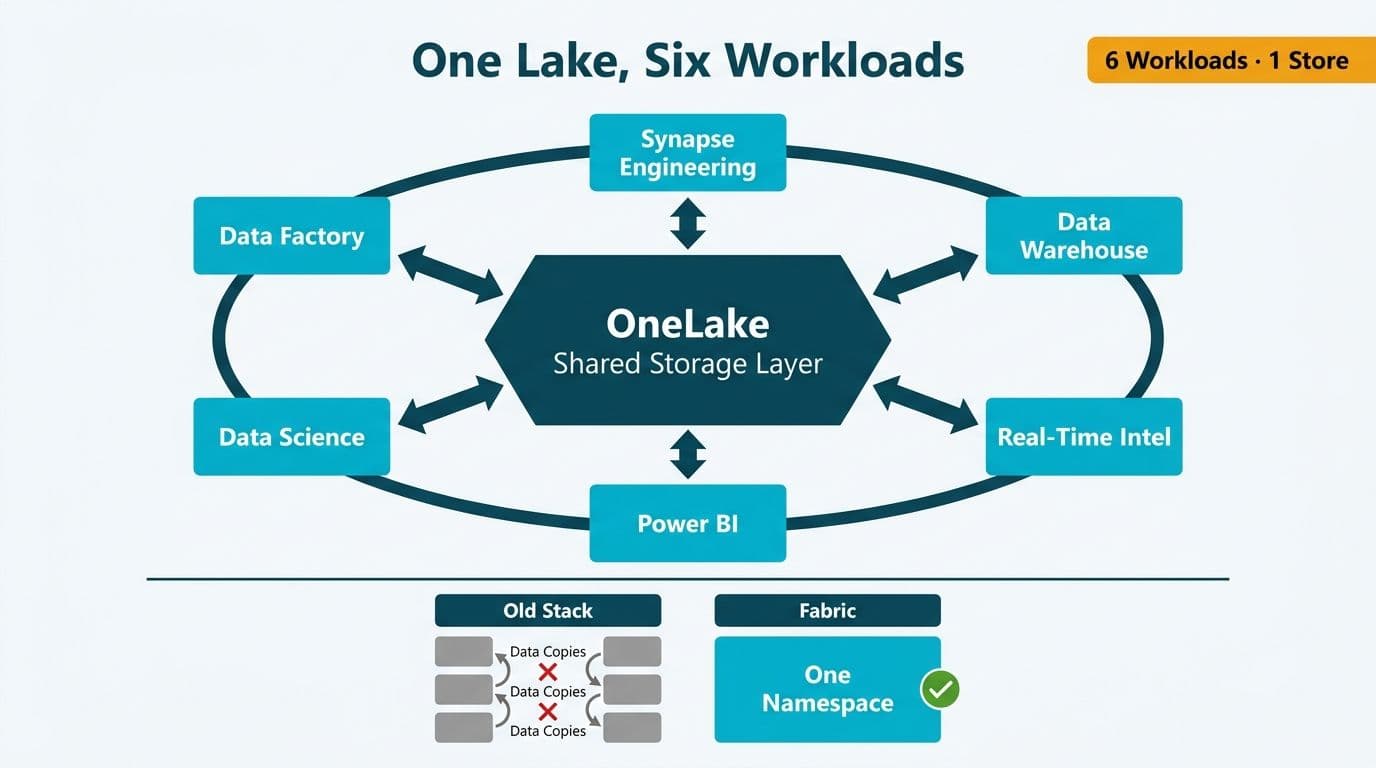
Microsoft Fabric is a unified analytics platform where six workloads - Data Factory, Synapse Data Engineering, Data Warehouse, Real-Time Intelligence, Power BI, and Data Science - all read from and write to a single logical storage layer called OneLake. This shared foundation eliminates the data copies and integration pipelines that make traditional multi-tool analytics stacks expensive and slow to maintain.
Key Takeaways
OneLake is Fabric's tenant-wide data lake; every workload reads and writes to the same namespace without copying data between services.
Six workloads span the full analytics lifecycle: ingestion, engineering, warehousing, streaming, BI reporting, and machine learning.
The Delta Parquet open format keeps data accessible to any workload - and to external compute engines - without transformation.
Mid-market healthcare and finance teams benefit from unified governance: one sensitivity-label policy, one lineage graph, and one access-control plane.
Fabric's regional deployment controls help organizations meet HIPAA, GDPR, and PIPEDA data residency and audit requirements.
What Are the Microsoft Fabric Architecture Components and How Do They Work Together?
Microsoft Fabric is Microsoft's end-to-end analytics platform, released for general availability in November 2023 (Microsoft, 2023). Its architecture places all six workloads inside a single Software-as-a-Service (SaaS) envelope on Microsoft's cloud, connected through OneLake as the universal storage substrate.
Traditional analytics stacks combine independent tools - a cloud data warehouse here, a Spark cluster there, a BI front end elsewhere - and engineers spend a significant share of their time writing ETL pipelines just to move data between those layers. Fabric's design inverts this: the storage layer is shared first, and the compute workloads are layered on top. An engineer ingesting data via Data Factory writes a Delta table to OneLake; a data scientist picks it up from the same OneLake path, without waiting for a copy job or a hand-off pipeline.
For organizations evaluating Power BI and Fabric consulting, understanding this layered architecture is the prerequisite to scoping a migration or a new build correctly. The workloads are not independent licenses - they are facets of a single capacity-based subscription called Fabric SKUs (F-SKUs), measured in Compute Units (CUs).
The practical implication for a CIO: you are not buying six separate products. You are buying a unified compute pool and a unified storage plane, with six different user interfaces layered on top.
What Is OneLake and Why Is It the Foundation of Microsoft Fabric?
OneLake is a single, logical data lake that spans the entire Fabric tenant - one per organization, structured like OneDrive but for analytical data (Microsoft Fabric documentation, 2024). It uses Delta Parquet as the universal open-table format, meaning every file written by any workload is immediately readable by every other workload without format conversion.
Three architectural properties make OneLake distinctive:
Shortcuts allow Fabric to reference data sitting in an external Azure Data Lake Storage Gen2 account, an Amazon S3 bucket, or a Google Cloud Storage bucket, surfacing it inside OneLake without copying a single byte. For a Canadian manufacturing company with years of historical data in Azure Blob Storage, this means Fabric workloads can query that legacy data the same day Fabric is provisioned.
One copy, many engines. The same physical Delta files can be queried via SQL (Data Warehouse), via Spark (Synapse Data Engineering), via notebooks (Data Science), or surfaced in Power BI reports - all hitting the same bytes on disk. For a UK fintech firm managing trade reconciliation data, this means the finance analyst running a Power BI report and the quantitative analyst running a Python notebook are working from the same source of truth with no synchronization lag.
Workspace isolation. Within OneLake, data is organized by workspace. Each workspace has its own OneLake folder. Role-based access control at the workspace and item level determines who can read or write each folder. Sensitivity labels from Microsoft Purview apply at the item level and travel with the data when it is exported or shared - a critical property for healthcare and financial services teams handling regulated data.
For a deeper look at OneLake's storage mechanics, see Microsoft Fabric OneLake Explained: The Unified Data Lake.
How Do the Six Microsoft Fabric Workloads Sit on Top of OneLake?
Each workload has a distinct role, but all of them persist data back to OneLake in Delta Parquet format. The table below maps each workload to its function and its primary artifact type.
| Workload | Primary Role | Primary Artifact | OneLake Interaction |
|---|---|---|---|
| **Data Factory** | Orchestration and low-code ETL | Pipelines, Dataflows Gen2 | Writes to Lakehouse or Warehouse tables |
| **Synapse Data Engineering** | Spark-based data preparation | Lakehouse, Notebooks, Spark Jobs | Reads and writes Delta tables via Lakehouse |
| **Data Warehouse** | SQL-first analytical warehousing | Warehouse with SQL endpoint | Reads Delta tables; writes managed tables |
| **Real-Time Intelligence** | Streaming and event processing | Eventstream, KQL Database, Eventhouse | Writes to Eventhouse; mirrors to OneLake |
| **Power BI** | BI reporting and self-service analytics | Reports, Semantic Models, Dashboards | Reads via Direct Lake mode from OneLake |
| **Data Science** | ML experimentation and AI features | Notebooks, ML Models, Experiments | Reads and writes via Lakehouse Delta tables |
Data Factory: Orchestration Without Copying Data
Data Factory in Fabric combines pipelines (orchestration equivalent to Azure Data Factory) with Dataflows Gen2 (low-code, Power Query-based transformations). Both write outputs directly into Fabric Lakehouses or Warehouses in OneLake. For a US healthcare system ingesting ADT (Admit, Discharge, Transfer) feeds from an EHR vendor, a Data Factory pipeline can land raw HL7 data into a Bronze Lakehouse table within minutes of provisioning, without a dedicated integration middleware layer.
For a step-by-step walkthrough, see Microsoft Fabric Data Pipeline Tutorial: Copy and Transform Data.
Synapse Data Engineering: The Medallion Architecture Layer
Synapse Data Engineering provides Apache Spark compute inside Fabric. The primary artifact is a Lakehouse - a folder in OneLake that exposes both a Spark API (for notebooks and Spark jobs) and an auto-generated SQL analytics endpoint. This dual interface enables the medallion architecture (Bronze, Silver, Gold layers) natively within Fabric, without configuring a separate Spark cluster or managing Spark infrastructure independently.
A typical pattern: raw data lands in a Bronze Lakehouse via Data Factory, a Spark notebook cleans and joins it into a Silver Lakehouse, and a final Spark job writes the business-ready Gold table that Power BI reads.
Data Warehouse: SQL for Finance and Operations Teams
Fabric Data Warehouse is a fully managed SQL analytics warehouse that stores its data in OneLake in Delta Parquet format. Analysts who prefer T-SQL work directly in the Warehouse using familiar constructs: views, stored procedures, and cross-database queries.
A US finance director at a 500-seat mid-market company typically routes budget actuals, GL data, and CRM pipeline data into the Warehouse, then builds Power BI semantic models on top. Because the Warehouse tables live in OneLake, a data scientist can query the same tables via a Spark notebook for forecasting - no additional data movement required.
Real-Time Intelligence: Streaming and Events
Real-Time Intelligence handles event streams, IoT feeds, and change data capture. Its core components are Eventstream (managed Kafka-compatible ingestion), Eventhouse / KQL Database (columnar store optimized for time-series queries), and Real-Time Dashboards (auto-refreshing visualizations with sub-minute latency).
For a US hospital monitoring patient vitals, Real-Time Intelligence can ingest telemetry from bedside devices via Eventstream, store it in an Eventhouse, and surface alerts in a Real-Time Dashboard - all within the Fabric environment. The data is automatically mirrored to OneLake in Delta format, so the same records appear in historical Power BI reports without duplication.
For practical healthcare analytics use cases, see Hospital Patient Flow and Bed Capacity Dashboard in Power BI.
Power BI: Direct Lake Mode Changes the Reporting Equation
Power BI in Fabric introduces Direct Lake mode, which reads Delta Parquet files directly from OneLake without importing data into an in-memory cache and without running live SQL queries at report-load time (Microsoft Power BI documentation, 2024). It combines the speed of Import mode with the freshness of DirectQuery, using a framing process that loads active Delta column groups into the engine's in-memory store on first query and falls back automatically to DirectQuery if the queried data exceeds the SKU's available memory - a key capacity-planning consideration for high-cardinality GL datasets.
For a finance team running month-end close reporting across tens of millions of GL transaction rows, Direct Lake means reports can reflect the latest posted journal entries without a scheduled import job and without the query-timeout risk of DirectQuery against a large warehouse. Finance teams managing the AI automation for financial close process will find this combination - Fabric Warehouse plus Direct Lake Power BI - substantially reduces the latency between data arrival and decision-ready reporting.
Data Science: ML Models That Share the Same Data
Data Science in Fabric provides managed Jupyter-style notebooks, ML experiment tracking via MLflow, and a model registry - along with the SynapseML library, which adds distributed ML algorithms (LightGBM, text analytics, and Azure OpenAI integration) running on the same Spark pool used by Synapse Data Engineering, with no separate cluster provisioning required. All of this is integrated with the same OneLake storage the rest of the platform uses. A data scientist training a churn-prediction or claims-fraud detection model can read the same Gold Lakehouse tables a Power BI report consumes, register the trained model in the experiment tracker, and write scored outputs back to OneLake for downstream use by Power BI or Data Factory.
How Does Microsoft Fabric Architecture Support Healthcare and Finance Compliance?
Fabric's compliance posture is governed through Microsoft's data residency commitments and the integration with Microsoft Purview. Several properties are directly relevant to healthcare and financial services organizations in North America and the UK.
Data residency and HIPAA. Fabric tenants can be pinned to specific Azure regions, ensuring that OneLake data does not leave a designated geography. A US hospital covered by HIPAA can constrain the tenant to US East and US West regions and leverage Microsoft's HIPAA Business Associate Agreement, which lists Fabric as a covered service (Microsoft Trust Center, as of 2024).
PIPEDA for Canadian organizations. A Canadian insurer handling policyholder data under PIPEDA can deploy Fabric in Canada Central and Canada East regions, keeping personal data within Canada's borders. Fabric's workspace-level access controls and Purview sensitivity labels provide the audit trail PIPEDA requires for demonstrating data governance accountability.
GDPR for UK and EU operations. For a UK fintech firm processing personal financial data, Fabric's EU Data Boundary commitment (Microsoft, as of 2024) means personal data remains within the EU/EEA at rest and in transit. Combined with row-level security in Power BI semantic models and column-level security in the Warehouse, finance teams can enforce data minimization at the platform level rather than relying solely on application-layer controls.
For guidance on compliant financial reporting in a SaaS BI context, see GDPR Compliant SaaS Financial Reporting: The BI Checklist.
Unified audit logs. All Fabric workspace activities are captured in the Microsoft 365 Unified Audit Log, which can be routed to a SIEM or to Azure Monitor. For SOC 2 Type II audit preparation, this provides a single log source covering data access events across all six workloads.
When Should a Mid-Market Organization Adopt Microsoft Fabric Architecture?
Fabric is the right architectural choice when an organization meets at least two of the following conditions: it is already running Power BI Premium or Fabric capacity; it has data work spanning two or more of the six workload types; or it wants to consolidate data from multiple source systems into a single governed lake without purchasing and integrating separate tools for each layer.
Fabric is less compelling when an organization's analytics workload is primarily reporting-only with no significant engineering or data science requirements. In that scenario, a leaner managed Power BI configuration may deliver better value per dollar of capacity spend.
The inflection point for most mid-market healthcare and finance organizations comes when the cost and complexity of maintaining separate ETL tools, a cloud data warehouse, and a BI platform begins to exceed the cost of a consolidated Fabric capacity. Suppose a 300-bed US hospital system is running a legacy BI environment, a separate SQL Server warehouse, and a Power BI Premium subscription. Migrating to Fabric consolidates those three into one capacity bill, one governance plane, and one OneLake storage account - without requiring a rip-and-replace of the business logic embedded in existing reports.
For teams considering a migration from a legacy BI environment, Cognos to Power BI Migration Checklist: 7-Phase Guide covers the key phases in detail, and Microsoft Fabric vs Synapse vs Databricks: TCO Cost Breakdown provides a cost comparison across competing platforms.
---
About Lets Viz: Lets Viz is a data analytics consultancy serving US healthcare systems, UK fintech firms, Canadian manufacturing companies, and global SaaS businesses since 2020, with a 5.0 Clutch rating across all engagements. Our team has designed and delivered Microsoft Fabric and Power BI architectures for mid-market organizations navigating compliance requirements under HIPAA, GDPR, and PIPEDA. We hold Microsoft Partner status and specialize in helping data teams move from fragmented multi-tool stacks to governed, scalable analytics platforms.
If your organization is evaluating Microsoft Fabric or consolidating a multi-tool analytics stack, Power BI and Fabric consulting outlines how we scope and deliver these projects for mid-market healthcare and finance teams.


