Microsoft Fabric Data Pipeline Tutorial: Copy and Transform Data
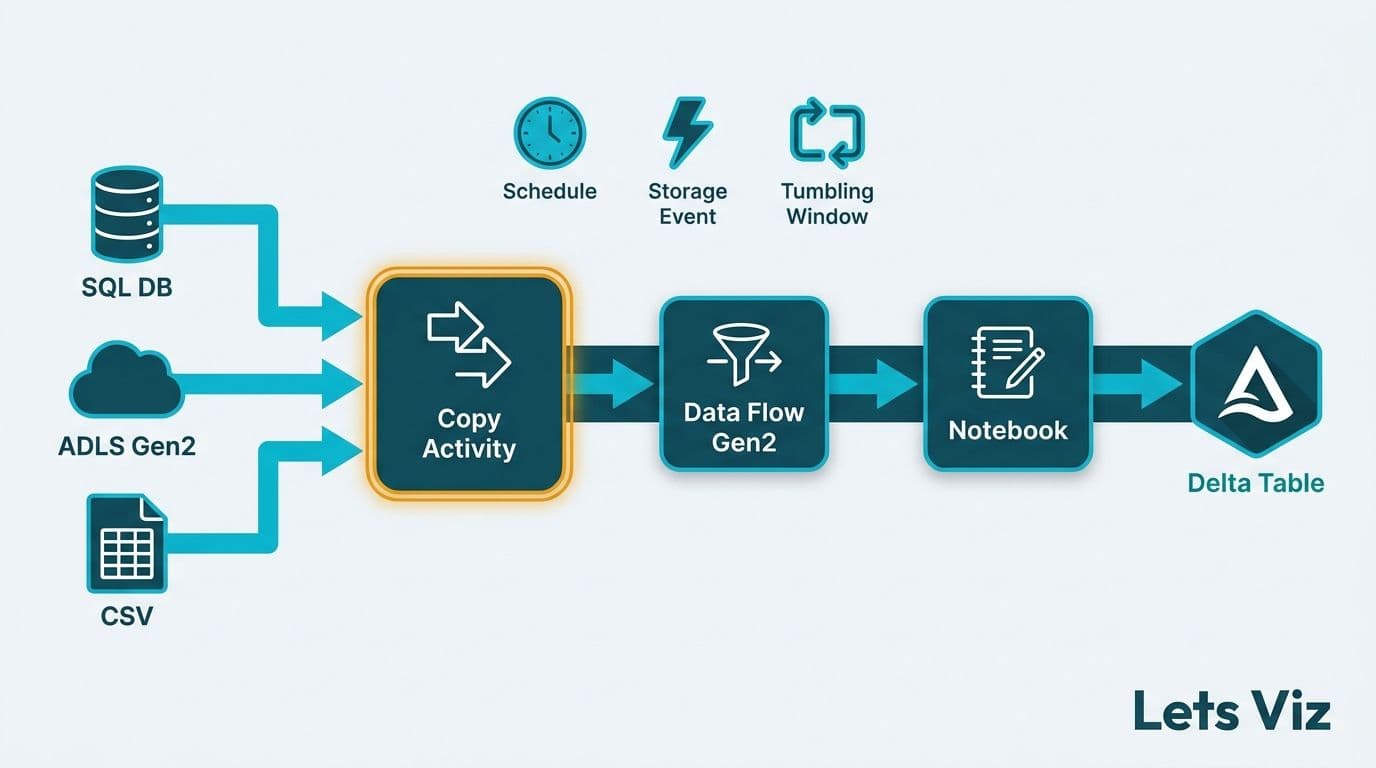
A Microsoft Fabric data pipeline lets you copy, transform, and load data across sources using a visual interface in Fabric Data Factory. You configure activities (Copy, Data Flow Gen2, or Notebook), set a trigger (schedule, storage event, or tumbling window), and write output directly to a Lakehouse Delta table. Most mid-market teams can build a production-grade pipeline in under two hours once linked services are in place.
Key Takeaways
Fabric Data Factory pipelines combine Copy Activity and Data Flow Gen2 transformations in a single orchestration layer - no separate ETL tool license required.
Three trigger types - schedule, storage event, and tumbling window - cover most enterprise automation needs, including regulatory time-series processing.
Output lands in Lakehouse Delta tables, making data immediately queryable in Power BI without an additional semantic layer.
Healthcare and finance teams can enforce HIPAA- or GDPR-compliant data handling at the pipeline level using column mappings and row filters.
A medallion architecture (bronze, silver, gold) maps naturally to Fabric pipeline stages and reduces redundant data movement.
What Is a Microsoft Fabric Data Pipeline?
A Microsoft Fabric data pipeline is a managed orchestration unit inside Fabric Data Factory that moves and transforms data between sources and destinations within the Microsoft Fabric ecosystem. Think of it as the connective tissue between raw source systems and the analytics-ready Lakehouse tables that feed your Power BI reports.
Unlike standalone ETL tools, Fabric pipelines run inside the same capacity as your Power BI reports and Lakehouses. This eliminates the latency and cost of cross-service data hops that arise when orchestration, storage, and reporting live on separate platforms. If your team is evaluating Power BI and Fabric consulting to manage your analytics stack, data pipelines are the natural next layer to automate data movement and reduce manual refresh dependencies.
The underlying engine is a cloud-native fork of Azure Data Factory, so teams migrating from existing Azure environments will find the activity palette and linked service model familiar. The key architectural difference is tight integration with OneLake - all pipeline output lands in the same unified storage that backs your Power BI semantic models, your Notebooks, and your SQL Analytics Endpoints. There is no siloed copy of data per workload; everything reads from one storage layer.
Enterprise investment in platform-native data infrastructure has accelerated sharply since 2024, and Fabric pipelines are a practical first step for organizations consolidating orchestration, storage, and reporting onto a single managed platform.
How Do You Set Up a Microsoft Fabric Data Pipeline? Step-by-Step Tutorial
Setting up your first pipeline takes four steps. Here is the complete walkthrough for a copy-and-transform pipeline that lands data in a Lakehouse table.
Step 1: Create a New Pipeline
Open your Fabric workspace and click New item, then select Data pipeline. Name your pipeline descriptively. For a US healthcare team ingesting EHR claims data, a name like "EHR-Claims-Bronze-Ingest" makes the data domain and medallion stage immediately clear to anyone auditing the workspace. For a UK fintech firm processing daily settlement files, "Settlement-Silver-Transform" signals the transformation stage at a glance.
The canvas opens with a blank pipeline. The left panel displays activity categories: Move and transform, Azure, General, and Iteration and conditionals.
Step 2: Add and Configure a Copy Activity
Drag a Copy Activity onto the canvas. In the properties panel:
Source: Select a linked service. Fabric supports over 90 connectors including SQL Server, SharePoint, REST API, Azure Blob, Salesforce, and SFTP. For an on-premises SQL Server at a US finance firm, configure a self-hosted integration runtime to bridge your VPN or private network.
Sink: Select Microsoft Fabric Lakehouse as the destination. Choose your Lakehouse workspace and table name. Set write mode to "Auto create table" for an initial build, or "Overwrite" and "Append" for recurring loads.
Column mapping: Explicitly map source columns to destination schema. This is where you implement AI data governance framework controls - exclude PII columns before they reach the Lakehouse, apply row filters to drop soft-deleted records, or rename columns to match your enterprise naming convention.
For HIPAA-covered US healthcare organizations, GDPR-governed UK and EU companies, or PIPEDA-regulated Canadian health networks, the column mapping step is where data minimization obligations are met at the ingestion layer - not patched in downstream reports.
Step 3: Chain a Data Flow Gen2 Transformation
After the Copy Activity lands raw data in a bronze Lakehouse table, chain a Data Flow Gen2 activity to transform it to silver. Connect the Copy Activity's On success output port to the Data Flow Gen2 activity. This conditional dependency means the transformation only executes if ingestion succeeds - a failed ingest does not produce a partially-transformed silver table.
Inside Data Flow Gen2, apply:
Deduplication using a surrogate key or composite key hash
Data type normalization (casting date strings to proper date types)
Business rule joins (linking a payer code lookup table to a claims fact)
Derived columns (calculating claim age in days, or a finance team's Days Sales Outstanding metric)
Teams building a medallion architecture in Microsoft Fabric will recognize this two-activity chain as the bronze-to-silver promotion pattern. A third Notebook activity or Power BI dataflow handles gold layer aggregations.
Step 4: Validate, Debug, and Publish
Click Validate in the pipeline toolbar to catch configuration errors before saving. Click Debug to run a live test pass. Debug mode uses a temporary Spark cluster and does not commit data to your production Lakehouse, so you can verify row counts, schema output, and transformation logic against real data without affecting downstream reports. Once debug output looks correct, click Publish all and attach your trigger.
What Activity Types Are Available in Fabric Data Factory?
Fabric Data Factory offers a broad activity palette. The table below maps the most commonly used types to their typical use case in mid-market healthcare and finance pipelines.
| Activity Type | What It Does | Typical Use Case |
|---|---|---|
| Copy Activity | Moves data from source to sink | Raw ingestion from SQL, REST, SFTP, cloud files |
| Data Flow Gen2 | Spark-based visual transformation | Cleansing, joins, type normalization, deduplication |
| Notebook Activity | Executes a Fabric Notebook (Python/PySpark) | Custom ML prep, complex business logic |
| Stored Procedure | Runs a T-SQL stored procedure | Post-load validation, index rebuild, audit inserts |
| Script Activity | Executes inline SQL or commands | Row count checks, lightweight audit log writes |
| Web Activity | Calls an HTTP endpoint | Triggering external APIs, sending pipeline alerts |
| Until Activity | Polls a condition until true | Waiting for upstream file arrival before proceeding |
| ForEach Activity | Iterates over a list or array | Processing multiple suppliers, regions, or file paths |
A Canadian manufacturing company running supplier invoice reconciliation, for example, uses a ForEach loop over a list of supplier-specific SFTP folder paths. Inside each iteration, a Copy Activity lands the file in a bronze Lakehouse partition, and a shared Data Flow Gen2 downstream normalizes all suppliers to a common invoice schema before writing to a silver table - a pattern that scales from 5 suppliers to 500 without rewriting pipeline logic.
How Do You Configure Trigger Options in Fabric Pipelines?
Fabric supports three trigger types. The right choice depends on how your data arrives and what your compliance environment requires.
Schedule trigger fires the pipeline at a fixed recurrence - hourly, daily, weekly, or a custom CRON expression. Best for batch loads with predictable cadence: nightly general ledger extracts, weekly claims files, or monthly regulatory submissions. Set the timezone explicitly (US Eastern, UK GMT/BST, Canada Pacific) to prevent Daylight Saving Time drift that silently shifts your batch window by an hour twice a year.
Storage event trigger fires when a file lands in a designated OneLake path or Azure Blob container. Best for near-real-time processing of inbound files such as EDI 837 claim batches, bank wire confirmations, or payment network settlement files. A UK fintech firm using this trigger on an inbound payments folder can cut file-to-reporting lag from several hours to under five minutes without polling loops.
Tumbling window trigger runs on a fixed interval with automatic backfill. If a pipeline run fails, the missed window is queued and processed in order - not skipped. This is the correct trigger for US finance regulatory reporting, where every time window must be accounted for and auditable. It also surfaces `windowStart` and `windowEnd` parameters you pass into the pipeline, enabling clean incremental loads keyed to the exact processing window.
As claim volumes and billing complexity scale in 2026, reliable trigger logic is a first-order infrastructure concern. A misconfigured batch window in a healthcare analytics pipeline can mean missed reporting cycles and compliance exposure - for example, a Schedule trigger set without an explicit timezone will silently shift a nightly 11 PM Eastern run from 4 AM UTC during EST to 3 AM UTC during EDT, creating a variable processing window that invalidates period-over-period comparisons in regulatory submissions.
How Do You Write Pipeline Output to Lakehouse Tables?
Choosing the correct write mode determines whether your Lakehouse tables remain consistent across pipeline runs or accumulate duplicates and schema drift over time.
Auto create table - Fabric infers schema from the source and creates a Delta table on the first run. Use only for initial prototyping. Once a pipeline is in production, schema changes at the source will cause auto-inferred types to drift from your downstream semantic model.
Overwrite - Truncates and rewrites the entire table on each pipeline run. Appropriate for small dimension tables (payer codes, product catalogs, currency rates) that are fully refreshed each cycle. Avoid on large fact tables where a full rewrite consumes unnecessary Fabric capacity units.
Append - Adds rows without touching existing data. Pair with a watermark column such as `load_timestamp` or `source_modified_date` and a deduplication step in Data Flow Gen2 to prevent double-counting on redelivered files.
For Gold layer tables that Power BI reports query directly, prefer Append with deduplication over full overwrite. This keeps Delta transaction logs clean for time-travel queries and reduces Spark capacity consumption on large fact tables. Once data lands in a Lakehouse table, it is immediately accessible via the Lakehouse SQL Analytics Endpoint.
For a deeper look at how Power BI connects to that endpoint, see the Power BI Import vs DirectQuery mid-market decision guide. If you are newer to how OneLake storage and Delta format work underneath pipeline output, the plain-English Lakehouse guide provides the necessary foundation before you begin building.
When Should You Choose Fabric Pipelines Over Other ETL Options?
Fabric pipelines are the right choice when your organization is standardizing on the Microsoft Fabric ecosystem and wants orchestration that shares capacity, governance, and monitoring with the rest of the analytics stack.
They are the stronger choice when:
Your data sources and primary destinations are within the Microsoft cloud - no cross-platform egress costs.
Your team needs low-code transformation via Data Flow Gen2 without a separate ETL platform license.
Your AI data governance framework requires all data movement to be logged and auditable within a single platform's activity monitor and lineage graph.
You are implementing time-series regulatory reporting that requires tumbling window guarantees.
You are building toward a medallion architecture where pipeline stages map cleanly to bronze, silver, and gold Lakehouse layers.
Fabric pipelines are a weaker fit when source systems require complex change data capture from legacy mainframes, when your team has deep investment in a non-Microsoft orchestration tool deployed across heterogeneous workloads, or when you need sub-minute streaming latency (where Fabric Eventstream is the better-suited service).
For organizations assessing whether to build internal Fabric pipeline capability or engage managed services, the open-source AI workflow automation build vs buy guide offers a decision framework that applies directly to Fabric pipeline adoption decisions.
By 2026, AI and data governance standards developed through industry consortia - including working groups convened by the World Economic Forum - have moved from voluntary guidelines into contractual requirements. Enterprise procurement teams and external auditors now routinely check for pipeline-level controls as part of vendor due diligence. For data engineering teams, the practical implication is concrete: column mapping, row filtering, and audit logs are no longer configuration details - they are audit evidence.
Fabric Pipeline Configuration Reference
The table below summarizes the key settings that determine pipeline reliability and compliance readiness in production environments.
| Setting | Recommended Value | Rationale |
|---|---|---|
| Pipeline timeout | 2-4 hours | Prevents runaway Spark jobs from consuming the full capacity allocation |
| Retry count | 3 retries, 5-minute backoff | Handles transient connectivity failures and API throttling |
| ForEach parallelism | Maximum 10 | Balances throughput against capacity unit consumption |
| Write mode (fact tables) | Append with deduplication | Avoids full rewrites and keeps Delta transaction logs clean |
| Write mode (dimension tables) | Overwrite | Ensures a clean dimension refresh on each cycle |
| Trigger timezone | Set explicitly | Prevents DST-related batch window timing drift |
| Column mapping | Explicit, not auto-inferred | Prevents source schema drift from breaking downstream semantic models |
| First pipeline activity | Row count validation | Flags anomalous source volumes before any data writes begin |
For US healthcare organizations governed by HIPAA, UK and EU companies under GDPR, and Canadian organizations subject to PIPEDA, the row count validation activity is particularly important. A file arriving with 50 records when 50,000 are expected typically signals an upstream system error. Catching that at the pipeline gate prevents corrupted data from propagating to gold Lakehouse tables and into the Power BI dashboards your clinical or finance leadership depends on.
---
If your organization is moving from a proof-of-concept to a production Fabric pipeline serving healthcare or finance teams, the configuration decisions above compound quickly. Trigger logic, write mode choices, schema governance, capacity sizing, and compliance controls all interact in ways that are difficult to retrofit after go-live. Explore how our Power BI and Fabric consulting practice can help you design, build, and operationalize a pipeline architecture that connects your Lakehouse data to the executive dashboards your leadership team depends on.
---
About Lets Viz: Lets Viz is a data analytics consultancy serving US healthcare, UK fintech, Canadian manufacturing, and global SaaS organizations since 2020. With a 5.0 Clutch rating, the team specializes in Microsoft Fabric, Power BI, and AI-driven analytics implementations that translate operational data into board-level intelligence.