Cognos to Power BI Migration Checklist: 7-Phase Guide
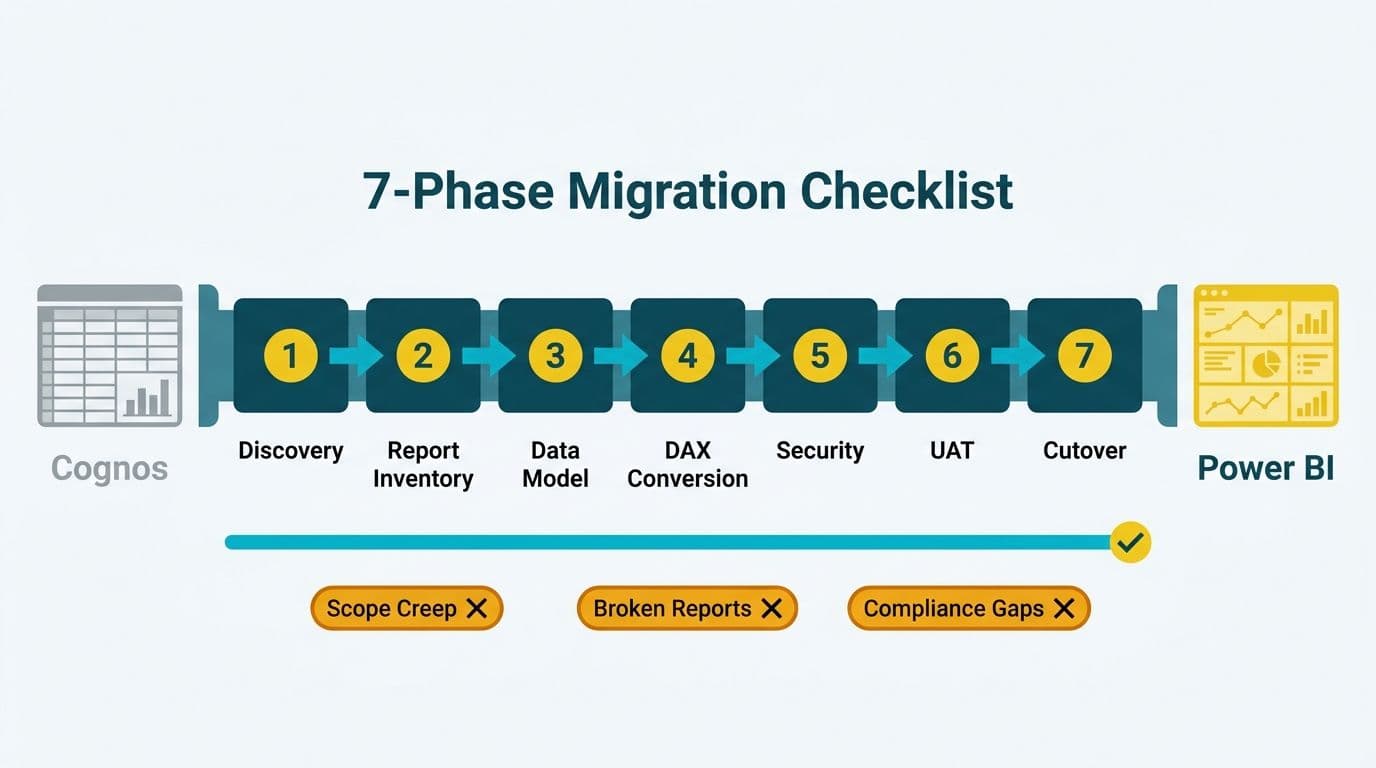
A Cognos to Power BI migration checklist should cover seven phases: discovery, report inventory, data model redesign, DAX conversion, security mapping, user acceptance testing, training, and cutover. Mid-market organizations that treat this as a simple tool swap - rather than a structured project - typically encounter scope creep, broken financial reports, or compliance gaps at go-live. A phase-by-phase approach with clear entry and exit criteria at each stage reduces that risk significantly.
Key Takeaways
A structured Cognos to Power BI migration checklist reduces go-live failures by ensuring each phase has clear entry and exit criteria before work begins.
Report inventory is the most underestimated phase: organizations typically find 30-50% of Cognos reports are unused and can be retired before migration scope is locked.
DAX replaces Cognos query language with a fundamentally different calculation paradigm - a dedicated conversion and peer-review phase prevents rework during UAT.
Cognos Transformer PowerCubes require a separate migration workstream from standard Framework Manager reports: dimensional hierarchies, stored aggregations, and cube calculations all translate into Power BI tabular constructs differently than relational query subjects do.
Security mapping is critical for healthcare (HIPAA, SOC 2) and finance (SOX, GDPR, PIPEDA) environments - row-level security in Power BI must replicate Cognos namespace roles before testing begins.
Finance teams migrating from Cognos to Power BI must address P&L hierarchy reconstruction, multi-entity RLS design, and IFRS/GAAP semantic model labelling as distinct workstreams - each carries compliance risk if treated as an afterthought rather than a planned phase deliverable.
Phased cutover - piloting with one business unit before full rollout - reduces organizational risk significantly compared to a hard cutover date.
What Does a Cognos to Power BI Migration Actually Involve?
A Cognos to Power BI migration is more than a technical lift-and-shift. It is a coordinated project spanning data architecture, report conversion, security model redesign, and organizational change management - all running against a live business environment with ongoing reporting obligations.
For organizations simultaneously managing other BI consolidation work, our Tableau to Power BI migration services describe the broader framework we use across legacy platform transitions. The governance overhead compounds when multiple platforms are being decommissioned in parallel, so sequencing and clear phase ownership matter from day one.
The migration typically affects CIOs, data team leads, and finance directors simultaneously: CIOs own the infrastructure and licensing decision, data teams own the technical conversion, and finance directors own the reporting accuracy sign-off. A checklist that addresses all three layers keeps the project from fragmenting into parallel tracks that do not converge before go-live.
Should You Stop at Power BI or Migrate Directly into Microsoft Fabric?
The architectural decision that most organizations defer until too late is whether the migration destination is Power BI Service or Microsoft Fabric - specifically, whether source data should land in OneLake, be modeled in a Lakehouse, and be consumed through Fabric notebooks and semantic models alongside Power BI reports. Organizations evaluating this as a cognos to microsoft fabric migration guide will find that the seven-phase structure below applies to both paths, but the scope of three phases expands significantly when Fabric is the target.
For most mid-market organizations running 50-200 Cognos reports, Power BI Service with a well-designed import or DirectQuery semantic model is the right landing zone. The Fabric path warrants serious evaluation when one or more of these conditions apply:
Data volume above 10 billion rows in production fact tables. DirectLake mode in Fabric serves large fact tables at near-import performance without the refresh overhead of full import cycles - a direct replacement for the in-memory query behavior Cognos TM1 users expect.
Active data science or ML workloads. Fabric notebooks sharing OneLake storage with Power BI semantic models remove the ETL hop that otherwise exists between the BI layer and the analytics layer. If data science teams are already building in Python or Spark alongside the Cognos environment, consolidating into Fabric avoids introducing a new data movement layer.
Parallel data warehouse decommission. If the organization is simultaneously retiring other relational data warehouses or cloud lakes alongside Cognos, OneLake shortcut architecture prevents duplicating that data into a separate Power BI-optimized store. The shortcut model also simplifies lineage documentation for SOX and GDPR audit purposes.
TM1 or Planning Analytics dependency. TM1 cube data maps more cleanly into a Fabric Lakehouse dimensional model than into a standalone Power BI import dataset, particularly when planning or writeback scenarios need to survive migration rather than being replaced by a separate planning tool.
When Fabric is the correct destination, three phases from the standard checklist expand in scope. Phase 1 Discovery must document the OneLake topology: which data domains land in which Lakehouses, and whether shortcut or full ingestion applies to each source. Phase 3 DAX Conversion expands to include Fabric notebook development for any Python or Spark-based transformation workloads replacing Framework Manager ETL logic. Phase 7 Cutover must add Fabric capacity provisioning, workspace governance (Fabric-enabled versus standard workspaces), and OneLake access policy validation alongside the standard Power BI deployment steps.
Organizations stopping at Power BI Service without Fabric should not add this scope. The governance overhead of Fabric without a concrete use case for notebooks or OneLake will extend timelines without delivering proportional value.
Phase 1: Discovery - How Do You Scope a Cognos to Power BI Migration Checklist?
Discovery defines what exists, what is actively used, and what the migration must deliver. Without a formal discovery phase, teams routinely underestimate effort by 40-60%, particularly when Cognos TM1 or Planning Analytics cubes are involved alongside standard Report Studio content.
Discovery checklist:
Identify all Cognos environments: production, development, and UAT namespaces
Document data sources: relational databases, OLAP cubes, flat file feeds, and API connections
Inventory all Cognos Transformer models and PowerCube files - these are a separate workstream from Framework Manager reports and require dedicated dimensional migration planning
Capture the authentication model: LDAP, Active Directory, or SSO provider
Map applicable governance obligations: HIPAA (US healthcare), SOC 2 (US SaaS and finance), GDPR (UK and EU organizations), PIPEDA (Canadian organizations)
Confirm the target architecture: standalone Power BI Service, Premium capacity, or Microsoft Fabric with OneLake and Lakehouse modeling
Define cutover date constraints: financial year-end, audit windows, and regulatory reporting cycles
Identify who owns each Cognos namespace and package, and confirm they are still with the organization
A US healthcare system running 400 Cognos reports across finance and clinical operations will produce very different discovery outputs than a UK fintech firm with 80 consolidated P&L dashboards. A Canadian manufacturing company with cross-border data flows will have additional PIPEDA obligations that affect where Power BI or Fabric capacity is provisioned. All three scenarios require a documented scope boundary before any conversion work begins.
Phase 2: Report Inventory - Which Reports Actually Need to Be Migrated?
Report inventory is the highest-leverage phase and the most frequently rushed. Organizations that skip a structured inventory typically migrate reports that no one uses, inflating cost and extending timeline without adding business value.
Report inventory checklist:
Export the full Cognos report list with last-run timestamps covering at least 12 months
Categorize reports: Tier 1 (daily or weekly, business-critical), Tier 2 (monthly or ad-hoc), Tier 3 (unused or stale)
Flag reports that reference retired or deprecated data sources
Identify reports owned by employees who have left the organization
Mark reports that duplicate output already available in existing Power BI or other BI assets
Confirm Tier 1 report owners and collect sample outputs to serve as UAT baseline comparisons
Retire Tier 3 reports with formal stakeholder sign-off before migration scope is locked
Industry experience consistently shows that 30-50% of Cognos report catalogs qualify for retirement at this stage. A Canadian manufacturing firm that completes a proper inventory before migration typically reduces its conversion workload by a third - with direct savings on consultant time and internal resource allocation.
For detailed effort estimates on the conversion work ahead, the Cognos to Power BI DAX Translation Guide provides a calculation-by-calculation mapping that helps scope the DAX phase accurately before committing to timelines.
Phase 3: How Do You Handle DAX Conversion from Cognos Query Language?
Cognos reports are built on Framework Manager models and Report Studio query subjects. Power BI uses a columnar in-memory data model with DAX (Data Analysis Expressions). The two languages share no common syntax, and the underlying calculation context model differs fundamentally - Cognos uses a relational query engine while DAX uses filter context propagation through table relationships.
DAX conversion checklist:
Document every Cognos calculated measure, filter condition, and prompt parameter
Identify Cognos cube-based reports (TM1 or Planning Analytics) - these require special data source handling separate from standard report conversion; see the PowerCube migration section below for the dimensional modeling workstream this triggers
Rebuild the semantic layer in Power BI Desktop, in a Power BI Service certified dataset, or in a Microsoft Fabric Lakehouse model depending on the architecture chosen in Phase 1
Convert summary calculations: Cognos running-total and rank expressions translate to DAX RANKX, CALCULATE, and FILTER patterns
Validate date intelligence: Cognos relative date filters map to DAX time intelligence functions such as DATESINPERIOD and SAMEPERIODLASTYEAR
Peer-review all DAX measures before UAT - a single circular dependency can break a report silently without throwing an error during development
Document every conversion decision for audit trail, especially in SOX-controlled finance environments
For finance reporting teams, the choice between DAX SUMMARIZE and SUMMARIZECOLUMNS has real implications for row context in multi-table financial models. The DAX SUMMARIZE vs SUMMARIZECOLUMNS: Finance Reporting Guide explains when each function applies and where each can produce unexpected results in regulated reporting contexts.
DAX proficiency is an increasingly critical capability for finance and analytics teams managing migrations without full external resourcing.
| Cognos Construct | Power BI / DAX Equivalent |
|---|---|
| Query Subject (Framework Manager) | Table in Data Model |
| Report Studio Calculated Field | DAX Measure |
| Running-Total Summary | DAX CALCULATE + FILTER |
| Relative Date Filter | DAX DATESINPERIOD / SAMEPERIODLASTYEAR |
| Burst Report (email delivery) | Power BI Subscriptions |
| Namespace Security | Row-Level Security (RLS) |
| TM1 Cube Data Source | Power BI XMLA Endpoint or Fabric Lakehouse |
How Do You Handle a Cognos Transformer PowerCube Migration to Power BI?
Cognos Transformer is the dimensional modeling tool that builds PowerCubes - pre-aggregated OLAP structures that Cognos Analytics serves for fast slice-and-dice querying across time, product, geography, and account dimensions. A Cognos Transformer to Power BI migration is a distinct workstream from standard Framework Manager report conversion: the source artifact is not a relational query subject but a multidimensional cube with pre-built hierarchies and stored aggregations, and the target is a Power BI columnar tabular model that must replicate dimensional behavior through table relationships, hierarchy definitions, and DAX rather than through cube coordinates.
Dimensional hierarchy mapping
Cognos Transformer hierarchies fall into two structural types that map differently into Power BI. Level-based hierarchies - where each level is a fixed depth, such as Country > Region > City - map directly into Power BI as explicit column hierarchies within a dimension table, with one column per level and a standard relationship join to the fact table on the lowest-level key. Ragged and parent-child hierarchies - common in account and organizational charts where the depth varies by branch - require a different approach: Power BI handles these using a parent-child DAX pattern with PATH(), PATHITEM(), and PATHLENGTH() functions to flatten the variable-depth structure into a set of fixed-level columns that the visual layer can navigate. BI architects migrating Cognos account hierarchies should audit every hierarchy in Transformer for depth variability before choosing the modeling approach, since applying a level-based pattern to a ragged hierarchy silently collapses uneven branches and produces incorrect subtotals.
Transformer's time dimension deserves special attention. Cognos builds its time hierarchy from a calendar definition in the model, and Transformer handles fiscal versus calendar year offsets natively within the cube. In Power BI, this logic moves into an explicit date table with calculated columns or DAX time intelligence functions. Fiscal year offsets, 4-4-5 calendar periods, and non-standard week numbering all need to be reconstructed explicitly in the Power BI date table rather than inherited from Transformer's calendar definition.
DAX equivalents for cube calculations
Cognos PowerCube calculations are written as Transformer-level calculations or as derived measures within the cube, evaluated in MDX coordinate space. The Power BI tabular equivalent evaluates in DAX filter context - a fundamentally different evaluation model. The most common Transformer calculations and their DAX equivalents:
| Cognos Transformer Calculation | DAX Equivalent |
|---|---|
| Period-to-date accumulation | DATESYTD / DATESMTD with CALCULATE |
| Prior-period comparison | SAMEPERIODLASTYEAR or DATEADD with CALCULATE |
| Share of parent total | DIVIDE([Measure], CALCULATE([Measure], ALLSELECTED(Dim))) |
| Rank within dimension | RANKX(ALLSELECTED(Dim[Level]), [Measure]) |
| Variance (actual vs. budget) | Simple subtraction measure; validate sign convention explicitly |
| Allocation across leaves | SUMX over dimension table with proportional weight measure |
The most common pitfall BI architects encounter is the share-of-parent calculation. Cognos Transformer evaluates this automatically through the cube hierarchy - each cell knows its parent aggregate. In DAX, the measure must explicitly define what "parent" means using ALLSELECTED or ALLEXCEPT, and the result changes depending on which slicers are active. This context sensitivity is correct DAX behavior but it produces different numbers from Transformer under the same filter conditions when report-level slicers are applied. Documenting this behavioral difference and getting explicit sign-off from finance stakeholders before UAT prevents the calculation from becoming a disputed defect during testing.
Pitfalls for BI architects
Beyond the calculation translation, three structural pitfalls consistently affect Cognos Transformer migrations:
Stored aggregations. PowerCubes pre-aggregate at every hierarchy level and serve summary queries directly from stored data. Power BI import mode aggregates on-the-fly from the grain-level fact table, which produces correct results but can be slower for very large fact tables when summary visuals span many dimension combinations. Architect-level mitigation options include composite model aggregation tables (explicit pre-aggregated tables that Power BI routes summary queries to automatically), Fabric DirectLake mode for tables above 1 billion rows, or restructuring the fact table to a higher grain if the Transformer cube was already pre-summarized above transaction level.
Many-to-many dimension relationships. Transformer handles allocations and shared dimension members through cube design conventions that have no direct tabular equivalent. Power BI handles many-to-many relationships using a bridge table pattern or TREATAS to apply filter context across disconnected tables. BI architects should map every shared dimension in the Transformer model before beginning tabular design, since retrofitting bridge tables after the model is built requires restructuring related DAX measures across the entire semantic model.
Write-back and planning scenarios. If the PowerCube supports TM1 or Planning Analytics write-back for budgeting or forecasting, that capability does not migrate into standard Power BI Service. Write-back scenarios require either a purpose-built planning tool (Pigment, Anaplan, or similar), a Fabric notebook with write-back logic to a Lakehouse, or continued use of TM1/Planning Analytics as the planning layer with Power BI consuming read-only outputs. This decision should be made in Phase 1 Discovery - not discovered mid-migration when finance teams realize their budget input workflow no longer exists.
Phase 4: How Do You Map Cognos Security to Power BI Row-Level Security?
Security mapping is the phase most likely to create compliance exposure if handled incorrectly. Cognos uses namespace-based role hierarchies that control both content visibility and data-row access simultaneously. Power BI separates these concerns: workspace and app permissions govern content access, while Row-Level Security (RLS) roles defined in the data model govern data-row filtering using DAX expressions.
Security mapping checklist:
Export the Cognos namespace role hierarchy and user-group assignments in full
Identify reports with data-level filtering, such as regional cost center access or entity-level P&L restriction by business unit
Design RLS roles in Power BI that replicate each Cognos data filter using DAX filter expressions on the relevant tables
Map Active Directory or Azure AD groups to Power BI workspace roles: Admin, Member, Contributor, and Viewer
Validate that HIPAA minimum-necessary standards are maintained for clinical finance reports in US healthcare deployments
Confirm GDPR data residency: Power BI or Fabric capacity region must align with EU data location requirements for UK and EU organizations
Verify PIPEDA obligations for Canadian organizations where cross-border data flows are involved in the tenant configuration
Document the complete security model for audit - SOX-controlled environments require formal evidence of access control design and approval
Run a parallel access validation: same user, same report, both platforms - data output must match exactly before cutover is authorized
For a detailed view of healthcare-specific data governance risks during BI migration, the AI Analytics Data Privacy Risks: Healthcare Audit Guide covers the compliance checkpoints relevant to HIPAA and SOC 2 environments in regulated US health systems.
How Does a Cognos to Power BI Migration for Finance Teams Differ?
A Cognos to Power BI migration for finance teams introduces a layer of complexity that operational or sales BI migrations do not carry: the reports being converted are directly tied to statutory obligations, external audit cycles, and regulatory disclosure requirements. A broken P&L report or an RLS misconfiguration in a multi-entity structure is not a usability problem - it is a compliance risk. Four areas require explicit planning beyond the standard seven-phase checklist.
P&L and balance-sheet report reconstruction
Cognos P&L and balance-sheet reports typically rely on Framework Manager query subjects that flatten account hierarchies into summary rows. Reconstructing these in Power BI requires building the account hierarchy as a parent-child or ragged hierarchy in the data model, then writing DAX measures that correctly handle credit/debit sign convention and period-closing entries. The most common failure point is YTD accumulation: Cognos running-total functions accumulate within the report query, while DAX requires explicit CALCULATE combined with DATESYTD or custom period logic to replicate the same behaviour across fiscal calendars that do not align with calendar year-end. Finance teams should validate every P&L and balance-sheet line against a frozen Cognos export as part of the UAT baseline before cutover is authorized.
Multi-entity RLS design
Organizations with multiple legal entities - subsidiaries, regional holding structures, or joint ventures - need RLS that enforces entity-level data isolation at the row level, not just at the workspace or app level. The recommended pattern is a security mapping table that links each Azure AD user or group to permitted entity codes, with a DAX USERPRINCIPALNAME() filter applied to every fact table containing entity-level data. A single RLS role with dynamic filtering handles this more maintainably than creating separate static roles per entity. Migration checklists for multi-entity finance environments should explicitly include an RLS penetration test: log in as a user permitted for Entity A only and confirm that Entity B rows are invisible across every report and every data export path.
IFRS and GAAP compliance labelling in the semantic model
Finance teams operating under IFRS or US GAAP should label their Power BI semantic model to reflect the accounting standard applied to each measure. Microsoft Purview sensitivity labels cover data classification for security and residency purposes, but IFRS/GAAP labelling is a semantic layer concern: certified dataset descriptions, measure display folder organization, and measure-level annotations should make the applicable standard explicit. For multi-standard organizations - for example, a UK subsidiary reporting under IFRS 17 while a US parent reports under US GAAP - maintaining separate certified datasets per standard, rather than a single shared model with conditional logic, reduces audit risk significantly.
Data-residency considerations for finance data
Finance data is subject to residency requirements that vary by jurisdiction: EU organizations under GDPR must confirm Power BI or Fabric capacity is provisioned in an EU region; UK organizations post-Brexit have separate ICO obligations; Canadian entities under PIPEDA must evaluate whether cross-border data flows to US-hosted capacity require additional contractual safeguards. For organizations with entities in multiple jurisdictions, the capacity region must be explicitly documented in the compliance map produced during Phase 1 Discovery and confirmed again at Phase 7 Cutover sign-off. Treating data residency as a post-go-live configuration item is the single most common compliance gap observed in cross-border finance migrations.
Phase 5: UAT - What Does a Solid User Acceptance Testing Phase Look Like?
UAT for a BI migration is not functional testing - it is data accuracy validation. The objective is to confirm that Power BI reports produce identical outputs to their Cognos counterparts under the same input conditions, using real production-representative data rather than synthetic test data.
UAT checklist:
Establish a frozen baseline: export Cognos report output as of the UAT start date as the reference snapshot for all comparisons
Define tolerance thresholds: financial reports typically require exact numerical match; operational KPI reports may allow a variance of plus or minus 0.1% for rounding differences
Assign business owners as UAT approvers - IT-only sign-off is insufficient for audit purposes in regulated finance and healthcare environments
Test edge cases: null values, zero-denominator calculations, and reports with no data for a given period or entity
Test across all security personas: confirm RLS behaves correctly for every role defined in Phase 4, not just the admin role
Document and track defects in a shared log with severity ratings and assigned resolution owners
Require written sign-off from each Tier 1 report owner before cutover is authorized to proceed
A US SaaS finance team migrating 60 Cognos reports to Power BI should budget four to six weeks for UAT when financial close reports are in scope. Compressing UAT to two weeks is the single most common cause of post-launch data credibility issues - and the most common reason migrations are rolled back within 90 days of go-live.
Cognos to Power BI Migration Testing: Row Counts, Calculated Totals, and Filter Parity Validation
The UAT checklist above defines what needs to be validated. This section covers the step-by-step methodology for doing it systematically - specifically how to execute cognos to power bi migration testing across the three dimensions that catch the most defects: row counts, calculated totals, and filter parity.
Row count validation
For every migrated report, export the underlying row-level dataset from Cognos as a detail report with no aggregation applied. In Power BI, run the equivalent table visual or a DAX query using COUNTROWS against the same fact table with identical filter conditions. A discrepancy of even a single row indicates one of three root causes: a relationship filter silently excluding rows, a date-boundary being interpreted differently between systems, or a source-query join behaving differently under the Power BI DirectQuery or import refresh model. Document each discrepancy with the Cognos row count, the Power BI row count, and the exact filter state applied so the root cause can be traced to a specific join or filter step rather than reopening the entire data model.
Calculated totals verification
Export grand totals, dimension subtotals, and running totals from Cognos as a reference CSV for each Tier 1 report. Build the matching Power BI output using the equivalent DAX measures and export under identical slicer and filter conditions. Compare line by line using a spreadsheet diff or a Python pandas comparison script. Financial reports require exact match; operational reports may allow rounding variance up to 0.01%. YTD accumulations and period-closing entries are the calculations most likely to diverge - Cognos running-total logic and DAX DATESYTD handle fiscal calendar boundaries differently, and this gap only surfaces when the filter spans a year-end boundary.
Filter parity testing
Apply the same combinations of filters or prompt values used in production Cognos reports - date ranges, cost center hierarchies, entity codes, product categories - and confirm that Power BI returns an identical row count and total for each filter state. This catches filter context propagation issues that do not surface under default unfiltered conditions. For parameterized Cognos reports, document each prompt value used in production and test at least three representative combinations per report: a narrow filter, a broad filter, and a cross-entity or cross-period filter that exercises relationship joins across multiple tables.
Record every test case - filter state, Cognos output, Power BI output, and pass/fail status - in a shared validation workbook. Tier 1 reports require a 100% pass rate across all test cases before cutover sign-off. Tier 2 reports require written sign-off from the report owner on any variance that falls within the approved tolerance threshold.
Stakeholder sign-off template
After all test cases are recorded, each Tier 1 report owner must complete a formal sign-off before cutover proceeds. A minimal sign-off template captures six fields: report name and ID, the Cognos baseline export date, the Power BI validation date, total test cases run with the pass rate, any open variances with written confirmation that they fall within the approved tolerance threshold, and the owner's name, role, and sign-off date. Keeping completed sign-offs in the same shared validation workbook alongside the test case log creates a single audit artifact that satisfies SOX, HIPAA, and GDPR reviewers without requiring separate documentation systems. For organizations running migration testing across multiple business units simultaneously, a consolidated sign-off tracker with one row per report - showing owner, current status (not started, in review, signed off), and any escalated variances - allows the project manager to gate the cutover decision on 100% Tier 1 sign-off without chasing individual email threads. No report should advance to the cutover phase with an open sign-off.
Phase 6: Training - How Do You Prepare End Users for Power BI After Cognos?
Cognos and Power BI have fundamentally different interaction models. Cognos users are accustomed to running parameterized reports on demand and waiting for the system to query and return results. Power BI's model is dashboard-centric with interactive filtering in real time across pre-loaded or live-connected data. Without structured training, adoption stalls even when the technical migration delivers perfectly accurate reports.
Training checklist:
Segment users by persona: report consumers, self-service analysts, report builders, and Power BI admins
Build a quick-reference guide mapping Cognos actions to Power BI equivalents (for example, "run report" maps to "open dashboard and apply slicer filters")
Deliver live training for Tier 1 report consumers at least two weeks before cutover
Record all training sessions for async access - essential for distributed teams across US, Canada, and UK time zones operating in different work schedules
Identify Power BI champions in each business unit to provide peer support in the weeks immediately after go-live
Confirm Power BI Desktop is provisioned and licensed for self-service analyst personas who will build reports independently
Include a module on Sensitivity Labels and data classification if the organization uses Microsoft Purview for information protection
Organizations that skip structured training routinely see a 60-90 day adoption lag post-cutover, during which shadow Cognos usage persists and two versions of the same metrics circulate across the business.
Phase 7: Cutover - What Is the Safest Go-Live Approach for a Cognos Migration?
Cutover is the moment Cognos is decommissioned or demoted to read-only status and Power BI becomes the system of record. A phased cutover - piloting with one business unit before full organizational rollout - reduces risk significantly compared to a hard cutover date applied simultaneously across all departments.
Cutover checklist:
Run Power BI in parallel with Cognos for at least two complete financial reporting cycles before any decommission action
Confirm data refresh schedules are live, monitored, and alerting correctly in Power BI Service under production conditions
Set Cognos to read-only access for a defined window, typically 30 days after go-live
Communicate the Cognos decommission date to all stakeholders with at least 30 days advance notice in writing
Archive Cognos report definitions, Framework Manager model exports, Transformer dimensional model files, and namespace configurations for audit and rollback purposes
Validate Power BI gateway connections are stable under full production load during peak reporting periods
Confirm that scheduled report subscriptions and email delivery equivalents are operational and have been tested end-to-end
Document the final security state for compliance audit trail, including a confirmed list of who has access to each workspace and dataset
Assign a hypercare period of two to four weeks post-go-live with dedicated support coverage and an escalation path for data discrepancy reports
For organizations finalizing the data architecture decision at this stage, the Power BI Import vs DirectQuery: Mid-Market Decision Guide covers the tradeoffs relevant to production refresh strategy and gateway performance under concurrent user load.
Does an SSRS to Power BI Migration Checklist Follow the Same Seven Phases?
The seven-phase structure above applies directly to SSRS (SQL Server Reporting Services) migrations, and organizations running both Cognos and SSRS simultaneously - a common configuration in mid-market Microsoft shops that adopted Cognos for enterprise planning while retaining SSRS for operational reporting - can consolidate both platforms into a single Power BI migration project using a combined checklist. An SSRS to Power BI migration checklist covers the same discovery, report inventory, data model redesign, security mapping, UAT, training, and cutover sequence, but three phases differ in how the work is actually executed.
RDL inventory replaces Cognos report export
SSRS reports are stored as Report Definition Language (.rdl) files - XML-based artifacts that can be exported in bulk from the SSRS Report Manager or directly from the ReportServer database. Unlike Cognos Report Studio content, .rdl files can be partially auto-converted using Microsoft's RDL Migration Tool, which handles basic tabular and matrix layouts. A thorough SSRS to Power BI migration checklist should categorize the RDL catalog by conversion complexity before scope is locked: auto-convertible (basic tabular and matrix layouts with standard grouping), partially convertible (drillthrough actions, grouped totals, parameterized filters), and manual-only (embedded custom code blocks, subreports, linked reports with shared parameters). Organizations typically find that 20-35% of their SSRS catalog falls into the manual-only category, and this proportion drives consultant effort estimates more than total report count does. The same Tier 1/Tier 2/Tier 3 retirement analysis from Phase 2 applies - SSRS environments accumulate unused reports at a similar rate to Cognos, and retiring stale .rdl files before migration scope is locked reduces conversion workload proportionally.
Data source mapping is simpler than Cognos
SSRS reports connect directly to SQL Server or other relational databases via embedded connection strings or shared data source (.rds) files - there is no Framework Manager abstraction layer to reconstruct. The data source mapping phase for an SSRS migration involves identifying all shared data source credentials, validating that connection strings resolve against production databases, and deciding whether to use a Power BI On-Premises Data Gateway or migrate source data into a cloud-hosted warehouse. This is substantially less complex than the Cognos Framework Manager conversion, but organizations should confirm gateway latency under concurrent user load before committing to a DirectQuery architecture for high-traffic operational reports.
Data residency obligations apply regardless of source platform
The GDPR requirements for UK and EU organizations and the PIPEDA requirements for Canadian organizations described in Phase 4 apply equally to SSRS migrations. Power BI or Fabric capacity must be provisioned in an EU region for EU-regulated data - the default US East tenant region Microsoft assigns to new tenants does not satisfy GDPR data residency requirements. Canadian organizations under PIPEDA should confirm in Phase 1 Discovery whether any SSRS data sources contain personal information that triggers cross-border data transfer obligations when loaded into US-hosted Power BI capacity. Both confirmations must be re-verified at Phase 7 Cutover sign-off regardless of whether the source platform is Cognos, SSRS, or a combination running in parallel.
Cognos to Power BI Migration Checklist: Phase Timeline Summary
| Phase | Key Deliverable | Typical Duration |
|---|---|---|
| 1. Discovery | Scoped inventory, compliance map, architecture decision (Power BI vs Fabric) | 1-2 weeks |
| 2. Report Inventory | Tiered report list, retirement sign-off | 1-2 weeks |
| 3. DAX Conversion | Validated data model and DAX measures | 3-8 weeks |
| 3a. PowerCube Migration | Dimensional hierarchy mapping, Transformer calculation translation | 2-4 weeks (runs parallel to Phase 3 where applicable) |
| 4. Security Mapping | RLS design, AD group mapping, compliance sign-off | 1-2 weeks |
| 5. UAT | Signed-off Tier 1 report baselines | 3-6 weeks |
| 6. Training | Trained user population per persona | 2-3 weeks (overlaps with UAT) |
| 7. Cutover | Decommissioned Cognos, live Power BI in production | 1-2 weeks + 30-day parallel run |
Total project timelines typically run three to six months for a mid-market organization with 50-200 reports in scope. Organizations with TM1 or Planning Analytics dependencies, Cognos Transformer PowerCube workloads, complex namespace security hierarchies, or multi-region data governance requirements across US, UK, and Canadian entities should plan for six to twelve months. Organizations choosing the full Microsoft Fabric path - with OneLake ingestion, Lakehouse modeling, and Fabric notebook workloads - should add two to four weeks to Phase 1 and Phase 3 to account for the expanded architecture and notebook development scope.
---
About Lets Viz: Lets Viz has been helping organizations modernize their analytics platforms since 2020, holding a 5.0 Clutch rating built on engagements across US healthcare systems, UK fintech firms, Canadian manufacturing companies, and global SaaS organizations. Our team specializes in Power BI migration, semantic model design, and compliance-aware data governance for regulated industries including HIPAA, GDPR, PIPEDA, and SOX environments.
If your organization is planning a Cognos decommission, explore our Tableau to Power BI migration services for a structured approach to moving legacy BI workloads to the Microsoft platform.


