Zoho CRM Multi-Currency Setup for Global Sales Teams
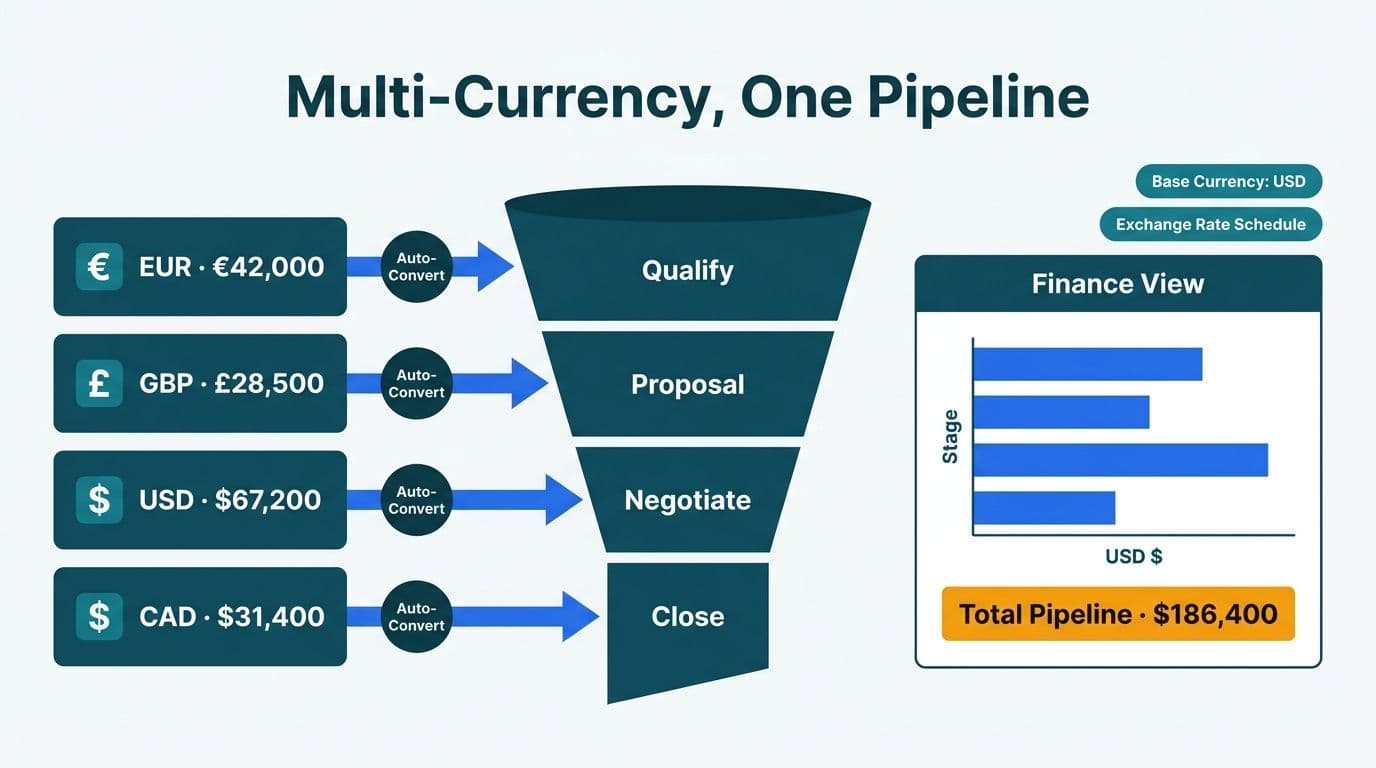
Zoho CRM's multi-currency module enables global sales teams to record deals in USD, GBP, EUR, CAD, or any supported currency while rolling all pipeline metrics into a single base currency for finance reporting. The feature is available from the Enterprise plan and above and takes two to four hours to configure correctly - covering currency activation, exchange-rate schedules, and report field mapping. Once live, finance directors see one consolidated pipeline view while sales reps work in their local currency without manual conversion.
Key Takeaways
Multi-currency requires Zoho CRM Enterprise or higher; base currency is set once and cannot be changed after deal records exist
Live exchange rates refresh daily, weekly, or on a manual schedule - and can be locked at the deal level via per-deal overrides
Pipeline reports aggregate all deal amounts in base currency using the rate active when each deal was last saved
Roles and profiles settings control which users may edit or override per-deal exchange rates
Territory management - available on the same Enterprise tier - controls which records each rep and manager sees, and how deals are automatically routed by region
Connecting Zoho CRM to Zoho Analytics unlocks cross-currency pipeline dashboards that native CRM reports cannot produce
What Is Zoho CRM Multi-Currency, and Which Plans Include It?
Zoho CRM's multi-currency module is a native feature that lets each deal, quote, or invoice carry its own transaction currency while the system converts values to a designated base currency for rollup reporting. According to Zoho's official product documentation (2025), the feature is available on the Enterprise plan and above - the same tier that unlocks advanced workflow rules, territory management, and custom modules.
For teams reviewing Zoho CRM pricing plans compared, multi-currency is one of the clearest reasons to move from Professional to Enterprise: without it, all deals must be entered in a single currency, which forces manual spreadsheet reconciliation for any team billing across multiple markets.
The base currency is configured once under Setup > Company Details > Currencies. After deal records exist in the system, Zoho locks the base currency - changing it requires a full data migration. US-headquartered finance teams typically select USD. A UK fintech managing revenue across European subsidiaries would set GBP or EUR depending on their group consolidation currency, and should align that choice with GDPR-compliant data residency options in Zoho's regional data center settings.
According to Zoho's product documentation (2025), Enterprise plan organizations can activate up to 10 currencies simultaneously; Ultimate plan organizations can activate up to 25. All ISO 4217 currencies are supported.
How Do You Configure Zoho CRM Multi-Currency Setup for Global Sales Teams?
The configuration sequence is where most mid-market rollouts make costly errors - and it is a core focus of any Zoho CRM consulting engagement in the first week of implementation. Several decisions here are irreversible once live data exists.
Step 1 - Activate multi-currency. Navigate to Setup > Company Details > Currencies > Enable Multi-Currency. Select your base currency. This setting cannot be undone after deal records are created.
Step 2 - Add active currencies. Click Add Currency and select from the ISO 4217 list. For a US/UK/EU/Canada footprint, add GBP, EUR, and CAD alongside USD as your base. Configure each currency's display format - symbol position, decimal separator, and thousands separator - as these affect invoice PDF output for regional clients.
Step 3 - Set exchange rates. For each added currency, enter the current rate or enable automatic rate refresh. The rate entered here becomes the active rate applied to all new records created from that point forward.
Step 4 - Audit custom field types. Any custom amount fields - for example, a Contracted ARR or Renewal Value field - must be typed as Currency, not Number. Fields typed as Number do not participate in base-currency conversion and display the raw numeric value regardless of deal currency, causing aggregate reports where GBP 50,000 and USD 50,000 appear equivalent. Audit all custom amount fields before enabling multi-currency across the organization.
Step 5 - Map fields in reports and test. In Setup > Reports & Dashboards, verify that amount fields in your Deals module are correctly tagged for base-currency aggregation. Create a test deal in GBP, view it in the pipeline report, and confirm the converted USD total matches your expected rate. This catches misconfigured field types before they affect live data.
Step 6 - Automate governance with workflow rules. Zoho CRM's workflow rules can alert a finance manager when a deal's exchange rate override deviates beyond a defined threshold - catching data-entry errors before they reach pipeline reports. For multi-step enforcement requiring finance approval before a rate override is saved, Blueprint automation is the appropriate tool. Understanding the distinction between Zoho CRM workflow rules and Blueprint is particularly important when designing currency governance for finance-regulated environments, where an unchecked override can quietly distort period-end reporting.
A typical Zoho CRM implementation timeline for multi-currency configuration is half a day for the setup itself; a full Enterprise rollout for a 30 to 50 seat mid-market team typically spans four to eight weeks when data migration, roles and profiles configuration, and user training are included. For teams evaluating Zoho CRM against other mid-market CRM platforms, multi-currency is a capability area where Zoho's configuration depth - particularly around role-based rate override permissions and Zoho Analytics integration for FX reporting - exceeds what most competing products offer natively.
How Do Live Exchange-Rate Feeds Work in Zoho CRM?
Zoho CRM does not maintain its own rate feed. Instead, it integrates with a third-party currency data provider to populate rates automatically when you enable Automatic Currency Conversion in currency settings. According to Zoho's Help Center documentation (2025), rates refresh on the schedule you configure: daily, weekly, or manually on demand.
| Rate Setting | Best For | Key Risk |
|---|---|---|
| Daily auto-refresh | High-volume transactional sales | Pipeline total fluctuates daily with FX markets |
| Weekly auto-refresh | Mid-length sales cycles (30-90 days) | Modest lag between market rate and CRM rate |
| Manual / locked system rate | Finance-controlled quarterly reporting | Requires a human process to update at period close |
| Per-deal override | Hedged contracts, fixed-price agreements | Can diverge from system rate logic if overused |
Daily refresh suits high-velocity transactional teams. Each morning, Zoho pulls the latest rate and applies it to records created or saved that day. Existing records retain the rate active at their last save - rates are not retroactively recalculated across all open deals.
Weekly refresh is appropriate for teams with longer sales cycles where daily rate fluctuations generate more noise than insight in pipeline reviews.
Manual locked rates are the standard choice for Canadian organizations governed by PIPEDA and for US finance teams operating under SOC 2 audit requirements. Setting a fixed rate at quarter-start and documenting the decision creates consistent period-over-period pipeline comparisons - a practice that also satisfies audit trail requirements under GDPR for UK and EU entities. Zoho's currency change history log, visible under Setup > Currencies > History, provides the record of each rate change that auditors require.
How Do You Report Pipeline Revenue in Base Currency?
Pipeline reporting in base currency is where multi-currency configuration either validates or undermines a finance director's trust in the CRM. Zoho CRM converts each deal's amount to base currency using the exchange rate that was active when the deal's Amount field was last saved - not the rate currently active at report run time.
A GBP deal entered when 1 GBP equaled 1.28 USD will appear as USD 128,000 in pipeline reports regardless of today's rate - until the deal record is next saved, at which point Zoho recalculates using the current active rate. For long-cycle deals, this behavior can cause pipeline totals to shift between monthly reviews even when no commercial change has occurred.
For finance-grade pipeline reporting, the best practice is to lock per-deal exchange rates for deals that reach the Proposal or Negotiation stage. This ensures late-stage pipeline totals remain stable through close and that month-over-month pipeline movement reflects actual deal progression, not FX volatility.
For dashboards that surface FX gain/loss by territory, currency mix by pipeline stage, or base-currency trend with drill-down to transaction currency, connect Zoho CRM to Zoho Analytics sales and finance dashboards. Zoho Analytics pulls currency metadata alongside deal data and supports calculated fields that isolate FX impact as a separate column - something Zoho CRM's native reporting layer does not produce.
Teams running Zoho CRM alongside Microsoft 365 can use the native Zoho CRM Microsoft 365 integration to push deal data into SharePoint or Excel for additional finance modeling. Configure the export to include both the transaction-currency amount column and the ISO currency code - without both, the receiving workbook cannot reconstruct base-currency equivalents for periods where the system rate changed between saves.
When Should You Use Per-Deal Currency Overrides?
Per-deal currency overrides let a user assign a specific exchange rate to an individual deal, replacing the system-wide active rate for that record only. Three scenarios call for this approach.
Hedged or forward-contracted deals. A UK fintech selling to a US enterprise at a GBP/USD rate locked in a forward contract should record that contracted rate on the deal rather than the live market rate. The contracted rate determines actual realized revenue; using the live rate misrepresents the deal's economics in base-currency pipeline reporting.
Multi-year agreements with fixed pricing. A Canadian SaaS company billing a US health system in USD at a rate locked at contract signature should use a deal-level override to ensure the CAD-equivalent ARR is consistent across the contract term. Under PIPEDA requirements, accurate period-over-period financial records depend on this consistency - a floating rate would cause the same deal to report different CAD values each quarter with no corresponding commercial change.
Retroactive corrections. When a deal was created during a rate anomaly and the recorded converted amount materially misrepresents deal value, an override corrects the record without requiring a new deal entry.
How to apply an override: On any deal record, find the Exchange Rate field adjacent to the converted base-currency amount. Entering a value here locks the conversion for that deal independently of the system rate. This field should be restricted to finance-role profiles - because unrestricted overrides create audit exposure for organizations subject to SOC 2, GDPR, or HIPAA requirements. The next section covers how to enforce that restriction.
How Do Roles and Profiles Govern Currency Permissions in Zoho CRM?
Zoho CRM's roles and profiles setup is the governance layer that determines who can view, edit, and override currency data. It is also the configuration step most often skipped in first-time implementations, and the most common source of post-launch audit findings.
Profiles control field-level permissions. To restrict exchange-rate overrides to finance staff:
1. Go to Setup > Users and Control > Profiles.
2. Edit the Sales Rep profile and set the Exchange Rate field in the Deals module to Read Only.
3. For the Finance Director or Finance Manager profile, set it to Read/Write.
Roles control data visibility. A recommended hierarchy for a global multi-currency team:
Global Sales Director - sees all deals in all currencies; pipeline totals displayed in base currency
Regional Manager - sees deals in their territory; amounts displayed in base currency even when the transaction currency differs
Sales Rep - sees their own deals; amounts displayed in the deal's transaction currency
This hierarchy means a sales rep in London works in GBP throughout the deal lifecycle, while a US-based CFO sees the same pipeline consolidated in USD - with no manual conversion required at either end.
For Zoho CRM user adoption in multi-currency environments, the most effective training rule for sales reps is simple: enter the deal amount in the currency your customer pays in and let Zoho handle the conversion. Reps who manually convert to base currency before entry create double-conversion errors that are difficult to detect and correct after the fact.
Zoho CRM for healthcare practices adds HIPAA-aligned field access controls on top of the standard currency permission framework - a configuration pattern directly relevant to US health systems that also operate Canadian affiliate entities billing in CAD.
How Do You Set Up Territory Management in Zoho CRM for a Multi-Region Sales Team?
Territory management is the organizational layer that sits alongside - and complements - the currency configuration described above. For companies selling across the US, UK/EU, and Canada, a Zoho CRM territory management setup determines which records each rep and manager can see, how deals are automatically routed to the right region, and how overlapping accounts - enterprise clients with offices in multiple countries - are handled without duplicating records. Territory management is available on the Enterprise plan and above, under Setup > Users and Control > Territories.
Step 1 - Build the territory hierarchy. Create a root territory (typically "Global" or the company name), then add child territories for each region. For a three-region footprint, a practical structure is:
- Global (root)
- Americas
- United States
- Canada
- EMEA
- United Kingdom
- Europe (EUR-billing)
This hierarchy controls report rollups: a Regional VP assigned to Americas sees all US and Canada deals aggregated in base currency; the Global Sales Director sees the full consolidated pipeline. The hierarchy mirrors the role structure described in the previous section, so each role level maps cleanly to a territory level.
Step 2 - Define assignment rules. Territory assignment rules automatically place accounts, contacts, and deals into the correct territory based on field criteria. The most reliable criteria for a multi-region team are Billing Country or a custom Region field. Navigate to Setup > Users and Control > Territories > [Territory Name] > Assignment Rules and configure criteria for each leaf territory - for example, Billing Country = "United States" for the US territory, and Billing Country IN [Germany, France, Netherlands] for the Europe territory. Run the assignment rule across existing records after initial configuration; new records matching a rule are assigned automatically on creation.
Step 3 - Assign users to territories. Each user can belong to one or more territories. Sales reps are typically assigned to a single leaf territory; regional managers are assigned to the parent territory, which grants visibility into all child territories. Make assignments under Setup > Users and Control > Territories > [Territory Name] > Users.
Step 4 - Handle overlapping accounts. Enterprise accounts with offices in multiple regions require overlap handling. Zoho CRM supports assigning a single account to multiple territories simultaneously - both the US and UK territories can own a shared enterprise account, with each territory's reps seeing the record but editing only the fields their profile permits. Configure overlap by adding the account to additional territories directly from the account record's Territory field.
Step 5 - Align territories with currency zones. The natural alignment between territory and currency is one of the underutilized advantages of Zoho CRM's architecture. Set each user's default currency under Setup > Users > [User] > Default Currency so new deal records pre-populate the correct transaction currency for their territory - USD for US reps, GBP for UK reps, CAD for Canada reps. This single step eliminates the most common currency entry error in multi-region rollouts and reduces the noise that distorts base-currency pipeline totals when reps accidentally record deals in the wrong currency.
A complete territory and currency configuration for a US/UK/Canada team adds roughly one to two days to the standard multi-currency setup timeline but pays back in reduced rep friction and cleaner finance reporting from day one.
What Are the Most Common Multi-Currency Implementation Pitfalls?
Five errors appear consistently in mid-market Zoho CRM multi-currency deployments, regardless of whether the team chose a certified Zoho partner or an in-house implementation path.
Wrong base currency set in production. Base currency cannot be changed after deal records exist. Organizations that configured a test currency and went live before resetting it have required full organization migrations to correct. Always configure and validate multi-currency in a sandbox environment; promote to production only after a confirmed test deal produces the correct base-currency conversion in reports.
Custom amount fields typed as Number instead of Currency. Fields typed as Number display the raw value regardless of deal currency. GBP 50,000 and USD 50,000 appear equivalent in aggregate reports, producing materially incorrect pipeline totals. Audit all custom amount fields and retype them as Currency before activating multi-currency.
No governance on rate overrides. Unrestricted rate override access creates audit risk for organizations subject to SOC 2, GDPR, and PIPEDA requirements. Restrict the Exchange Rate field to finance profiles through the Profiles configuration and document the rate change control policy for auditors.
No Zoho Analytics connection for FX reporting. Native Zoho CRM reports aggregate in base currency but do not surface FX gain/loss, currency mix by pipeline stage, or territory-level variance. The setup guide in Zoho Analytics for compliance and finance reporting covers the connection in detail and applies broadly to any organization requiring finance-grade currency analysis beyond what native CRM reports produce.
Underestimating Zoho CRM total cost of ownership for mid-market multi-currency rollouts. The license fee is one component; the real TCO includes custom field auditing, data migration, role hierarchy design, territory configuration, analytics connection, and user training. These effort items are predictable when scoped upfront but expensive to retrofit after go-live - which is the central argument for structured pre-launch planning, whether through a certified Zoho partner or a disciplined in-house process.
How Does Zoho CRM Compare to Pipedrive for Global Sales Teams?
Teams evaluating Zoho CRM vs Pipedrive for sales teams - particularly at the SMB-to-mid-market inflection point - will find the two platforms diverge significantly across five dimensions that bear directly on a global multi-currency rollout.
Pipeline customization. Zoho CRM supports fully custom pipelines with custom stages, stage-level probability overrides, and Blueprint automation that enforces required actions before a deal can advance. Pipedrive's pipeline editor is faster to configure but allows fewer stage-level constraints - it suits linear sales motions but becomes limiting when different product lines or regional deal types require separate stage logic and field sets. For global teams managing region-specific pipelines, Zoho's custom module layer means each regional flow can carry its own fields alongside shared base fields, without creating parallel organizations.
Automation depth. Zoho CRM's workflow rules and Blueprint layer can trigger actions across related modules - creating a support ticket in Zoho Desk when a deal closes, or routing a contract to Zoho Sign on stage change. Pipedrive's native automation is lighter; most advanced cross-module triggers require Zapier or Make as an intermediary. For mid-market teams on Zoho One, the in-platform automation advantage compounds because the same workflow engine spans CRM, Desk, Campaigns, and Finance without an external iPaaS cost or point-of-failure.
Pricing at scale. Pipedrive's per-seat pricing is lower at small team sizes (under 10 users), but the gap narrows for teams that also need analytics, email marketing, and support tooling. Zoho CRM Enterprise is priced per user per month; Zoho One bundles over 40 applications at a flat per-user rate. Teams comparing total cost should model the full tooling stack, not just the CRM license. For 30-to-50-seat mid-market teams, Zoho One typically delivers a lower all-in cost than Pipedrive plus separate analytics, email, and support applications.
EU data residency and GDPR defaults. Zoho CRM offers explicit EU data residency through its European data center, with GDPR consent fields, audit trails, and data subject request workflows built into the platform. Pipedrive also supports EU data residency, but GDPR-specific tooling - consent logs, right-to-erasure workflows - requires more configuration effort. For UK fintech and EU SaaS teams subject to active GDPR enforcement, Zoho's out-of-the-box GDPR field set reduces implementation risk and satisfies DPA documentation requirements with less custom development.
Implementation complexity. Pipedrive is measurably faster to deploy for a single-currency, single-region sales team: a 10-seat team can be production-ready in days. Zoho CRM's multi-currency, territory management, and multi-module configuration - covering the field audit, role hierarchy, assignment rules, analytics connection, and currency governance described in this article - is more complex, typically spanning four to eight weeks for a mid-market team. The tradeoff is that Zoho's configuration depth is the capability, not the cost: teams that need cross-currency pipeline reporting, SOC 2 audit trails, or Zoho Analytics integration for FX dashboards will eventually outgrow Pipedrive's simpler architecture.
The short answer for most global sales teams: Pipedrive is the faster start; Zoho CRM is the better long-term fit once multi-currency reporting, territory-based visibility, compliance requirements, or cross-product automation become non-negotiable requirements rather than nice-to-haves.
Ready to configure Zoho CRM multi-currency for your global sales team? Our Zoho CRM consulting practice handles the irreversible decisions first - base currency, field types, role hierarchy, territory structure - so your pipeline reporting is accurate from day one.
---
About Lets Viz: Lets Viz has delivered Zoho and analytics implementations for clients across US healthcare, UK fintech, Canadian manufacturing, and global SaaS since 2020, earning a 5.0 rating on Clutch. Our consulting practice covers end-to-end Zoho CRM deployments - from architecture and data migration through user adoption - with particular depth in finance-grade reporting and compliance configurations for regulated industries.