Zoho Analytics for Healthcare Compliance Reporting: A Setup Guide
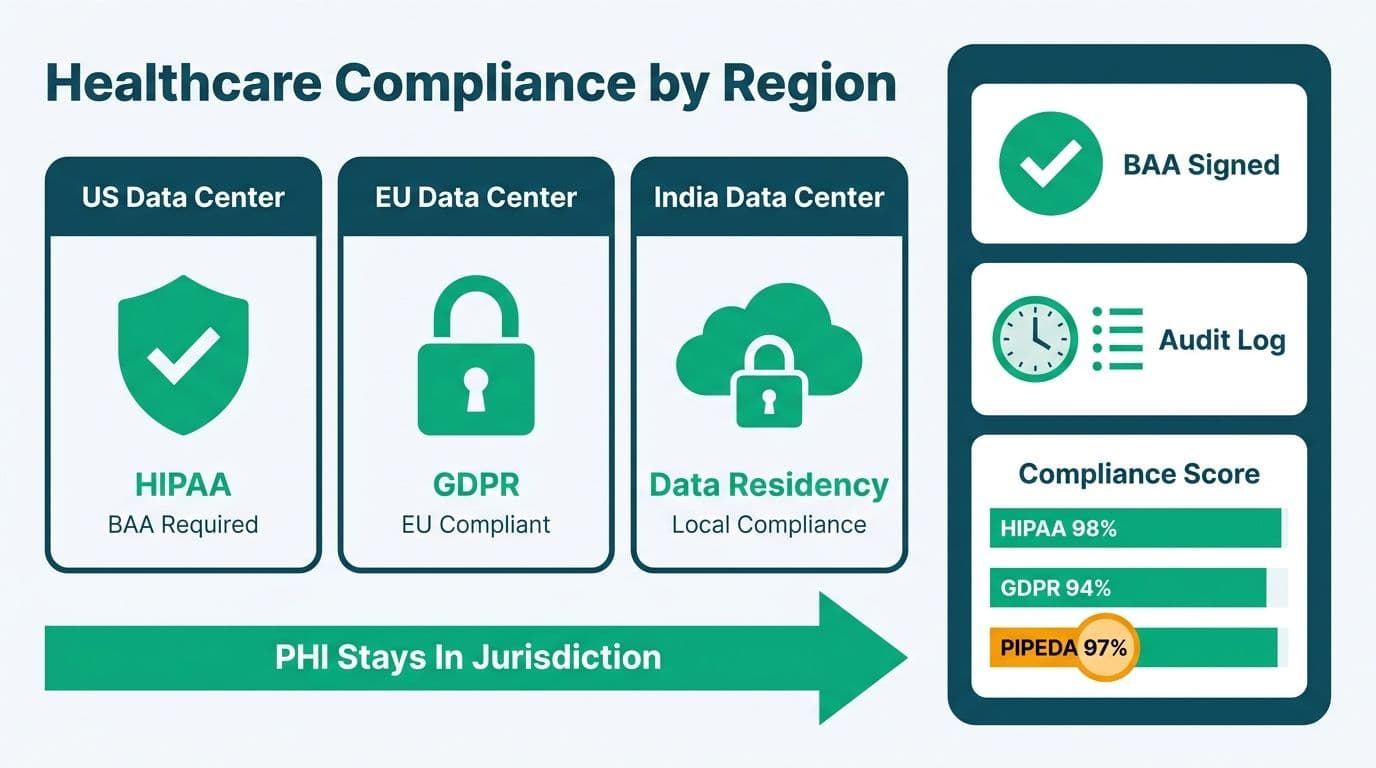
Zoho Analytics supports healthcare compliance reporting through configurable data residency (US, EU, and India data centers), a signed Business Associate Agreement (BAA) on Enterprise plans, and tamper-evident audit logs. Finance and compliance teams at clinics, health-tech SaaS companies, and hospital groups in the US, UK, and Canada use it to meet HIPAA, GDPR, and PIPEDA requirements without moving protected health data outside their required jurisdiction.
Key Takeaways
Zoho Analytics offers US, EU, and India data center options - the US data center is required for HIPAA-covered workloads.
A signed BAA is available for US healthcare organizations on Zoho Analytics Enterprise plans, satisfying a core HIPAA covered-entity obligation.
The platform audit log records every user action, query, export, and permission change with timestamps - and is exportable for external review.
Compliance dashboards can track claims denial rates, authorization lag, payer mix, and revenue-cycle KPIs alongside embedded audit-trail visibility.
Engaging a Zoho consulting partner shortens configuration time and reduces the misconfigurations most likely to create compliance exposure.
What Makes Zoho Analytics Suitable for Healthcare Compliance Reporting?
Zoho Analytics is well-suited to healthcare compliance because it pairs platform-level security certifications with the granular access controls regulated industries require. The platform holds SOC 2 Type II and ISO/IEC 27001 certifications - both verified by independent auditors and expected by most health-system legal and compliance teams before any protected health information (PHI) enters a third-party analytics system.
Data in transit is encrypted via TLS 1.2 or higher; data at rest uses AES-256 encryption. Role-based access control (RBAC) lets administrators assign view-only, edit, or admin permissions at the workspace, data source, or individual report level. Multi-factor authentication (MFA) is enforceable organization-wide - a HIPAA Security Rule best practice that external auditors consistently verify during annual assessments.
Zoho's AI assistant, Zia, adds natural language querying to compliance dashboards - a finance director can ask "show me denied claims by payer this quarter" without writing SQL. Compliance teams should note that Zia operates within the same permissioned data model as every other report: it cannot bypass row-level security filters. When clinical and financial data share a workspace but must remain siloed by department, that boundary holds under Zia queries as it does everywhere else.
Zoho Analytics integrations connect billing exports, EHR systems, practice management platforms, and cloud storage directly into the platform - reducing the number of data-movement steps where PHI leakage risk accumulates. Fewer pipeline hops mean fewer points an audit trail needs to cover.
How Does Data Residency Work in Zoho Analytics for HIPAA, GDPR, and PIPEDA?
Data residency determines which physical data center stores your organization's data and, by extension, which jurisdiction's data protection laws govern it at rest. Zoho Analytics offers three data center regions: United States (US), European Union (Amsterdam), and India (Chennai). The region is selected during account setup; migrating between regions requires a formal request to Zoho support.
For US healthcare organizations covered by HIPAA, the US data center is the required selection. PHI stored on EU or India infrastructure falls outside the BAA's geographic scope and complicates breach notification obligations under the HIPAA Breach Notification Rule.
For UK and EU health-tech SaaS companies, the EU data center satisfies GDPR's data transfer restrictions under Chapter V. After the UK's post-Brexit adequacy arrangements, UK organizations can use the EU data center without a separate transfer mechanism - though most UK firms pair this with a Data Processing Agreement (DPA) executed directly with Zoho. Zoho publishes its Standard Contractual Clauses (SCCs) and DPA templates in its Trust Center, which UK compliance officers reference during ICO audit preparation.
Canadian organizations face a nuanced situation under PIPEDA (and, for provincially regulated entities, PHIPA in Ontario or PIPA in British Columbia). PIPEDA does not mandate that data reside on Canadian soil - it requires that organizations ensure comparable protection through contractual means regardless of storage location. A Canadian hospital finance team can legitimately use the US data center, provided they document the cross-border data flow in their privacy policy and execute Zoho's DPA. Some organizations prefer the EU data center as a baseline, treating GDPR-equivalent contractual clauses as a durable safeguard under PIPEDA's accountability principle.
For a step-by-step audit of the documentation these transfer mechanisms require, see our GDPR-compliant SaaS financial reporting checklist.
Is a Business Associate Agreement (BAA) Available with Zoho Analytics?
Yes - Zoho offers a signed BAA for US-based covered entities and business associates under HIPAA. The BAA is available on Zoho Analytics Enterprise plans and must be requested through Zoho's HIPAA compliance portal before any PHI is loaded into the platform. Operating without a signed BAA while storing or processing PHI creates potential HIPAA enforcement exposure - OCR has published clear guidance on the BAA requirement as a precondition for using cloud analytics services.
The BAA covers Zoho Analytics as a business associate, obligating Zoho to use PHI only as permitted under the agreement, report breaches within HIPAA Breach Notification Rule timeframes, and make its security practices available for review upon request. The BAA does not extend to third-party connectors: if you pull data from an external EHR vendor via API, that vendor requires its own BAA.
Health-tech SaaS companies operating in the US and serving covered entities should note that BAA obligations flow downstream. If your analytics workspace stores PHI on behalf of a hospital client, your organization is a business associate, and Zoho Analytics becomes a sub-processor. In that configuration, both the Zoho BAA and a separately negotiated customer-facing BAA are necessary.
For UK organizations, the equivalent instrument is a DPA with a UK GDPR Article 28 data processor clause. For Canadian organizations, PHIPA (Ontario) requires written agreements with information custodians' agents that achieve comparable protections. Zoho's Trust Center documentation covers both.
Engaging a Zoho Analytics consultant during initial setup helps compliance teams identify which agreements apply to their specific entity type - and prevents the common mistake of signing a BAA after PHI is already in the system. For a full view of Zoho Analytics plan tiers and what each includes, see Zoho Analytics pricing plans and limits explained.
How Do You Configure Audit Logs in Zoho Analytics?
Audit logs are the evidentiary backbone of any compliance program. They answer who accessed what, when, and from where. In Zoho Analytics, audit logging is enabled at the organization level by an administrator.
Enabling audit logs:
1. Navigate to Settings > Admin Panel > Audit Log.
2. Toggle audit logging on for the organization.
3. Configure the log retention period (Enterprise customers can request extended retention beyond the standard window via Zoho support).
4. Select the events to log - at minimum, enable user logins, report views, data exports, and permission changes.
What the audit log captures:
The audit trail records the user identity (email and IP address), action type (view, edit, export, delete, share), object affected (workspace name, report name, data source), and timestamp in UTC. Export events - the highest PHI-leakage risk action - include the destination and record count exported.
Exporting logs for compliance review:
Audit logs can be downloaded as CSV from the Admin Panel. Most compliance programs require logs ingested into a SIEM or stored in immutable cloud object storage. A US clinic preparing for a HIPAA audit might export monthly logs to immutable cloud object storage with write-once read-many (WORM) settings. A UK health-tech firm might route the same CSV to its existing security logging stack to satisfy UK Cyber Essentials+ audit requirements.
Separation of duties: Assign the audit log admin role to someone other than the primary workspace owner. If one person can both modify data and delete audit records, the log loses its evidentiary value - a gap external auditors flag consistently.
One practical limitation: Zoho Analytics does not provide native real-time alerting on audit events. Compliance teams that need near-real-time anomaly detection - flagging a bulk export after business hours, for instance - should schedule periodic audit log exports to a monitoring tool, or build a secondary Zoho Analytics workspace that ingests and visualizes the audit log data.
What Compliance Dashboards Can Healthcare Finance Teams Build in Zoho Analytics?
Healthcare compliance dashboards in Zoho Analytics typically cover three domains: revenue cycle and claims integrity, access and data governance, and operational compliance KPIs.
| Dashboard Domain | Key Metrics | Primary Users |
|---|---|---|
| Revenue Cycle | Claims denial rate by payer, authorization approval lag, clean claim rate, AR days | Hospital finance, billing teams |
| Data Governance | Active users by role, export events by user, unauthorized access attempts | Compliance officers, IT security |
| Operational Compliance | Audit completion rates, policy attestation tracking, incident response SLA | Risk and compliance teams |
| Payer Mix Analysis | Revenue by payer, contract rate vs. reimbursement, capitation vs. fee-for-service split | CFO, finance directors |
Revenue cycle dashboards are the most common starting point for US hospital finance teams. A typical build pulls billing exports from a practice management system, joins them against payer contract tables, and surfaces denial reason codes in a heat map by payer and procedure code. The aim is to identify denial patterns early enough to correct coding errors before they become write-offs.
A hypothetical mid-market US health system operating 12 clinics might configure a denial rate dashboard drillable to individual claim IDs, authorization dates, and remark codes - with row-level security ensuring each clinic administrator sees only their facility's data while the CFO sees the consolidated view.
UK health-tech SaaS companies frequently build GDPR-adjacent dashboards tracking consent status, data subject access request (DSAR) timelines, and breach notification logs - displayed alongside operational KPIs in a single workspace. Zoho Analytics multi-source joins make it practical to combine operational and compliance tracking data without standing up a separate tool.
Canadian hospital finance teams subject to provincial health information acts often build dashboards tracking which staff roles accessed which billing record categories - a direct audit response to minimum-necessary access principles that parallel HIPAA's standard. For teams comparing data model patterns across platforms, our hospital patient flow and bed capacity dashboard guide illustrates structuring approaches that translate directly to Zoho Analytics table design.
How Do Small Clinics and Dental Groups Configure Zoho One for HIPAA and PIPEDA Compliance?
Zoho Analytics is typically the reporting layer within a broader Zoho One deployment. For small-to-mid-size clinics and dental groups evaluating Zoho One for healthcare practices with HIPAA and PIPEDA requirements, the four modules carrying the most compliance weight are Zoho CRM (patient relationship records and referral tracking), Zoho Desk (patient communications and support tickets), Zoho Books (billing and invoicing), and Zoho Sign (digital consent forms and intake documents).
Patient intake with Zoho Sign: Dental practices and primary care clinics use Zoho Sign to collect patient consent forms, HIPAA authorization documents, and intake questionnaires digitally. For US practices, Zoho Sign falls within the scope of Zoho's HIPAA BAA when operating on the US data center - the same BAA that governs Zoho Analytics. Canadian clinics under PIPEDA should execute Zoho's DPA and reference the intake-to-records data flow explicitly in their patient-facing privacy notice. PIPEDA's accountability principle requires demonstrable contractual controls over personal information once it enters a third-party system, regardless of where that system physically stores data.
Billing with Zoho Books: Zoho Books handles invoicing, insurance coordination, and payment records. For HIPAA purposes, any payment record linked to an identifiable patient qualifies as PHI when associated with a diagnosis or treatment code. US practices should confirm Zoho Books is within scope of their signed BAA before loading patient billing data. Ontario clinics operating under PHIPA, and British Columbia dental groups under PIPA, face comparable obligations: billing record processors must be named or categorized in patient-facing privacy disclosures.
Scheduling and CRM: Zoho CRM's appointment and pipeline modules let clinics manage patient journeys from first contact through recurring care. Row-level security in CRM should mirror the RBAC model configured in Zoho Analytics - front-desk staff access scheduling records; billing coordinators access financial records; neither role sees clinical notes unless explicitly permissioned. Maintaining this consistency across Zoho One modules is a structural advantage over assembling point solutions from different vendors: a single identity and access management configuration can propagate across the suite rather than requiring separate governance for each tool.
Cross-module PIPEDA documentation for Canadian practices: Canadian clinics using Zoho One across CRM, Books, and Sign should document each module in their data processing inventory. PIPEDA's Schedule 1 principle 4 requires organizations to identify collection purposes at or before the point of collection. A Zoho Sign intake form that feeds into Zoho CRM and Zoho Books represents three distinct processing points - each should appear in the patient's privacy notice and the organization's internal data map. A Zoho consulting partner familiar with both Zoho One architecture and Canadian privacy law can build this documentation alongside the technical configuration, preventing the common mistake of treating compliance documentation as an afterthought after go-live.
When Should You Hire a Zoho Analytics Consultant for Compliance Reporting?
The right answer depends on the compliance stakes and the in-house team's existing Zoho Analytics depth. Internal analysts can build effective compliance dashboards when the data model is straightforward and requirements are well-understood internally. The risk is that misconfiguring RBAC, skipping the audit log, or loading PHI before a BAA is executed creates real exposure - exposure no dashboard can retroactively fix.
Engaging a consultant makes clear sense when:
The organization is deploying Zoho Analytics for the first time in a HIPAA-regulated environment and needs a BAA-first setup sequence.
Data sources span multiple systems (EHR, billing, practice management, payer portals) requiring a governed pipeline rather than manual CSV imports.
The compliance or legal team needs to demonstrate to auditors that the analytics environment was configured by credentialed professionals following a documented methodology.
The organization operates across multiple jurisdictions - a US parent with a UK subsidiary faces HIPAA and UK GDPR simultaneously, and the data center, DPA, and BAA decisions interact in ways that consistently catch in-house teams off guard.
Zoho-certified analysts bring documented platform expertise - particularly in compliance-sensitive configurations like row-level security and audit log architecture - that in-house generalists building their first healthcare analytics environment typically lack. Organizations can incorporate Zoho Analytics certification into the in-house team's development roadmap once the initial compliance architecture is stable and externally validated.
A cost-effective hybrid: bring a Zoho consulting partner in for the initial compliance architecture (data center selection, BAA execution, RBAC design, audit log setup), then hand ongoing dashboard development to in-house analysts trained during the engagement. This sequencing is covered in our Zoho One implementation guide, which details the broader configuration sequence compliance-sensitive organizations follow across the Zoho ecosystem.
---
About Lets Viz: Lets Viz has delivered analytics implementations for US healthcare groups, UK fintech firms, and Canadian manufacturing organizations since 2020, with a 5.0 Clutch rating built on compliance-first data architecture. Our team works directly with CIOs, finance directors, and compliance officers to configure analytics environments that hold up under external audit - not just look right on a dashboard.
If your organization is configuring Zoho Analytics for healthcare compliance reporting, our Zoho consulting services team handles BAA setup, data center selection, audit log architecture, and compliant dashboard builds for mid-market organizations in the US, UK, and Canada. Try Zoho Analytics free and explore the platform before your first consultation.


