Zoho CRM for Healthcare Practices: Compliance Configuration Guide
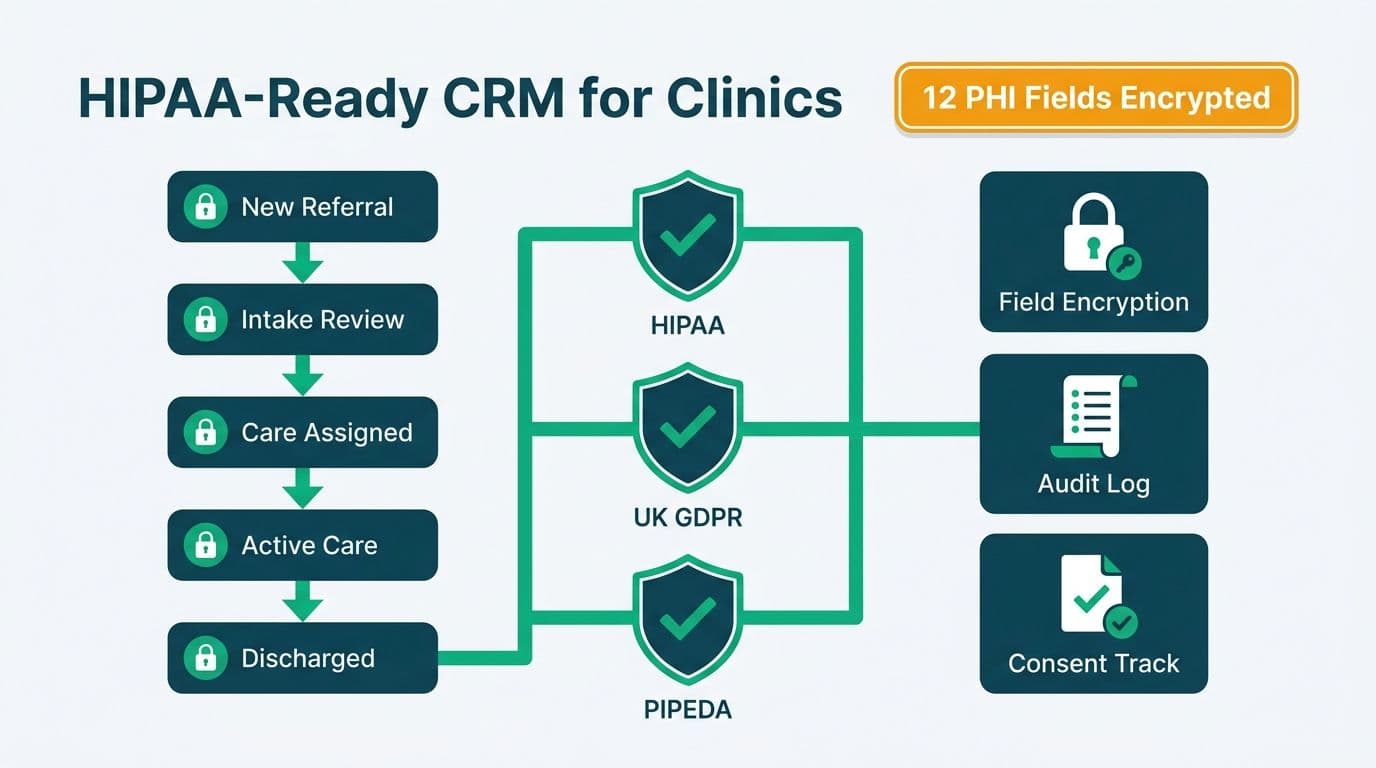
Healthcare organizations in the US, UK, Canada, and the EU configure Zoho CRM for healthcare practices by mapping patient referral workflows to custom modules, enabling field-level encryption for protected health information, and activating audit-log and consent-management features required under HIPAA, UK GDPR, EU GDPR, and PIPEDA. When deployed correctly, Zoho CRM becomes a compliant, centralized hub for managing provider relationships, referral pipelines, and care coordination - without the seven-figure price tag of enterprise alternatives.
Key Takeaways
Zoho CRM supports HIPAA, UK GDPR, EU GDPR, and PIPEDA through field-level security, audit trails, consent tracking, and regional data residency options.
Healthcare practices should replace the default sales-oriented module layout with clinical equivalents: Referral Inquiries, Care Episodes, and a Provider Directory.
Integration with EHR systems is achievable via Zoho Flow or API - keep clinical data in the EHR and relationship data in the CRM to contain your compliance scope.
A compliance-first implementation - BAA signed, encryption configured, audit logs activated - must precede any data import.
What Makes Zoho CRM Right for Healthcare Practices?
Zoho CRM offers a modular, highly configurable architecture that healthcare organizations can adapt to relationship management workflows without commissioning a custom software build. The platform's role-based access controls, field-level encryption, and audit trails address the core technical requirements of HIPAA in the US, UK GDPR for British clinics, EU GDPR for European practices, and PIPEDA for Canadian health organizations - all within a single deployment.
CRM platforms sit at the center of this shift - managing the referral relationships, payer contacts, and care coordinator communications that directly drive revenue and patient outcomes.
For mid-market clinics, specialist networks, and health-tech firms, the cost equation is decisive. Zoho CRM's per-seat licensing runs significantly below what enterprise-tier platforms charge, and when paired with a structured Zoho consulting services engagement to configure compliance controls from day one, total cost of ownership stays predictable across multi-year contracts.
Allied health providers - physiotherapy networks, behavioral health groups, and occupational therapy practices - are particularly well-positioned for Zoho CRM deployment because their referral relationships are persistent and relationship-dependent in ways that traditional practice management software does not handle well. Health-tech firms selling into health systems face a similar gap: they must manage not just patient relationships but a network of clinical champions, procurement contacts, and IT decision-makers within the same CRM structure.
Critical prerequisite: Zoho acts as a business associate under HIPAA when processing protected health information (PHI). Before any patient data enters the system, your organization must execute a Business Associate Agreement (BAA) with Zoho. BAAs are available on the Enterprise plan and above - this step is non-negotiable and must precede any data import.
How Do You Configure Zoho CRM for HIPAA, PIPEDA, and UK GDPR Compliance?
Compliance configuration is a sequenced process completed before the first data import. The specific steps differ by jurisdiction, but the underlying architecture is consistent: encrypt sensitive fields, restrict access by role, log every action, and document the legal basis for each data processing activity.
HIPAA (United States)
1. Execute a BAA with Zoho (Enterprise plan required).
2. Enable field-level encryption for PHI fields: date of birth, insurance IDs, diagnosis codes, and referral notes.
3. Activate audit logs under Setup > Security Control > Audit Log and set retention to a minimum of six years, as required under HIPAA.
4. Create role-based profiles restricting PHI access to clinical and compliance staff only - front-desk and scheduling roles should not see clinical note fields.
5. Enable two-factor authentication and configure IP restrictions for all user accounts.
PIPEDA (Canada)
Canadian health organizations - including Ontario health information custodians governed by PHIPA - must address data residency and consent management explicitly.
1. Provision your Zoho instance to a Canadian data center (Zoho offers Canada-region hosting; confirm with your account manager at setup, not after go-live).
2. Add explicit consent fields at the Contact level to record the legal basis for storing each individual's information.
3. Build auto-purge workflows to enforce data retention limits, triggering deletion automatically for records that exceed your retention windows.
4. Document the data flow from Zoho CRM to every integrated third-party system - labs, billing platforms, scheduling tools - for inclusion in your PIPEDA privacy impact assessment.
UK GDPR
UK clinics, health-tech firms, and NHS-adjacent organizations operate under UK GDPR, which maintains the same core obligations as EU GDPR with some post-Brexit divergences.
1. Activate the GDPR compliance module in Zoho CRM (Setup > Compliance Settings > GDPR) to record lawful basis, consent, and data subject rights requests per contact record.
2. Map a data subject access request (DSAR) workflow that auto-generates a filtered export and routes it to your Data Protection Officer within the 30-day statutory response window.
3. Apply data minimization at the field level - disable or delete unused default fields rather than leaving them dormant and collecting unintended data.
4. For UK-to-EU data transfers, document the International Data Transfer Agreement (IDTA) basis in your processing records.
For organizations running analytics on top of patient relationship data, reviewing the AI Analytics Data Privacy Risks: Healthcare Audit Guide alongside your CRM configuration is advisable before connecting any downstream reporting or BI tools.
What Is the Step-by-Step Zoho CRM GDPR, PIPEDA, and Data Privacy Configuration Playbook for EU, UK, and Canadian Practices?
EU, UK, and Canadian organizations face a distinct configuration challenge: unlike HIPAA, which centers on a BAA and technical safeguards, Zoho CRM GDPR and PIPEDA data privacy configuration requires documenting the legal basis for every processing activity, building automated erasure workflows, and confirming data residency before a single contact record is created. The following playbook covers each element in sequence.
Data Residency
EU GDPR: Provision your Zoho instance to a European data center (Frankfurt or Dublin) at account creation. In Setup > Data Centers, confirm your instance region before onboarding any contacts. EU data residency is a baseline requirement, not an optional enhancement - it determines whether your processing falls within the GDPR's geographic scope by default.
UK GDPR: UK instances can remain on EU infrastructure with an IDTA basis documented, or move to Zoho's UK-region servers if your DPA requires explicit UK residency. Confirm your region with your account manager at signup - post-provisioning migration is operationally disruptive.
PIPEDA / PHIPA (Canada): Activate Canada-region hosting during instance provisioning. The residency decision must be made before go-live; retrofitting it after data has accumulated is technically possible but creates unnecessary regulatory uncertainty during the transition window.
Consent Fields
Navigate to Setup > Modules > Contacts and add the following custom fields at the Contact level:
- Consent Given (Boolean) - records whether the individual has provided explicit consent
- Consent Date (Date) - timestamp of consent capture
- Consent Method (Picklist: Web Form, Paper, Verbal, Email)
- Lawful Basis (Picklist: Consent, Legitimate Interest, Contract, Legal Obligation, Vital Interests, Public Task)
- Consent Withdrawn Date (Date) - populated when an erasure or opt-out request is processed
For EU and UK GDPR, the Lawful Basis field must be populated for every contact record before any automated marketing or outreach activity begins. Zoho CRM's native GDPR compliance module (Setup > Compliance Settings > GDPR) generates a per-contact consent audit trail automatically once activated - enable this before the first import, not after.
Right-to-Erasure Workflows
Under EU GDPR and UK GDPR, data subjects have the right to request deletion of their personal data within 30 days. Build a dedicated erasure workflow in three steps:
1. Create a Data Subject Rights custom module to log incoming requests - fields: requester name, request type, date received, response deadline (auto-calculated as 25 days from receipt, leaving five days for QA), and status.
2. Build a workflow rule triggered on new DSR record creation: auto-assign to your Data Protection Officer, send an acknowledgment email via a Zoho CRM template, and set a task reminder at day 20 if status remains open.
3. On approval, use a Zoho Flow action to purge the contact record and associated activity records - manual deletion leaves no audit evidence of the erasure event. Log the completed erasure in the DSR record and retain that log for a minimum of three years as proof of compliance.
For PIPEDA, the erasure right is less prescriptive but the same workflow architecture applies: document the request, act within a reasonable timeframe (the OPC considers 30 days reasonable), and retain evidence.
Audit Log Configuration for GDPR and PIPEDA Deployments
In Setup > Security Control > Audit Log, apply these settings for EU, UK, and Canadian instances:
- Set retention to six years where healthcare record-retention rules apply, or three years for pure CRM relationship data under GDPR and PIPEDA.
- Enable logging for: field edits, record deletions, bulk export events, login events, and profile or role changes.
- Assign a read-only Audit Reviewer profile to your compliance officer so they can run reports without modifying CRM configuration.
- Schedule a monthly Audit Log Export to Zoho WorkDrive or an offsite storage bucket - Zoho's native retention is subject to plan limits and should not be your sole archive.
Treat the audit log as a compliance artifact in its own right: regulators under GDPR and PIPEDA may request evidence of specific processing events, and a well-configured log answers those requests without requiring manual record reconstruction.
How Should Healthcare Practices Structure Zoho CRM Modules?
The default Zoho CRM module layout - Leads, Contacts, Accounts, Deals - is designed for B2B sales pipelines. Healthcare organizations must reconfigure these modules to reflect clinical and operational workflows before staff training begins; retrofitting structure after data entry has started is expensive and produces inconsistent records.
Recommended Module Map for Healthcare CRM
| Default Module | Healthcare Rename | Primary Use |
|---|---|---|
| Contacts | Patients / Referral Sources | Individual patients or referring clinicians |
| Accounts | Practices / Facilities | Clinics, hospitals, specialist networks |
| Leads | Referral Inquiries | Inbound referrals not yet triaged |
| Deals | Care Episodes / Referral Pipeline | Active referral journeys through stages |
| Custom Module | Provider Directory | External specialists, payer contacts |
This mapping turns the pipeline view from a revenue tracker into a referral journey tracker: Inquiry Received - Triage Completed - Appointment Scheduled - Follow-up Required - Closed. Stage-by-stage visibility allows practice managers to identify exactly where referrals stall and assign corrective action before relationships erode.
US example: A multi-specialty group in Chicago used this module structure to track referrals from 40 primary care partners. By mapping each referral source as an Account and each referral event as a pipeline stage, the group identified a systematic follow-up gap that was allowing 18% of inbound referrals to go cold before the first appointment was scheduled.
UK example: A London allied-health network deployed two parallel pipelines - one for NHS referrals and one for private patient inquiries. The GDPR module captured distinct lawful bases for each relationship category, enabling the network to demonstrate full compliance in an ICO audit without manual record reconstruction.
Canadian example: A physiotherapy chain operating across Ontario and British Columbia added PHIPA-aligned consent fields at the Contact level and built a custom module to track WSIB workplace injury claims separately from private-pay patient records - a structural distinction that simplified provincial regulatory reporting and reduced audit preparation time considerably.
How Do You Integrate Zoho CRM with EHR and Practice Management Systems?
The objective of CRM-EHR integration is separation of concerns, not data duplication. Clinical records belong in the EHR, where HIPAA technical safeguards are mature and independently audited. Relationship data - referral source, communication history, consent status, appointment context - belongs in Zoho CRM.
Integration options by complexity:
Zoho Flow (no-code): connects Zoho CRM to scheduling and billing platforms using prebuilt connectors. Use webhook triggers from the EHR to push appointment and discharge events as CRM activity records without moving clinical data across the compliance boundary.
Zoho Creator (low-code): build a custom patient intake portal or referral submission form that feeds directly into Zoho CRM records. See What Is Zoho Creator Used For? No-Code Apps Explained for a practical overview of the platform's healthcare use cases.
REST API (custom): Zoho CRM's REST API supports bidirectional sync. A common pattern is a lightweight daily sync script that pushes referral status updates from the practice management system into Zoho CRM - keeping both systems current without a permanent integration layer that creates ongoing maintenance overhead.
What not to sync: Do not pull diagnosis codes, clinical notes, medication records, or lab results into Zoho CRM. If staff need clinical context within a CRM workflow, use a link field that opens the patient's EHR record directly - keeping clinical data in the authoritative system while giving CRM users one-click access without expanding the compliance scope of the CRM.
Throughout 2026, three themes are dominating healthcare analytics strategy: value-based care, AI-driven analytics, and payer analytics innovation. Organizations pursuing value-based care contracts need referral tracking data from CRM to align with outcome reporting from payer systems, making a clean CRM-EHR integration a strategic priority rather than a convenience.
Zoho CRM vs Enterprise Alternatives for Healthcare Relationship Management
When evaluating platforms for healthcare CRM, the comparison is rarely about features in isolation. It is about configurability, compliance support, and total cost at the mid-market tier.
| Factor | Zoho CRM | Enterprise CRM Alternatives |
|---|---|---|
| BAA availability | Yes (Enterprise plan) | Varies; often requires separate contract negotiation |
| Field-level encryption | Included in Enterprise | Frequently an additional cost module |
| GDPR / UK GDPR module | Native, no extra cost | Often a third-party add-on |
| Custom modules | Unlimited, no additional cost | Limited or licensed separately |
| Per-seat cost (mid-market) | $35-52/user/month | $75-300+/user/month |
| EHR integration | API + Zoho Flow | Typically requires paid middleware |
| Implementation timeline | 6-12 weeks with a partner | 12-24+ weeks |
The Zoho CRM Implementation Checklist: Phase-by-Phase Guide provides a phase-by-phase sequencing framework that healthcare organizations can adapt to ensure compliance configuration precedes automation and reporting setup - the order matters significantly for regulated deployments.
What Are the Most Common Configuration Mistakes Healthcare Organizations Make?
Deployments that encounter regulatory or operational problems typically share the same pattern of avoidable errors. Identifying them in advance is the most cost-effective form of implementation risk management.
1. Importing PHI before the BAA is signed. This creates immediate regulatory exposure. The BAA must be executed and the Enterprise plan must be active before any patient-identifiable data is imported or entered manually - no exceptions.
2. Using the default module layout without reconfiguration. Treating patients as Leads and referral events as Deals without renaming or restructuring modules leads to data quality degradation, user confusion, and audit trail gaps that are difficult to remediate once records accumulate.
3. Skipping audit log configuration. The audit log is not enabled with maximum retention by default. Healthcare organizations must explicitly set retention periods and verify that log records remain accessible for the full required duration before go-live.
4. Over-syncing with the EHR. Pulling clinical notes or diagnosis codes into Zoho CRM for operational convenience expands your compliance scope significantly and creates data governance complexity that is difficult and expensive to unwind.
5. No designated compliance-aware CRM administrator. Configuration settings are only as durable as their governance. Designating an administrator with both Zoho platform knowledge and compliance training - or engaging an external partner for ongoing administration - prevents configuration drift as the organization scales and staff turns over.
For healthcare finance directors evaluating whether a Zoho CRM deployment is the right investment, the Zoho CRM for Financial Services Firms: Configuration Guide covers structurally similar compliance configuration challenges in a regulated vertical that healthcare IT leaders consistently find directly applicable.
Organizations across regulated sectors are increasingly treating compliant technology configuration as a professional service rather than an internal competency.
---
Ready to configure Zoho CRM for your healthcare practice with HIPAA, UK GDPR, EU GDPR, or PIPEDA compliance built in from day one? Our team has delivered CRM deployments for clinical networks, allied-health providers, and health-tech firms across the US, UK, Canada, and the EU. Book a scoping call with our Zoho consulting services or Try Zoho CRM free to explore the platform before committing to a full deployment.
---
About Lets Viz: Lets Viz has delivered data analytics and CRM implementations for clients in US healthcare, UK fintech, Canadian manufacturing, and global SaaS since 2020. Our Zoho-certified consultants have configured HIPAA-compliant, UK GDPR-aligned, EU GDPR-ready, and PIPEDA-ready CRM deployments for mid-market organizations across three continents, earning a 5.0 Clutch rating from clients who require both technical precision and regulatory confidence.