Automate Power BI Report Distribution: Step-by-Step Guide
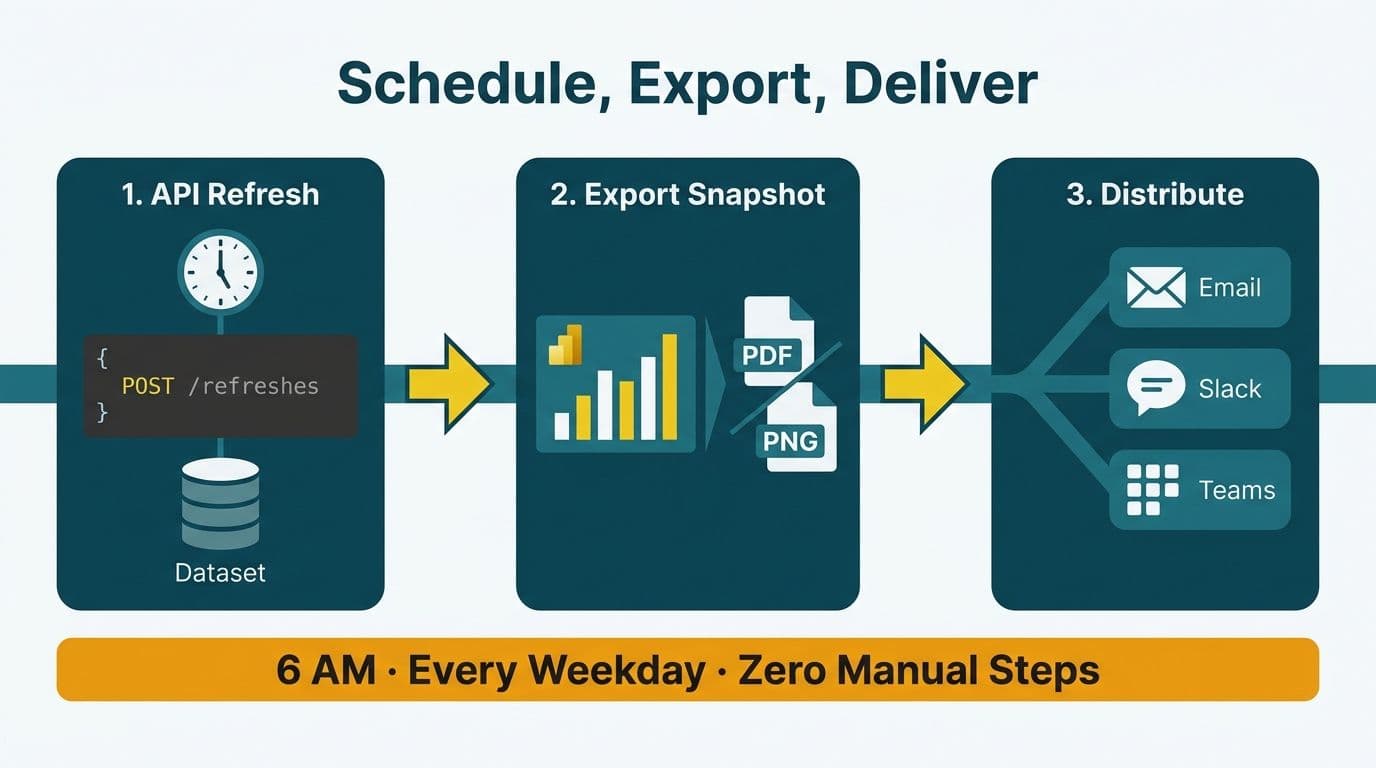
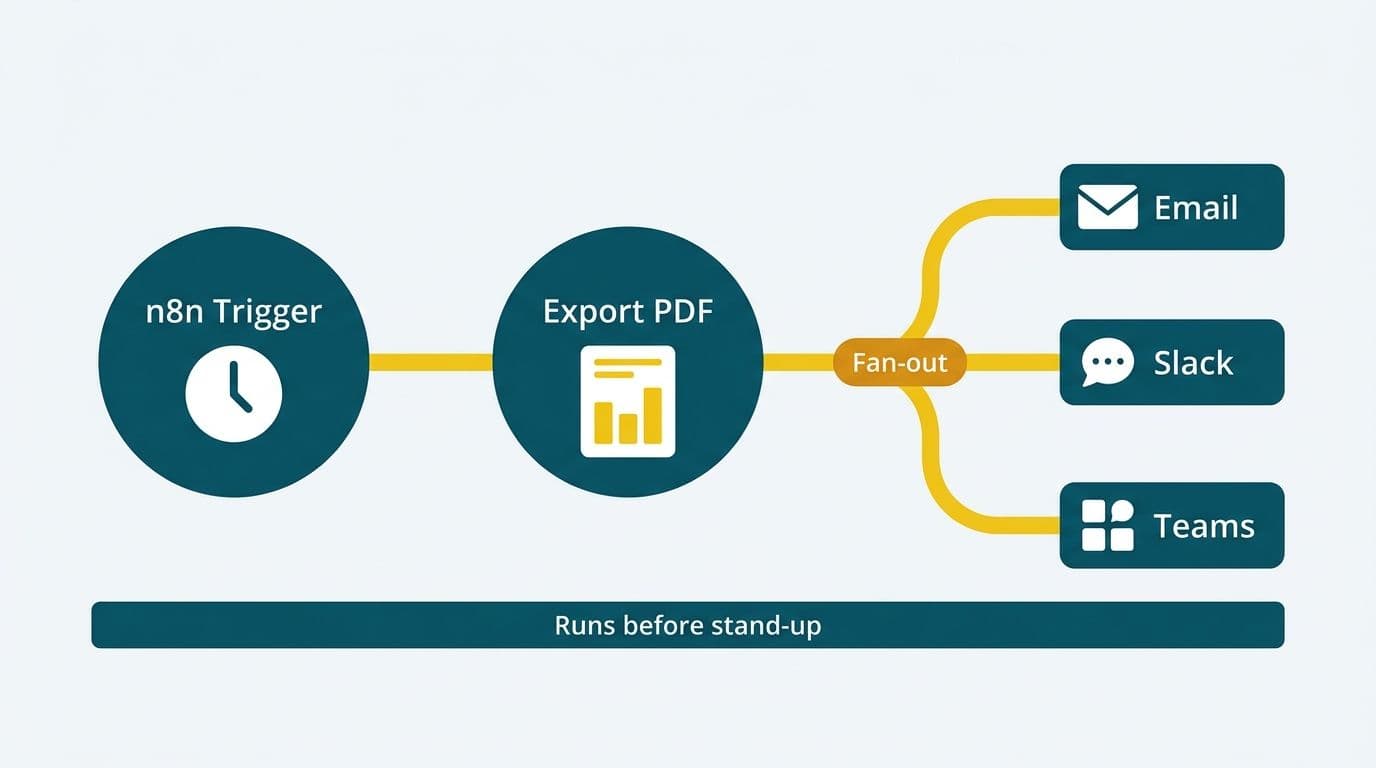
Automating a Power BI report distribution workflow means connecting three sequential steps: triggering a dataset refresh via the Power BI REST API, exporting the refreshed visuals as a PDF or PNG snapshot, and routing that snapshot to Slack, Microsoft Teams, or an email list through n8n or Power Automate. Each step runs without analyst intervention, so recipients receive current data before the morning stand-up regardless of time zone.
Key Takeaways
- Power BI's built-in email subscriptions lack conditional logic, Slack or Teams output, and delivery to unlicensed recipients.
- The Power BI REST API - the refresh and ExportTo endpoints - is the foundation of any fully automated distribution pipeline.
- n8n suits developer-led, multi-cloud stacks; Power Automate is faster to deploy for Microsoft 365 organisations.
- The `reportLevelFilters` export parameter replicates Cognos report bursting - personalised snapshots per recipient without a separate scheduling server.
- US healthcare, UK/EU, and Canadian teams must map each pipeline step to HIPAA, GDPR, or PIPEDA requirements before going live.
Lets Viz provides Microsoft Power Automate consulting -- cloud flows, desktop flows and AI Builder for teams on Microsoft 365 and Dynamics.
What Is a Power BI Report Distribution Workflow?
A Power BI report distribution workflow is an automated pipeline that refreshes a dataset, renders the updated visuals as a deliverable file, and delivers that file to defined recipients on a schedule or in response to a data trigger. It eliminates the manual "refresh and forward" routine that consumes analyst time every Monday morning.
Unlike a Looker Studio sales dashboard setup - which distributes data through manual sharing links rather than a programmatic delivery API - Power BI's architecture supports end-to-end automated distribution through its REST API. This makes it the stronger platform for organisations that need scheduled, conditional, or personalised delivery.
This is where AI automation consulting delivers immediate productivity gains: an orchestration layer sits between the data model and the recipient list, so the moment a dataset finishes refreshing, the distribution step fires automatically. Finance directors at mid-market US firms typically schedule these pipelines before the 08:00 stand-up; UK fintech teams often time them to capture overnight data before the London market opens.
Why Native Subscriptions Fall Short
Power BI's built-in email subscriptions fire at fixed clock times regardless of refresh status. A long-running refresh can produce a stale snapshot. They also offer no conditional delivery logic, no Slack or Teams output, and no delivery to recipients without a Power BI licence.
Teams replacing Cognos report bursting - which supports parameterised, role-based delivery to large lists - find native subscriptions inadequate beyond a handful of recipients. The API-plus-workflow approach closes that gap.
How Do You Trigger a Power BI Dataset Refresh Automatically?
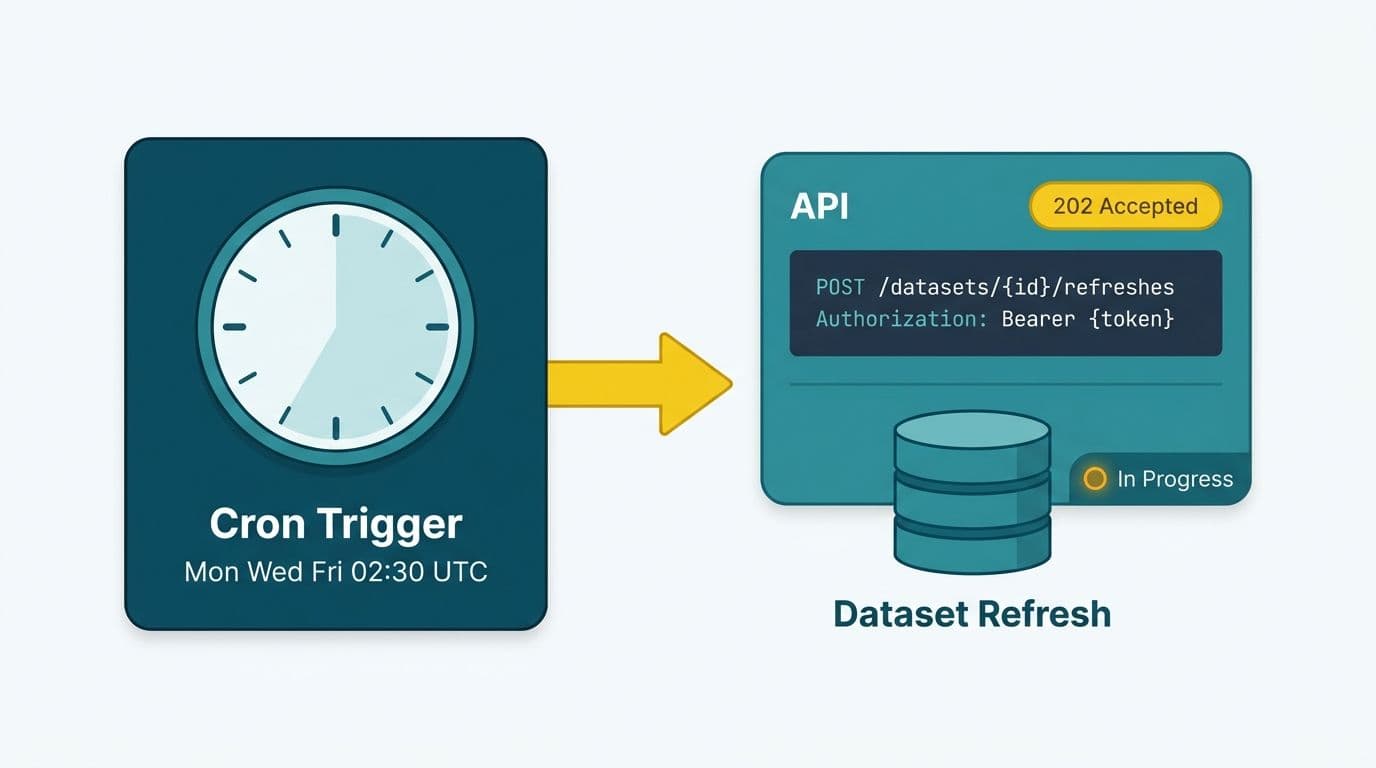
Call `POST /datasets/{datasetId}/refreshes` in the Power BI REST API, then poll `GET /datasets/{datasetId}/refreshes` for completion before advancing to export (Microsoft Power BI REST API reference, 2024).
The four-step sequence:
1. Authenticate - register a service principal in Microsoft Entra ID, grant it Dataset.ReadWrite.All, and add it to the target workspace. OAuth 2.0 client credentials returns a bearer token.
2. POST the refresh - supply the dataset ID from the workspace URL. The API returns HTTP 202 immediately; the refresh runs asynchronously.
3. Poll for completion - query the GET endpoint every 30-60 seconds until the latest entry shows `"status": "Completed"` or `"status": "Failed"`.
4. Branch on result - proceed to export on success; alert the on-call channel and halt on failure.
Power Automate runs this via its HTTP action (premium connector). n8n uses the HTTP Request node with built-in OAuth2 injection.
A Canadian manufacturing company running daily production dashboards might trigger the refresh at 05:30 local time after an overnight ERP batch completes. PIPEDA obligations mean the refresh and any intermediate caching must remain within Canadian Azure regions - Power BI Premium's geo-capacity settings accommodate this.
Scheduling Without Premium Capacity
On-demand API-triggered refresh requires Premium Per User (PPU) at minimum. Standard Pro licences cap UI-scheduled refresh at eight times per day. If PPU is unavailable, Power Automate's native Power BI connector can initiate a refresh within those Pro limits using delegated credentials - no service principal required.
How Do You Export Power BI Snapshots Programmatically?
Call `POST /reports/{reportId}/ExportTo` with a target format of PDF, PNG, or PPTX. Poll `GET /reports/{reportId}/exports/{exportId}` until status reaches `"Succeeded"`, then fetch the binary from the result URL (Microsoft Power BI REST API reference, 2024).
| Export Parameter | Common Values | Purpose |
|---|---|---|
| format | PDF, PNG, PPTX | PNG renders inline in Slack and Teams |
| pages | specific page names | omit for full report |
| reportLevelFilters | DAX filter expressions | personalises snapshot per recipient |
| locale | en-US, en-GB, fr-CA | regional number and date formatting |
The `reportLevelFilters` parameter is the programmatic equivalent of Cognos report bursting. Loop over a recipient list, inject a filter per row (region, cost centre, entity), export a tailored snapshot, and deliver only the relevant slice - no Cognos Transformer scheduling server required. Teams undertaking Cognos to Power BI supply chain reporting migrations use this pattern to preserve the personalised delivery that procurement managers depend on.
One boundary worth knowing: Power BI's visual-layer export caps CSV output at 30,000 rows. When a downstream process needs a full extract, the XMLA read endpoint (available on PPU and Premium) bypasses that cap entirely. We connected a book distributor straight to the model engine underneath Power BI and streamed all 5,042,721 billing rows out at roughly a million rows a minute using this method.
For reports built on measures using the CALCULATE function in DAX - period-over-period comparisons, dynamic currency conversion, filtered aggregations - the ExportTo API renders those measures correctly because it invokes the full Analysis Services engine, not a raw data query.
n8n vs Power Automate: Which Should You Use to Automate Power BI Report Distribution?
Both tools can orchestrate a complete refresh-export-deliver pipeline, but they suit different teams.
Power Automate is the default for any team inside Microsoft 365. Its native Power BI connector removes hand-coded OAuth flows, and pre-built connectors for Outlook, Teams, and SharePoint eliminate custom HTTP calls for the most common delivery targets. The trade-off is cost: premium connectors add per-flow fees on top of Microsoft 365 subscriptions.
n8n is open-source and self-hostable. Every integration uses the HTTP Request node, so there are no per-connector fees. Teams evaluating n8n vs OpenAI agent builder for business automation generally find n8n wins on structured orchestration - branching logic, error handling, and retry policies with exponential backoff - while OpenAI's agent builder suits natural-language reasoning tasks rather than deterministic API pipelines.
| Criterion | Power Automate | n8n |
|---|---|---|
| Setup speed | Fast - M365 connectors pre-built | Moderate - HTTP nodes, manual OAuth |
| Cost model | Per-user plus premium connector fees | Self-host free; n8n Cloud from $20/month |
| Power BI native connector | Yes (delegated auth) | No - HTTP Request node |
| Slack and Teams delivery | Native connectors | HTTP or Slack node |
| Error handling | Basic retry policy | Full branching, dead-letter routing |
| Data residency | Azure region - configurable | Self-host on compliant VPS |
| Best fit | Microsoft 365 organisations | Developer teams, multi-cloud stacks |
For a US healthcare system with HIPAA Business Associate Agreement requirements, Power Automate inside an Azure tenant with BAA coverage is the lower-friction option. A UK fintech firm under GDPR may prefer n8n self-hosted in an EU data centre to keep API transit within region and avoid cross-border transfer questions.
How Do You Deliver Power BI Reports to Slack, Teams, or Email?
Once the export bytes are available, the delivery step is a single API call in any workflow tool.
Microsoft Teams
Use Power Automate's Post a message in a chat or channel action with a file attachment, or post to a Teams Incoming Webhook as an Adaptive Card. A card with a PNG thumbnail renders inline without requiring recipients to open a browser - effective for morning finance briefings.
Slack
Slack's `files.upload` v2 endpoint accepts multipart form data. In n8n, the Slack node has a native file upload action. PNG snapshots preview inline; PDFs appear as download links. For large distribution lists, include a retry-with-backoff loop to handle rate limits gracefully.
Power Automate's Send an email (V2) action supports HTML body and attachments. In n8n, the Send Email node covers SMTP. US healthcare and finance teams sending snapshots containing protected health information must confirm every delivery route is encrypted in transit and that each recipient mailbox is covered by the applicable HIPAA or SOC 2 policy.
Audit Logging and Failure Routing
Every production pipeline needs two supporting branches:
- Success log - write recipient, timestamp, report ID, and filter context to SharePoint, Azure Table Storage, or a database table. This satisfies SOC 2 audit requirements for US SaaS firms and the GDPR Article 5 accountability principle for UK/EU organisations.
- Failure alert - route any pipeline error immediately to the on-call channel. Silent failures are typically discovered by an executive noticing a missing report, not by the data team.
The AI automation compliance checklist for finance teams provides the full control framework for automated financial report delivery in regulated environments.
What Governance Checks Are Needed Before Go-Live?
Automated distribution introduces data-flow risks that workspace-level controls alone do not address. The Power BI governance best practices checklist covers workspace controls; the distribution layer adds three checks:
- Row-level security validation - confirm the service principal used for the export call cannot access data beyond what the recipient is authorised to view. An RLS misconfiguration can expose cross-entity financial data when a broad service account inherits wide permissions.
- Snapshot retention policy - PDF and PNG files delivered to Slack or Teams are stored on those platforms' infrastructure. Define a retention period aligned to your data classification policy. Under PIPEDA, Canadian organisations must demonstrate where personal information is held and for how long.
- Licence audit - API-triggered refresh and export require PPU or Premium. Document which workspaces sit on which capacity tier so compliance audits can confirm automated access falls within licence scope.
Teams running Managed Power BI services typically have these checks handled within the service wrapper. The Power BI managed service for finance teams guide explains what governance handoffs look like when a managed service owns the automation layer.
---
About Lets Viz: Lets Viz has delivered data analytics and automation solutions to US healthcare providers, UK fintech firms, Canadian manufacturers, and global SaaS companies since 2020, holding a 5.0 Clutch rating. The team designs production-grade Power BI environments - including automated distribution pipelines, governance frameworks, and compliance-ready managed service wrappers - for mid-market organisations across multiple regulatory jurisdictions.
Ready to eliminate the manual refresh-and-forward routine? Explore AI automation consulting to build a Power BI distribution pipeline that runs without analyst intervention.