Zoho CRM for Financial Services Firms: Configuration Guide
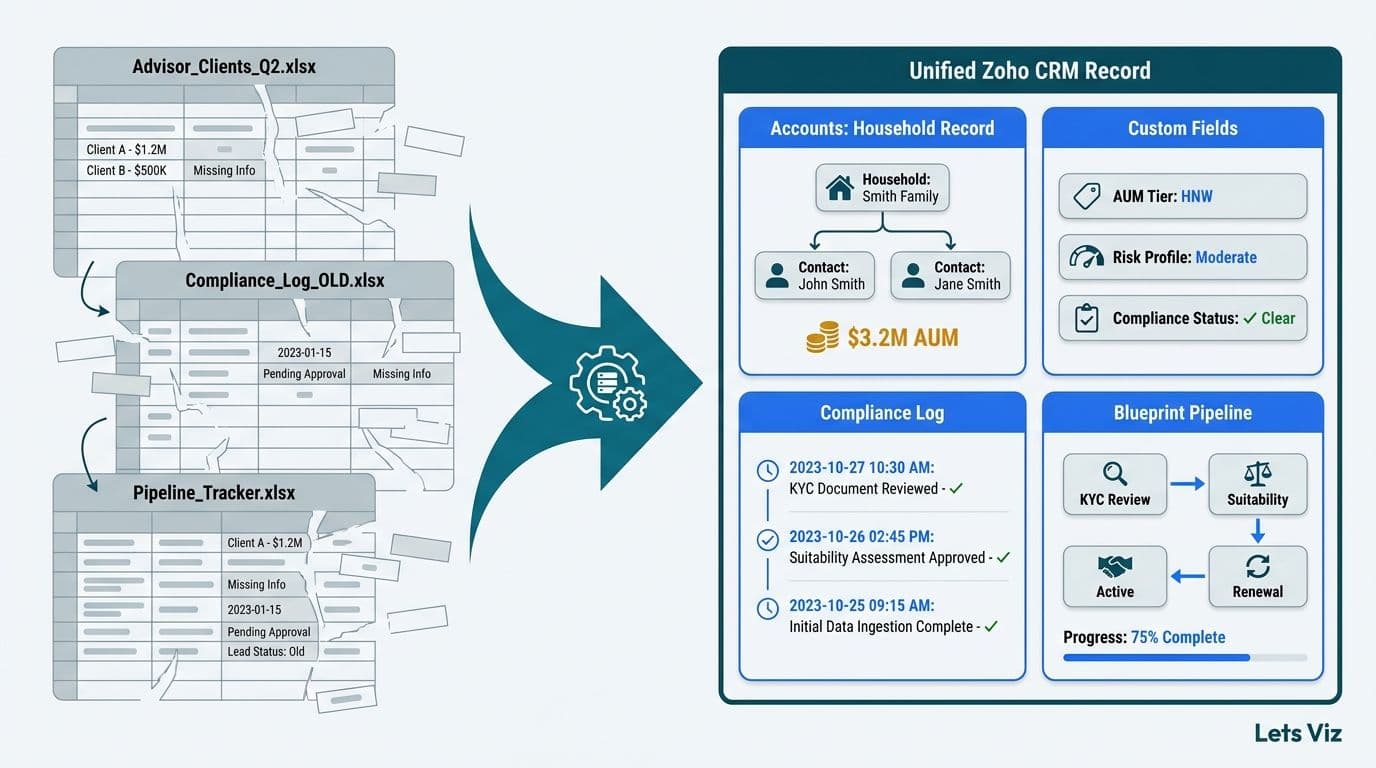
Zoho CRM becomes a purpose-built financial CRM when its modules are extended with AUM custom fields, segmentation views, a compliance log module, and Blueprint-enforced workflows. RIAs, insurance brokers, and wealth managers configure the Contacts and Accounts modules around household relationships and asset tiers, then layer in automated compliance logging and stage-gated pipeline tracking. The result replaces disconnected advisor spreadsheets with a single, auditable client record.
Key Takeaways
The Accounts module serves as the household record for RIAs and wealth managers; custom AUM tier, custodian, and account type fields form the foundation of every financial CRM build.
Client segmentation via Custom Views lets advisors filter by AUM band, review date, and compliance status without manual list management.
Compliance activity logging requires a dedicated Custom Module plus Blueprint-enforced workflows to produce a defensible audit trail for FINRA, SEC, or state insurance review.
Workflow Rules handle event-triggered automations such as review reminders; Blueprint enforces gated multi-step compliance processes where each stage must be verified before the record advances.
Agencies and professional services firms configure Zoho CRM differently from financial services firms - deal tracking, retainer billing, and project handoff require five specific module customizations plus native Zoho Books and Zoho Projects integrations.
A mid-market financial firm should budget 8-14 weeks and $15,000-$40,000 in professional services for a full implementation covering modules, automation, data migration, and training.
Lets Viz offers Zoho consulting services for businesses implementing Zoho One, Zoho CRM, and the full Zoho suite across US, UK, and Canadian markets.
What Makes Zoho CRM for Financial Services Firms Different From Generic Deployments?
Financial services CRM requirements diverge from standard commercial setups in three critical areas: data model, compliance obligations, and pipeline structure. Out of the box, Zoho CRM treats Contacts as individuals and Deals as forward revenue - neither maps cleanly to a wealth management or insurance brokerage practice.
For RIAs and wealth managers, the fundamental record is the household, not the individual. A household contains multiple beneficiaries - primary client, spouse, children, or trustees - each with distinct account types managed across one or more custodians. Insurance brokers face an analogous mismatch: the Deals module's default stages and probability weights do not reflect a renewal-based sales cycle where the client relationship predates the revenue event.
According to Future Market Insights (2026), the AI consulting services market - estimated at USD 14 billion as of mid-2026 - is on track to reach USD 90.99 billion by 2035 at a 26.2% CAGR, driven substantially by financial services firms investing in CRM-connected data infrastructure and compliance automation. That downstream analytics investment only returns value when the CRM foundation is correctly configured.
For context on which Zoho product tier matches your firm's complexity, our Zoho CRM vs Bigin comparison guide clarifies when to deploy the full CRM platform versus lighter options.
How Do RIAs Configure Zoho CRM Modules for AUM Tracking?
AUM tracking is built on the Accounts module, which in a wealth management context represents the client household or investing entity rather than a corporate account. A production-ready configuration requires these custom fields on the Account record:
Total Household AUM (Currency) - updated by advisors after each review or custodian statement
AUM Tier (Formula or Picklist) - Mass Affluent ($250k-$1M), HNW ($1M-$5M), UHNW ($5M+)
Primary Custodian (Picklist) - Schwab, Fidelity, Pershing, or Other
Account Types Held (Multi-select Picklist) - IRA, Roth IRA, Joint Taxable, Trust, 401k Rollover
Last Annual Review Date (Date)
Next Review Due (Date, auto-calculated by Workflow Rule as Last Review Date plus 365 days)
Assigned Advisor (Lookup to Users)
Compliance Status (Picklist) - Active, Restricted, Under Review, Closed
Within each household Account, individual Contacts represent the account holders. Contact-level custom fields - Date of Birth, Risk Tolerance, Preferred Communication Method, and KYC Verified Status - separate individual relationship data from household-level financial data, keeping records clean for both reporting and compliance review.
The AUM Tier formula field is the keystone of the configuration. Deriving tier automatically from Total Household AUM keeps segmentation current without advisor input - a foundational principle of Zoho CRM best practices for sales teams adapted for advisory practices, where manual data maintenance is a reliability risk.
For data migration, understanding how to import and map data in Zoho CRM is critical at this stage. Zoho's import wizard maps CSV or Excel columns to CRM fields at the point of import, but household deduplication and account-type normalization must be completed before the file reaches the wizard. A poorly mapped import creates duplicate household records that cascade into errors across every downstream segment view.
For insurance brokers, the equivalent configuration centers on a Policy custom module rather than AUM fields - tracking carrier, coverage type, annual premium, renewal date, and broker of record against each Account. A single Account holds multiple linked Policy records, each representing an active line of coverage.
Learn how AI consulting services for financial advisors extend this AUM data layer with predictive analytics and client risk scoring.
How Do You Build Client Segmentation in Zoho CRM?
Client segmentation uses Custom Views, Tags, and Canvas record layouts to surface the right clients to each advisor without manual list management. A mid-market wealth management firm with 500-2,000 households typically maintains five to eight named views that replace advisor-owned spreadsheets.
| Segment Name | Filter Logic | Primary Use |
|---|---|---|
| HNW - Review Due Soon | AUM Tier = HNW, Next Review Due within 30 days | Priority outreach |
| Mass Affluent - Dormant | AUM Tier = Mass Affluent, Last Activity > 90 days | Re-engagement |
| Trust Accounts | Account Types includes Trust | Estate planning outreach |
| Restricted - No Contact | Compliance Status = Restricted | Exclude from all campaigns |
| New Client 90-Day | Created Date within 90 days | Onboarding milestone check |
| Insurance Cross-Sell | Account Type = Brokerage, no Insurance Policy linked | Cross-referral opportunity |
These views are saved at the organization level and shared across the advisory team, eliminating per-advisor filter rebuilds. Tags add a second segmentation dimension: clients tagged by referral source or acquisition event can be filtered within any AUM tier without creating duplicate views.
The World Economic Forum's 2026 AI in Financial Services report notes that more than 120 financial services organizations - up from roughly 50 in 2024 - are now actively coordinating on shared client data governance frameworks, reflecting an accelerating industry-wide shift from siloed, advisor-owned data to centralized, auditable CRM records.
This is a defining Zoho CRM use case for professional services firms: replacing the advisor's personal spreadsheet with shared, automatically maintained segments that give firm leadership consistent client visibility. Agencies and consultancies running a Zoho CRM setup for professional services apply the same shared-view principle to client accounts and retainer status, which is covered in detail in the agency configuration section below.
How Do You Log Compliance Activities Auditably in Zoho CRM?
Compliance activity logging is the highest-stakes configuration area for financial services Zoho CRM deployments. FINRA Rule 4511, SEC books-and-records requirements, and state insurance regulations all mandate documented records of client interactions, disclosures, and suitability determinations. Zoho CRM supports a compliant logging architecture through three components working in sequence.
Layer 1 - Extended Notes
Every client interaction is logged as a Note on the Contact or Account record, extended with custom fields: Interaction Type (Call, Meeting, Email, Portal Message), Topics Discussed (Multi-select Picklist), Disclosures Provided (Checkbox), and Advisor ID (auto-populated from the logged-in user). This creates a timestamped, advisor-attributed interaction record attached directly to the client file.
Layer 2 - Compliance Log Custom Module
A dedicated Compliance Log module captures formal compliance events separately from general Notes: suitability reviews, KYC updates, complaint receipts, required annual disclosures, and regulatory filings. Fields include Event Type, Completed Date, Completed By, Regulation Reference (such as FINRA Rule 4512 or SEC Rule 17a-3), and a file upload field for signed documents or recorded call citations.
Layer 3 - Blueprint-Enforced Process Workflows
Zoho CRM's Blueprint feature enforces stage-gated progression through formal compliance processes. For a suitability review, Blueprint requires each transition - from Review Initiated through Assessment Completed, Plan Delivered, and Client Sign-Off - to have mandatory fields completed before the record can advance. Skipping steps is structurally impossible, which is exactly what regulators audit for. Firms that deploy Blueprint-enforced suitability workflows report resolving SEC examination document requests in three to five business days, compared to the two-to-four weeks typical of manual compliance log reconstruction where advisors must piece together interaction histories from email and notes. This gap has grown more consequential since the SEC's 2025 RIA examination priority letter explicitly flagged CRM record completeness and suitability documentation integrity as focus areas - examiners now request native CRM exports rather than accepting advisor-assembled summaries, making a structured, Blueprint-enforced audit trail the expected standard rather than a best practice.
According to Market Research Future (2026), the Healthcare Financial Analytics Market is projected to grow at an 8.58% CAGR through 2035, reflecting broad investment in compliance-grade data infrastructure across regulated industries. Financial services firms operate under equivalent documentation pressure, and CRM-native compliance logging has become the auditor-expected standard.
For firms with any healthcare-adjacent financial operations, our HIPAA-compliant analytics dashboard checklist addresses the reporting layer built on top of this compliance data.
Zoho CRM Workflow Rules vs Blueprints: What Should Finance Teams Use?
A common question in every Zoho CRM workflow automation setup guide for financial services is when to use Workflow Rules versus Blueprint. The tools are complementary but solve distinct process problems.
Workflow Rules are event-triggered automations that execute when a record condition is met:
Send a review reminder email when Next Review Due falls within 14 days
Create a Task for an advisor when a new Lead is assigned
Update Compliance Status when AUM drops below a defined threshold
Fire a webhook to a portfolio management system when Total AUM is updated
Blueprint enforces a defined sequential process with mandatory field completion and optional approver gates at each stage transition:
Suitability review: Initiated - Assessment Completed - Plan Delivered - Client Signed - Filed
Policy renewal: Renewal Identified - Market Check - Proposal Sent - Bound or Lost
New client onboarding: each milestone must be confirmed before the next stage is accessible
The practical rule for finance teams: if you need to prove to a regulator that a process was followed correctly and in sequence, use Blueprint. If you need to react to a data change automatically, use Workflow Rules. Most compliance-ready CRM builds run both simultaneously.
Understanding Zoho CRM free plan limitations and upgrades matters here: Blueprint is unavailable below the Professional tier, and Workflow Rule automation volume is capped on entry-level plans. Mid-market financial services firms consistently need Enterprise tier to support the compliance workflow depth described above.
Our Zoho CRM customization cost guide covers tier-by-tier pricing and professional services cost ranges for financial services implementations.
What Does Pipeline Reporting Look Like for Financial Services Firms in Zoho CRM?
Pipeline reporting replaces the Deals module's generic stage names with firm-specific sequences and surfaces them through the Dashboards module for management visibility.
For an RIA prospect pipeline, stage progression follows the advisory engagement sequence:
| Stage | Key Fields Tracked | Typical Duration |
|---|---|---|
| Prospect Identified | Source, Estimated AUM, Assigned Advisor | Open |
| Initial Meeting Scheduled | Meeting Date, Agenda Notes | 7-14 days |
| Financial Plan Delivered | Plan Document, Follow-up Date | 14-30 days |
| Investment Proposal Accepted | Proposed AUM, Fee Structure | 7-14 days |
| Account Paperwork Submitted | Custodian, Account Types Selected | 3-7 days |
| Account Funded | Funded AUM, Funding Date | 3-5 days |
| First Review Scheduled | Review Date | 30-90 days post-fund |
A four-panel Zoho CRM Dashboard gives practice managers their weekly view without a manual spreadsheet: pipeline by stage (count and estimated AUM), advisor-level close rates, deals overdue by current stage, and trailing-90-day closed AUM by advisor.
For insurance brokers, the same Deals module tracks renewal pipelines by policy expiry date, carrier, and coverage type - with Workflow Rules sending automated alerts at 180, 90, and 30 days before expiry.
For the BI and analytics layer that connects Zoho CRM pipeline data to executive reporting, our guide on AI-powered Power BI consulting for finance teams covers the integration architecture between CRM and reporting tools.
How Do Agencies and Professional Services Firms Configure Zoho CRM for Deal Tracking, Retainer Billing, and Project Handoff?
A Zoho CRM setup for agencies and professional services firms - marketing agencies, IT consultancies, management practices, and design studios - diverges from the financial services configuration in one foundational way: revenue is project- or retainer-based rather than AUM-linked, and the CRM must hand off a won deal directly into a delivery workflow. Firms that connect Zoho CRM to standalone project tools without deliberate integration design quickly develop attribution gaps: work is delivered but never traced back to the client account that generated it, making profitability analysis impossible.
The five module customizations that anchor this configuration are:
1. Deals Module - Engagement Type Picklist
Add an Engagement Type field (Picklist: One-Time Project, Monthly Retainer, Annual Retainer, Time and Materials) to every Deal record. This single field drives downstream Zoho Books invoice templates and Zoho Projects billing codes, so it must be required before a Deal can be marked Closed Won. A Blueprint transition gate enforces this.
2. Deals Module - Estimated Hours and Contracted Fee
Two fields - Estimated Hours (Number) and Contracted Fee (Currency) - replace the generic Deal Amount for Time and Materials engagements. A Workflow Rule calculates effective blended rate and flags any Deal where Contracted Fee divided by Estimated Hours falls below the firm's rate floor, surfacing scope underpricing before delivery begins.
3. Accounts Module - Retainer Status and Renewal Date
Monthly retainer clients require an Account-level Retainer Status field (Active, Pausing, At Risk, Churned) and a Renewal Date field. A Workflow Rule fires an internal alert to the account manager 45 days before Renewal Date and creates a linked Task for a renewal call - replacing the spreadsheet-based retainer tracker that most agencies operate until client volume forces a system change.
4. Zoho Books Integration - Auto-Invoice on Deal Close
Zoho CRM's native Zoho Books integration triggers a draft invoice when a Deal is marked Closed Won. For retainer engagements, configure the integration to generate a recurring invoice schedule in Zoho Books rather than a one-time document. The integration maps CRM Deal fields - client, contracted fee, billing cycle start date, payment terms - directly to the Books invoice, eliminating manual re-entry and the billing lag that compounds at agencies carrying more than ten active retainer clients. Set the Books customer record to sync from the CRM Account, not from individual Contacts - this keeps invoicing at the entity level and prevents duplicate billing records when multiple contacts exist under one account, a common failure point when connecting the two products for the first time.
5. Zoho Projects Integration - Automated Project Handoff
On Closed Won, a Blueprint transition triggers project creation in Zoho Projects via Zoho Flow or the native Projects connector. The handoff record carries the client name, project type, contracted scope, engagement type, and assigned delivery lead - eliminating the verbal or email handoff that sales-to-delivery transitions typically depend on. Map the CRM Deal ID to the Zoho Projects project description field from day one: this join key is required for profitability analysis comparing contracted fee against logged hours, and it cannot be reconstructed retroactively once projects are underway.
Project milestones in Zoho Projects can be configured to update a Delivery Status field on the CRM Deal in real time, giving account managers delivery visibility without leaving the CRM. Combined with the Retainer Status view on the Accounts module, this gives agency principals a single screen showing sales pipeline, active delivery status, and renewal health across every client - the equivalent of the financial services dashboard described in the pipeline reporting section above.
How Do Consulting, Legal, and Accounting Firms Configure Zoho CRM for Long Sales Cycles and Referral Tracking?
Zoho CRM for professional services firms - management consultancies, law firms, CPA practices, and boutique advisory firms - requires a distinct configuration layer beyond what agencies or financial services firms need. The defining structural differences are a sales cycle that routinely runs six to eighteen months, revenue that often begins with a scoped engagement before converting to a long-term retainer, and a client acquisition model that depends heavily on referral networks rather than inbound marketing.
Long Sales Cycle Stage Design
Default Zoho CRM deal stages assume a thirty-to-sixty day sales motion. Consulting and legal pipelines do not. A production-ready stage sequence for a professional services practice looks like: Initial Conversation - Needs Assessment - Proposal Scoping - Proposal Under Internal Review - Proposal Delivered - Legal or Compliance Review - Engagement Letter Sent - Signed. Each stage should carry a mandatory Last Activity Date field updated at every touchpoint, and a Workflow Rule should flag any Deal with no logged activity in thirty days as Stalled - surfacing at-risk engagements before they quietly go cold.
Blueprint is well-suited to gating stage transitions here, particularly around the Proposal Delivered-to-Signed handoff. Requiring that an Engagement Letter is uploaded and a signed copy is confirmed before a Deal can reach Closed Won protects the firm from revenue recognition errors when deals close across a fiscal quarter boundary.
Referral Source Tracking Across the Contacts Module
For law firms, accounting practices, and consultancies, referral relationships generate a disproportionate share of qualified pipeline. The Contacts module should carry three referral-specific fields: Referral Source Type (Picklist: Client, Professional Network, Speaking Engagement, Former Colleague, Online), Referred By (Lookup to another Contact record), and Referral Revenue to Date (Rollup Summary from linked Deals). This configuration lets firm principals run a single Custom View showing which contacts have driven the most closed revenue, allowing deliberate relationship investment rather than intuition-based networking. A Workflow Rule can automatically create a Task to send a thank-you or referral acknowledgment whenever a Deal linked to a referred Contact reaches Closed Won.
Retainer Billing Signals
Once an engagement converts to a retainer, the Account record needs billing health visibility. Add three fields to the Accounts module: Monthly Retainer Value (Currency), Hours Remaining This Month (Number, manually updated or synced from Zoho Projects), and Retainer Health (Picklist: Healthy, Watch, At Risk). A Workflow Rule fires an internal alert when Hours Remaining This Month drops below fifteen percent of the contracted monthly allocation - giving the account manager a proactive signal to discuss scope before the client raises a billing dispute. Combined with the Renewal Date Workflow Rule described in the agencies section, this gives firm principals a retainer dashboard that shows renewal timing, billing health, and referral attribution in a single Account-level view.
How Long Does Zoho CRM Implementation Take for a Mid-Market Financial Firm?
How long does Zoho CRM implementation take for a mid-market financial services firm depends primarily on scope and source data quality. A full build covering custom modules, AUM configuration, compliance log, Blueprint workflows, data migration, integrations, and user training typically runs 8-14 weeks.
Zoho CRM implementation cost for mid-market companies in financial services runs $15,000-$40,000 in professional services fees, plus Enterprise licensing at approximately $50 per user per month (billed annually, as of 2026).
| Phase | Duration | Key Deliverables |
|---|---|---|
| Discovery and Design | 1-2 weeks | Field map, process documentation, role-permission matrix |
| Module Configuration | 2-3 weeks | Custom fields, layouts, picklists, roles, profiles |
| Workflow and Blueprint Build | 2-3 weeks | Automation rules, compliance workflows, email templates |
| Data Migration | 1-2 weeks | CSV preparation, import, deduplication, validation |
| Integration Build | 1-2 weeks | Email/calendar sync, portfolio system webhooks |
| Training and UAT | 1-2 weeks | Advisor training, compliance team sign-off |
| Go-Live and Stabilization | 1 week | Hypercare support, post-launch fixes |
Firms migrating from a well-maintained prior CRM can compress data migration to one week. Firms migrating from distributed advisor spreadsheets typically need a data cleanup sprint before import begins, extending the total timeline to 12-16 weeks.
Within the $15,000-$40,000 professional services range, the primary cost drivers are the number of custom modules required, the complexity of external integrations - particularly custodian data feeds or financial planning software connections - and the size of the advisory team requiring role-based data access configuration.
For the analytics and reporting investment that typically accompanies a CRM build, our outsourced financial analytics services guide helps scope the full engagement across CRM, BI, and data infrastructure.
Our Zoho consulting services cover the full financial services CRM implementation lifecycle - from AUM module design and compliance workflow build to data migration, integration, and advisor training.
---
About Lets Viz: Lets Viz has delivered CRM implementation and data analytics projects for financial services and healthcare firms across the US and Canada since 2020. Our consultants hold hands-on certifications in Zoho CRM, Power BI, and Microsoft Fabric, working with RIAs, wealth managers, insurance practices, and healthcare finance teams across the full stack from CRM configuration to executive reporting. We design and implement systems that meet the compliance, reporting, and operational requirements of mid-market professional services firms.