COUNTX vs COUNT in Power BI DAX: Iterator Semantics Explained
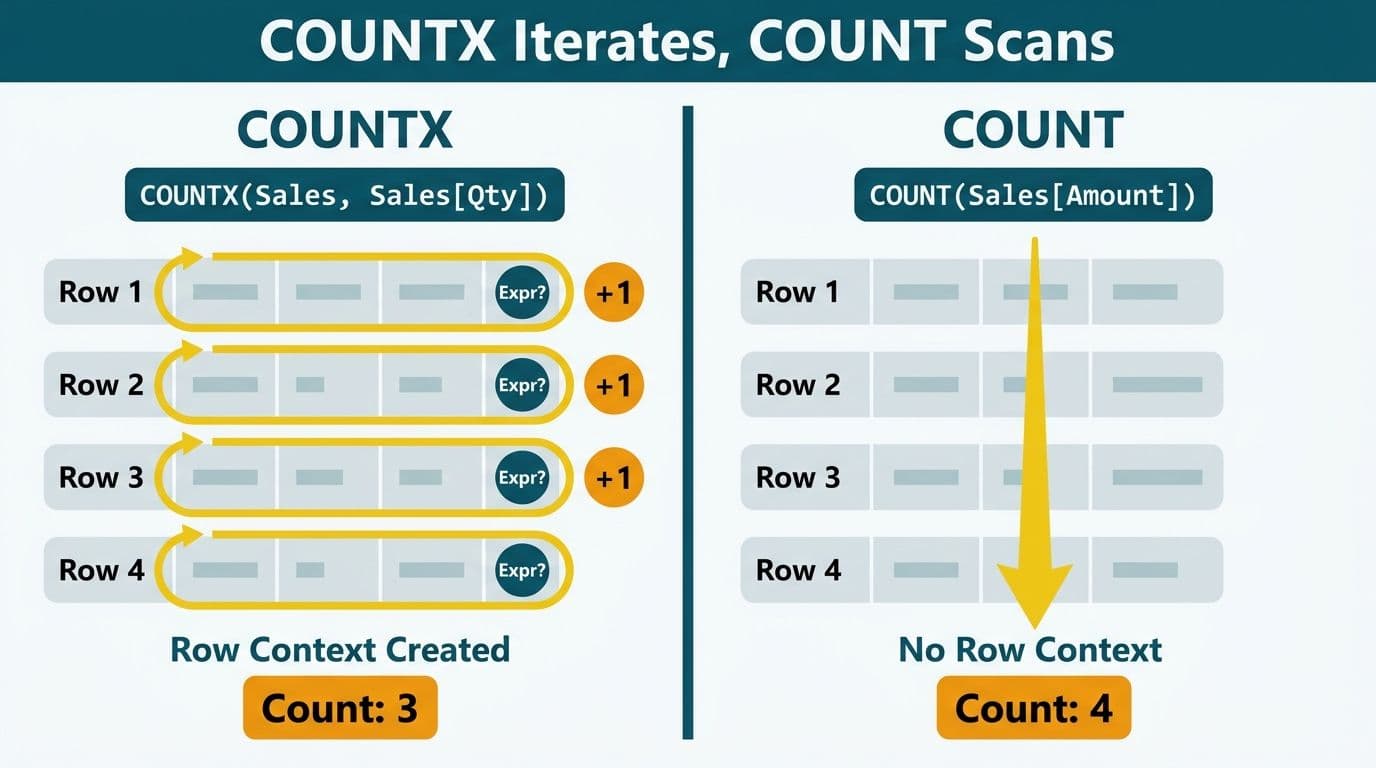
COUNTX is an iterator function that evaluates an expression row by row across a table, counting the rows where that expression returns a non-blank result and creating its own row context in the process. COUNT and COUNTA aggregate a single column directly without iterating. Use COUNTX when your counting logic depends on a conditional test or a calculated value; use COUNT when you need a straightforward count of non-blank values in an existing column.
Key Takeaways
COUNTX iterates row by row and creates row context; COUNT and COUNTA scan a column in a single pass with no row-level iteration
COUNT ignores blanks, text, and errors; COUNTA counts any non-blank value including text; COUNTX counts rows where its expression returns non-blank
The correct DAX pattern for conditional row counting is COUNTX with an IF() expression returning 1 on success and an implicit BLANK on failure
Placing a measure reference - rather than a column reference - inside COUNTX is the most common source of silent count errors in finance and healthcare Power BI models
Filter context applies to COUNTX exactly as it does to COUNT; the additional complexity is that COUNTX also creates an inner row context layered on top of the outer filter
What Is the Difference Between COUNTX and COUNT in Power BI DAX?
COUNT returns the number of non-blank values in a single column, evaluated after filter context is applied. It ignores blank cells, logical values, and error values. COUNTA extends this behavior to include text - it counts any non-blank value in the column, including strings. Neither function iterates rows or evaluates conditional expressions.
COUNTX is an X-function (iterator). Its signature is `COUNTX ( Table, Expression )`. For every row in the table, DAX evaluates the expression in the row context of that row. COUNTX then counts the number of rows where the expression returned a non-blank result. The critical distinction: COUNT reads a physical column; COUNTX evaluates a virtual result that may not exist as a column anywhere in the model.
For organizations managing Managed Power BI services across large finance and healthcare datasets, this distinction is the difference between a measure that silently returns the wrong number and one that correctly counts conditional records from millions of rows.
Syntax comparison:
```dax
// Simple column count - no iteration
Non-Blank Amounts = COUNT ( Invoices[Amount] )
// Iterator count - evaluates a condition row by row
Large Invoices = COUNTX ( Invoices, IF ( Invoices[Amount] > 10000, 1 ) )
```
In the COUNTX formula, IF() returns 1 when the condition is true and BLANK() when it is false (the implicit else branch). COUNTX counts only non-blank results, so it counts precisely the rows where the invoice exceeds $10,000. COUNT has no mechanism for conditional logic - it counts all non-blank values in the column regardless of their value.
How Does Row Context Work Inside COUNTX?
Row context is DAX's awareness of which specific row is being processed at any moment. Calculated columns always have row context - DAX knows which row the formula is evaluating for. Measures do not have inherent row context; they evaluate in filter context only, scoped to whatever rows are currently visible in the report.
COUNTX creates its own row context as it iterates. During each pass, the current row is fully accessible: any column from the iteration table can be referenced directly in the expression argument. This matters when the counting condition spans multiple columns on the same row.
A US healthcare organization tracking inpatient encounters subject to HIPAA audit requirements might write:
```dax
Same Day Discharges =
COUNTX (
Encounters,
IF ( Encounters[AdmitDate] = Encounters[DischargeDate], 1 )
)
```
Both columns are accessible inside the iterator because row context makes them live. This is the core pattern behind operational metrics in hospital patient flow dashboards - counting encounters, procedures, or readmissions that meet specific clinical criteria without building intermediate calculated columns.
The most damaging mistake is using a measure reference inside COUNTX expecting it to behave like a column reference:
```dax
// Problematic: measure evaluates in filter context, not row context
Wrong Count = COUNTX ( Claims, IF ( [Status Measure] = "Approved", 1 ) )
// Correct: column reference evaluates in row context
Correct Count = COUNTX ( Claims, IF ( Claims[Status] = "Approved", 1 ) )
```
When a measure is called inside an iterator, it evaluates against the current filter context - which may not correspond to the row being iterated. The result is often a repeated constant across all rows, producing a dramatically wrong total. The SUMX vs SUM in Power BI guide covers this same row context mechanic as it applies to the SUM iterator family and is useful reading alongside this guide.
When Should You Use COUNTX Instead of COUNT or COUNTA?
Use COUNTX in four situations:
Counting rows that meet a condition. COUNT cannot evaluate conditions. COUNTX with IF() is the canonical DAX pattern for any "count where" requirement - overdue invoices, flagged claims, transactions above a threshold, patients meeting specific clinical criteria.
Counting based on a value derived at runtime. If the counting criterion requires arithmetic or a combination of columns that does not exist as a stored column in the model, COUNTX is the only option. Suppose a finance team needs to count invoices where the margin percentage falls below a target - that percentage must be computed per row before the condition can be tested, and COUNTX handles this naturally.
Counting across a virtual or pre-filtered table. COUNTX accepts any table expression as its first argument - including FILTER(), CALCULATETABLE(), VALUES(), or ALL(). This makes it the correct tool for counting within a dynamically scoped subset of rows.
Counting related child rows. `COUNTX ( RELATEDTABLE ( Orders ), Orders[OrderID] )` counts the number of Orders rows related to each customer - a common pattern in finance and CRM models where you need order volume per customer as a dynamic measure.
Use COUNT or COUNTA when a column already holds exactly the value you need to count and no condition is required. A UK fintech firm managing GDPR-compliant transaction logs might use COUNT to verify that every trade record has a populated ISIN field - a data completeness audit where no conditional logic is needed - while switching to COUNTX to count trades where the notional value exceeds a regulatory threshold.
COUNTX vs COUNT vs COUNTA: Side-by-Side Comparison
| Scenario | COUNT | COUNTA | COUNTX |
|---|---|---|---|
| Count non-blank numbers in a column | Yes | Yes | Yes |
| Count non-blank text in a column | No | Yes | Yes |
| Count rows meeting a condition | No | No | Yes (with IF expression) |
| Count a value derived from multiple columns | No | No | Yes |
| Count across a virtual or filtered table | No | No | Yes |
| Count related child rows | No | No | Yes (with RELATEDTABLE) |
| Respects active filter context | Yes | Yes | Yes |
| Creates row context during evaluation | No | No | Yes |
| Returns BLANK when no rows exist | Yes | Yes | Yes |
| Performance overhead vs. column scan | Minimal | Minimal | Higher |
One important edge case: `COUNTX ( Table, Table[Column] )` produces exactly the same result as `COUNT ( Table[Column] )`. The iterator evaluates the column in row context, which simply reads the column value - identical to what COUNT does. The COUNTX version adds iteration overhead with no benefit. Default to COUNT for single-column counts and reserve COUNTX for expressions that require evaluation.
How Do You Count Conditional Rows in DAX Without Errors?
The standard pattern uses COUNTX with an IF() expression returning 1 on success and relying on the implicit BLANK on failure:
```dax
// Pattern 1: Single condition
Overdue Claims =
COUNTX (
Claims,
IF ( Claims[DaysOutstanding] > 90, 1 )
)
// Pattern 2: Multiple AND conditions
High Value Overdue =
COUNTX (
Claims,
IF (
Claims[DaysOutstanding] > 90 && Claims[ClaimAmount] > 50000,
1
)
)
// Pattern 3: Pre-filter the iteration table before counting
Northeast Overdue =
COUNTX (
FILTER ( Claims, Claims[Region] = "Northeast" ),
IF ( Claims[DaysOutstanding] > 90, 1 )
)
```
The COUNTROWS(FILTER()) pattern is functionally equivalent for simple conditions:
```dax
// Equivalent to Pattern 1
Overdue Claims Alt = COUNTROWS ( FILTER ( Claims, Claims[DaysOutstanding] > 90 ) )
```
COUNTROWS(FILTER()) is often more readable for straightforward conditions and easier for finance analysts to review in a model audit. In practice, when a Power BI model is handed off to an external auditor or a non-DAX-specialist finance controller — a common scenario in GDPR and SOC 2 review cycles — COUNTROWS(FILTER()) reads closer to plain English and substantially reduces the back-and-forth needed to confirm what the measure counts. COUNTX is preferred when the expression is more complex than a simple column test, or when the count will be composed inside a larger iterating formula. For FP&A dashboards in Power BI, knowing both patterns gives the model author the flexibility to match the formula to the context and the reader.
A Canadian manufacturing company operating under PIPEDA data governance requirements might use COUNTX to count supplier records flagged for data-access review, where the flag condition shifts dynamically based on slicer selections from finance managers. COUNTX handles this well because the iteration table and expression both update in real time as the filter context changes.
COUNTX returns BLANK - not zero - when no rows meet the condition. For KPI cards or conditional formatting that compare against zero, wrap the result explicitly:
```dax
Overdue Claims Safe = IF ( ISBLANK ( [Overdue Claims] ), 0, [Overdue Claims] )
```
How Does Filter Context Interact with COUNTX in DAX?
Filter context is the set of filters active at the moment a measure evaluates - driven by slicers, visual filters, page-level filters, and CALCULATE() calls. COUNTX inherits this filter context exactly as COUNT does: it iterates only the rows that survive the current filter state. This is the expected and correct behavior in most reporting scenarios.
The added complexity is the context transition rule. The row context COUNTX creates during iteration does not automatically become filter context for any measures called inside the expression. Measures evaluated inside COUNTX still see the outer filter context, not the individual row being iterated - unless you explicitly use CALCULATE() to force a context transition.
```dax
// [Revenue Band] is a measure - it does NOT automatically see row context
// This produces unexpected or incorrect counts
Wrong Count = COUNTX ( Customers, IF ( [Revenue Band] = "High", 1 ) )
// Force context transition with CALCULATE
Better Count = COUNTX ( Customers, IF ( CALCULATE ( [Revenue Band] ) = "High", 1 ) )
// Best: reference the column directly and avoid the transition problem entirely
Best Count = COUNTX ( Customers, IF ( Customers[RevenueCategory] = "High", 1 ) )
```
The ALLSELECTED DAX function guide covers how filter context manipulation via ALLSELECTED affects the same class of aggregation patterns across the DAX function family - essential reading for analysts building models with complex slicer interactions.
For US healthcare organizations tracking claim approval rates under SOC 2 compliance requirements, a wrong context transition can produce totals that appear correct under standard filtering but break under specific slicer combinations - the kind of defect that surfaces during an audit review rather than during development. A UK fintech team building GDPR-compliant transaction reports faces the same risk whenever date-range slicers modify the filter context in ways the COUNTX expression does not correctly account for.
What Are the Most Common COUNTX Mistakes in Finance and Healthcare DAX Models?
Finance and healthcare Power BI models count things with regulatory weight - claim volumes, transaction totals, patient admissions, compliance flags. A wrong count in a HIPAA audit trail or a GDPR transaction log is not just a data quality issue; it can become a compliance finding during external review.
Five mistakes recur consistently across mid-market implementations:
1. Referencing a measure inside COUNTX instead of a column. This is the single most common cause of silent DAX count errors. The measure evaluates in filter context; the row being iterated is invisible to it. Reference columns directly inside iterators. If you genuinely need a measure's value evaluated in the context of each row, use CALCULATE() to force the context transition - but the cleaner fix is usually to identify the underlying column and reference it directly.
2. Choosing COUNTX when COUNTROWS(FILTER()) is clearer. Both produce correct results. Pick the form your team can read, understand, and maintain independently. Analytical models with long lifespans benefit from choosing the simpler form when logic permits.
3. Expecting COUNTX to return zero when no rows match. COUNTX returns BLANK. KPI tiles, conditional formatting rules, and variance calculations that compare against zero behave incorrectly unless you convert BLANK to zero explicitly with an IF(ISBLANK()) wrapper.
4. Iterating the wrong table granularity. If the fact table holds one row per line item but you pass a summary or pre-aggregated table to COUNTX, you will undercount. Always confirm that the table in the first argument is at the correct grain for what you are counting - one row per claim, one row per transaction, one row per patient visit.
5. Iterating a large unfiltered fact table. COUNTX over an unfiltered fact table is one of the most consistent sources of slow report load times in large regulated-industry models. Query profiling on Fabric and Azure Synapse-backed Power BI models (as of 2026) routinely shows unfiltered COUNTX scans over 50 million rows completing in 20–40 seconds, while the same measure pre-filtered to the relevant region or date window drops below 2 seconds — a 15–20× difference that is fully attributable to the iteration scope. Pre-filter with FILTER() or CALCULATETABLE() before the iteration, particularly in models backed by large US or Canadian healthcare claims datasets or high-frequency financial transaction tables.
---
If your finance or healthcare analytics team is debugging inconsistent DAX count measures or working around logic errors in an inherited Power BI model, the Managed Power BI services team at Lets Viz can audit your measure layer, standardize your COUNTX patterns, and deliver a model that is correct, performant, and ready for compliance review.
---
About Lets Viz: Lets Viz is a data analytics consultancy serving US healthcare, UK fintech, Canadian manufacturing, and global SaaS organizations since 2020. With more than six years of production Power BI engagements and a 5.0 Clutch rating, the firm specializes in Power BI model architecture, DAX measure design, and managed analytics delivery for mid-market finance and operations teams. All DAX guidance in this article reflects production patterns validated across regulated-industry client engagements.