How to Migrate from HubSpot to Zoho CRM: 2026 Guide
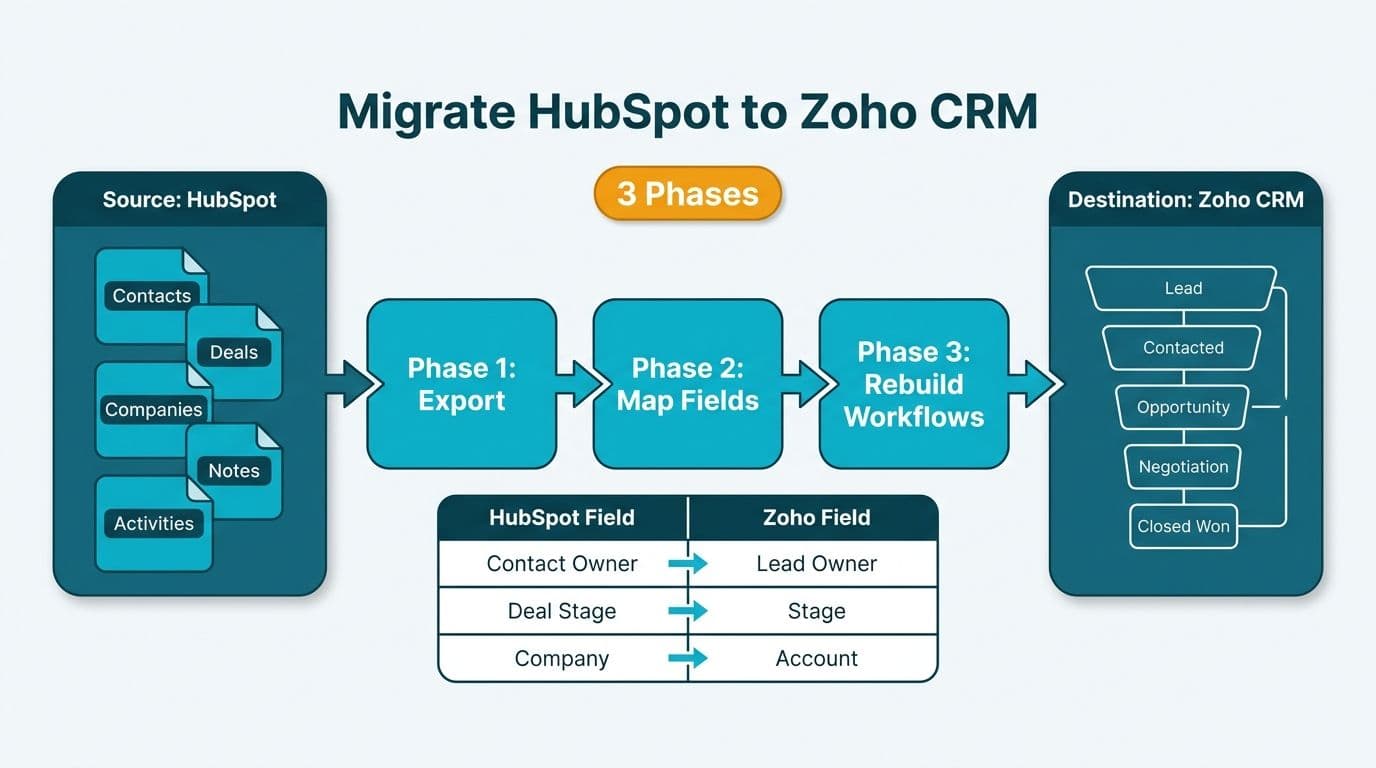
Migrating from HubSpot to Zoho CRM requires three coordinated phases: a structured data export, a deliberate field mapping exercise to bridge HubSpot's schema to Zoho's object model, and a workflow rebuild that replicates sequences, automations, and pipelines. Mid-market RevOps teams that execute these phases in sequence reduce post-migration data errors and avoid the revenue-cycle disruption that comes from switching platforms mid-quarter.
Key Takeaways
Export HubSpot data as CSV or use Zoho CRM's native HubSpot Migration Wizard to pull contacts, companies, deals, notes, and activities without manual file handling.
Field mapping is the highest-risk step - custom HubSpot properties rarely have a 1:1 equivalent in Zoho CRM's module structure, particularly around the Lead vs. Contact split.
Rebuild HubSpot Sequences and Workflows as Zoho CRM Cadences, Workflow Rules, or Blueprints before go-live - failed workflows are often silent and can cause missed follow-ups on live deals.
Run a parallel validation period of five to ten business days with HubSpot in read-only mode before decommissioning.
Plan for compliance continuity before migration day: HIPAA and SOC 2 in the US, GDPR in the UK and EU, PIPEDA and CASL in Canada.
What Data Can You Export from HubSpot Before Migrating to Zoho CRM?
HubSpot allows full data exports in CSV format from Settings > Data Management > Export. Contacts, companies, deals, tickets, activities (calls, emails, meetings, notes), and custom property values can each be exported independently.
Key export considerations by object type:
Contacts: Export all properties, including lifecycle stage, owner assignment, and opt-in status. For Canadian organizations, CASL consent timestamps must transfer explicitly - they do not export automatically with the standard contact template.
Deals: Include associated contact IDs, pipeline name, stage, close date, and deal source. Pipeline name becomes critical for matching to Zoho CRM sales stages during import.
Activities: HubSpot exports calls, meetings, and emails as separate CSV files. Zoho CRM's import wizard ingests these into the Activities module, but each file must be imported separately and associated with the correct contact or deal record.
Custom Properties: List all custom properties from Settings > Properties before starting any export. Properties not included in HubSpot's default export template require a manual CSV column or a filtered export with those fields selected.
Zoho CRM also provides a HubSpot Migration Wizard under Setup > Data Administration > Import, which connects directly via API and pulls contacts, leads, accounts, and deals without requiring manual CSV handling. For US healthcare firms managing PHI-adjacent contact data, a direct API migration is preferable - it eliminates the window during which protected data sits in flat files on a local workstation, reducing HIPAA exposure during the transfer.
What File Formats Does Zoho CRM Accept for Import?
Zoho CRM accepts CSV, XLS, and XLSX for most modules. VCF is supported for contacts only. For deals and activities, CSV is the required format. If you are using the HubSpot Migration Wizard, format constraints are handled automatically. For manual imports, chunk large exports by date range — a safe batch size is 10,000–15,000 rows per file; at that volume, import errors are isolated to a manageable subset and re-runs are fast without risking a partial import that corrupts your record-count baseline for validation. Files above 50,000 rows frequently time out during upload.
How Do You Map HubSpot Fields to Zoho CRM's Data Model?
Field mapping is where most migrations stall. HubSpot's flat object model - where contacts, companies, deals, and tickets exist as parallel, loosely coupled objects - maps imperfectly onto Zoho CRM's module hierarchy of Leads, Contacts, Accounts, and Deals.
Our Zoho consulting services team routinely encounters the same six mapping friction points at mid-market clients across the US, UK, and Canada:
| HubSpot Field / Object | Zoho CRM Equivalent | Migration Gotcha |
|---|---|---|
| Contact Lifecycle Stage | Lead Status + Contact module | HubSpot uses one object for all contacts; Zoho splits Leads from Contacts |
| Deal Pipeline Stage | Sales Stage (Deals module) | Stage names and probability percentages must be manually recreated |
| Associated Company | Account | HubSpot allows multiple company associations; Zoho enforces one Account per Contact |
| Sequences enrollment | Cadences (CRM Plus / Enterprise) | Available only in Zoho CRM Plus or Enterprise - not Standard or Professional |
| Custom multi-select properties | Multi-Select Picklist | Supported in Zoho, but fields must be created in the schema before import begins |
| HubSpot Score | Lead Scoring Rules | Historical scores do not transfer; scoring logic must be rebuilt in Zoho |
The most consequential mapping decision is how to handle the Lead-Contact distinction. HubSpot collapses unqualified prospects and active customers into a single Contact object. Zoho CRM separates them: Leads (unqualified, not yet associated with an Account) and Contacts (linked to an Account). RevOps teams migrating mid-cycle typically choose one of two approaches: import everything as Contacts for speed, accepting the loss of lead-qualification history; or segment the export by lifecycle stage, importing MQLs and earlier records as Leads and SQLs, customers, and closed-won contacts as Contacts. For teams running active pipeline, the segmented approach is the stronger default: it preserves lead-source attribution and keeps qualification-stage reporting coherent from day one in Zoho CRM, rather than requiring a retroactive re-tagging exercise across potentially thousands of records after go-live.
For Canadian organizations subject to PIPEDA, consent fields require particular attention. HubSpot's email subscription status does not map automatically to Zoho CRM's opt-in fields. Create a custom Marketing Consent field in Zoho before import, populate it from the subscription export, and have your compliance team verify the mapping before re-enabling outbound email sends from the new platform.
How Do You Rebuild HubSpot Workflows and Sequences in Zoho CRM?
HubSpot Workflows - automated action chains triggered by property changes, form submissions, deal stage shifts, or date thresholds - translate to Zoho CRM Workflow Rules for event-based triggers and Blueprints for stage-gated processes that require mandatory field completion at each transition.
HubSpot Sequences (timed email and call cadences managed by a rep) map to Zoho CRM Cadences, available in Zoho CRM Plus and Enterprise tiers. On Standard or Professional plans, multi-step cadences require either a plan upgrade or approximation using Workflow Rules, Task assignments, and scheduled email templates - functional but without the native enrollment tracking Cadences provide.
Workflow rebuild priority order:
1. Lead routing rules - territory-based or round-robin assignment to the correct owner on record creation
2. Stage-change notifications to deal owners and managers
3. SLA breach alerts - important for UK fintech firms tracking FCA complaint response windows and US healthcare organizations managing patient inquiry SLAs
4. MQL-to-SQL handoff triggers that notify sales when a contact crosses the qualification threshold
5. Post-close onboarding task sequences
A common migration mistake is attempting to rebuild all workflows before validating field mapping. Workflows referencing fields that have not yet been created in Zoho CRM fail silently at trigger time - meaning missed follow-ups on live opportunities during the validation window. Build field schema first, test each workflow rule against a dummy record second.
For a structured approach to CRM environment setup, user provisioning, and integration sequencing, the Zoho CRM implementation checklist: phase-by-phase guide maps dependencies clearly and helps teams avoid the setup ordering errors that most commonly delay go-live.
What Are the Compliance Risks in a HubSpot to Zoho CRM Migration?
Healthcare and financial services organizations face compliance-specific risks that general RevOps migration guides overlook. These are the controls most likely to be missed under time pressure.
US Healthcare (HIPAA): If any HubSpot contact fields contain PHI - patient name paired with appointment date, insurance carrier, or any clinical identifier - those fields require handling under your Business Associate Agreement. Confirm that your Zoho CRM contract includes a BAA covering HIPAA-eligible use before importing that data. Encrypt interim CSV files and delete them immediately after a confirmed successful import. Do not leave PHI exports sitting in a shared drive or email thread during the migration window.
US Finance (SOC 2 / FINRA): Deal notes and email logs in HubSpot may constitute communication records subject to retention requirements. Export and archive these to your document management or compliance system before decommissioning HubSpot - do not rely on Zoho CRM's activity log as a sole compliance record during the transition period.
UK and EU (GDPR): HubSpot's Data Processing Addendum covers EU data subjects during your active subscription. When you decommission the platform, you must either confirm deletion of EU contact data under Article 17 or document the legitimate retention ground. Export a full consent audit trail - including timestamps and consent source - before migration. Review and accept Zoho CRM's DPA for your EU and UK contacts before beginning any import.
Canada (PIPEDA / CASL): CASL requires express or implied consent for commercial electronic messages. A Canadian SaaS firm or manufacturing company migrating mid-cycle should freeze outbound email sends for 24-48 hours after import, allowing the compliance team to verify that consent fields mapped correctly before re-enabling the email engine in Zoho CRM.
For broader context on compliant data handling across regulated platforms, the GDPR Compliant SaaS Financial Reporting: The BI Checklist outlines a documentation and controls framework that translates well to CRM data migrations in regulated industries.
What Does a Post-Migration Validation Checklist Look Like?
Run a structured validation phase for five to ten business days after import, with HubSpot in read-only mode and Zoho CRM handling all new activity. This parallel period is non-negotiable for mid-market firms switching mid-cycle - it gives RevOps time to catch mapping errors before they affect live pipeline.
Data integrity checks:
Record counts match between HubSpot export CSV row totals and Zoho CRM module totals, within 0.5% variance to account for deduplication
Spot-check 50 contacts across lifecycle stages and verify all custom field values transferred correctly
Confirm deal amounts, close dates, and pipeline stage labels match for all open opportunities
Verify activity logs (calls, emails, meetings, notes) are associated with the correct contact and deal records
Automation checks:
Trigger each workflow rule manually against a test record and confirm the expected action fires
Send a test cadence email through Zoho CRM and verify delivery, open tracking, and unsubscribe handling
Create a dummy lead and confirm it routes to the correct owner under your assignment rules
Confirm SLA timer workflows fire at the correct interval
Integration checks:
Reconnect your marketing automation platform (Zoho Campaigns or third-party) and verify bidirectional sync
Confirm website contact forms push new leads to Zoho CRM and not HubSpot
Reconnect finance or ERP integrations - particularly important for healthcare billing systems and finance platforms where the deal-to-invoice handoff is automated
Compliance sign-off:
HIPAA BAA confirmed in Zoho contract for any PHI-adjacent data (US healthcare)
GDPR consent audit trail exported and deletion or retention documented (UK / EU)
CASL opt-in fields verified and email sends re-enabled only after compliance review (Canada)
The Migrating to Zoho CRM: Data Import, Deduplication and Validation guide covers the deduplication layer in detail - important for HubSpot instances that accumulated duplicate contact records over months of marketing activity.
How Long Does a HubSpot to Zoho CRM Migration Take?
For a mid-market firm with 10,000-50,000 contact records, three to five active pipelines, and moderate workflow complexity, a realistic migration timeline is four to eight weeks when approached methodically.
| Phase | Duration | Key Deliverable |
|---|---|---|
| Audit and export preparation | Week 1 | HubSpot property list, export CSVs, field map draft |
| Schema build in Zoho CRM | Weeks 1-2 | Custom fields, picklists, and modules configured |
| Import and deduplication | Weeks 2-3 | Records loaded, duplicates resolved |
| Workflow and integration rebuild | Weeks 3-4 | All automations live and tested in Zoho CRM |
| Parallel validation | Weeks 4-6 | Sign-off from RevOps, compliance, and finance leads |
| HubSpot decommission | Weeks 6-8 | Data archived, subscriptions cancelled |
Compressed timelines of two to three weeks are achievable for smaller datasets with minimal workflow complexity. Adding compliance review cycles - standard for US healthcare organizations or Canadian firms with CASL obligations - typically extends the validation phase by one to two weeks. A UK fintech firm migrating during a regulatory reporting window should build additional buffer into the sign-off phase rather than compressing validation to meet an arbitrary go-live date.
---
About Lets Viz: Lets Viz has delivered CRM implementation and data analytics projects for US healthcare systems, UK fintech firms, and Canadian manufacturing and SaaS companies since 2020 — six-plus years of hands-on delivery across regulated industries — holding a 5.0 rating on Clutch. Our team brings hands-on experience with Zoho CRM migrations, compliance-aligned data architecture, and RevOps workflow rebuilds across regulated industries in the US, UK, EU, and Canada.
Planning a HubSpot to Zoho CRM migration? Our Zoho consulting services team handles field mapping, workflow rebuilds, and compliance sign-off end to end - so your RevOps team stays focused on pipeline, not platform logistics. Try Zoho CRM free → to evaluate the platform before committing to migration.