Zoho Analytics Integrations: A Complete Connector Map (2026)
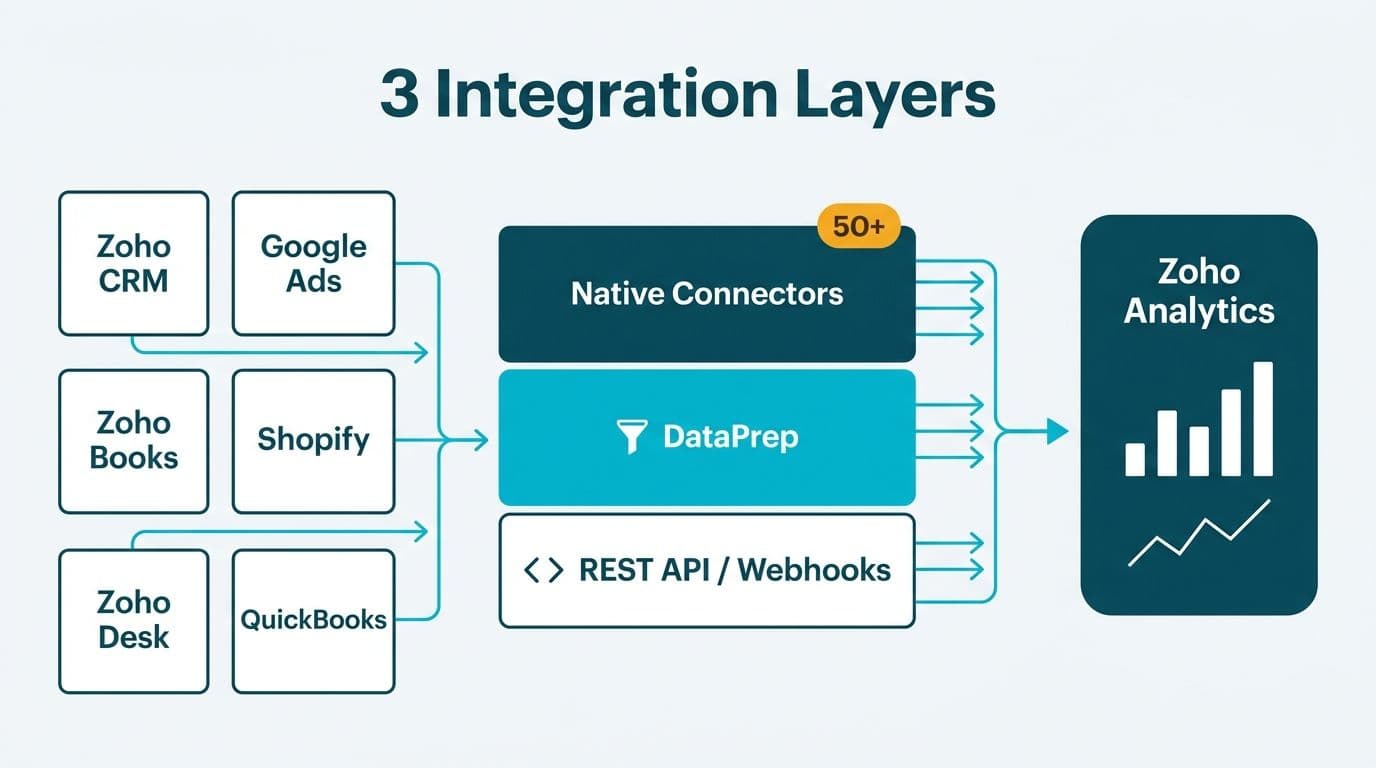
Zoho Analytics connects to over 50 native sources spanning its own suite - Zoho CRM, Zoho Books, Zoho Desk - plus third-party platforms including Google Ads, Shopify, and major accounting tools. Zoho DataPrep handles pre-load cleaning and transformation, and a REST API with webhook support covers custom or legacy data. These three layers give ops and IT leads a clear framework for auditing their full data landscape before committing to a rollout.
Key Takeaways
- Zoho Analytics offers three integration layers: native connectors, DataPrep transformations, and API/webhook pipelines.
- Native connectors cover the full Zoho suite plus leading ad platforms, e-commerce tools, accounting systems, and databases.
- Zoho DataPrep cleans, joins, and reshapes data before it loads into Analytics - eliminating the need for a separate ETL tool for many mid-market use cases.
- Healthcare and finance teams in the US, UK, and Canada must verify that each connector path meets HIPAA, GDPR, or PIPEDA requirements before connecting regulated data.
- A structured connector audit - mapping source, freshness, and transformation logic - prevents field-mapping gaps that silently break dashboards downstream.
What Native Connectors Does Zoho Analytics Support?
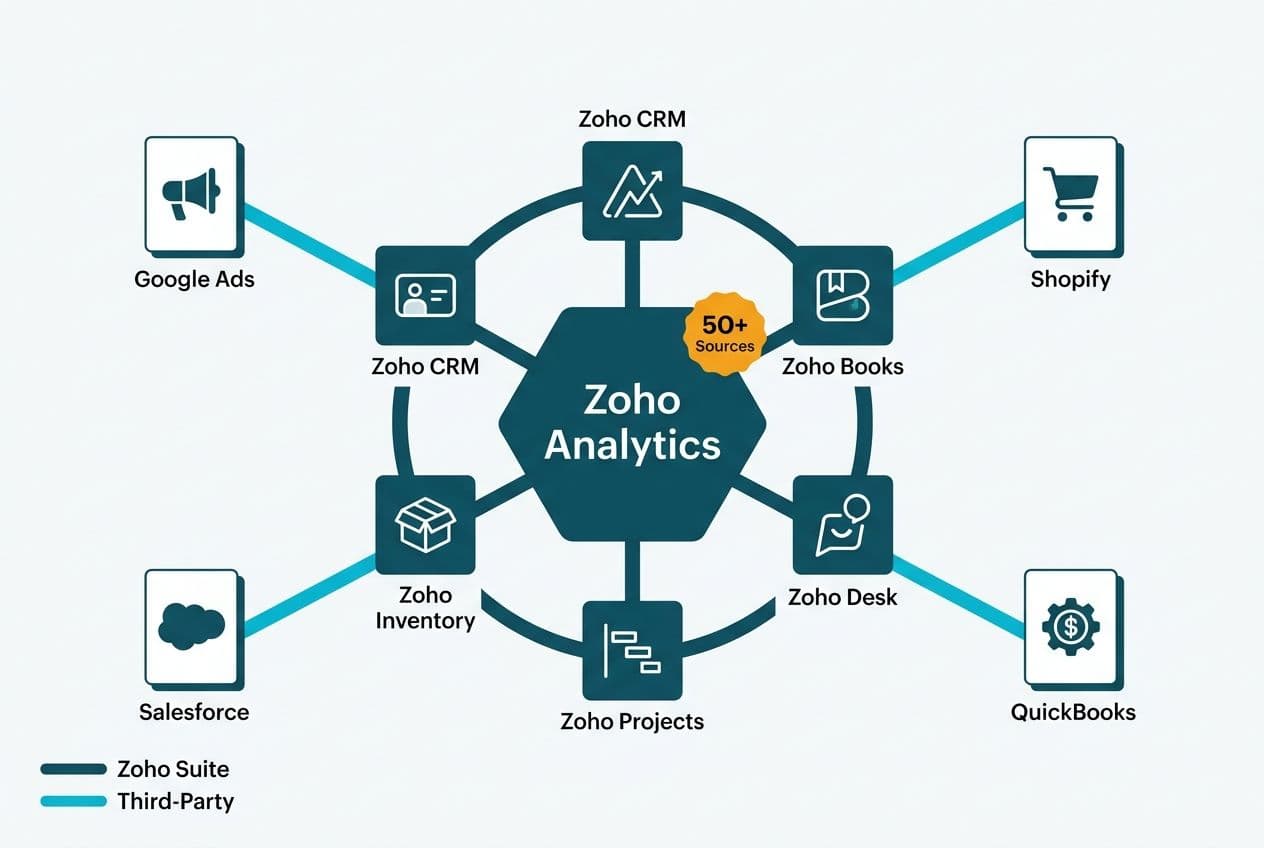
Zoho Analytics provides three tiers of native connectivity: first-party connectors within the Zoho ecosystem, pre-built third-party connectors to popular business applications, and file and database imports for legacy sources.
First-party Zoho connectors are the densest part of the map, covering Zoho CRM, Zoho Books, Zoho Desk, Zoho Campaigns, Zoho Creator, Zoho Recruit, Zoho Projects, and Zoho Commerce. Because these connectors run on the same identity layer as the rest of the Zoho platform, permissions sync automatically - a practical advantage for healthcare teams that need to separate clinical data from billing data within a shared workspace. Zoho Creator custom apps, for instance, can feed operational data directly into Zoho Analytics without any middleware. Working with a Zoho consulting services partner during initial setup ensures these permission boundaries are configured correctly from day one.
Third-party connectors cover the most common external data sources at mid-market companies. According to Zoho's 2026 connector documentation, the library includes:
| Category | Example Connectors |
|---|---|
| CRM & Sales | Third-party CRM platforms |
| Advertising | Google Ads, Facebook Ads, LinkedIn Ads |
| E-commerce | Shopify, WooCommerce, Amazon Seller Central |
| Accounting | QuickBooks, Xero, FreshBooks |
| Databases | MySQL, PostgreSQL, MS SQL Server, Amazon Redshift |
| Cloud Storage | Google Drive, Dropbox, Amazon S3 |
| HR & Payroll | Major HR and payroll systems |
| Helpdesk | Third-party helpdesk platforms |
File and database imports round out the native layer. Zoho Analytics accepts CSV, Excel, JSON, and XML uploads, plus direct database connections over JDBC and ODBC. For finance teams running legacy ERP systems that predate SaaS APIs, this import path is often the fastest route to a working dashboard without custom development.
The practical audit question is not which connectors exist, but which sources you actually need and whether each connector syncs at the right frequency. Zoho Analytics offers sync schedules from every hour to once daily on most native connectors - adequate for weekly executive dashboards, but potentially stale for an intraday trading desk or a real-time patient flow monitor. Identify your refresh tolerance before finalising the connector map.
How Does Zoho DataPrep Handle Pre-Load Transformations?
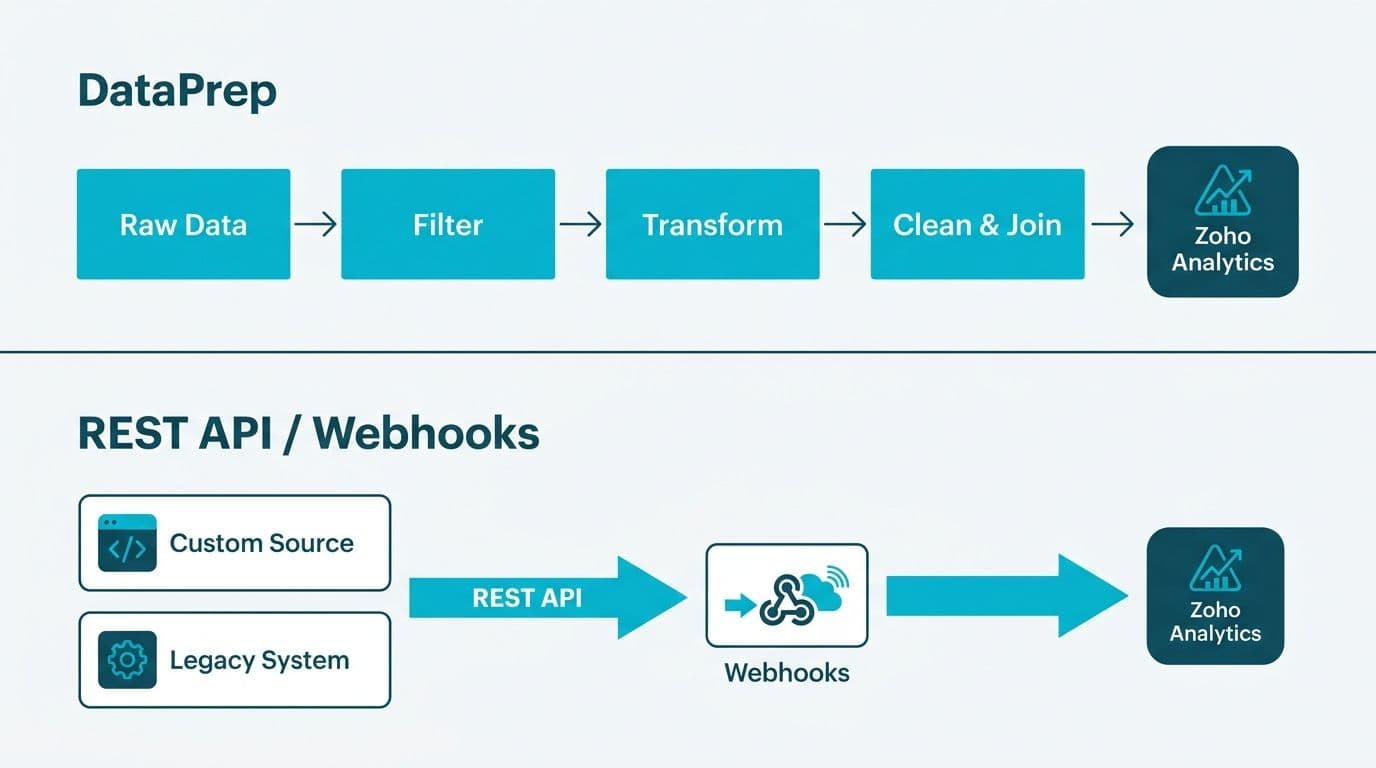
Zoho DataPrep is a self-service data preparation tool that sits between your raw sources and your Zoho Analytics workspace. It cleans, reshapes, and enriches data before it loads - meaning quality problems are solved at the source rather than patched with calculated columns inside the reporting layer.
DataPrep's core capabilities include:
- Column profiling: instant summary of null rates, value distributions, and data types so you can spot bad fields before they corrupt a metric.
- Join and merge: combine tables from different sources - say, CRM deal data with accounting invoice records - on a shared key without writing SQL.
- Formula columns: derive new fields using 200+ built-in functions including date math, string parsing, and conditional logic.
- Deduplication: flag or remove duplicate rows based on single or composite keys.
- Lookup enrichment: append reference data - country codes, product categories, cost centres - from a master file.
For healthcare compliance reporting in Zoho Analytics, DataPrep is particularly useful for normalising patient identifier formats or stripping PHI fields before data lands in a shared workspace accessible to non-clinical staff.
A real-world illustration of why pre-load transformation logic matters: one multi-region B2B client's regional email routing was failing silently. The Country field was empty for all 19,643 contacts; Mailing Country was populated on only 2.3% of records. The team built a fallback chain - Region first, then email domain - to route contacts correctly without touching the source CRM schema. DataPrep's conditional formula columns handle exactly this kind of derivation in a Zoho-native environment, keeping the fix inside the analytics pipeline rather than requiring a source system migration.
When DataPrep is not enough - for large-volume streaming data or complex multi-hop transformations - Zoho Analytics exposes an API layer that connects to full ETL and iPaaS platforms.
What API and Webhook Options Do Zoho Analytics Integrations Include?
For sources not covered by a native connector, Zoho Analytics offers three programmatic integration paths.
The REST API allows external systems to push rows into a Zoho Analytics table, query data, create or modify reports, and manage workspaces. Authentication uses OAuth 2.0 - the same token framework as the rest of the Zoho platform. For a Canadian manufacturing company operating under PIPEDA, this matters because OAuth scopes can be narrowed to the minimum dataset, reducing the footprint of any data-sharing arrangement with a third-party analytics tool.
Bulk API handles high-volume data loads - historical backfills, nightly warehouse syncs, or large ERP exports - more efficiently than the standard REST endpoint. It uses a file-based approach: generate an import file, upload it, then poll for job completion. Finance teams migrating multi-year transaction histories will typically use this path to avoid timeout limits on the standard API.
Webhook-based data push lets event-driven systems - payment processors, ticketing platforms, IoT sensors - write a row to Zoho Analytics the moment an event fires, with no polling loop required. A UK fintech firm processing payment events, for example, could push each transaction record directly into a Zoho Analytics table and have a compliance dashboard refreshed within seconds, without exposing the raw payment database to an external connector.
For orchestration, Zoho Analytics also integrates with major iPaaS platforms - Zapier, Make, and Boomi - giving IT teams a no-code middleware option when direct API development is not feasible. These platforms handle authentication, retry logic, and error logging, reducing the engineering burden for smaller data teams.
Programmatic paths require more governance than native connectors. API keys and OAuth tokens need rotation policies, and webhook endpoints should be secured with signature verification. For US healthcare organisations covered by HIPAA, any third-party iPaaS that receives PHI must be evaluated as a Business Associate under the HIPAA Privacy Rule (HHS.gov, 2026). For UK and EU companies, the same third-party tool must satisfy GDPR's data processing agreement requirements before any personal data crosses its boundary.
How Should Healthcare and Finance Teams Audit Their Zoho Analytics Data Landscape?
A connector audit is not a one-time checkbox - it is a living inventory that maps each data source to its connector type, refresh schedule, transformation rules, and compliance classification. Running it before go-live prevents the kind of silent data failures that only surface when an executive questions a number in a board report.
A structured audit follows five steps:
1. Inventory your sources. List every system that holds data you report on: CRM, ERP, ad platforms, HR, helpdesk, and any manual Excel files. Flag which ones already have a Zoho Analytics native connector.
2. Classify by compliance tier. In the US, separate HIPAA-covered data (patient records, insurance claims) from non-covered operational data. In the UK and EU, identify fields containing GDPR-regulated personal data. In Canada, apply PIPEDA's consent and data-minimisation requirements at the field level. Your connector choice may differ by tier - a native Zoho connector with in-region data processing is safer than a generic webhook routed through an offshore iPaaS node if your primary requirement is Canadian data residency.
3. Map field-level schemas. Confirm that field names in the source system match the columns your reports expect. Field naming mismatches are among the most common causes of silent dashboard failures - and they are invisible until someone drills into an unexpected zero. The Zoho Analytics dashboard examples for sales and finance guide shows what a correctly field-mapped workspace looks like in practice.
4. Set and document refresh schedules. Record the sync frequency for each connector alongside the business SLA it supports. A finance director who needs yesterday's close by 07:00 needs a nightly sync completing by 06:30, with an alert configured for job failures.
5. Validate row counts on first load. Compare source system record counts against what landed in Zoho Analytics after the first sync. Any discrepancy signals a filter, a permission scope, or a schema mismatch that needs resolution before the data is trusted in a live dashboard.
For teams embedding analytics into automated finance workflows, the AI automation compliance checklist for finance teams covers the governance documentation these audits feed into.
When Should You Use a Native Connector vs. a Custom API Integration?
The decision comes down to three factors: source availability, data volume, and transformation complexity.
Use a native connector when your source is in Zoho's pre-built library, your data volume is under a few million rows, and the transformation is simple enough for DataPrep. This covers the majority of mid-market use cases - CRM-to-analytics, accounting-to-analytics, and ad-spend-to-analytics pipelines that a two-person data team can configure in a day.
Use the REST API or a webhook when the source is a custom-built internal application, a niche vertical system - such as a specialist healthcare EMR or a commodity trading platform - or when you need sub-hour data freshness that scheduled native connectors cannot deliver.
Use an iPaaS when you need to route data through multiple systems before it reaches Zoho Analytics, or when your engineering capacity is limited and you want retry logic and error handling out of the box without custom code.
A US SaaS finance team might use native connectors for its CRM and accounting systems, DataPrep to join and clean the combined dataset, and a webhook for a custom billing system - all three layers operating in parallel with no overlap. By contrast, a UK fintech firm might rely primarily on the REST API, feeding Zoho Analytics from a data warehouse that aggregates multiple regulated data sources, keeping the BI layer cleanly separated from raw transaction data for GDPR boundary management.
For a deeper look at how Zoho CRM data flows into Analytics for compliance-heavy industries, see the Zoho CRM for healthcare practices compliance configuration guide.
Native Connector vs. Custom API: At a Glance
| Factor | Native Connectors | Custom API / ETL Pipeline |
|---|---|---|
| Setup time | Hours to days | Days to weeks |
| Maintenance burden | Managed by Zoho | Owned by your team |
| Transformation depth | DataPrep (no-code) | Full SQL or script flexibility |
| Real-time capability | Hourly minimum | Sub-second via webhooks |
| Compliance controls | Zoho BAA available (US HIPAA) | Depends on pipeline tools used |
| Cost | Included in Analytics plan | Engineering plus infrastructure |
| Best for | Zoho-centric stacks | Heterogeneous or custom stacks |
---
About Lets Viz: Lets Viz has delivered data analytics and BI implementations since 2020 across US healthcare, UK fintech, Canadian manufacturing, and global SaaS organisations. The firm holds a 5.0 rating on Clutch and works exclusively with mid-market and enterprise clients navigating complex data environments where accuracy, compliance, and governance are non-negotiable.
Ready to map your organisation's Zoho Analytics integrations and close data landscape gaps? Explore our Zoho consulting services to see how we scope and deliver connector audits, DataPrep configurations, and API integration builds for healthcare and finance teams across North America and Europe. You can also try Zoho Analytics free → to explore the connector library directly before committing to a full configuration.