How to Automate Microsoft Fabric Pipelines with n8n
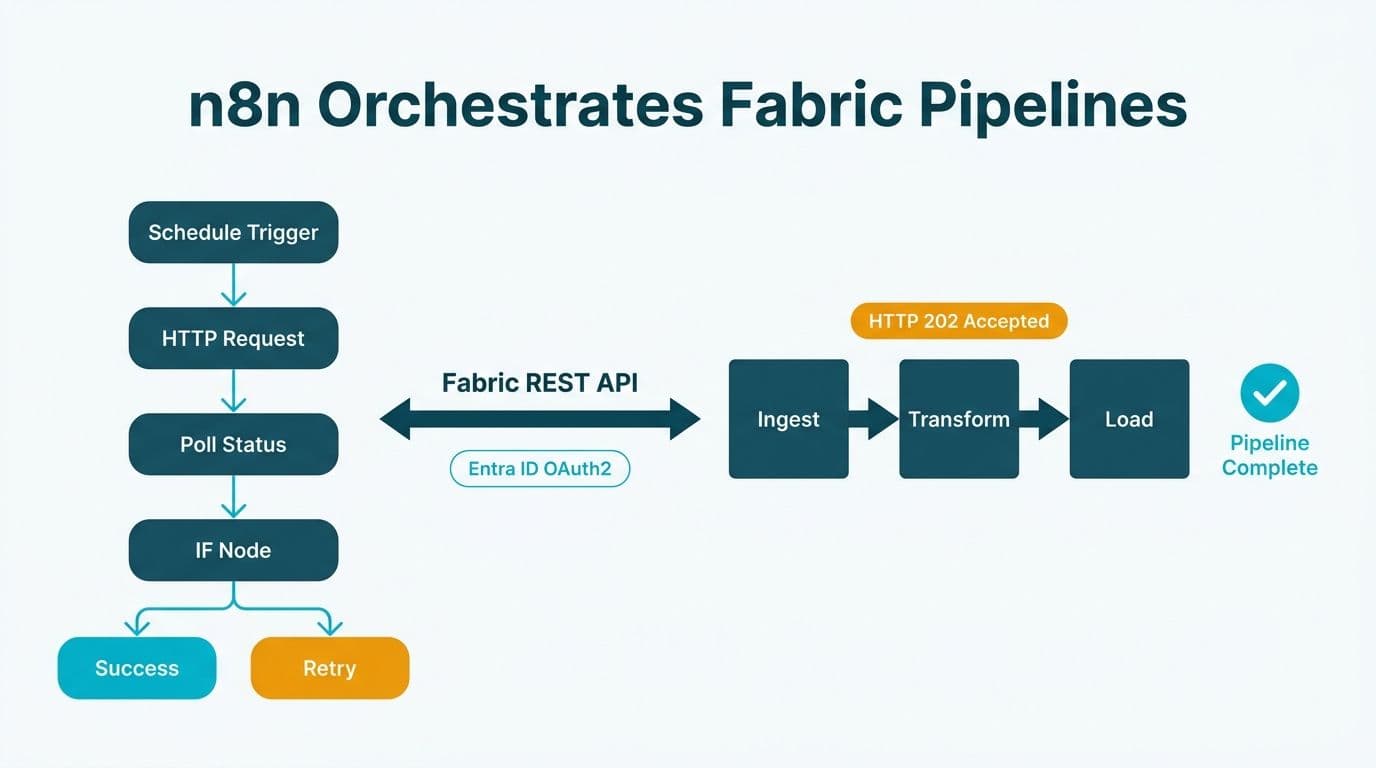
You can automate Microsoft Fabric pipelines with n8n by calling the Fabric REST API from n8n's HTTP Request node, authenticated via Azure Entra ID OAuth2. n8n handles scheduling, status polling, failure branching, and multi-step ETL coordination without requiring Azure Data Factory. The result is a flexible, event-driven orchestration layer that sits cleanly alongside your existing Fabric workspace.
Key Takeaways
n8n triggers Fabric pipeline runs via the Fabric REST API using an HTTP Request node and Entra ID OAuth2 credentials
Failure handling uses n8n's native error branches, polling loops, and notification nodes - no separate alerting tool required
Multi-hop ETL chains run by polling each pipeline's job status and gating the next trigger on a confirmed success
n8n costs significantly less than Azure Data Factory for moderate pipeline volumes and supports webhook and AI agent triggers ADF cannot match natively
Compliance controls (HIPAA, GDPR, PIPEDA) sit at the Entra ID and Fabric workspace layers - n8n passes trigger commands only, not payload data
What Is n8n and Why Use It to Automate Microsoft Fabric Pipelines?
n8n is an open-source, self-hostable workflow automation platform supporting HTTP, webhook, scheduled, and AI agent triggers alongside a visual node editor. For Fabric-heavy data teams, it fills an orchestration gap: triggering pipelines based on external events rather than relying solely on Fabric's built-in schedule.
Teams working with a Power BI and Fabric consulting partner increasingly reach for n8n when trigger logic is too dynamic for a fixed Fabric schedule but Azure Data Factory's cost or operational overhead is not justified. A US healthcare analytics team processing daily HL7 feeds needs a pipeline to fire only after a batch file clears validation - a conditional, event-driven trigger n8n handles with a Webhook node and a single IF branch, no ADF integration runtime required.
Beyond fixed scheduling, n8n supports an AI agent layer for automated reporting - classifying incoming documents or flagging anomalies before deciding which Fabric pipeline to run and when. That cross-system trigger flexibility is the primary reason mid-market teams adopt it alongside Fabric rather than treating ADF as the only option.
How Do You Set Up Authentication Between n8n and the Fabric REST API?
Authentication is the most common sticking point. Microsoft Fabric's REST API uses Azure Entra ID OAuth2, not simple API keys.
Step 1 - Register an Entra ID application. In the Azure portal, create a new app registration under your tenant. Grant it the Fabric API permissions `Item.Execute.All` (needed to run pipeline jobs) and `Workspace.Read.All` (needed to list workspaces), give the app access to the target Fabric workspace, and generate a client secret. Record the tenant ID and client ID. Confirm the exact scope names against the Microsoft Learn Fabric REST API scopes reference for the endpoints you call.
Step 2 - Create an OAuth2 credential in n8n. In n8n's credential store, create a new "OAuth2 API" credential. Set the token URL to `https://login.microsoftonline.com/{your-tenant-id}/oauth2/v2.0/token`, enter the client ID and secret, and set the scope to `https://api.fabric.microsoft.com/.default`.
Step 3 - Verify the connection. Use an HTTP Request node with this credential to call `GET https://api.fabric.microsoft.com/v1/workspaces`. A valid workspace list in the response confirms the credential works before you build the trigger workflow.
A UK fintech firm using Fabric for regulatory reporting would store these credentials in n8n's encrypted credential store and restrict the n8n host to internal VPN access - satisfying GDPR data-minimisation requirements since no pipeline payload data passes through n8n, only trigger commands.
How Do You Trigger a Microsoft Fabric Pipeline Run from n8n?
With credentials in place, triggering a Fabric pipeline is a single HTTP Request node call.
The endpoint:
```
POST https://api.fabric.microsoft.com/v1/workspaces/{workspaceId}/items/{itemId}/jobs/instances?jobType=Pipeline
```
Replace `{workspaceId}` and `{itemId}` with the GUIDs visible in the Fabric portal URL when the pipeline is open.
n8n node configuration:
Method: POST
Authentication: the OAuth2 credential from Step 2
Body (JSON): `{ "executionData": { "parameters": { "env": "prod" } } }` to pass runtime parameters
The API returns `202 Accepted` with a `Location` header pointing to the job instance status URL. Store that URL in an n8n Set node - it drives all subsequent polling.
Any upstream n8n trigger can fire this call: a cron schedule, a CRM webhook, a database row-change listener, or an n8n AI agent classifying an incoming file before selecting which pipeline to run. For a Canadian manufacturing company following PIPEDA guidelines, keeping n8n on-premises in a Canadian Azure region while Fabric runs in the same region satisfies data-residency requirements without a custom ADF self-hosted integration runtime.
For building the agent layer above these triggers, How to Build an n8n AI Agent Workflow: Step-by-Step covers the node patterns in detail.
How Do You Handle Fabric Pipeline Failures in n8n?
Failure handling is where n8n's visual model earns its keep. The pattern has three layers: status polling, error branching, and notification.
Status polling loop. After triggering the pipeline, add a Wait node (30-60 seconds) then an HTTP Request node calling `GET {Location URL}`. Parse the `status` field:
`NotStarted` or `InProgress` - loop back to Wait
`Completed` - proceed downstream
`Failed` or `Cancelled` - branch to the error handler
Add a counter variable to cap the loop - 60 iterations at 30-second intervals equals 30 minutes - before escalating to a timeout alert.
Error branch actions. On failure: send an email or Slack alert with pipeline name, workspace, timestamp, and a link to the Fabric monitoring hub; write a failure record to your data warehouse via a database node; or trigger a compensating action such as archiving the failed batch to an ADLS Gen2 error folder.
Global error workflow. Configure a dedicated Error Workflow in n8n settings to catch system-level failures - lost connectivity, node crashes - that bypass in-workflow polling. This fires on any production workflow crash and is the safety net your on-call engineer relies on at 2 a.m.
US healthcare teams under HIPAA should POST all execution events - including failures - to an immutable audit log in Azure Log Analytics or Fabric Eventhouse, keeping the trail within the compliant boundary without PHI transiting n8n nodes.
How Do You Coordinate Multi-Hop ETL Without Azure Data Factory?
Multi-hop ETL - where Pipeline B depends on Pipeline A's output and Pipeline C depends on B - is the scenario most often cited as the reason to stay with ADF. n8n replicates it with sequential trigger-and-poll blocks, and adds quality gates ADF's GUI makes difficult to express.
The core pattern:
```
Trigger (cron or webhook)
-> Trigger Pipeline A (HTTP POST)
-> Poll until Completed or timeout
-> Quality gate: check row count or file existence
-> Trigger Pipeline B
-> Poll until Completed or timeout
-> Trigger Pipeline C
-> Poll until Completed or timeout
-> Send success notification
```
Build the poll-and-gate block as a reusable sub-workflow parameterised by job instance URL and max-wait-minutes. Call it via Execute Workflow at each hop.
Parallel branches. If Pipeline B and Pipeline C can run concurrently after Pipeline A, split the flow into two parallel HTTP trigger nodes, then merge with a Merge node set to "Wait for All" before the final notification - mirroring ADF's parallel activity execution without the dependency JSON syntax.
Quality gates between hops. Add a Fabric table statistics call or a Lakehouse SQL query between hops to assert expected row counts before committing compute to downstream pipelines. This is especially valuable in finance workflows building Power BI cash flow forecast dashboards or tracking SaaS metrics - ARR, MRR, churn - where stale inputs silently corrupt CFO-facing KPIs.
For the downstream reporting layer after Fabric processing completes, How to Connect AI Workflow Automation to Power BI covers pushing outputs into Power BI semantic models.
n8n vs Azure Data Factory for Fabric Orchestration: When Does Each Win?
The AI reporting automation build vs buy question maps directly to this choice: ADF is the managed "buy" option with native Fabric GUI integration; n8n is the "build" option that trades native Fabric activities for cross-system flexibility and lower cost at moderate pipeline volumes.
| Dimension | n8n (self-hosted) | Azure Data Factory |
|---|---|---|
| Pricing model | Free self-hosted; cloud from ~$20/month | Pay-per-activity-run plus compute costs |
| Trigger types | Cron, webhook, AI agent, database poll | Cron, Azure event triggers (limited) |
| Fabric pipeline support | HTTP Request node (manual API config) | Native Fabric pipeline activity (GUI) |
| Failure handling | Visual error branch and notification nodes | Monitor alerts and ADF monitoring hub |
| Multi-hop ETL | Poll-and-trigger with quality gates | Dependency graph GUI |
| Self-host option | Yes - Docker, on-premises, any region | No - Azure-managed only |
| Cross-system triggers | Strong - any HTTP source or webhook | Azure ecosystem focused |
| Best suited for | Event-driven, cross-system, AI-triggered | Pure Azure/Fabric, GUI-first teams |
For teams already running n8n for CRM, finance, or marketing automation - common at mid-market UK fintechs and Canadian SaaS businesses - extending n8n to Fabric orchestration avoids introducing ADF as a second tool with separate licensing, service principals, and IAM overhead.
For enterprises deeply committed to the Azure ecosystem and preferring GUI-driven pipeline authoring, ADF's native Fabric activity remains the lower-friction starting point.
The Power Automate vs n8n: Enterprise Automation Compared guide covers the broader platform decision for teams evaluating n8n alongside Microsoft's native stack.
What Compliance and Governance Controls Apply to n8n-Fabric Integrations?
The compliance posture hinges on one architectural fact: in a correctly designed n8n-Fabric integration, n8n handles only control-plane signals (trigger commands and status responses), never the payload data flowing through Fabric pipelines.
US healthcare and finance teams (HIPAA / SOC 2). Deploy n8n within SOC 2-scoped or HIPAA-eligible infrastructure. Restrict the Entra ID app to the minimum permission scope. Log all workflow executions. PHI must not pass through n8n nodes - validate that no pipeline parameters carry patient identifiers. Include the n8n host in your annual SOC 2 controls review.
UK and EU teams (GDPR). Fabric REST API calls from n8n are processing instructions, not personal data transfers. However, if failure alerts reference data subject identifiers - a pipeline failing on a patient record batch, for example - those notifications become personal data subject to GDPR Article 28 processor obligations. Use abstract batch identifiers in n8n payloads.
Canadian organisations (PIPEDA). PIPEDA's accountability principle requires documented knowledge of where orchestration tooling runs and who has access. Self-hosting n8n in a Canadian Azure region or on-premises satisfies data-residency expectations. Document the integration in your privacy impact assessment.
Across all jurisdictions: rotate Entra ID client secrets on a defined schedule, apply n8n's role-based access control to restrict workflow editing to senior data engineers, and enable n8n's audit log for all credential access and workflow run events.
For a governance framework that spans your Fabric and Power BI environment, the Power BI Governance Best Practices: 12-Point Checklist covers workspace permissions, sensitivity labels, and access review processes.
To build a production-ready Fabric orchestration layer with proper error handling, compliance controls, and downstream Power BI reporting, explore our Power BI and Fabric consulting service.
---
About Lets Viz: Lets Viz has delivered data engineering and analytics projects for US healthcare organisations, UK fintechs, Canadian manufacturers, and global SaaS companies since 2020. With a 5.0 Clutch rating, the team brings hands-on Fabric pipeline architecture, n8n workflow engineering, and Power BI implementation experience to mid-market clients navigating complex compliance and reporting requirements.


