n8n Finance Workflow Automation: 5 Real Examples
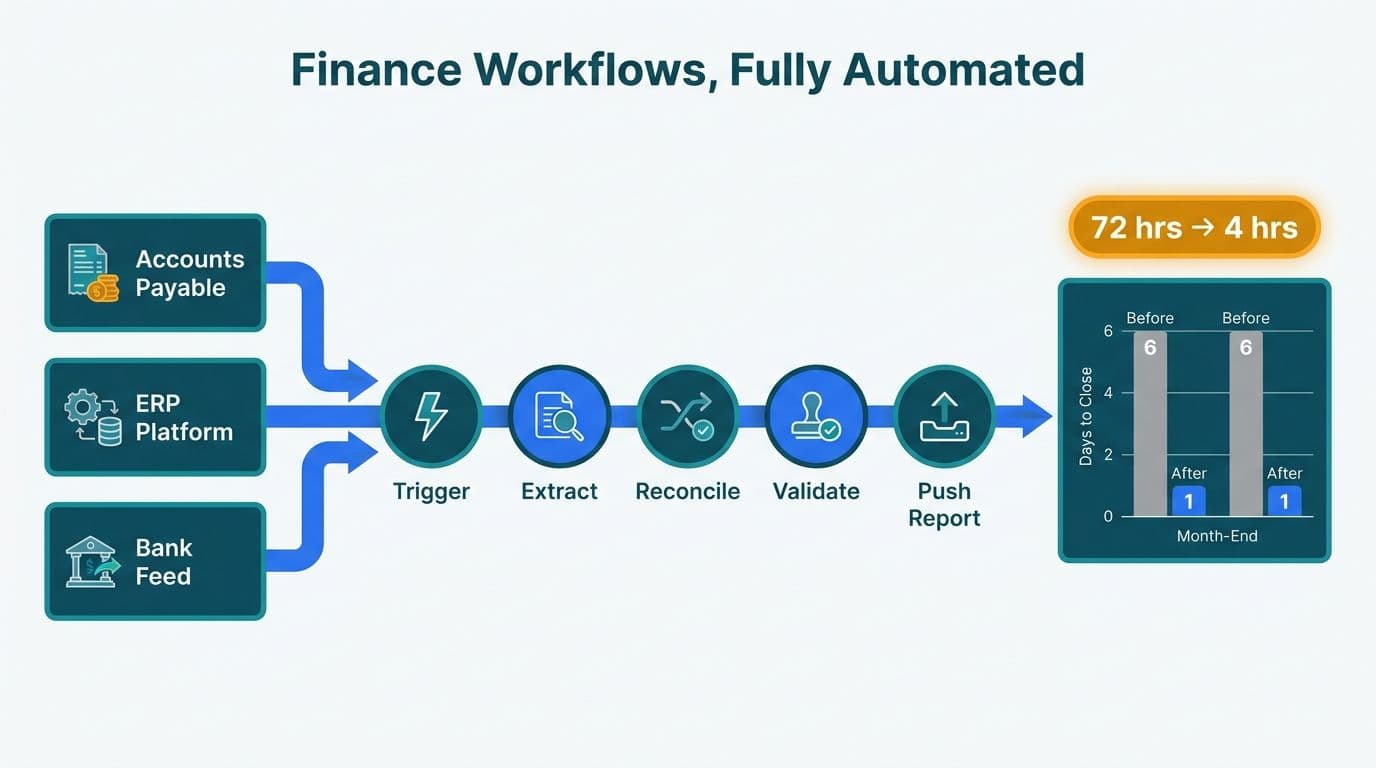
n8n finance workflow automation connects accounts payable and receivable systems, ERP platforms, and reporting tools through visual, trigger-based pipelines. Finance teams at mid-market companies in the US, UK, and Canada use n8n to eliminate manual data entry, accelerate month-end close, and push clean financial data into dashboards - without waiting on IT backlogs. The platform's self-hosted deployment option makes it viable where HIPAA, GDPR, and PIPEDA compliance are non-negotiable.
Key Takeaways
n8n automates AP/AR processing, month-end reconciliation, ERP-to-reporting sync, and AI-powered exception handling with visual, low-code pipelines
Self-hosted n8n keeps financial data on-premises, meeting HIPAA (US), GDPR (UK/EU), and PIPEDA (Canada) compliance requirements
Finance teams typically reduce manual data-entry hours by 60-80% within the first workflow deployed (as of 2026)
Pairing n8n with Power BI creates a near-real-time finance reporting stack that updates automatically from your ERP
Mid-market firms increasingly prefer n8n over enterprise integration platforms due to its lower cost and open-source flexibility
What Is n8n and Why Are Finance Teams Adopting It?
n8n is an open-source, self-hostable workflow automation platform that connects APIs, databases, and SaaS tools through a visual node-based editor. Finance teams choose it because it handles the conditional logic that simpler tools cannot express - three-way invoice matching, aging-bucket segmentation, multi-currency conversion - without requiring full-time engineering support.
While n8n workflow automation initially gained traction among digital agencies and developer teams, mid-market finance departments have become one of its fastest-growing user segments. The draw is practical: n8n natively supports QuickBooks, NetSuite, SAP, Xero, Salesforce, Slack, and hundreds of other tools, while letting finance-adjacent developers extend any workflow with custom JavaScript or Python nodes.
Engaging experienced AI automation consulting at the design stage prevents the most common n8n pitfalls: credential sprawl, missing error-handling branches, and workflows that pass testing but break at real invoice volumes.
n8n Finance Workflow Automation Examples: AP Invoice Processing
Accounts payable (AP) automation is typically the first workflow finance teams deploy in n8n. The manual steps - email triage, data extraction, three-way match, approval routing, payment scheduling - are repetitive, error-prone, and well-suited to automation.
Here is a concrete walkthrough for a US SaaS finance team running QuickBooks Online and Gmail:
1. Trigger: Gmail node - Monitor a dedicated AP inbox for email attachments tagged as invoices.
2. Extract: HTTP Request node - POST the PDF attachment to a document AI API to extract vendor name, invoice number, amount, line items, and due date.
3. Match: Code node - Query QuickBooks for the matching purchase order and goods-receipt record. Run a three-way match in JavaScript: PO amount vs. invoice amount vs. receipt quantity.
4. Branch: IF node - If the match passes within a defined tolerance, route to auto-approval. If it fails, route to a Slack notification to the AP manager with the discrepancy highlighted.
5. Approve: Wait node + Slack node - The AP manager clicks an approval link inside Slack. n8n resumes the workflow on the webhook response.
6. Post: QuickBooks node - Create the bill in QuickBooks with all extracted fields pre-populated. Schedule the payment run based on vendor payment terms stored in a reference sheet.
7. Log: Google Sheets node - Append every invoice to an audit log with timestamps, matched values, and approver identity.
Teams running this workflow typically cut AP processing time by 65-75% and reduce cost-per-invoice from an industry average of $12-15 down to $3-4, while maintaining the audit trail required for SOC 2 Type II certification. For a broader look at the AI toolset available to finance functions, the best AI tools for finance professionals guide provides a useful complement to this AP walkthrough.
How Do You Build an n8n AR Collections Workflow?
Accounts receivable (AR) automation targets the aging report: identifying overdue invoices, sending escalating reminders, and logging customer responses - without an analyst manually refreshing spreadsheets every morning.
The following n8n AR workflow integrates with Xero and Twilio:
1. Trigger: Schedule node - Run every weekday at 07:00 local time.
2. Fetch: Xero node - Pull all outstanding invoices where the due date is past. Segment by aging bucket: 1-30 days, 31-60 days, 60+ days overdue.
3. Branch: Switch node - Route each invoice to a different communication template based on aging bucket.
4. Remind: Gmail node - For 1-30 days overdue, send a polite email with the invoice PDF attached and a direct payment link.
5. Escalate: Twilio SMS node - For 31-60 days overdue, send an SMS from the finance director's virtual number.
6. Flag: Xero node + Slack node - For 60+ days, mark the invoice in Xero as "In Dispute" and notify the CFO in Slack with a link to the customer account.
7. Log: Google Sheets node - Record every outreach event, channel, and customer response for collections reporting.
Under GDPR - which applies to UK and EU-based finance teams and their counterparties - the workflow stores only the data fields needed for collections, with no broader customer profiling. The n8n self-hosted deployment means no invoice data leaves the firm's own cloud environment.
Month-End Reconciliation: How n8n Automates the Close Process
Month-end close is the highest-stakes finance workflow: errors compound, timelines compress, and multiple systems must agree before the books close. n8n can orchestrate the full reconciliation sequence across bank feeds, ERP subledgers, and general ledger systems.
Here is a walkthrough for a Canadian manufacturing company using NetSuite and RBC Bank:
1. Trigger: Schedule node - Fire at 06:00 on the first business day of each month.
2. Fetch bank statement: HTTP Request node - Pull the prior month's statement via RBC's Open Banking API. Under PIPEDA, the self-hosted instance is configured to process data within Canadian cloud regions only.
3. Fetch GL transactions: HTTP Request node (NetSuite SuiteQL) - Pull all posted transactions for the prior month from the relevant GL accounts.
4. Compare: Code node - Run a reconciliation script matching bank transactions to GL entries by amount and date within a one-day window. Flag unmatched items in both directions.
5. Report: Gmail node - Email the controller a formatted HTML summary listing matched items, unmatched bank entries (potential missed postings), and unmatched GL entries (potential timing differences).
6. Update: HTTP Request node - For auto-matched items, mark them reconciled in NetSuite and attach the bank reference ID.
7. Notify: Slack node - Post a close-status update to the #month-end channel: total matched, exception count, estimated close readiness percentage.
8. Escalate: Conditional branch - If unmatched items exceed a set threshold, alert the CFO via PagerDuty.
The Canadian manufacturing firm reduced its month-end close from nine working days to four and eliminated the spreadsheet-based process that had required two analysts working overtime each month. Research from the World Economic Forum (as of 2026), drawing on input from more than 50 financial services organizations, confirms that reconciliation automation has become one of the top three AI priorities for finance leadership teams globally.
ERP-to-Reporting Sync: Connecting Finance Systems to Live Dashboards
Finance directors need more than accurate books - they need current numbers visible in dashboards without waiting for a monthly data export. n8n bridges the gap between ERP systems and reporting layers such as Power BI, creating a near-real-time finance reporting stack that replaces manual CSV exports.
A typical ERP-to-reporting sync in n8n works as follows:
1. Trigger: Schedule or webhook - Run every hour, or trigger on ERP data-change events via webhook.
2. Extract: ERP node - Pull updated GL balances, revenue figures, cost-center spend, or headcount data from NetSuite, SAP, or QuickBooks.
3. Transform: Code node - Apply business logic: allocate shared costs, convert currencies using a live FX rate API, flag budget variances above threshold.
4. Load: Database node - Push transformed data to a staging table in Azure SQL, Snowflake, or BigQuery.
5. Refresh: HTTP Request node - Call the Power BI dataset refresh endpoint via REST API so dashboards update automatically after each sync.
| Sync method | Latency | Setup complexity | Best for |
|---|---|---|---|
| n8n scheduled ERP sync | 15-60 min | Low-medium | Mid-market teams, standard ERP APIs |
| Native ERP connector (e.g., SAP BW) | Near-real-time | High | Enterprise SAP deployments |
| Manual CSV export | 24-48 hours | Very low | Small teams, no automation budget |
| Enterprise iPaaS platform | Near-real-time | Medium-high | Large enterprise with dedicated IT resources |
Choosing the right query mode for the data n8n pushes into Power BI is critical to dashboard performance: the Power BI Import vs DirectQuery decision guide covers the trade-offs for finance datasets specifically. Once the data layer is established, Managed Power BI services can take over ongoing model governance, refresh scheduling, and dashboard delivery so your finance team stays focused on analysis rather than infrastructure.
n8n Self-Hosted vs Cloud Compliance for Finance and Healthcare
The choice between n8n self-hosted and n8n Cloud is driven by compliance requirements, not personal preference. Understanding the distinction is non-negotiable for regulated finance and healthcare organizations.
n8n self-hosted runs entirely within your own infrastructure - on-premises, in a private cloud, or in a VPC you control:
Financial data never leaves your environment to a third-party SaaS vendor
Data residency stays within your chosen jurisdiction, satisfying GDPR (UK/EU) and PIPEDA (Canada)
Network isolation can be configured so n8n only reaches approved internal endpoints
SOC 2 controls apply to your own infrastructure, not a shared cloud platform
n8n Cloud is hosted by n8n GmbH on their shared infrastructure. It is appropriate for internal workflows where financial data sensitivity is low, or for teams running proof-of-concept builds before committing to a self-hosted deployment.
For n8n HIPAA-compliant workflow automation, self-hosted is the only viable path. HIPAA's Security Rule requires covered entities and business associates to execute a Business Associate Agreement (BAA) before any electronic protected health information (ePHI) is transmitted to a vendor's infrastructure. n8n GmbH does not currently offer a BAA for their cloud tier. US healthcare finance teams running claims reconciliation, patient billing, or payer analytics workflows must deploy self-hosted, with encryption at rest, audit logging, and role-based access controls in place.
MedInsight (2026) identified AI-driven analytics as one of three defining healthcare finance themes of the year - alongside value-based care and payer analytics innovation - reinforcing why secure, compliant automation infrastructure has become a board-level priority for US and Canadian health systems.
For Canadian organizations under PIPEDA, self-hosted instances within Canadian data centers - AWS ca-central-1 or Azure Canada Central - satisfy data residency requirements that shared-cloud deployments may not meet. The AI workflow automation pre-launch checklist walks through the security and compliance gates that teams most often skip under deadline pressure, and is essential reading before deploying n8n in any regulated environment.
How to Build AI Agents with n8n for Finance Exception Handling
Beyond rule-based automation, n8n's AI Agent node enables agentic finance workflows - where the system reasons over inputs and decides which tools to invoke, rather than following a fixed sequence of steps.
A practical example: an n8n AI agent for invoice exception handling. The agent is given access to three tools: a QuickBooks query function, a Slack messaging function, and a Google Sheets logging function. When it receives a failed three-way match, it:
1. Queries QuickBooks for the vendor's historical invoice patterns over the past 12 months
2. Determines whether the current variance falls within the vendor's typical range
3. Either auto-approves with a documented rationale or escalates to the AP manager with a natural-language explanation of precisely why the match failed
This tool-calling agent pattern is where n8n's AI integration earns its value in finance: instead of hard-coded IF/ELSE branches that break on edge cases, the agent adapts to invoice data it has not encountered before. Teams evaluating whether to build in n8n or use a managed automation platform will find the open-source AI workflow automation build vs. buy guide useful for framing that decision before committing engineering time.
---
The team at Lets Viz designs, builds, and maintains n8n automation pipelines for finance teams across the US, UK, and Canada. If you are ready to move beyond manual exports and spreadsheet-based reconciliation, start with our AI automation consulting service to scope your first workflow and map the full integration architecture.
---
About Lets Viz: Lets Viz has been delivering data analytics and automation solutions for mid-market organizations since 2020, with a 5.0 Clutch rating earned across engagements spanning US healthcare systems, UK fintech firms, Canadian manufacturing companies, and global SaaS businesses. Our team combines deep expertise in ERP integration, Power BI reporting, and AI workflow design to help finance directors move from manual processes to automated, audit-ready pipelines.