Microsoft Fabric Delta Tables: Schema Evolution & Audit Trail
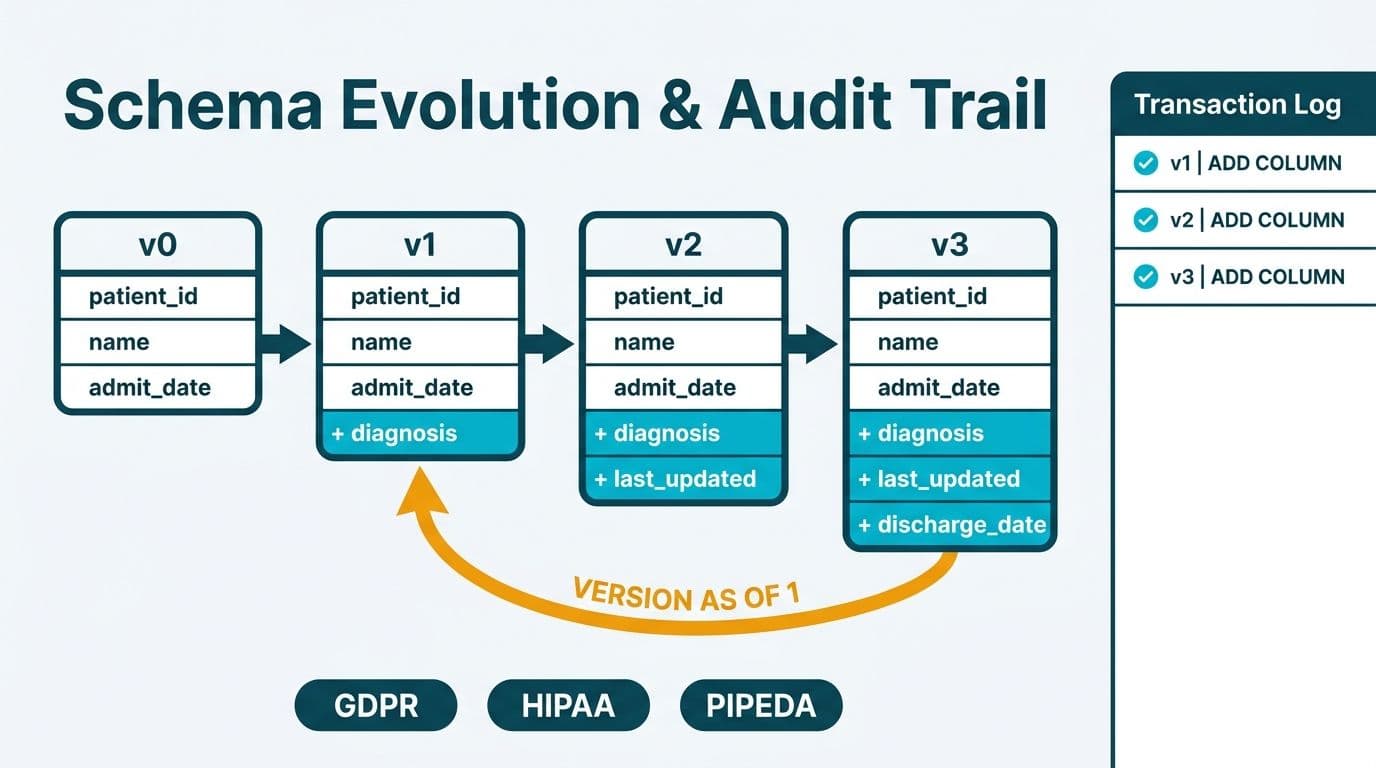
Microsoft Fabric lakehouses store all data in Delta Lake format - an open-source storage layer that adds ACID transactions, versioned history, and schema enforcement on top of Parquet files in OneLake. For healthcare and finance organizations navigating GDPR, HIPAA, or PIPEDA, Delta's built-in versioning serves as a technical audit trail, and time-travel queries let you reconstruct any table as it existed at a prior point without a separate audit system.
Key Takeaways
- Delta Lake is the native open format for all Fabric lakehouse tables - data is stored as versioned Parquet files with an append-only transaction log.
- Schema evolution allows new columns to be added without rewriting historical data or breaking downstream Power BI reports.
- Time-travel queries (`VERSION AS OF`, `TIMESTAMP AS OF`) reconstruct table state at any prior version or timestamp.
- Delta's append-only log and deletion vectors map directly to GDPR (UK/EU), HIPAA (US), and PIPEDA (Canada) audit and erasure requirements.
- Fabric lakehouses suit schema-flexible ingestion; Fabric data warehouses suit governed, SQL-centric BI - most mid-market deployments use both.
What Are Delta Tables in a Microsoft Fabric Lakehouse?
Delta tables are the native storage unit of a Fabric lakehouse. Each table consists of Parquet data files in OneLake plus a `_delta_log` folder that records every transaction as an append-only JSON commit entry (Microsoft Docs, 2025). This transaction log gives Delta tables four properties that data lakes historically lacked: atomicity, consistency, isolation, and durability - collectively known as ACID compliance.
When an engineer writes patient records or financial transactions to a lakehouse, Fabric writes a new Parquet file and appends a commit entry to the log. Any query sees a consistent snapshot - never a half-written state mid-load.
For organizations working with a Power BI and Fabric consulting partner to design their analytics platform, Delta's open format is a key differentiator: any engine that speaks the Delta protocol - Apache Spark, Trino, DuckDB, or Fabric's native SQL analytics endpoint - can read the same files without conversion.
Delta tables in Fabric live in OneLake, Microsoft's unified storage layer. This matters for teams evaluating whether to migrate Azure Data Lake Storage to a Microsoft Fabric lakehouse: existing Delta tables in ADLS Gen2 can be shortcutted into a lakehouse without physically copying data, and Fabric recognizes them immediately.
How Does Schema Evolution Work in Fabric Delta Tables?
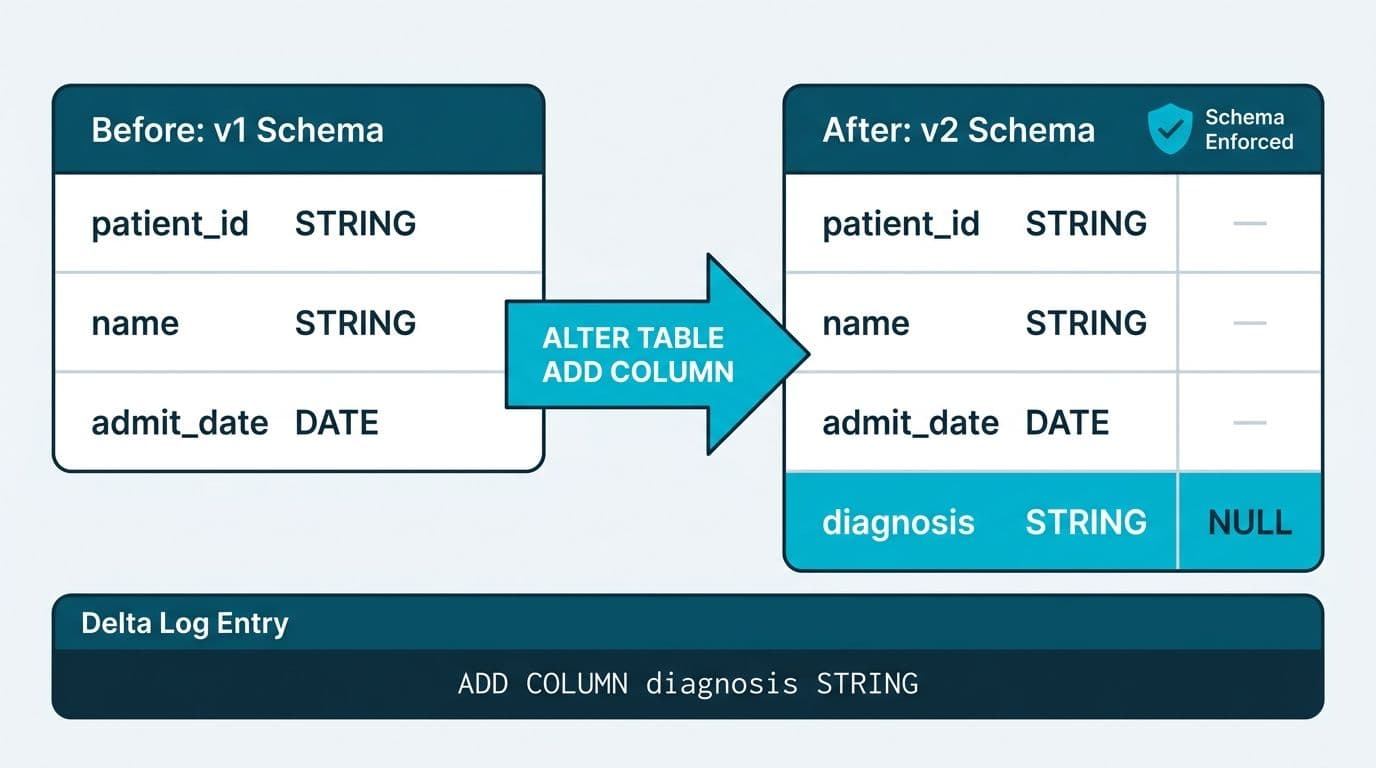
Schema evolution is Delta Lake's mechanism for allowing a table's structure to change over time without rewriting historical Parquet files. By default, Fabric Delta tables enforce schema on write - a mismatched column type returns an error rather than silently corrupting data. Schema evolution relaxes this in two controlled ways.
Schema merging (additive evolution): Setting `mergeSchema = true` on a write operation allows new columns to be appended to the table definition. Rows in existing Parquet files return `NULL` for the new column. This is purely additive and safe for regulated environments.
Schema overwriting (replacement): Setting `overwriteSchema = true` replaces the table definition entirely. This is a destructive operation: treat it like a DDL schema drop in a traditional database, and require change-management approval in HIPAA- or GDPR-governed environments.
Consider a US healthcare organization managing EHR exports where new clinical data fields arrive with each HL7 FHIR revision. With additive schema merging, the lakehouse table absorbs new fields automatically - prior Parquet files are untouched, new files carry the additional columns, and no migration project is required.
A UK fintech firm adding MiFID II transaction fields partway through a reporting year faces the same pattern: add the new columns mid-year and the full-year table remains queryable without rewriting earlier data.
The Power BI Governance Best Practices: 12-Point Checklist covers how change-management controls at the workspace and dataset level complement Delta's technical schema guards for organizations with formal data governance programs.
What Is Time Travel in Delta Lake and How Do You Query It?
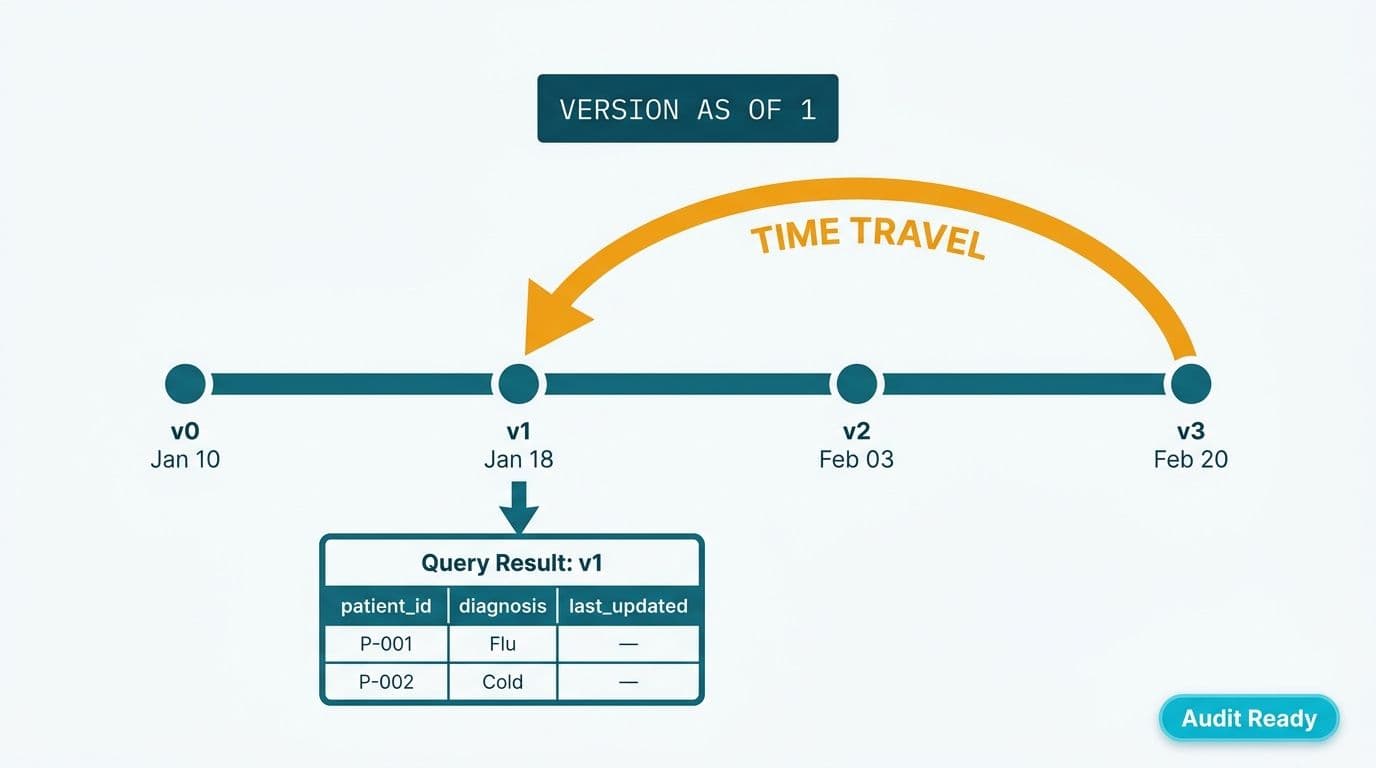
Time travel is Delta Lake's ability to query a table as it existed at a prior version number or timestamp. Every commit increments a version counter starting at zero. Both Fabric's SQL analytics endpoint and Spark notebooks support two time-travel syntaxes (Microsoft Docs, 2025):
```sql
-- Query by version number
SELECT * FROM patient_encounters VERSION AS OF 42;
-- Query by timestamp
SELECT * FROM patient_encounters TIMESTAMP AS OF '2026-01-15 00:00:00';
```
In a Fabric Spark notebook using PySpark:
```python
df = spark.read.format("delta") \
.option("versionAsOf", 42) \
.load("Tables/patient_encounters")
```
The transaction log retains commit history for as long as log files exist. Fabric respects Delta Lake's default log retention of 30 days, but this is configurable via the `delta.logRetentionDuration` table property. Organizations with multi-year audit requirements - common under HIPAA documentation standards (45 CFR §164.530, HHS guidance) - should set this explicitly:
```sql
ALTER TABLE patient_encounters
SET TBLPROPERTIES ('delta.logRetentionDuration' = 'interval 7 years');
```
One operational caution: the `VACUUM` command physically deletes old Parquet files to reclaim storage. Running `VACUUM` with a retention window shorter than your log retention breaks time-travel access to those versions. In regulated environments, align `VACUUM`'s `RETAIN` period to your compliance retention window, or disable automatic VACUUM on sensitive tables and run it manually after legal review.
How Do Delta Table Versions Map to GDPR, HIPAA, and PIPEDA Audit Requirements?
Delta versioning maps directly to what compliance auditors expect: an immutable, timestamped record of every change with no mechanism to silently alter historical data.
HIPAA (US): The HIPAA Security Rule requires covered entities to maintain audit controls recording activity in systems containing electronic protected health information (ePHI). Delta's `_delta_log` is an append-only record of every write, update, and delete. A hospital system or health insurer can provide auditors direct access to the transaction log to demonstrate data integrity, or export log entries as formal audit evidence.
GDPR (UK and EU): Article 17's right to erasure creates a tension with immutable logs. Delta handles this through deletion vectors - a feature available on Fabric lakehouses (Microsoft Docs, 2025) - which mark rows as logically deleted without rewriting the underlying Parquet files. The transaction log records the deletion commit; the row is invisible to subsequent queries; and a scheduled VACUUM eventually removes the physical bytes. This satisfies erasure requests while preserving an audit record that a deletion occurred at a specific version and timestamp.
PIPEDA (Canada): Canada's Personal Information Protection and Electronic Documents Act requires organizations to document how personal information is collected, used, and disclosed, and to retain records of disposal. A Canadian wealth management firm or a manufacturing company processing employee data can use Delta's version history to produce point-in-time snapshots showing the state of a dataset at any regulatory checkpoint.
| Regulation | Jurisdiction | Delta Lake Mechanism | Requirement Met |
|---|---|---|---|
| HIPAA Security Rule | US | Append-only transaction log | Audit controls for ePHI systems |
| GDPR Article 17 | UK/EU | Deletion vectors + VACUUM schedule | Right to erasure with audit record |
| GDPR Article 30 | UK/EU | Versioned commits + timestamps | Records of processing activities |
| PIPEDA Principle 4.7 | Canada | Point-in-time snapshots | Retention and disposal accountability |
| SOC 2 Type II | US | Immutable log + access controls | Change management evidence |
For healthcare environments where compliance documentation spans multiple systems, Clinical Trial Data Reporting in Power BI: A GCP & GDPR Guide covers how Fabric integrates with GCP and GDPR documentation workflows.
Fabric Lakehouse vs Fabric Data Warehouse: When Should You Use Delta Tables?
Both a Fabric lakehouse and a Fabric data warehouse store data in Delta format - the distinction is not the file format but the governance model, compute engine, and SQL feature set available.
Use a Fabric lakehouse when:
- Ingestion schemas change frequently (IoT streams, EHR exports, SaaS API payloads)
- Data engineers need Spark notebooks alongside SQL queries on the same tables
- You are landing raw and semi-structured data before curation
- You want to shortcut Delta tables from ADLS or another cloud storage without physically copying data
Use a Fabric data warehouse when:
- The schema is stable and governed by a dedicated data engineering team
- Business analysts require T-SQL without Spark dependencies
- You need cross-database joins against other Fabric warehouses
- Row-level security and column masking via SQL are the primary access controls
Most mid-market organizations in healthcare and finance use both: a lakehouse as the bronze (raw) and silver (cleansed) layer, and a Fabric data warehouse as the gold (dimensional model) layer for BI. This medallion architecture is detailed in Fabric Lakehouse Finance Analytics: Power BI Reporting for FP&A, which walks through the full pattern for finance teams.
For organizations evaluating the overall investment, Microsoft Fabric Pricing: F-SKU vs P-SKU Capacity Cost Guide covers how capacity unit selection affects Microsoft Fabric lakehouse implementation cost and timeline for mid-market rollouts.
How Does Power BI Direct Lake Mode Connect to Delta Tables?
Power BI Direct Lake mode reads Delta table Parquet files in OneLake directly - bypassing the in-memory import cache and the SQL translation layer that DirectQuery uses. The result is near-import-mode query speed on live lakehouse data without a scheduled refresh cycle (Microsoft Docs, 2025).
Technically, Direct Lake reads the latest Parquet snapshot from the Delta transaction log. When a new batch lands and a new commit is written, Power BI reads the updated snapshot on the next query automatically - no manual refresh trigger required for most scenarios.
| Mode | Data Location | Refresh Required | Query Speed | Compliance Consideration |
|---|---|---|---|---|
| Import | Power BI in-memory cache | Yes, scheduled | Fastest | Data copied - adds a data residency surface |
| DirectQuery | Source via SQL engine | No | Slower (per-visual query) | Data stays in source system |
| Direct Lake | OneLake Parquet files | No (automatic) | Near-import speed | Data stays in OneLake |
For HIPAA- and GDPR-governed datasets, Direct Lake's data-stays-in-OneLake behavior matters: patient or financial records are not copied into Power BI's in-memory engine, limiting the number of systems holding a sensitive data copy.
Direct Lake does have constraints. It requires the semantic model to live in the same Fabric workspace as the lakehouse (or a linked workspace with appropriate permissions), and it does not support every DAX calculation that Import mode does. For complex composite models, a hybrid approach - Direct Lake for large fact tables, Import for small reference dimensions - is a common pattern in production deployments.
The Microsoft Fabric Real-Time Analytics vs Stream Analytics article covers how streaming data written to Delta tables surfaces in Direct Lake reports without a refresh latency gap.
What Does a Microsoft Fabric Delta Tables Implementation Look Like in Practice?
A typical mid-market Fabric lakehouse rollout - whether for a 300-bed US regional hospital or a Canadian financial services firm with 50 analysts - follows a phased pattern designed to deliver early value within the first quarter while maintaining compliance controls from day one.
Phase 1 - Foundation (weeks 1-4): Provision Fabric capacity, configure OneLake workspace isolation by data domain, and establish Delta table naming conventions and log retention policies before any data lands. For HIPAA-covered entities, this phase includes Business Associate Agreement review with Microsoft and workspace-level encryption key configuration.
Phase 2 - Bronze ingestion (weeks 5-8): Land raw data from source systems - ERP, EHR, CRM - into lakehouse bronze Delta tables via Fabric Data Factory pipelines or Spark notebooks. Schema merging is enabled from day one so source schema changes do not break nightly loads.
Phase 3 - Silver curation (weeks 9-12): Apply cleansing, deduplication, and PII tagging logic in Spark notebooks, writing curated Delta tables to the silver layer. Deletion vectors are enabled on tables containing personal data to support GDPR and PIPEDA erasure workflows.
Phase 4 - Gold layer and Direct Lake (weeks 13-16): Build the dimensional model in the Fabric warehouse or as lakehouse shortcuts, connect Power BI semantic models via Direct Lake, and configure row-level security before handing off to business analysts.
Suppose a UK fintech firm running the same pattern: the silver-layer Delta tables holding transaction data are configured with a three-year log retention window to satisfy financial conduct audit requirements, and VACUUM is disabled on those tables pending compliance sign-off.
---
About Lets Viz: Lets Viz has delivered data analytics and Microsoft Fabric implementations since 2020 for clients across US healthcare, UK fintech, Canadian manufacturing, and global SaaS. The firm holds a 5.0 rating on Clutch, with deep hands-on experience in Delta Lake compliance configurations, schema governance, and Power BI Direct Lake deployments for mid-market organizations navigating HIPAA, GDPR, and PIPEDA requirements.
If your organization is planning a Microsoft Fabric lakehouse implementation or needs to align Delta table configuration to GDPR, HIPAA, or PIPEDA audit requirements, Power BI and Fabric consulting from Lets Viz covers architecture design through go-live.