Microsoft Fabric Pricing: F-SKU vs P-SKU Capacity Cost Guide
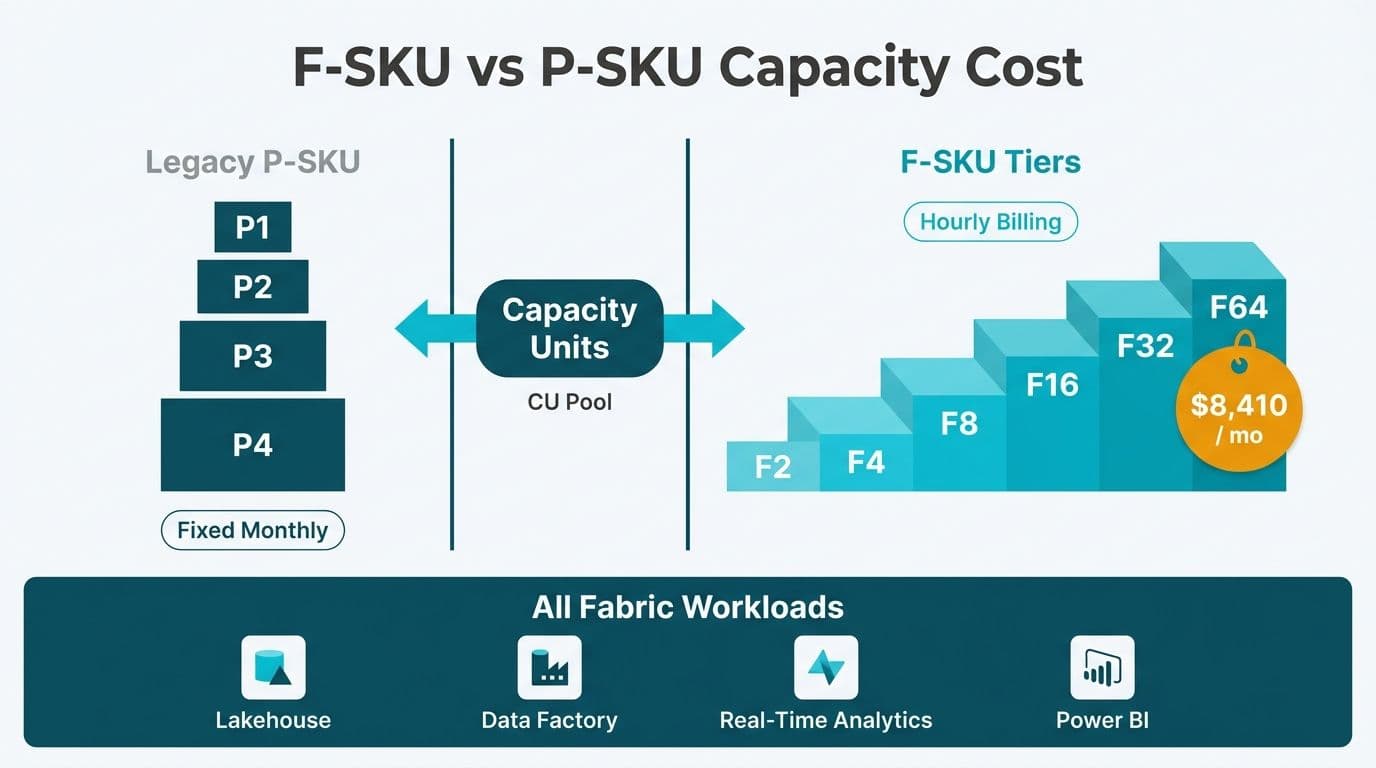
Microsoft Fabric consolidates the entire Microsoft data stack - Lakehouse, Synapse Analytics, Data Factory, Real-Time Analytics, and Power BI - onto a single capacity model billed in Capacity Units (CUs). The F-SKU tiers that replaced legacy P-SKUs offer more granular entry points, flexible hourly billing, and unified workload coverage. Understanding the tiers, regional price bands, and break-even thresholds is the fastest route to a defensible budget for CIOs and finance directors evaluating the platform.
Key Takeaways
F-SKUs cover all Fabric workloads from a shared CU pool; legacy P-SKUs were limited to Power BI Premium compute only
The tier ladder runs from F2 (2 CUs) to F2048 (2,048 CUs), giving teams 11 options between entry-level and enterprise scale
A 1-year reserved commitment saves roughly 41% over pay-as-you-go - the break-even point is approximately 58% of monthly utilization hours
US East is Microsoft's lowest-price Fabric region; UK South, West Europe, and Canada Central carry 5-8% premiums at current list prices
HIPAA, GDPR, and PIPEDA-scoped workloads are supported within Fabric's compliance framework - region selection is the primary data-residency control lever
What Are Microsoft Fabric Capacity Units and How Do They Work?
Capacity Units are the universal compute currency of Microsoft Fabric. Every workload - Spark notebooks in the Fabric Lakehouse, warehouse queries, real-time data ingestion through EventStream, Data Factory pipelines, Power BI semantic models, and Microsoft Fabric data agents - draws from the same CU pool tied to a single F-SKU. When one workload is idle, its headroom flows to others, so a well-sized F-SKU nearly always delivers better utilization than equivalent compute spread across siloed Azure services billed separately.
CU consumption is metered in 30-second intervals. Unused CUs in any interval roll forward into a smoothing window - up to 10 minutes depending on the SKU - which absorbs short bursts without throttling. This smoothing behavior is absent in the legacy P-SKU model, making F-SKUs materially more efficient for the bursty workloads common in healthcare claims processing or financial month-end runs.
The capacity model also dissolves the traditional fabric lakehouse vs data warehouse choice. Teams can run both a Lakehouse (Delta tables on OneLake, Spark for exploration and transformation) and a Warehouse (SQL-native, T-SQL optimized) from the same F-capacity, right-sizing each workload independently without procuring separate services.
For organizations working with our Power BI and Fabric consulting team, capacity sizing begins with a workload heat-map - mapping peak CU demand by hour across all intended workloads - rather than guessing from a P-SKU equivalent.
F-SKU vs P-SKU: What Is the Core Difference?
The most critical distinction is scope. P-SKUs (P1-P5) were Power BI Premium capacities: they ran Power BI reports and dataflows, supported paginated reports, and enabled XMLA endpoint access. They did not run Spark, did not support Fabric Lakehouse Delta tables, and could not host Warehouse or Real-Time Analytics workloads. Microsoft no longer sells P-SKUs to new customers; existing P-SKU holders are being migrated to F-SKU equivalents.
F-SKUs cover the entire Fabric platform. An F64 can run a Spark job, ingest streaming telemetry through a Fabric Lakehouse, serve a Power BI DirectLake semantic model, and execute a Data Factory pipeline - all from the same capacity pool.
| Feature | Legacy P-SKU | F-SKU |
|---|---|---|
| Workload coverage | Power BI Premium only | All Fabric workloads |
| Procurement path | Enterprise Agreement only | EA + pay-as-you-go |
| Minimum commitment | 12-month subscription | None (hourly PAYG) |
| Smallest available tier | P1 (~F64 equivalent) | F2 |
| CU smoothing and bursting | Limited | Yes (up to 10-minute window) |
| Power BI Premium features | Included | Included at F64 and above |
| Delta table and Lakehouse support | No | Yes |
P1 maps to approximately F64 in compute capacity; P2 to F128; P3 to F256; P4 to F512. Organizations migrating from P-SKU contracts should target the nearest F-SKU equivalent and then right-size downward after a 30-day observation period using the Fabric Capacity Metrics app.
Microsoft Fabric Capacity SKU Pricing: The F-SKU Tier Breakdown
Microsoft prices F-SKUs by the CU-hour at a base rate, with a 1-year reserved option that discounts the effective monthly cost by approximately 41% (US East, Microsoft Azure pricing calculator, July 2026). The table below shows the main commercial tiers with approximate US East pay-as-you-go and reserved monthly costs at full utilization (730 hours):
| SKU | CUs | PAYG Rate/hr (US East) | PAYG/month (730 hr) | 1-yr Reserved/month |
|---|---|---|---|---|
| F2 | 2 | ~$0.72 | ~$526 | ~$310 |
| F4 | 4 | ~$1.44 | ~$1,051 | ~$620 |
| F8 | 8 | ~$2.88 | ~$2,102 | ~$1,240 |
| F16 | 16 | ~$5.76 | ~$4,205 | ~$2,481 |
| F32 | 32 | ~$11.52 | ~$8,410 | ~$4,962 |
| F64 | 64 | ~$23.04 | ~$16,819 | ~$9,923 |
| F128 | 128 | ~$46.08 | ~$33,638 | ~$19,847 |
| F256 | 256 | ~$92.16 | ~$67,277 | ~$39,693 |
| F512 | 512 | ~$184.32 | ~$134,554 | ~$79,387 |
*Source: Microsoft Azure pricing calculator, July 2026. Prices in USD. Always verify current rates on the Microsoft Azure pricing page before committing.*
F2 and F4 are designed for dev/test or small departmental BI workloads. F64 is the practical entry point for production use because it unlocks Power BI Premium features - paginated reports, XMLA read/write, and DirectLake for large semantic models. Mid-market healthcare or financial services teams running 20-80 report consumers typically land between F64 and F128. A 3-year reserved term offers an additional 14-17% saving beyond the 1-year rate for organizations confident in long-term Fabric adoption.
Pay-As-You-Go vs Reserved Capacity: When Does Each Make Sense?
Pay-as-you-go charges by the CU-hour with no commitment. Capacity can be paused overnight or on weekends through the Azure portal or an Azure Automation runbook, eliminating idle costs entirely. This model suits development and staging environments, seasonal analytics workloads (insurance open-enrollment periods, tax season for US and Canadian financial services teams), proof-of-concept deployments before right-sizing, and organizations that need precise project-level cost attribution.
Reserved capacity locks in a 1-year or 3-year commitment at a roughly 41% discount from the full-utilization PAYG monthly rate. It suits workloads that must run continuously - 24/7 operational dashboards, real-time data ingestion pipelines, or HIPAA-regulated healthcare environments where pausing capacity would interrupt audit logging and data-freshness SLAs.
The break-even rule is straightforward: if your capacity runs more than approximately 58% of monthly hours (roughly 424 of 730 hours), reserved beats pay-as-you-go. Below that threshold, pay-as-you-go combined with a pause schedule is cheaper.
Break-even worksheet - F64 in US East:
| Scenario | Active Hours/Month | PAYG Cost | Reserved Cost | Better Option |
|---|---|---|---|---|
| Business hours only (Mon-Fri, 10 hr/day) | ~218 hrs | ~$5,023 | ~$9,923 | Pay-as-you-go |
| Extended hours (Mon-Fri, 16 hr/day) | ~348 hrs | ~$8,022 | ~$9,923 | Pay-as-you-go |
| Break-even point | ~430 hrs | ~$9,907 | ~$9,923 | Roughly equal |
| 24/7 production | 730 hrs | ~$16,819 | ~$9,923 | Reserved (~41% saving) |
*PAYG rate: ~$23.04/hr for F64, US East. Reserved: ~$9,923/month (1-year term, Microsoft Azure, July 2026).*
For a typical US SaaS finance team running overnight batch jobs plus business-hours dashboards, total active hours often land around 500-550 per month - firmly in reserved territory. For a UK fintech firm with a heavier intraday analytics load and always-on compliance monitoring, 24/7 reserved is almost always the right call.
How Do Microsoft Fabric Prices Differ by Region Across US, UK, EU, and Canada?
Microsoft Fabric pricing is anchored to the Azure region where the capacity is provisioned. US East and US West are the lowest-price anchor regions. UK South, West Europe, and Canada Central carry modest premiums that reflect local Azure infrastructure costs - but also provide the data-residency guarantees that regulated industries require.
Approximate regional multipliers against US East list prices (Microsoft Azure pricing, July 2026):
| Region | Multiplier vs US East | Primary Compliance Framework |
|---|---|---|
| US East / US West | 1.00x (base) | HIPAA BAA, SOC 2 |
| Canada Central | ~1.05x | PIPEDA, SOC 2 |
| UK South | ~1.07x | UK GDPR |
| West Europe (Netherlands) | ~1.08x | EU GDPR |
For a UK fintech firm running F64, the premium versus US East amounts to roughly $670-720 per month at pay-as-you-go rates - a modest cost for keeping data within UK borders under UK GDPR. For a Canadian financial institution subject to PIPEDA's data-residency guidance, Canada Central adds roughly 5% to base US pricing and keeps customer financial records on Canadian soil. US healthcare organizations handling protected health information (PHI) can provision Fabric in US East or US West under Microsoft's HIPAA Business Associate Agreement, which covers Fabric as a compliant workload. Region selection is therefore simultaneously a cost variable and the first data-governance control.
Microsoft Fabric Compliance: HIPAA, GDPR, and PIPEDA
Microsoft Fabric's data governance architecture extends across the full platform - Lakehouse, Warehouse, Real-Time Analytics, and Power BI - through integration with Microsoft Purview. Compliance requirements for regulated industries break down by geography.
HIPAA (US healthcare): Microsoft's BAA covers Fabric. Organizations must provision capacity in a US region, enable customer-managed encryption keys (CMK) for data at rest, and apply sensitivity labels through Microsoft Purview. A US hospital network running a hospital readmission analytics dashboard in Power BI should budget for F64 at minimum to enable DirectLake without data leaving the OneLake boundary. Teams operating workflow automation alongside Fabric for clinical use cases should also review HIPAA-compliant workflow automation requirements.
GDPR (UK and EU): EU and UK customers must provision capacity in UK South or a West Europe region. OneLake stores data in the capacity's home region by default - there is no automatic geo-replication that would breach residency rules. Purview data maps and information-protection labels extend across all Fabric item types, including Delta tables generated by Spark jobs and streams processed through Real-Time Analytics. For the complete control checklist, our GDPR compliant SaaS financial reporting guide maps directly to Fabric's configuration options.
PIPEDA (Canada): Canada Central provisioning keeps data on Canadian soil. PIPEDA does not prohibit cross-border transfers outright but requires adequate contractual protections - Microsoft's standard Data Processing Agreement satisfies this for most Canadian financial institutions. The microsoft fabric data governance gdpr hipaa pipeda compliance scope covers Delta table outputs, Spark job results, and real-time data ingestion streams through EventStream; all inherit the capacity's compliance boundary when correctly configured.
How Do You Connect Power BI to a Fabric Lakehouse via DirectLake?
DirectLake is the query mode that makes F-SKU economics compelling at scale. Traditional Import mode copies data into a Power BI semantic model; DirectQuery reads from source on demand with latency overhead. DirectLake reads Parquet files stored in OneLake directly at query time - without a data copy, without an on-premises gateway, and without the throughput cost of DirectQuery. Power BI holds a 22.86% share of the Data Visualization and BI category (TechnologyChecker, 2026), and DirectLake is a primary reason enterprise teams are consolidating their lakehouse and BI stacks onto a single Fabric capacity rather than running separate services.
To connect Power BI to a Fabric Lakehouse via DirectLake:
1. Create a Lakehouse in a Fabric workspace assigned to your F-capacity
2. Load data as microsoft fabric delta tables via Spark, Dataflow Gen2, or a Data Factory pipeline - the Delta log is what DirectLake reads
3. In Power BI Desktop or the Fabric web interface, create a new semantic model pointing to the Lakehouse's SQL analytics endpoint using DirectLake connection mode
4. Publish the semantic model to the same F-capacity workspace
The semantic model stays current as Delta table snapshots update - no scheduled refresh job is required. This eliminates significant operational overhead for teams running frequent ingestion pipelines. For the full architecture behind this pattern, our Fabric Lakehouse architecture diagram and reference design guide covers the complete component map.
How Do You Use the Fabric Capacity Metrics App to Catch Throttling Early?
The Microsoft Fabric Capacity Metrics app is a free Power BI app published by Microsoft on AppSource. Walking through its installation and key views is the most practical Microsoft Fabric capacity metrics app tutorial available for production Fabric admins - and it is the tool that converts vague "the reports feel slow" complaints into a concrete F-SKU upgrade decision backed by data.
Installing the app
Search for "Microsoft Fabric Capacity Metrics" in the Power BI Apps marketplace and install it into any Fabric-enabled workspace. Connect the app to the Azure subscription that holds your F-capacity during the setup wizard - it reads from Fabric's internal system metadata tables automatically, so no additional data source configuration is required. For multi-region tenants running separate capacities in, for example, UK South and US East, install one app instance per capacity and pin the report pages from both instances into a shared monitoring workspace so you can compare utilization across regions at a glance.
Reading the key metrics
The home page renders a 14-day utilization heatmap where each cell represents a 30-second metering interval. Color bands indicate health at a glance: green cells (below 70%) are healthy, amber cells (70-100%) are approaching the ceiling, and red cells above 100% signal that the smoothing buffer is being drawn down. Three numbers drive every decision:
- CU % (Actual): raw consumption in the interval before the smoothing window is applied
- CU % (Smoothed): the figure Fabric uses internally when evaluating whether to throttle - bursts absorbed by the 10-minute window do not appear here
- Throttling events: listed in the Throttling tab, showing interactive delays (user-facing query slowdowns) before background job delays appear
The Timepoint Details drill-through identifies exactly which operations spiked CU consumption in any given 30-second window - a runaway Spark notebook, a heavy semantic model refresh, or a Data Factory pipeline scheduled at peak hours will appear as a discrete spike you can act on without resizing.
Acting on the data
When smoothed CU % consistently exceeds 80% during business hours across multiple days, the next F-tier upgrade is typically warranted within 60-90 days. At 100% smoothed utilization, interactive report queries begin incurring 20-second delay penalties; at 120%, background refreshes are deferred up to 24 hours. The User Activity tab lists the top CU consumers by identity, making it practical to approach individual teams about query optimization or off-peak scheduling before committing to a higher tier.
Multi-region right-sizing for UK and EU admins
CUs are not shared across Azure regions - a US East capacity with spare headroom cannot absorb a throttling event on a UK South capacity. Each region's Metrics app instance must be monitored independently. The workflow for EU admins managing GDPR-scoped data is to run both instances side by side, compare peak-hour utilization, and identify whether any workloads in the higher-cost UK South or West Europe capacity could be migrated to a lower-cost region - subject to data-residency rules. Where GDPR mandates that data remain in-region, resizing based on Metrics app evidence is the only available lever, and the user-level breakdown makes it straightforward to build a business case for the upgrade without guesswork.
When Should You Upgrade Your F-SKU Tier?
Throttling is the clearest signal. When smoothed CU consumption consistently exceeds 100% of allocated CUs across a 10-minute window, Fabric queues and delays workloads rather than failing them outright. The Fabric Capacity Metrics app - a free Power BI app from Microsoft AppSource - surfaces CU utilization by workload, by user, and by time of day, making the upgrade decision data-driven rather than reactive. The previous section covers the full installation and interpretation workflow for the app.
Typical upgrade triggers for mid-market teams include sustained CU utilization above 85% during business hours, increasing job queuing in the Metrics app, addition of a high-volume workload such as a real-time data ingestion pipeline from an insurance claims stream or healthcare IoT telemetry feed, and onboarding a second business unit with its own dedicated Lakehouse workspace.
Fabric supports online resizing with no downtime: moving from F64 to F128 takes minutes in the Azure portal, removing the capacity-planning anxiety that came with annual P-SKU contract negotiations. The most cost-efficient production pattern for mid-market teams is typically a production F-capacity on 1-year reserved pricing plus a separate F4 or F8 development capacity on pay-as-you-go with an overnight pause schedule - combining commitment savings on the workload that runs continuously with zero idle cost on the environment that does not.
---
About Lets Viz: Lets Viz has designed and delivered Microsoft Fabric, Power BI, and cloud data platform solutions since 2020, serving US healthcare systems, UK fintech firms, Canadian manufacturing companies, and global SaaS businesses. The firm holds a 5.0 rating on Clutch, with a delivery track record spanning regulated-industry deployments across HIPAA, GDPR, and PIPEDA requirements.
---
Choosing the right F-SKU tier and commitment model is a decision with multi-year budget implications. Lets Viz's Power BI and Fabric consulting team runs a structured capacity-sizing workshop that maps your workload mix to the optimal tier and billing model - typically completing the analysis within one week.