Looker Studio Pro vs Free: What You Get for the Price
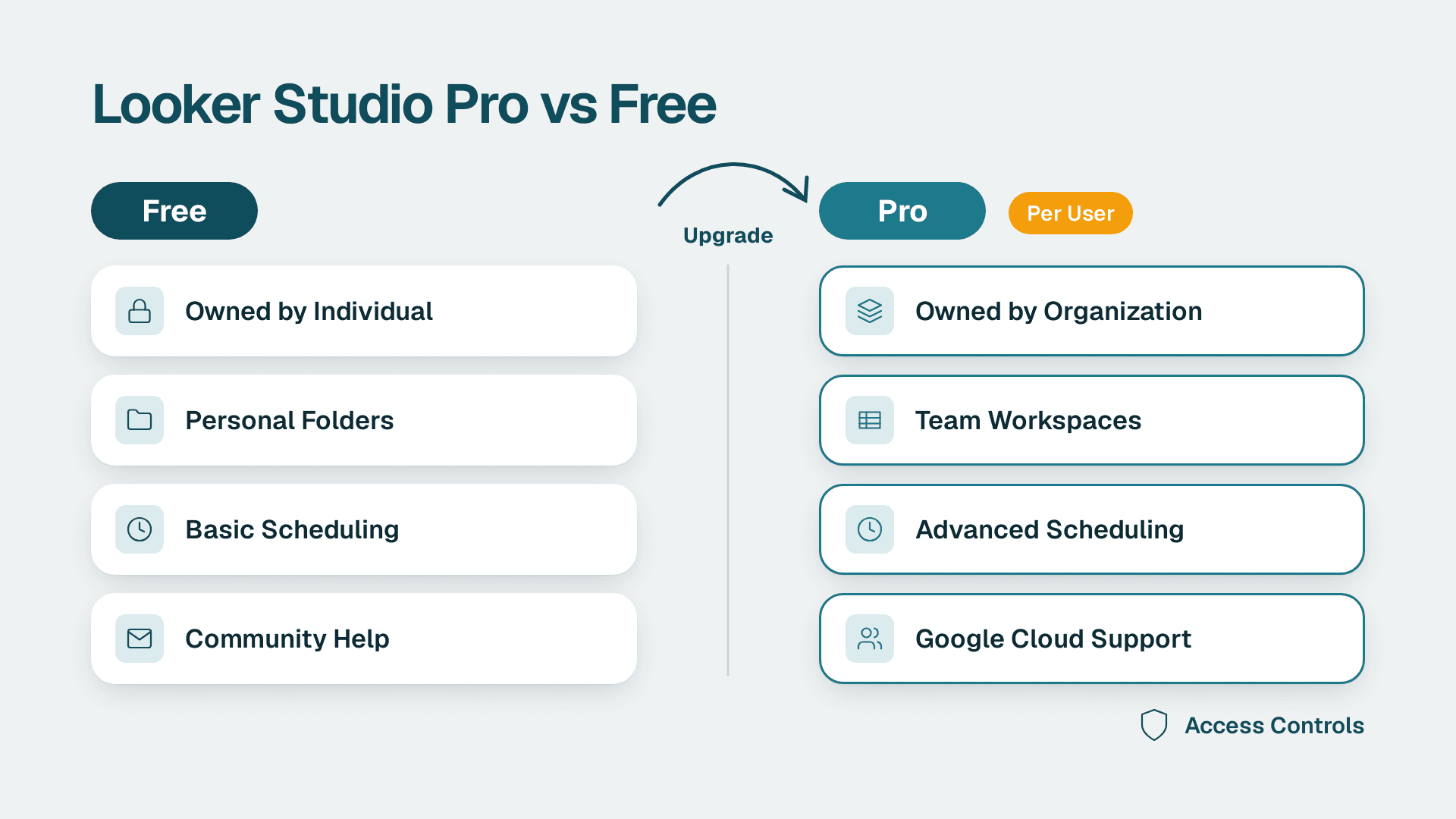
Looker Studio Pro is worth paying for when more than one person builds or owns dashboards, which describes most agencies and ops teams. It adds organization-owned assets, team workspaces, heavier scheduling, security controls and Google Cloud support. A solo analyst with a handful of reports will be fine on the free version.
Key Takeaways
- Pro changes who owns your reports: the organization, not the person who built them.
- Team workspaces and role-based access are the biggest day-to-day upgrade for agencies.
- Pro is billed per user and tied to a Google Cloud project, so check the current price on Google's pricing page before budgeting.
- Security extras (customer-managed encryption keys, data residency) matter mainly for regulated clients.
- If your reports are few, personally owned and rarely scheduled, stay on the free version.
Quick Comparison
The table below summarises the differences. If you want help deciding for your own account structure, our Certified Looker Studio consulting team can audit it. Google's own documentation now calls the product Data Studio Pro, so you will see both names in the wild.
| Criteria | Looker Studio (free) | Looker Studio Pro |
|---|---|---|
| Cost | No licence fee | Paid, per user per month, billed through a Google Cloud project |
| Asset ownership | Individual user who created the report | The organization, optionally linked to a Google Cloud project |
| Collaboration | Sharing report by report | Team workspaces with Manager, Content Manager and Contributor roles |
| Scheduling | Basic email scheduling | Up to 200 delivery schedules per report, Google Chat delivery, chart alerts |
| Security and compliance | Standard Google account controls | Customer-managed encryption keys, customer-managed storage, data residency |
| Support | Community and help pages | Google Cloud Customer Care |
| Setup time | Minutes | Hours to days, because it needs a Cloud project and billing set up |
| Best fit | Solo analysts, small teams, light reporting | Agencies and mid-market teams with shared, client-facing dashboards |
How Much Does Looker Studio Pro Cost?
Pro is a per-user monthly subscription billed through Google Cloud, and the free version costs nothing. I am not quoting a dollar figure here because third-party pages disagree, and the price depends on how your subscription and projects are set up. Confirm it on Google's pricing page the day you buy.
The cost question that matters more than the headline rate is who needs a licence. Not every viewer has to be a paid user in the way many teams assume, so map your people into three groups before you budget:
- Builders who create and edit reports every week. These almost certainly need Pro.
- Managers who organise workspaces, move content and set permissions.
- Viewers such as clients or executives who only open dashboards.
A ten-person agency with four builders has a very different bill from one that licenses everyone. Check Google's current licensing terms for how viewers are treated, and watch how the subscription attaches to projects. Several buyers have been caught out by the per-project aspect of billing, so read the checkout screen carefully. If you also run a Looker instance, some Pro licences may come at no cost, which is described in Google's subscription overview.
For a wider view of what a reporting stack costs once you add connectors and build time, our instant project cost calculator gives a rough estimate.
Is Looker Studio Free of Cost, and What Do You Lose?
Yes, the standard version is free, and for most small teams it does the job. You get the report editor, the connector library and sharing by link or by email address. What you give up is the organizational layer around the reports.
On the free tier, each report and data source belongs to a person. That is perfectly fine while one analyst owns everything. It becomes a risk once clients depend on those dashboards, because the dashboards live and die with individual accounts.
If you are still learning the product, start free. Our guide to copying and customizing a Looker Studio template shows how far you can get without paying anything, and the marketing dashboard examples show what a finished agency-grade report looks like.
What Do Team Workspaces and Asset Ownership Change?
This is the main reason agencies upgrade. With Pro, reports and data sources belong to the organization rather than individual users, and content can be linked to a Google Cloud project. Administrators can then set project-level permissions with IAM.
Asset ownership
With the free version, a departing employee's reports are a handoff problem. Someone has to transfer ownership, and if the account is suspended first, dashboards and data source credentials can break. Under Pro, the organization owns created content, managed through the Google Cloud project by default, so ownership transfers are not needed when employees leave. For an agency with staff turnover, that alone can justify the cost.
Team workspaces
A team workspace gives members automatic access to everything inside it. Permissions follow the role granted:
- Manager controls the workspace and its membership.
- Content Manager can create, edit and organise content.
- Contributor can add and edit content with narrower rights.
A workspace can be shared with individuals or Google Groups, and all members get access to content created in or moved into it. In practice, that means you can build one workspace per client, add the account team's Google Group once, and stop sharing reports one by one. Adding a new hire becomes one group change instead of forty sharing dialogs.
Personal report links
Pro also supports personal report links. Each person who opens one gets their own copy, so they can explore and edit without touching the original. This is useful for stakeholders who like to tinker and for any team that has had a client accidentally break a live dashboard.
Does Looker Studio Pro Improve Governance and Security?
Yes, but mostly for teams with compliance obligations or enterprise clients. The governance gains come in two layers: control over who can see and change content, and control over where data and keys live.
On the access side, project-level IAM permissions let your admin team manage Looker Studio access with the same tooling used for the rest of Google Cloud. That is cleaner than auditing sharing settings report by report.
On the data side, Pro adds:
- Customer-managed encryption keys (CMEK) so you hold the keys.
- Customer-managed storage, with file uploads going to your own Cloud Storage bucket and data extracts going to your own BigQuery dataset.
- Data residency options for clients who require data to stay in a region.
If a client's security questionnaire asks where extracts are stored and who controls encryption, the free version leaves you with weak answers. Pro gives you specific ones. If nobody has asked those questions yet, you are probably not paying for governance you will use.
A caution on cataloguing: Google's introductory post noted that integration with Dataplex was in private preview at the time, so do not plan a data catalogue strategy around it without checking its current status.
Governance is also about knowing what you have. Whichever tier you use, a periodic clean-up of unused assets pays off, and our walkthrough on finding duplicate workbooks and unused dashboards applies the same logic.
What Does Support Look Like, and Is There an SLA?
Pro gives you a real support channel, which the free version does not. Data Studio Pro customers have access to Google Cloud Customer Care support services. On the free tier you rely on help pages and community forums.
The word SLA deserves care. I have not seen a published response-time commitment for Pro that I can verify, so do not assume one. If an SLA matters to your contract with a client, ask Google or your reseller for the written terms of your support plan before you promise anything downstream. Support tiers within Customer Care can differ, and the response times you get depend on the plan you hold.
What you can say with confidence is that a dashboard outage on a free account has no escalation path, while a Pro account has one. For client-facing reporting where a broken dashboard affects someone's Monday morning meeting, that difference is practical rather than theoretical.
Does Pro Improve Scheduling and Alerts?
Yes, and the limits are generous for most agencies. Pro customers can add up to 200 delivery schedules to a single report, deliver reports to Google Chat, and set up alerts that fire when a chart meets criteria you specify.
That matters in two ways:
1. Client-by-client delivery. One report template with a filter can send a tailored PDF to many recipients on different schedules.
2. Exception reporting. Instead of sending a weekly dashboard nobody opens, you alert the team only when spend spikes or conversions drop.
If your main need is automated delivery rather than ownership or governance, compare the options in our roundup of automated reporting tools for professional services firms. Pro may not be the cheapest route if scheduling is your only pain.
Is Looker Studio Still Relevant?
Yes. It remains Google's reporting layer for marketing and web data, and Google continues to invest in the paid tier. The best evidence is that Google built a paid team-and-governance tier on top of it rather than retiring it. For GA4, Google Ads, Search Console and Sheets reporting, it is still the path of least resistance.
It is a reporting and visualisation tool, not a modelling platform. Pro does not change that. If your needs include a governed semantic layer, reusable metric definitions across the company and heavy data modelling, you are looking at a different class of product.
Is there a difference between Looker and Looker Studio?
Yes. Looker is Google's enterprise BI platform with a modelling layer, while Looker Studio is the self-service reporting and dashboard tool. Pro sits inside the Studio family and upgrades it for teams. It does not turn it into Looker. Think of Pro as the team edition of the same editor, not a move up to a modelling platform.
When to Choose Looker Studio (Free)
- You are a solo analyst or freelancer with under a dozen reports, all owned by you.
- Your team is two to four people and everyone already shares a single Google account structure that works.
- Reports are internal and low risk, so an ownership handoff would be an annoyance rather than an incident.
- You schedule a few email deliveries and do not need chat delivery or alerts.
- No client or security questionnaire has asked about encryption keys or data residency.
When to Choose Looker Studio Pro
- You run a marketing agency with a dashboard per client and staff who join and leave during the year.
- You need one workspace per client with role-based access, managed through Google Groups.
- Your clients or your own legal team require CMEK, customer-managed storage or data residency.
- You want alerts and Google Chat delivery instead of manual weekly check-ins.
- You want a support route for dashboards that clients rely on every day.
The Verdict
For agencies and mid-market teams with shared, client-facing dashboards, Looker Studio Pro is worth the money. Organization-owned assets remove the single biggest operational risk of the free version, and team workspaces replace a lot of manual sharing. The cost is justified by the first employee who leaves without a messy handoff. Budget by counting builders and managers, not every person who views a report, and confirm the current price and licence terms with Google before you commit.
The free version is still the better call for a solo practitioner or a small internal team with a few personally owned reports and no compliance pressure. Paying for governance you do not use is just overhead. Start free, and upgrade the day ownership, access control or support becomes a real problem.
If you want a second opinion on your account structure before you buy, talk to our Certified Looker Studio consulting team, who can review your reports, workspaces and licensing and tell you whether Pro pays for itself.
Sources
- About Data Studio Pro (Google Cloud documentation)
- An introduction to Looker Studio Pro (Google Cloud blog)
- Data Studio Pro subscription overview (Google Cloud documentation)
Facts and prices checked October 2026.
---
About Lets Viz: Lets Viz is a data analytics consultancy that has helped teams build, govern and scale dashboards since 2020. We serve marketing agencies, professional services firms, finance teams and distribution businesses, and we hold a 5.0 Clutch rating from client reviews.