Looker Studio Data Sources List: All Connectors by Category
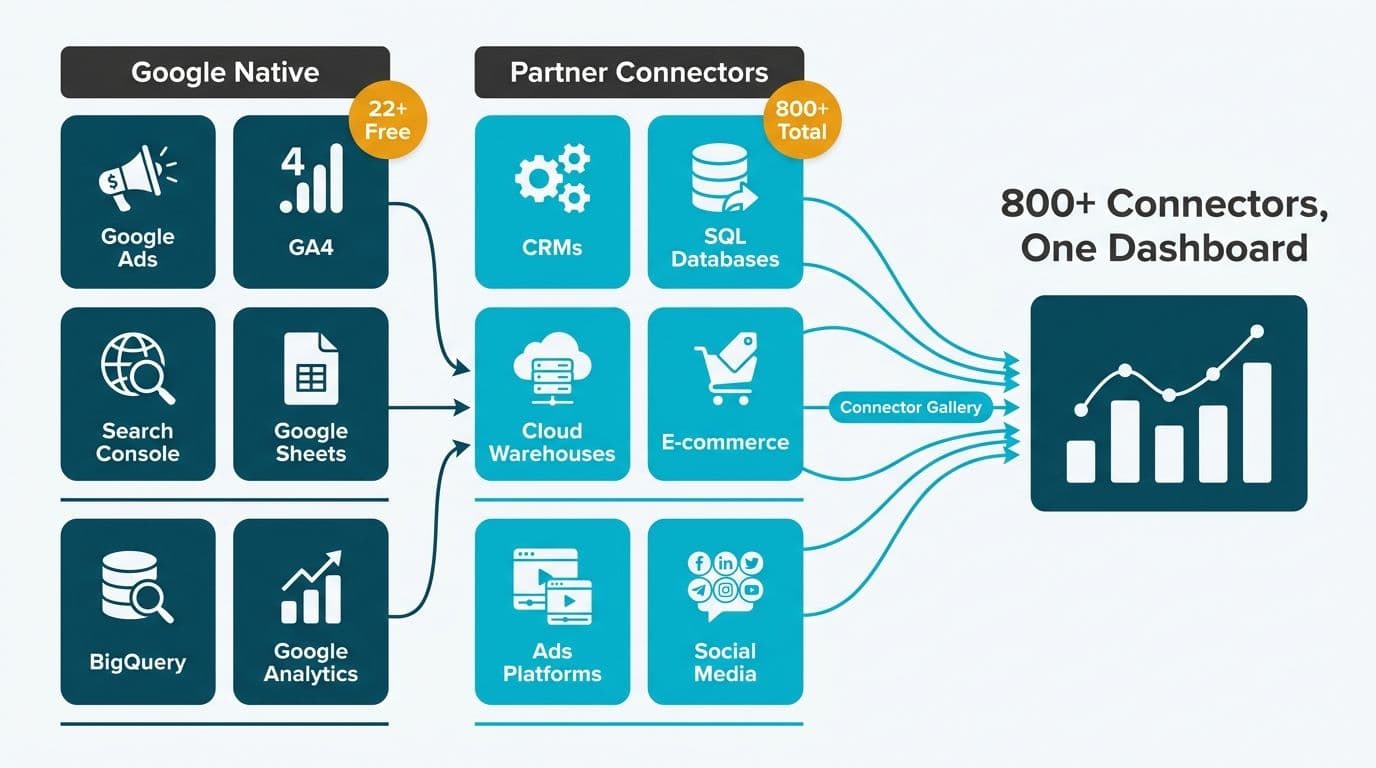
Looker Studio connects to more than 900 data sources (as of 2026) through a combination of 22-plus free native connectors built by Google and hundreds of third-party partner connectors available in the Connector Gallery. The native connectors cover Google's own ecosystem - Ads, Analytics, Search Console, and Sheets - while partner connectors extend reach to CRMs, SQL databases, cloud warehouses, and e-commerce platforms. Knowing which connectors exist, and which tier each falls into, is the first planning step before any Looker Studio dashboard project.
Key Takeaways
Looker Studio offers 22+ free native connectors built and maintained by Google, covering the full Google ecosystem at no additional cost.
900+ partner connectors in the Connector Gallery extend coverage to CRMs, databases, e-commerce platforms, and social media networks.
Connectors fall into clear categories: Advertising, CRM, Databases, E-Commerce, Social Media, and Cloud SaaS.
Free native connectors carry no subscription fee; partner connectors typically require a separate vendor licence.
Healthcare and finance teams in the US, UK, and Canada must verify data residency and compliance capabilities before connecting sensitive datasets.
What Free Native Connectors Does Looker Studio Include?
Looker Studio's free, Google-maintained connectors are the fastest way to get reporting live. They require only the relevant Google account and appropriate permissions - no third-party subscription or connector fee.
Google Advertising
Google Ads
Campaign Manager 360
Display & Video 360
Search Ads 360
Google Analytics and Search
Google Analytics 4 (GA4)
Google Search Console
Google Trends (limited preview connector)
Google Workspace and Cloud Storage
Google Sheets
BigQuery
Google Cloud Storage
Looker (via the Looker API, for teams on the full Looker platform)
Cloud Spanner
Google Business
Google My Business Insights
YouTube
YouTube Analytics
YouTube Studio
These connectors refresh on Google's own schedule - typically live or daily incremental updates depending on the source. For teams operating primarily inside Google's ecosystem, such as a US SaaS finance team running GA4 alongside Google Ads, the free native connectors alone can power a complete marketing and revenue analytics stack without any additional connector spend.
Working with a Certified Looker Studio consulting partner at the start of a project helps map these native connectors to your specific reporting objectives, identify where a partner connector is genuinely needed, and prevent unnecessary complexity in the data source architecture.
What Is the Complete Looker Studio Data Sources List by Category?
Beyond Google's native set, the Connector Gallery lists more than 900 partner connectors built using the Looker Studio Connector SDK. These are maintained by their respective vendors, and pricing varies - some are free while others require a monthly or annual subscription to the connector provider.
The table below organises the most widely used connectors by category, with notes on common reporting use cases.
| Category | Representative Connectors | Typical Use Case |
|---|---|---|
| **Advertising** | Meta Ads, LinkedIn Ads, TikTok Ads, Pinterest Ads, Bing Ads, Amazon Ads | Cross-channel media spend vs. conversion reporting |
| **CRM and Sales** | Salesforce, HubSpot, Pipedrive, Zoho CRM | Pipeline velocity, deal stage, and rep performance |
| **Databases and Warehouses** | MySQL, PostgreSQL, Snowflake, Amazon Redshift, Databricks, Azure Synapse | Direct query or extract from analytical data stores |
| **E-Commerce** | Shopify, WooCommerce, Amazon Seller Central, Magento | Order volume, revenue, and abandoned cart metrics |
| **Social and Content** | Facebook Insights, Instagram Business, LinkedIn Pages | Audience growth and content engagement reporting |
| **Cloud SaaS and Operations** | Stripe, Zendesk, Intercom, Airtable, Notion | Subscription, support, and product usage metrics |
| **Finance and Accounting** | QuickBooks, Xero, NetSuite (via middleware) | P&L, cash flow, AR/AP dashboards |
| **HR and Workforce** | BambooHR, ADP (via middleware), Workday | Headcount, attrition, and payroll cost reporting |
Partner connectors are added through the same Add data workflow as native connectors, but the authorisation flow routes through the vendor's own OAuth or API key system rather than through Google directly.
How Do Looker Studio Data Sources Work Under the Hood?
A data source in Looker Studio is a reusable configuration layer that sits between a raw dataset and one or more reports. Each data source stores connection credentials, field definitions, calculated fields, and default aggregation rules. A single data source can power multiple reports - update a field definition once, and every report referencing that source reflects the change automatically.
Three connection modes determine how data moves from source to report:
Direct query: Looker Studio fires a live query against the source system each time the report loads. Delivers near-real-time data but can be slower at scale and places load on the source system.
Extract: Looker Studio pulls a scheduled snapshot on an hourly or daily cadence and caches it in Google's infrastructure. Dashboard loads are faster, but data may be up to 24 hours behind the source.
Blending: Combines up to five data sources in a single chart using a shared join key - for example, merging Google Ads spend data with Shopify revenue on a campaign ID to calculate blended return on ad spend.
For a UK fintech firm managing FCA-regulated customer data under GDPR, the distinction between direct query and extract carries real compliance weight. Direct query leaves data resident in the source system; extract creates a temporary Google-hosted copy. Teams subject to GDPR should review Google's data processing addendum before enabling extract mode on any dataset containing personal information.
Which Looker Studio Connectors Are Best for Healthcare and Finance Teams?
Healthcare and finance are the two verticals where connector selection extends beyond convenience and into compliance and data governance requirements.
Healthcare (US and Canada)
US healthcare organisations operating under HIPAA must ensure that any data flowing through Looker Studio does not expose protected health information (PHI) without a covered Business Associate Agreement (BAA). Google provides a BAA for Google Workspace and Google Cloud services, which covers BigQuery. This makes BigQuery the recommended connector backbone for US healthcare teams: de-identified or aggregated patient data is modelled in BigQuery, Looker Studio connects via the native BigQuery connector, and the BAA coverage chain remains intact.
Our Healthcare KPI Dashboard Examples by Department guide maps common connector requirements to clinical and financial KPIs across acute care, payer, and ambulatory settings.
Canadian healthcare organisations under PIPEDA - and particularly those in Quebec subject to Law 25 - face similar data residency considerations. Data flowing into Google-managed extract caches may raise concerns in stricter provincial jurisdictions. Direct-query BigQuery with a Canadian regional dataset (northamerica-northeast1 or northamerica-northeast2) is the cleaner compliance path and eliminates ambiguity in cross-border data reviews.
Finance (US, UK, and Canada)
Finance teams commonly connect:
Payment processors (Stripe, Adyen) via partner connectors for subscription revenue, churn, and cohort reporting
CRM platforms (Salesforce, HubSpot) for pipeline-to-closed-revenue dashboards
BigQuery as a central warehouse consolidating general ledger data from NetSuite, QuickBooks, or Xero via an ELT pipeline
A US SaaS finance team running SOC 2 Type II audits should document every Looker Studio data source as part of its system inventory and verify that connector vendors hold their own SOC 2 certification. A UK fintech firm under GDPR obligations should confirm that partner connector vendors have executed a compliant data processing agreement before enabling data flows through their infrastructure.
For a side-by-side look at platform costs across BI tools, our Looker vs Power BI Cost Comparison covers total cost of ownership at 50 to 500 seats. For broader data privacy guidance, see our AI Analytics Data Privacy Risks: Healthcare Audit Guide.
How Do You Add a New Data Source in Looker Studio?
Adding any connector - native or partner - follows five steps regardless of the platform:
1. Open Looker Studio at lookerstudio.google.com and create or open an existing report.
2. Click Add data in the toolbar (or navigate to Resource > Manage added data sources).
3. Search the connector gallery - type the platform name, for example "Shopify", "Snowflake", or "BigQuery".
4. Authorise the connection. Native Google connectors use your Google account directly. Partner connectors redirect to the vendor's OAuth flow or ask for an API key or service account credentials.
5. Configure fields: select the table or dataset, apply row-level filters if needed, define any calculated fields, then click Add to report.
Once added, the data source appears in the field panel and can be reused across multiple charts and pages without re-authorising.
Workspace-level shared data sources are the right choice for larger teams. Created independently from any single report, they allow multiple report builders in the same organisation to reference the same authorised connection - reducing credential sprawl and making permission audits traceable. This matters particularly for a Canadian manufacturing company managing role-based access controls under ISO 27001 or a SOC 2 programme, where system access evidence is collected during every audit cycle.
What Are the Limits of Looker Studio Data Sources?
Looker Studio is a visualisation and reporting layer, not a transformation or modelling tool. Understanding its limits prevents surprises after go-live.
Row limits: Most partner connectors cap queries at 1 million rows. The native BigQuery connector handles billions of rows, but query processing costs accrue at the BigQuery billing layer.
Blending scope: Data blending supports a maximum of five sources and defaults to a left outer join. Complex multi-table models should be resolved in the upstream warehouse before reaching Looker Studio.
Refresh cadence: Most partner connectors refresh every 12 to 24 hours. Sub-hour or real-time requirements need direct-query mode against a live or streaming data source, not an extract-based partner connector.
Connector reliability: Partner connectors depend on the vendor's own infrastructure. When Meta deprecated Graph API v16 in mid-2024 and v17 in early 2025, dozens of third-party Meta Ads connectors broke simultaneously until vendors shipped updated integrations — in some cases leaving executive dashboards dark for 48–72 hours. Teams with SLA expectations on advertising or social data should maintain a BigQuery staging layer as a buffer, so a connector outage stops the feed but does not blank the report.
Organisations increasingly pair Looker Studio with upstream transformation layers such as dbt or Dataform inside BigQuery to address these limits without replacing the visualisation tool. The connector serves as the last mile; the warehouse does the heavy lifting.
When Should You Use BigQuery as Your Central Looker Studio Data Source?
BigQuery occupies a unique position in the Looker Studio ecosystem: it is both a free native connector and the most scalable, compliance-friendly backend available to teams in any geography.
Use BigQuery as the central data source when:
You are combining data from three or more platforms - for example, Salesforce CRM plus Stripe billing plus GA4 web analytics
Row counts exceed 500,000 and report load times are becoming a problem for end users
You need a documented BAA (HIPAA), data processing addendum (GDPR), or regional data residency (PIPEDA) for data at rest
Your analytics engineering team is already running dbt or Dataform models in Google Cloud
The architecture is straightforward: ELT pipelines load source data into BigQuery, the analytics team models it into curated views using dbt, and Looker Studio connects to those views. Because the BigQuery connector is free within Looker Studio, all compute costs are managed at the BigQuery billing layer - where partitioned tables and clustering keep query costs predictable at scale.
Throughout 2026, three dominant themes continue to shape healthcare analytics: value-based care, AI-driven analytics, and payer analytics innovation, according to Medinsight's 2026 industry analysis. Each theme requires richer, more integrated data pipelines across clinical, financial, and operational systems - exactly what BigQuery as the central Looker Studio hub delivers. Broader AI-driven use cases across both healthcare and finance are explored in our AI Analytics Use Cases in Healthcare Finance.
---
About Lets Viz: Lets Viz has delivered data analytics and BI consulting to US healthcare systems, UK fintech firms, Canadian manufacturing companies, and global SaaS organisations since 2020, earning a 5.0 Clutch rating. Our certified consultants build Looker Studio connector architectures that meet HIPAA, GDPR, and PIPEDA requirements without sacrificing dashboard performance or team autonomy.
Ready to connect the right data sources for your reporting stack? Our Certified Looker Studio consulting team designs, implements, and maintains Looker Studio data source architectures for healthcare, finance, and SaaS organisations across the US, UK, and Canada.