Looker Studio Connector Types Comparison: 2026 Decision Matrix
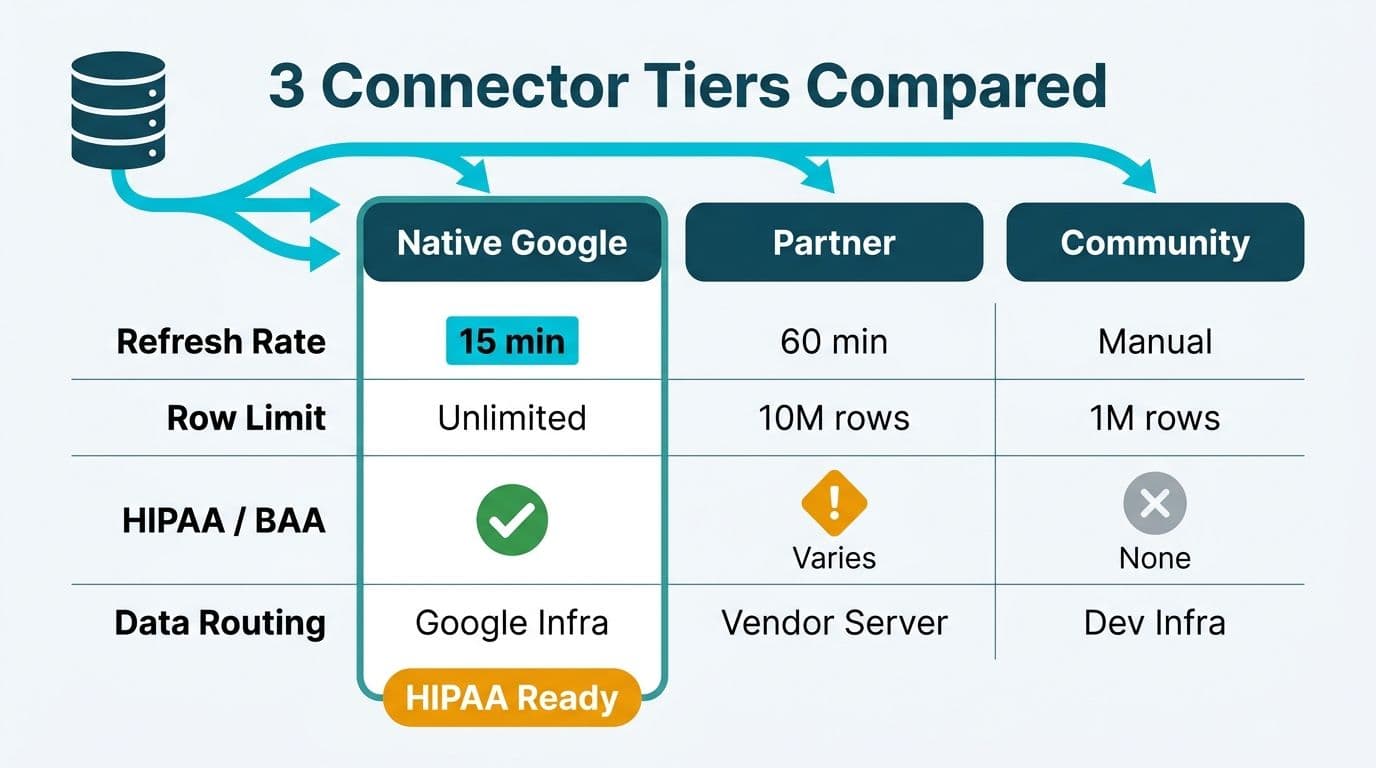
Looker Studio organizes data connectivity into three tiers: native Google connectors maintained by Google, partner connectors built by third-party vendors and listed in the Connector Gallery, and community connectors created by independent developers via the Apps Script API. Each tier differs in refresh cadence, row-volume limits, and data routing - factors that determine whether a connector is viable for GDPR, PIPEDA, or HIPAA-regulated workloads.
Key Takeaways
Native Google connectors keep data within Google's infrastructure, support HIPAA BAAs, and offer GDPR-compliant EU region storage in BigQuery
Partner connectors route data through third-party servers and require a signed DPA - and for EU personal data, Standard Contractual Clauses - before deployment
Community connectors carry no formal data processing agreements and are not suitable for regulated healthcare or financial data
Refresh rates span near real-time (BigQuery native) to manual-only; Apps Script execution limits cap community connector row volumes at roughly 10,000 to 50,000 rows
A compliance-first decision matrix should evaluate connector tier before evaluating features
What Are the Three Types of Looker Studio Connectors?
Looker Studio's three connector tiers carry materially different technical and legal properties. Understanding the taxonomy is the first task for any data team building reports against regulated data - and it is the lens our Certified Looker Studio consulting team applies at the start of every engagement.
Native Google connectors are built, maintained, and certified by Google. They include BigQuery, Google Analytics 4, Google Ads, Google Search Console, Google Sheets, Campaign Manager 360, Display and Video 360, and other first-party Google products. Because Google controls both the connector and the underlying infrastructure, these connectors benefit from Google's Cloud Data Processing Addendum, EU-region data storage options in BigQuery, and HIPAA Business Associate Agreements available for covered Google Cloud services.
Partner connectors appear in the Looker Studio Connector Gallery and are developed by third-party software vendors - payroll systems, CRM platforms, cloud data warehouses, and marketing attribution tools all publish connectors here. Google reviews connectors for basic functionality but carries no compliance certification responsibility. Data extracted through a partner connector transits the partner's own servers before Looker Studio receives it, creating a data sub-processor relationship your legal and compliance teams must formalize before deployment.
Community connectors are open-source tools built by individual developers using the Looker Studio Data Source Connector API, which runs on Google Apps Script. They appear alongside partner connectors in the gallery but receive no formal security or data-handling review. Response sizes are constrained by Apps Script execution limits — a maximum 6-minute runtime and 10 MB response payload per invocation — limits Google has not raised since the connector API launched; at 2026 data volumes, most production datasets outgrow these caps within 12 to 18 months of deployment.
For organizations in healthcare or financial services - governed by HIPAA, SOC 2, GDPR, or Canada's PIPEDA - the connector tier is the first filter to apply, not the last.
How Do Refresh Rates and Row Caps Differ Across Connector Types?
Native connectors deliver the highest throughput and most flexible refresh options; community connectors are the most constrained. Choosing the wrong connector for a high-volume financial dashboard can leave executives reviewing stale data on a report that appears current.
Refresh Rate by Connector Tier
Native Google connectors offer the most control. BigQuery connections query live data on each report load - subject to BigQuery slot capacity - enabling near-real-time reporting. Google Analytics 4 and Google Ads data carry Google's own processing latency (typically 24 to 48 hours for GA4, though intraday data surfaces up to three times daily as of 2026) but the connector adds no additional caching delay. Google Sheets refreshes on demand when a viewer opens or manually triggers the report.
Partner connectors introduce a cache layer managed by the partner. Most cache data for 12 to 24 hours; premium tiers on some platforms offer 15-minute or hourly refresh windows. The refresh schedule is governed by the partner's infrastructure, not Looker Studio - a distinction that matters when regulators require timestamp accuracy in financial reporting.
Community connectors refresh only when Apps Script executes. Most implementations rely on a scheduled trigger - hourly, daily, or manual - subject to Google's Apps Script quota limits: a 6-minute maximum runtime and a 90-minute aggregate daily execution budget per user on free accounts.
Row Caps Across Connector Types
| Connector Type | Typical Row Limit | Configurable? | Key Constraint |
|---|---|---|---|
| Native - BigQuery | Effectively unlimited | Yes (query design) | BigQuery slot quotas, not the connector |
| Native - Google Analytics 4 | Up to 1,000,000 per query | Partial | Sampling above threshold; GA4 360 raises cap |
| Native - Google Sheets | Sheet size dependent | Yes | 10 million cell limit per spreadsheet |
| Partner | 10,000 - 500,000 (varies by plan) | Vendor-dependent | Free tiers often cap at 10,000 to 50,000 rows |
| Community | ~10,000 - 50,000 | No (Apps Script bound) | Hard cap at 10 MB response and 6-minute execution |
A US insurance carrier building a claims-frequency dashboard would exhaust most partner connector row caps within weeks of data growth. BigQuery native connectivity is the appropriate path for any report running against a dataset exceeding 100,000 rows.
What Data-Residency Risks Do Partner and Community Connectors Carry?
Data residency is typically the first question regulators ask. When a Looker Studio report connects through a partner connector, data physically moves from the source system to the partner's server before Looker Studio receives it. That routing step can violate GDPR Article 46, PIPEDA's cross-border transfer accountability obligations, or a US healthcare organization's HIPAA minimum-necessary principle - depending on where the partner's servers are located and what they log.
Native connectors carry the lowest residency risk. BigQuery supports region-specific datasets: a UK fintech firm can confine data to the europe-west2 (London) region, satisfying GDPR's data localization expectations without custom architecture. Google's EU Data Processing Addendum is standard for Workspace customers and applies across native connectors.
Partner connectors require due diligence that data teams routinely skip. Before enabling a partner connector for regulated data, obtain:
A signed Data Processing Agreement (DPA) from the connector vendor
Confirmation of server regions where data is processed and stored
Standard Contractual Clauses (SCCs) for any transfer from the EEA to non-adequacy countries
Evidence of SOC 2 Type II or equivalent certification
For Canadian organizations subject to PIPEDA and Quebec's Law 25, the accountability obligation runs further: your organization remains responsible for data protection after it crosses to a sub-processor. A Canadian financial services firm using a partner connector hosted on US infrastructure must document the transfer, assess residual risk, and disclose the cross-border flow in its privacy notices.
Community connectors present the highest residency risk. The developer's infrastructure - which may be a personal Google Cloud project, a shared hosting environment, or no persistent server at all - handles your data with no contractual protection. Critically, this means a data breach by the connector developer creates no enforceable legal remedy: there is no DPA to invoke, no incident-response SLA, and no regulatory disclosure obligation on the developer's part. For any data classified as personal information, protected health information, or financial records subject to regulatory retention rules, community connectors are not a viable option.
Our GDPR Compliant SaaS Financial Reporting: The BI Checklist covers the broader DPA framework that applies to the full BI stack, not just Looker Studio connectors.
How Does GDPR and PIPEDA Compliance Differ by Connector Type?
The legal standard under GDPR requires data controllers to conduct a Transfer Impact Assessment for any personal data leaving the EEA. Under PIPEDA, the standard is comparable protection - your Canadian organization must ensure the sub-processor protects data to a standard equivalent to Canadian law, even when processing occurs abroad.
| Compliance Framework | Native Connectors | Partner Connectors | Community Connectors |
|---|---|---|---|
| GDPR (EU/UK) | Google DPA applies; BigQuery supports EU region-locking | Requires DPA + SCCs per vendor | No DPA available; not permissible for personal data |
| PIPEDA (Canada) | BigQuery Montreal region available | Requires documented cross-border transfer agreement | No enforceable accountability instrument |
| HIPAA (US Healthcare) | BAA available for BigQuery and covered Workspace services | BAA required per vendor; most do not offer one | No BAA mechanism; not eligible for PHI |
| SOC 2 (US Finance/SaaS) | Google Cloud SOC 2 Type II certified | Verify per vendor independently | No certification pathway |
GDPR compliance by connector tier:
Native: Google's standard terms include GDPR-compliant DPA provisions. EU data processed through BigQuery can be region-locked to an EEA region. Acceptable for most regulated use cases.
Partner: Requires an individual DPA with each vendor; SCCs are necessary for US-hosted partners. Feasibility depends on whether the vendor offers these agreements at your contract tier.
Community: No DPA available. GDPR prohibits using community connectors for personal data of EU residents without extraordinary additional controls that typically defeat the purpose of the connector.
PIPEDA compliance by connector tier:
Native: Acceptable. Google Cloud's northamerica-northeast1 region (Montreal) allows BigQuery datasets to remain in Canada for organizations requiring domestic data residency.
Partner: Permissible with documented cross-border accountability agreements and disclosure in privacy notices.
Community: High risk; accountability is effectively unenforceable without a contractual instrument in place.
For US healthcare and financial teams: HIPAA BAAs are available for BigQuery and other covered Google Cloud services. No partner connector should process Protected Health Information without a signed BAA - and most vendors will not provide one. The Looker Studio vs Power BI 2026: Decision-Maker's Guide explores how platform choice intersects with these compliance requirements at a broader level.
When Should Finance and Healthcare Teams Choose Native Over Partner Connectors?
Default to native connectors for any dataset containing personal information, financial records subject to SOX or IFRS standards, protected health information, or data crossing jurisdictional boundaries.
Consider a 200-person US health plan administrator building a medical-loss-ratio dashboard in Looker Studio. The actuarial data lives in a claims database. The correct path is loading that data into BigQuery, executing a BAA with Google, and connecting via the native BigQuery connector. Routing claims data through a partner connector to avoid one pipeline step introduces HIPAA exposure that outweighs the convenience.
The same logic applies across geographies. A UK-based asset manager with EU client data and a Canadian subsidiary can use native Google Analytics and BigQuery connectors with EU region settings under the UK GDPR adequacy framework. The Canadian subsidiary, subject to PIPEDA, can use BigQuery with the Montreal region. If either entity needs data from a third-party portfolio attribution platform via a partner connector, vendor DPAs must be in place before the connector is activated - not after the audit.
Partner connectors are appropriate when:
No native Google connector exists for the data source
Row volumes stay within the connector's published caps
You have a signed DPA and verified server regions
The data is not subject to HIPAA, GDPR Article 9 special categories, or equivalent high-sensitivity regulation
For guidance on scoping a compliance review, How Much Does a Looker Studio Consultant Cost in 2026? outlines typical engagement structures for a connector architecture audit.
Looker Studio Connector Types Comparison: Building Your Decision Matrix
A structured decision matrix prevents ad hoc connector choices from accumulating compliance debt. Apply this sequence before any new connector is authorized in your environment.
Step 1 - Classify the data. Does the dataset contain personal data (GDPR), personal information (PIPEDA), PHI (HIPAA), or financial records under SOX or IFRS? If yes, community connectors are immediately eliminated from consideration.
Step 2 - Check for a native connector. Google's native connector list covers the most common sources: BigQuery, GA4, Google Ads, Search Console, and Google Sheets. If a native connector exists, use it.
Step 3 - Evaluate partner connectors. If no native connector exists, obtain the vendor's DPA, confirm server regions, request SCCs for EU data if needed, and verify row caps against your data volume projections.
Step 4 - Assess refresh requirements. If your dashboard requires sub-hourly refresh on a dataset exceeding 50,000 rows, most partner connectors will not meet the SLA. Load the data into BigQuery and use the native connector instead.
Step 5 - Record the decision. GDPR Article 30 requires a Record of Processing Activities (RoPA). Each connector used for personal data should appear in the RoPA with the sub-processor's details and the legal basis for any cross-border transfer.
This decision framework applies whether you are a US healthcare insurer building actuarial dashboards, a UK fintech firm monitoring transaction risk, or a Canadian manufacturing company reporting against provincial data obligations.
---
About Lets Viz: Lets Viz is a data analytics consultancy serving US healthcare, UK fintech, Canadian manufacturing, and global SaaS organizations since 2020. With a 5.0 Clutch rating and certified expertise across Google Looker Studio, Power BI, and modern cloud data platforms, Lets Viz helps regulated data teams deploy analytics that meet HIPAA, GDPR, and PIPEDA standards without sacrificing reporting speed.
Ready to build a compliant Looker Studio reporting stack? Our Certified Looker Studio consulting team evaluates your connector architecture and data-residency posture as part of every engagement.