Looker Studio Dashboard for Healthcare Compliance Reporting
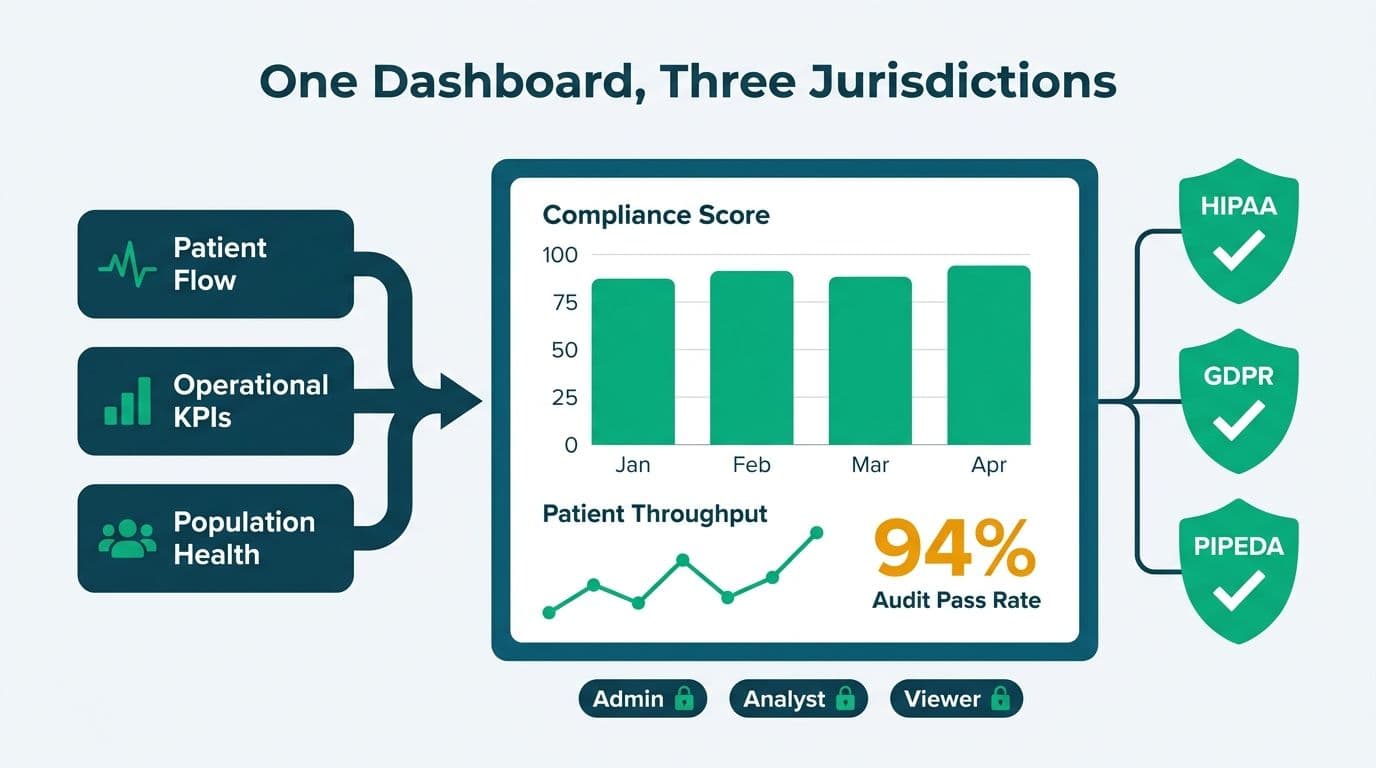
Building a looker studio dashboard for healthcare compliance reporting means centralizing patient-flow data, operational KPIs, and population-health metrics in a governed, role-controlled workspace. When configured on de-identified or appropriately authorized data and backed by Google Cloud's compliance infrastructure, a single dashboard architecture can satisfy HIPAA requirements in the United States, GDPR obligations in the United Kingdom and EU, and PIPEDA rules in Canada - without maintaining a separate analytics stack for each jurisdiction.
Key Takeaways
Looker Studio connects natively to BigQuery, Cloud SQL, and third-party EHR connectors, giving healthcare teams a single reporting layer over multiple source systems
HIPAA compliance requires a signed Business Associate Agreement (BAA) with Google; GDPR and PIPEDA impose additional data-residency and consent controls that affect dashboard architecture
Patient-flow, bed-capacity, and operational KPI views each require distinct data scopes and row-level access rules to prevent PHI exposure across departments
A looker studio healthcare dashboard template can accelerate delivery for operational KPIs, but complex PHI handling almost always requires a custom-built data layer
Role-based access, immutable audit logs, and controlled data-refresh windows are the three non-negotiable governance layers for any compliant healthcare dashboard
What Is a Looker Studio Dashboard for Healthcare Compliance Reporting?
A healthcare compliance dashboard in Looker Studio is a governed, web-based reporting interface that pulls clinical, operational, and financial data from authorized sources - BigQuery, Cloud SQL, hospital information systems - and presents it to role-appropriate users without exposing protected health information (PHI) to unauthorized viewers.
The tool sits at the reporting layer, not the data layer, which is the architecturally important distinction. The data remains in your warehouse or database; Looker Studio queries it at runtime and renders the result. Your compliance program therefore focuses on controlling access to the underlying data store and configuring the connector securely, rather than managing PHI within the reporting tool itself.
Healthcare data teams working with our Certified Looker Studio consulting practice typically land on this architecture when they need live operational visibility - bed census, discharge rates, appointment fill rates - without exporting CSVs that create secondary PHI exposure points. The cloud-native, query-at-runtime model means there is no local data extract that needs to be secured on an analyst's laptop.
How Do HIPAA, GDPR, and PIPEDA Shape a Healthcare Compliance Dashboard?
Each jurisdiction's framework imposes distinct requirements on how patient data flows into and through a dashboard. Understanding those differences before you build prevents costly architectural rework.
HIPAA in the US centers on de-identification, Business Associate Agreements, and the minimum-necessary access principle. GDPR in the UK and EU adds lawful basis for processing, the right to erasure, and explicit data-residency controls. PIPEDA in Canada requires meaningful consent and limits cross-border data transfers unless adequate protections are in place.
The table below maps the key requirements across the three frameworks as they apply to a Looker Studio deployment:
| Requirement | HIPAA (US) | GDPR (UK/EU) | PIPEDA (Canada) |
|---|---|---|---|
| Vendor agreement | Business Associate Agreement (BAA) with Google | Data Processing Agreement (DPA) | Contractual safeguards with third-party processors |
| De-identification | Safe Harbor (18 identifiers removed) or Expert Determination | Pseudonymization strongly recommended | Anonymization preferred; identifiable data needs consent |
| Data residency | No strict residency rule; BAA covers US-based processing | EU/UK data must stay within adequate jurisdictions unless SCCs in place | Cross-border transfer requires equivalent protection |
| Access control | Role-based; minimum necessary standard | Role-based; purpose limitation principle | Need-to-know basis; access logging required |
| Audit logs | Required for covered entities and business associates | Required to demonstrate accountability | Required to demonstrate compliance |
| Breach notification | 60 days to HHS; affected individuals notified | 72 hours to supervisory authority | As soon as feasible to Privacy Commissioner and individuals |
Google Cloud offers a signed BAA covering qualifying services including BigQuery and Cloud SQL, which is the data backbone most compliant Looker Studio healthcare builds use (Google Cloud Security documentation, 2026). UK NHS trusts or private hospital groups deploying Looker Studio for GDPR-compliant reporting must verify that their Google Cloud region is set to `europe-west2` (London) or another EU-adequate region, and that no data flows to non-adequate jurisdictions without Standard Contractual Clauses in place.
A Canadian regional health authority building a PIPEDA-compliant dashboard would typically configure BigQuery in the `northamerica-northeast1` (Montreal) region and document the data-flow mapping to satisfy the Office of the Privacy Commissioner's accountability principle.
For overlapping controls that apply across healthcare and finance reporting, the GDPR Compliant SaaS Financial Reporting: The BI Checklist covers the governance layer in comparable depth.
What Data Sources Can You Connect to a Looker Studio Healthcare Dashboard?
The strongest compliant architecture routes all PHI through BigQuery rather than through direct connector calls to EHR systems. Looker Studio's native BigQuery connector is fast, supports row-level security via authorized views, and keeps service account credentials server-side rather than embedded in a shared dashboard link.
When teams need to connect Looker Studio to a SQL database - for example, a MySQL or PostgreSQL instance running their patient administration system - the recommended path is to replicate that database into BigQuery using Datastream or a managed ETL service, then connect Looker Studio exclusively to the BigQuery layer. Direct SQL connectors in Looker Studio lack native row-level security, meaning a misconfigured connection can expose more data than intended to anyone who opens the report.
Common data sources for a healthcare compliance dashboard:
BigQuery - primary layer for de-identified operational and clinical data; supports authorized views and column-level security
Cloud SQL (via BigQuery Federation) - patient administration systems, scheduling databases, and billing platforms
Google Sheets - acceptable for non-PHI operational benchmarks such as staffing targets and bed-allocation plans
Certified third-party EHR connectors - some EHR vendors publish Looker Studio connectors; verify their BAA coverage and data-handling terms before use
Google Analytics 4 (GA4) - patient portal engagement and appointment booking funnel analytics; no PHI should flow through GA4 in a compliant configuration
A commonly used pattern with US hospital networks is maintaining a BigQuery dataset of de-identified encounter data refreshed nightly from the EHR, then building all Looker Studio dashboards exclusively against that dataset. PHI never enters the reporting layer; compliance review focuses on the ETL pipeline and BigQuery IAM policies rather than the dashboard itself. This approach also makes it significantly easier to demonstrate compliance during audits, since the data flow is documented at the pipeline level rather than scattered across individual report configurations.
How Do You Build Patient-Flow and Operational KPI Views in Looker Studio?
Patient-flow dashboards track how patients move through a care facility: arrivals, triage, bed assignment, treatment, discharge, and readmission. Each stage is a distinct event in the source system, and the dashboard must aggregate those events in real time or near-real time without surfacing individual patient records to unauthorized viewers.
A practical patient-flow view in Looker Studio typically includes these core metrics:
Average length of stay (ALOS) by unit, service line, or payer category
Bed occupancy rate - current occupied beds divided by licensed capacity, updated on a defined refresh schedule
ED wait time - time from arrival to triage, triage to provider, and provider to disposition order
Discharge lag - time elapsed between discharge order and physical discharge, a significant driver of throughput and bed availability
30-day readmission rate - often contractually required for value-based care and bundled payment reporting
Operational KPI dashboards extend this view to staffing ratios, supply chain fill rates, and revenue cycle metrics. For organizations comparing Looker Studio against other platforms for this use case, the Hospital Patient Flow & Bed Capacity Dashboard in Power BI article illustrates how the same KPI set translates across tooling choices.
A US academic medical center might route its ADT (admit-discharge-transfer) feed into BigQuery via an HL7 FHIR integration pipeline, then build Looker Studio views scoped by authorized views - charge nurses see their unit, bed coordinators see the facility map, and the CMO sees the executive summary. Compliance lives at the BigQuery IAM layer; the dashboard is simply a rendering engine.
In the UK, a private hospital group building a GDPR-compliant equivalent would use the same architecture but restrict all data processing to the `europe-west2` region, ensuring that query results returned to the Looker Studio connector never leave UK infrastructure.
What Do Real-World Looker Studio Healthcare Dashboard Examples Look Like?
The six looker studio healthcare dashboard examples below represent the most common production layouts deployed across US hospital networks, UK NHS-affiliated trusts, and Canadian regional health authorities. Each includes the BigQuery data-source configuration and the compliance annotation that applies under HIPAA and GDPR, since those two frameworks govern the majority of production builds.
1. Patient Flow - ADT Event Stream
Data source: HL7 ADT (admit-discharge-transfer) feed ingested into BigQuery via an FHIR integration pipeline, refreshed every 15 minutes. Each row represents one ADT event keyed on a pseudonymous encounter ID, storing unit code, event type, and timestamp - no patient name or date of birth in the BigQuery layer.
Looker Studio layout: Three scorecards across the top (current census, ALOS, bed occupancy rate), a unit-level bar chart with drill-down to individual beds, and an hourly inflow-versus-outflow timeline. A location filter control scopes the entire page to a single unit for charge nurses.
HIPAA/GDPR annotation: BigQuery authorized views restrict each Looker Studio service account to its permitted unit rows - access cannot be bypassed by sharing a report link. Cloud Audit Logs satisfy the HIPAA access-log requirement. GDPR deployments lock the dataset to the `europe-west2` region.
2. Payer Mix and Revenue Distribution
Data source: Claims data from the revenue cycle management system, loaded nightly into BigQuery via a managed ETL pipeline. The table holds payer code, DRG, billed amount, and expected reimbursement - no patient name, address, or SSN reaches the reporting layer.
Looker Studio layout: A donut chart of current payer mix (commercial, Medicare, Medicaid, self-pay), a stacked bar chart showing payer-mix shift quarter over quarter, a scatter plot of case-mix index versus average reimbursement by DRG, and a ranked table of the top payer contracts by net revenue.
HIPAA/GDPR annotation: DRG codes combined with facility and date can constitute PHI for small-volume facilities. Row-level security on the authorized view suppresses cells below a minimum count of 10 before the row appears in Looker Studio results, preventing re-identification via small-count inference.
3. Quality Metrics - HEDIS and CMS STAR Ratings
Data source: Pre-computed measure rates produced by a quality analytics engine (Arcadia, Lightbeam, or equivalent) and exported to BigQuery as one row per measure per reporting period per population cohort. No individual-level records reach Looker Studio.
Looker Studio layout: A traffic-light scorecard for each tracked STAR measure (green above threshold, amber within five percentage points, red below), a quarterly trend line per measure, and a comparison table benchmarking facility rates against publicly available CMS national averages.
HIPAA/GDPR annotation: Because the BigQuery table contains only aggregate measure rates, the PHI risk is low. Governance documentation should nonetheless confirm the de-identification method used by the upstream quality analytics engine, since those rates are derived from identifiable source records.
4. Emergency Department Operations
Data source: ED event log from the emergency information system, replicated into BigQuery via Datastream. Each row represents one ED visit event keyed on a pseudonymous visit ID. Chief complaint is stored as a coded category, not free text, to reduce PHI surface area.
Looker Studio layout: A funnel chart tracking average wait time at each stage (door-to-triage, triage-to-provider, door-to-disposition), a left-without-being-seen (LWBS) rate line chart by day of week and shift, an hourly arrival heatmap, and an alert panel showing current diversion status.
HIPAA/GDPR annotation: Triage codes aggregated to small cell counts can constitute PHI. Apply the same minimum-cell-size suppression rule as the payer mix dashboard at the authorized-view layer. For GDPR deployments, verify that service account credentials are not embedded in any published connector URL.
5. Population Health Scorecard by Geography
Data source: Claims data de-identified under HIPAA Safe Harbor (all 18 direct identifiers removed) in BigQuery, joined to publicly available census-tract demographics from BigQuery's public dataset. Geography is stored at census-tract level - not street address - to prevent geographic re-identification.
Looker Studio layout: A Geo chart showing chronic disease prevalence by census tract, a bar chart ranking top conditions by cohort, a gap-rate scorecard for annual screenings (mammography, colorectal, A1C), and a cohort comparison table sliced by age band and risk tier.
HIPAA/GDPR annotation: Data de-identified under HIPAA Safe Harbor does not require PHI-level access controls on the Looker Studio layer, substantially simplifying governance. For PIPEDA deployments in Canada, confirm with your Privacy Officer that the de-identification method satisfies the OPC's expectation of meaningful anonymization before removing BigQuery IAM restrictions.
6. Workforce and Staff Utilization
Data source: Scheduling and payroll data from the workforce management system (Kronos, UKG, or an equivalent), loaded nightly into BigQuery. The table surfaces aggregate metrics by role, unit, and shift - no individual employee name or ID number reaches the Looker Studio layer.
Looker Studio layout: Scorecards for current staffing ratio versus target, a shift-level bar chart comparing scheduled versus actual FTEs, a rolling 90-day trend line for agency spend, and a vacancy heatmap by unit and role.
HIPAA/GDPR annotation: Workforce data is governed by employment law rather than HIPAA for patient-data purposes, but GDPR Article 88 and the corresponding UK GDPR provisions impose data-minimisation obligations on employee analytics. Configure BigQuery authorized views to surface only aggregate shift-level metrics; individual employee records should not be accessible from the Looker Studio layer.
How Do You Build a Looker Studio Patient Acquisition Dashboard for Healthcare?
A looker studio patient acquisition dashboard for healthcare solves a different problem than a clinical operations view: it tracks where new patients come from - paid search, organic, referral networks, or specific campaigns - and attributes those sources accurately across multiple clinic locations, all without routing PHI through marketing platforms.
The compliance challenge is significant. Google Ads conversion data and GA4 session data must never be joined to individually identifiable patient records. HIPAA prohibits disclosing PHI to advertising platforms without explicit authorization; GDPR's consent requirements under Article 6 and Article 9 mean that health-related web behaviour can only be processed with explicit, granular consent - not the general cookie consent that suffices for most e-commerce sites.
The architecture that satisfies both constraints separates tracking into two clean layers:
Consent-gated front-end events - appointment booking confirmations fire a server-side conversion event to Google Ads only after consent has been collected and verified. No diagnostic or appointment-type data is passed as a conversion parameter; only a pseudonymous click ID and a conversion label. For GDPR deployments in the UK and EU, the Google Ads consent mode v2 API signals - `ad_user_data` and `ad_personalization` - must be set accurately based on the patient's actual consent record, not defaulted to granted.
Pseudonymous join in BigQuery - the consent record, the CRM new-patient flag, and the GA4 session are joined on a hashed patient identifier inside BigQuery. Looker Studio queries this joined BigQuery table and never touches the raw PII. The result is a patient acquisition view that shows cost per new patient, channel mix, and campaign ROI without any PHI entering the reporting layer.
Multi-location attribution - healthcare groups operating across several sites require location-specific conversion goals in Google Ads and a `clinic_id` dimension in the BigQuery events table. Looker Studio then slices acquisition metrics by location using a filter control, allowing a regional marketing director to compare cost per appointment across clinics without exposing patient volumes from one location to staff at another. Row-level security on the BigQuery authorized view ensures the location filter cannot be overridden by someone with a direct report link.
Referral-source dashboards extend this model to track physician referrals alongside digital channels. An inbound referral from a partner practice is logged in the CRM as a non-digital source; that record joins the same BigQuery acquisition table so the dashboard shows organic referrals, paid search, and physician network contributions in a single blended view. For multi-specialty groups, segmenting acquisition cost by service line - orthopedics versus cardiology versus primary care - reveals which channels drive the highest-value patient relationships, a key input for media budget decisions.
Looker Studio Healthcare Dashboard Template vs. Custom Build: Which Is Right?
The looker studio healthcare dashboard template versus custom build decision comes down to data sensitivity and workflow complexity.
For a small clinic or independent practice, a template built on non-PHI operational metrics - appointment volume, revenue cycle status, staff scheduling - can be a legitimate starting point. The moment PHI enters the picture, templates require substantial modification to meet compliance requirements, and that effort often equals or exceeds a clean custom build.
| Factor | Template | Custom Build |
|---|---|---|
| Time to first dashboard | Hours to days | Weeks to months |
| PHI handling | Requires additional configuration and data layer redesign | Built to your specific data model and PHI scope |
| Row-level security | Limited; depends on connector and template data source | Fully configurable via BigQuery authorized views |
| Compliance documentation | Must be created separately; template owner may not provide it | Part of the build process; documented at each layer |
| Upfront cost | Lower | Higher |
| Long-term risk | Higher if compliance gaps are discovered post-deployment | Lower when compliance is built in from the start |
| Best suited for | Non-PHI operational KPIs, small teams, pilot projects | Regulated data, multi-department, audit requirements |
The practical answer for most mid-market healthcare organizations is a hybrid approach: use a looker studio finance dashboard template or operational template as a wireframe for layout and metric selection, then rebuild the data layer from scratch on a compliant BigQuery architecture. The visual scaffold accelerates stakeholder alignment; the custom data layer carries the compliance weight. A similar calculus applies when evaluating a looker studio financial dashboard template for revenue cycle or CFO-level reporting - the template can define the output format while the data pipeline is engineered to regulated standards.
What Governance Controls Keep a Healthcare Dashboard Audit-Ready?
Three controls determine whether a healthcare dashboard survives a compliance audit without remediation findings.
Row-level access via BigQuery authorized views
BigQuery authorized views enforce data scoping at the warehouse layer, not the dashboard layer. A charge nurse sees only their unit's data; the compliance officer sees facility-wide aggregates. Because the restriction lives in BigQuery IAM, it cannot be bypassed by sharing a Looker Studio report link - the underlying query returns only the authorized rows regardless of who opens the report or how they access it. This is the key architectural advantage over dashboard-layer filtering, which can be circumvented by exporting data or modifying URL parameters.
Immutable audit logs via Cloud Audit Logs
Google Cloud's Data Access audit logs capture every query executed against a BigQuery dataset, including which Looker Studio connector triggered it and which service account or user was active at the time. These logs directly support HIPAA's access log requirements, GDPR's accountability obligations under Article 5(2), and PIPEDA's breach-detection requirements. Export logs to a separate Cloud Storage bucket with a retention policy aligned to your compliance obligation - HIPAA-covered entities are required to retain documentation for six years under 45 CFR 164.530(j) - and apply object-level locks to prevent deletion.
Controlled data-refresh and caching policy
Looker Studio's report-level data freshness setting can cause the tool to cache query results, which may inadvertently retain PHI in an intermediate cache layer. For any Looker Studio view that accesses PHI - even through a de-identified BigQuery authorized view - configure the data freshness to avoid caching and rely on BigQuery's native query cache, which is user-scoped. For non-PHI operational dashboards, scheduled extracts refreshed during off-peak hours are acceptable and reduce per-query BigQuery costs.
Teams evaluating how this governance architecture compares to alternative platforms will find a detailed breakdown in the Looker Studio vs Power BI 2026: Decision-Maker's Guide, particularly for organizations that carry HIPAA obligations in the US alongside GDPR requirements for a UK or EU subsidiary.
How Does Looker Studio Compare to Power BI for Healthcare Compliance Reporting?
When healthcare IT and compliance teams evaluate power bi vs Looker Studio for healthcare compliance reporting, the decision typically narrows to three technical controls: where row-level security is enforced, how deeply audit logs capture activity, and how precisely data residency can be locked per jurisdiction. Each platform handles these differently, and those differences carry real compliance weight for hospital finance, clinical operations, and population-health reporting teams working under HIPAA, GDPR, or PIPEDA.
The table below compares the two platforms on the controls that matter most across all three frameworks:
| Control | Looker Studio + BigQuery | Power BI Premium |
|---|---|---|
| Row-level security | Enforced at BigQuery authorized-view layer; cannot be bypassed via dashboard sharing or URL manipulation | Enforced via Power BI RLS roles; dataset owner can override if they have direct dataset access |
| Audit logging | Cloud Audit Logs capture every BigQuery query, connector call, and IAM change; tamper-evident, exportable to Cloud Storage with object-level locks | Unified Audit Log in Microsoft 365; full activity API access requires Power BI Premium P1 or higher |
| Data residency (HIPAA) | BigQuery region is set at dataset creation; US-only processing enforced via organization policy | Power BI tenant region is org-wide; granular per-workspace residency requires Premium per user or Premium capacity |
| Data residency (GDPR UK/EU) | `europe-west2` (London) or EU multi-region; data never leaves the specified region | UK region (`uksouth`) and EU regions are available; requires validation with your DPA that no transient processing crosses regions |
| Data residency (PIPEDA) | `northamerica-northeast1` (Montreal) enforced via BigQuery resource policy; documented for OPC accountability principle | Canadian Azure region (`canadacentral`) is available; cross-border processing to US must be separately verified |
| HIPAA BAA coverage | Google Cloud BAA covers BigQuery, Cloud SQL, Cloud Storage, and Cloud Audit Logs | Microsoft Online Services BAA covers Power BI; verify specific services in the current BAA version annually |
| GDPR DPA | Google Cloud DPA with EU SCCs and UK IDTA | Microsoft DPA with EU SCCs and UK IDTA |
| Cost to access full compliance controls | All governance controls included in standard BigQuery pricing; no compliance-tier upsell | Full audit log API and advanced RLS configurations require Premium capacity (P1 starts at approximately $4,995/month as of 2026) |
Hospital finance dashboard example: A 600-bed US academic medical centre building a CFO-level revenue cycle dashboard needed HIPAA-compliant row-level security so that departmental finance directors could see only their service line's charge capture, collections, and days-in-AR data, while the CFO saw the consolidated facility view. On Looker Studio backed by BigQuery, authorized views were configured per service line and tied to Google Workspace identity groups. Cloud Audit Logs recorded every query execution - the triggering service account, the timestamp, and the rows scanned - satisfying the HIPAA access-log requirement without any additional tooling or cost tier. A Power BI equivalent on the same data would have required Premium capacity to expose the full activity log API, a meaningful cost differential for a health system that needs the compliance log specifically rather than the broader Premium feature set.
A UK NHS trust performing the same evaluation for a GDPR-compliant finance reporting build found that Looker Studio's per-dataset region lock gave its data protection officer more precise residency documentation than Power BI's tenant-level region setting, which required additional steps to confirm that query results were not temporarily cached outside the `europe-west2` region during processing.
Neither platform is universally superior. Power BI's richer native visualization library and tighter Microsoft 365 integration make it a natural default for organizations already running Azure and Microsoft Fabric. Looker Studio's compliance advantage lies in its layered architecture: governance controls live in BigQuery and Cloud IAM, not in the BI tool itself, which narrows the compliance surface area and makes audits more straightforward. The Looker Studio vs Power BI 2026: Decision-Maker's Guide covers the full feature comparison beyond the compliance-specific controls detailed here.
How Do Population-Health Dashboards Work in Looker Studio?
Population-health dashboards aggregate de-identified patient data to surface care gaps, chronic disease prevalence, and preventive care opportunities across a defined population - without exposing individual records at any point in the reporting interface.
In Looker Studio, a population-health view is built on BigQuery tables that have been de-identified before ingestion using HIPAA's Safe Harbor method (removal of all 18 specified direct identifiers) or the Expert Determination method (statistical validation that re-identification risk is very small). Data that meets either standard can be shared broadly within an organization without triggering PHI access controls, which substantially simplifies the Looker Studio governance layer for population-level views.
Practical metrics for a Looker Studio population-health dashboard:
Chronic disease prevalence by geography, age band, or payer cohort
Preventive care gap rate - the percentage of eligible patients missing annual screenings within a defined period
Readmission risk cohort distribution - patient populations stratified by risk score tier, derived from a predictive model applied before dashboard ingestion
Social determinants index - neighborhood-level factors correlated with utilization patterns, aggregated to census-tract level to avoid individual identification
A Canadian regional health authority in Ontario, building a PIPEDA-compliant population-health dashboard for health system planners, would route de-identified claims data through BigQuery in the `northamerica-northeast1` region and produce population-level views with no individual records accessible from the reporting interface. The AI Workflow Automation for Healthcare Operations (2026) article covers how AI-assisted pipelines can automate the de-identification and validation step before data reaches Looker Studio - increasingly relevant for organizations processing large claims datasets across multiple payers.
Ready to build a HIPAA-, GDPR-, or PIPEDA-compliant healthcare dashboard on Looker Studio? Our Certified Looker Studio consulting practice designs the data architecture, access controls, and audit trail so your analytics team can report with confidence and your compliance team can sleep at night.
---
About Lets Viz: Lets Viz has delivered data and analytics projects since 2020 for US healthcare systems, UK fintech firms, Canadian manufacturing operations, and global SaaS businesses, earning a 5.0 rating on Clutch. Our certified Looker Studio and BI consulting teams specialize in compliant, scalable reporting architectures for regulated industries where governance is not optional.