Looker Studio Data Connectors: Free vs Paid Complete Guide
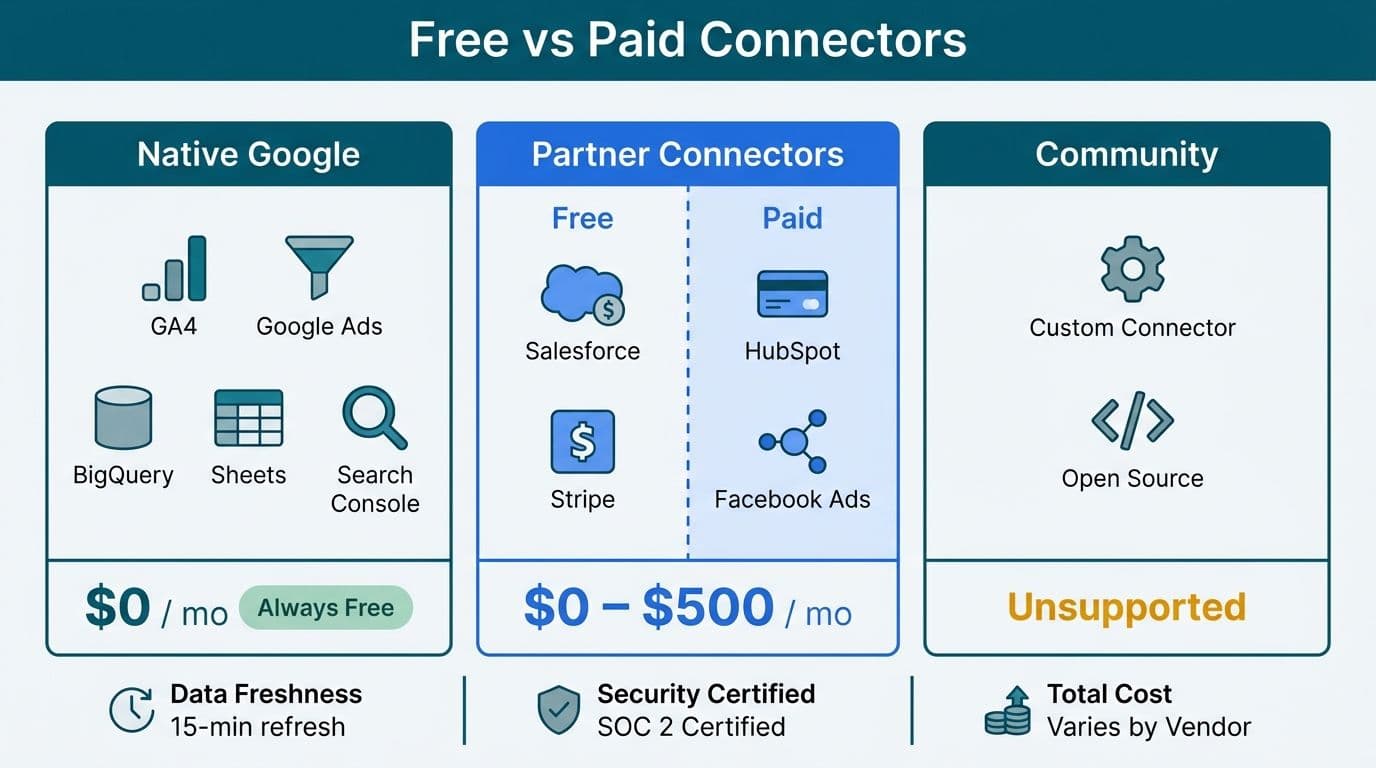
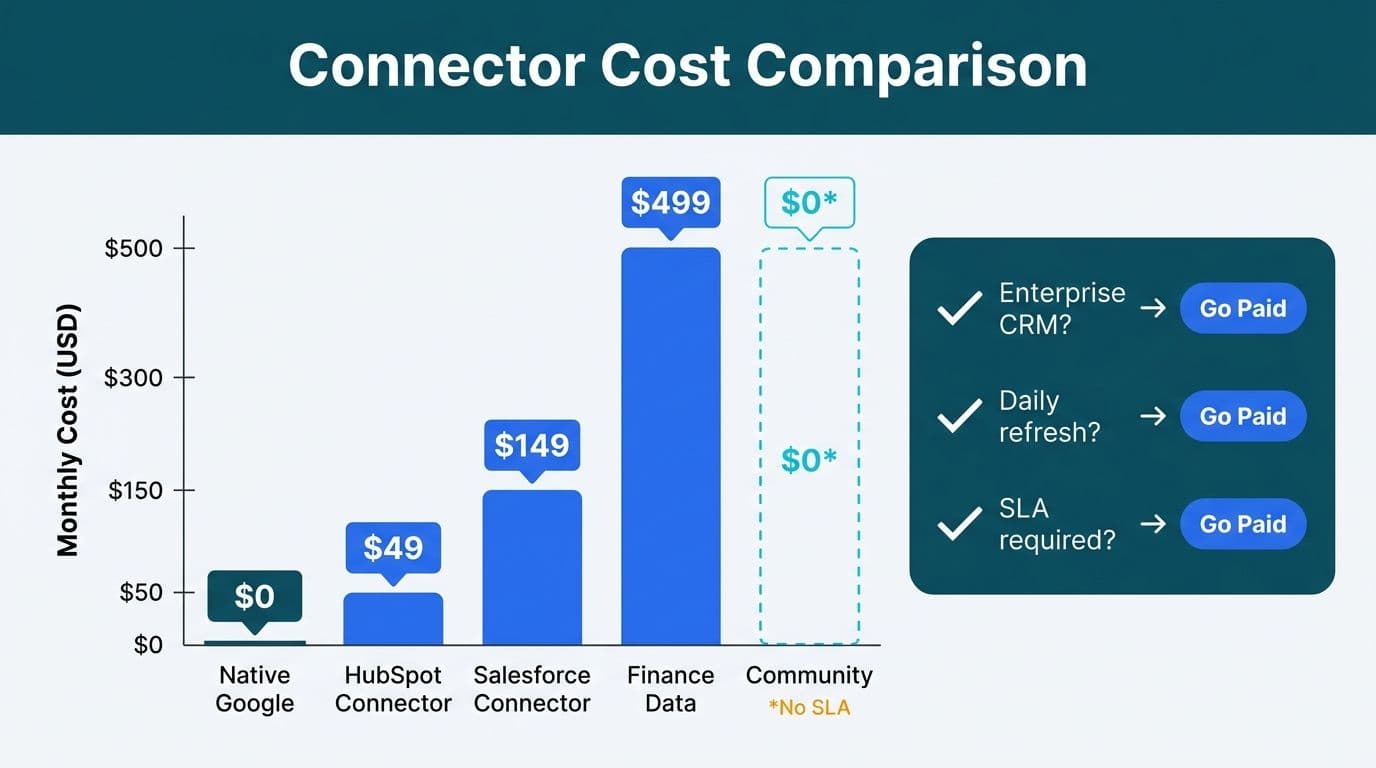
Looker Studio splits its connector library into three tiers: native Google connectors (always free), partner connectors (most free, some paid), and community connectors (free but unsupported). Native connectors cover the full Google stack at no cost. Paid partner connectors become necessary for enterprise CRMs, financial platforms, and operational data sources where third-party vendors charge for API access. Your choice hinges on data freshness, security certification, and total connector cost.
Key Takeaways
- Looker Studio's native Google connectors - covering GA4, Google Ads, BigQuery, Search Console, and the rest of the Google product suite - are free with no per-seat or usage fees.
- Most partner connectors are also free at the basic tier; paid tiers are priced by the connector vendor, not by Google, and costs vary by data source, account volume, and refresh frequency.
- Community connectors carry no direct cost but have no SLA, no security certification, and no vendor support - they are unsuitable for production environments handling sensitive data.
- Healthcare organizations managing PHI and finance teams operating under SOX, GDPR, or PIPEDA should limit connector selection to vendors with documented security controls and signed data processing agreements.
- Connector choice directly affects data freshness: native connectors update in near-real-time, while most free partner connectors refresh only once daily.
What Are Looker Studio Data Connectors and How Do They Work?
A Looker Studio data connector is the bridge between a raw data source and the visualization layer. Each connector authenticates to a source system - via OAuth, API key, service account, or direct database credentials - and presents the data as a structured table that Looker Studio's report builder can query. Connectors do not store your data; they query it on demand or on a defined refresh schedule.
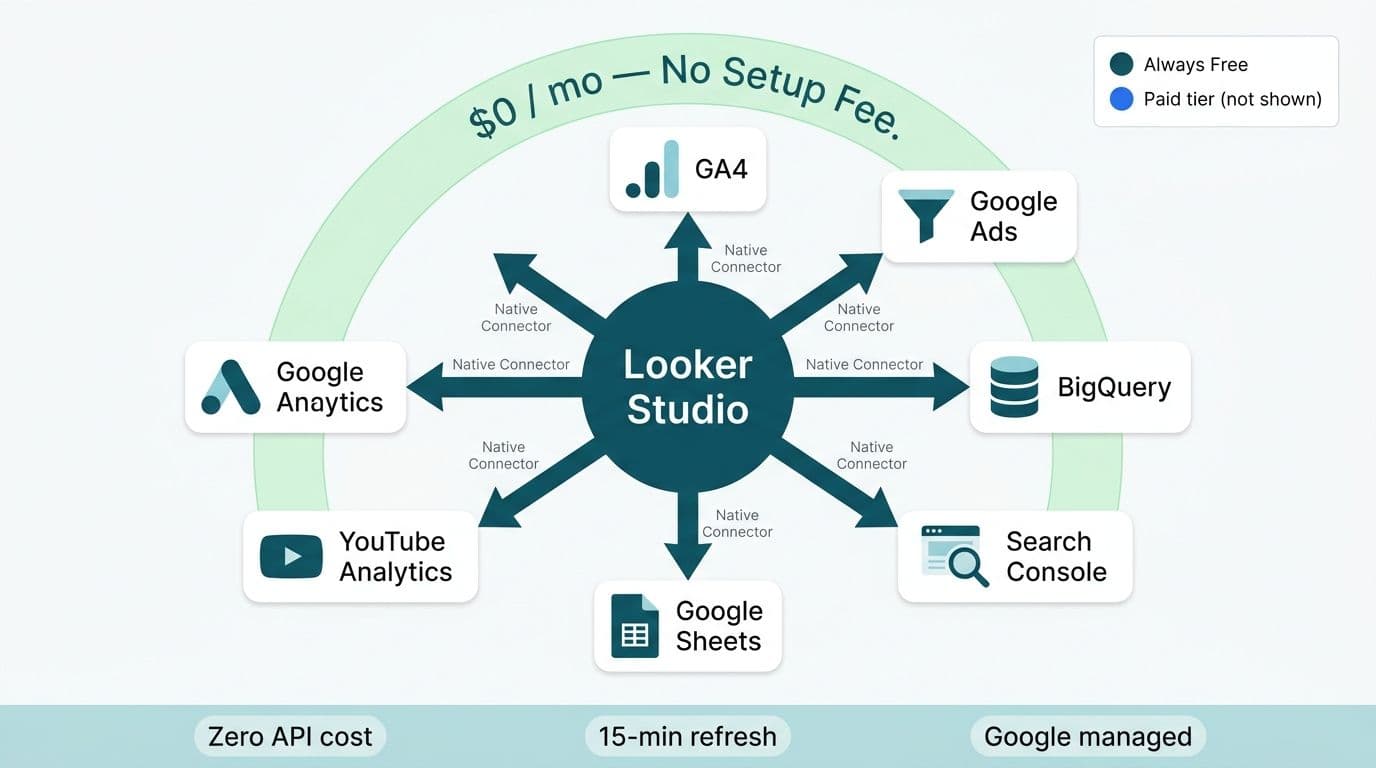
Google maintains three categories of connectors within the product. Native connectors are built and maintained by Google. Partner connectors are built by approved third-party developers and distributed through the Looker Studio connector gallery. Community connectors are built by anyone using the open-source Connector SDK and published without Google's vetting or security review.
If you are evaluating where Looker Studio fits within a broader BI stack - particularly relative to enterprise alternatives - Looker vs Looker Studio: Which Google BI Tool Fits Your Team? covers the positioning in detail. For an overview of what production connector configuration and dashboard delivery looks like in practice, the Certified Looker Studio consulting service page outlines the full engagement scope from connector audit to reporting go-live.
The connector you choose has downstream consequences beyond cost: it determines your data freshness window, the transformations available before data reaches the report layer, and the security posture you can represent to auditors and compliance teams.
Which Looker Studio Connectors Are Free?
Native Google Connectors (Always Free)
Google provides native connectors covering its core product suite, all free of charge (Google Looker Studio Help, 2026). These connectors require no third-party account and are maintained directly by Google:
- Google Analytics 4 - website and app event data
- Google Ads - campaign, ad group, keyword, and conversion data
- Google Search Console - impressions, clicks, position, and page-level data
- BigQuery - full SQL query access to any BigQuery dataset in your GCP project
- Google Sheets - live connection to any sheet in your Google Workspace account
- YouTube Analytics - channel and video performance metrics
- Display and Video 360 - programmatic advertising data
- Search Ads 360 - cross-engine paid search data
- Campaign Manager 360 - ad server impressions and click data
- Google Cloud Storage - CSV or JSON files stored in GCS buckets
- Cloud SQL - managed MySQL, PostgreSQL, or SQL Server on Google Cloud
- Firebase - mobile app event and user data
- Google Forms - survey and form response data
- Google Ad Manager - publisher revenue and impressions
- Merchant Center - product feed and Shopping performance data
For teams already operating inside the Google ecosystem, these native connectors are sufficient for a full marketing dashboard, a client reporting setup, or a search performance monitor - with zero spend on connector infrastructure.
Free Partner Connectors
The partner connector gallery lists hundreds of third-party connectors, the majority of which are free at the basic tier. Common free partner connectors include connections to social media advertising platforms, email marketing tools, project management applications, and CRM systems at the entry level. Free partner connectors typically limit data history (often 12 to 18 months), offer daily refresh only, and may cap the number of accounts or properties you can connect simultaneously.
For a looker studio marketing dashboard template or a looker studio client reporting for agencies use case, free partner connectors often cover the core requirement - pulling ad spend, impressions, and conversions from social platforms into a unified report. The limit appears when a finance director needs intraday refresh or a data team lead needs access to more than 18 months of paid media history without manual exports.
Community Connectors (Free, Unsupported)
Community connectors are built by individual developers and shared in the gallery without Google's security vetting. They are free to use but carry significant caveats: no SLA, no security audit, no vendor support, and no guarantee of continued maintenance. For internal experimentation or connecting to niche platforms with no partner connector alternative, community connectors are a reasonable prototype starting point. For any production report that touches customer PII, financial records, or protected health information, they are not appropriate.
Looker Studio Data Connectors Free vs Paid: The Full Comparison
The table below maps each connector tier against the factors that matter most to data team leads and finance directors:
| Connector Type | Examples | Cost | Refresh Frequency | Security Certification | Best For |
|---|---|---|---|---|---|
| Native Google | GA4, Google Ads, BigQuery, Sheets, GSC | Free | Near real-time to 1 hr | Google SOC 2 / SOC 3 | Google ecosystem, core analytics |
| Free Partner | Social ad platforms, email tools, basic CRM | Free | Daily (some hourly) | Varies by vendor | Marketing dashboards, agency reporting |
| Paid Partner | Enterprise CRM, ERP, financial platforms | Vendor-priced; higher tiers for volume and frequency | Hourly to near real-time | Vendor-certified; varies | CRM, finance ops, ERP reporting |
| Community | Custom APIs, niche SaaS tools | Free | Implementation-dependent | None | Prototypes, internal tools |
Key insight for CIOs: The connector licensing fee is rarely the largest line item. The hidden cost is analyst time spent working around a connector that does not support the data freshness or field-level access your reporting actually requires. A paid connector with hourly refresh and full field access is typically cheaper over a quarter than the analyst hours spent exporting CSVs to patch the gaps in a free connector that falls short.
Paid partner connectors also vary significantly in how they are priced. Some charge per connected account - a structure that compounds quickly for a marketing agency managing many client accounts. Others charge a flat monthly fee for unlimited accounts within one platform. Evaluate the pricing model against your account volume and refresh requirements before committing to a vendor.
How Should CRM, Finance, and Ops Teams Choose the Right Connector?
The choice between native, free partner, and paid connector comes down to four variables: data location, refresh requirements, field coverage, and compliance posture.
Data location determines whether a native connector exists. If your operational data lives in BigQuery, Google Sheets, or Cloud SQL, native connectors cover it at no cost. If it lives in a third-party CRM, ERP, or accounting platform, you need a partner or community connector.
Refresh requirements are critical for operational reporting. A looker studio logistics dashboard template tracking shipment status, carrier performance, or warehouse throughput is meaningless on a 24-hour lag. If your ops team makes intraday decisions, verify the connector's refresh capability before building the dashboard. Most free partner connectors refresh once daily; most paid connectors support hourly or near-real-time refresh via scheduled data pipelines.
Field coverage is the most common silent failure point. A free connector might connect to your CRM but expose only a subset of the fields your finance team needs for deal-stage revenue forecasting or pipeline aging analysis. Paid connectors from enterprise-focused vendors typically expose full schema access, custom fields, and historical data without truncation.
Compliance posture is non-negotiable for mid-market healthcare and finance organizations. A US healthcare firm operating under HIPAA cannot route protected health information through a community connector with no documented security controls. A Canadian manufacturer working under PIPEDA needs to know where connector vendors process and store data before approving the architecture. A UK fintech subject to GDPR must confirm that any connector vendor acting as a data processor has a valid Data Processing Agreement in place before provisioning.
For teams building a looker studio client reporting template for agencies or a looker studio ecommerce dashboard shipping and fulfilment view, the free partner tier is usually sufficient for the reporting layer. For finance directors building consolidated P&L dashboards that pull from ERP and accounting platforms, the paid tier is almost always necessary.
Consider using BigQuery as an intermediate layer when your data sources are diverse. Pull from your CRM, ERP, and operational platforms into BigQuery using purpose-built data pipelines, then connect Looker Studio to BigQuery via the native free connector. This approach reduces paid connector dependency, centralizes data governance, and gives you full SQL flexibility before the data reaches the visualization layer.
How do Looker Studio data sources work, and how do you add one?
A data source in Looker Studio is a reusable layer between a raw dataset and your reports. It stores connection credentials, field definitions, calculated fields and default aggregation rules. Update a field definition once and every report that uses the source picks it up.
Three connection modes
- Direct query: a live query runs each time the report loads. Data is near real time, but loads can be slower at scale and the source system carries the load.
- Extract: a scheduled snapshot (hourly or daily) is cached in Google's infrastructure. Reports load faster, but data can be up to 24 hours behind. Because an extract creates a temporary Google-hosted copy, teams under GDPR should review Google's data processing addendum before using it on personal data.
- Blending: combines up to five data sources in one chart on a shared join key, for example Google Ads spend and Shopify revenue joined on campaign ID.
Adding a source
- Open a report at lookerstudio.google.com and click Add data (or Resource > Manage added data sources).
- Search the connector gallery by platform name.
- Authorise the connection: native connectors use your Google account, partner connectors use the vendor's OAuth, API key or service account.
- Choose the table, apply row-level filters, define calculated fields, then click Add to report.
For larger teams, create workspace-level shared data sources. Several report builders then reuse one authorised connection, which cuts credential sprawl and makes permission audits easier.
What are the limits of Looker Studio data sources?
- Blending: maximum of five sources, defaulting to a left outer join. Resolve complex multi-table models upstream.
- Refresh: most partner connectors refresh every 12 to 24 hours. Faster needs call for direct query.
- Reliability: partner connectors depend on the vendor. A BigQuery staging layer means a connector outage stops the feed but does not blank the report.
What Do Healthcare and Finance Organizations Need to Know About Connector Security?
Connector security is not a feature conversation - it is a regulatory one. For mid-market organizations in healthcare and finance, the connector you choose becomes part of your compliance architecture.
HIPAA (US Healthcare): Any connector handling protected health information must be part of a documented Business Associate Agreement chain. Google has a BAA that covers BigQuery and Google Workspace, including Sheets. Third-party connector vendors vary widely. Before connecting a healthcare data source through any partner or community connector, confirm the vendor will sign a BAA and that their infrastructure meets HIPAA's technical safeguard requirements. HIPAA Compliant BI Tools for Hospital Data Visualization provides a fuller framework for evaluating the complete BI stack in a healthcare context.
SOX (US Finance): Finance directors at US public companies building audit-trail dashboards need connectors that support immutable data access logs and field-level access control. Native BigQuery connectors satisfy most SOX data access requirements when combined with appropriate IAM policies and VPC Service Controls in Google Cloud.
GDPR (UK and EU): Any connector vendor processing data about EU or UK residents must act as a data processor under Article 28 of the GDPR. This means a signed Data Processing Agreement, documentation of sub-processors, and data residency clarity. UK organizations post-Brexit operate under UK GDPR, which mirrors the EU framework in most material respects. When selecting a paid connector vendor, request their DPA and sub-processor list before provisioning. AI Compliance Requirements for Financial Services: 2026 Regulatory Map covers the UK and EU regulatory landscape in detail.
PIPEDA (Canada): Canadian organizations subject to PIPEDA - and Quebec's Law 25, which imposes stricter requirements on sensitive data - must ensure that cross-border data transfers to connector vendors are covered by appropriate contractual protections. A Canadian healthcare organization connecting its patient scheduling system to Looker Studio through a US-based paid connector vendor should confirm whether that vendor processes data within Canada or has contractually adequate data transfer protections in place.
The practical implication across all four frameworks: native Google connectors and well-established paid partner connectors from enterprise software vendors typically carry the documentation needed to satisfy regulatory requirements. Free and community connectors rarely do.
How to Build Effective Dashboards Once You Have the Right Connector
Connector selection is the foundation, but dashboard design determines whether the data actually drives decisions.
For looker studio marketing dashboard templates and looker studio marketing report templates, the standard architecture combines a native GA4 connector for organic performance data, a free partner connector supplying paid media metrics from advertising platforms, and a Google Sheets connector carrying budget targets or manual annotations. This three-connector setup is zero-cost and covers most marketing reporting requirements for mid-market teams building campaign-level or channel-mix dashboards.
For looker studio client reporting for agencies, consistency matters more than connector cost. Agencies typically use one paid partner connector that aggregates multiple client accounts into a single schema, then build templated reports on top. The economies of scale on a paid connector - one monthly fee covering unlimited client accounts within a platform - usually justify the cost within the first few client mandates, particularly when building a standardized looker studio client reporting template for agencies that can be replicated across the portfolio.
For looker studio logistics dashboard templates and looker studio ecommerce dashboard shipping and fulfilment views, the underlying data typically lives in an order management system, a third-party logistics platform, or an ERP. These sources almost always require a paid connector or a BigQuery intermediary pipeline. The dashboard design should surface carrier-level delivery performance, warehouse throughput by SKU, and return rates by region - metrics that depend on fresh, field-complete data that free connectors rarely provide at the required granularity.
Looker Studio's string functions - including REGEXP_MATCH, TRIM, SUBSTR, and CONCAT - are available regardless of connector type, operating on data after it arrives from the connector. When a connector exposes data in a format that does not match your reporting schema, a common friction point with community connectors and some free partner connectors, string functions provide a lightweight transformation layer. Complex multi-step transformations are better handled upstream in BigQuery rather than post-hoc in Looker Studio calculated fields, but for straightforward field normalization - standardizing region codes, trimming whitespace from product SKUs, or concatenating name fields - string functions are effective and require no additional infrastructure.
A US SaaS finance team building a revenue reconciliation dashboard might use a paid partner connector to pull from their billing platform, apply string functions to normalize product SKU codes across systems, and join the result against a BigQuery table of contract values. A UK fintech firm might route all connector data through BigQuery to satisfy GDPR data residency requirements before it reaches Looker Studio. A Canadian healthcare organization might limit connector selection entirely to vendors with signed PIPEDA-compliant data processing agreements and documented Canadian data residency. In all three cases, the connector tier decision comes first - and is significantly harder to reverse once a dashboard is in production and stakeholders have formed reporting habits around it.
For teams evaluating the full cost of a Looker Studio reporting stack - including connector fees, analyst time, and ongoing dashboard maintenance - In-House BI vs. Managed Reporting: SaaS CFO Cost Guide provides a structured cost comparison framework.
If your connector selection process has stalled a dashboard project, or if you are building reporting infrastructure that must meet HIPAA, GDPR, or PIPEDA requirements, Certified Looker Studio consulting covers the full stack - from connector audit and compliance review to production dashboard delivery.
---
About Lets Viz: Lets Viz has delivered data analytics and dashboard consulting since 2020, serving clients across US healthcare, UK fintech, Canadian manufacturing, and global SaaS. With a 5.0 rating on Clutch and hands-on experience across Google, Microsoft, and Zoho analytics platforms, the team brings the technical depth and compliance awareness that mid-market CIOs, data team leads, and finance directors require.