How to Set Up Lead Scoring in Zoho CRM
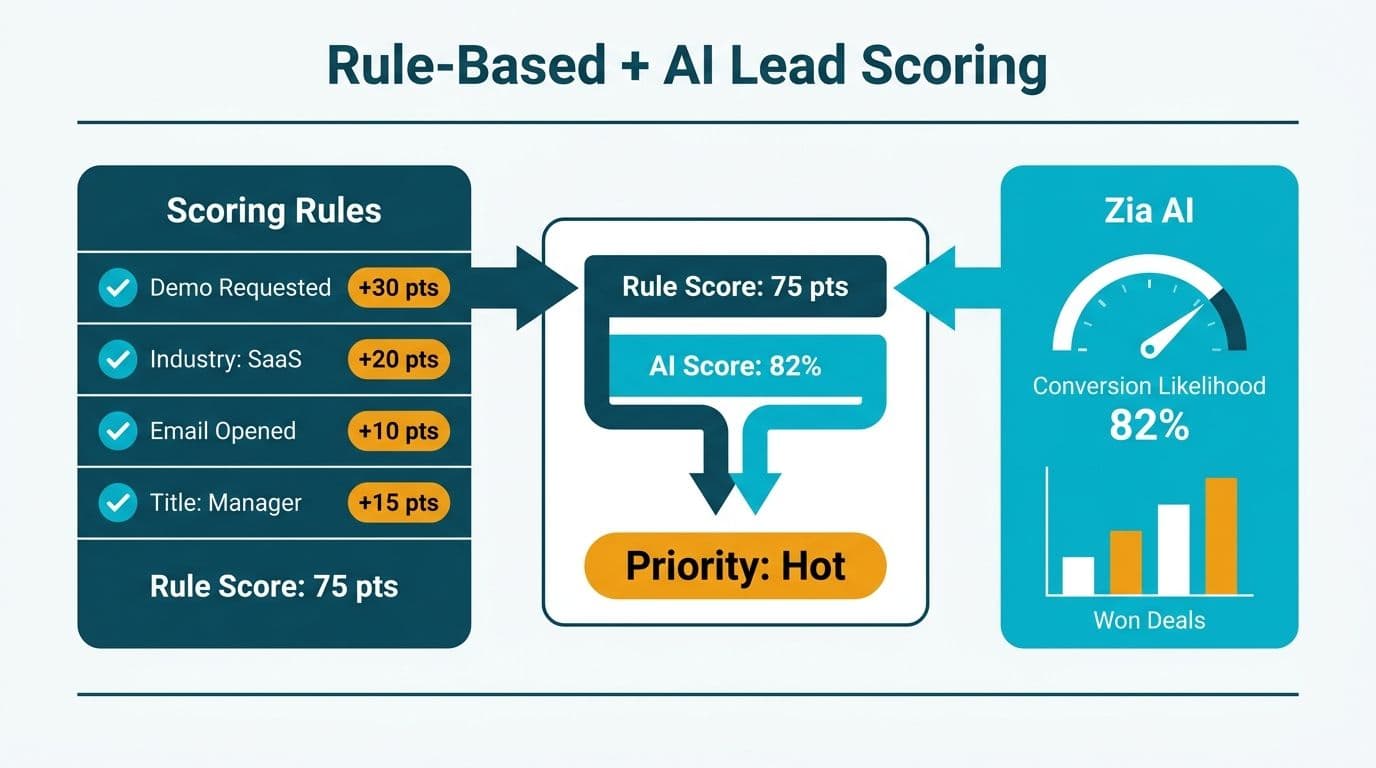
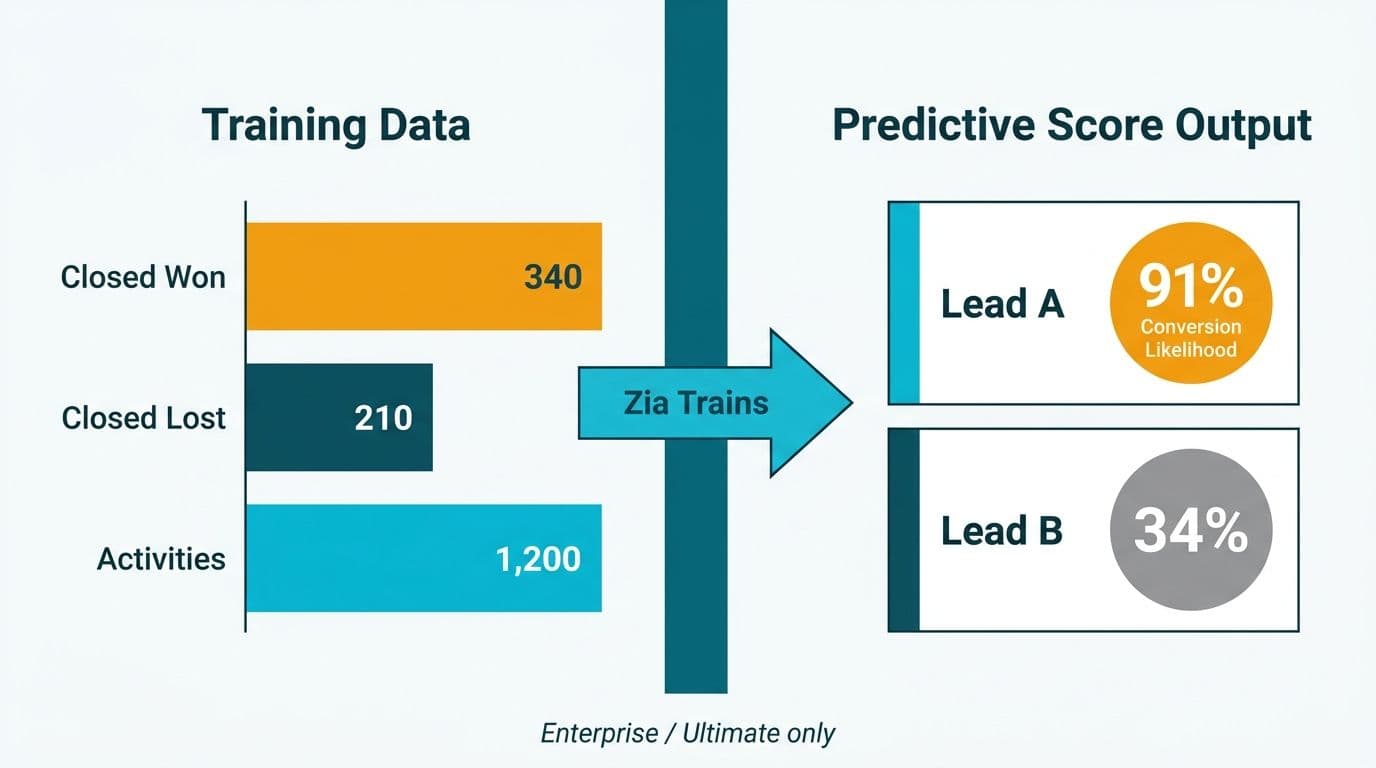
Zoho CRM provides two lead scoring systems: rule-based Scoring Rules (Professional plan and above) and Zia AI predictive scoring (Enterprise and Ultimate). Configure rule-based scoring at Setup > Modules and Fields > Leads > Scoring Rules by assigning point values to field conditions and engagement actions. Zia trains on your closed-won history and adds a predictive conversion likelihood score alongside your manual ruleset.
Key Takeaways
- Rule-based Scoring Rules are available from Zoho CRM Professional; Zia AI predictive scoring requires Enterprise or Ultimate (Zoho CRM edition guide, 2026).
- All scoring conditions must reference standard CRM fields - custom fields do not drive Scoring Rules reliably across all module configurations.
- Negative point values for disqualifying signals - wrong industry, sub-threshold headcount, absent decision-maker title - improve pipeline accuracy as efficiently as positive weights.
- Healthcare and finance teams in the US and Canada should embed HIPAA consent flags and PIPEDA-traceable attributes directly into scoring criteria.
- Activate scores using Workflow Rules, not Blueprint - Blueprint governs sequential stage transitions, not real-time score thresholds.
What Is Lead Scoring in Zoho CRM and Which Plan Do You Need?
Zoho CRM's lead scoring assigns a cumulative numeric value to each lead or contact based on profile attributes and engagement signals. Two scoring engines run in parallel on Enterprise and above; on Professional, administrators work with rule-based scoring alone.
If you are evaluating whether your current Zoho configuration is set up to support scoring effectively, a Zoho CRM consulting engagement typically starts with a module and field audit before any rules are written - because the quality of your field data determines the quality of your scores.
Rule-based Scoring Rules (Professional, Enterprise, Ultimate) let administrators assign positive or negative integer values to field conditions, email engagement, call logs, web-visit events pushed via the SalesSignals API, and campaign responses. Each condition fires independently; the score is the running sum of all matching conditions.
Zia predictive scoring (Enterprise, Ultimate) overlays a machine-learned conversion probability. Zia trains on your historical closed-won and closed-lost records, identifies the field combinations that predict conversion, and scores each open lead against that model. Per Zoho's 2026 product documentation, Zia requires a minimum of 50 closed records in each outcome category before the model produces reliable output.
| Plan | Rule-Based Scoring | Zia Predictive Scoring | Advanced Workflow |
|---|---|---|---|
| Standard | No | No | Limited |
| Professional | Yes | No | Yes |
| Enterprise | Yes | Yes | Yes |
| Ultimate | Yes | Yes | Yes + BI add-ons |
*Source: Zoho CRM edition comparison, 2026.*
For mid-market teams with fewer than 100 closed pipeline records, start with rule-based scoring and plan to activate Zia at the six-month mark once your closed-won history is sufficient to train the model.
How Do You Set Up Rule-Based Scoring Rules in Zoho CRM?
Rule-based setup follows four steps: create the ruleset, define field conditions, define activity conditions, then activate and assign the ruleset to a module list view.
Step 1 - Create the ruleset
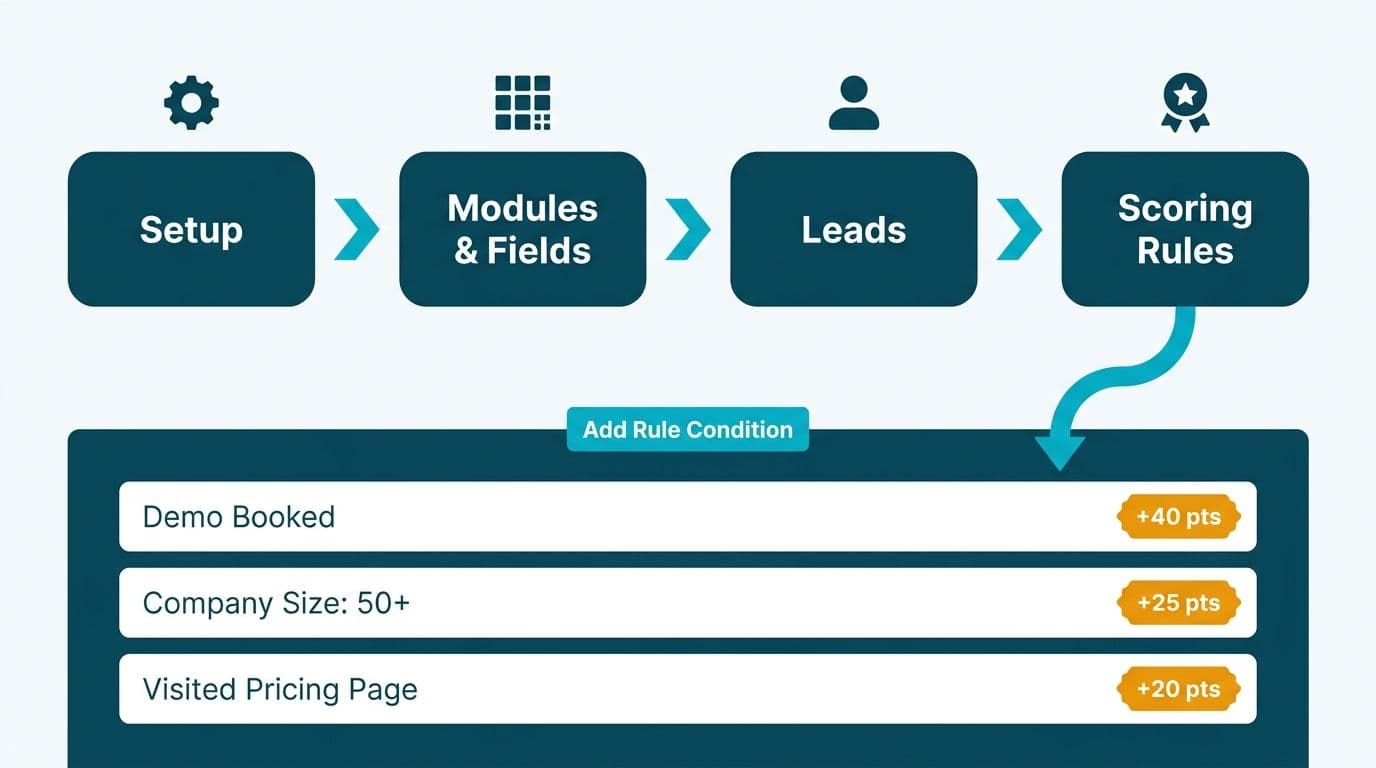
Go to Setup > Modules and Fields > select Leads (or Contacts) > Scoring Rules. Click "Create Scoring Rule," name the ruleset, and select the target module. Zoho allows one active scoring ruleset per module per organisation as of 2026.
Step 2 - Define field-based conditions
Assign positive integers for ICP-matching attributes and negative integers for disqualifying signals. A starter field map for a B2B professional services firm targeting healthcare and finance decision-makers in North America:
| Condition | Field | Value | Points |
|---|---|---|---|
| Decision-maker title | Title | Contains "CFO", "VP Finance", "CIO", "Director of Finance" | +15 |
| Target industry | Industry | Healthcare, Financial Services | +10 |
| Company size fit | No. of Employees | 100 to 2,000 | +8 |
| Geographic fit | Country | United States, Canada, United Kingdom | +5 |
| Inbound referral | Lead Source | Direct Referral, Partner Referral | +12 |
| Disqualify: solo operator | No. of Employees | Less than 10 | -20 |
| Disqualify: wrong vertical | Industry | Retail, Hospitality | -15 |
| No decision-maker title | Title | Is empty | -5 |
Step 3 - Define activity-based conditions
Switch to the Activities tab within the same Scoring Rule. Common weights for B2B services: email open (+2), email click-through (+5), SalesSignals website visit (+3 per visit, capped at three events), call logged (+4), demo attended (+20), webinar registration (+8), inactivity for 30 days (-10).
Step 4 - Activate and assign
Toggle the ruleset to Active. Open your Leads list view, add the Score column, and configure a saved filter at your agreed MQL threshold - commonly 40 to 60 points for B2B professional services - as the BDR team's default view.
Critical field-mapping note: Scoring Rules reference standard fields only. This is the same constraint that applies to Zoho's mass-email engine, which reads only the standard Email field rather than a custom field such as Primary_Email. We worked with a client whose bulk outreach consistently reported "No emails have been sent." The root cause: 281 of 358 contacts had their email address stored in a custom field while the standard Email field was blank. After backfilling the standard field, coverage rose from 77 of 358 to 283 of 358, and the resend delivered 206 of 206. The same pattern produces silent scoring failures - conditions appear to fire but match nothing because the qualifying data sits in a non-standard field. Audit every intended scoring field against the standard field list before building rules.
How Does Zia AI Predictive Scoring Work - and When Should You Use It?
Zia predictive scoring generates a conversion likelihood percentage for each open lead by correlating its attributes and activity history against your closed-won patterns. It does not replace rule-based scoring; it surfaces leads your manual conditions may underweight.
The Zia score appears as a separate "Prediction Score" column in list views and can be used as a filter condition in Workflow Rules and CRM reports. Per Zoho's 2026 AI documentation, the model retrains on a rolling 90-day window, so it adapts as your ideal customer profile evolves.
When rule-based scoring is sufficient:
- Your ICP is tightly defined and stable - for example, US health systems with 200 to 500 beds, finance director or CIO title, inbound referral source only.
- You operate in a regulated environment - HIPAA in the US, PIPEDA in Canada - and require an auditable, deterministic scoring trail for compliance reviews.
- Your closed pipeline history is under 100 records.
When Zia adds measurable value:
- You have a broad top-of-funnel with mixed inbound sources and hundreds of leads per month.
- Your sales team suspects the rule-based score is missing latent signals not captured in existing field conditions.
- You are on Enterprise or Ultimate and want to reduce BDR manual triage time at scale.
For UK fintech firms operating under GDPR, Zia's automated scoring constitutes automated processing of personal data under Article 22 UK GDPR. Where scoring directly determines whether a contact receives outreach, confirm the lawful basis with your data protection officer and build a human review step into the MQL escalation Workflow Rule before deployment.
What Field Mapping Do B2B Professional Services Firms Need Before Scoring?
Field mapping is the most consistently underestimated prerequisite in lead scoring projects. A pre-build audit should cover four areas.
Completeness by field. Run a Zoho CRM report: Leads module, grouped by Lead Source, with blank-count columns for each intended scoring field. Any field with more than 40% blank rate will produce unreliable scores and skewed MQL threshold distributions.
Value standardisation. Zoho's Industry picklist includes 23 default values. If your web form submits "Health Care" and manual entries read "Healthcare," the condition "Industry equals Healthcare" matches manual entries only. Standardise picklist values and add field validation rules before activating the scoring ruleset.
Standard vs. custom field audit. List every field you intend to use in conditions. Confirm each is a standard Zoho CRM field, not a custom field added during implementation. Even heavily used custom fields - regional classification attributes, secondary contact hierarchies - will not trigger Scoring Rules reliably in all module configurations.
Roles and profiles alignment. Check Setup > Users and Control > Profiles to confirm the Score column and score-filtered list views are visible in the Leads module layout for BDRs and their managers. Zoho CRM roles and profiles setup is a prerequisite for Zoho CRM user adoption best practices: if the BDR team cannot see scores in their default view, the scoring system is invisible to the people who need it most. Address this during UAT, not after rollout.
For Canadian organisations under PIPEDA, document the scoring logic and the fields it references as part of your data processing records. If lead scores determine differential outreach frequency, PIPEDA's accountability principle (Principle 1) requires that automated processing affecting individuals be traceable to a named responsible decision-maker within your organisation.
How Do Scoring Rules Interact With Workflow Rules and Blueprint Automation?
Zoho CRM workflow rules vs Blueprint automation is a frequent source of confusion for teams implementing score-triggered lead routing. The distinction is structural.
Workflow Rules are event-driven: a rule fires when a record is created, updated, or when a field value crosses a numeric threshold. This is the correct mechanism for score-based routing. A practical configuration: "When Score is greater than or equal to 50, set Status to MQL, assign to Senior BDR pool, send internal alert email." Workflow Rules fire on condition match without enforcing a process sequence.
Blueprint governs sequential, stage-gated processes - it enforces that a lead can move from "Contacted" to "Demo Scheduled" only after a call is logged and a budget field is populated. Blueprint does not trigger on numeric thresholds such as Score.
For score-based lead routing, always build on Workflow Rules. A US healthcare technology firm might configure two cascading rules: one at 50 points that flags a lead as MQL and routes it to the BDR queue, and a second at 75 points that triggers a manager alert and assigns the record to a senior account executive. Blueprint then governs the subsequent stage - what the BDR must complete before marking a lead "Sales Accepted."
Zoho CRM Microsoft 365 integration note: Score-triggered alert emails route through Zoho's native email action engine, not the Microsoft 365 connector, even where Zoho CRM Microsoft 365 integration setup is active for calendar and contact sync. Test score-triggered alerts in a sandbox before going live to confirm delivery to Microsoft 365 mailboxes.
What Does a Realistic Lead Scoring Implementation Timeline Look Like?
A mid-market B2B firm building lead scoring from a standing start should budget four to six weeks for a production-ready ruleset, assuming no prior field standardisation work.
Weeks 1-2: Field audit and data cleanup - completeness reports, picklist standardisation, standard vs. custom field confirmation across all intended scoring criteria.
Week 3: Scoring design workshop - define ICP criteria with both sales and marketing leads, assign point weights, obtain formal sign-off.
Week 4: Build and UAT - configure Scoring Rules in a Zoho sandbox, test against a representative sample of 50 to 100 real lead records, validate score distribution against known-good and known-bad conversion examples.
Week 5: Workflow integration - configure Workflow Rules at the agreed MQL threshold, test alert routing, field updates, and assignment logic end-to-end.
Week 6: Training and rollout - configure BDR list views, run adoption training, establish a 30-day feedback loop for score recalibration.
The Zoho CRM partner vs in-house implementation decision significantly affects this timeline. An in-house team without prior Zoho configuration experience typically adds two to three weeks on field mapping and workflow troubleshooting. A certified Zoho partner compresses the audit and build phases because lead scoring configuration patterns are well-established. See Zoho partner certification levels for what credentials to look for when evaluating external support.
On Zoho CRM total cost of ownership mid-market: lead scoring is included in the Professional and Enterprise plan subscription cost. No additional per-seat charge applies for Scoring Rules or Zia. The data standardisation phase is consistently the largest hidden cost and is absent from most vendor quotes. For a full cost breakdown by edition, see our Zoho CRM pricing comparison.
For teams in regulated industries earlier in their Zoho evaluation, the Zoho CRM for healthcare practices compliance configuration guide covers the module and field architecture decisions that shape scoring downstream. Finance teams should also review the AI automation compliance checklist for finance teams before activating Zia predictive scoring in a regulated context.
Try Zoho CRM free to explore Scoring Rules and Zia AI hands-on before committing to a full implementation build.
---
About Lets Viz: Lets Viz has delivered data analytics and CRM consulting engagements since 2020, working with US healthcare systems, UK fintech firms, Canadian manufacturing organisations, and global SaaS companies. We hold a 5.0 rating on Clutch and maintain Zoho partner status. Our Zoho CRM engagements include field architecture reviews, scoring rule design, and Zia AI configuration for mid-market professional services teams.
Ready to build a lead scoring model that reflects your actual ICP? Our team walks you through field mapping, rule design, and Workflow integration as part of a structured Zoho CRM consulting engagement.