How to Build AI Agents in n8n: A Practical Tutorial
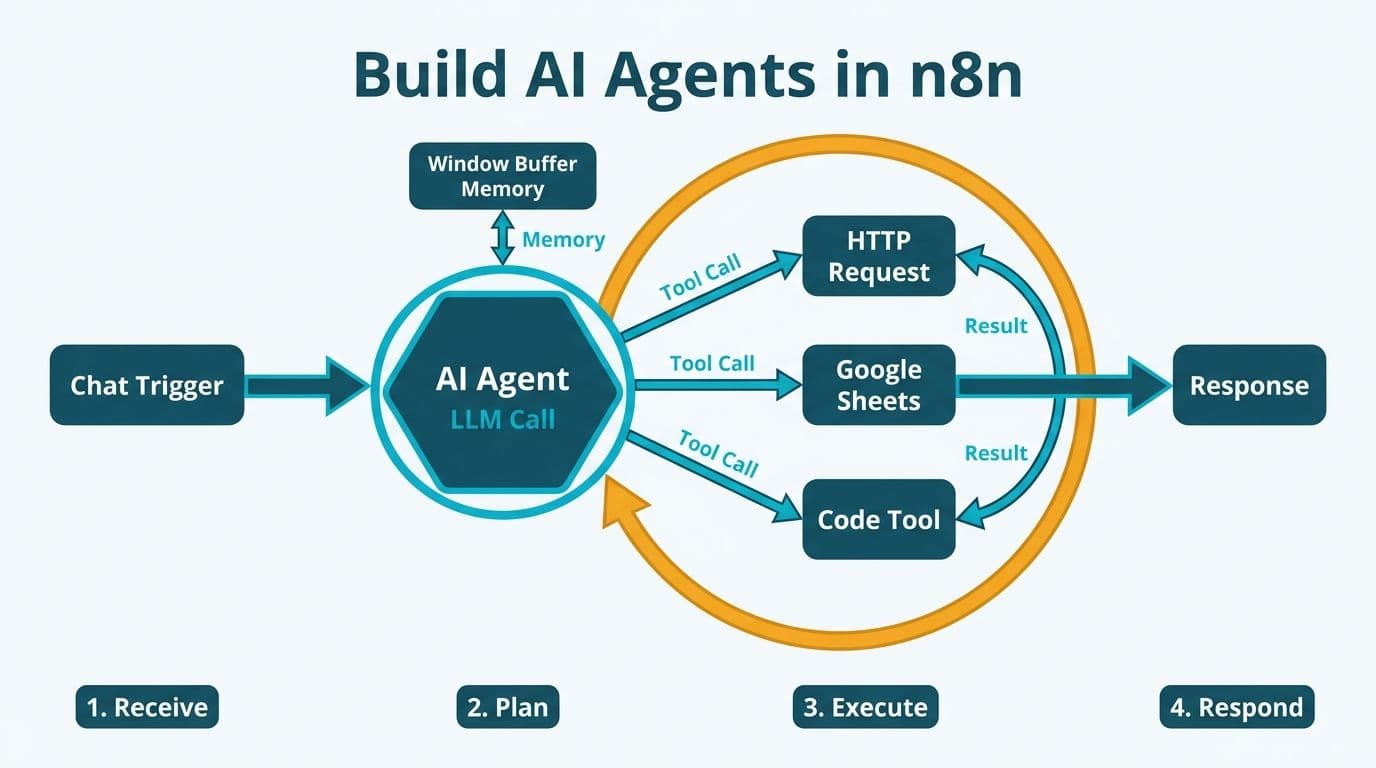
Building an AI agent in n8n means wiring an LLM node to a memory store and one or more tool nodes inside a trigger-driven workflow. n8n's visual canvas handles the agent reasoning loop natively: the model decides which tool to call, n8n executes it, and the result feeds back into the next model turn - all without writing orchestration code. Mid-market finance and healthcare teams can deploy production agents in hours, not weeks.
Key Takeaways
n8n's AI Agent node orchestrates LLM calls, memory, and tool execution in a single visual reasoning loop
A Window Buffer Memory node gives the agent conversational context across multiple turns without custom code
Tool nodes - HTTP Request, Code, database connectors, and sub-workflows - extend agent capabilities without custom middleware
Healthcare and finance teams must enforce credential scoping, audit logging, and human approval gates at the workflow level
n8n suits mid-market teams that need production-grade agents without the overhead of a custom Python orchestration framework
Lets Viz provides n8n consulting and implementation -- self-hosted setup, AI workflow design and ongoing support for SMB and mid-market teams.
What Is an n8n AI Agent and How Does It Work?
An n8n AI Agent node is a pre-built orchestration loop that lets an LLM decide which tool to invoke, receives the result, and continues reasoning until it satisfies the task - all configured visually. Unlike a simple prompt-to-response chain, the agent can call tools multiple times in sequence, adapting based on what each tool returns.
The architecture has three layers. The reasoning layer is the LLM - OpenAI GPT-4o, Anthropic Claude, or any OpenAI-compatible endpoint including local Ollama models for air-gapped deployments. The memory layer holds conversational context between turns. The tool layer is a set of callable nodes - APIs, databases, code blocks - that the model can invoke by name. n8n connects all three through its agent loop, handling JSON tool-call parsing and retry logic automatically.
Enterprise demand for autonomous agents that act on business systems rather than merely answer questions is precisely the capability gap n8n's agent node addresses for mid-market teams without dedicated ML engineering resources.
When the agent node fires, n8n serializes the current memory, constructs the tool manifest from connected nodes, and sends a single API call to the LLM. The model replies with either a final answer or a tool-call JSON block. n8n parses that call, routes it to the correct downstream node, and feeds the result back into the next model turn. This loop continues until the model signals task completion.
How Do You Build AI Agents in n8n Step by Step
The foundation of any n8n agent - whether built in-house or through an AI automation consulting engagement - is a well-defined trigger and a scoped system prompt. Broad, unfocused prompts produce unpredictable tool-call patterns; narrow, specific ones produce reliable, auditable agents.
Global AI consulting and support services are expanding at a 31.6% CAGR through 2030 - a trajectory 2026 market activity continues to validate (Yahoo Finance, 2025) - and the pressure to ship working agents quickly is real - but speed without structure creates agents that are difficult to govern in regulated environments like US healthcare and Canadian financial services.
Step 1 - Choose a trigger. For synchronous agents invoked by users or external systems, use the Chat Trigger or Webhook node. For scheduled autonomous agents - nightly reporting, daily data pulls, weekly compliance checks - use the Schedule Trigger with a cron expression.
Step 2 - Add and configure the AI Agent node. Drag it onto the canvas and connect it to your trigger. In the node settings, select your LLM provider credential (OpenAI, Anthropic, Azure OpenAI, or a local Ollama endpoint for on-premises deployments) and choose the model. GPT-4o and Claude Sonnet are the most common choices for mid-market production agents in 2026.
Step 3 - Write the system prompt. Be specific. A finance agent system prompt should instruct the model to query actuals and budget tables, compute variance, and return a formatted summary - and explicitly prohibit estimation when data is unavailable. Specificity reduces hallucination risk in regulated contexts.
Step 4 - Add a memory node. Connect a Window Buffer Memory node to the agent's memory input. Set the window to 5-10 turns to balance context quality against token cost. For persistent memory across sessions, use a Postgres Chat Memory or Redis Chat Memory node instead.
Step 5 - Wire tool nodes to the agent's tool input. Each connected node becomes a callable function the LLM can invoke by name. n8n auto-generates the tool manifest from connected node descriptions - write clear, one-sentence descriptions for every tool, because the LLM uses these to decide when each is appropriate.
Step 6 - Add an output parser. For structured outputs - JSON reports, scored assessments, formatted tables - connect a Structured Output Parser. This forces the LLM to return machine-readable data your downstream systems can consume without additional parsing.
Step 7 - Build error branches. Connect an Error Trigger node to a notification or human-review workflow. Set retry logic on HTTP tool nodes (three attempts, exponential backoff). In regulated environments, route all tool-call failures to a review queue before the workflow marks completion.
Before going to production, review the AI workflow automation pre-launch checklist - it covers the most common failure modes including undefined tool schemas, missing credential scopes, and agents that loop indefinitely on ambiguous inputs.
How Do You Add Memory to an n8n AI Agent?
Memory determines whether your agent feels stateful or forgetful across a conversation. n8n provides five memory strategies, each suited to a different operational context.
Healthcare finance teams building n8n agents for prior-authorization lookups or budget-variance alerts need persistent memory that survives session restarts - making database-backed memory essential rather than optional.
| Memory Type | Storage | Persistence | Best For |
|---|---|---|---|
| Window Buffer Memory | In-process | Session only | Chat interfaces, short tasks |
| Simple Memory | In-workflow variable | Workflow run only | Single-run batch agents |
| Postgres Chat Memory | External database | Cross-session | Enterprise agents, regulated environments |
| Redis Chat Memory | External cache | Cross-session (fast) | High-frequency agents, sub-second recall |
| Vector Store Memory | Pinecone / Qdrant / Supabase | Long-term semantic | RAG agents, knowledge-base retrieval |
For most mid-market deployments, start with Window Buffer Memory during development, then migrate to Postgres Chat Memory before going to production. This gives you a queryable audit trail of every agent turn - critical for HIPAA compliance in US healthcare settings and for PIPEDA obligations in Canadian financial services organizations.
A US hospital revenue cycle team using an n8n agent to automate eligibility checks should store every session in Postgres with a patient-encounter foreign key. That creates an auditable record of which API the agent queried, what it received, and what it returned - satisfying HIPAA requirements for an audit trail on any PHI-adjacent workflow.
What Tool Nodes Can You Wire Into an n8n AI Agent?
Tools are what separate a conversational chatbot from a functional agent. Each tool node connected to the agent's tool input becomes an action the LLM can choose to invoke. n8n ships with over 400 native integration nodes and organizes agent-callable tools into five broad categories - giving most mid-market teams enough coverage to avoid building custom connectors entirely.
Enterprises are investing in agents that take real actions on business systems - which makes tool design and access control a critical decision from day one, not an afterthought.
HTTP Request tools call external REST APIs: practice management systems, EHR endpoints, trading data feeds, CRM connectors. Authenticate through the credential manager, define the input schema in the node description, and the agent handles parameter injection automatically.
Code tools execute JavaScript or Python inline. Use these for calculations, data transformation, or regex extraction that no built-in node covers. A finance agent computing debt-service coverage ratios from raw balance-sheet figures does this efficiently in a Code node without an external API call.
Database tools run parameterized SQL against Postgres, MySQL, BigQuery, or Snowflake. Always use parameterized queries - never interpolate user input directly into a query string. An agent that accepts user-supplied entity names is a SQL injection surface if this rule is violated.
Sub-workflow tools invoke other n8n workflows as callable functions. This is the mechanism for multi-agent architectures in n8n: a supervisor agent delegates to specialist sub-agents, each encapsulated in its own workflow. A financial reporting agent might call a `fetch-actuals` sub-workflow, a `fetch-budget` sub-workflow, and a `send-email` sub-workflow - each independently testable and deployable.
Vector store tools - connecting to Pinecone, Qdrant, or Supabase - enable retrieval-augmented generation, where the agent queries an indexed knowledge base before generating a response. A UK fintech compliance agent, for example, might use a vector store loaded with FCA guidance documents so it can cite specific regulatory text rather than relying solely on the base model's training data.
For teams weighing n8n against other approaches, the open-source AI workflow automation tools guide compares build-vs-buy tradeoffs across platforms. Finance teams assessing which AI tools belong in their stack will find the best AI tools for finance professionals (2026) comparison useful before committing to an architecture.
How Should Healthcare and Finance Teams Govern n8n AI Agents?
Governance is where many mid-market agent deployments fail. An agent that performs correctly in testing can violate data handling requirements the first time it encounters unexpected input in production. Regulated industries need guardrails at the workflow level - not just in the system prompt.
Through 2025 and into 2026, three themes have dominated health analytics: value-based care, AI-driven analytics, and payer analytics innovation (MedInsight, 2025). Autonomous agents sit at the intersection of all three - but they introduce data-flow risks that traditional analytics pipelines do not. The AI analytics data privacy risks guide covers audit-log requirements and PHI de-identification checkpoints applicable to US, UK, and Canadian deployments.
Credential scoping. Each tool credential should be read-only unless write access is explicitly required. An agent querying a database for reporting has no business holding credentials that allow DELETE operations. Apply least-privilege to every n8n credential.
Data residency. n8n Cloud routes data through EU or US regions; self-hosted n8n gives full control. A UK fintech firm processing customer financial data through an agent must ensure personal data does not leave the UK/EEA without adequate safeguards under UK GDPR. Configure your LLM provider to a vendor with a UK data processing agreement, or self-host the model entirely. A Canadian asset manager operating under PIPEDA has equivalent obligations: verify that your LLM provider can execute a Data Processing Agreement covering Canadian resident data before passing customer records through the agent context window.
Human-in-the-loop gates. For any agent action with real-world consequences - sending an email, posting a transaction, updating a patient record - insert a Wait node and route to a human approval step before execution. In SOC 2 Type II environments, automated changes to production data must be attributable to an authorized human decision even if the agent proposed the action.
Audit logging. Connect every agent workflow's execution log to your SIEM or data warehouse. n8n's built-in execution history is not a substitute for a durable, queryable audit trail. A US hospital network running prior-authorization agents under HIPAA must retain those execution logs for the same duration as the underlying clinical records.
When Is n8n the Right Platform for Building AI Agents?
n8n is the right choice when your team needs a production-grade agent quickly and lacks the Python expertise or timeline to build a custom orchestration layer. It is not always the right choice for every scenario.
| Requirement | n8n | Custom Python Framework |
|---|---|---|
| Time to first agent | Hours | Days to weeks |
| Code required | Minimal (node config) | Significant |
| Tool integration effort | Low (built-in connectors) | Medium (custom wrappers) |
| Customization ceiling | Medium | High |
| Observability | Built-in execution logs | Requires external tooling |
| Self-hosting option | Yes (Docker / Kubernetes) | Yes |
| Regulatory auditability | Good (execution history) | Depends on implementation |
| Best fit | Mid-market, rapid iteration | Complex multi-agent, ML pipelines |
n8n becomes the wrong choice when your agent needs fine-grained control over the reasoning loop - custom token budgets per tool, dynamic few-shot injection based on semantic similarity, or multi-step chain-of-thought the built-in node cannot expose. At that point, a Python orchestration framework with n8n as a workflow coordinator (triggering Python functions via webhook) is a stronger architecture.
For mid-market US finance teams, UK fintech operations, and Canadian healthcare payers, n8n occupies a practical middle ground: more capable than a no-code automation platform, far less expensive to maintain than a bespoke agent framework. Most mid-market teams find n8n fully sufficient for the first two or three agent use cases before they encounter its configuration ceiling.
---
About Lets Viz: Lets Viz is a data analytics and AI automation consultancy serving US healthcare systems, UK fintech firms, Canadian financial services organizations, and global SaaS companies since 2020. With a 5.0 Clutch rating, the team specializes in translating AI capabilities into governed, production-ready workflows across platforms including n8n, Power BI, and Sanity. Our practitioners bring direct implementation experience across HIPAA, UK GDPR, and PIPEDA-regulated environments.
If your team is ready to move from standalone automations to agents that reason, remember, and act on real business systems, AI automation consulting is the right starting point.


