How to Add Custom Fields in Zoho CRM: 2026 Guide
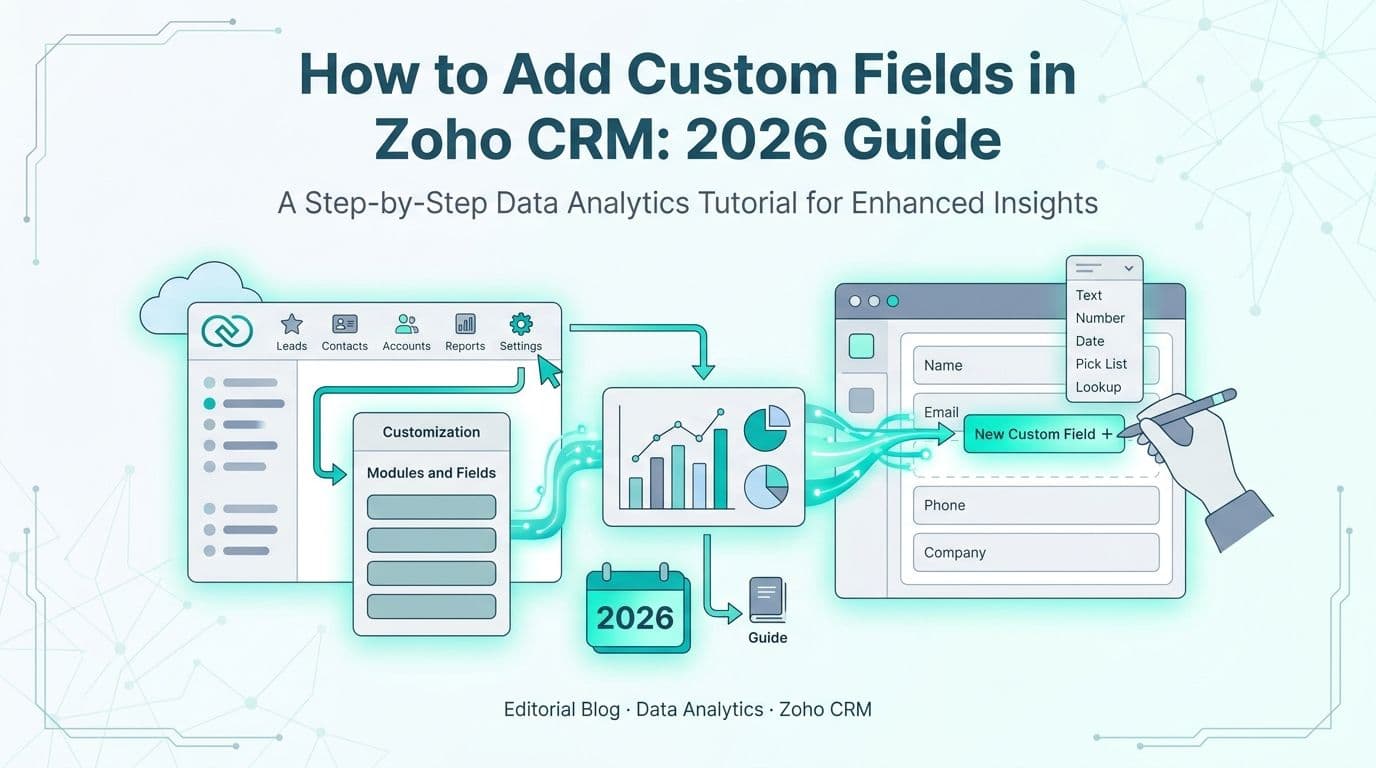
Adding custom fields in Zoho CRM takes under five minutes per field: navigate to Setup > Modules and Fields, select your target module, click + New Custom Field, choose a field type, configure properties, and save. Custom fields extend Zoho CRM's default schema without touching the underlying data model, giving mid-market teams in healthcare and finance the flexibility to capture the exact data points their workflows require without building a separate system.
Key Takeaways
Zoho CRM supports more than a dozen field types - text, picklist, formula, lookup, multi-select, currency, and more.
Field count limits range from 10 (Standard plan) to 500 (Enterprise/Ultimate) per module.
Validation rules enforce data quality at the point of entry, separate from mandatory field settings.
Layout placement controls which fields appear to which user profiles and in what order.
Formula fields (Enterprise and above) auto-calculate KPIs like gross margin, days to close, and risk tier directly inside the CRM.
Lets Viz offers Zoho consulting services for businesses implementing Zoho One, Zoho CRM, and the full Zoho suite across US, UK, and Canadian markets.
What Field Types Can You Add in Zoho CRM?
Zoho CRM offers fourteen field types, each built for a different data structure. Choosing the correct type before saving matters - field types cannot be changed after the first record uses the field.
| Field Type | Best Used For | Key Configuration Options |
|---|---|---|
| **Single Line** | Short text, codes, IDs | Min/max length, regex pattern |
| **Multi Line** | Notes, descriptions | Max character limit |
| **Integer** | Counts, quantities, scores | Min/max value range |
| **Decimal** | Rates, ratios | Decimal places, min/max |
| **Currency** | Deal value, ARR, spend | Precision, min/max |
| **Percent** | Margins, conversion rates | Range enforcement |
| **Date / DateTime** | Renewal dates, referral dates | Past or future restriction |
| **Picklist** | Status, tier, payer segment | Controlled value list |
| **Multi-Select Picklist** | Tags, product lines | Max selections |
| **Checkbox** | Boolean flags | Default state |
| **Formula** | Calculated KPIs | Expression (read-only output) |
| **Lookup** | Cross-module relationships | Related module, record filter |
| **Auto-Number** | Case IDs, ticket numbers | Prefix, starting number |
| **File Upload** | Contracts, attachments | Allowed file types, size cap |
According to Future Market Insights (2026), the AI consulting services market will grow from USD 13.97 billion in 2026 to USD 90.99 billion by 2035 at a 26.2% CAGR. Mid-market firms building clean, well-typed CRM field schemas now will be best positioned to feed that AI infrastructure with reliable structured data.
For healthcare BD teams, Date fields with future-date restrictions and Picklist fields for facility type or payer category are the most common custom additions. For finance teams, Currency, Percent, and Formula fields covering ARR, gross margin, and days-to-close dominate most customization projects. For a full breakdown of implementation costs, see our Zoho CRM customization cost guide.
How Do You Add Custom Fields in Zoho CRM? (Step-by-Step)
The field creation workflow is consistent across modules. Below is the exact path for Zoho CRM Enterprise or Ultimate.
Step 1 - Open Modules and Fields
Go to Setup (gear icon, top-right) > Customization > Modules and Fields. The list shows all standard and custom modules in your CRM.
Step 2 - Select Your Module
Click the module name - Leads, Contacts, Deals, Accounts, or a custom module. You land on a configuration page with tabs for Fields, Layouts, Related Lists, and more.
Step 3 - Open the Fields Tab
Select the Fields tab. Existing fields appear in a sortable list with type, API name, and current section assignment.
Step 4 - Create a New Field
Click + New Custom Field. A side panel opens. Select the field type first - this choice is permanent once the first record uses the field.
Step 5 - Configure Field Properties
Label - the display name users see on forms and list view column headers.
API Name - auto-generated from the label; edit it now if your integration team uses a specific naming convention (example: `cf_contract_arr_usd`).
Tooltip - hover guidance text, valuable in regulated environments where field definitions must be precise and consistent.
Mandatory - blocks record save if the field is empty; applies globally across all layouts.
Read Only - appropriate for formula outputs or fields populated by an integration.
Unique - prevents duplicate values across all records in the module; useful for NPI numbers, policy IDs, or external system keys.
Step 6 - Configure Validation (Type-Specific)
Set regex patterns for text fields, min/max bounds for numeric fields, and past/future restrictions for date fields at the field level. Multi-field conditional validation belongs in the module-level Validation Rules tab, covered in detail below.
Step 7 - Save and Place on a Layout
Click Save. The field exists in the system but does not appear to any user until you drag it onto a page layout. New fields land in the unused fields panel in the layout editor.
What Are the Field-Count Limits Per Module in Zoho CRM?
Field count limits are plan-specific and apply independently to each module - not as a global CRM cap. Hitting a limit mid-project means deleting unused fields or upgrading, neither of which is simple once records carry live data.
| Zoho CRM Plan | Custom Fields Per Module |
|---|---|
| Standard | 10 |
| Professional | 155 |
| Enterprise | 500 |
| Ultimate | 500 |
Points that enterprise deployments frequently miss:
System fields - Owner, Created By, Modified Time, and similar built-in fields - do not count toward the limit.
Formula fields do count toward the limit.
File Upload fields count as 2 fields internally.
Each module has its own independent cap: 500 in Leads, 500 in Contacts, 500 in Deals, and so on.
Custom modules you create start at zero; their cap matches your plan's per-module limit.
The Healthcare Financial Analytics Market is projected to grow at an 8.58% CAGR from 2026 to 2035 (Market Research Future, 2026). As analytics investments scale, a CRM field schema that is difficult to query or extract will create technical debt that compounds alongside organizational data growth.
For healthcare organizations running separate modules for hospital Accounts, physician Contacts, and a custom Patient Referrals module, the 500-field cap on Contacts becomes a real architectural risk if every intake data point receives its own field. The correct design pushes granular clinical metadata into a dedicated custom module and links it to Contacts via a Lookup field.
How Do Validation Rules Work for Zoho CRM Custom Fields?
Validation rules fire when a user attempts to save a record and block the save if a defined condition evaluates to true. They go beyond the mandatory toggle by evaluating cross-field logic and delivering a targeted error message to the user.
Where to create them: Setup > Customization > Modules and Fields > [Module] > Validation Rules tab - this is separate from the field editor itself, a common source of confusion for first-time administrators.
Rule components:
1. Trigger - which record action fires the check: Create, Edit, or both.
2. Condition - the logical expression that blocks the save when it evaluates to true. Example: `Deal Value is greater than 500000 AND Approval Stage is empty`.
3. Error message - the text the user sees when blocked. Keep it actionable: `Deals above $500K require an Approval Stage before saving`.
Finance team validation patterns:
Block close date entry if Probability is below 20%.
Require a PO Number when Deal Stage changes to `Closed Won`.
Enforce a 6-digit NAICS code format on a custom Industry Code field using a regex rule.
Block negative values in ARR or MRR currency fields.
Healthcare CRM validation patterns:
Require NPI Number on Contacts where Role equals `Referring Physician`.
Block backdated Referral Date entries to prevent historical record manipulation.
Enforce a valid payer code selection before a Lead converts to a Contact.
Validation rules are a first-line data quality guard at the form level. For multi-step compliance gates - where required fields change depending on pipeline stage - pair them with Blueprint (Setup > Process Automation > Blueprint), which enforces field completion at each defined stage transition. Our HIPAA-compliant analytics dashboard guide covers the governance layer that sits downstream of CRM field-level controls.
How Do You Place Custom Fields on a Zoho CRM Layout?
A newly created field is available to the system but invisible to users until it appears on a page layout. Layouts control which fields display on the record detail and edit views, in what order, and for which user profiles.
Open the Layout Editor:
Setup > Customization > Modules and Fields > [Module] > Layouts tab. Select the layout to edit. Enterprise and Ultimate plans support multiple layouts per module, each assignable to different user profiles.
Editor mechanics:
The canvas shows sections - collapsible field groups organized in a 1- or 2-column grid.
The left panel lists unused fields, including your new custom field.
Drag the field from the panel to the target section and position on the canvas.
Right-click a field on the canvas to enable Mandatory in this Layout - this overrides the global mandatory toggle for users assigned to this profile, so a field can be required for one team and optional for another.
Section management best practices:
Name sections by data domain: Contract Details, Compliance Flags, Financial Summary.
Collapse non-critical sections by default to keep the primary view clean for high-volume data entry teams.
Place the most frequently updated fields in the first section - reps rarely scroll past the initial fold on mobile.
What Is Zoho CRM Canvas and How Does It Work?
Canvas is Zoho CRM's no-code record detail-view designer - a separate tool from the standard layout editor. While layouts organize fields in a structured grid, Canvas lets you build a pixel-level record view using a drag-and-drop designer that supports custom CSS, embedded images, and conditional field visibility. For most teams adding custom fields, the standard layout editor covers all requirements. Canvas is appropriate when you need a branded or role-specific record presentation that structured sections cannot produce. A concrete example: a healthcare BD team can build a Canvas view for physician Contacts that surfaces NPI Number, Specialty, and a color-coded Payer Mix tier badge above the fold, eliminating three click-throughs per rep per visit and keeping the most compliance-critical identifiers visible throughout the entire outreach call without scrolling.
Profile and mobile layout assignment:
Under the layout's Properties tab, assign each layout to one or more user profiles. A Finance Operations profile sees ARR, PO Number, and Payment Terms; a Healthcare BD profile sees NPI Number, Specialty, and Payer Type. Mobile layouts are maintained separately - the desktop and mobile layout canvases are independent, so verify that critical custom fields appear on the mobile layout for reps who visit accounts in the field.
When Should Formula Fields Replace Calculated Columns in Your BI Tool?
Formula fields compute values at the record level inside Zoho CRM, making calculated outputs available for filters, workflow triggers, and CRM-native reports - without requiring a data export or a downstream ETL job.
Finance team formula examples:
Gross Margin %: `(Deal Value - COGS Field) / Deal Value * 100`
ARR from MRR: `MRR Field * 12`
Days to Close: `DATEDIFF(Close Date, Created Time)`
Discount Flag: `IF(Discount Percent > 15, 'Needs Approval', 'Standard')`
Healthcare CRM formula examples:
Referral Lag (Days): `DATEDIFF(Appointment Date, Referral Date)`
Contract Days Remaining: `DATEDIFF(Contract End Date, TODAY())`
Risk Tier: `IF(Patient Volume > 500 AND Payer Mix < 40, 'High', 'Standard')`
Formula fields are read-only and recalculate on every record save. They count toward your module's field limit and require Enterprise plan or above.
The practical split: if a sales rep needs gross margin on a deal record to make a real-time pricing decision, a CRM formula field is the correct tool. If a finance director needs that same value aggregated across 5,000 deals — segmented by quarter, region, and deal size — the calculation belongs in the BI layer, where columnar query engines handle aggregation in seconds rather than iterating across individual CRM records. Our AI-powered Power BI consulting guide for finance teams covers how organizations connect Zoho CRM field data to downstream financial reporting models.
The global AI Consulting and Support Services market is forecast to surpass USD 300 billion by 2032 at a 33.5% CAGR (Grand View Research, 2026) — a trajectory that makes a well-architected CRM data layer a near-term strategic priority for mid-market firms, not a deferred infrastructure project.
How Do Lookup Fields Create Cross-Module Relationships in Zoho CRM?
Lookup fields create a relational link between two modules - functionally similar to a foreign key in a relational database. They eliminate data duplication across modules and enable cross-module reporting without custom scripting.
Creating a Lookup field:
Select Lookup as the field type in the field editor. You will be prompted to specify:
1. Related module - the module this record will reference (Accounts, Contacts, Deals, or any custom module).
2. Filter (optional) - restricts the dropdown to records matching a condition. Example: only Accounts where Type equals Hospital.
3. Related list label - the name shown on the linked parent record for the sub-list of records that point back to it.
Common lookup architectures for mid-market deployments:
| Parent Module | Lookup From | Business Use Case |
|---|---|---|
| Accounts | Custom: Contracts | One health system, multiple active contracts |
| Contacts | Accounts | Referring physician linked to hospital system |
| Deals | Accounts | Multiple revenue opportunities per account |
| Custom: Referrals | Contacts | Referral events tied to a specific physician |
Related lists on the parent record support aggregate functions - sum, average, and count - letting you display total contract value or aggregate referral volume directly on an Account record without leaving Zoho CRM.
When your module architecture spans more than five interconnected modules, Lookup field design has direct implications for page load times and report query performance. At data volumes above 200,000 records per module, a lookup chain with three or more hops can add 3–5 seconds to individual record load times — a friction point that compounds quickly across a team of 25 reps each making 60+ record visits per day. Planning the lookup chain before deployment prevents structural bottlenecks that become expensive to restructure once data volumes scale.
If your healthcare or finance organization is designing a Zoho CRM field architecture from scratch - or restructuring before a BI integration - our Zoho consulting services team offers structured field audits and module schema reviews built for mid-market scale.
---
About Lets Viz: Lets Viz has delivered data analytics and CRM consulting to healthcare and finance organizations across the US and Canada since 2020. Our team has designed Zoho CRM field schemas for mid-market health systems, revenue cycle management providers, and financial services firms - with hands-on expertise in custom module architecture, validation rule design, and CRM-to-BI pipeline configuration. Engagements span strategic advisory through implementation and ongoing managed support.
---