CROSSFILTER DAX: Bidirectional vs Single-Direction Joins
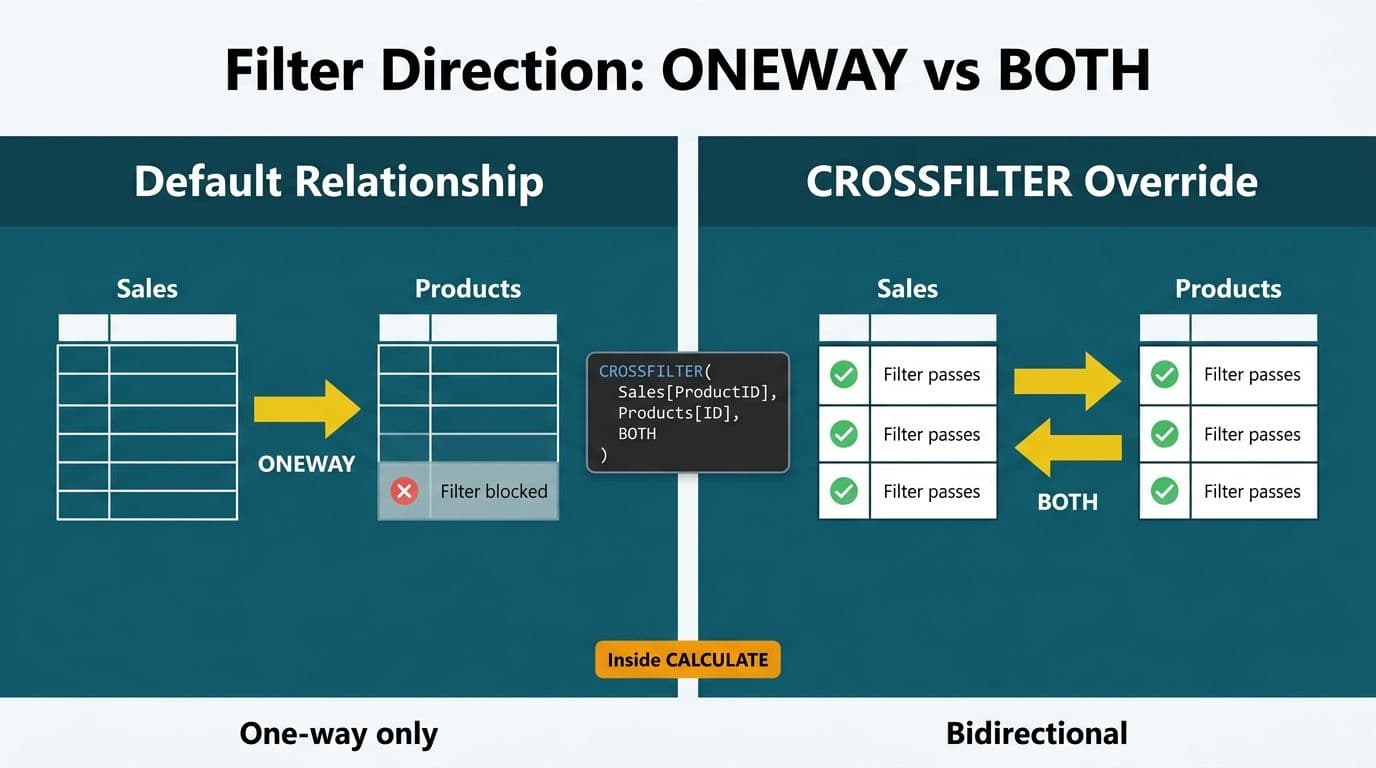
CROSSFILTER is a DAX function that temporarily overrides the filter direction of a table relationship inside a single measure calculation. It takes three arguments - the left column, the right column, and the direction (`BOTH`, `ONEWAY`, or `NONE`) - and runs inside `CALCULATE` without changing the underlying data model. Use it when the default relationship direction prevents a calculation from filtering correctly across related tables.
Key Takeaways
CROSSFILTER modifies filter direction within a single DAX measure and leaves the data model structure completely unchanged.
The three direction options are `BOTH` (bidirectional), `ONEWAY` (single-direction), and `NONE` (no filtering between those tables).
USERELATIONSHIP activates an inactive relationship; CROSSFILTER changes the direction of an active one - they solve different problems and are not interchangeable.
Bidirectional joins at the model level create ambiguous filter paths in shared-dimension schemas; CROSSFILTER at the measure level is the safer alternative.
Healthcare and finance data models governed by HIPAA, GDPR, or PIPEDA benefit most from measure-level filter direction control rather than model-level bidirectional settings.
What Is CROSSFILTER in DAX?
CROSSFILTER is a filter-modifier function in DAX. It does not aggregate data or return a scalar value on its own - it changes how filter context flows between two related tables for the duration of a single `CALCULATE` or `CALCULATETABLE` call.
The function signature is:
```dax
CROSSFILTER(<columnName1>, <columnName2>, <direction>)
```
Where `<direction>` accepts three values:
`BOTH` - filter propagates in both directions between the two tables
`ONEWAY` - filter propagates only from the "one" side to the "many" side (the default model behavior)
`NONE` - filtering is disabled between the two tables entirely
Consider a US healthcare organization with a data model linking a `FactClaims` table to a `DimProvider` dimension. The default single-direction relationship lets `DimProvider` filter `FactClaims` - so you can slice claims by provider. But if a finance director wants a count of providers who submitted more than 50 claims in a given quarter, filters need to flow from `FactClaims` back to `DimProvider`. That requires CROSSFILTER with `BOTH` inside the measure, not a model change.
Organizations managing this kind of relationship complexity across production Power BI environments increasingly rely on Managed Power BI services to architect semantic layers that stay performant and compliant as models grow.
CROSSFILTER DAX Syntax: A Step-by-Step Breakdown
Understanding CROSSFILTER DAX syntax is easiest through a concrete finance reporting example. Consider a model with three tables:
`FactTransactions` - one row per financial transaction
`DimAccount` - chart of accounts with account type classifications
`DimCostCenter` - cost center hierarchy
A single-direction relationship links `DimAccount` to `FactTransactions`. A finance director at a Canadian financial institution wants a measure that counts how many cost centers had activity against a filtered set of accounts. With the default single-direction relationship, `FactTransactions` cannot filter `DimCostCenter`. Here is the CROSSFILTER solution:
```dax
Cost Centers With Activity =
CALCULATE(
DISTINCTCOUNT(DimCostCenter[CostCenterID]),
CROSSFILTER(
FactTransactions[AccountID],
DimAccount[AccountID],
BOTH
)
)
```
Step 1 - Wrap in CALCULATE. CROSSFILTER must appear as a filter argument inside `CALCULATE` or `CALCULATETABLE`. It modifies filter context only for that evaluation and has no effect outside of these functions.
Step 2 - Specify the relationship columns exactly. The first two arguments must be the exact columns that define the foreign key - primary key relationship. Mismatched columns produce a runtime error.
Step 3 - Choose the direction. `BOTH` enables bidirectional filtering. `ONEWAY` enforces standard single-direction (useful to override a model-level bidirectional setting temporarily). `NONE` deactivates filtering between those specific tables.
Step 4 - Validate with DAX Studio. Run a server timing trace after authoring the measure. A `BOTH` direction on a large fact table can generate expensive cross-joins in the storage engine. High formula engine (FE) cost relative to storage engine (SE) cost signals a problematic filter path that needs redesign.
For finance teams working with grouped aggregations alongside filter modifications, DAX SUMMARIZE vs SUMMARIZECOLUMNS explains how grouping functions interact with filter context in ways that compound CROSSFILTER behavior.
Bidirectional vs. Single-Direction Joins: What Is the Difference?
Bidirectional and single-direction joins define where filter context is permitted to travel in a Power BI data model - and the choice has significant consequences for both accuracy and performance.
In a single-direction join, filters flow from the "one" side (dimension table) to the "many" side (fact table). This is the Power BI default and is intentional - it prevents filter ambiguity in star schemas where dimensions are shared across multiple fact tables.
In a bidirectional join, filters travel in both directions. A filter applied to the fact table can also reduce rows returned from the dimension. This enables certain count-distinct calculations but introduces serious risks in multi-fact models.
| Direction | Filter Travel | Best Use Case | Risk Level |
|---|---|---|---|
| ONEWAY (default) | Dim to Fact only | Standard star schema aggregations | Low |
| BOTH (model level) | Dim and Fact both ways | Simple two-table models with no shared dims | High |
| BOTH (measure level via CROSSFILTER) | Controlled per measure | Count distinct dim values from filtered fact | Medium |
| NONE | No filtering | Baseline grand-total measures | Low |
A UK fintech firm running GDPR-mandated data lineage reporting faces a specific risk with model-level bidirectional joins. When `FactLoans` and `FactPayments` both join to `DimClient`, enabling bidirectional at the model level creates an ambiguous filter path - the engine cannot reliably determine which route to traverse when a slicer filters `DimClient`. Using CROSSFILTER at the measure level (bidirectional only inside the specific measure that needs it) eliminates that ambiguity without altering the documented model structure.
The same logic applies to Canadian organizations under PIPEDA and US healthcare systems under HIPAA: stable, documented model-level relationships reduce audit surface area. Measure-level CROSSFILTER delivers bidirectional behavior precisely where needed without destabilizing the entire semantic layer.
The ALLSELECTED DAX function behaves unexpectedly alongside model-level bidirectional joins - it restores outer filter context across relationship paths you may not intend to include, a subtle bug that measure-level CROSSFILTER sidesteps cleanly.
When Should You Use CROSSFILTER vs. USERELATIONSHIP?
CROSSFILTER and USERELATIONSHIP are both `CALCULATE` modifier functions that affect how relationships behave inside a measure - but they solve fundamentally different problems.
USERELATIONSHIP activates an inactive relationship for a single measure. The canonical use case is role-playing date dimensions: `OrderDate` is the active relationship, `ShipDate` is an inactive alternate path. A "Revenue by Ship Date" measure switches to the inactive path for that one calculation only.
CROSSFILTER changes the filter direction of an already-active relationship. Use it when the relationship exists, is active, and is the correct relationship to use - but the default single-direction prevents the filter from flowing where the calculation needs it.
```dax
-- USERELATIONSHIP: switch to an inactive relationship
Revenue By Ship Date =
CALCULATE(
SUM(FactSales[Revenue]),
USERELATIONSHIP(FactSales[ShipDate], DimDate[Date])
)
-- CROSSFILTER: reverse direction of an active relationship
Physicians With ICU Encounters =
CALCULATE(
DISTINCTCOUNT(DimPhysician[PhysicianID]),
CROSSFILTER(
FactEncounters[PhysicianID],
DimPhysician[PhysicianID],
BOTH
),
FactEncounters[UnitType] = "ICU"
)
```
A US hospital network using the second measure gets an accurate count of physicians who treated ICU patients in any selected period - without any model-level change. This preserves the stable relationship structure that SOC 2 auditors and HIPAA compliance teams need to verify data flow documentation.
More sophisticated analytics environments mean more complex data models - and higher stakes for getting CROSSFILTER vs. USERELATIONSHIP right before a model reaches production.
For teams using DirectQuery or composite models where both functions carry additional restrictions, Power BI Import vs DirectQuery covers how storage mode affects DAX function availability and relationship behavior.
When Does CROSSFILTER Hurt Performance?
CROSSFILTER with `BOTH` can significantly slow query execution. Three scenarios trigger the worst behavior.
Large many-to-many bridge tables. When two large fact tables share a bridge dimension and you apply CROSSFILTER BOTH, the engine must resolve filter propagation across multiple paths simultaneously - often generating cross-joins in the storage engine layer that multiply rows evaluated exponentially.
Stacked CROSSFILTER calls. Two or more CROSSFILTER modifiers inside a single CALCULATE call are legal syntax but force the engine to reconcile competing filter directions at once. In production models with fact tables exceeding 5 million rows, two stacked CROSSFILTER modifiers routinely double query execution time relative to equivalent single-modifier designs - a cost that compounds further when reports run across wide date ranges. This is usually a design signal to refactor using a dedicated bridge table or by reconfiguring the relationship at the model level instead.
CROSSFILTER inside row iterators. Placing CROSSFILTER inside SUMX, AVERAGEX, or RANKX forces the filter direction change to re-evaluate on each row iteration. On a 10-million-row fact table, this compounds into serious query latency. CROSSFILTER belongs in the outer CALCULATE call, not inside the iterator.
For US healthcare organizations managing large `FactClaims` or `FactEncounters` tables under HIPAA - where dashboard timeouts compromise clinical workflow adoption - and for teams building healthcare KPI dashboards across multiple departments, performance-aware CROSSFILTER design is non-negotiable.
As of 2026, industry analysis consistently identifies value-based care analytics, AI-driven clinical decision support, and payer analytics innovation as the three dominant healthcare analytics themes - and all three have deepened their reliance on accurate, performant multi-table filtering compared to 2024 benchmarks. These are exactly the environments where CROSSFILTER design decisions carry measurable clinical and financial consequences.
CROSSFILTER in Real-World Healthcare and Finance Data Models
Production healthcare and finance models are rarely textbook star schemas. They are snowflake schemas, role-playing dimensions, and multi-fact bridges - conditions where default relationship settings consistently fail and where CROSSFILTER mastery becomes a practical necessity.
US healthcare (HIPAA-compliant). A hospital network's model links `FactClaims` to `DimProvider`, `DimDiagnosis`, and `DimPayer` via single-direction relationships. A "Payers With Denied Claims" measure needs fact-to-dimension filtering: CROSSFILTER BOTH inside CALCULATE, model-level relationship unchanged. PHI access paths remain stable, auditable, and consistent with HIPAA access control documentation.
Canadian finance (PIPEDA-compliant). A Canadian bank's credit risk model joins `FactLoanApplications` to `DimBranch` across 18 regional branches with four years of application history - roughly 3.1 million loan records. The Chief Risk Officer needs "branches with high-risk applications above $500K" - a fact-to-dimension filter. CROSSFILTER BOTH inside the specific measure delivers this without touching the model configuration that SOC 2 and PIPEDA compliance documentation references as the authoritative source.
UK investment management (GDPR-compliant). A UK firm's regulatory reporting model separates client data into `FactHoldings` and `FactTransactions`, both joined to `DimClient`. Model-level bidirectional filtering between both fact tables would create an ambiguous path. Each GDPR-mandated data subject report uses CROSSFILTER precisely scoped to the relevant calculation - bidirectional only where required, single-direction everywhere else.
For data governance in outsourced Power BI environments, this level of semantic layer control separates reliable, auditable reporting from models that produce inconsistent numbers under different slicer states. AI Analytics Data Privacy Risks: Healthcare Audit Guide details how filter context governance intersects with access control in regulated industries.
---
About Lets Viz: Lets Viz is a data analytics and BI consulting firm operating since 2020, with a 5.0 Clutch rating across engagements spanning US healthcare, UK fintech, Canadian manufacturing, and global SaaS. Our team designs production-grade Power BI semantic layers, DAX optimization programs, and managed analytics services for mid-market organizations navigating complex data models and regulatory compliance requirements.
If your team is managing complex relationship logic, slow DAX measures, or compliance-driven semantic layer constraints, explore how Managed Power BI services can help you build a data model that performs and scales.