ALLSELECTED DAX Function in Power BI: Filter Context Explained
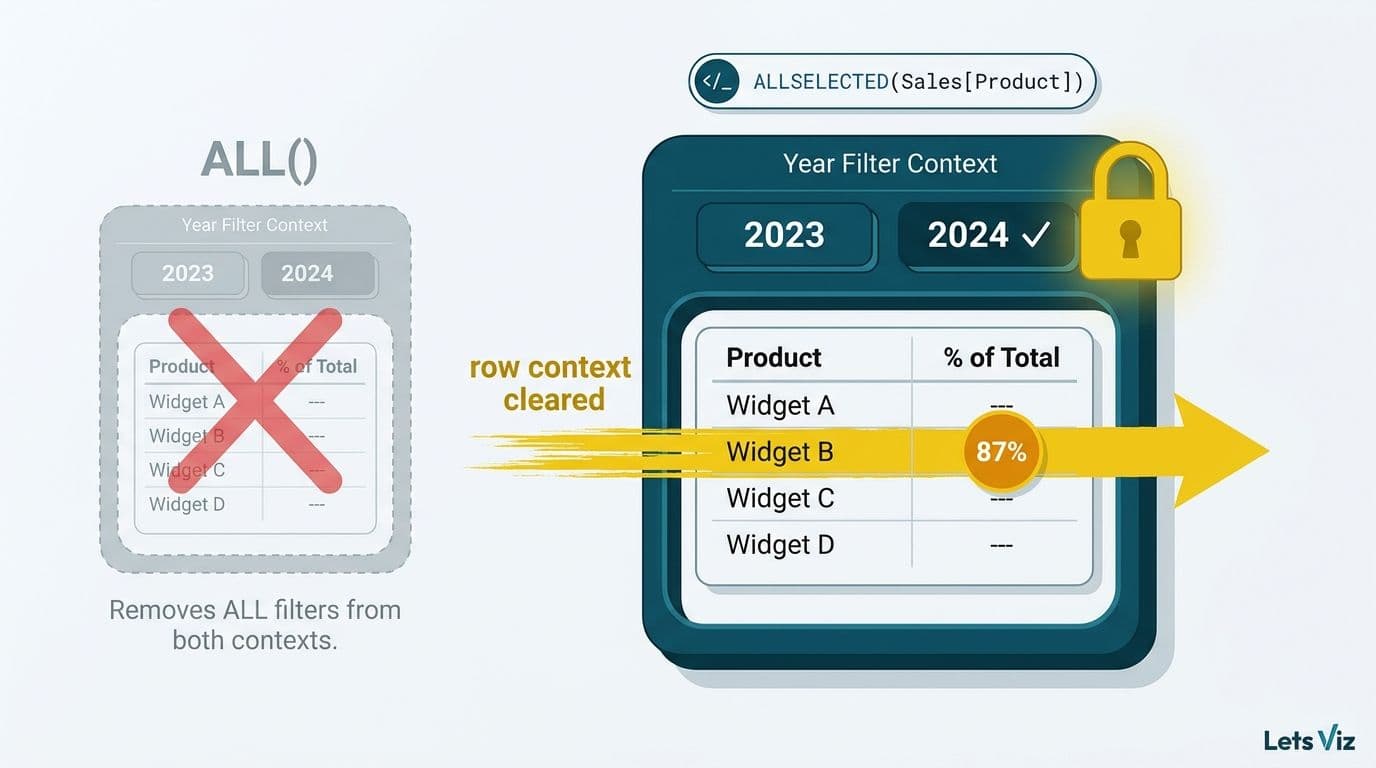
`ALLSELECTED` is a DAX function in Power BI that clears visual-level filter context while preserving the outer filter context - the filters set by slicers, page filters, and report filters. Where `ALL` ignores every filter silently, `ALLSELECTED` keeps slicer selections intact, making it the correct choice for running totals, grand total percentages, and period-over-period ratios in interactive reports.
Key Takeaways
`ALLSELECTED` preserves outer filter context (slicers, page filters) while clearing row-level context within visuals; `ALL` removes every filter unconditionally.
Three scenarios where `ALL` silently produces wrong numbers: running totals, percentage of grand total, and period-over-period ratios in sliced reports.
`ALLSELECTED` with no arguments captures the full outer filter context rather than targeting a specific column - useful in iterators but easy to misuse in nested CALCULATE chains.
`CALCULATE` is the core DAX filter engine behind every advanced finance measure - YTD actuals, budget-vs-actuals variance, and rolling-12-month revenue all use `CALCULATE` as their structural backbone, with time intelligence functions as filter arguments.
`REMOVEFILTERS` is the self-documenting alias for `ALL` inside `CALCULATE`; `KEEPFILTERS` intersects rather than replaces the active filter - making it the correct choice when a slicer selection and a measure filter must coexist without one overriding the other.
`CROSSFILTER` extends this control to relationship direction - activating inactive date paths, enabling bidirectional many-to-many propagation, and isolating measures in composite models. Five practical CROSSFILTER DAX function examples in Power BI cover the most common pain points in managed report development.
Power BI Copilot generates `CALCULATE`-based measures reliably but defaults to `ALL` in denominator positions where `ALLSELECTED` is correct - a one-step audit before deployment catches this pattern every time.
In regulated industries, incorrect denominators in DAX measures create compliance documentation gaps alongside accuracy errors, not just cosmetic display issues.
For teams evaluating the true build cost of a DAX-heavy Power BI implementation, the Instant project cost calculator gives a vendor-neutral starting estimate before any scoping conversation.
What Is the ALLSELECTED DAX Function in Power BI?
`ALLSELECTED` is a table function and filter modifier in DAX (Data Analysis Expressions), Power BI's formula language. It returns all rows from a table or all values from a column while respecting the outermost filter context - specifically the filters applied by slicers, page-level filters, and report-level filters active at query time.
It was introduced to solve a real gap: developers needed a way to write denominator measures that reflected "what the user has filtered to" rather than "everything in the model." The function signature is:
```dax
ALLSELECTED([TableNameOrColumnName])
```
When called with no arguments inside an iterator, it captures the entire outer filter context. When called with a column reference - for example, `ALLSELECTED(Sales[Product])` - it clears only that column's filter context while leaving all other filters intact.
The Healthcare Financial Analytics Market is projected to grow at an 8.58% CAGR from 2026 to 2035, driven by demand for real-time clinical and financial reporting (Market Research Future, 2026). In that environment, a denominator that accidentally ignores slicer selections - because a developer reached for `ALL` instead of `ALLSELECTED` - can produce materially incorrect utilization rates and cost-per-case figures in hospital patient flow and bed capacity dashboards.
How Does Filter Context Differ from Outer Filter Context in DAX?
Filter context is the set of filters active at the moment a DAX expression is evaluated. In a Power BI visual, two layers of filter context are always present simultaneously.
The inner filter context is generated by the visual itself - the row headers in a matrix, the category axis in a bar chart. Each row or bar introduces a context that scopes calculations to a single product, time period, or category.
The outer filter context is everything applied above the visual level: slicer selections, page filters, report filters, and cross-filter propagation from other visuals. This context is set by the user at interaction time, not by the visual's own structure.
`ALL` destroys both layers. `ALLSELECTED` destroys only the inner layer and preserves the outer layer.
That asymmetry is the entire practical point of the function. A matrix showing monthly sales with a region slicer set to Northeast should use the Northeast total as its denominator for percentage calculations - not the global model total. `ALL` gives you the global model total. `ALLSELECTED` gives you the Northeast total.
According to medinsight.com (2026), three themes are dominating healthcare analytics strategy through 2026: value-based care, AI-driven analytics, and payer analytics innovation. Each depends on segmented, slicer-driven reporting where denominators must reflect the filtered patient population, not the global universe - making correct filter context a functional requirement, not an optimisation.
What Does CALCULATE Do to Filter Context in Power BI DAX?
The calculate function DAX Power BI developers rely on most is `CALCULATE` - and understanding how it modifies filter context is the prerequisite concept behind `ALLSELECTED`, `ALL`, and `CROSSFILTER` all making sense. Getting the CALCULATE DAX filter context model clear in plain English is the single highest-leverage skill in Power BI development.
The plain-English model: `CALCULATE` takes an expression and, before evaluating it, replaces or extends the current filter context with whatever filter arguments you supply. The replacement is scoped only to that expression - nothing outside the `CALCULATE` call is affected.
Step-by-step: how CALCULATE works in Power BI DAX
Every time the engine encounters a `CALCULATE` call, it executes the same four steps:
1. Snapshot the current filter context - every slicer selection, page filter, report filter, and row-context filter active at the moment of the call.
2. Process filter arguments left to right - each argument replaces the existing filter on its target column or table. `KEEPFILTERS` changes this to an intersection; `REMOVEFILTERS` or `ALL` explicitly removes a filter.
3. Evaluate the inner expression in the modified context - the aggregation, nested measure, or further `CALCULATE` call runs with the new filter in effect.
4. Restore the outer filter context - once `CALCULATE` returns its result, the surrounding filter context is exactly as it was. Nothing leaks outward.
This four-step sequence is why `CALCULATE` is called a context-transition function: it creates a temporary, scoped modification, not a permanent model change. Every `ALLSELECTED`, `ALL`, `DATESYTD`, and `CROSSFILTER` argument you write is an instruction to `CALCULATE` about which filter layers to modify in step 2.
Sales example: subcategory share with a category slicer
A product analyst building a retail performance report needs each subcategory row to show its share of the selected category total. The naive approach uses `ALL`:
```dax
SubCategory Share (broken) =
DIVIDE(
[Total Sales],
CALCULATE([Total Sales], ALL(Products[SubCategory]))
)
```
When the user slices to "Electronics" only, `ALL` removes the subcategory row filter in step 2 - but it also discards the Electronics slicer, so every row returns its share of the global model total. Replacing `ALL` with `ALLSELECTED` corrects this:
```dax
SubCategory Share (correct) =
DIVIDE(
[Total Sales],
CALCULATE([Total Sales], ALLSELECTED(Products[SubCategory]))
)
```
Step 2 now lifts only the subcategory row filter. The Electronics category slicer - part of the outer filter context - is preserved. The column sums to 100% within whatever category the user selects, and the denominator updates automatically when the slicer changes.
A before/after example from a budget-vs-actuals report makes the finance equivalent concrete.
Before CALCULATE - the row context filters automatically:
In a matrix with Department on rows, this measure needs no `CALCULATE`:
```dax
Actuals =
SUM(Financials[Actual])
```
The row header (Finance, Operations, Sales) creates a filter context that scopes `SUM` to that department automatically. No override required.
After CALCULATE - replacing the filter for a comparison denominator:
```dax
Budget Total All Depts =
CALCULATE(
SUM(Financials[Budget]),
ALL(Financials[Department])
)
```
`CALCULATE` removes the Department filter before evaluating the sum. Every row returns the company-wide budget total - the correct denominator for a percentage-of-budget column.
Variance analysis: CALCULATE and ALLSELECTED working together
In a variance analysis report where users filter to a specific cost centre via slicer, you need each row to show that cost centre's variance as a share of the slicer-filtered total budget - not the company-wide total. `CALCULATE` with `ALLSELECTED` handles this precisely:
```dax
Variance % of Selected Budget =
DIVIDE(
[Actuals] - [Budget],
CALCULATE(SUM(Financials[Budget]), ALLSELECTED(Financials[Department]))
)
```
`CALCULATE` replaces the Department row filter with `ALLSELECTED` scope - all departments visible under the current slicer selection. The slicer boundary is preserved; only the row-level granularity is lifted. The result is a correct share-of-selected-budget figure that updates when the user narrows the slicer.
YTD actuals for finance reporting
Year-to-date is the most requested finance measure after simple totals. The Power BI CALCULATE function DAX pattern uses `DATESYTD` as the filter argument - `CALCULATE` replaces the active date filter with all dates from January 1 through the latest date in the current context:
```dax
YTD Actuals =
CALCULATE(
SUM(Financials[Actual]),
DATESYTD(Dates[Date])
)
```
Combined with a year slicer, this measure respects the selected year because `DATESYTD` operates within the active year boundary. For fiscal year variants, `DATESYTD` accepts an optional year-end date parameter - for example, `DATESYTD(Dates[Date], "3/31")` for a March fiscal year-end. The logic is the same: `CALCULATE` applies the time-bounded filter, `DATESYTD` specifies which dates to include.
Rolling-12-month revenue for management accounts
Finance teams producing rolling management accounts need a measure that always returns the trailing twelve months from the last date in context - not a fixed calendar year. `DATESINPERIOD` is the correct time intelligence function here:
```dax
Rolling 12M Revenue =
CALCULATE(
[Total Sales],
DATESINPERIOD(
Dates[Date],
MAX(Dates[Date]),
-12,
MONTH
)
)
```
`CALCULATE` applies this 12-month window as the active date filter. The window shifts automatically as the user moves through months in a date slicer - no hardcoded year reference, no manual update for each new fiscal period. Combined with `ALLSELECTED` at the month level, the same pattern supports rolling comparisons within a slicer-narrowed date range without losing the outer filter boundary.
Finance reporting teams building budget-vs-actuals dashboards, YTD tracking, and rolling-period views will find these `CALCULATE` patterns form the structural backbone of nearly every measure. The mental model from the variance example applies consistently: `DATESYTD` and `DATESINPERIOD` are filter specifications; `CALCULATE` is the engine that applies them.
The core mental model for all of the above: every `ALL`, `ALLSELECTED`, `DATESYTD`, `DATESINPERIOD`, and `CROSSFILTER` argument you write is an instruction to `CALCULATE` about which filter layers to modify or extend. `CALCULATE` is the mechanism; those functions are the filter specifications it acts on. Once this relationship is clear, the `ALLSELECTED` patterns in the sections below become straightforward to write and debug.
How Do REMOVEFILTERS and KEEPFILTERS Change CALCULATE's Filter-Context Behavior in Power BI DAX?
Two filter modifiers that experienced calculate function DAX Power BI practitioners reach for regularly are `REMOVEFILTERS` and `KEEPFILTERS`. Both operate inside `CALCULATE` but solve opposite problems: one strips filters explicitly, the other adds them without replacing what is already active.
REMOVEFILTERS: the self-documenting alias for clearing filters
`REMOVEFILTERS` is semantically identical to `ALL` when used as a `CALCULATE` filter argument, but its name signals intent more clearly. Where `ALL(Incidents[Priority])` reads ambiguously - it could be a table function returning rows or a filter removal - `REMOVEFILTERS(Incidents[Priority])` unambiguously says "remove the Priority filter for this calculation."
In an IT service desk dashboard where rows show individual priority tiers (P1, P2, P3) and each row needs to display the total ticket volume across all priorities as a context denominator:
```dax
Total Tickets All Priorities =
CALCULATE(
COUNT(Incidents[TicketID]),
REMOVEFILTERS(Incidents[Priority])
)
```
Using `REMOVEFILTERS` here makes the measure self-documenting: any developer reading it immediately knows the Priority filter is being lifted for the duration of this evaluation, not that a table function is returning all rows as a side effect.
KEEPFILTERS: intersecting instead of replacing the active filter
`KEEPFILTERS` changes `CALCULATE`'s default replacement behavior. Normally, a filter argument like `Incidents[Status] = "Closed"` inside `CALCULATE` replaces any existing Status filter already in context. `KEEPFILTERS` intersects instead - the new condition is added on top of whatever filter is already active, rather than overwriting it.
This matters in IT service metrics when a measure must count tickets that are both closed and SLA-compliant, without overriding a queue filter already applied by a slicer:
```dax
SLA Compliant Closed =
CALCULATE(
COUNT(Incidents[TicketID]),
KEEPFILTERS(Incidents[Status] = "Closed"),
KEEPFILTERS(Incidents[SLAMet] = TRUE())
)
```
With `KEEPFILTERS`, if a user has sliced to the "Network" queue, this measure returns closed, SLA-compliant tickets in the Network queue - not all closed SLA-compliant tickets across all queues. Without `KEEPFILTERS`, `CALCULATE` would silently replace the queue filter and return a broader total that ignores the slicer selection entirely.
Nested CALCULATE: how filter context layers at each level
Nested `CALCULATE` calls appear frequently in finance and IT service measures where two independent filter overrides must coexist. The inner `CALCULATE` evaluates first within the context established by the outer `CALCULATE`, which then applies its own modifiers on top of the result.
A finance scenario: computing each department's share of the IT Infrastructure budget, where the outer context pins the cost category and the inner contexts handle the department-level and company-wide totals separately:
```dax
Dept Budget Share of IT Costs =
CALCULATE(
DIVIDE(
CALCULATE(
SUM(Financials[Budget]),
REMOVEFILTERS(Financials[CostCategory])
),
CALCULATE(
SUM(Financials[Budget]),
REMOVEFILTERS(Financials[Department]),
REMOVEFILTERS(Financials[CostCategory])
)
),
Financials[CostCategory] = "IT Infrastructure"
)
```
The outer `CALCULATE` fixes the category to IT Infrastructure. The first inner `CALCULATE` removes only the Department filter to get the department-level IT total. The second inner `CALCULATE` removes both filters to get the company-wide IT budget. Each `REMOVEFILTERS` operates in the context established by its enclosing `CALCULATE` - not the outermost query context.
The practical debugging rule for nested `CALCULATE`: work from the inside out. Identify what filter context the innermost `CALCULATE` sees, then layer each outer `CALCULATE`'s modifiers on top. `ALLSELECTED` placed inside a nested `CALCULATE` inherits the filter context established by the enclosing `CALCULATE` call - not the original slicer context - which is the most common source of unexpected values in deeply nested measures.
How Does Power BI Copilot Interpret and Auto-Generate CALCULATE DAX Expressions?
Power BI Copilot - available on Microsoft Fabric capacities and Power BI Premium/Pro with Copilot enabled - can generate DAX measures from plain-English prompts. When you ask for "YTD revenue," "budget vs actuals variance," or "rolling 12-month sales," the generated output almost always centres on the same CALCULATE function DAX Power BI developers write manually: `CALCULATE` wrapping an aggregation, with a time intelligence or filter modifier as the second argument.
This makes Copilot's generated measures both predictable and auditable. If you understand `CALCULATE` filter context, you can verify Copilot output in under a minute rather than treating it as a black box.
What Copilot typically generates correctly:
Basic YTD measures using `CALCULATE([Measure], DATESYTD(Dates[Date]))` when the date table is marked as a date table in the model
Budget variance measures that subtract two aggregations inside `CALCULATE`
Rolling-period measures using `DATESINPERIOD` with `MAX(Dates[Date])` as the anchor
Where to audit Copilot output before deploying:
Copilot frequently defaults to `ALL` in denominator positions where `ALLSELECTED` is the correct choice. A generated percentage measure may read:
```dax
% of Total (Copilot generated) =
DIVIDE(
[Total Sales],
CALCULATE([Total Sales], ALL(Sales[Product]))
)
```
This produces wrong percentages the moment a user applies a product slicer - the exact failure described in the percentage-of-grand-total scenario above. The fix is a targeted swap:
```dax
% of Total (Corrected) =
DIVIDE(
[Total Sales],
CALCULATE([Total Sales], ALLSELECTED(Sales[Product]))
)
```
Copilot also occasionally generates nested `CALCULATE` chains where an inner context overrides the outer `ALLSELECTED` scope, producing the same silent wrong-total problem described in the no-argument section below. And it sometimes inserts `CALCULATE` with no filter modifier - harmless, but redundant.
The practical two-step workflow:
Use Copilot to generate the structural scaffold of a `CALCULATE`-based measure - it reliably produces the correct shape and time intelligence function. Then apply the `ALL` vs `ALLSELECTED` audit from the section above before the measure goes into a published report. For regulated-industry teams, this generate-then-audit process is faster than writing from scratch while remaining more reliable than trusting generated output without review.
Microsoft has been expanding Copilot's DAX generation capabilities through 2026, with each Fabric update cycle improving filter-context handling. The audit steps above remain valid regardless of the Copilot version because they are grounded in DAX filter context semantics rather than Copilot-specific behaviour.
When Should You Use ALLSELECTED Instead of ALL in DAX Measures?
Use `ALLSELECTED` whenever the denominator of a ratio, the starting point of a running total, or the baseline of a comparison must reflect what the user has filtered to in the current view.
Here are the three precise scenarios where `ALL` breaks and `ALLSELECTED` fixes:
1. Running totals in a sliced date table
A running total accumulates values from the start of a period through the current row. The standard pattern uses `ALL(Dates[Date])` with a `<=` filter to accumulate - but `ALL` removes the date table from the slicer's scope entirely. If a user slices to Q3 only, the running total restarts at January 1 instead of July 1, and the cumulative figure is meaningless for the Q3 review being conducted. Replacing `ALL(Dates[Date])` with `ALLSELECTED(Dates[Date])` makes the accumulation start at the slicer's earliest visible date.
2. Percentage of grand total
The classic pattern `CALCULATE([Total Sales], ALL(Sales))` calculates each row's share of the entire model total. Add a country slicer selecting Canada and the denominator stays at the global total - so Canadian rows sum to perhaps 8% rather than 100%. The fix: `CALCULATE([Total Sales], ALLSELECTED(Sales))`. Now the denominator is the total for Canada, and the column correctly sums to 100% within the slicer's scope.
3. Period-over-period ratios in date-sliced reports
A year-over-year ratio uses `DATEADD` or `SAMEPERIODLASTYEAR` to fetch the prior period. If the denominator is an `ALL`-based total, the ratio shifts unexpectedly when users change the date slicer, because the reference total is no longer aligned with the visual's actual date range. `ALLSELECTED` keeps the reference total scoped to whatever date range is currently visible.
For teams building these patterns at scale, the Power BI Import vs DirectQuery decision guide covers query mode implications that affect how `ALLSELECTED` behaves across storage modes - a distinction that matters in large regulated-industry datasets where DirectQuery is often required for data recency.
ALLSELECTED vs ALL: A Direct Comparison
The table below contrasts the two functions across the scenarios that matter most in production reports.
| Scenario | ALL Behavior | ALLSELECTED Behavior |
|---|---|---|
| Running total with date slicer | Ignores slicer - accumulates from model start | Respects slicer - accumulates from first visible date |
| % of grand total with region slicer | Uses global model total as denominator | Uses slicer-filtered total as denominator |
| YoY ratio in sliced report | Reference total includes all periods | Reference total scoped to selected period |
| No slicer or no active filter | Identical - both remove all filters | Identical |
| Called with no arguments in iterator | Removes all filters from all tables | Captures full outer filter context |
| Performance in DirectQuery models | Generally faster - simpler query plan | Marginally higher overhead on very large models |
| Risk of silent wrong answers | High when slicers are present | Low - designed for interactive slicer-driven reports |
If any row in the scenario column describes your current measure, `ALLSELECTED` is the safer default unless you have an explicit reason to compute against the full unfiltered model.
How Does the No-Argument Form of ALLSELECTED Work in Power BI DAX?
The no-argument form - `ALLSELECTED()` - is the most misunderstood variant. Without a table or column argument, it does not target a specific filter. Instead, it captures the entire outer filter context of the current query session.
This is useful inside iterating functions like `SUMX` or `CALCULATE` where you want to reference the full slicer state without specifying which column to release. But it creates a subtle trap: if there is no outer context - for example, the measure is evaluated inside another `CALCULATE` that has already established a new filter context - `ALLSELECTED()` may behave identically to `ALL()`.
The practical rule: use `ALLSELECTED(TableName)` or `ALLSELECTED(ColumnName)` with explicit references when you know which filter layer you want to preserve. Reserve the no-argument form for advanced iterator patterns where you have tested its scope behavior against real slicer interactions in your specific data model.
Why Regulated Industries Cannot Afford Silent DAX Errors
In regulated industries, the difference between a measure using `ALL` and one using `ALLSELECTED` is not just an accuracy issue - it is a compliance documentation issue.
A US healthcare analytics team building Power BI dashboards for HIPAA-compliant clinical reporting needs patient cohort percentages to reflect the filtered population. If the denominator uses `ALL`, a physician reviewing a slicer-filtered report sees percentages that sum to less than 100% - because the denominator is the entire hospital population, not the filtered department cohort. That inconsistency erodes trust and creates audit documentation gaps. See Power BI consulting for healthcare organizations for how a DAX denominator audit fits into a compliant implementation review.
A UK fintech firm subject to GDPR data minimisation requirements typically restricts analysts to specific product lines or customer segments via row-level security and slicer defaults. If a DAX measure bypasses those slicer boundaries by using `ALL` where `ALLSELECTED` was intended, reported figures can inadvertently aggregate data outside the analyst's permitted scope - a potential GDPR incident rather than just a display error. GDPR fines for data minimisation violations can reach 20 million euros or 4% of global annual turnover, meaning a single incorrectly scoped denominator measure is a regulatory liability, not a cosmetic bug.
A Canadian manufacturing organization operating under PIPEDA faces similar issues when building production dashboards for different plant sites. An `ALL`-based denominator means a plant manager's report includes capacity figures from other facilities, distorting efficiency ratios and potentially triggering incorrect procurement decisions.
The AI consulting services market is forecast to grow from USD 14.0 billion in 2026 to over USD 90 billion by 2035 at a 26.2% CAGR (Future Market Insights, 2026). As more regulated-industry teams embed analytics into daily decision workflows, the cost of silent DAX errors scales with that adoption. A single incorrectly specified denominator measure, replicated across dozens of reports, becomes a systemic accuracy risk that is far harder to remediate after deployment.
For healthcare teams building departmental views, the healthcare KPI dashboard examples by department article demonstrates how correct filter context directly determines the reliability of clinical performance metrics.
Power BI row level security and ALLSELECTED interaction: Power BI row level security for healthcare data operates at the model level and cannot be bypassed by DAX filter functions. `ALLSELECTED` correctly preserves both the RLS boundary and the slicer filter simultaneously - returning only the slicer-visible rows within the rows RLS permits. `ALL` also cannot bypass RLS, but it clears the slicer, returning all RLS-permitted rows regardless of slicer state. Teams building healthcare dashboard templates and hospital patient flow or bed capacity dashboards need to understand this interaction: the slicer boundary and the RLS boundary serve different purposes and must both be accounted for in denominator design.
Practical DAX Patterns for the Three Core Scenarios
The three production-ready patterns below address the failures described earlier. Each replaces an `ALL` call with `ALLSELECTED` in exactly the position where the outer filter context matters.
Running total that respects a date slicer:
```dax
Running Total Sales =
CALCULATE(
[Total Sales],
FILTER(
ALLSELECTED(Dates[Date]),
Dates[Date] <= MAX(Dates[Date])
)
)
```
Percentage of slicer-filtered grand total:
```dax
% of Selected Total =
DIVIDE(
[Total Sales],
CALCULATE([Total Sales], ALLSELECTED(Sales))
)
```
Year-over-year growth scoped to selected period:
```dax
YoY Growth % =
VAR CurrentPeriod = [Total Sales]
VAR PriorPeriod =
CALCULATE(
[Total Sales],
DATEADD(ALLSELECTED(Dates[Date]), -1, YEAR)
)
RETURN DIVIDE(CurrentPeriod - PriorPeriod, PriorPeriod)
```
`DATEADD` with `ALLSELECTED` works correctly only when the Dates table has a contiguous date range within the selected period. Test against non-contiguous selections - fiscal year gaps, custom calendar exclusions - before deploying in production environments.
Teams migrating from other BI tools will find the Tableau calculated fields to Power BI DAX conversion guide useful for mapping fixed LOD expressions - which share a conceptually similar outer-context scope - to their DAX equivalents, including these `ALLSELECTED` patterns.
EARLIER Function in DAX Power BI: Nested Row Context for Running Totals, Ranking, and Prior-Row Comparisons
The `EARLIER` function in DAX Power BI explained plainly: it lets a calculated column or iterator expression reach back one row-context level to retrieve a value from the outer loop while the inner loop is still running. This is the specific problem it solves - when DAX evaluates a calculated column row by row (the outer row context) and the formula inside starts a second loop through the same table (the inner row context), the outer row's values are shadowed by the inner loop. `EARLIER` steps back one context level to retrieve what the outer row is currently holding.
This is distinct from filter context. `EARLIER` operates entirely within row context - the evaluation mode DAX uses when scanning a table during calculated column creation or inside iterating functions like `FILTER`, `SUMX`, and `RANKX`.
Running total column - daily retail sales (paste-ready)
A retail analyst adding a cumulative sales column to a transaction table needs each row to show the total of all sales up to and including that row's date:
```dax
Cumulative Daily Sales =
CALCULATE(
SUM(Sales[Amount]),
FILTER(
ALL(Sales[Date]),
Sales[Date] <= EARLIER(Sales[Date])
)
)
```
`EARLIER(Sales[Date])` captures the current outer row's date. `FILTER` loops through every date in the table and keeps only those on or before that value. `CALCULATE` sums the filtered result. Each row receives a correctly accumulated total from the first transaction date to its own date.
Rank column - finance cost centre ranking by spend (paste-ready)
A finance analyst ranking cost centres by budget spend without writing a separate measure:
```dax
Spend Rank =
COUNTROWS(
FILTER(
Budgets,
Budgets[TotalSpend] > EARLIER(Budgets[TotalSpend])
)
) + 1
```
`EARLIER(Budgets[TotalSpend])` pins the outer row's spend figure. `FILTER` counts every other row whose spend exceeds it. Adding 1 converts the count of higher-ranked rows into the rank of the current row. The highest spender receives Rank 1. Ties receive identical ranks with no gap - standard dense-rank behaviour.
Prior-row comparison - month-over-month delta (paste-ready)
For a summary table using an integer month key (1 through 12):
```dax
Prior Month Sales =
CALCULATE(
SUM(Sales[Amount]),
FILTER(
ALL(Calendar[MonthKey]),
Calendar[MonthKey] = EARLIER(Calendar[MonthKey]) - 1
)
)
```
Replace the integer subtraction with `DATEADD` logic for date-based calendar tables. The structure is identical - `EARLIER` pins the outer row's month key, and `FILTER` selects the single preceding period.
EARLIER vs VAR: which to use in new development
Microsoft's current DAX guidance recommends `VAR` over `EARLIER` for new measures and columns because variables are scoped explicitly and easier to read in code review. The VAR equivalent of the running total above:
```dax
Cumulative Daily Sales (VAR) =
VAR CurrentDate = Sales[Date]
RETURN
CALCULATE(
SUM(Sales[Amount]),
FILTER(ALL(Sales[Date]), Sales[Date] <= CurrentDate)
)
```
`VAR CurrentDate` captures the outer row's date before the inner `FILTER` loop begins. The intent is explicit, and the inner loop cannot accidentally shadow it. The two patterns produce identical results. Use `EARLIER` when maintaining existing DAX that already uses it, or when working in environments with older DAX engine constraints. In all new development, `VAR` is the cleaner choice - but knowing how `EARLIER` works remains essential for debugging the large volume of production reports that still rely on it.
Finance and retail teams building row-level calculated columns across large transaction datasets benefit from a structured DAX review before these patterns scale into production reports. Lets Viz Managed Power BI covers ongoing measure development, performance audit, and DAX review across iterating column patterns.
CROSSFILTER DAX Function in Power BI: Five Examples for Complex Filter Scenarios
`ALLSELECTED` controls which rows are visible in a calculation by managing filter context. `CROSSFILTER` solves a different but related problem: it controls the direction in which filter context propagates between tables within a single measure. Together, they give Power BI developers precise command over filter flow that neither function achieves alone.
`CROSSFILTER` is used inside `CALCULATE` and accepts three arguments: a column from one table, a column from the related table, and a direction constant (`NONE`, `ONEWAY`, or `BOTH`). It does not return values - it modifies the active relationship direction for the duration of the enclosing `CALCULATE` evaluation, leaving the model schema unchanged for all other measures.
The following five CROSSFILTER DAX function examples in Power BI cover the scenarios that cause the most friction in managed report development: inactive date relationships, many-to-many bridge tables, alternate fiscal calendars, composite model isolation, and role-playing dimensions.
1. Activating an inactive date relationship
Sales fact tables often carry multiple date columns - order date, ship date, delivery date. Power BI allows only one active relationship per table pair, so the others are dormant. `CROSSFILTER` combined with `USERELATIONSHIP` temporarily activates a dormant path for a single measure:
```dax
Ship Date Sales =
CALCULATE(
[Total Sales],
USERELATIONSHIP(Sales[ShipDate], Dates[Date]),
CROSSFILTER(Sales[ShipDate], Dates[Date], ONEWAY)
)
```
This measure uses ship date as the filter axis while the main order-date relationship remains active for all other visuals on the page - the most common inactive-relationship use case in logistics and supply chain reporting.
2. Many-to-many models via bridge tables
When customers and products connect through a bridge table - for example, a subscription or entitlement table - the default single-direction relationship means a customer slicer cannot filter the product list. Enabling bidirectional propagation inside a specific measure avoids the performance cost of setting the model relationship to `BOTH` globally:
```dax
Entitled Products Count =
CALCULATE(
DISTINCTCOUNT(Bridge[ProductID]),
CROSSFILTER(Bridge[CustomerID], Customers[CustomerID], BOTH)
)
```
Applying `CROSSFILTER(... BOTH)` inside the measure rather than the model keeps the relationship one-directional everywhere else, which prevents fan-out overcounting in unrelated totals.
3. Period-over-period comparisons with an alternate fiscal calendar
Organisations maintaining both a standard and a fiscal calendar often use two date tables. A fiscal year-over-year measure must activate the fiscal relationship without disturbing the standard date relationship driving other page visuals:
```dax
Fiscal YoY Growth % =
VAR CurrentFiscal =
CALCULATE(
[Total Sales],
USERELATIONSHIP(Sales[FiscalDate], FiscalCalendar[Date]),
CROSSFILTER(Sales[FiscalDate], FiscalCalendar[Date], ONEWAY)
)
VAR PriorFiscal =
CALCULATE(
[Total Sales],
USERELATIONSHIP(Sales[FiscalDate], FiscalCalendar[Date]),
CROSSFILTER(Sales[FiscalDate], FiscalCalendar[Date], ONEWAY),
DATEADD(FiscalCalendar[Date], -1, YEAR)
)
RETURN DIVIDE(CurrentFiscal - PriorFiscal, PriorFiscal)
```
When used alongside `ALLSELECTED`, this pattern also respects any fiscal date slicer applied by the user - without `ALLSELECTED` wrapping the inner date filter, the alternate relationship path ignores the slicer entirely, producing the same silent wrong-total problem described in the running total scenario above.
4. Disabling cross-filter propagation in composite models
In composite models combining multiple fact tables, a slicer on one fact table can inadvertently filter a second fact table through shared dimension tables. Setting `CROSSFILTER(..., NONE)` isolates the calculation from that propagation path:
```dax
Unfiltered Headcount =
CALCULATE(
[Total Headcount],
CROSSFILTER(HR[DepartmentID], Departments[DepartmentID], NONE)
)
```
This is useful in executive dashboards that combine sales and HR data where department selections should scope revenue figures but must not constrain headcount totals.
5. Bidirectional filtering for role-playing dimensions
A geography dimension linked to both a Customers table and a Stores table serves two roles. If a map visual filters by region, the measure should propagate to both fact tables. Enabling `BOTH` direction within a summarization measure achieves this without permanently altering the model schema:
```dax
Combined Regional Revenue =
CALCULATE(
[Total Sales] + [Store Revenue],
CROSSFILTER(Customers[RegionID], Geography[RegionID], BOTH),
CROSSFILTER(Stores[RegionID], Geography[RegionID], BOTH)
)
```
Multiple `CROSSFILTER` calls coexist inside a single `CALCULATE` - each modifies only its specified relationship path, leaving all others at their model-defined direction.
For managed report development teams, the practical rule is: use `ALLSELECTED` when the problem is which rows to count, and use `CROSSFILTER` when the problem is which tables should filter each other. When a slicer-driven date range and an inactive relationship must both be respected in the same measure, the two functions are used in combination, as shown in example 3 above.
How to Audit Existing Reports for ALL vs ALLSELECTED Errors
Many production Power BI reports use `ALL` where `ALLSELECTED` was intended, and the error stays invisible until a user applies a slicer and notices percentages that no longer sum correctly.
A systematic audit approach:
1. Search DAX measures for `ALL(` - any measure using `ALL(TableName)` or `ALL(ColumnName)` in a denominator or accumulation context is a candidate for review.
2. Test each measure with a slicer applied - add a simple slicer, select a subset, and check whether percentage totals sum to 100% and running totals start from the correct period boundary.
3. Check no-argument ALLSELECTED - any `ALLSELECTED()` without arguments inside a complex `CALCULATE` chain should be tested with nested filter contexts to verify it captures the intended outer context and does not silently collapse to `ALL()` behaviour.
4. Audit CROSSFILTER direction in multi-fact models - any measure that uses `CROSSFILTER` with `BOTH` should be tested to confirm it does not introduce fan-out overcounting in totals that span bridge tables.
5. Document the intended scope - for regulated-industry reports, add a measure description (via the Description property in Model view) stating whether the denominator is model-total or slicer-total. This supports audit trails for HIPAA, GDPR, and PIPEDA compliance reviews.
If your team is scoping a Power BI implementation that includes complex DAX measures - running totals, cohort percentages, or period-over-period ratios across regulated datasets - the Instant project cost calculator gives you a vendor-neutral starting estimate for the build.
---
About Lets Viz: Lets Viz is a data analytics consultancy serving US healthcare organizations, UK fintech firms, Canadian manufacturers, and global SaaS businesses since 2020. Our Power BI practice covers DAX architecture, HIPAA-compliant clinical dashboards, and data governance across regulated industries, and we hold a 5.0 Clutch rating across client engagements.